
【Oracle/Java】向三张表各插入百万数据,共用时18分3秒,平均每张表6分钟
三张表DDL如下:
CREATE TABLE tb01
(
"ID" ,) not null primary key,
"NAME" NVARCHAR2() not null,
"AGE" ,)  not null ,
"CREATEDTIME" ) not null
)

CREATE TABLE tb02
(
"ID" ,) not null primary key,
"SN" NVARCHAR2() not null,
"NAME" NVARCHAR2() not null,
"AGE" ,)  not null ,
"CREATEDTIME" ) not null
)

CREATE TABLE tb03
(
"ID" ,) not null primary key,
"SN" NVARCHAR2() not null,
"NAME" NVARCHAR2() not null,
"AGE" ,)  not null ,
"ADDRESS" NVARCHAR2() not null,
"CREATEDTIME" ) not null
)
插值程序:
package com.hy;

import java.sql.Connection;
import java.sql.DriverManager;
import java.sql.SQLException;
import java.sql.Statement;
import java.text.SimpleDateFormat;
import java.util.ArrayList;
import java.util.Calendar;
import java.util.Date;
import java.util.List;

/**
 * 数据库连接参数
 * @author horn1
 *
 */
class DbParam{
    final String Driver = "oracle.jdbc.driver.OracleDriver";
    final String DbUrl = "jdbc:oracle:thin:@127.0.0.1:1521:orcl";
    final String User = "ufo";
    final String Pswd = "1234";
}

class TypeField{
    String type;
    String field;
}
/**
 *      多表批量插入器
 * @author horn1
 *
 */
public class MultiTbBatchInserter {
    private final int BatchSize=100;

    // 有三个表需要插入,如果是多个表,扩充数组即可
    // PK:主键 CH:文字 DT:Datetime,还可以根据需要扩充代号,在getInsertSql函数中则根据代号来设置值
    private final String[][] tableArray= {
            {"tb01:1000000","PK:ID","CH:NAME","CH:AGE","DT:CREATEDTIME"},
            {"tb02:1000000","PK:ID","CH:SN","CH:NAME","CH:AGE","DT:CREATEDTIME"},
            {"tb03:1000000","PK:ID","CH:SN","CH:NAME","CH:AGE","CH:Address","DT:CREATEDTIME"},
            };

    /**
     * 批量插值
     */
    public void batchInsert() {
        DbParam dbParam=new DbParam();
        Connection conn = null;
        Statement stmt = null;

        try{
            Class.forName(dbParam.Driver).newInstance();
            conn = DriverManager.getConnection(dbParam.DbUrl, dbParam.User, dbParam.Pswd);
            stmt = conn.createStatement();
            System.out.println("Begin to access "+dbParam.DbUrl+" as "+dbParam.User+"...");

            for(String[] innerArr:tableArray) {
                String tableName=innerArr[0].split(":")[0];
                int count=Integer.parseInt(innerArr[0].split(":")[1]);
                System.out.println("准备向表"+tableName+"插入"+count+"条记录.");

                // 插值前先清空
                truncateTable(tableName,conn,stmt);

                // 真正插入数据
                insertTestDataTo(tableName,count,innerArr,conn,stmt);
            }
        } catch (Exception e) {
            System.out.print(e.getMessage());
        } finally {
            try {
                stmt.close();
                conn.close();
            } catch (SQLException e) {
                System.out.print("Can't close stmt/conn because of " + e.getMessage());
            }
        }
    }

    /**
     * 以当前时间为基准减去数十秒
     * @param n
     * @return
     */
    private static String getDatetimeBefore(int n) {
        try {
            Calendar now = Calendar.getInstance();
            now.add(Calendar.SECOND,-n*10);//日期减去n*10秒

            Date newDate=now.getTime();

            SimpleDateFormat sdf=new SimpleDateFormat("yyyy-MM-dd HH:mm:ss");
            String retval = sdf.format(newDate);
            return retval;
        }
        catch(Exception ex) {
            ex.printStackTrace();
            return null;
        }
    }

    /**
     * 清空一个表的数据,注意此功能有破坏性,不可恢复,注意备份好数据
     * @param tableName
     * @param conn
     * @param stmt
     * @throws SQLException
     */
    private void truncateTable(String tableName,Connection conn,Statement stmt) throws SQLException{
        String sql="truncate table "+tableName;
        stmt.execute(sql);
        System.out.println("truncated table:"+tableName);
    }

    /**
     * 向一个表插入数据
     * @param tableName
     * @param count
     * @param innerArr
     * @param conn
     * @param stmt
     * @throws SQLException
     */
    private void insertTestDataTo(String tableName,int count,String[] innerArr,Connection conn,Statement stmt) throws SQLException{
        // 得到字段名和字段类型
        List<TypeField> typefields=new ArrayList<TypeField>();
        for(int i=1;i<innerArr.length;i++) {
            String temp=innerArr[i];
            String[] arrTmp=temp.split(":");

            TypeField tf=new TypeField();
            tf.type=arrTmp[0];
            tf.field=arrTmp[1];
            typefields.add(tf);
        }

        List<String> fields=new ArrayList<String>();
        List<String> values=new ArrayList<String>();
        int index=0;
        for(TypeField tf:typefields) {
            fields.add(tf.field);
            values.add("''{"+index+"}''");
            index++;
        }

        index=0;
        int times=count/BatchSize;
        for(int i=0;i<times;i++) {
            StringBuilder sb=new StringBuilder();
            sb.append("INSERT ALL ");

            for(int j=0;j<BatchSize;j++) {
                index=i*BatchSize+j;
                sb.append(getInsertSql(tableName,typefields,index));
            }

            sb.append(" select * from dual");
            String sql = sb.toString();
            //System.out.println("sql="+sql);
            stmt.executeUpdate(sql);
            System.out.println("#"+i+" "+BatchSize+" records inserted");
        }
    }

    /**
     * 得到批量插入语句
     * @param tableName
     * @param typefields
     * @param index
     * @return
     */
    private String getInsertSql(String tableName,List<TypeField> typefields,int index) {
        String currTime=getDatetimeBefore(index);

        StringBuilder sb=new StringBuilder();
        sb.append(" INTO "+tableName+"(");
        List<String> fields=new ArrayList<String>();
        for(TypeField tf:typefields) {
            fields.add(tf.field);
        }
        sb.append(String.join(",",fields));

        sb.append(") values(");
        List<String> values=new ArrayList<String>();
        for(TypeField tf:typefields) {
            if(tf.type.equals("PK")) {
                values.add("'"+String.valueOf(index)+"'");
            }else if(tf.type.equals("CH")) {
                values.add("'0'");
            }else if(tf.type.equals("DT")) {
                values.add("to_date('"+currTime+"','yyyy-MM-dd HH24:mi:ss')");
            }
        }
        sb.append(String.join(",",values));
        sb.append(")");

        String insertSql=sb.toString();
        return insertSql;
    }

    /**
     * 将秒转化为日时分秒
     * @param secondCount
     * @return
     */
    private static String sec2DHMS(long secondCount) {
        String retval = null;

        long days = secondCount / (60 * 60 * 24);
        long hours = (secondCount % (60 * 60 * 24)) / (60 * 60);
        long minutes = (secondCount % (60 * 60)) / 60;
        long seconds = secondCount % 60;

        String strSeconds="";
        if(seconds!=0) {
            strSeconds=seconds + "s";
        }

        if (days > 0) {
            retval = days + "d" + hours + "h" + minutes + "m" + strSeconds;
        } else if (hours > 0) {
            retval = hours + "h" + minutes + "m" + strSeconds;
        } else if (minutes > 0) {
            retval = minutes + "m" + strSeconds;
        } else {
            retval = strSeconds;
        }

        return retval;
    }

    public static void main(String[] args) {
        MultiTbBatchInserter mi=new MultiTbBatchInserter();
        long startTime = System.currentTimeMillis();
        mi.batchInsert();
        long endTime = System.currentTimeMillis();

        System.out.println("Time elapsed:" + sec2DHMS((endTime - startTime)/1000) );
    }
}
输出:
#9990 100 records inserted
#9991 100 records inserted
#9992 100 records inserted
#9993 100 records inserted
#9994 100 records inserted
#9995 100 records inserted
#9996 100 records inserted
#9997 100 records inserted
#9998 100 records inserted
#9999 100 records inserted
Time elapsed:18m3s
数据库的情况:
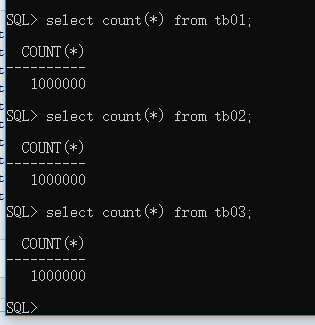
主程序稍微扩充一下就是一款性能测试的利器。
--END-- 2019年11月9日15:38:35
【Oracle/Java】向三张表各插入百万数据,共用时18分3秒,平均每张表6分钟的更多相关文章
- 【java/oralce/sql】往一张仅有id,名称,创建时间三个字段的表中插入百万数据需要多久?1分26秒
代码下载:https://files.cnblogs.com/files/xiandedanteng/fastfilltable20191222.rar 表testtb18的结构如下: CREATE ...
- 在mysql数据库中创建oracle scott用户的四个表及插入初始化数据
在mysql数据库中创建oracle scott用户的四个表及插入初始化数据 /* 功能:创建 scott 数据库中的 dept 表 */ create table dept( deptno int ...
- MySQL_(Java)使用JDBC向数据库中插入(insert)数据
MySQL_(Java)使用JDBC向数据库发起查询请求 传送门 MySQL_(Java)使用JDBC向数据库中插入(insert)数据 传送门 MySQL_(Java)使用JDBC向数据库中删除(d ...
- 【Oracle/Java】以Insert ALL方式向表中插入百万条记录,耗时9分17秒
由于按一千条一插程序长期无反应,之后改为百条一插方式,运行完发现插入百万记录需要9m17s,虽然比MySQL效率差,但比单条插入已经好不少了. 对Oracle的批量插入语法不明的请参考:https:/ ...
- 快速向表中插入大量数据Oracle中append与Nologging
来源于:http://blog.sina.com.cn/s/blog_61cd89f60102e7gi.html 当需要对一个非常大的表INSERT的时候,会消耗非常多的资源,因为update表的时候 ...
- JDBC插入百万数据,不到5秒!
java自带的批量操作,就可以很好的支持大量数据的处理.相比c#,简单很多.c#要使用oracle提供的ODP.NET,效率才很高,但是代码却很复杂.总之,在这方面,c#没得比.当然,这里的表是没加索 ...
- php操作mysql,1分钟内插入百万数据
版权声明:本文为博主原创文章,遵循 CC 4.0 by-sa 版权协议,转载请附上原文出处链接和本声明.本文链接:https://blog.csdn.net/qq_33862644/article/d ...
- JAVA中计算两个时间相差多少 天,时,分,秒
1: import java.util.Date; 2: 3: public class ShowTimeInterval{ 4: public void ShowTimeInterval(Date ...
- Oracle 生成一张测试表并插入随机数据
--生成随机表 --CREATE table scott.One_Million as ( SELECT ROWNUM AS T_ID, TRUNC(DBMS_RANDOM.VALUE(, )) 年龄 ...
随机推荐
- MongoDB的基础概念
1.MongoDB和传统数据库的概念区别 database database 数据库table collection 数据库表/集合row ...
- 解决npm安装时出现run `npm audit fix` to fix them, or `npm audit` for details 的问题
npm audit fix npm audit fix --force npm audit 按照顺序一一运行亲测完全可用如果还是不行的话,可以把node_modules和package-lock.js ...
- 大数据之路week07--day04 (YARN,Hadoop的优化,combline,join思想,)
hadoop 的计算特点:将计算任务向数据靠拢,而不是将数据向计算靠拢. 特点:数据本地化,减少网络io. 首先需要知道,hadoop数据本地化是指的map任务,reduce任务并不具备数据本地化特征 ...
- Ajax的简单例子——PHP
PHP PHP是一种创建动态交互性站点的服务器端脚本语言 PHP能够生成动态页面内容 PHP能够创建.打开.读取.写入.删除以及关闭服务器上的文件 PHP能够接收表单数据 PHP能够发送并取回cook ...
- RabbitMQ3 单机及集群安装配置及优化
一.操作系统需求及配置 # 1.1.操作系统推荐配置 4C*8G*40G磁盘 # 1.2.内核参数优化 # 系统参数需要留有swap空间,rabbitmq 启动进程用户打开文件数至少需要5万,yum安 ...
- MySQL之JDBC插入、修改、删除封装集于一个方法
1. 先建四个包 ① com.tz.entity 实体包 ② com.tz.dao 数据访问层包 -> com.tz.dao.impl 实现包 ③ com.tz.util 工具类包 ④ com. ...
- linux服务器上安装jenkins
nkins常用的有两种安装方式: 1.直接下载war包jenkins.war,下载地址https://jenkins.io/download 直接下载 1.1.可以把war包直接部署到servlet容 ...
- SVN工作区同步
单击“团队同步”菜单项或“团队同步”视角的“团队”工具栏上的“同步”按钮后,“同步视图”中将显示SVN工作区同步.它提供了从远程检查本地副本的更改类型的概率. 这是“同步视图”中的 “SVN工作空间同 ...
- c语言二级指针的使用,malloc内存申请
#include<stdio.h> #include<stdlib.h> void AllocateMemory(int **pGetMemory, int n) { int ...
- pyharm无法安装包的问题
1.换成下面这个网址 https://github.com/pypa/pip/issues/5236 2.下载最新的pip 3. 然后换回 https://pypi.org/simple/