
JavaWeb_(Mybatis框架)MyBatis整合Spring框架
MyBatis + Spring整合开发
a)使用Spring容器用单例模式管理Mybatis的sqlSessionFactory;
b)使用Spring管理连接池、数据源等;
c)将Dao/Mapper动态代理对象注入到Spring容器中,使用时直接获取;
一、MyBatis整合Spring框架
a)导入所需的包;
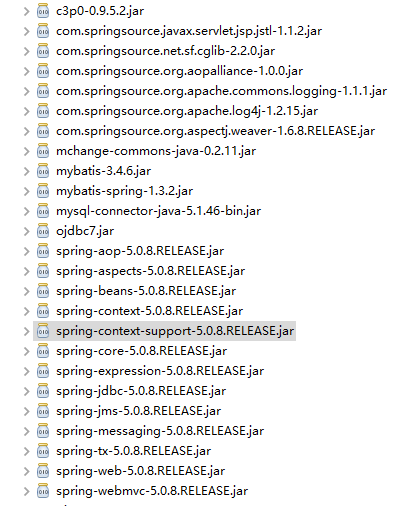
b)创建Mybatis主配置文件sqlMapConfig.xml;
<?xml version="1.0" encoding="UTF-8" ?>

<!DOCTYPE configuration

  PUBLIC "-//mybatis.org//DTD Config 3.0//EN"

  "http://mybatis.org/dtd/mybatis-3-config.dtd">

<configuration>

  <!-- 别名配置 -->

  <typeAliases>

      <!-- 别名直接按他的类名去取的User(不区别大小写) -->

      <package name="com.Gary.bean"/>

  </typeAliases>

</configuration>
sqlMapConfig.xml
c)创建Spring主配置文件applicationContext.xml (以下是spring框架xml的头,需要导入约束);
<?xml version="1.0" encoding="UTF-8"?>

<beans

    xmlns:xsi="http://www.w3.org/2001/XMLSchema-instance"

    xmlns="http://www.springframework.org/schema/beans"

    xmlns:aop="http://www.springframework.org/schema/aop"

    xmlns:context="http://www.springframework.org/schema/context"

    xmlns:tx="http://www.springframework.org/schema/tx"

    xmlns:util="http://www.springframework.org/schema/util"

    xsi:schemaLocation="http://www.springframework.org/schema/beans

    http://www.springframework.org/schema/beans/spring-beans.xsd

    http://www.springframework.org/schema/aop http://www.springframework.org/schema/aop/spring-aop.xsd

    http://www.springframework.org/schema/context http://www.springframework.org/schema/context/spring-context.xsd

    http://www.springframework.org/schema/tx http://www.springframework.org/schema/tx/spring-tx.xsd

    http://www.springframework.org/schema/util http://www.springframework.org/schema/util/spring-util.xsd ">

</beans>
applicationContent.xml
d)配置C3P0连接池;
    <!-- 配置c3p0连接池 -->

    <bean name="dataSource" class="com.mchange.v2.c3p0.ComboPooledDataSource">

        <property name="driverClass" value="${jdbc.driverClass}"/>

        <property name="jdbcUrl" value="${jdbc.jdbcUrl}"/>

        <property name="user" value="${jdbc.user}"/>

        <property name="password" value="${jdbc.password}"/>

    </bean>
<?xml version="1.0" encoding="UTF-8"?>

<beans

    xmlns:xsi="http://www.w3.org/2001/XMLSchema-instance"

    xmlns="http://www.springframework.org/schema/beans"

    xmlns:aop="http://www.springframework.org/schema/aop"

    xmlns:context="http://www.springframework.org/schema/context"

    xmlns:tx="http://www.springframework.org/schema/tx"

    xmlns:util="http://www.springframework.org/schema/util"

    xsi:schemaLocation="http://www.springframework.org/schema/beans

    http://www.springframework.org/schema/beans/spring-beans.xsd

    http://www.springframework.org/schema/aop http://www.springframework.org/schema/aop/spring-aop.xsd

    http://www.springframework.org/schema/context http://www.springframework.org/schema/context/spring-context.xsd

    http://www.springframework.org/schema/tx http://www.springframework.org/schema/tx/spring-tx.xsd

    http://www.springframework.org/schema/util http://www.springframework.org/schema/util/spring-util.xsd ">

    <!-- 读取配置文件 -->

    <context:property-placeholder location="db.properties" />

    <!-- 配置c3p0连接池 -->

    <bean name="dataSource" class="com.mchange.v2.c3p0.ComboPooledDataSource">

        <property name="driverClass" value="${jdbc.driverClass}"/>

        <property name="jdbcUrl" value="${jdbc.jdbcUrl}"/>

        <property name="user" value="${jdbc.user}"/>

        <property name="password" value="${jdbc.password}"/>

    </bean>

</beans>
applicationContent.xml
e)读取db.properties;
    <!-- 读取配置文件 -->

    <context:property-placeholder location="db.properties" />
jdbc.driverClass=com.mysql.jdbc.Driver
jdbc.jdbcUrl=jdbc:mysql://localhost:3306/ssm_mybatis
jdbc.user=root
jdbc.password=123456
<?xml version="1.0" encoding="UTF-8"?>

<beans

    xmlns:xsi="http://www.w3.org/2001/XMLSchema-instance"

    xmlns="http://www.springframework.org/schema/beans"

    xmlns:aop="http://www.springframework.org/schema/aop"

    xmlns:context="http://www.springframework.org/schema/context"

    xmlns:tx="http://www.springframework.org/schema/tx"

    xmlns:util="http://www.springframework.org/schema/util"

    xsi:schemaLocation="http://www.springframework.org/schema/beans

    http://www.springframework.org/schema/beans/spring-beans.xsd

    http://www.springframework.org/schema/aop http://www.springframework.org/schema/aop/spring-aop.xsd

    http://www.springframework.org/schema/context http://www.springframework.org/schema/context/spring-context.xsd

    http://www.springframework.org/schema/tx http://www.springframework.org/schema/tx/spring-tx.xsd

    http://www.springframework.org/schema/util http://www.springframework.org/schema/util/spring-util.xsd ">

    <!-- 读取配置文件 -->

    <context:property-placeholder location="db.properties" />

    <!-- 配置c3p0连接池 -->

    <bean name="dataSource" class="com.mchange.v2.c3p0.ComboPooledDataSource">

        <property name="driverClass" value="${jdbc.driverClass}"/>

        <property name="jdbcUrl" value="${jdbc.jdbcUrl}"/>

        <property name="user" value="${jdbc.user}"/>

        <property name="password" value="${jdbc.password}"/>

    </bean>

</beans>
applicationContent.xml
    jdbc.driverClass=com.mysql.jdbc.Driver

    jdbc.jdbcUrl=jdbc:mysql://localhost:3306/ssm_mybatis

    jdbc.user=root

    jdbc.password=123456
db.properties
f)配置sqlSessionFactory;
    <!-- 配置mybatis sqlSessionFactory -->

    <bean id="sqlSessionFactoryBean" class="org.mybatis.spring.SqlSessionFactoryBean">

        <!-- 配置数据源  -->

        <property name="dataSource" ref="dataSource"/>

        <!-- 告诉spring mybatis的核心配置文件 -->

        <property name="configLocation" value="classpath:sqlMapConfig.xml"/>

    </bean>
<?xml version="1.0" encoding="UTF-8"?>

<beans

    xmlns:xsi="http://www.w3.org/2001/XMLSchema-instance"

    xmlns="http://www.springframework.org/schema/beans"

    xmlns:aop="http://www.springframework.org/schema/aop"

    xmlns:context="http://www.springframework.org/schema/context"

    xmlns:tx="http://www.springframework.org/schema/tx"

    xmlns:util="http://www.springframework.org/schema/util"

    xsi:schemaLocation="http://www.springframework.org/schema/beans

    http://www.springframework.org/schema/beans/spring-beans.xsd

    http://www.springframework.org/schema/aop http://www.springframework.org/schema/aop/spring-aop.xsd

    http://www.springframework.org/schema/context http://www.springframework.org/schema/context/spring-context.xsd

    http://www.springframework.org/schema/tx http://www.springframework.org/schema/tx/spring-tx.xsd

    http://www.springframework.org/schema/util http://www.springframework.org/schema/util/spring-util.xsd ">

    <!-- 读取配置文件 -->

    <context:property-placeholder location="db.properties" />

    <!-- 配置c3p0连接池 -->

    <bean name="dataSource" class="com.mchange.v2.c3p0.ComboPooledDataSource">

        <property name="driverClass" value="${jdbc.driverClass}"/>

        <property name="jdbcUrl" value="${jdbc.jdbcUrl}"/>

        <property name="user" value="${jdbc.user}"/>

        <property name="password" value="${jdbc.password}"/>

    </bean>

    <!-- 配置mybatis sqlSessionFactory -->

    <bean id="sqlSessionFactoryBean" class="org.mybatis.spring.SqlSessionFactoryBean">

        <!-- 配置数据源  -->

        <property name="dataSource" ref="dataSource"/>

        <!-- 告诉spring mybatis的核心配置文件 -->

        <property name="configLocation" value="classpath:sqlMapConfig.xml"/>

    </bean>

</beans>
applicationContent.xml
# Global logging configuration

log4j.rootLogger=DEBUG, stdout

# Console output...

log4j.appender.stdout=org.apache.log4j.ConsoleAppender

log4j.appender.stdout.layout=org.apache.log4j.PatternLayout

log4j.appender.stdout.layout.ConversionPattern=%5p [%t] - %m%n
log4j.properties
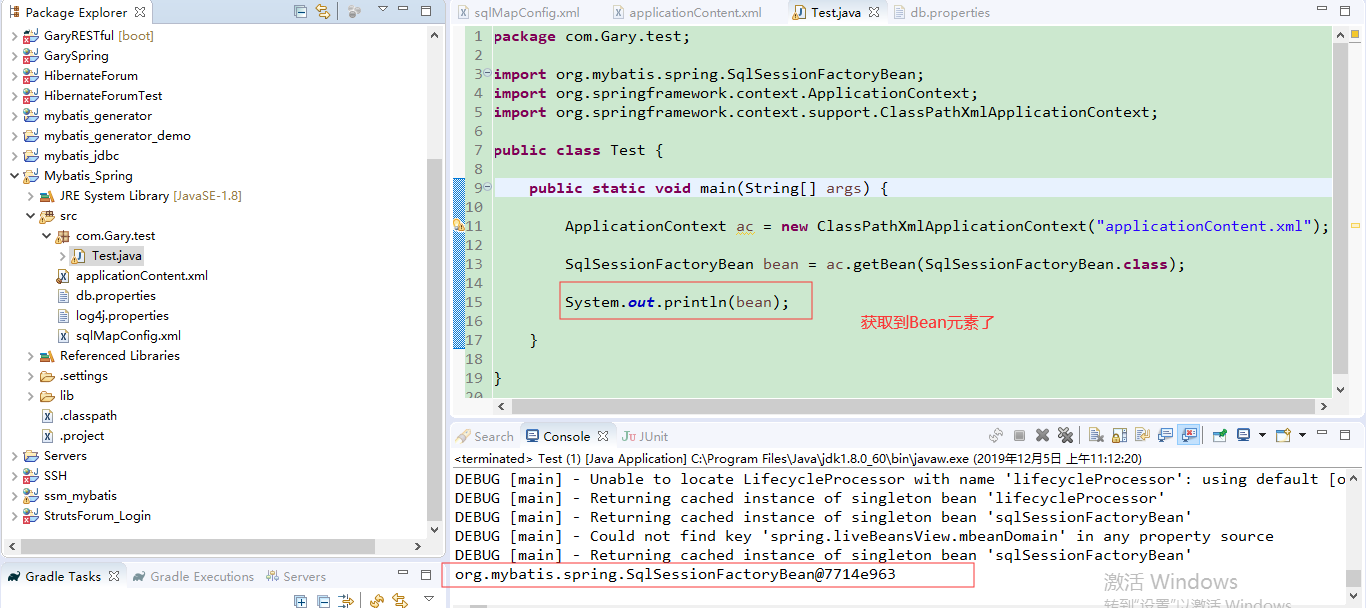
package com.Gary.test;

import org.mybatis.spring.SqlSessionFactoryBean;

import org.springframework.context.ApplicationContext;

import org.springframework.context.support.ClassPathXmlApplicationContext;

public class Test {

    public static void main(String[] args) {

        ApplicationContext ac = new ClassPathXmlApplicationContext("applicationContent.xml");

        SqlSessionFactoryBean bean = ac.getBean(SqlSessionFactoryBean.class);

        System.out.println(bean);

    }

}
Test.java
JavaWeb_(Mybatis框架)MyBatis整合Spring框架的更多相关文章
- 整合Spring框架和MyBatis框架
------------------------siwuxie095 整合 Spring 框架和 MyBatis 框架 ...
- OSGI企业应用开发(四)使用Blueprint整合Spring框架(一)
上篇文章中介绍了如何使用独立的Equinox发行包搭建OSGI运行环境,而不是依赖与具体的Eclipse基础开发工具,本文开始介绍如何使用Blueprint將Spring框架整合到OSGI中. 一.开 ...
- 整合Spring框架和Hibernate框架
-------------------siwuxie095 整合 Spring 框架和 Hibernate 框架 1.导 ...
- mybatis入门_一对多,多对多映射以及整合spring框架
一.一对多映射. 1.1 一对多映射之根据多的一方关联查询一的一方 示例:查询出具体的订单信息,同时也查询出来订单的用户信息. 引入的订单表如下所示: 框选出来的为具体的外键. 订单的Pojo类如下所 ...
- java框架之MyBatis(2)-进阶&整合Spring&逆向工程
进阶内容 准备 jdbc.url=jdbc:mysql://192.168.208.192:3306/test?characterEncoding=utf-8 jdbc.driver=com.mysq ...
- OSGI企业应用开发(五)使用Blueprint整合Spring框架(二)
上篇文章中,我们开发了一个自定义的Bundle,接着从网络中下载到Spring和Blueprint的Bundle,然后复制到DynamicRuntime项目下. 需要注意的是,这些Bundle并不能在 ...
- JavaWeb_(Spring框架)在Struts+Hibernate框架中引入Spring框架
spring的功能:简单来说就是帮我们new对象,什么时候new对象好,什么时候销毁对象. 在MySQL中添加spring数据库,添加user表,并添加一条用户数据 使用struts + hibern ...
- MyBatis使用总结+整合Spring
MyBatis 本是apache的一个开源项目iBatis, 2010年这个项目由apache software foundation 迁移到了google code,并且改名为MyBatis .20 ...
- mybatis笔记<二> 整合spring
mybatis与spring整合需要添加几个jar包,mybatis-spring, spring-context, spring-jdbc 1. spring ioc只要一个jar包就ok 2. 我 ...
随机推荐
- C#从零单排上王者系列---元组
从零单排系列说明 博主最初的想法是想写个蜕茧成蝶的系列文章,后来觉得博客的表现形式很难做到连贯和系统.所以从本篇博客开始博主会选择书中比较重要和不好理解的知识点并结合自己的实际工作经验来讲解,不再是照 ...
- CentOS 安装hping3工具及安装遇到的错误及解决方法
hping是用于生成和解析TCPIP协议数据包的开源工具.创作者是Salvatore Sanfilippo.目前最新版是hping3,支持使用tcl脚本自动化地调用其API.hping是安全审计.防火 ...
- 日志实时查看、轮询、统计、监控工具 Loggrove
Loggrove 是对日志文件进行 阅读.轮询.关键词匹配.监控告警.图表展示 的 Web 服务. 下载地址 https://github.com/olajowon/loggrove 超轻组件 Pyt ...
- Linux常用命令及文件管理
Linux上的文件管理类命令都有哪些,其常用的使用方法及其相关示例演示. 目录解释: .代表此层目录: .. 代表父目录:-代表前一个目录:~代表是家目录. (1)ls命令(显示) -a:列出所有文 ...
- centos7误删yum源的解决办法 ( -bash: yum: command not found)
这里以安装阿里的yum源为例: 1.查看自己的centos版本 cat /etc/redhat-release 2.进入阿里云源站地址:http://mirrors.aliyun.com/centos ...
- Ubuntu系统---报错Assertion '0' failed
Ubuntu系统---报错Assertion '0' failed YOLO V3,CUDA Error: out of memory darknet: ./src/cuda.c:36: check_ ...
- python关于解决'\u'开头的字符串转中文的方法
转自: https://www.cnblogs.com/hahaxzy9500/p/7685955.html 字符串转中文: s = '\u5468\u661f\u9170' print(s) ##打 ...
- Petrozavodsk Winter Training Camp 2018 Jagiellonian U Contest Problem A. XOR
先把所有的数异或起来 得到sum 然后sum有一些位是1一些位是0 是0的位表示所有数里面有这位的数是偶数个 则无论怎么划分数 这一位对最终的答案都是不会有贡献的 因为偶数=偶数+偶数/奇数+奇数 ...
- 日志分析方法概述 & Web日志挖掘分析的方法
日志在计算机系统中是一个非常广泛的概念,任何程序都有可能输出日志:操作系统内核.各种应用服务器等等.日志的内容.规模和用途也各不相同,很难一概而论. 本文讨论的日志处理方法中的日志,仅指Web日志.其 ...
- 剑指Offer的学习笔记(C#篇)-- 左旋转字符串
题目描述 汇编语言中有一种移位指令叫做循环左移(ROL),现在有个简单的任务,就是用字符串模拟这个指令的运算结果.对于一个给定的字符序列S,请你把其循环左移K位后的序列输出.例如,字符序列S=”abc ...