
Devexpress GridControl中 repositoryItemCheckEdit作为选择列以及作为显示列的使用方法
一、在gridcontrol列表控件中使用单选框作为选择列,这里有两种方式。
方式一:选择gridcontrol控件的Run Designer按钮,添加一列,设置该列的ColumnEdit为checkedit。如下图:
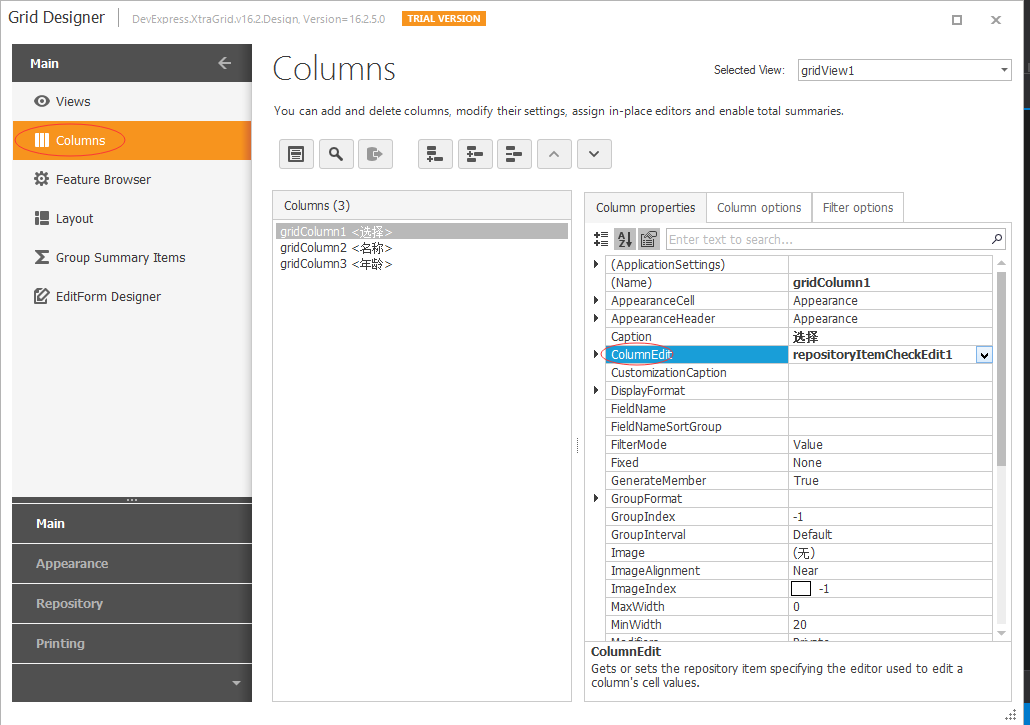
代码如下:
private void Form1_Load(object sender, EventArgs e)

        {

            try

            {

                List<Student> studentList = new List<Student> { new Student() { Selected="N",Name="张三",Age= },

                new Student() { Selected="N",Name="李四",Age= }, new Student() { Selected="N",Name="王五",Age=}};

                repositoryItemCheckEdit1.ValueUnchecked = "N";

                //定义选中状态值

                repositoryItemCheckEdit1.ValueChecked = "Y";

                //绑定数据

                gridControl1.DataSource = studentList;

                //gridControl2.DataSource = studentList;

            }

            catch (Exception ex)

            {

                MessageBox.Show(ex.Message);

            }

        }

        /// <summary>

        /// 得到选中项

        /// </summary>

        private void simpleButton1_Click(object sender, EventArgs e)

        {

            try

            {

                if (gridView1.FocusedRowHandle >= )

                {

                    string str = string.Empty;

                    for (int i = ; i < gridView1.RowCount; i++)

                    {

                        if (gridView1.GetRowCellValue(i, "Selected").ToString().Equals("Y"))

                        {

                            if(string.IsNullOrEmpty(str))

                            {

                                str = gridView1.GetRowCellValue(i, "Name").ToString();

                            }

                            else

                            {

                                str+="\n"+ gridView1.GetRowCellValue(i, "Name").ToString();

                            }

                        }

                    }

                    MessageBox.Show(str);

                }

            }

            catch (Exception ex)

            {

                MessageBox.Show(ex.Message);

            }

        }

 public class Student

    {

        public string Selected { get; set; }

        public string Name { get; set; }

        public int Age { get; set;}

    }
效果图:
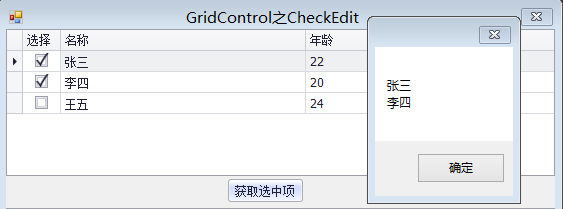
方式二:选择gridcontrol控件的Run Designer按钮,选中gridview,设置gridview的MultiSelect和MultiSelectMode属性。如下图:
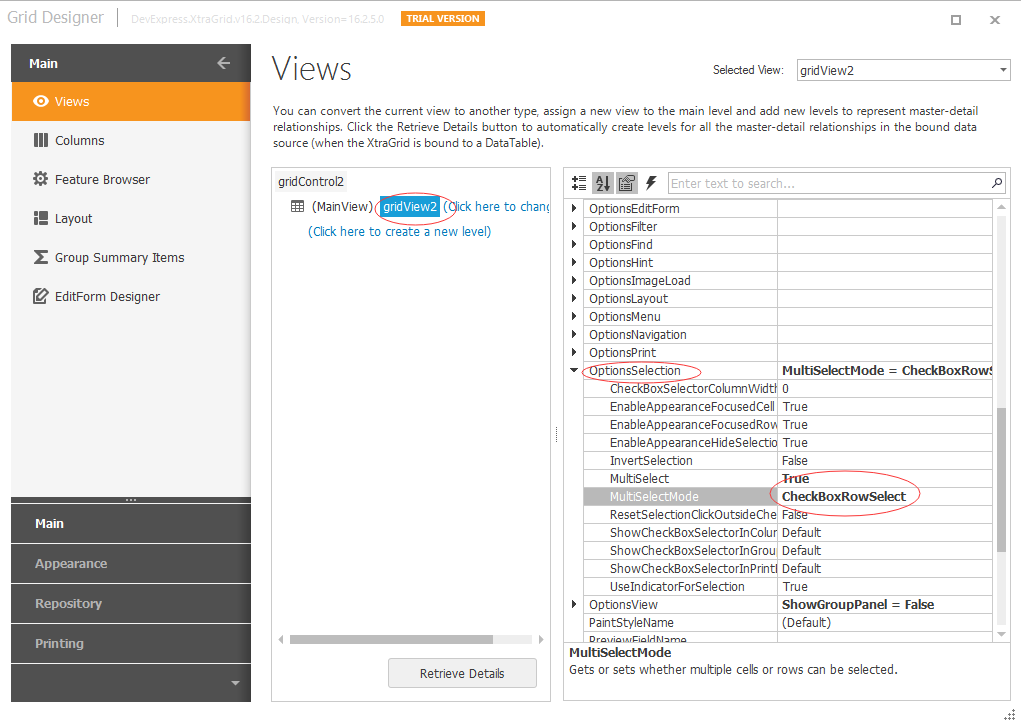
代码如下:
private void Form1_Load(object sender, EventArgs e)

        {

            try

            {

                List<Student> studentList = new List<Student> { new Student() { Selected="N",Name="张三",Age= },

                new Student() { Selected="N",Name="李四",Age= }, new Student() { Selected="N",Name="王五",Age=}};

                //repositoryItemCheckEdit1.ValueUnchecked = "N";

                //定义选中状态值

                //repositoryItemCheckEdit1.ValueChecked = "Y";

                //绑定数据

                //gridControl1.DataSource = studentList;

                gridControl2.DataSource = studentList;

            }

            catch (Exception ex)

            {

                MessageBox.Show(ex.Message);

            }

        }

         /// <summary>

        /// 得到选中项

        /// </summary>

  private void simpleButton2_Click(object sender, EventArgs e)

        {

            try

            {

               int[] rowIndex=gridView2.GetSelectedRows();

                string str = string.Empty;

                foreach (int index in rowIndex)

                {

                    if (string.IsNullOrEmpty(str))

                    {

                        str = gridView1.GetRowCellValue(index, "Name").ToString();

                    }

                    else

                    {

                        str += "\n" + gridView1.GetRowCellValue(index, "Name").ToString();

                    }

                }

                MessageBox.Show(str);

            }

            catch (Exception ex)

            {

                MessageBox.Show(ex.Message);

            }

        }
效果图如下:
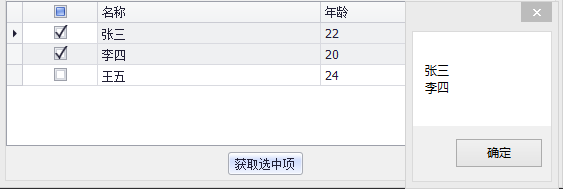
二、在gridcontrol列表控件中使用单选框作为显示列
选择gridcontrol控件的Run Designer按钮,添加一列,设置该列的ColumnEdit为checkedit,设置gridview的optionscolumn的AllowEdit为false(设置改列不可编辑)。如下图
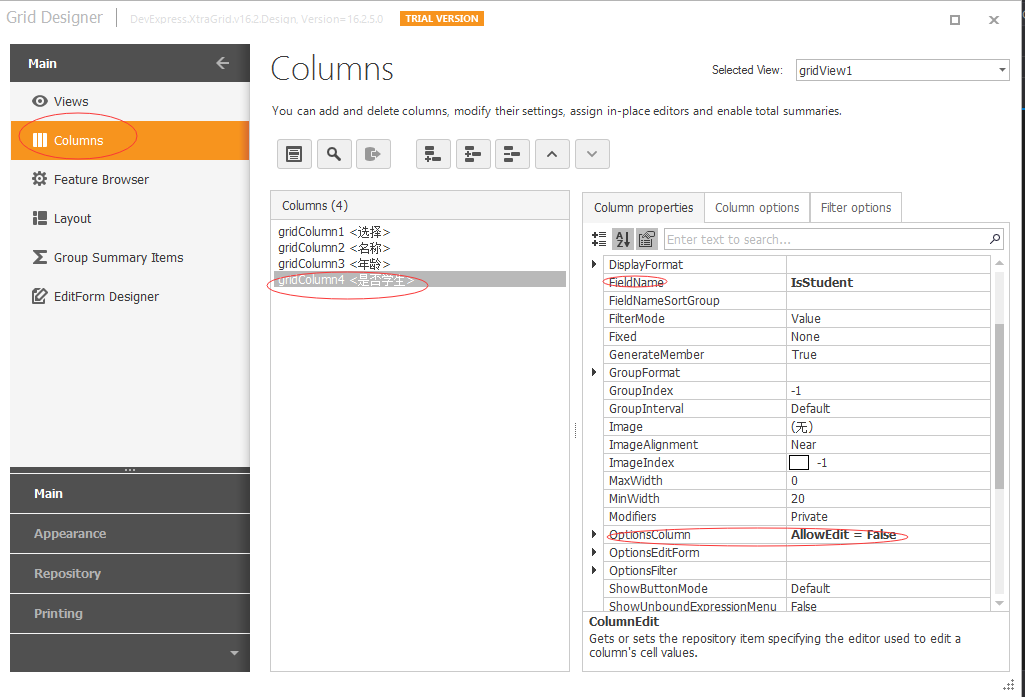
代码如下:
private void Form1_Load(object sender, EventArgs e)

        {

            try

            {

                 List<Student> studentList = new List<Student> { new Student() { Selected="N",Name="张三",Age=,IsStudent=true },

                new Student() { Selected="N",Name="李四",Age=,IsStudent=true }, new Student() { Selected="N",Name="王五",Age=,IsStudent=false}};

                repositoryItemCheckEdit3.CheckStyle = DevExpress.XtraEditors.Controls.CheckStyles.Standard;

                //复选框加载的状态     实心   空心   空心打勾

                repositoryItemCheckEdit3.NullStyle = DevExpress.XtraEditors.Controls.StyleIndeterminate.Unchecked;

                //绑定数据

                gridControl1.DataSource = studentList;

            }

            catch (Exception ex)

            {

                MessageBox.Show(ex.Message);

            }

        }

    public class Student

    {

        public string Selected { get; set; }

        public string Name { get; set; }

        public int Age { get; set; }

        public bool IsStudent { get; set; }

    }
效果图如下:
示例代码:http://download.csdn.net/detail/u012026245/9917399
Devexpress GridControl中 repositoryItemCheckEdit作为选择列以及作为显示列的使用方法的更多相关文章
- Devexpress GridControl中combobox级联显示 z
http://minmin86121.blog.163.com/blog/static/4968115720143163533356/ 在 使用GridControl时,可能会有需求要求某2列显示co ...
- 在DevExpress GridControl中添加进度条控件 z
首先可以使用 DevExpress GridControl 自带的进度条控件. 但是我要用一个方法来设置所有的单元格进度,而不是每个单元格都要设置一遍,同时我想要根据进度值不同,进度条显示不同的颜色. ...
- DevExpress GridControl使用(转)
DevExpress GridControl使用 (一)原汁原味的表格展示 Dev控件中的表格控件GridControl控件非常强大.不过,一些细枝末节的地方有时候用起来不好找挺讨厌的.使用过程中,多 ...
- [DevExpress]GridControl 同步列头checkbox与列中checkbox状态
关键代码: /// <summary> /// 同步列头checkbox与列中checkbox状态 /// </summary> /// <param name=&quo ...
- 在DevExpress GridControl的一列中显示图片
作者:jiankunking 出处:http://blog.csdn.net/jiankunking 近期做项目的时候用到了将GridControl中一列设置为PictureEdit类型,然后通过这一 ...
- 在DevExpress程序中使用GridView直接录入数据的时候,增加列表选择的功能
在我上篇随笔<在DevExpress程序中使用Winform分页控件直接录入数据并保存>中介绍了在GridView以及在其封装的分页控件上做数据的直接录入的处理,介绍情况下数据的保存和校验 ...
- DevExpress控件GridControl中的布局详解 【转】
DevExpress控件GridControl中的布局详解 [转] 2012-10-24 13:27:28| 分类: devexpress | 标签:devexpress |举报|字号 订阅 ...
- dev 中的GridControl中的行实现选择的功能实现
1.项目有实现不GridControl中的数据导出Excel的功能,导出的时候是把所有的数据全部导出,现在要实现可供选择的灵活的导出功能.除了全选可全不选,还可以对每一行实现选择的功能.实现起来比较简 ...
- WPF界面开发:DevExpress WPF在GridControl中固定行时处理时刻
DevExpress广泛应用于ECM企业内容管理. 成本管控.进程监督.生产调度,在企业/政务信息化管理中占据一席重要之地.通过DevExpress WPF Controls,您能创建有着强大互动功能 ...
随机推荐
- MySQL修改默认编码 utf8
修改liunux下MySql默认编码 1安装mysql后,启动服务并登陆,使用status m命令发现mysql的编码并不是 utf8! mysql> status; 2关闭mysql 服务: ...
- VUE CLI3 less 全局变量引用
方法一 1.添加依赖 style-resources-loader 2.vue.config.js中添加 module.exports = { pluginOptions: { 'style-reso ...
- java轻松玩转httpget和httppost
废话不多少说,直接上代码 //get请求 public static void HttpClientGet(String url) throws Exception { // 获取http客户端 Cl ...
- CentOS7使用yum安装PostgreSQL和PostGIS
更新yum源 CentOS7默认yum源的PostgreSQL版本过低,不适合在本版本上使用.在https://yum.postgresql.org/repopackages.php上找到适合Cent ...
- iOS分类(category),类扩展(extension)—史上最全攻略
背景: 在大型项目,企业级开发中多人同时维护同一个类,此时程序员A因为某项需求只想给当前类currentClass添加一个方法newMethod,那该怎么办呢? 最简单粗暴的方式是把newMethod ...
- Image Processing and Analysis_8_Edge Detection:Edge Detection Revisited ——2004
此主要讨论图像处理与分析.虽然计算机视觉部分的有些内容比如特 征提取等也可以归结到图像分析中来,但鉴于它们与计算机视觉的紧密联系,以 及它们的出处,没有把它们纳入到图像处理与分析中来.同样,这里面也有 ...
- springboot系列(一) Spring Boot浅谈(转载)
首先申明一下本文是转载自https://blog.csdn.net/fly_zhyu/article/details/76407830: 1. Spring Boot是什么,解决哪些问题 1) Spr ...
- 熟记这些python内置函数,你离大佬就不远了
python内置了很多函数,方便我们在写程序的时候调用,在ython 2.7 的所有内置函数共有80个.熟练记住和使用这些内置函数,将大大提高写Python代码的速度和代码的优雅程度. 以下代码示例用 ...
- C 预编译 宏 声明
- BCB6 调用C# DLL
最近项目涉及第三方接口调用.第三方是用C#实现的WCF服务.而我们的程序是使用的BCB6开发.因此,打算将与WCF的通讯包含在C#的类库中,给BCB6调用.BCB6 是无法直接调用C#的DLL,但可以 ...