
C#操作IIS程序池及站点的创建配置实现代码
首先要对Microsoft.Web.Administration进行引用,它主要是用来操作IIS7;
using System.DirectoryServices;
using Microsoft.Web.Administration;
1:首先是对本版IIS的版本进行配置:
DirectoryEntry getEntity = new DirectoryEntry("IIS://localhost/W3SVC/INFO");

string Version = getEntity.Properties["MajorIISVersionNumber"].Value.ToString();

MessageBox.Show("IIS版本为:" + Version);
2:是判断程序池是存在;
        /// <summary>

        /// 判断程序池是否存在

        /// </summary>

        /// <param name="AppPoolName">程序池名称</param>

        /// <returns>true存在 false不存在</returns>

        private bool IsAppPoolName(string AppPoolName)

        {

            bool result = false;

            DirectoryEntry appPools = new DirectoryEntry("IIS://localhost/W3SVC/AppPools");

            foreach (DirectoryEntry getdir in appPools.Children)

            {

                if (getdir.Name.Equals(AppPoolName))

                {

                    result = true;

                }

            }

            return result;

        }
3:删除应用程序池
        /// <summary>

        /// 删除指定程序池

        /// </summary>

        /// <param name="AppPoolName">程序池名称</param>

        /// <returns>true删除成功 false删除失败</returns>

        private bool DeleteAppPool(string AppPoolName)

        {

            bool result = false;

            DirectoryEntry appPools = new DirectoryEntry("IIS://localhost/W3SVC/AppPools");

            foreach (DirectoryEntry getdir in appPools.Children)

            {

                if (getdir.Name.Equals(AppPoolName))

                {

                    try

                    {

                        getdir.DeleteTree();

                        result = true;

                    }

                    catch

                    {

                        result = false;

                    }

                }

            }

            return result;

        }
4:创建应用程序池 (对程序池的设置主要是针对IIS7;IIS7应用程序池托管模式主要包括集成跟经典模式,并进行NET版本的设置)
            string AppPoolName = "LamAppPool";

            if (!IsAppPoolName(AppPoolName))

            {

                DirectoryEntry newpool;

                DirectoryEntry appPools = new DirectoryEntry("IIS://localhost/W3SVC/AppPools");

                newpool = appPools.Children.Add(AppPoolName, "IIsApplicationPool");

                newpool.CommitChanges();

                MessageBox.Show(AppPoolName + "程序池增加成功");

            }

            #endregion

            #region 修改应用程序的配置(包含托管模式及其NET运行版本)

            ServerManager sm = new ServerManager();

            sm.ApplicationPools[AppPoolName].ManagedRuntimeVersion = "v4.0";

            sm.ApplicationPools[AppPoolName].ManagedPipelineMode = ManagedPipelineMode.Classic; //托管模式Integrated为集成 Classic为经典

            sm.CommitChanges();

            MessageBox.Show(AppPoolName + "程序池托管管道模式:" + sm.ApplicationPools[AppPoolName].ManagedPipelineMode.ToString() + "运行的NET版本为:" + sm.ApplicationPools[AppPoolName].ManagedRuntimeVersion);
运用C#代码来对IIS7程序池托管管道模式及版本进行修改;
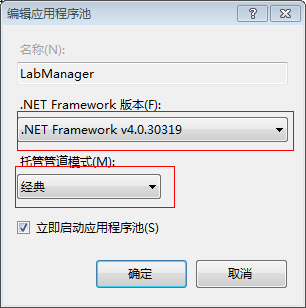
5:针对IIS6的NET版进行设置;因为此处我是用到NET4.0所以V4.0.30319 若是NET2.0则在这进行修改 v2.0.50727
            //启动aspnet_regiis.exe程序

            string fileName = Environment.GetEnvironmentVariable("windir") + @"\Microsoft.NET\Framework\v4.0.30319\aspnet_regiis.exe";

            ProcessStartInfo startInfo = new ProcessStartInfo(fileName);

            //处理目录路径

            string path = vdEntry.Path.ToUpper();

            int index = path.IndexOf("W3SVC");

            path = path.Remove(, index);

            //启动ASPnet_iis.exe程序,刷新脚本映射

            startInfo.Arguments = "-s " + path;

            startInfo.WindowStyle = ProcessWindowStyle.Hidden;

            startInfo.UseShellExecute = false;

            startInfo.CreateNoWindow = true;

            startInfo.RedirectStandardOutput = true;

            startInfo.RedirectStandardError = true;

            Process process = new Process();

            process.StartInfo = startInfo;

            process.Start();

            process.WaitForExit();

            string errors = process.StandardError.ReadToEnd();
6:平常我们可能还得对IIS中的MIME类型进行增加;下面主要是我们用到两个类型分别是:xaml,xap
IISOle.MimeMapClass NewMime = new IISOle.MimeMapClass();

NewMime.Extension = ".xaml"; NewMime.MimeType = "application/xaml+xml";

IISOle.MimeMapClass TwoMime = new IISOle.MimeMapClass();

TwoMime.Extension = ".xap"; TwoMime.MimeType = "application/x-silverlight-app";

rootEntry.Properties["MimeMap"].Add(NewMime);

rootEntry.Properties["MimeMap"].Add(TwoMime);

rootEntry.CommitChanges();
7:下面是做安装时一段对IIS进行操作的代码;兼容IIS6及IIS7;新建虚拟目录并对相应的属性进行设置;对IIS7还进行新建程序池的程序;并设置程序池的配置;
    /// <summary>

    /// 创建网站

    /// </summary>

    /// <param name="siteInfo"></param>

      public  void CreateNewWebSite(NewWebSiteInfo siteInfo)

        {

            if (!EnsureNewSiteEnavaible(siteInfo.BindString))

            {

                throw new Exception("该网站已存在" + Environment.NewLine + siteInfo.BindString);

            }

            DirectoryEntry rootEntry = GetDirectoryEntry(entPath);

            newSiteNum = GetNewWebSiteID();

            DirectoryEntry newSiteEntry = rootEntry.Children.Add(newSiteNum, "IIsWebServer");

            newSiteEntry.CommitChanges();

            newSiteEntry.Properties["ServerBindings"].Value = siteInfo.BindString;

            newSiteEntry.Properties["ServerComment"].Value = siteInfo.CommentOfWebSite;

            newSiteEntry.CommitChanges();

            DirectoryEntry vdEntry = newSiteEntry.Children.Add("root", "IIsWebVirtualDir");

            vdEntry.CommitChanges();

            string ChangWebPath = siteInfo.WebPath.Trim().Remove(siteInfo.WebPath.Trim().LastIndexOf('\\'),);

            vdEntry.Properties["Path"].Value = ChangWebPath;

            vdEntry.Invoke("AppCreate", true);//创建应用程序

            vdEntry.Properties["AccessRead"][] = true; //设置读取权限

            vdEntry.Properties["AccessWrite"][] = true;

            vdEntry.Properties["AccessScript"][] = true;//执行权限

            vdEntry.Properties["AccessExecute"][] = false;

            vdEntry.Properties["DefaultDoc"][] = "Login.aspx";//设置默认文档

            vdEntry.Properties["AppFriendlyName"][] = "LabManager"; //应用程序名称

            vdEntry.Properties["AuthFlags"][] = ;//0表示不允许匿名访问,1表示就可以3为基本身份验证,7为windows继承身份验证

            vdEntry.CommitChanges();

            //操作增加MIME

            //IISOle.MimeMapClass NewMime = new IISOle.MimeMapClass();

            //NewMime.Extension = ".xaml"; NewMime.MimeType = "application/xaml+xml";

            //IISOle.MimeMapClass TwoMime = new IISOle.MimeMapClass();

            //TwoMime.Extension = ".xap"; TwoMime.MimeType = "application/x-silverlight-app";

            //rootEntry.Properties["MimeMap"].Add(NewMime);

            //rootEntry.Properties["MimeMap"].Add(TwoMime);

            //rootEntry.CommitChanges();

            #region 针对IIS7

            DirectoryEntry getEntity = new DirectoryEntry("IIS://localhost/W3SVC/INFO");

            int Version =int.Parse(getEntity.Properties["MajorIISVersionNumber"].Value.ToString());

            if (Version > )

            {

                #region 创建应用程序池

                string AppPoolName = "LabManager";

                if (!IsAppPoolName(AppPoolName))

                {

                    DirectoryEntry newpool;

                    DirectoryEntry appPools = new DirectoryEntry("IIS://localhost/W3SVC/AppPools");

                    newpool = appPools.Children.Add(AppPoolName, "IIsApplicationPool");

                    newpool.CommitChanges();

                }

                #endregion

                #region 修改应用程序的配置(包含托管模式及其NET运行版本)

                ServerManager sm = new ServerManager();

                sm.ApplicationPools[AppPoolName].ManagedRuntimeVersion = "v4.0";

                sm.ApplicationPools[AppPoolName].ManagedPipelineMode = ManagedPipelineMode.Classic; //托管模式Integrated为集成 Classic为经典

                sm.CommitChanges();

                #endregion

                vdEntry.Properties["AppPoolId"].Value = AppPoolName;

                vdEntry.CommitChanges();

            }

            #endregion

            //启动aspnet_regiis.exe程序

            string fileName = Environment.GetEnvironmentVariable("windir") + @"\Microsoft.NET\Framework\v4.0.30319\aspnet_regiis.exe";

            ProcessStartInfo startInfo = new ProcessStartInfo(fileName);

            //处理目录路径

            string path = vdEntry.Path.ToUpper();

            int index = path.IndexOf("W3SVC");

            path = path.Remove(, index);

            //启动ASPnet_iis.exe程序,刷新脚本映射

            startInfo.Arguments = "-s " + path;

            startInfo.WindowStyle = ProcessWindowStyle.Hidden;

            startInfo.UseShellExecute = false;

            startInfo.CreateNoWindow = true;

            startInfo.RedirectStandardOutput = true;

            startInfo.RedirectStandardError = true;

            Process process = new Process();

            process.StartInfo = startInfo;

            process.Start();

            process.WaitForExit();

            string errors = process.StandardError.ReadToEnd();

            if (errors != string.Empty)

            {

                throw new Exception(errors);

            }

        }
       string entPath = String.Format("IIS://{0}/w3svc", "localhost");

       public  DirectoryEntry GetDirectoryEntry(string entPath)

       {

           DirectoryEntry ent = new DirectoryEntry(entPath);

           return ent;

       }

        public class NewWebSiteInfo

        {

            private string hostIP;   // 主机IP

            private string portNum;   // 网站端口号

            private string descOfWebSite; // 网站表示。一般为网站的网站名。例如"www.dns.com.cn"

            private string commentOfWebSite;// 网站注释。一般也为网站的网站名。

            private string webPath;   // 网站的主目录。例如"e:\ mp"

            public NewWebSiteInfo(string hostIP, string portNum, string descOfWebSite, string commentOfWebSite, string webPath)

            {

                this.hostIP = hostIP;

                this.portNum = portNum;

                this.descOfWebSite = descOfWebSite;

                this.commentOfWebSite = commentOfWebSite;

                this.webPath = webPath;

            }

            public string BindString

            {

                get

                {

                    return String.Format("{0}:{1}:{2}", hostIP, portNum, descOfWebSite); //网站标识(IP,端口,主机头值)

                }

            }

            public string PortNum

            {

                get

                {

                    return portNum;

                }

            }

            public string CommentOfWebSite

            {

                get

                {

                    return commentOfWebSite;

                }

            }

            public string WebPath

            {

                get

                {

                    return webPath;

                }

            }

        }
8:下面的代码是对文件夹权限进行设置,下面代码是创建Everyone 并给予全部权限
        /// <summary>

        /// 设置文件夹权限 处理给EVERONE赋予所有权限

        /// </summary>

        /// <param name="FileAdd">文件夹路径</param>

        public void SetFileRole()

        {

            string FileAdd = this.Context.Parameters["installdir"].ToString();

            FileAdd = FileAdd.Remove(FileAdd.LastIndexOf('\\'), );

            DirectorySecurity fSec = new DirectorySecurity();

            fSec.AddAccessRule(new FileSystemAccessRule("Everyone",FileSystemRights.FullControl,InheritanceFlags.ContainerInherit|InheritanceFlags.ObjectInherit,PropagationFlags.None,AccessControlType.Allow));

            System.IO.Directory.SetAccessControl(FileAdd, fSec);

        }
C#操作IIS程序池及站点的创建配置实现代码的更多相关文章
- C#操作IIS程序池及站点的创建配置
最近在做一个WEB程序的安装包:对一些操作IIS进行一个简单的总结:主要包括对IIS进行站点的新建以及新建站点的NET版本的选择,还有针对IIS7程序池的托管模式以及版本的操作:首先要对Microso ...
- C#操作IIS程序池及站点的创建配置(转)
原文:http://www.cnblogs.com/wujy/archive/2013/02/28/2937667.html 最近在做一个WEB程序的安装包:对一些操作IIS进行一个简单的总结:主 ...
- 用C#操作IIS创建虚拟目录和网站
#region CreateWebsite 添加网站 public string CreateWebSite(string serverID, string serverComment, string ...
- IIS监控应用程序池和站点假死,自动重启IIS小工具
文章技术适合初学者.高级的C#开发工程师这些估计都熟悉到烂了,望不要喷. 第一.C#代码要操作IIS 就必须先导入 Microsoft.Web.Administration.dll ,方便控制台程序做 ...
- .net操作IIS,新建网站,新建应用程序池,设置应用程序池版本,设置网站和应用程序池的关联
ServerManager类用来操作IIS,提供了很多操作IIS的API.使用ServerManager必须引用Microsoft.Web.Administration.dll,具体路径为:%wind ...
- C# 使用代码来操作 IIS
由于需要维护网站的时候,可以自动将所有的站点HTTP重定向到指定的静态页面上. 要操作 IIS 主要使用到的是“Microsoft.Web.Administration.dll”. 该类库不可以在引用 ...
- C#管理IIS中的站点
原文:http://www.knowsky.com/534237.html Microsoft自Windows Vista一起发布了IIS 7.0,这个已经是去年的话题了,随后,由.NET开发的Web ...
- C#操作IIS完整解析
原文:C#操作IIS完整解析 最近在为公司实施做了一个工具,Silverlight部署早已是轻车熟路, 但对于非技术人员来说却很是头疼的一件事,当到现场实施碰到客户情况也各不相同, 急需一个类似系统备 ...
- C#操作 iis启用父目录
iis6实现: DirectoryEntry site = (DirectoryEntry)root.Invoke("Create", "IIsWebServer&quo ...
随机推荐
- house买房原理,2019,第一版
,购买框架 1,通过自己的买房预算金额 和 pre-approval 确定你要的房屋总价, 估计到自己可以接受的房子,卖方也喜欢这样的买家,但不一定能拿全额贷款 2,pre-approval对信用分数 ...
- 第4课.vi编辑器
1.vi编辑器的配置 cd /etc/vim cp vimrc ~/.vimrc cd ~ gedit .vimrc 在.vimrc中加入如下内容: "关闭兼容功能 set nocompat ...
- LINQPad 应用
https://www.linqpad.net/ 使用 LINQPad 调试linq以及lambda表达式 http://www.studyofnet.com/news/1168.html linq ...
- 【EF】vs2017中没有EF模型
在添加->新建项目 中找不到实体模型? 或者 在vs中打开edmx文件时,显示的只有文本,没有图形模式 原因:是因为没有安装实体模型插件 解决方法: 1.打开网址 https://marketp ...
- python模块之psutil
一.模块安装 1.简介 psutil是一个跨平台库(http://pythonhosted.org/psutil/)能够轻松实现获取系统运行的进程和系统利用率(包括CPU.内存.磁盘.网络等)信息. ...
- Note_4.1
2019/4/1 奇奇怪怪的笔记 多项式除法 问题描述 给定\(n\)次多项式\(A(x)\)和\(m\)次多项式\(B(x)\) 求: \[ A(x)=B(x)*C(x)+R(x) \] 我们要求\ ...
- Android中进度条
<ProgressBar android:id="@+id/progress_bar" android:layout_width="match_parent&quo ...
- Perl深度优先迷宫算法
迷宫求解,可以用穷举法,将每个点的方向都穷举完:由于在求解过程中会遇到某一方向不可通过,此时就必须按原路返回. 想到用Perl数组来保存路径,记录每次所探索的方向,方便原路返回时得到上一步的方向,再退 ...
- Wrapper: Error - Unable to execute Java command
在64位的系统下 将短信程序运行于服务中,出现以下错误: Error: [size=14px; line-height: 26px;]FATAL | wrapper | 2012/06/18 17 ...
- 【阿里云IoT+YF3300】9.快速开发modbus设备驱动
Modbus是一种串行通信协议,是莫迪康公司为PLC(编程逻辑控制器)通信而设计的协议.Modbus目前已经成为工业领域通信协议的业界标准,大部分的仪器仪表都支持该通信协议.很早以前就开发过基于Mod ...