
Salesforce 开发整理(八)PDF打印相关
一:基础设置
Salesforce中的PDF页面本质上还是Visualforce[简称VF]页面,所以只需要给VF页面加上一个属性[renderAs="pdf"] 即可生成一个PDF页面
1 <apex:page renderAs="pdf">

2     this is a Visualforce page!!! 这是一个VF页面

3 </apex:page>
预览页面,可以看到生成了一个PDF页面,但是只显示了英文,涉及的中文字体都没有出现

对于中文,在PDF中,需要设置font-family: Arial Unicode MS;才能显示中文字体。
添加上属性
 body {

       font-family: Arial Unicode MS;

       font-size:14px;

       font-weight:200;

 }
此时还需要额外设置几个属性,applyHtmlTag="false" applyBodyTag="false" showheader="false"
原因是Salesforce对自己的页面做了相当程度的封装,所以在这样的全部都是自定义的情况下,设置上面的属性将VF自带的样式关闭,此时预览页面

可以看到中文的正常显示。需要注意的,PDF页面不支持JS,不支持文字的加粗,只能通过文字的字号大小进行区分。
我们来看一个基本的PDF页面模板
 <apex:page renderAs="pdf" showheader="false" standardstylesheets="false"  applyBodyTag="false" applyHtmlTag="false"  contentType="text/html; charset=UTF-8">

 <html>

     <head>

         <style>

         body {

             font-family: Arial Unicode MS;

             font-size:14px;

             font-weight:200;

         }

         </style>

     </head>

      this is a Visualforce page!!! 这是一个VF页面

      <!-- 输入你想要的页面内容 -->

  </html>

 </apex:page>
二:页眉和页脚
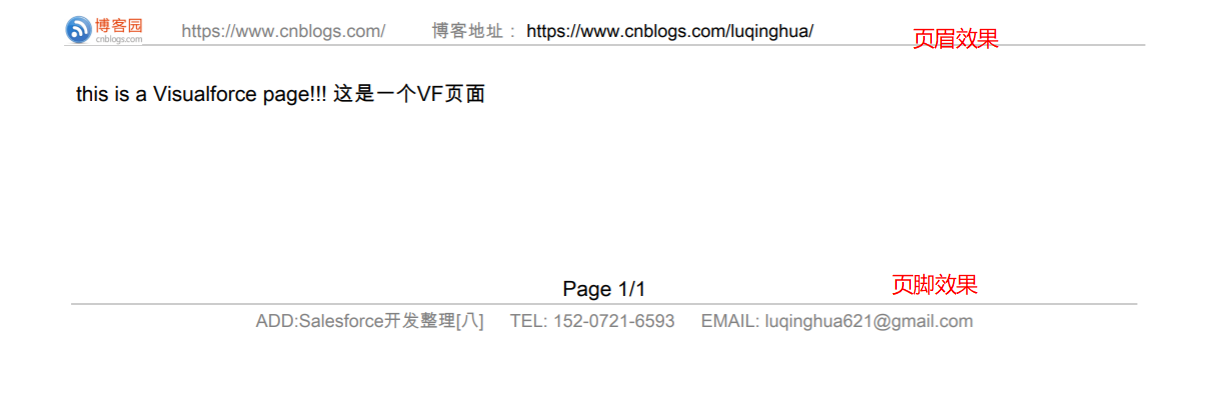
经常需要使用的PDF页面内容肯定包括页眉和页脚的显示设置,下面用一个demo进行示范
 @page {

     @top-center {

         content: element(header);

     }

     @bottom-left {

         content: element(footer);

     }

 }

 div.header {

     display: block;

     height: 20px;

     position: running(header);

 }

 div.footer {

     display: block;

     padding: 5px;

     position: running(footer);

 }

 .pagenumber:before {

     content: counter(page);

 }

 .pagecount:before {

     content: counter(pages);

 }
页眉页脚对应的页面代码如下
<!-- 设置页眉和页脚 -->
<!-- 页眉 -->
<div class="header" style="border-bottom: 1px solid #ccc">
<div>
<img src="{!$Resource.Logo}" style="display: block;height: 20px;float:left;" />
<div style="float:left;">
<span style="font-size:12px;color: #808080;"> https://www.cnblogs.com/</span>
<span style="font-size:12px;">
<span style="color: #808080;"> 博客地址:</span>
https://www.cnblogs.com/luqinghua/
</span>
</div>
<div style="clear: both;"></div>
</div>
</div>
<!-- 页脚 -->
<div class="footer">
<div style="text-align: center;"> Page <span class="pagenumber"/>/<span class="pagecount"/></div>
<div style="border-top: 1px solid #ccc;text-align: center;">
<span style="font-size:12px;color: #808080;"> ADD:Salesforce开发整理[八]</span>
<span style="font-size:12px;color: #808080;"> TEL: 152-0721-6593</span>
<span style="font-size:12px;color: #808080;"> EMAIL: luqinghua621@gmail.com</span>
</div>
</div>
页面预览效果
三:中文自动换行
在PDF上换行,如果是前端可以使用<br/> 强制换行,或者文字内使用 换行,但是经常会有传递的中文参数,如果长度超出的情况下,需要自动换行的情况,此时我们可以在后台将中文字符串转换成一个字符串的集合,再在前端页面输出,此时可以看到自动换行的效果。
后台控制器代码
 public with sharing class PrintPDFController {

     public  List<String> list_Name{get;set;} // PDF标题

     public PrintPDFController() {

         String  CompanyName = '公司名称特别长超出你需要限制的长度比如15个字公司名称特别长超出你'

                     + '需要限制的长度比如15个字公司名称特别长超出你需要限制的长度比如15'

                     + '个字公司名称特别长超出你需要限制的长度比如15个字';

         list_Name = spliteStringToList(CompanyName);

     }

     public List<String> spliteStringToList(String field){

         List<String> StringList = new List<String>();

         for(integer i = 0 ; i < field.length(); i++){

             StringList.add(field.Substring(i,i+1));

         }

         return StringList;

     }

 }
前端输出
<apex:repeat value="{!list_Name}" var="name"><apex:outputText value="{!name}"/><textarea/></apex:repeat>
可以看到前端的预览
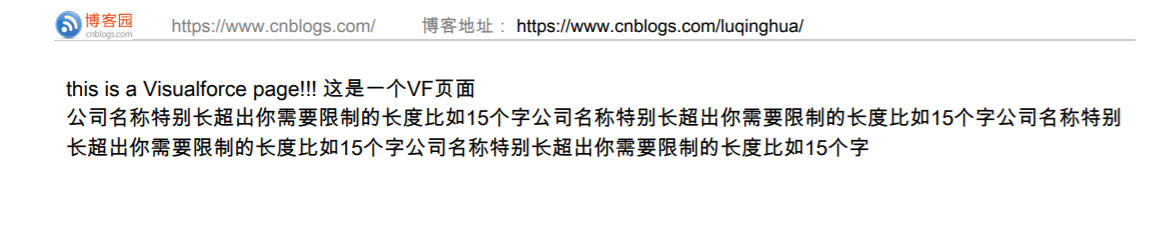
所有的超出页面长度显示的中文都会自动换行显示
四:保留系统中的长文本字段样式输出
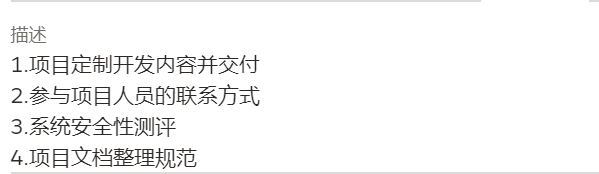
打印系统中的长文本字段时需要保留原本的样式进行输出,譬如在业务机会上的描述里面写这样的格式信息,在后台获取并输出
后台控制器代码
 public with sharing class PrintPDFController {

     public Integer Index{get;set;}

     public List<String> IndexList{get;set;}

     public List<List<List<String>>> ContentList{get;set;}

     public Map<String,List<List<String>>> ContentMap{get;set;}

     public PrintPDFController() {

         Opportunity opp = [ SELECT

                                 Id,

                                 Description

                             FROM

                                 Opportunity

                             WHERE

                                 Id =:'0066F00000sAyL1QAK' Limit 1];

         Index = 0;

         IndexList = new List<String>();

         ContentList = new List<List<List<String>>>();

         ContentMap = new Map<String,List<List<String>>>();

         spliteString(opp.Description);

     }

     public void spliteString(String s){

         Index++;

         IndexList.add(String.valueOf(Index));

         List<String> str = s.split('\n');

         List<String> str_temp;

         List<List<String>> sTable = new List<List<String>>();

         for(String tr:str){

             str_temp = new List<String>();

             for(Integer i=0;i<tr.length();i++){

                 str_temp.add(tr.subString(i,i+1));

             }

             sTable.add(str_temp);

         }

         ContentList.add(sTable);

         ContentMap.put(String.valueOf(Index),sTable);

     }

 }
前端代码
 <div>

   <h3>业务机会描述</h3>

   <div>

     <table>

       <apex:repeat value="{!IndexList}" var="index">

         <tr style="border:0px">

           <td width="90%" style="border:0px;font-size:13px;">

             <apex:repeat value="{!ContentMap[index]}" var="contentList">

               <apex:repeat value="{!contentList}" var="con">{!con}<textarea/></apex:repeat>

               <br/>

             </apex:repeat>

           </td>

         </tr>

       </apex:repeat>

     </table>

   </div>

 </div>
预览页面效果

五:小技巧汇总
最后记录几个小技巧:
1、控制PDF某一区域作为一个整体不能被分页切割,使用 page-break-inside:avoid; ,可用于div,span,table,tr,td等一切你想要要保持在同一个页面显示的内容;
2、与之相对的就是强制换页使用:<P style='page-break-after:always'> </P> ,类似WORD中的分页符,缺点是其本身也占有一行。
3、PDF页面不支持Javascript的使用,对于某些条件限制的需求,可以使用IF作为判断,比如
value="{!IF(ord.Deals__c=='01-标准','■','□')}"
或者 用于style元素中控制样式的显示
style="{!IF(pi.Company__c!="几米",'display:none;','width:100%;')}"
4、VF页面时间格式化
<apex:outputText value="{0, date, yyyy-MM-dd}">

       <apex:param value="{!con.PlanStartDate__c}" />

</apex:outputText>
如有错漏,欢迎指正,有问题可以在评论区留言,大家共同进步。
----------------------------------------------------- end -----------------------------------------------
最后贴上本文使用的demo页面源码
后台控制器:PrintPDFController
 public with sharing class PrintPDFController {

     public  List<String> list_Name{get;set;} // PDF标题

     public Integer Index{get;set;}

     public List<String> IndexList{get;set;}

     public List<List<List<String>>> ContentList{get;set;}

     public Map<String,List<List<String>>> ContentMap{get;set;}

     public PrintPDFController() {

         String  CompanyName = '公司名称特别长超出你需要限制的长度比如15个字公司名称特别长超出你'

                     + '需要限制的长度比如15个字公司名称特别长超出你需要限制的长度比如15'

                     + '个字公司名称特别长超出你需要限制的长度比如15个字';

         list_Name = spliteStringToList(CompanyName);

         Opportunity opp = [ SELECT

                                 Id,

                                 Description

                             FROM

                                 Opportunity

                             WHERE

                                 Id =:'0066F00000sAyL1QAK' Limit 1];

         Index = 0;

         IndexList = new List<String>();

         ContentList = new List<List<List<String>>>();

         ContentMap = new Map<String,List<List<String>>>();

         spliteString(opp.Description);

     }

     public List<String> spliteStringToList(String field){

         List<String> StringList = new List<String>();

         for(integer i = 0 ; i < field.length(); i++){

             StringList.add(field.Substring(i,i+1));

         }

         return StringList;

     }

     public void spliteString(String s){

         Index++;

         IndexList.add(String.valueOf(Index));

         List<String> str = s.split('\n');

         List<String> str_temp;

         List<List<String>> sTable = new List<List<String>>();

         for(String tr:str){

             str_temp = new List<String>();

             for(Integer i=0;i<tr.length();i++){

                 str_temp.add(tr.subString(i,i+1));

             }

             sTable.add(str_temp);

         }

         ContentList.add(sTable);

         ContentMap.put(String.valueOf(Index),sTable);

     }

 }
前端VF页面
<apex:page renderAs="pdf" showheader="false" standardstylesheets="false" applyBodyTag="false" applyHtmlTag="false" contentType="text/html; charset=UTF-8" controller="PrintPDFController">
<html>
<head>
<style>
body {
font-family: Arial Unicode MS;
font-size:14px;
font-weight:200;
}
@page {
@top-center {
content: element(header);
}
@bottom-left {
content: element(footer);
}
}
div.header {
display: block;
height: 20px;
position: running(header);
}
div.footer {
display: block;
padding: 5px;
position: running(footer);
}
.pagenumber:before {
content: counter(page);
}
.pagecount:before {
content: counter(pages);
}
</style>
</head>
this is a Visualforce page!!! 这是一个VF页面
<br/>
<!-- 输入你想要的页面内容 -->
<apex:repeat value="{!list_Name}" var="name"><apex:outputText value="{!name}"/><textarea/></apex:repeat>
<br/> <div>
<h3>业务机会描述</h3>
<div>
<table>
<apex:repeat value="{!IndexList}" var="index">
<tr style="border:0px">
<td width="90%" style="border:0px;font-size:13px;">
<apex:repeat value="{!ContentMap[index]}" var="contentList">
<apex:repeat value="{!contentList}" var="con">{!con}<textarea/></apex:repeat>
<br/>
</apex:repeat>
</td>
</tr>
</apex:repeat>
</table>
</div>
</div> <!-- 设置页眉和页脚 -->
<!-- 页眉 -->
<div class="header" style="border-bottom: 1px solid #ccc">
<div>
<img src="{!$Resource.Logo}" style="display: block;height: 20px;float:left;" />
<div style="float:left;">
<span style="font-size:12px;color: #808080;"> https://www.cnblogs.com/</span>
<span style="font-size:12px;">
<span style="color: #808080;"> 博客地址:</span>
https://www.cnblogs.com/luqinghua/
</span>
</div>
<div style="clear: both;"></div>
</div>
</div>
<!-- 页脚 -->
<div class="footer">
<div style="text-align: center;"> Page <span class="pagenumber"/>/<span class="pagecount"/></div>
<div style="border-top: 1px solid #ccc;text-align: center;">
<span style="font-size:12px;color: #808080;"> ADD:Salesforce开发整理[八]</span>
<span style="font-size:12px;color: #808080;"> TEL: 152-0721-6593</span>
<span style="font-size:12px;color: #808080;"> EMAIL: luqinghua621@gmail.com</span>
</div>
</div>
</html>
</apex:page>
Salesforce 开发整理(八)PDF打印相关的更多相关文章
- Salesforce 开发整理(五)代码开发最佳实践
在Salesforce项目实施过程中,对项目代码的维护可以说占据极大的精力,无论是因为项目的迭代,还是需求的变更,甚至是项目组成员的变动,都不可避免的需要维护之前的老代码,而事实上,几乎没有任何一个项 ...
- Salesforce 开发整理(二)报表开发学习
Salesforce提供了强大的报表功能,支持表格.摘要.矩阵以及结合共四种形式,本文探讨在站在开发的角度要如何理解报表. 一:查询报表基本信息报表在Sales force中是Report对象,基本的 ...
- Salesforce 开发整理(一)测试类最佳实践
在Sales force开发中完善测试类是开发者必经的一个环节,代码的部署需要保证至少75%的覆盖率,那么该如何写好测试类呢. 测试类定义格式如下: @isTest private class MyT ...
- Salesforce 开发整理(七)配置审批流
salesforce提供了比较强大的可配置审批流功能,在系统中翻译为“批准过程”.所以需要配置审批时,选择创建 ——> 工作流和批准 ——> 批准过程,然后选择管理批准过程,选择需要配置 ...
- Salesforce 开发整理(四)记录锁定
如果一个对象的记录在满足某个条件的情况下,希望能对其进行锁定,即普通用户没有权限对其进行编辑操作,记录页面显示如下图 一般会在提交审批,或者项目进行到某个阶段的情况下,由后台进行判断要不要锁定记录,或 ...
- Salesforce 开发整理(三)权限共享
Salesforce提供对象的访问权限可以通过 安全性控制 → 共享设置,可以查看每个对象在系统内部默认的访问权限 共用读写:对象的记录任何用户都可以进行读写操作 公用只读:对象的记录任何用户都可以查 ...
- Salesforce 开发整理(十)项目部署总结
项目部署顺序 全局值集 小组 自定义字段-对象-设置(SF1 紧凑布局要和记录类型在这里要一起部署) 邮件模板-静态资源 角色 工作流-流定义(包含进程生成器) 批准过程 开发部署<Apex类, ...
- Salesforce 开发整理(九) 开发中使用的一些小技巧汇总[持续更新]
1.查询一个对象下所有字段 当需要查询一个对象所有字段进行复制或其他操作,可以使用一段拼接的语句来查询 String query = 'select '; for(String fieldApi : ...
- Salesforce 开发整理(六) Visualforce分页
分页的实现总体上分真分页和假分页. 所谓真分页指页面上列出来的数据就是实际查询的数据,假分页则是无论页面上一次显示多少条记录,实际上后台已经加载了所有的记录,分页只是为了展示给用户查看.今天分享一个V ...
随机推荐
- matplotlib画预测框以及打标签
https://blog.csdn.net/weixin_43338538/article/details/89003280 https://blog.csdn.net/yjl9122/article ...
- vuex 源码分析(六) 辅助函数 详解
对于state.getter.mutation.action来说,如果每次使用的时候都用this.$store.state.this.$store.getter等引用,会比较麻烦,代码也重复和冗余,我 ...
- [KMP]一本通(http://ybt.ssoier.cn:8088) 1698:字符串匹配
字符串匹配 [题目描述] 对于一个字符集大小为C的字符串pp,可以将任意两个字符在p中的位置进行互换,例如p=12321,交换1.21.2得到21312,交换1.4得到42324,交换可以进行任意次. ...
- 机器学习(十)-------- 降维(Dimensionality Reduction)
降维(Dimensionality Reduction) 降维的目的:1 数据压缩 这个是二维降一维 三维降二维就是落在一个平面上. 2 数据可视化 降维的算法只负责减少维数,新产生的特征的意义就必须 ...
- 使用T4模板同时生成多个类文件
代码: <#@ template language="C#" debug="false" hostspecific="true"#&g ...
- JPA技术之EntityManager使用方法
Session bean or MD bean对Entity bean的操作(包括所有的query, insert, update, delete操作)都是通过EntityManager实例来完成的. ...
- Jmeter参数化、检查点、集合点教程
在使用Jemeter做压力测试的时候,往往需要参数化用户名,密码以到达到多用户使用不同的用户名密码登录的目的,这个时候我们就可以使用参数化登录. 一.badboy录制需要的脚本.也可以用fiddler ...
- 个人项目:WC
一.GitHub项目地址:https://github.com/lseap/myWC 二.PSP表格: PSP2.1 Personal Software Process Stages 预估耗时(分钟) ...
- Transformer —— attention is all you need
https://www.cnblogs.com/rucwxb/p/10277217.html Transformer -- attention is all you need Transformer模 ...
- Centos7安装宝塔控制面板
目录 宝塔面板安装和使用图文教程 1,通过ssh工具登录服务器 2,安装宝塔面板 2,登录宝塔面板 3,设置宝塔面板 3.1,首先我们进入面板设置 3.2,更改面板端口 3.3,绑定域名 3.4,绑定 ...