
[solr] - Facet - autocomplete
Solr的facet可以用于一般性的前缀式自动完成功能,当然,它的主要功能是用于做统计、分类、区间等。
统计、分类、区间功能,可参考下文:
http://hongweiyi.com/2013/03/apache-solr-facet-introduction/
下面例子是使用Facet做前缀式自动完成功能。
schema.xml
<?xml version="1.0" ?>

<schema name="my core" version="1.1">

    <fieldtype name="string"  class="solr.StrField" sortMissingLast="true" omitNorms="true"/>

    <fieldType name="long" class="solr.TrieLongField" precisionStep="0" positionIncrementGap="0"/>

    <fieldType name="tdate" class="solr.TrieDateField" precisionStep="6" positionIncrementGap="0"/>

    <fieldType name="int" class="solr.TrieIntField" precisionStep="0" positionIncrementGap="0"/>

    <fieldType name="float" class="solr.TrieFloatField" precisionStep="0" positionIncrementGap="0"/>

    <fieldType name="double" class="solr.TrieDoubleField" precisionStep="0" positionIncrementGap="0"/>

    <fieldType name="boolean" class="solr.BoolField" sortMissingLast="true"/>

    <fieldtype name="binary" class="solr.BinaryField"/>

    <fieldType name="text_cn" class="solr.TextField">

        <analyzer type="index" class="org.wltea.analyzer.lucene.IKAnalyzer" />

        <analyzer type="query" class="org.wltea.analyzer.lucene.IKAnalyzer" />

    </fieldType>

    <!-- general -->

    <field name="id" type="long" indexed="true" stored="true" multiValued="false" required="true"/>

    <field name="subject" type="text_cn" indexed="true" stored="true" />

    <field name="content" type="text_cn" indexed="true" stored="true" />

    <field name="category_id" type="long" indexed="true" stored="true" />

    <field name="category_name" type="text_cn" indexed="true" stored="true" />

    <field name="last_update_time" type="tdate" indexed="true" stored="true" />

    <field name="_version_" type="long" indexed="true" stored="true"/>

     <!-- field to use to determine and enforce document uniqueness. -->

     <uniqueKey>id</uniqueKey>

     <!-- field for the QueryParser to use when an explicit fieldname is absent -->

     <defaultSearchField>subject</defaultSearchField>

     <!-- SolrQueryParser configuration: defaultOperator="AND|OR" -->

     <solrQueryParser defaultOperator="OR"/>

</schema>
Java Bean:
package com.my.entity;

import java.util.Date;

import org.apache.solr.client.solrj.beans.Field;

public class Item {

    @Field

    private long id;

    @Field

    private String subject;

    @Field

    private String content;

    @Field("category_id")

    private long categoryId;

    @Field("category_name")

    private String categoryName;

    @Field("last_update_time")

    private Date lastUpdateTime;

    public long getId() {

        return id;

    }

    public void setId(long id) {

        this.id = id;

    }

    public String getSubject() {

        return subject;

    }

    public void setSubject(String subject) {

        this.subject = subject;

    }

    public String getContent() {

        return content;

    }

    public void setContent(String content) {

        this.content = content;

    }

    public long getCategoryId() {

        return categoryId;

    }

    public void setCategoryId(long categoryId) {

        this.categoryId = categoryId;

    }

    public String getCategoryName() {

        return categoryName;

    }

    public void setCategoryName(String categoryName) {

        this.categoryName = categoryName;

    }

    public Date getLastUpdateTime() {

        return lastUpdateTime;

    }

    public void setLastUpdateTime(Date lastUpdateTime) {

        this.lastUpdateTime = lastUpdateTime;

    }

}
测试:
package com.my.solr;

import java.io.IOException;

import java.util.ArrayList;

import java.util.Date;

import java.util.List;

import org.apache.solr.client.solrj.SolrQuery;

import org.apache.solr.client.solrj.SolrQuery.ORDER;

import org.apache.solr.client.solrj.SolrQuery.SortClause;

import org.apache.solr.client.solrj.SolrServerException;

import org.apache.solr.client.solrj.impl.HttpSolrServer;

import org.apache.solr.client.solrj.impl.XMLResponseParser;

import org.apache.solr.client.solrj.response.FacetField;

import org.apache.solr.client.solrj.response.FacetField.Count;

import org.apache.solr.client.solrj.response.QueryResponse;

import com.my.entity.Item;

public class TestSolr {

    public static void main(String[] args) throws IOException, SolrServerException {

        String url = "http://localhost:8899/solr/mycore";

        HttpSolrServer core = new HttpSolrServer(url);

        core.setMaxRetries(1);

        core.setConnectionTimeout(5000);

        core.setParser(new XMLResponseParser()); // binary parser is used by default

        core.setSoTimeout(1000); // socket read timeout

        core.setDefaultMaxConnectionsPerHost(100);

        core.setMaxTotalConnections(100);

        core.setFollowRedirects(false); // defaults to false

        core.setAllowCompression(true);

        // ------------------------------------------------------

        // remove all data

        // ------------------------------------------------------

        core.deleteByQuery("*:*");

        List<Item> items = new ArrayList<Item>();

        items.add(makeItem(1, "cpu", "this is intel cpu", 1, "cpu-intel"));

        items.add(makeItem(2, "cpu AMD", "this is AMD cpu", 2, "cpu-AMD"));

        items.add(makeItem(3, "cpu intel", "this is intel-I7 cpu", 1, "cpu-intel"));

        items.add(makeItem(4, "cpu AMD", "this is AMD 5000x cpu", 2, "cpu-AMD"));

        items.add(makeItem(5, "cpu intel I6", "this is intel-I6 cpu", 1, "cpu-intel-I6"));

        core.addBeans(items);

        // commit

        core.commit();

        // ------------------------------------------------------

        // search

        // ------------------------------------------------------

        SolrQuery query = new SolrQuery();

        query.setQuery("*:*");

        query.setStart(0);    // query的开始行数(分页使用)

        query.setRows(0);    // query的返回行数(分页使用)

        query.setFacet(true);    // 设置使用facet

        query.setFacetMinCount(1);    // 设置facet最少的统计数量

        query.setFacetLimit(10);    // facet结果的返回行数

        query.addFacetField("category_name");    // facet的字段

        query.setFacetPrefix("cpu");    // facet字段值

        query.addSort(new SortClause("id", ORDER.asc));    // 排序

        QueryResponse response = core.query(query);

        List<Item> items_rep = response.getBeans(Item.class);

        List<FacetField> facetFields = response.getFacetFields();

        // 因为上面的start和rows均设置为0,所以这里不会有query结果输出

        for (Item i : items_rep) {

            System.out.println("id=" + i.getId() + "\tcontent=" + i.getContent());

        }

        // 打印所有facet

        for(FacetField ff : facetFields) {

            System.out.println("name=" + ff.getName() + "\tcount=" + ff.getValueCount());

            System.out.println("--------------------");

            for(Count count: ff.getValues() ) {

                System.out.println("name=" + count.getName() + "\tvalue=" + count.getCount());

            }

        }

    }

    private static Item makeItem(long id, String subject, String content, long categoryId, String categoryName) {

        Item item = new Item();

        item.setId(id);

        item.setSubject(subject);

        item.setContent(content);

        item.setLastUpdateTime(new Date());

        item.setCategoryId(categoryId);

        item.setCategoryName(categoryName);

        return item;

    }

}
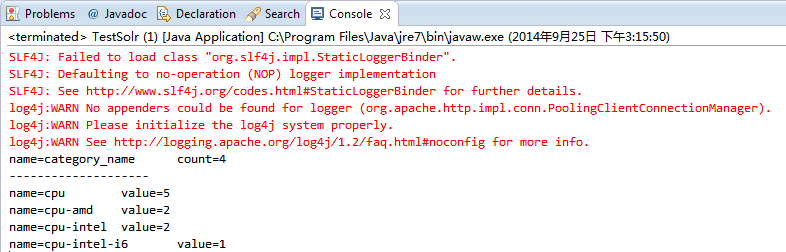
输出结果:
[solr] - Facet - autocomplete的更多相关文章
- Solr Facet 默认值
前言 今天在用Solr Facet遇到了默认值的问题,我用Facet.field查询发现数据总共100条,刚开始没有注意,发现少个别数据,但是用这几个个别的id查询又能查出来数据.才发现是Facet默 ...
- [solr] - Facet
Solr facet使用于分类统计,是最好的工具.下面例子使用facet将可模拟查询搜索出租房信息. 1.在schema.xml中的内容如下: <?xml version="1.0&q ...
- Solr -- Solr Facet 1
一.Facet介绍 solr facet 是solr搜索的一大特色,facet不好翻译,有说是垂直搜索,有说是分片搜索,但都不是很好,还是懒得翻译了,就叫facet ,具体功能看下面的例子意会吧. 比 ...
- Solr Facet 统计查询
一)概述 Facet是solr的高级搜索功能之一,可以给用户提供更友好的搜索体验.在搜索关键字的同时,能够按照Facet的字段进行分组并统计.例如下图所示,你上淘宝,输入“电脑”进行搜索,就会出现品牌 ...
- solr facet查询及solrj 读取facet数据[转]
solr facet查询及solrj 读取facet数据 | 所属分类:solr facet solrj 一. Facet 简介 Facet 是 solr 的高级搜索功能之一 , 可以给用户提供更 ...
- Solr -- Solr Facet 2
solr将以导航为目的的查询结果称为facet. 它并不会修改查询结果信息, 只是在查询结果上根据分类添加了count信息, 然后用户根据count信息做进一步的查询, 比如淘宝的查询列表中, 上面会 ...
- Solr Facet 搜索时,facet.missing = true 的真正含义
Solr的WiKI原文是如下解释: facet.missing Set to "true" this param indicates that in addition to the ...
- solr facet查询及solrj 读取facet数据(相当有用)
原文出自:http://www.coin163.com/java/docs/201310/d_3010029802.html 一. Facet 简介 Facet 是 solr 的高级搜索功能之一 ...
- Solr高级查询Facet
一.什么是facet solr种以导航为目的的查询结果成为facet,在用户查询的结果上根据分类增加了count信息,然后用户根据count信息做进一步搜索. facet主要用于导航实现渐进式精确搜索 ...
随机推荐
- linux笔记:用户和用户组管理-用户配置文件
用户信息文件(/etc/passwd): 影子文件(/etc/shadow) 组信息文件(/etc/group)和组密码文件(/etc/gshadow):
- LCT专题练习
[bzoj2049]洞穴勘测 http://www.cnblogs.com/Sdchr/p/6188628.html 小结 (1)LCT可以方便维护树的连通性,但是图的连通性的维护貌似很麻烦. [bz ...
- JavaWeb基础: ServletContext
基本概念 Web容器在启动时,会为每个Web应用程序都创建一个对应的ServletContext对象,它代表当前Web应用. ServletContext(javax.servlet.http.Ser ...
- openwrt 的依赖找不到问题
Openwrt报告库找不到Package * is missing dependencies for the following libraries: libc.so.6 或其他先检查系统里面有没有这 ...
- guava学习--Ordering
转载:http://www.cnblogs.com/peida/p/Guava_Ordering.html Ordering是Guava类库提供的一个犀利强大的比较器工具,Guava的Ordering ...
- java_easyui体系之DataGrid(1)[转]
一:简介 以表格的形式展示数据.项目中式很常见的一个使用.table展示数据.牵扯到分页.上一页下一页.首页.尾页.翻页.选中展示的记录用于操作.总记录数等等.使用DataGrid很容易实现这一点. ...
- HDU 2871 Memory Control
一共4种操作 其中用线段树 区间合并,来维护连续空的长度,和找出那个位置.其他用vector维护即可 #include<cstring> #include<cstdio> #i ...
- 5、android ConnectivityManager获取网络状态
? 1 2 3 4 5 6 7 8 9 10 11 12 13 14 15 16 17 18 19 20 21 22 23 24 25 26 27 28 29 30 31 32 33 34 35 36 ...
- JDBC中的PreparedStatement
PreparedStatement类从Statement中继承来. 可以将SQL语句传给数据库做编译处理,即在执行的SQL语句中包含一个或多个IN参数,可以设置IN参数值多次执行SQL语句,不必重新给 ...
- OWL,以及XML,RDF
Ontology来源于哲学词汇:存在论(也有翻译成本体论).RDF是一种不错的本体描述方式,我们可以定义根据对现实世界的理解针对某个领域定义词汇来描述这个领域的知识.但RDF与RDF不能定义同义词.反 ...