
[solr] - Facet
Solr facet使用于分类统计,是最好的工具。下面例子使用facet将可模拟查询搜索出租房信息。
1、在schema.xml中的内容如下:
<?xml version="1.0" ?>

<schema name="my core" version="1.1">

    <fieldtype name="string"  class="solr.StrField" sortMissingLast="true" omitNorms="true"/>

    <fieldType name="long" class="solr.TrieLongField" precisionStep="0" positionIncrementGap="0"/>

    <fieldType name="tdate" class="solr.TrieDateField" precisionStep="6" positionIncrementGap="0"/>

    <fieldType name="int" class="solr.TrieIntField" precisionStep="0" positionIncrementGap="0"/>

    <fieldType name="float" class="solr.TrieFloatField" precisionStep="0" positionIncrementGap="0"/>

    <fieldType name="double" class="solr.TrieDoubleField" precisionStep="0" positionIncrementGap="0"/>

    <fieldType name="boolean" class="solr.BoolField" sortMissingLast="true"/>

    <fieldtype name="binary" class="solr.BinaryField"/>

    <fieldType name="text_cn" class="solr.TextField">

        <analyzer type="index" class="org.wltea.analyzer.lucene.IKAnalyzer" />

        <analyzer type="query" class="org.wltea.analyzer.lucene.IKAnalyzer" />

        <analyzer>

            <tokenizer class="solr.KeywordTokenizerFactory"/>

            <filter class="solr.LowerCaseFilterFactory"/>

        </analyzer>

    </fieldType>

    <!-- general -->

    <field name="id" type="long" indexed="true" stored="true" multiValued="false" required="true"/>

    <field name="subject" type="text_cn" indexed="true" stored="true" />

    <field name="content" type="text_cn" indexed="true" stored="true" />

    <field name="regionId" type="int" indexed="true" stored="true" />

    <field name="region" type="text_cn" indexed="true" stored="true" />

    <field name="categoryId" type="int" indexed="true" stored="true" />

    <field name="category" type="text_cn" indexed="true" stored="true" />

    <field name="price" type="float" indexed="true" stored="true" />

    <field name="_version_" type="long" indexed="true" stored="true"/>

     <!-- field to use to determine and enforce document uniqueness. -->

     <uniqueKey>id</uniqueKey>

     <!-- field for the QueryParser to use when an explicit fieldname is absent -->

     <defaultSearchField>subject</defaultSearchField>

     <!-- SolrQueryParser configuration: defaultOperator="AND|OR" -->

     <solrQueryParser defaultOperator="OR"/>

</schema>
2、Java bean:
package com.my.entity;

import org.apache.solr.client.solrj.beans.Field;

public class Item {

    @Field

    private long id;

    @Field

    private String subject;

    @Field

    private String content;

    @Field

    private int regionId;

    @Field

    private int categoryId;

    @Field

    private float price;

    public long getId() {

        return id;

    }

    public void setId(long id) {

        this.id = id;

    }

    public String getSubject() {

        return subject;

    }

    public void setSubject(String subject) {

        this.subject = subject;

    }

    public String getContent() {

        return content;

    }

    public void setContent(String content) {

        this.content = content;

    }

    public int getRegionId() {

        return regionId;

    }

    public void setRegionId(int regionId) {

        this.regionId = regionId;

    }

    public int getCategoryId() {

        return categoryId;

    }

    public void setCategoryId(int categoryId) {

        this.categoryId = categoryId;

    }

    public float getPrice() {

        return price;

    }

    public void setPrice(float price) {

        this.price = price;

    }

}
3、使用solrj测试例子:
package com.my.solr;

import java.io.IOException;

import java.util.ArrayList;

import java.util.HashMap;

import java.util.List;

import org.apache.solr.client.solrj.SolrQuery;

import org.apache.solr.client.solrj.SolrQuery.ORDER;

import org.apache.solr.client.solrj.SolrQuery.SortClause;

import org.apache.solr.client.solrj.SolrServerException;

import org.apache.solr.client.solrj.impl.HttpSolrServer;

import org.apache.solr.client.solrj.impl.XMLResponseParser;

import org.apache.solr.client.solrj.response.FacetField;

import org.apache.solr.client.solrj.response.FacetField.Count;

import org.apache.solr.client.solrj.response.QueryResponse;

import org.apache.solr.common.params.FacetParams;

import com.my.entity.Item;

public class TestSolr {

    private static HashMap<Integer, String> mapRegion = new HashMap<Integer, String>();

    private static HashMap<Integer, String> mapCategory = new HashMap<Integer, String>();

    public static void main(String[] args) throws IOException,

            SolrServerException {

        // ------------------------------------------------------

        // Set map

        // ------------------------------------------------------

        mapRegion.put(1, "罗湖区");

        mapRegion.put(2, "南山区");

        mapRegion.put(3, "龙岗区");

        mapRegion.put(4, "福田区");

        mapCategory.put(1, "单间");

        mapCategory.put(2, "2房1厅");

        mapCategory.put(3, "3房2厅");

        mapCategory.put(4, "1房1厅");

        String url = "http://localhost:8899/solr/mycore";

        HttpSolrServer core = new HttpSolrServer(url);

        core.setMaxRetries(1);

        core.setConnectionTimeout(5000);

        core.setParser(new XMLResponseParser()); // binary parser is used by

                                                    // default

        core.setSoTimeout(1000); // socket read timeout

        core.setDefaultMaxConnectionsPerHost(100);

        core.setMaxTotalConnections(100);

        core.setFollowRedirects(false); // defaults to false

        core.setAllowCompression(true);

        // ------------------------------------------------------

        // remove all data

        // ------------------------------------------------------

        core.deleteByQuery("*:*");

        List<Item> items = new ArrayList<Item>();

        items.add(makeItem(items.size() + 1, "龙城公寓一房一厅", "豪华城城公寓1房1厅,拧包入住", 1, 1, 1200f));

        items.add(makeItem(items.size() + 1, "兴新宿舍楼 1室0厅", " 中等装修 招女性合租", 1, 1, 1000f));

        items.add(makeItem(items.size() + 1, "西丽新屋村新宿舍楼单间", " 无敌装修只招女性", 2, 1, 1000f));

        items.add(makeItem(items.size() + 1, "大芬村信和爱琴居地铁口2房1厅", " 地铁口 + 出行便利=居家首选", 3, 2, 2000f));

        items.add(makeItem(items.size() + 1, "龙岗富豪花园3房2厅出租", " 离地铁口只要5分钟,快来秒杀吧", 3, 3, 4500f));

        items.add(makeItem(items.size() + 1, "海景房园3房2厅出租", "无敌海景,可以看到伦敦", 4, 3, 8500f));

        items.add(makeItem(items.size() + 1, "天域花园1房1厅出租", "男女不限,入住免水电一月", 2, 4, 1500f));

        items.add(makeItem(items.size() + 1, "神一样的漂亮,玉馨山庄3房2厅", "心动不如行动,拧包即可入住,来吧!", 1, 3, 9500f));

        items.add(makeItem(items.size() + 1, "玉馨山庄2房1厅,情侣最爱", "宅男宅女快来吧只要2500,走过路过,别再错过", 1, 2, 2500f));

        items.add(makeItem(items.size() + 1, "天域花园3房2厅出租", "都来看看,都来瞄瞄,3房只要7500.", 4, 3, 7500f));

        items.add(makeItem(items.size() + 1, "深都花园出租3房2厅", "找爱干净的人氏,全新装修", 4, 3, 5200f));

        core.addBeans(items);

        // commit

        core.commit();

        // ------------------------------------------------------

        // search

        // ------------------------------------------------------

        SolrQuery query = new SolrQuery();

        query.setQuery("*:*");

        query.setStart(0); // query的开始行数(分页使用)

        query.setRows(100); // query的返回行数(分页使用)

        query.setFacet(true); // 设置使用facet

        query.setFacetMinCount(1); // 设置facet最少的统计数量

        query.setFacetLimit(10); // facet结果的返回行数

        query.addFacetField("categoryId", "regionId"); // facet的字段

        query.setFacetSort(FacetParams.FACET_SORT_COUNT);

        query.addSort(new SortClause("id", ORDER.asc)); // 排序

        QueryResponse response = core.query(query);

        List<Item> items_rep = response.getBeans(Item.class);

        List<FacetField> facetFields = response.getFacetFields();

        // 因为上面的start和rows均设置为0,所以这里不会有query结果输出

        System.out.println("--------------------");

        System.out.println("Search result:");

        for (Item item : items_rep) {

            System.out.println("id=" + item.getId() + "\tsubject=" + item.getSubject()

                    + "\tregion=" + mapRegion.get(item.getRegionId())

                    + "\tcategory=" + mapCategory.get(item.getCategoryId())

                    + "\tprice=" + item.getPrice());

        }

        // 打印所有facet

        for (FacetField ff : facetFields) {

            System.out.println("--------------------");

            System.out.println("name=" + ff.getName() + "\tcount=" + ff.getValueCount());

            System.out.println("--------------------");

            switch (ff.getName()) {

            case "regionId":

                printOut(mapRegion, ff.getValues());

                break;

            case "categoryId":

                printOut(mapCategory, ff.getValues());

                break;

            }

        }

    }

    @SuppressWarnings({ "rawtypes" })

    private static void printOut(HashMap map, List<Count> counts) {

        for (Count count : counts) {

            System.out.println("name=" + map.get(Integer.parseInt(count.getName())) + "\tcount=" + count.getCount());

        }

        System.out.println("--------------------");

    }

    private static Item makeItem(long id, String subject, String content, int regionId, int categoryId, float price) {

        Item item = new Item();

        item.setId(id);

        item.setSubject(subject);

        item.setContent(content);

        item.setRegionId(regionId);

        item.setCategoryId(categoryId);

        item.setPrice(price);

        return item;

    }

}
运行结果:
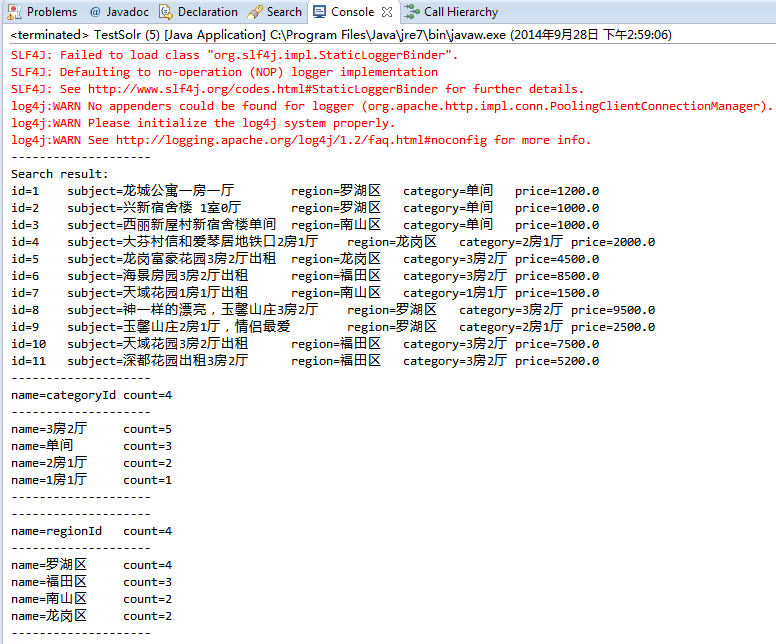
如果把测试例子中的这句query:
query.setQuery("*:*");
修改为:
query.setQuery("subject:*出租* && price:[1000 TO 8000]");
运行结果将为:
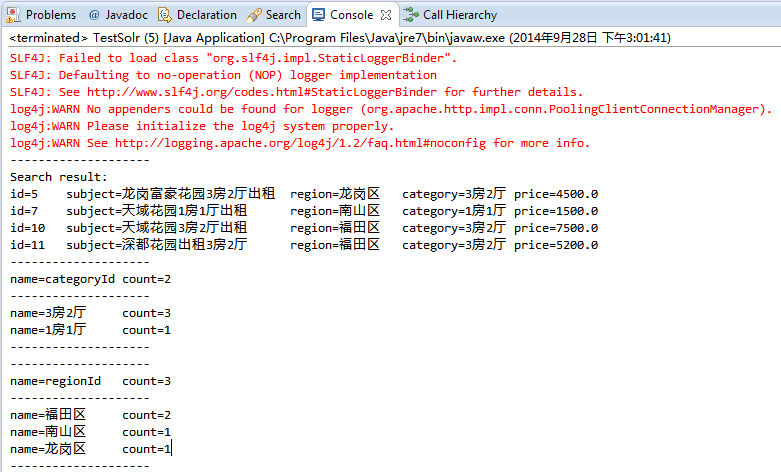
如果将:
query.setFacetMinCount(1); // 设置facet最少的统计数量
修改为:
query.setFacetMinCount(0); // 设置facet最少的统计数量
运行结果为:
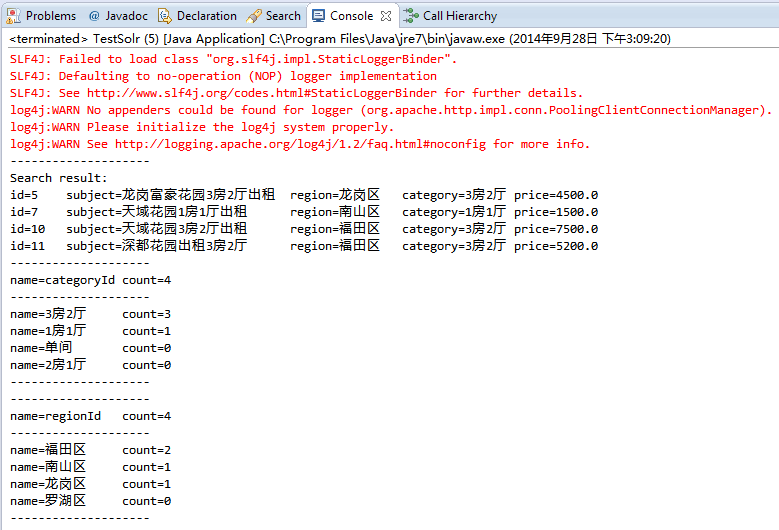
比较上面两个运行结果图可以看出,这个setFacetMinCount(...)方法是过滤将最少统计量的数据
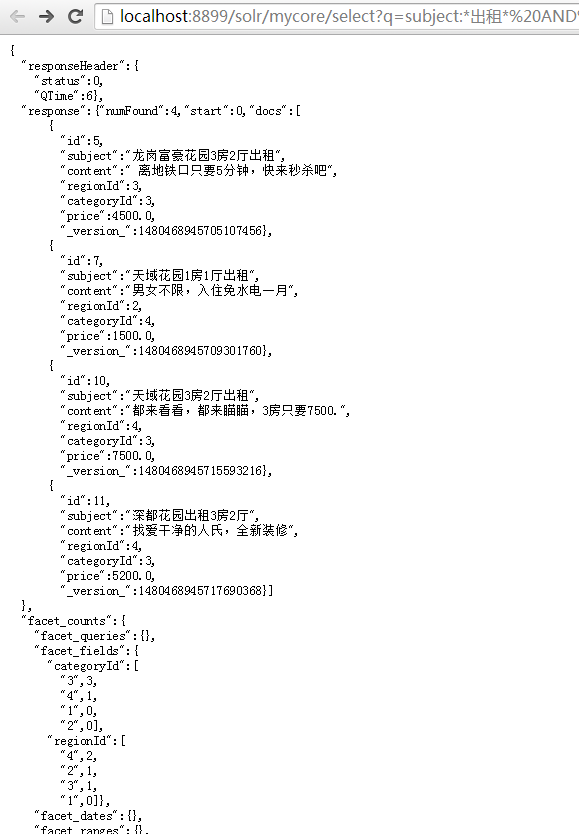
当然,也可以使用solr admin的浏览器地址栏进行访问查询:
http://localhost:/solr/mycore/select?q=subject:*出租* AND price :[ TO ]&wt=json&indent=true&facet=true&facet.field=categoryId&facet.field=regionId&facet.sort=count
运行输出:
[solr] - Facet的更多相关文章
- Solr Facet 默认值
前言 今天在用Solr Facet遇到了默认值的问题,我用Facet.field查询发现数据总共100条,刚开始没有注意,发现少个别数据,但是用这几个个别的id查询又能查出来数据.才发现是Facet默 ...
- Solr -- Solr Facet 1
一.Facet介绍 solr facet 是solr搜索的一大特色,facet不好翻译,有说是垂直搜索,有说是分片搜索,但都不是很好,还是懒得翻译了,就叫facet ,具体功能看下面的例子意会吧. 比 ...
- Solr Facet 统计查询
一)概述 Facet是solr的高级搜索功能之一,可以给用户提供更友好的搜索体验.在搜索关键字的同时,能够按照Facet的字段进行分组并统计.例如下图所示,你上淘宝,输入“电脑”进行搜索,就会出现品牌 ...
- solr facet查询及solrj 读取facet数据[转]
solr facet查询及solrj 读取facet数据 | 所属分类:solr facet solrj 一. Facet 简介 Facet 是 solr 的高级搜索功能之一 , 可以给用户提供更 ...
- [solr] - Facet - autocomplete
Solr的facet可以用于一般性的前缀式自动完成功能,当然,它的主要功能是用于做统计.分类.区间等. 统计.分类.区间功能,可参考下文: http://hongweiyi.com/2013/03/a ...
- Solr -- Solr Facet 2
solr将以导航为目的的查询结果称为facet. 它并不会修改查询结果信息, 只是在查询结果上根据分类添加了count信息, 然后用户根据count信息做进一步的查询, 比如淘宝的查询列表中, 上面会 ...
- Solr Facet 搜索时,facet.missing = true 的真正含义
Solr的WiKI原文是如下解释: facet.missing Set to "true" this param indicates that in addition to the ...
- solr facet查询及solrj 读取facet数据(相当有用)
原文出自:http://www.coin163.com/java/docs/201310/d_3010029802.html 一. Facet 简介 Facet 是 solr 的高级搜索功能之一 ...
- Solr高级查询Facet
一.什么是facet solr种以导航为目的的查询结果成为facet,在用户查询的结果上根据分类增加了count信息,然后用户根据count信息做进一步搜索. facet主要用于导航实现渐进式精确搜索 ...
随机推荐
- golang获取数据表转换为json通用方法
package main import ( "database/sql" "fmt" "log" "net/http" ...
- high-frequency words and phases
abide by(=be faithful to ; obey vt)忠于:遵守. a) Plese feel assured we will abide by our promise. 2. be ...
- C++ 高级语法学习与总结(代码实例)
C++11增加了许多的特性,auto就是一个很明显的例子. 还有就是typedid()获取数据变量的类型 看下面简短的代码: atuo: 很像java中的加强for循环..... //获取一个数据 ...
- CentOS7 安装RabbitMQ
第一.下载erlang和rabbitmq-server的rpm: http://www.rabbitmq.com/releases/erlang/erlang-19.0.4-1.el7.centos. ...
- 51nod 1027大数乘法
题目链接:51nod 1027大数乘法 直接模板了. #include<cstdio> #include<cstring> using namespace std; ; ; ; ...
- ssh下:系统初始化实现ServletContextListener接口时,获取spring中数据层对象无效的问题
想要实现的功能:SSH环境下,数据层都交由Spring管理:在服务启动时,将数据库中的一些数据加载到ServletContext中缓存起来. 系统初始化类需要实现两个接口: ServletContex ...
- 移动端web之像素基础
px:css pixels逻辑像素,浏览器使用的抽象单位 dp,pt :device independent pixels 设备无关像素 dpr:devicePixelRatio 设备像素缩放比 计算 ...
- Codeforces Round #370 (Div. 2) E. Memory and Casinos 线段树
E. Memory and Casinos 题目连接: http://codeforces.com/contest/712/problem/E Description There are n casi ...
- Rhel6-pacemaker+drbd配置文档
系统环境: rhel6 x86_64 iptables and selinux disabled 主机: 192.168.122.119 server19.example.com 192.168.12 ...
- 视频1-14待JSP课程看完再练习
视频1-14待JSP课程看完再练习 http://www.imooc.com/video/5555