
[solr] - Facet - autocomplete
Solr的facet可以用于一般性的前缀式自动完成功能,当然,它的主要功能是用于做统计、分类、区间等。
统计、分类、区间功能,可参考下文:
http://hongweiyi.com/2013/03/apache-solr-facet-introduction/
下面例子是使用Facet做前缀式自动完成功能。
schema.xml
<?xml version="1.0" ?>

<schema name="my core" version="1.1">

    <fieldtype name="string"  class="solr.StrField" sortMissingLast="true" omitNorms="true"/>

    <fieldType name="long" class="solr.TrieLongField" precisionStep="0" positionIncrementGap="0"/>

    <fieldType name="tdate" class="solr.TrieDateField" precisionStep="6" positionIncrementGap="0"/>

    <fieldType name="int" class="solr.TrieIntField" precisionStep="0" positionIncrementGap="0"/>

    <fieldType name="float" class="solr.TrieFloatField" precisionStep="0" positionIncrementGap="0"/>

    <fieldType name="double" class="solr.TrieDoubleField" precisionStep="0" positionIncrementGap="0"/>

    <fieldType name="boolean" class="solr.BoolField" sortMissingLast="true"/>

    <fieldtype name="binary" class="solr.BinaryField"/>

    <fieldType name="text_cn" class="solr.TextField">

        <analyzer type="index" class="org.wltea.analyzer.lucene.IKAnalyzer" />

        <analyzer type="query" class="org.wltea.analyzer.lucene.IKAnalyzer" />

    </fieldType>

    <!-- general -->

    <field name="id" type="long" indexed="true" stored="true" multiValued="false" required="true"/>

    <field name="subject" type="text_cn" indexed="true" stored="true" />

    <field name="content" type="text_cn" indexed="true" stored="true" />

    <field name="category_id" type="long" indexed="true" stored="true" />

    <field name="category_name" type="text_cn" indexed="true" stored="true" />

    <field name="last_update_time" type="tdate" indexed="true" stored="true" />

    <field name="_version_" type="long" indexed="true" stored="true"/>

     <!-- field to use to determine and enforce document uniqueness. -->

     <uniqueKey>id</uniqueKey>

     <!-- field for the QueryParser to use when an explicit fieldname is absent -->

     <defaultSearchField>subject</defaultSearchField>

     <!-- SolrQueryParser configuration: defaultOperator="AND|OR" -->

     <solrQueryParser defaultOperator="OR"/>

</schema>
Java Bean:
package com.my.entity;

import java.util.Date;

import org.apache.solr.client.solrj.beans.Field;

public class Item {

    @Field

    private long id;

    @Field

    private String subject;

    @Field

    private String content;

    @Field("category_id")

    private long categoryId;

    @Field("category_name")

    private String categoryName;

    @Field("last_update_time")

    private Date lastUpdateTime;

    public long getId() {

        return id;

    }

    public void setId(long id) {

        this.id = id;

    }

    public String getSubject() {

        return subject;

    }

    public void setSubject(String subject) {

        this.subject = subject;

    }

    public String getContent() {

        return content;

    }

    public void setContent(String content) {

        this.content = content;

    }

    public long getCategoryId() {

        return categoryId;

    }

    public void setCategoryId(long categoryId) {

        this.categoryId = categoryId;

    }

    public String getCategoryName() {

        return categoryName;

    }

    public void setCategoryName(String categoryName) {

        this.categoryName = categoryName;

    }

    public Date getLastUpdateTime() {

        return lastUpdateTime;

    }

    public void setLastUpdateTime(Date lastUpdateTime) {

        this.lastUpdateTime = lastUpdateTime;

    }

}
测试:
package com.my.solr;

import java.io.IOException;

import java.util.ArrayList;

import java.util.Date;

import java.util.List;

import org.apache.solr.client.solrj.SolrQuery;

import org.apache.solr.client.solrj.SolrQuery.ORDER;

import org.apache.solr.client.solrj.SolrQuery.SortClause;

import org.apache.solr.client.solrj.SolrServerException;

import org.apache.solr.client.solrj.impl.HttpSolrServer;

import org.apache.solr.client.solrj.impl.XMLResponseParser;

import org.apache.solr.client.solrj.response.FacetField;

import org.apache.solr.client.solrj.response.FacetField.Count;

import org.apache.solr.client.solrj.response.QueryResponse;

import com.my.entity.Item;

public class TestSolr {

    public static void main(String[] args) throws IOException, SolrServerException {

        String url = "http://localhost:8899/solr/mycore";

        HttpSolrServer core = new HttpSolrServer(url);

        core.setMaxRetries(1);

        core.setConnectionTimeout(5000);

        core.setParser(new XMLResponseParser()); // binary parser is used by default

        core.setSoTimeout(1000); // socket read timeout

        core.setDefaultMaxConnectionsPerHost(100);

        core.setMaxTotalConnections(100);

        core.setFollowRedirects(false); // defaults to false

        core.setAllowCompression(true);

        // ------------------------------------------------------

        // remove all data

        // ------------------------------------------------------

        core.deleteByQuery("*:*");

        List<Item> items = new ArrayList<Item>();

        items.add(makeItem(1, "cpu", "this is intel cpu", 1, "cpu-intel"));

        items.add(makeItem(2, "cpu AMD", "this is AMD cpu", 2, "cpu-AMD"));

        items.add(makeItem(3, "cpu intel", "this is intel-I7 cpu", 1, "cpu-intel"));

        items.add(makeItem(4, "cpu AMD", "this is AMD 5000x cpu", 2, "cpu-AMD"));

        items.add(makeItem(5, "cpu intel I6", "this is intel-I6 cpu", 1, "cpu-intel-I6"));

        core.addBeans(items);

        // commit

        core.commit();

        // ------------------------------------------------------

        // search

        // ------------------------------------------------------

        SolrQuery query = new SolrQuery();

        query.setQuery("*:*");

        query.setStart(0);    // query的开始行数(分页使用)

        query.setRows(0);    // query的返回行数(分页使用)

        query.setFacet(true);    // 设置使用facet

        query.setFacetMinCount(1);    // 设置facet最少的统计数量

        query.setFacetLimit(10);    // facet结果的返回行数

        query.addFacetField("category_name");    // facet的字段

        query.setFacetPrefix("cpu");    // facet字段值

        query.addSort(new SortClause("id", ORDER.asc));    // 排序

        QueryResponse response = core.query(query);

        List<Item> items_rep = response.getBeans(Item.class);

        List<FacetField> facetFields = response.getFacetFields();

        // 因为上面的start和rows均设置为0,所以这里不会有query结果输出

        for (Item i : items_rep) {

            System.out.println("id=" + i.getId() + "\tcontent=" + i.getContent());

        }

        // 打印所有facet

        for(FacetField ff : facetFields) {

            System.out.println("name=" + ff.getName() + "\tcount=" + ff.getValueCount());

            System.out.println("--------------------");

            for(Count count: ff.getValues() ) {

                System.out.println("name=" + count.getName() + "\tvalue=" + count.getCount());

            }

        }

    }

    private static Item makeItem(long id, String subject, String content, long categoryId, String categoryName) {

        Item item = new Item();

        item.setId(id);

        item.setSubject(subject);

        item.setContent(content);

        item.setLastUpdateTime(new Date());

        item.setCategoryId(categoryId);

        item.setCategoryName(categoryName);

        return item;

    }

}
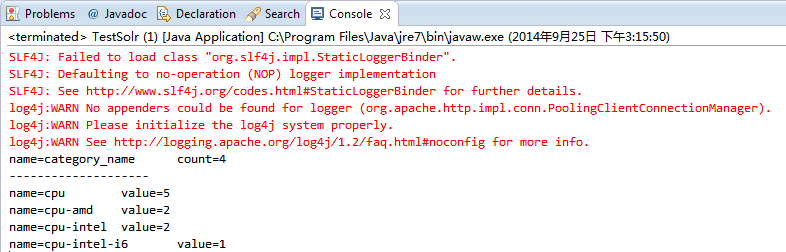
输出结果:
[solr] - Facet - autocomplete的更多相关文章
- Solr Facet 默认值
前言 今天在用Solr Facet遇到了默认值的问题,我用Facet.field查询发现数据总共100条,刚开始没有注意,发现少个别数据,但是用这几个个别的id查询又能查出来数据.才发现是Facet默 ...
- [solr] - Facet
Solr facet使用于分类统计,是最好的工具.下面例子使用facet将可模拟查询搜索出租房信息. 1.在schema.xml中的内容如下: <?xml version="1.0&q ...
- Solr -- Solr Facet 1
一.Facet介绍 solr facet 是solr搜索的一大特色,facet不好翻译,有说是垂直搜索,有说是分片搜索,但都不是很好,还是懒得翻译了,就叫facet ,具体功能看下面的例子意会吧. 比 ...
- Solr Facet 统计查询
一)概述 Facet是solr的高级搜索功能之一,可以给用户提供更友好的搜索体验.在搜索关键字的同时,能够按照Facet的字段进行分组并统计.例如下图所示,你上淘宝,输入“电脑”进行搜索,就会出现品牌 ...
- solr facet查询及solrj 读取facet数据[转]
solr facet查询及solrj 读取facet数据 | 所属分类:solr facet solrj 一. Facet 简介 Facet 是 solr 的高级搜索功能之一 , 可以给用户提供更 ...
- Solr -- Solr Facet 2
solr将以导航为目的的查询结果称为facet. 它并不会修改查询结果信息, 只是在查询结果上根据分类添加了count信息, 然后用户根据count信息做进一步的查询, 比如淘宝的查询列表中, 上面会 ...
- Solr Facet 搜索时,facet.missing = true 的真正含义
Solr的WiKI原文是如下解释: facet.missing Set to "true" this param indicates that in addition to the ...
- solr facet查询及solrj 读取facet数据(相当有用)
原文出自:http://www.coin163.com/java/docs/201310/d_3010029802.html 一. Facet 简介 Facet 是 solr 的高级搜索功能之一 ...
- Solr高级查询Facet
一.什么是facet solr种以导航为目的的查询结果成为facet,在用户查询的结果上根据分类增加了count信息,然后用户根据count信息做进一步搜索. facet主要用于导航实现渐进式精确搜索 ...
随机推荐
- unity htc vive使用
本文介绍如何在Unity中使用HTC vive设备,当前VR作为市场比较火热的热点,HTC VIVE设备作为三大供应商之一,许多人购买了该设备,却不知道如何使用,本文通过图文并茂的形式,进行手把手的讲 ...
- 【接口测试】Jenkins+Ant+Jmeter搭建持续集成的接口测试平台
参考文档: http://www.cnblogs.com/liuqi/p/5224579.html
- python的基础类源码解析——collection类
1.计数器(counter) Counter是对字典类型的补充,用于追踪值的出现次数. ps:具备字典的所有功能 + 自己的功能 ################################### ...
- C++ template的一些高级用法(元编码,可变参数,仿函数,using使用方法,. C++ 智能指针)
1 . 通用函数可变参数模板 对于有些时候,我们无法确切的知道,函数的参数个数时,而又不想过多的使用所谓的函数重载,那么就可以效仿下面的例子: #include<iostream> #i ...
- css透明度的兼容!!!
以前总是写透明度的代码,今天弄了个弹出框要求就边框透明,于是有了下边的结论,虽然很多东西不合理了,日后找到更合理在做更新!!! html <div class="new_playerf ...
- WCF初探-20:WCF错误协定
WCF错误协定概述 在所有托管应用程序中,处理错误由 Exception 对象表示. 在基于 SOAP 的应用程序(如 WCF 应用程序)中,服务方法使用 SOAP 错误消息来传递处理错误信息. SO ...
- z-index、display、selector选择器优先级css优先级面试用到
z-index:控制元素叠放顺序,哪个z-index数值越大,那个优先被叠放在上面. relative.absolute.fixed这三种情况可以使用z-index. static不可以使用. dis ...
- js异步加载
默认情况javascript是同步加载的,也就是javascript的加载时阻塞的,后面的元素要等待javascript加载完毕后才能进行再加载,对于一些意义不是很大的javascript,如果放在页 ...
- iOS 注释的5要3不要和编码规范的26个方面
注释 代码注释,可以说是比代码本身更重要.这里有一些方法可以确保你写在代码中的注释是友好的: 不要重复阅读者已经知道的内容 能明确说明代码是做什么的注释对我们是没有帮助的. // If the col ...
- 升级设置win2008r2开发环境,遇到问题小结
升级设置2008r2开发环境,是一般程序员经历的事情.许多从vs 2003,vs2005+sql2000+win2003过来,但是,时间推移,技术革新,64位的推行.架构的变化和强大.我们也只可以学习 ...