
使用 Git@OSC 管理代码
开源中国的 git 服务的地址是:http://git.oschina.net/
以下记录 push 本地已有的项目至 git@osc 的过程。
① 注册登录之后,创建一个自己的项目:
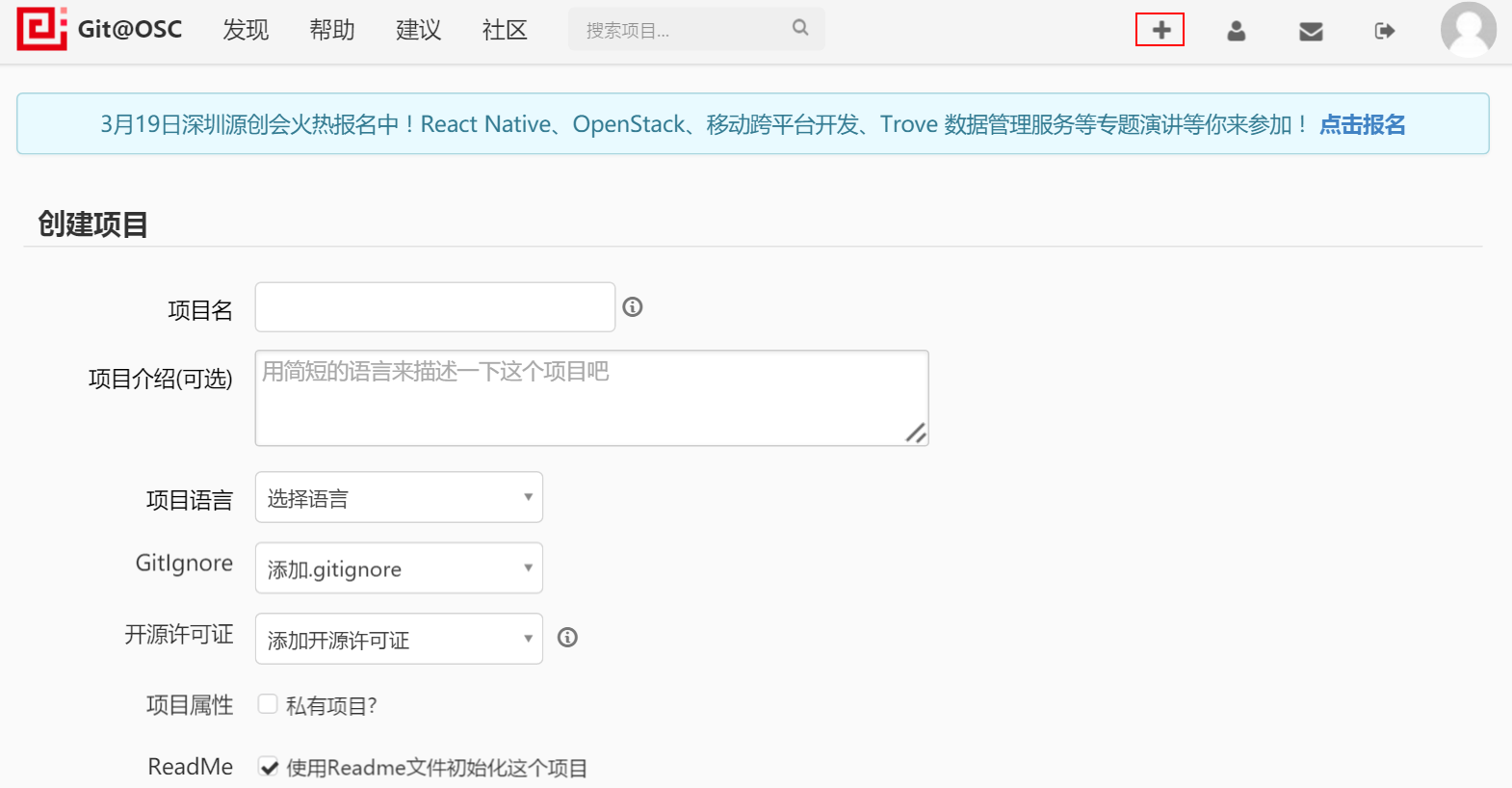
创建好的默认项目中包含一个 README.md 文件,用于项目的描述,使用 Markdown 编辑。
② 生成 ssh-key
在 linux 下生成 ssh 公钥:
[root@localhost ~]# ssh-keygen
公钥保存的位置是 ~/.ssh/id_rsa.pub
查看并复制公钥:
[root@localhost ~]# cat ~/.ssh/id_rsa.pub
把公钥的内容复制到 oschina 的 SSH 公钥中:
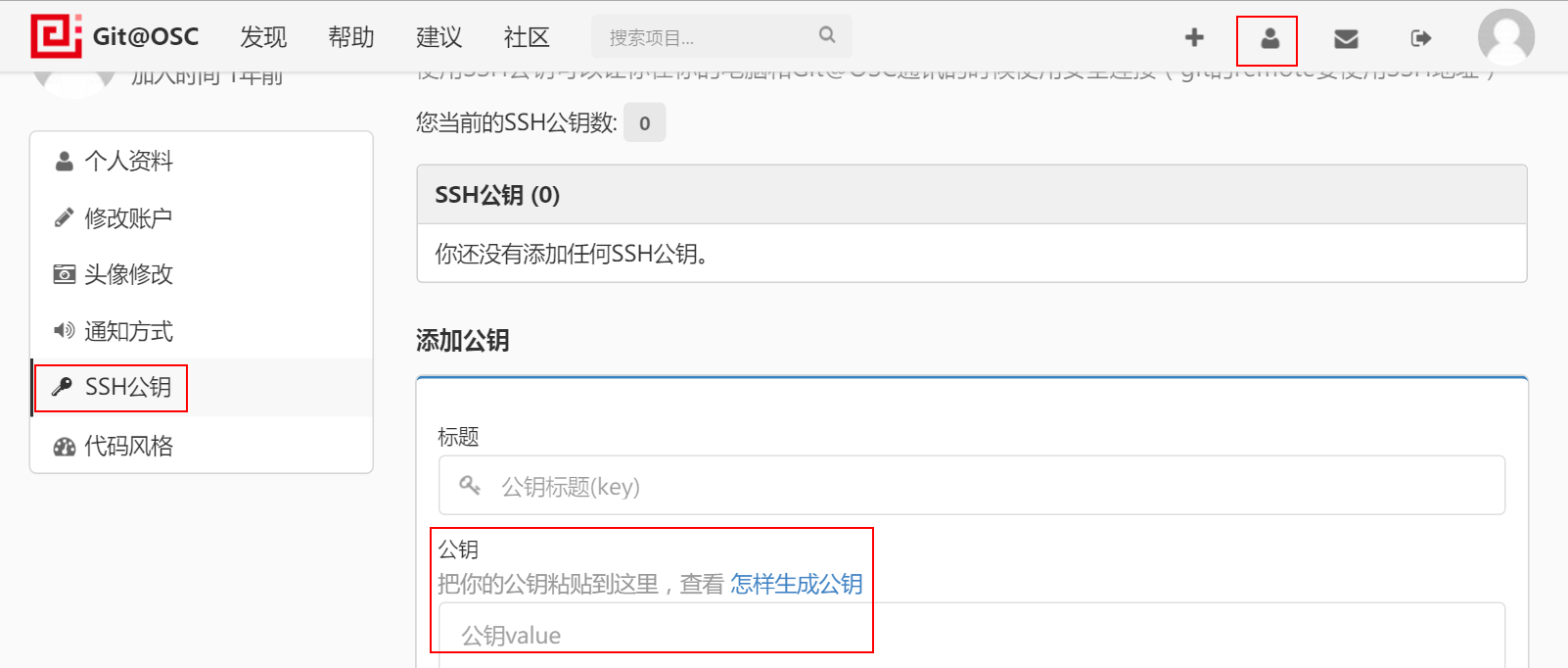
保存。
可以通过下面的命令查看公钥是否配置成功。
[root@localhost ~]# ssh -T git@git.oschina.net
输出:

③ 提交代码
进入本地项目,将目录转化为 Git 版本库
[root@localhost practise]# git init
添加项目中所有的 file 至版本库
[root@localhost practise]# git add .
提交:
[root@localhost practise]# git commit -m 'add practise files'
添加到远程版本库,也就是 git@osc
[root@localhost practise]# git remote add origin git@git.oschina.net:dee0912/practise.git
[root@localhost practise]# git push -u origin master
如果版本库中已有文件,在使用 push 命令的时候报错:
To git@git.oschina.net:dee0912/practise.git

 ! [rejected]        master -> master (non-fast-forward)

error: failed to push some refs to 'git@git.oschina.net:dee0912/practise.git'

To prevent you from losing history, non-fast-forward updates were rejected

Merge the remote changes before pushing again.  See the 'Note about

fast-forwards' section of 'git push --help' for details.
则先要把远程仓库中的文件 fetch 到本地然后再 merge,这两步相当于 git pull
[root@localhost practise]# git fetch

[root@localhost practise]# git merge
如果出现以下信息:
[root@localhost practise]# git merge

usage: git merge [options] <remote>...

   or: git merge [options] <msg> HEAD <remote>
则输入以下命令即可:
[root@localhost practise]# git config branch.master.remote origin

[root@localhost practise]# git config branch.master.merge refs/heads/master

[root@localhost practise]# git pull
说明:
1 当你处于 master branch,默认的 remote 就是 origin
2 当你在 master branch 上使用 git pull 时,没有指定 remote 和 branch,那么 git 就会采用默认的 remote(也就是origin)来 merge 在 master branch 上所有的改变
参考:
http://git.oschina.net/oschina/git-osc/wikis/home
http://git.oschina.net/wzw/git-quick-start
github上传时出现error: src refspec master does not match any解决办法
git pull 失败 ,提示:fatal: refusing to merge unrelated histories
使用 Git@OSC 管理代码的更多相关文章
- 使用GIT来管理代码的心得
使用GIT来管理代码,第一步当然就是下载一个GIT客户端(不知道是不是这么叫,但是觉得和客户端的功能差不多).电脑的操作系统是windows7的,所以下的是对应的GIT. 就是这玩意,安装的时候不停的 ...
- PyCharm 通过Github和Git上管理代码
1.最近希望通过github来管理代码,记录下pycharm上的设置,以下是针对windows版本.mac版本略有却别 如图所示 file-settings-Version Control-GitHu ...
- 使用git保存管理代码
1.git是个代码版本管理软件,类似SVN github是个网站,提供git服务,我们只需要注册个账号,就可以使用它的git服务,不需要自己部署git系统 git需要先在电脑端安装,安装完成后,讲产生 ...
- 使用git@osc管理现有项目
首先安装git和powershell集成git工具 参考 http://www.cnblogs.com/kreo/p/4685988.html 打开windows powershell,进入项目目录, ...
- windows下安装git & 在git@OSC上推送代码
第一部分 windows下安装git 1.下载最新版本的git:直接百度“git”,如图所示,点击立即下载. 也可以直接在官网下载最新版本的git:http://www.git-scm.com/dow ...
- 用开源中国(oschina)Git管理代码(整合IntelliJ 13.1.5)
简介 开源中国提供了Git服务(地址:http://git.oschina.net/),在速度上比国外的github要快很多.使用了一段时间,感觉很不错.oschina git提供了演示平台,可以运行 ...
- 如何使用Git和码云Git@OSC
1.Git简介 关于Git是什么,阅读博客Git简介 2.Git 基础 Git命令很多,常用命令如下图 Workspace:工作区 Index/Stage :暂存区 Local Repository: ...
- Git与码云(Git@OSC)入门-如何在实验室和宿舍同步你的代码(2)
4. 处理冲突 4.1 向远程仓库push时无法提交成功,提示在push前应该先pull 如图所示: 有可能是因为远程仓库的版本与本地仓库的版本不一致,所以应先git pull将远程仓库的内容合并到本 ...
- TortoiseGit客户端安装及使用(上传代码到git@osc
用TortoiseGit客户端之前要下载安装git http://git-scm.com/download/win 下载完安装完就可以了,之后好像就用不上了,全交给TortoiseGit客户端了 第一 ...
随机推荐
- 20145223《Java程序程序设计》第1周学习总结
20145223 <Java程序设计>第1周学习总结 教材学习内容总结 1.JDK.JRE以及JVM的区别 JDK:撰写java程序语言的时候需要用到的编译工具 JRE:java执行环境 ...
- wpf,CollectionViewSource,使用数据过滤 筛选 功能。
class TextListBoxVMpublic : ViewModelBase { public TextListBoxVMpublic() { var list = this.GetEmploy ...
- Codeforces Round #347 (Div. 2)
unrating的一场CF A - Complicated GCD #include <bits/stdc++.h> const int N = 1e5 + 5; char a[105], ...
- Python基础1-Python环境搭建
Python环境搭建首先通过终端窗口输入 "python" 命令来查看本地是否已经安装Python以及Python的安装版本: 若未安装则需要下载安装,下面为linux和windo ...
- 看Ue4角色代码——跳跃与实现二段跳
看了一下终于发现了跳跃的关键代码 bool UCharacterMovementComponent::DoJump(bool bReplayingMoves) { if ( CharacterOwne ...
- c# 基本值类型及其默认值
//值类型 C# 类型 .NET Framework 类型 bool System.Boolean 4Byte 32bit布尔型变量 逻辑值,true或者false,默 ...
- HDU 3069 (树形DP)
题目链接: http://acm.hdu.edu.cn/showproblem.php?pid=3069 题目大意:用最少警力,监控一个树,逮住逃犯.即最大警力去一个子树捉人时,确保父点至少被一个警察 ...
- 洛谷 P1433 吃奶酪 Label:dfs && 剪枝Ex
题目描述 房间里放着n块奶酪.一只小老鼠要把它们都吃掉,问至少要跑多少距离?老鼠一开始在(0,0)点处. 输入输出格式 输入格式: 第一行一个数n (n<=15) 接下来每行2个实数,表示第i块 ...
- 【POJ】1739 Tony's Tour
http://poj.org/problem?id=1739 题意:n×m的棋盘,'#'是障碍,'.'是空白,求左下角走到右下角且走过所有空白格子的方案数.(n,m<=8) #include & ...
- 【hdu】p1754I Hate It
I Hate It Time Limit: 9000/3000 MS (Java/Others) Memory Limit: 32768/32768 K (Java/Others)Total S ...