
玩转spring boot——国际化
前言
在项目开发中,可能遇到国际化的问题,而支持国际化却是一件很头疼的事。但spring boot给出了一个非常理想和方便的方案。
一、准备工作
pom.xml:
<?xml version="1.0" encoding="UTF-8"?>

<project xmlns="http://maven.apache.org/POM/4.0.0" xmlns:xsi="http://www.w3.org/2001/XMLSchema-instance"

    xsi:schemaLocation="http://maven.apache.org/POM/4.0.0 http://maven.apache.org/xsd/maven-4.0.0.xsd">

    <modelVersion>4.0.0</modelVersion>

    <groupId>com.example</groupId>

    <artifactId>spring-boot-14</artifactId>

    <version>0.0.1-SNAPSHOT</version>

    <packaging>jar</packaging>

    <name>spring-boot-14</name>

    <description>Demo project for Spring Boot</description>

    <parent>

        <groupId>org.springframework.boot</groupId>

        <artifactId>spring-boot-starter-parent</artifactId>

        <version>1.5.3.RELEASE</version>

        <relativePath/> <!-- lookup parent from repository -->

    </parent>

    <properties>

        <project.build.sourceEncoding>UTF-8</project.build.sourceEncoding>

        <project.reporting.outputEncoding>UTF-8</project.reporting.outputEncoding>

        <java.version>1.8</java.version>

    </properties>

    <dependencies>

        <dependency>

            <groupId>org.springframework.boot</groupId>

            <artifactId>spring-boot-starter-thymeleaf</artifactId>

        </dependency>

        <dependency>

            <groupId>org.springframework.boot</groupId>

            <artifactId>spring-boot-starter-web</artifactId>

        </dependency>

        <dependency>

            <groupId>org.springframework.boot</groupId>

            <artifactId>spring-boot-devtools</artifactId>

            <scope>runtime</scope>

        </dependency>

        <dependency>

            <groupId>org.springframework.boot</groupId>

            <artifactId>spring-boot-starter-test</artifactId>

            <scope>test</scope>

        </dependency>

    </dependencies>

    <build>

        <plugins>

            <plugin>

                <groupId>org.springframework.boot</groupId>

                <artifactId>spring-boot-maven-plugin</artifactId>

            </plugin>

        </plugins>

    </build>

</project>
pom.xml
App.java:
package com.example;

import org.springframework.boot.SpringApplication;

import org.springframework.boot.autoconfigure.SpringBootApplication;

@SpringBootApplication

public class App {

    public static void main(String[] args) {

        SpringApplication.run(App.class, args);

    }

}
App.java
创建国际化配置文件:LocaleConfig.java
package com.example;

import java.util.Locale;

import org.springframework.boot.autoconfigure.EnableAutoConfiguration;

import org.springframework.context.annotation.Bean;

import org.springframework.context.annotation.ComponentScan;

import org.springframework.context.annotation.Configuration;

import org.springframework.web.servlet.LocaleResolver;

import org.springframework.web.servlet.config.annotation.InterceptorRegistry;

import org.springframework.web.servlet.config.annotation.WebMvcConfigurerAdapter;

import org.springframework.web.servlet.i18n.LocaleChangeInterceptor;

import org.springframework.web.servlet.i18n.SessionLocaleResolver;

@Configuration

@EnableAutoConfiguration

@ComponentScan

public class LocaleConfig extends WebMvcConfigurerAdapter {

    @Bean

    public LocaleResolver localeResolver() {

        SessionLocaleResolver slr = new SessionLocaleResolver();

        // 默认语言

        slr.setDefaultLocale(Locale.US);

        return slr;

    }

    @Bean

    public LocaleChangeInterceptor localeChangeInterceptor() {

        LocaleChangeInterceptor lci = new LocaleChangeInterceptor();

        // 参数名

        lci.setParamName("lang");

        return lci;

    }

    @Override

    public void addInterceptors(InterceptorRegistry registry) {

        registry.addInterceptor(localeChangeInterceptor());

    }

}
MainController.java:
package com.example;

import org.springframework.stereotype.Controller;

import org.springframework.web.bind.annotation.GetMapping;

/**

 * 控制器 博客出处:http://www.cnblogs.com/GoodHelper/

 *

 */

@Controller

public class MainController {

    @GetMapping("/")

    public String index() {

        return "index";

    }

}
在resources目录增加两个properties文件,分别为:
messages_en_US.properties:
hello=hello
messages_zh_CN.properties:
hello=\u4F60\u597D
二、前端调用
在thymeleaf模板引擎中使用#{}的标签就能调用messages中的内容
index.html:
<!DOCTYPE html>

<html xmlns:th="http://www.thymeleaf.org">

<head>

<meta http-equiv="Content-Type" content="text/html; charset=UTF-8" />

<title>玩转spring boot——国际化</title>

</head>

<body>

    <h1>玩转spring boot——国际化</h1>

    <h4>

        <a href="http://www.cnblogs.com/GoodHelper/">from 刘冬的博客</a>

    </h4>

    <br />

    <br />

    <a href="/?lang=en_US">English(US)</a>

    <a href="/?lang=zh_CN">简体中文</a>

    <br />

    <h3 th:text="#{hello}"></h3>

    <br />

    <br />

    <a href="http://www.cnblogs.com/GoodHelper/">点击访问原版博客(www.cnblogs.com/GoodHelper)</a>

</body>

</html>
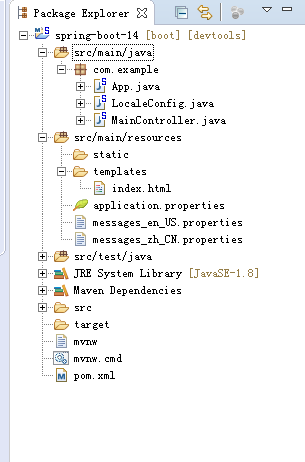
项目结构如下:
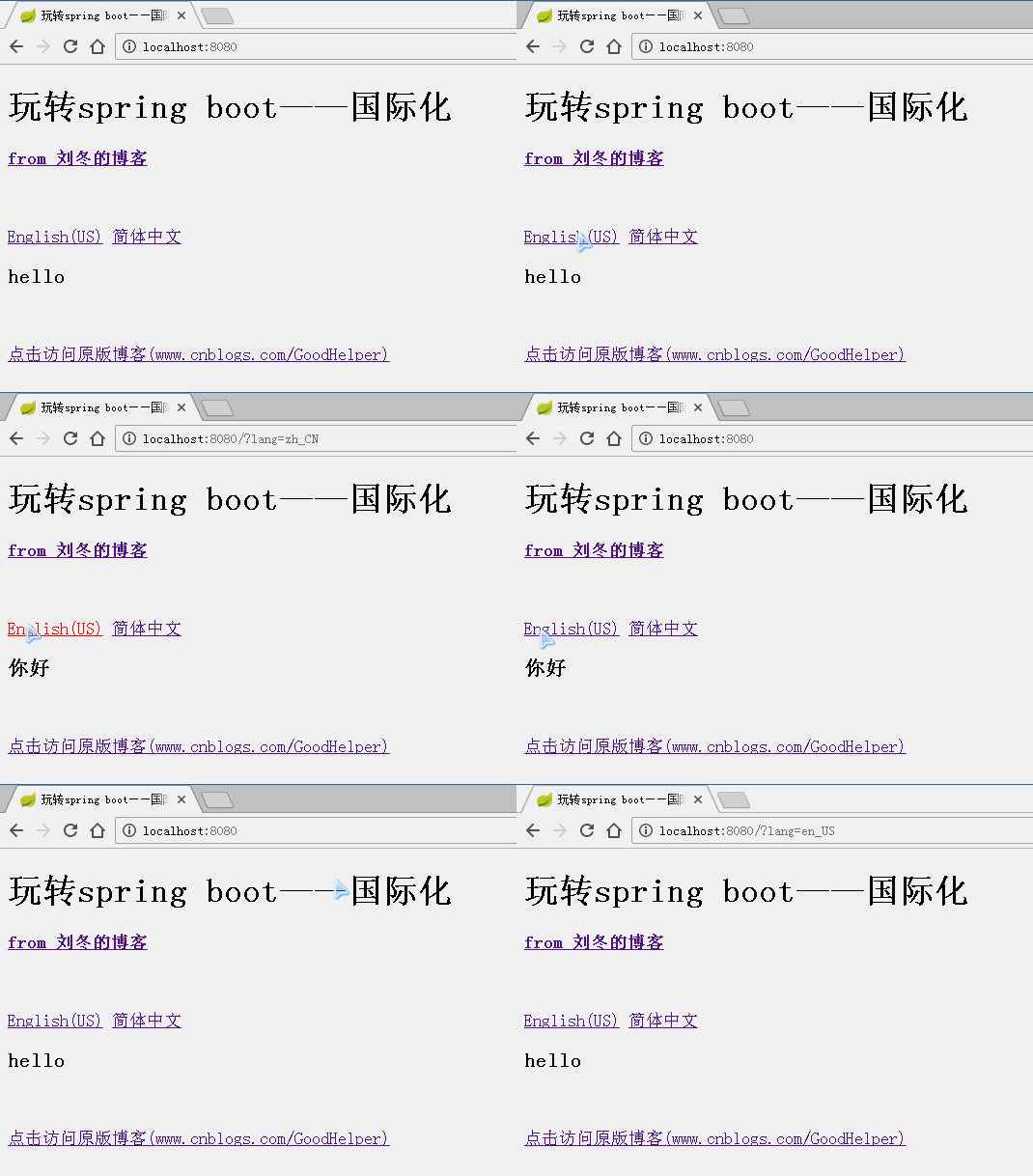
运行效果:
三、后端渲染
修改MainController类:
package com.example;

import java.util.Locale;

import org.springframework.beans.factory.annotation.Autowired;

import org.springframework.context.MessageSource;

import org.springframework.context.i18n.LocaleContextHolder;

import org.springframework.stereotype.Controller;

import org.springframework.ui.Model;

import org.springframework.web.bind.annotation.GetMapping;

/**

 * 控制器 博客出处:http://www.cnblogs.com/GoodHelper/

 *

 */

@Controller

public class MainController {

    @Autowired

    private MessageSource messageSource;

    @GetMapping("/")

    public String index(Model model) {

        Locale locale = LocaleContextHolder.getLocale();

        model.addAttribute("world", messageSource.getMessage("world", null, locale));

        return "index";

    }

}
其中,MessageSource类可以获取messages的内容。
index.html:
<!DOCTYPE html>

<html xmlns:th="http://www.thymeleaf.org">

<head>

<meta http-equiv="Content-Type" content="text/html; charset=UTF-8" />

<title>玩转spring boot——国际化</title>

</head>

<body>

    <h1>玩转spring boot——国际化</h1>

    <h4>

        <a href="http://www.cnblogs.com/GoodHelper/">from 刘冬的博客</a>

    </h4>

    <br />

    <br />

    <a href="/?lang=en_US">English(US)</a>

    <a href="/?lang=zh_CN">简体中文</a>

    <br />

    <h3 th:text="#{hello} + ' , ' + ${world}"></h3>

    <br />

    <br />

    <a href="http://www.cnblogs.com/GoodHelper/">点击访问原版博客(www.cnblogs.com/GoodHelper)</a>

</body>

</html>
一个使用了#{}标签直接调用messages的内容,另一个使用了${}标签来获取后台的值
运行效果:

总结
国际化就已经实现了,然而更完美的做法是当第一次请求时,在后台通过Request获取到一个初始的语言。当获取到的语言和用户所需要的语言不一直时,才需要在前端UI再去设置哪个语言是用户所需要的。
代码下载:https://github.com/carter659/spring-boot-14.git

如果你觉得我的博客对你有帮助,可以给我点儿打赏,左侧微信,右侧支付宝。
有可能就是你的一点打赏会让我的博客写的更好:)
玩转spring boot——国际化的更多相关文章
- 玩转spring boot——快速开始
开发环境: IED环境:Eclipse JDK版本:1.8 maven版本:3.3.9 一.创建一个spring boot的mcv web应用程序 打开Eclipse,新建Maven项目 选择quic ...
- 玩转spring boot——开篇
很久没写博客了,而这一转眼就是7年.这段时间并不是我没学习东西,而是园友们的技术提高的非常快,这反而让我不知道该写些什么.我做程序已经有十几年之久了,可以说是彻彻底底的“程序老炮”,至于技术怎么样?我 ...
- 玩转spring boot——结合redis
一.准备工作 下载redis的windows版zip包:https://github.com/MSOpenTech/redis/releases 运行redis-server.exe程序 出现黑色窗口 ...
- 玩转spring boot——AOP与表单验证
AOP在大多数的情况下的应用场景是:日志和验证.至于AOP的理论知识我就不做赘述.而AOP的通知类型有好几种,今天的例子我只选一个有代表意义的“环绕通知”来演示. 一.AOP入门 修改“pom.xml ...
- 玩转spring boot——结合JPA入门
参考官方例子:https://spring.io/guides/gs/accessing-data-jpa/ 接着上篇内容 一.小试牛刀 创建maven项目后,修改pom.xml文件 <proj ...
- 玩转spring boot——结合JPA事务
接着上篇 一.准备工作 修改pom.xml文件 <project xmlns="http://maven.apache.org/POM/4.0.0" xmlns:xsi=&q ...
- 玩转spring boot——结合AngularJs和JDBC
参考官方例子:http://spring.io/guides/gs/relational-data-access/ 一.项目准备 在建立mysql数据库后新建表“t_order” ; -- ----- ...
- 玩转spring boot——结合jQuery和AngularJs
在上篇的基础上 准备工作: 修改pom.xml <project xmlns="http://maven.apache.org/POM/4.0.0" xmlns:xsi=&q ...
- 玩转spring boot——MVC应用
如何快速搭建一个MCV程序? 参照spring官方例子:https://spring.io/guides/gs/serving-web-content/ 一.spring mvc结合thymeleaf ...
随机推荐
- MySQL(九)之数据表的查询详解(SELECT语法)一
这一篇是MySQL中的重点也是相对于MySQL中比较难得地方,个人觉得要好好的去归类,并多去练一下题目.MySQL的查询也是在笔试中必有的题目.希望我的这篇博客能帮助到大家! 重感冒下的我,很难受!k ...
- Codility:Titanium 2016 challenge:BracketsRotation
发现codility上很难找到自己的代码,所以来存一下. 用的一种水法,不知道是结论对还是数据水. 处理出所有极大合法串最后就只剩)))((((状的括号,然后枚举右端点,左端点单调. 但是未匹配点数量 ...
- hdu_1033(我怎么找到的这么水的题,只为保存代码。。。)
#include<cstdio> #include<cstring> #include<iostream> #include<algorithm> us ...
- a*b(mod m)的实现过程
/*a*b (mod m) 的实现过程*/ /*当a,b很大的时候mod m就会产生溢出, 故运用乘法原理转换为加法求解*/ LL multi(LL a, LL b, LL m) { LL exp = ...
- 【笔记】nodejs读取JSON,数组转树
const fs = require('fs'); // --------------- 读取源文件 --------------- const originData = require('./vux ...
- 慕课网-前端JavaScrpt基础面试技巧-学习笔记
章节目录: JS基础知识(上)--讲解 JS 基础语法相关的面试题,分析原理以及解答方法.这一章节讲解了基础知识的第一部分:变量的类型和计算.以及JS "三座大山" -- 原型.作 ...
- encodeURIComponent() 函数
https://baike.baidu.com/item/encodeURIComponent() 函数/7418815?fr=aladdin encodeURIComponent() 函数[1] 作 ...
- LNMP状态管理命令
https://lnmp.org/faq/lnmp-status-manager.html LNMP状态管理命令: LNMP 1.2+状态管理: lnmp {start|stop|reload|res ...
- DESTOON B2B标签(tag)调用手册
路径:include/tag.func.php 1.标签格式的大致说明 {tag("moduleid=9&table=article_9&length=40&cond ...
- 【编程技巧】applicationContext.xml 里面可配置bean和数据库地址
<bean id="vendorManagerDao" class="com.active.vendor.dao.VendorManagerDaoImpl" ...