
解决Debian 9 iwlwifi固件缺失导致无法连接无线网络的问题
本文由荒原之梦原创,原文链接:http://zhaokaifeng.com/?p=692
前言:
本文介绍了解决Debian9安装完成后无法连接wifi的问题以及一些扩展知识。
问题描述:
安装Debian9的时候就提示缺少iwlwifi固件,但是我当时连接的是有线网络,因此跳过去该问题并没有影响我安装Debian。不过,以这种方式安装完成的Debian只能使用有线网络连接互联网,无法使用无线网络。当插入一个USB无线网卡时,我们会在网络连接页面看到“固件缺失”的提示:
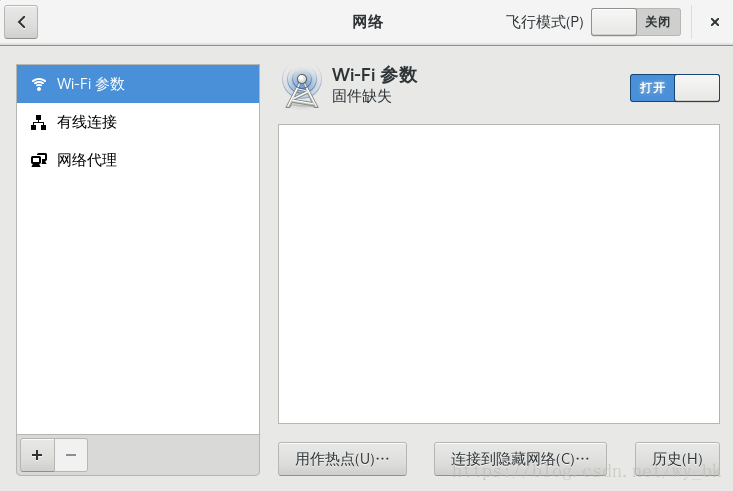
图 1
操作环境:
系统:
Linux zd 4.9.0-6-amd64 #1 SMP Debian 4.9.82-1+deb9u3 (2018-03-02) x86_64 GNU/Linux网络:
有线网络(用于下载安装包)和无线网络(用于验证问题是否解决)
解决过程:
1.连接上有线网络并切换到root用户。
2.备份一下Debian9的软件源配置文件:
cd /etc/apt/

cp sources.list sources.list.bak
2.打开Debian9的软件源配置文件:
leafpad /etc/apt/sources.list注:用leafpad打开方面复制,Debian9默认没有安装leafpad.
3.将non-free添加到每个源的后面:
修改好之后是这样的:
#

# deb cdrom:[Debian GNU/Linux 9.4.0 _Stretch_ - Official amd64 DVD Binary-1 20180310-11:21]/ stretch contrib main

#deb cdrom:[Debian GNU/Linux 9.4.0 _Stretch_ - Official amd64 DVD Binary-1 20180310-11:21]/ stretch contrib main

deb http://mirrors.tuna.tsinghua.edu.cn/debian/ stretch main non-free

deb-src http://mirrors.tuna.tsinghua.edu.cn/debian/ stretch main non-free

deb <http://security.debian.org/debian-security stretch/updates> main contrib non-free

deb-src <http://security.debian.org/debian-security stretch/updates> main contrib non-free

# stretch-updates, previously known as 'volatile'

deb http://mirrors.tuna.tsinghua.edu.cn/debian/ stretch-updates main contrib non-free

deb-src http://mirrors.tuna.tsinghua.edu.cn/debian/ stretch-updates main contrib non-free
更新系统:
apt-get update安装firmware-iwlwifi包:
apt-get install firmware-iwlwifiiwlwifi模块可以被自动加载,当iwlwifi被自动加载时我们需要重新插入该模块以访问固件。
设置iwlwifi自动重新加载:
modprobe -r iwlwifi ; modprobe iwlwifi之后我们就可以看到wifi连接的选项了:
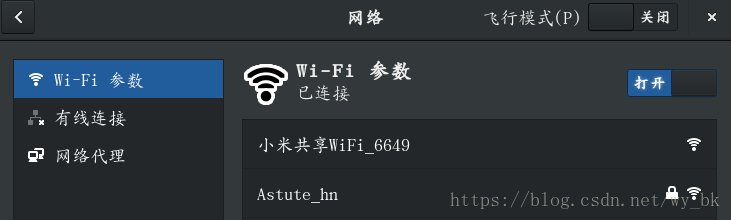
图 2
扩展知识:
Debian是一个开源操作系统。因此,在安装Debian的时候,默认只安装自由软件,而非自由软件(non-free)则不会被默认安装。在Debian官方的wiki(https://wiki.debian.org/WiFi)中有关于wifi固件以及非开源的wifi驱动程序的说明,在这篇关于wifi的wiki里,有这样的描述:
”Currently there are only a few modern wifi chipsets readily available that work with free software systems. For USB wifi devices this list includes the Realtek RTL8187B chipset (802.11G) and the Atheros AR9170 chipset (802.11N). For Mini PCIe all cards with an Atheros chipset are supported.”.
翻译成中文就是:
“目前只有少数几个现代的WiFi芯片组可以与自由软件系统一起工作。对于USB WiFi设备,该列表包括RealTek RTL8187B芯片组(802.11g)和ActhOS AR9170芯片组(802.11n)。对于小型PCIe,所有具有AcICOS芯片组的卡都得到支持。”
也就是说并不是所有计算机中的wifi固件都支持自由软件,因此Debian9默认并没有启用对wifi的支持。但是 802.11n是支持自由软件的,所以我们需要安装iwlwifi Linux kernel driver(iwlwifi内核驱动程序)来启用对Intel 802.11n devices(Intel 802.11n设备)的支持。
参考资料:
1.Debian Wiki: WiFi:https://wiki.debian.org/WiFi
2.Debian Wiki: iwlwifi:https://wiki.debian.org/iwlwifi
3.iwlwifi - WikiDevi:https://wikidevi.com/wiki/Iwlwifi
4.802.11n_百度百科:https://baike.baidu.com/item/802.11n
解决Debian 9 iwlwifi固件缺失导致无法连接无线网络的问题的更多相关文章
- Android Studio 解决ADB检测不到手机导致无法连接的问题
ADB的全称是Android Debug Bridge,是用来管理模拟器和真机的通用调试工具. 开USB调试 方法:手机设置 - 开发人员选项 - USB调试 - 勾选(开发者调试被隐藏了,在关于手机 ...
- Centos无法连接无线网络解决办法
系统->管理->服务器设置->服务,将NetworkManager选项勾选,点击重启服务.然后就可以看到右上角已经有了网络连接.
- 【Debian学徒记事】记一次解决Debian开机1min30s
记一次解决Debian开机1min30s 打开我亲爱的Debian 欸,好像有点慢 [* * * * ] A start job is running for....(*/1min30s) [TIME ...
- 解决ie6不支持position: fixed;导致无法滚动的办法
<div id="im" style="top: 100px; position: fixed; left: 5px; border: 3px solid #006 ...
- 解决点击cell执行动画导致的重用问题
解决点击cell执行动画导致的重用问题 说明: 动画的细节都是裸露的,并没有封装,靠看官来优化了. 效果: 源码: https://github.com/YouXianMing/UITableView ...
- event.preventDefault() 解决按钮多次点击 导致页面变大
event.preventDefault() 解决按钮多次点击 导致页面变大
- 解决debian 9 重启nameserver失效问题
目录 解决debian 9 重启nameserver失效问题 安装resolvconf 编辑文件 测试 解决debian 9 重启nameserver失效问题 刚安装完debian9,用过之后会发现/ ...
- (转)https://wiki.debian.org/iwlwifi debian7下wifi intel 5100agn
https://wiki.debian.org/iwlwifi Debian 7 "Wheezy" Add a "non-free" component to ...
- SELinux导致PHP连接MySQL异常Can't connect to MySQL server的解决方法
原文摘自:http://www.jb51.net/article/52581.htm 这篇文章主要介绍了SELinux导致PHP连接MySQL异常Can't connect to MySQL serv ...
随机推荐
- cocos2d-x action执行完毕的回调
cocos2d-x action执行完毕的回调 MySprite::createOne() { .... // MUST add to sheet firstly spriteShee ...
- Oracle Advanced Pricing White Papers
Oracle Order Management - Version 11.5.10.0 and later Oracle Advanced Pricing - Version 11.5.10 and ...
- hive使用过的基本命令
命令:完成操作 hive:进去hive show databases:显示 所有database use wizad: 使用database wizad,或者如use aso show tables: ...
- VS2010 / MFC + OpenCV 2.4.9打开图片
原文地址:http://www.opencv.org.cn/forum.php?mod=viewthread&tid=30832 第一部分,参考http://jingyan.baidu.com ...
- LeetCode之旅(15)-Odd Even Linked List
题目描述: Given a singly linked list, group all odd nodes together followed by the even nodes. Please no ...
- 面试之路(3)-详解MVC,MVP,MVVM
一:mvc mvc结构: 视图(View):用户界面. 控制器(Controller):业务逻辑 模型(Model):数据保存 mvc各部分的通信方式 mvc互动模式 通过 View 接受指令,传递给 ...
- javascript访问html元素的内容(2)
对于(1)中最后一个包装方式创建的是一个方法,我们必须以方法调用的方式来使用它,这和其他默认的以属性返回结果略有不同,如果有强迫症的童鞋有些伤不起,那么我们下面就把它实现为属性返回的方式: //chi ...
- ELF 动态链接 - so 的 .dynamic 段
动态链接文件中最重要的段就是 .dynamic段 这个段里保存了动态链接器需要的最基本的信息 比如:1. 依赖于哪些共享对象, d_tag = DT_NEED, d_ptr 表示共享对象文件名 2 ...
- 使用oracle sqldr命令导入文件后出现中文乱码问题
1:导入命令 sqlldr userid=$DB_USER/$DB_PASS@@DB_SERVICE control=text.ctl errors=10000000 说明:username/pas ...
- java实习面试题(阿里一面)
1.抽象类和接口的不同点: 抽象类可以有构造函数,接口中不能有构造函数: 抽象类中可以有普通成员变量,但是接口中不能有普通成员变量: 抽象类中可以包含非抽象的普通方法,但是接口中必须是抽象方法:(jd ...