
ansible+packer+terraform在aws上布署web服务器
各工具所扮演的角色
ansible:
配合packer生成安装有apache的基础镜像
packer:
生成amazon AMI
terraform:
以packer生成的镜像为基础,布署web服务器
下面我要放各种配置文件上来了,先来个目录树,省的凌乱。。。
packer/
├── bastion.json
├── playbook.yml
└── roles
    └── httpd
        └── tasks
            └── main.yml
bastion.json(这个是packer要用到的文件)
[root@ip-172-31-42-166 packer]# cat bastion.json
{
  "variables": {
    "aws_access_key": "",
    "aws_secret_key": "",
    "aws_region": "us-west-2"
  },
  "provisioners": [
    {
      "type": "ansible",
      "playbook_file": "./playbook.yml",
      "ansible_env_vars": [
        "ANSIBLE_HOST_KEY_CHECKING=False",
        "ANSIBLE_SSH_ARGS='-o ForwardAgent=yes -o ControlMaster=auto -o ControlPersist=60s'",
        "ANSIBLE_NOCOLOR=True"
      ]

    }
  ],
  "builders": [{
    "type": "amazon-ebs",
    "access_key": "{{user `aws_access_key`}}",
    "secret_key": "{{user `aws_secret_key`}}",
    "region": "{{user `aws_region` }}",
    "source_ami": "ami-0031f978",
    "instance_type": "t2.micro",
    "ssh_username": "root",
    "ami_name": "packer-bastion {{timestamp | clean_ami_name}}"
  }]
}
下面是ansible的playbook
[root@ip-172-31-42-166 packer]# cat playbook.yml
---
- hosts: all
  remote_user: sysop
  become: yes
  vars:
    AWS_ACCESS_KEY_ID: '{{ AWS_ACCESS_KEY_ID }}'
    AWS_SECRET_ACCESS_KEY: '{{ AWS_SECRET_ACCESS_KEY }}'
    filename: '{{ filename }}'
    rolename: '{{ rolename }}'
    project: '{{ project }}'
    release: '{{ release }}'
    envname: '{{ envname }}'
    processList: '{{ processList}}'
  roles:
  - httpd
[root@ip-172-31-42-166 packer]# ls
bastion.json  playbook.yml  roles
[root@ip-172-31-42-166 packer]# cat playbook.yml
---
- hosts: all
  remote_user: sysop
  become: yes
  vars:
    AWS_ACCESS_KEY_ID: '{{ AWS_ACCESS_KEY_ID }}'
    AWS_SECRET_ACCESS_KEY: '{{ AWS_SECRET_ACCESS_KEY }}'
    filename: '{{ filename }}'
    rolename: '{{ rolename }}'
    project: '{{ project }}'
    release: '{{ release }}'
    envname: '{{ envname }}'
    processList: '{{ processList}}'
  roles:
  - httpd
下面是http的roles文件
[root@ip-172-31-42-166 packer]# cat roles/httpd/tasks/main.yml
- name: install the latest version of Apache
  yum:
    name: httpd
    state: latest
好了配置文件就这么多。
生成amazon AMI
cd packer/
packer build bastion.json
来看看aws的控制台,ami已经生成了

下面基于terraform来启动web server
先把配置文件放上,注意看注释
[root@ip-172-31-42-166 data]# cat terraform_workspace/main.tf
provider "aws" {
  region = "us-west-2"
}

resource "aws_instance" "example" {
  ami           = "ami-9842dbe0"
  instance_type = "t2.micro"
  vpc_security_group_ids = ["${aws_security_group.instance.id}"] #在这里我们引用了下面创建的安全组,没有顺序关系,terraform会自动生成顺序和依赖,使用terraform graph可以查看。

  user_data = <<-EOF
              #!/bin/bash
              /etc/init.d/httpd start
              chkconfig httpd on
              EOF

  tags {
    Name = "apache"
  }
}

resource "aws_security_group" "instance" {
  name = "terraform-example-instance"     #在这个resource里我们新建了安全组,需要在上面引用,否则无效

  ingress {
    from_port   = 80           #web线上服务器一般不开80端口,打开小于1024的端口要使用root权限,这是不安全的,一般都是前线的负载均衡器开80,然后映射到后面的高端口上。
    to_port     = 80
    protocol    = "tcp"
    cidr_blocks = ["0.0.0.0/0"]
  }
}
我们来访问一下试试:
curl http://<EC2_INSTANCE_PUBLIC_IP>:80
#成功了,显示了好大一堆,不放上来了
布署可配置的web服务器
什么是可配置的呢?我感脚就是引入变量。。。。。
所以上面的配置文件也可以写成这样式的:
[root@ip-172-31-42-166 terraform_workspace]# cat main.tf
provider "aws" {
  region = "us-west-2"
}

variable "server_port" {
  description = "define a variable server_port"
  default = 80
}

resource "aws_instance" "example" {
  ami           = "ami-9842dbe0"
  instance_type = "t2.micro"
  vpc_security_group_ids = ["${aws_security_group.instance.id}"]

  user_data = <<-EOF
              #!/bin/bash
              /etc/init.d/httpd start
              chkconfig httpd on
              EOF

  tags {
    Name = "apache"
  }
}

resource "aws_security_group" "instance" {
  name = "terraform-example-instance"

  ingress {
    from_port   = "${var.server_port}"
    to_port     = "${var.server_port}"
    protocol    = "tcp"
    cidr_blocks = ["0.0.0.0/0"]
  }
}
当然这变量还可以是一个列表,像这样:
variable "list_example" {
  description = "An example of a list in Terraform"
  type        = "list"
  default     = [1, 2, 3]
}
或者是一组映射,像这样:
variable "map_example" {
  description = "An example of a map in Terraform"
  type        = "map"

  default = {
    key1 = "value1"
    key2 = "value2"
    key3 = "value3"
  }
}
布署web服务器集群
在aws中,auto scaling group可以控制服务器的启停,实现集群操作
要创建asg的第一步就是创建启动配置,长这样的:
resource "aws_launch_configuration" "example" {
  image_id        = "ami-9842dbe0"
  instance_type   = "t2.micro"
  security_groups = ["${aws_security_group.instance.id}"]

  user_data = <<-EOF
              #!/bin/bash
              /etc/init.d/httpd start
              chkconfig httpd on
              EOF

  lifecycle {
    create_before_destroy = true   #在干掉一个机器之前,先启动一个机器 ,注意这里设置为true了,在安全组里也得设置成true,因为他们相互依赖的。
  }
}
所以安全组长这样子:
resource "aws_security_group" "instance" {
  name = "terraform-example-instance"

  ingress {
    from_port   = "${var.server_port}"
    to_port     = "${var.server_port}"
    protocol    = "tcp"
    cidr_blocks = ["0.0.0.0/0"]
  }
  lifecycle {
    create_before_destroy = true
  }
}
好了,下面就可以写安全组的source了:
resource "aws_autoscaling_group" "example" {
  launch_configuration = "${aws_launch_configuration.example.id}"

  # The same availability zone as our instances
  availability_zones = ["${split(",", var.availability_zones)}"]

  min_size = 2
  max_size = 3

  tag {
    key                 = "Name"
    value               = "terraform-asg-example"
    propagate_at_launch = true
  }
}
组合在一起,上个完整的配置文件:
provider "aws" {
  region = "us-west-2"
}

variable "server_port" {
  description = "define a variable server_port"
  default = 80
}

variable "availability_zones" {
  default     = "us-west-2a,us-west-2b,us-west-2c"
  description = "List of availability zones, use AWS CLI to find your "
}

resource "aws_instance" "example" {
  ami           = "ami-9842dbe0"
  instance_type = "t2.micro"
  vpc_security_group_ids = ["${aws_security_group.instance.id}"]

  user_data = <<-EOF
              #!/bin/bash
              /etc/init.d/httpd start
              chkconfig httpd on
              EOF

  tags {
    Name = "apache"
  }
}

resource "aws_security_group" "instance" {
  name = "terraform-example-instance"

  ingress {
    from_port   = "${var.server_port}"
    to_port     = "${var.server_port}"
    protocol    = "tcp"
    cidr_blocks = ["0.0.0.0/0"]
  }
  lifecycle {
    create_before_destroy = true
  }
}

resource "aws_launch_configuration" "example" {
  image_id        = "ami-9842dbe0"
  instance_type   = "t2.micro"
  security_groups = ["${aws_security_group.instance.id}"]

  user_data = <<-EOF
              #!/bin/bash
              /etc/init.d/httpd start
              chkconfig httpd on
              EOF

  lifecycle {
    create_before_destroy = true
  }
}

resource "aws_autoscaling_group" "example" {
  launch_configuration = "${aws_launch_configuration.example.id}"
  #availability_zones = ["${data.aws_availability_zones.all.names}"]
  availability_zones = ["${split(",", var.availability_zones)}"]

  min_size = 2
  max_size = 3

  tag {
    key                 = "Name"
    value               = "terraform-asg-example"
    propagate_at_launch = true
  }
}
在aws控制台上可以看到,新启动了两台机器。
现在我们已经有多台webserver在工作了,我们加个负载均衡器上去玩一下麻:
布署负载均衡器
关于负载均衡器,使用aws_elb resource进行配置:
resource "aws_elb" "example" {
  name               = "terraform-asg-example"
  availability_zones = ["${data.aws_availability_zones.all.names}"]
  security_groups    = ["${aws_security_group.elb.id}"]

  listener {
    lb_port           = 80
    lb_protocol       = "http"
    instance_port     = "${var.server_port}"
    instance_protocol = "http"
  }

  health_check {
    healthy_threshold   = 2
    unhealthy_threshold = 2
    timeout             = 3
    interval            = 30
    target              = "HTTP:${var.server_port}/"
  }
}
还要配置相应的安全组:
resource "aws_security_group" "elb" {
  name = "terraform-example-elb"

  ingress {
    from_port   = 80
    to_port     = 80
    protocol    = "tcp"
    cidr_blocks = ["0.0.0.0/0"]
  }

  egress {
    from_port   = 0
    to_port     = 0
    protocol    = "-1"
    cidr_blocks = ["0.0.0.0/0"]
  }
}
下面来个整体的配置文件吧,如果一个看着乱,可以拆分成多个:
provider "aws" {
  region = "us-west-2"
}

variable "server_port" {
  description = "define a variable server_port"
  default = 80
}

variable "availability_zones" {
  default     = "us-west-2a,us-west-2b,us-west-2c"
  description = "List of availability zones, use AWS CLI to find your "
}

resource "aws_instance" "example" {
  ami           = "ami-9842dbe0"
  instance_type = "t2.micro"
  vpc_security_group_ids = ["${aws_security_group.instance.id}"]

  user_data = <<-EOF
              #!/bin/bash
              /etc/init.d/httpd start
              chkconfig httpd on
              EOF

  tags {
    Name = "apache"
  }
}

resource "aws_security_group" "instance" {
  name = "terraform-example-instance"

  ingress {
    from_port   = "${var.server_port}"
    to_port     = "${var.server_port}"
    protocol    = "tcp"
    cidr_blocks = ["0.0.0.0/0"]
  }
  lifecycle {
    create_before_destroy = true
  }
}

resource "aws_security_group" "elb" {
  name = "terraform-example-elb"

  ingress {
    from_port   = 80
    to_port     = 80
    protocol    = "tcp"
    cidr_blocks = ["0.0.0.0/0"]
  }

  egress {
    from_port   = 0
    to_port     = 0
    protocol    = "-1"
    cidr_blocks = ["0.0.0.0/0"]
  }
}

resource "aws_launch_configuration" "example" {
  image_id        = "ami-9842dbe0"
  instance_type   = "t2.micro"
  security_groups = ["${aws_security_group.instance.id}"]

  user_data = <<-EOF
              #!/bin/bash
              /etc/init.d/httpd start
              chkconfig httpd on
              EOF

  lifecycle {
    create_before_destroy = true
  }
}

resource "aws_autoscaling_group" "example" {
  launch_configuration = "${aws_launch_configuration.example.id}"
  availability_zones = ["${split(",", var.availability_zones)}"]

  load_balancers    = ["${aws_elb.example.name}"]
  health_check_type = "ELB"

  min_size = 2
  max_size = 3

  tag {
    key                 = "Name"
    value               = "terraform-asg-example"
    propagate_at_launch = true
  }
}

resource "aws_elb" "example" {
  name               = "terraform-asg-example"
  availability_zones = ["${split(",", var.availability_zones)}"]
  security_groups    = ["${aws_security_group.elb.id}"]

  listener {
    lb_port           = 80
    lb_protocol       = "http"
    instance_port     = "${var.server_port}"
    instance_protocol = "http"
  }

  health_check {
    healthy_threshold   = 2
    unhealthy_threshold = 2
    timeout             = 3
    interval            = 30
    target              = "HTTP:${var.server_port}/"
  }
}

output "elb_dns_name" {
  value = "${aws_elb.example.dns_name}"
}
[root@ip-172-31-42-166 terraform_workspace]# ls
main.tf  main.tf.bak  terraform.tfstate  terraform.tfstate.backup
[root@ip-172-31-42-166 terraform_workspace]# cat main.tf
provider "aws" {
  region = "us-west-2"
}

variable "server_port" {
  description = "define a variable server_port"
  default = 80
}

variable "availability_zones" {
  default     = "us-west-2a,us-west-2b,us-west-2c"
  description = "List of availability zones, use AWS CLI to find your "
}

resource "aws_instance" "example" {
  ami           = "ami-9842dbe0"
  instance_type = "t2.micro"
  vpc_security_group_ids = ["${aws_security_group.instance.id}"]

  user_data = <<-EOF
              #!/bin/bash
              /etc/init.d/httpd start
              chkconfig httpd on
              EOF

  tags {
    Name = "apache"
  }
}

resource "aws_security_group" "instance" {
  name = "terraform-example-instance"

  ingress {
    from_port   = "${var.server_port}"
    to_port     = "${var.server_port}"
    protocol    = "tcp"
    cidr_blocks = ["0.0.0.0/0"]
  }
  lifecycle {
    create_before_destroy = true
  }
}

resource "aws_security_group" "elb" {
  name = "terraform-example-elb"

  ingress {
    from_port   = 80
    to_port     = 80
    protocol    = "tcp"
    cidr_blocks = ["0.0.0.0/0"]
  }

  egress {
    from_port   = 0
    to_port     = 0
    protocol    = "-1"
    cidr_blocks = ["0.0.0.0/0"]
  }
}

resource "aws_launch_configuration" "example" {
  image_id        = "ami-9842dbe0"
  instance_type   = "t2.micro"
  security_groups = ["${aws_security_group.instance.id}"]

  user_data = <<-EOF
              #!/bin/bash
              /etc/init.d/httpd start
              chkconfig httpd on
              EOF

  lifecycle {
    create_before_destroy = true
  }
}

resource "aws_autoscaling_group" "example" {
  launch_configuration = "${aws_launch_configuration.example.id}"
  availability_zones = ["${split(",", var.availability_zones)}"]

  load_balancers    = ["${aws_elb.example.name}"]
  health_check_type = "ELB"

  min_size = 2
  max_size = 3

  tag {
    key                 = "Name"
    value               = "terraform-asg-example"
    propagate_at_launch = true
  }
}

resource "aws_elb" "example" {
  name               = "terraform-asg-example"
  availability_zones = ["${split(",", var.availability_zones)}"]
  security_groups    = ["${aws_security_group.elb.id}"]

  listener {
    lb_port           = 80
    lb_protocol       = "http"
    instance_port     = "${var.server_port}"
    instance_protocol = "http"
  }

  health_check {
    healthy_threshold   = 2
    unhealthy_threshold = 2
    timeout             = 3
    interval            = 30
    target              = "HTTP:${var.server_port}/"
  }
}

output "elb_dns_name" {
  value = "${aws_elb.example.dns_name}"
}
[root@ip-172-31-42-166 terraform_workspace]# ls
main.tf  main.tf.bak  terraform.tfstate  terraform.tfstate.backup
[root@ip-172-31-42-166 terraform_workspace]# cat main.tf
provider "aws" {
  region = "us-west-2"
}

variable "server_port" {
  description = "define a variable server_port"
  default = 80
}

variable "availability_zones" {
  default     = "us-west-2a,us-west-2b,us-west-2c"
  description = "List of availability zones, use AWS CLI to find your "
}

resource "aws_instance" "example" {
  ami           = "ami-9842dbe0"
  instance_type = "t2.micro"
  vpc_security_group_ids = ["${aws_security_group.instance.id}"]

  user_data = <<-EOF
              #!/bin/bash
              /etc/init.d/httpd start
              chkconfig httpd on
              EOF

  tags {
    Name = "apache"
  }
}

resource "aws_security_group" "instance" {
  name = "terraform-example-instance"

  ingress {
    from_port   = "${var.server_port}"
    to_port     = "${var.server_port}"
    protocol    = "tcp"
    cidr_blocks = ["0.0.0.0/0"]
  }
  lifecycle {
    create_before_destroy = true
  }
}

resource "aws_security_group" "elb" {
  name = "terraform-example-elb"

  ingress {
    from_port   = 80
    to_port     = 80
    protocol    = "tcp"
    cidr_blocks = ["0.0.0.0/0"]
  }

  egress {
    from_port   = 0
    to_port     = 0
    protocol    = "-1"
    cidr_blocks = ["0.0.0.0/0"]
  }
}

resource "aws_launch_configuration" "example" {
  image_id        = "ami-9842dbe0"
  instance_type   = "t2.micro"
  security_groups = ["${aws_security_group.instance.id}"]

  user_data = <<-EOF
              #!/bin/bash
              /etc/init.d/httpd start
              chkconfig httpd on
              EOF

  lifecycle {
    create_before_destroy = true
  }
}

resource "aws_autoscaling_group" "example" {
  launch_configuration = "${aws_launch_configuration.example.id}"
  availability_zones = ["${split(",", var.availability_zones)}"]

  load_balancers    = ["${aws_elb.example.name}"]
  health_check_type = "ELB"

  min_size = 2
  max_size = 3

  tag {
    key                 = "Name"
    value               = "terraform-asg-example"
    propagate_at_launch = true
  }
}

resource "aws_elb" "example" {
  name               = "terraform-asg-example"
  availability_zones = ["${split(",", var.availability_zones)}"]
  security_groups    = ["${aws_security_group.elb.id}"]

  listener {
    lb_port           = 80
    lb_protocol       = "http"
    instance_port     = "${var.server_port}"
    instance_protocol = "http"
  }

  health_check {
    healthy_threshold   = 2
    unhealthy_threshold = 2
    timeout             = 3
    interval            = 30
    target              = "HTTP:${var.server_port}/"
  }
}

output "elb_dns_name" {
  value = "${aws_elb.example.dns_name}"
}
注意:
配置完成的时候出了点问题,elb使用http方式检测webserver状态错误,但是tcp方式是可能,看下图;
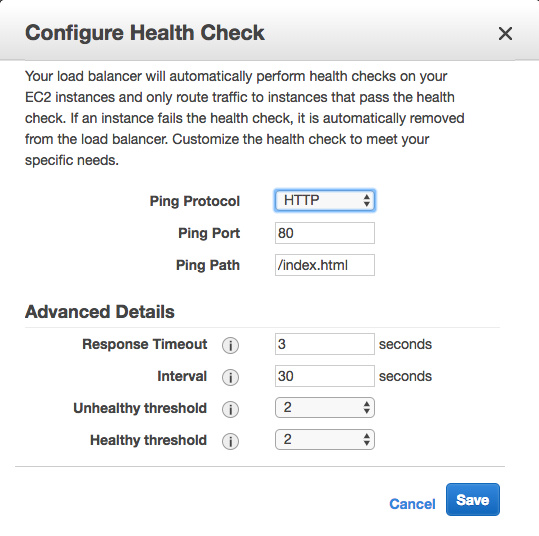
它默认去找/index.html文件了,但是我装的apache路径默认不是这个,所以检测一定是失败的。
为了节省资源,我们可以把aws刚才创建的资源都干掉,只要留着配置文件随时可以烣复:
terraform destroy
that`all thank you~
ansible+packer+terraform在aws上布署web服务器的更多相关文章
- 在公网上布署Web Api的时候,不能调用,返回404
在internet上布署web API做的站点时,发现不能调用web api的任何action, 返回404. 经过很多的努力,也找不到原因,环境是win server 2008, IIS 75. n ...
- 通过Jenkins在IIS上布署站点
当需要在多台服务器的IIS上布署站点时,如果纯粹靠人工手动完成此任务的话,过于低效,而借助Jenkins之类的自动化工具,则可以极大提升工作效率. 以下便是Jenkins Pipeline所使用的脚本 ...
- Windows server 2008 布署FTP服务器实例(适用于阿里云)!
Windows server 2008 布署FTP服务器实例(适用于阿里云). 1.打开管理.配置-用户-新建用户,如:ftp_user,并设置password.选择永只是期和password不能更改 ...
- 在 Azure VM 上安装 LEMP Web 服务器
本文逐步讲解如何在 Azure 中的 Ubuntu VM 上部署 NGINX Web 服务器.MySQL 和 PHP(LEMP 堆栈). LEMP 堆栈可以替代常用的 LAMP 堆栈,可安装在 Azu ...
- 在 Azure VM 上安装 LAMP Web 服务器
本文逐步讲解如何在 Azure 中的 Ubuntu VM 上部署 Apache Web 服务器.MySQL 和 PHP(LAMP 堆栈). 如果想要部署 NGINX Web 服务器,请参阅 LEMP ...
- Jexus是一款Linux平台上的高性能WEB服务器和负载均衡网关
什么是Jexus Jexus是一款Linux平台上的高性能WEB服务器和负载均衡网关,以支持ASP.NET.ASP.NET CORE.PHP为特色,同时具备反向代理.入侵检测等重要功能.可以这样说,J ...
- 如何在Ubuntu 16.04上安装Apache Web服务器
转载自:https://www.howtoing.com/how-to-install-the-apache-web-server-on-ubuntu-16-04 介绍 Apache HTTP服务器是 ...
- 如何在Ubuntu 18.04上安装Apache Web服务器
一. apt库安装 1.在终端输入更新检查命令,sudo apt-get update 2. 在更新完成后(如果不想检查更新,也可直接输入此步)输入:sudo apt-get install apac ...
- NodeJs+http+fs+request+cheerio 采集,保存数据,并在网页上展示(构建web服务器)
目的: 数据采集 写入本地文件备份 构建web服务器 将文件读取到网页中进行展示 目录结构: package.json文件中的内容与上一篇一样:NodeJs+Request+Cheerio 采集数据 ...
随机推荐
- 浅谈TCP三次握手和四次挥手
学习三次握手和四次挥手前,先了解下几个基础的概念. Seq:数据段序号,我们都知道TCP是提供有序传输的,有序传输的基础就是数据段序号,接收方在收到发送方乱序包的情况下可以根据Seq进行重新排序,确保 ...
- L2-001. 紧急救援(PAT)~最短路应用
作为一个城市的应急救援队伍的负责人,你有一张特殊的全国地图.在地图上显示有多个分散的城市和一些连接城市的快速道路.每个城市的救援队数量和每一条连接两个城市的快速道路长度都标在地图上.当其他城市有紧急求 ...
- java基础笔记(10)----集合之set集合
set接口特点: 存储任意Object元素 无序,无下标,元素内容不可以重 方法: 继承父接口Collection中的所有方法 遍历: 有两种遍历方法,foreach遍历和迭代遍历 forEach遍历 ...
- [BZOJ 3813]奇数国
3813: 奇数国 Time Limit: 10 Sec Memory Limit: 256 MBSubmit: 736 Solved: 416[Submit][Status][Discuss] ...
- 【R语言系列】read.table报错incomplete final line found by readTableHeader
文件内容: id,SGBH,DMSM1,SGDO,SGFSSJ 1,310117620,伤人事故,上海市,2018-03-02 20:04:00 2,310117621,死亡事故,杭州市,2018-0 ...
- Beta 第七天
今天遇到的困难: 构造新适配器的时候出现了某些崩溃的问题 ListView监听器有部分的Bug 今天完成的任务: 陈甘霖:完成相机调用和图库功能,完成阿尔法项目遗留下来的位置调用问题,实现百度定位 蔡 ...
- 在Eclipse中调用Algs4库
首先下载Eclipse,我选择的是Eclipse IDE for Java Developers64位版本,下载下来之后解压缩到喜欢的位置然后双击Eclipse.exe启动 然后开始新建项目,File ...
- 初学深度学习(TensorFlow框架的心得and经验总结)自用环境的总结
初学者的时间大部分浪费在了环境上了: 建议直接上Linux系统,我推荐国产的深度系统,deepin这几年一直在不断的发展,现在15.4已经很不错了 1,图形化界面很漂亮,内置正版crossover,并 ...
- javascript 中的类型
javascript 中的类型 js 是一门弱语言,各式各样的错误多种多样,特别是确定返回值有问题的时候,你会用什么来进行表示错误? 我一般有三个选择: null '' error {} 第一个选择 ...
- SSH 配置
ssh免密通用配置 Host * Port 1234 User root #ProxyCommand nc -X 5 -x 127.0.0.1:1081 %h %p #5 socks5, 4 sock ...