
python---内置模块
时间模块
时间分为三种类型:时间戳,结构化时间,格式化时间
#时间模块,time

import time

#时间戳

x = time.time()

time.gmtime()   #将时间戳转换成UTC时间元组

y = time.localtime()    #将时间戳转换成本地时区的时间元组

print(y)

#结构化数据,为元组的形式

y = time.mktime(y)       #将结构化数据转换成时间戳

print(y)

#格式化数据

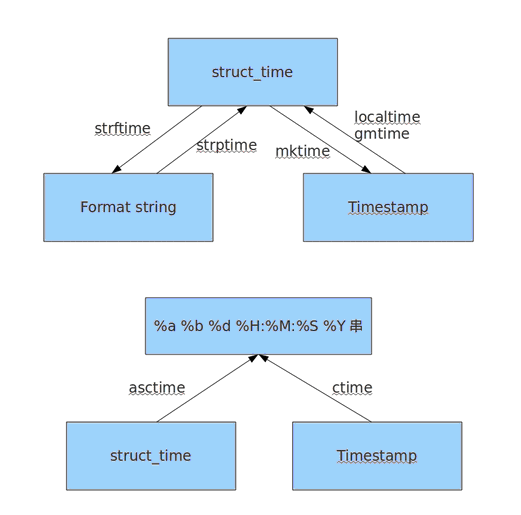
z = time.strftime("%Y-%m-%d %H:%M:%S",y) #将结构化数据转换成格式化数据

#time.strftime("格式","结构化的时间数据(元组)")  --->将结构化时间数据转化成格式化时间数据

#time.strptime("格式化时间字符串","格式")  ----->按着给定的格式进行匹配格式化时间字符串,并转换成格式化时间数据

示例

# >>> x = time.localtime()

# >>> print(x)

# time.struct_time(tm_year=2017, tm_mon=7, tm_mday=9, tm_hour=23, tm_min=11, tm_se

# c=32, tm_wday=6, tm_yday=190, tm_isdst=0)

# >>> time.strftime("%Y-%m-%d %H:%M:%S",x)        #即%Y去匹配tm_year,%m匹配tm_mon,无须注意顺序

# '2017-07-09 23:11:32'

# >>>

# >>> time.strptime('2017-07-09 23:11:32',"%Y-%m-%d %H:%M:%S")    %Y 匹配2017,必须注意顺序

# time.struct_time(tm_year=2017, tm_mon=7, tm_mday=9, tm_hour=23, tm_min=11, tm_se

# c=32, tm_wday=6, tm_yday=190, tm_isdst=-1)

#

# time.ctime(x)   #将时间戳数据转换成特定格式

# >>> time.ctime(x)

# 'Mon Jul 10 19:26:16 2017'

# >>> time.asctime(y) #将结构化数据转换成特定格式

# 'Mon Jul 10 19:26:45 2017'
时间模块
时间加减
import datetime

print(datetime.datetime.now()) #返回 2016-08-19 12:47:03.941925

print(datetime.date.fromtimestamp(time.time()) )  # 时间戳直接转成日期格式 2016-08-19

print(datetime.datetime.now() )

print(datetime.datetime.now() + datetime.timedelta(3)) #当前时间+3天

print(datetime.datetime.now() + datetime.timedelta(-3)) #当前时间-3天

print(datetime.datetime.now() + datetime.timedelta(hours=3)) #当前时间+3小时

print(datetime.datetime.now() + datetime.timedelta(minutes=30)) #当前时间+30分

c_time  = datetime.datetime.now()

print(c_time.replace(minute=3,hour=2)) #时间替换
时间转换图
随机模块
 import random

 # print(random.randint(1,9))

 # print(random.random())

 #

 # print(random.randrange(2,10,4))

 # print(random.sample('chenglv',2))

 # print(random.randrange(0,99,2))

 # print(random.uniform(1,10))

 生成验证码

 checkcode = ""

 for i in range(4):

     x = random.randint(0, 9)

     y = random.choice("adbcdefglikopnm")

     if i == random.randint(0,3):

         tmp = x

     else:

         tmp = y

     checkcode += str(tmp)

 print(checkcode)
os 模块
 import os

 os.getcwd()                                      #获取当前工作目录,即当前python脚本工作的目录路径

 os.chdir("dirname")                             #改变当前脚本工作目录;相当于shell下cd

 os.curdir                                        #返回当前目录: ('.')

 os.pardir                                         #获取当前目录的父目录字符串名:('..')

 os.makedirs('dirname1/dirname2')                #可生成多层递归目录

 os.removedirs('dirname1')                       #若目录为空,则删除,并递归到上一级目录,如若也为空,则删除,依此类推

 os.mkdir('dirname')                             #生成单级目录;相当于shell中mkdir dirname

 os.rmdir('dirname')                              #删除单级空目录,若目录不为空则无法删除,报错;相当于shell中rmdir dirname

 os.listdir('dirname')                               #列出指定目录下的所有文件和子目录,包括隐藏文件,并以列表方式打印

 os.remove()                                           #删除一个文件

 os.rename("oldname","newname")                      #重命名文件/目录

 os.stat('path/filename')                            # 获取文件/目录信息

 os.sep                                              #输出操作系统特定的路径分隔符,win下为"\\",Linux下为"/"

 os.linesep                                          #输出当前平台使用的行终止符,win下为"\t\n",Linux下为"\n"

 os.pathsep                                          #输出用于分割文件路径的字符串

 os.name                                             #输出字符串指示当前使用平台。win->'nt'; Linux->'posix'

 os.system("bash command")                   #运行shell命令,直接显示

 os.environ                                  #获取系统环境变量

 os.path.abspath('dirname')                   #返回path规范化的绝对路径

 os.path.split('dirname')                            #将path分割成目录和文件名二元组返回

 os.path.dirname('dirname')                   #返回path的目录。其实就是os.path.split(path)的第一个元素

 os.path.basename('dirname')                  #返回path最后的文件名。如何path以/或\结尾,那么就会返回空值。即os.path.split(path)的第二个元素

 os.path.exists('dirname')                    #如果path存在,返回True;如果path不存在,返回False

 os.path.isabs('dirname')                         #如果path是绝对路径,返回True

 os.path.isfile('dirname')                        #如果path是一个存在的文件,返回True。否则返回False

 os.path.isdir('dirname')                             #如果path是一个存在的目录,则返回True。否则返回False

 os.path.join('dirname'[, 'dirname'[, ...]])             #将多个路径组合后返回,第一个绝对路径之前的参数将被忽略

 os.path.getatime('dirname')                      #返回path所指向的文件或者目录的最后存取时间

 os.path.getmtime('dirname')                          #返回path所指向的文件或者目录的最后修改时间
os 模块
sys模块
 import sys

 # print(sys.argv[1])      #可以处理传递的参数

 # F:\python\oldboy\day5>python os_module.py 1 2 3

 #

 #

 # sys.argv

 # F:\python\oldboy\day5>python os_module.py 1 2 3      #1,2,3是参数

 # ['os_module.py', '1', '2', '3']

 # import time

 # for i in range(100):

 #     time.sleep(0.1)

 #     sys.stdout.flush()          #在控制台输出,flush是立刻输出

 #     sys.stdout.write('!')       #write是输出内容

 # print(sys.path)

 # print(sys.platform)

 print(sys.version)              #输出python版本信息
配置更改 模块 configparser
 config = configparser.ConfigParser()

 # config["DEFAULT"] ={'ServerAliveInterval':'45',

 #                     'Compression':'yes',

 #                     'CompressionLevel':'9'

 #

 # }

 # config['bitbucket.org'] = {}

 # config['bitbucket.org']['User'] = 'LC'

 # config['topsecret.server.com'] = {}

 # topsecret = config['topsecret.server.com']

 # topsecret['Host Port'] = '80'

 # topsecret['ForwardX11'] = 'no'

 # config['DEFAULT']['USER'] = 'LC'

 # with open('example.ini','w') as f:

 #     config.write(f)

 config.read('example.txt')

 # sec = config.remove_section('bitbucket.org')

 # config.write(open('example.txt','w'))

 # config.add_section('XMMMMMM')

 # config.write(open('example.txt','w'))

 a = config.has_section('XMMMMMM')

 config.set("XMMMMMM","server",'10.1.1.2')

 config.write(open('example.txt','w'))
configparser
运行效果,根据需求,可以保存成文件,并通过调用configparser进行修改
[DEFAULT]

serveraliveinterval = 45

compression = yes

compressionlevel = 9

user = LC

[bitbucket.org]

user = LC

[topsecret.server.com]

host port = 80

forwardx11 = no

[XMMMMMM]

server = 10.1.1.2
文件压缩,复制模块shutil
 import shutil

 # f1 = open("file1",encoding="utf-8")

 # f2 = open("file2","w",encoding="utf-8")

 # shutil.copyfileobj(f1,f2)

 # shutil.copy("file2","file3")        #复制文件和权限

 # shutil.copystat("file3","file2")            #复制权限信息,但是内容不拷贝

 # shutil.copyfile()                   #复制文件

 # shutil.copytree()                   #递归复制,即复制整一个目录,包含内容

 # shutil.rmtree()                     #递归删除,即将目录所有内容删除

 # shutil.copymode()               #仅拷贝权限,内容,组,用户均不变

 # shutil.move()               #移动目录

 # shutil.make_archive("shutil_archive_test","zip","F:\python\oldboy\day5")    #压缩文件名,压缩类型,要压缩的文件目录

 import zipfile

 z = zipfile.ZipFile("day5.zip","w")

 z.write("file2")

 z.write("file1")
xml模块
import xml.etree.ElementTree as ET

tree = ET.parse("xmltest.xml")

root = tree.getroot()

print(root.tag)

# 遍历xml文档

# for child in root:

#     print(child.tag, child.attrib)

#     for i in child:

#         print(i.tag, i.text,i.attrib)

#

# # 只遍历year 节点

# for node in root.iter('year'):

#     print(node.tag, node.text)

#修改xml

# for node in root.iter('year'):

#     new_year = int(node.text) +1

#     node.text = str(new_year)

#     node.set("update_by","LC")

# tree.write("xmltest.xml")

#删除node

# for country in root.findall('country'):

#     rank = int(country.find('rank').text)

#     if rank > 50:

#         root.remove(country)

# tree.write("output.xml")

new_xml = ET.Element("namelist")

name = ET.SubElement(new_xml, "name", attrib={"enrolled": "yes"})

name.text = "XMM"

age = ET.SubElement(name, "age", attrib={"checked": "no"})

sex = ET.SubElement(name, "sex")

sex.text = ''

name2 = ET.SubElement(new_xml, "name", attrib={"enrolled": "no"})

age = ET.SubElement(name2, "age")

age.text = ''

name2.text = "Huang Dou"

et = ET.ElementTree(new_xml)  # 生成文档对象

et.write("test.xml", encoding="utf-8", xml_declaration=True)

ET.dump(new_xml)  # 打印生成的格式
xml模块运行效果
<data>

    <country name="Liechtenstein">

        <rank updated="yes">2</rank>

        <year update_by="LC">2009</year>

        <gdppc>141100</gdppc>

        <neighbor direction="E" name="Austria" />

        <neighbor direction="W" name="Switzerland" />

        <info>

            <hello1>what1</hello1>

            <hello2>what2</hello2>

        </info>

    </country>

    <country name="Singapore">

        <rank updated="yes">5</rank>

        <year update_by="LC">2012</year>

        <gdppc>59900</gdppc>

        <neighbor direction="N" name="Malaysia" />

    </country>

    <country name="Panama">

        <rank updated="yes">69</rank>

        <year update_by="LC">2012</year>

        <gdppc>13600</gdppc>

        <neighbor direction="W" name="Costa Rica" />

        <neighbor direction="E" name="Colombia" />

    </country>

</data>
shelve模块:通过shelve模块,实现key,value的存储,即通过shelve模块,可以将k,v的值直接存入文件中,并可以通过shelve直接通过key调用
import shelve

import datetime

d = shelve.open('shelve_test')

info = {'age':22,'job':'it'}

name = ['alex','rain','test']

d['name'] = name            #将name信息存入文件中

d['info'] = info

d['date'] = datetime.datetime.now()

d.close()

======

print(d.get('name'))       #可以直接获取

print(d.get('info'))

print(d.get('date'))
python---内置模块的更多相关文章
- python内置模块(4)
这一部分是python内置模块系列的最后一部分,介绍了一些小巧有用的内置模块. 目录: 1.random 2.shelve 3.getpass 4.zipfile 5.tarfile 6.bisect ...
- Python学习笔记【第八篇】:Python内置模块
什么时模块 Python中的模块其实就是XXX.py 文件 模块分类 Python内置模块(标准库) 自定义模块 第三方模块 使用方法 import 模块名 form 模块名 import 方法名 说 ...
- Python内置模块与标准库
Python内置模块就是标准库(模块)吗?或者说Python的自带string模块是内置模块吗? 答案是:string不是内置模块,它是标准库.也就是说Python内置模块和标准库并不是同一种东西. ...
- python内置模块[re]
python内置模块[re] re模块: python的re模块(Regular Expression正则表达式)提供各种正则表达式的匹配操作,在文本解析.复杂字符串分析和信息提取时是一个非常有用的工 ...
- python内置模块[sys,os,os.path,stat]
python内置模块[sys,os,os.path,stat] 内置模块是python自带功能,在使用内置模块时,需要遵循 先导入在 使用 一.sys 对象 描述 sys.argv 命令行参数获取,返 ...
- Python内置模块和第三方模块
1.Python内置模块和第三方模块 内置模块: Python中,安装好了Python后,本身就带有的库,就叫做Python的内置的库. 内置模块,也被称为Python的标准库. Python 2.x ...
- python内置模块collections介绍
目录 python内置模块collections介绍 1.namedtuple 2.deque 3.defaultdict 4.OrderedDict 5.ChainMap 6.Counter 7.小 ...
- python内置模块介绍(一)
本文主要介绍模块列表如下: os sys re time datetime random shutil subprocess os模块 os.getcwd() ...
- python内置模块(time模块)
常用的python内置模块 一.time模块 在python的三种时间表现形式: 1.时间戳,给电脑看的. - 自1970-01-01 00:00:00到当前时间,按秒计算,计算了多少秒. impor ...
- python 内置模块续(二)
目录 python 内置模块补充 1.hashlib模块 简易使用: 高级使用: 进阶使用: 加盐处理: 校验文件一致性 2.logging日志模块 日志等级 常用处理 "四大天王" ...
随机推荐
- 存储那些事儿(五):BTRFS文件系统之Btree结构详解
Btree数据结构可以说是BTRFS文件系统的基础.它提供了一个通用的方式去存储不同的数据类型.它仅仅存储3个数据类型:key, item和block header. btrfs_header的定义如 ...
- android 解析服务器数据使用json还是xml方式
整理自百度搜索: 现在的Android应用程序,几乎没有不与服务端交换数据的了!那么,android应用在与服务端交换数据的时候,我们有哪些选择呢?哪种数据交换格式要更好吗?下面文章简单为 andro ...
- TOMCAT数据源连接配置
/* *本文档简单介绍系统使用TOMCAT6.0数据源方式连接数据库的配置方法: *1,系统环境: gdczsam4.0 + Tomcat6.0 + JDK1.5 + SQL Server2008 ...
- Swift基础之Delegate方法的使用
本文简单介绍了使用Delegate方法的进行值的传递,改变上一个界面的字体大小和颜色 首先创建一个导航视图: let viewC = ViewController(); let navi ...
- Java应用程序使用系统托盘资源
要想使自己开发的Java SE项目运行在自己的电脑系统托盘上,这并不是什么难事,总共需要如下几步即可: 1.线判断一下,系统托盘是否可用,否则接下来的程序将不可避免的报出异常咯 2.获得一个Syste ...
- Ajax 初步学习总结
Ajax是什么 Ajax是(Asynchronous JavaScript And XML)是异步的JavaScript和xml.也就是异步请求更新技术.Ajax是一种对现有技术的一种新的应用,不是一 ...
- [SqlServer]如何向数据库插入带有单引号(')的字符串
今天在做一个复制功能的时候,发现存在单引号字符串与INSERT INTO 语句的' '产生冲突. 在网络上找到了一个这样功能 如何向数据库插入带有单引号(')的字符串 用SQL语句往数据库某字段(字符 ...
- AWR報告詳解
AWR是Oracle 10g 版本 推出的新特性, 全称叫Automatic Workload Repository-自动负载信息库, AWR 是通过对比两次快照(snapshot)收集到的统计信息 ...
- 【linux学习笔记】在ubuntu下使用QT Cmake支持C++11
今天在ubuntu下使用QT来进行C++编程,选择了Cmake,当用到initializer_list的时候提示不支持C++11,现提供一下解决方案: 错误提示: error: This file r ...
- 树莓派linux驱动学习之LED控制
前面我们编写了hello world的程序,接下来继续研究GPIO功能,通过GPIO来控制LED的亮灭,这在单片机中应该算是十分简单的一个程序了,但是在Linux系统中控制GPIO没有那么简单,难点就 ...