
Project support for both iOS 6 and iOS 7
原文:https://developer.apple.com/library/ios/documentation/UserExperience/Conceptual/TransitionGuide/SupportingEarlieriOS.html#//apple_ref/doc/uid/TP40013174-CH14-SW1
On This Page
If business reasons require you to continue supporting iOS 6 or earlier, you need to choose the most practical way to update the app for iOS 7. The techniques you choose can differ, but the overall advice remains the same: First, focus on redesigning the app for iOS 7. Then—if the redesign includes navigational or structural changes—bring these changes to the iOS 6 version as appropriate (don’t restyle the iOS 6 version of the app to use iOS 7 design elements, such as translucent bars or borderless bar buttons).
NOTE
On a device running iOS 7, all of the system UI—such as alerts and notifications—uses the iOS 7 appearance, even if your app is currently using an earlier appearance.
Using Interface Builder to Support Multiple App Versions
Interface Builder in Xcode 5 includes new features that help you transition an app to iOS 7 while continuing to support earlier versions.
Get a preview of how the UI updates you make affect an earlier version. Using the assistant editor, you can make changes to an iOS 7 storyboard or XIB file on the canvas and simultaneously see how those changes look in the iOS 6 version of the file.
Follow these steps to preview an earlier storyboard or XIB file:
While viewing the iOS 7 storyboard or XIB file on the canvas, open the assistant editor.
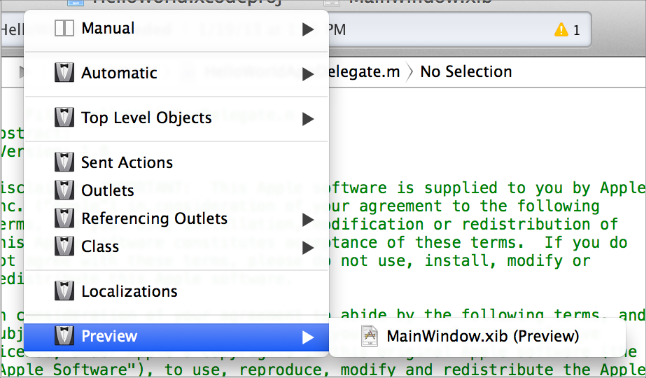
Open the Assistant pop-up menu. (The Assistant pop-up menu is the first item to the right of the back and forward arrows in the assistant editor jump bar.)
In the menu, scroll to the Preview item and choose the storyboard or XIB file.
Toggle between viewing app UI in iOS 7 and iOS 6.1 or earlier. If your app needs to support iOS 6.1 or earlier, use this feature to make sure the UI looks correct in all versions of the app.
Follow these steps to switch between two versions of the UI:
Open the File inspector in Interface Builder.
Open the “View as” menu.
Choose the version of the UI you want to view.
For more information about new Interface Builder features in Xcode 5, see What's New in Xcode.
Supporting Two Versions of a Standard App
If both versions of a standard app should have a similar layout, use Auto Layout to create a UI that works correctly in both versions of iOS. To support multiple versions of iOS, specify a single set of constraints that Auto Layout can use to adjust the views and controls in the storyboard or XIB files (to learn more about constraints, see “Constraints Express Relationships Between Views”).
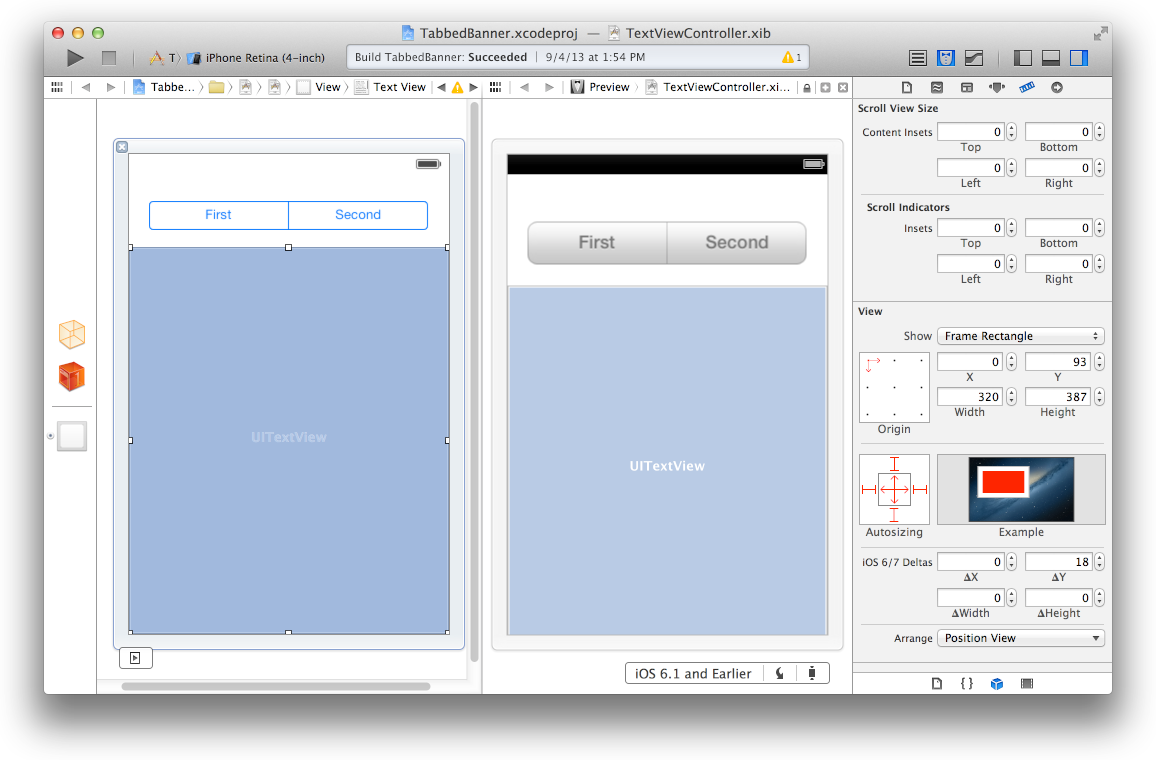
If both versions of a standard app should have a similar layout and you’re not using Auto Layout, use offsets. To use offsets, first update the UI for iOS 7. Next, use the assistant editor to get a preview of how the changes affect the earlier version (to open the preview, select the Preview item in the Assistant pop-up menu as described in Using Interface Builder to Support Multiple App Versions). Then, specify values that define the origin, height, and width of each element in the earlier UI as offsets from the element’s new position in the iOS 7 UI. For example, the y position of the text view shown below would have to change by 18 points in the earlier version of the UI to accommodate the greater height of the iOS 6 segmented control.
To learn more about Auto Layout, see Auto Layout Guide.
Managing Multiple Images in a Hybrid App
Hybrid apps often include custom image assets, such as bar button icons, and background views for bars or other controls. Apps can use one or more asset catalogs to manage these resources. (To learn more about asset catalogs, see Asset Catalog Help.)
NOTE
An asset catalog contains resources that are displayed within an app; an asset catalog doesn’t hold the app icon, launch image, or any other image that an outside process needs to access.
In a hybrid app that must support multiple versions of iOS, you manage the images yourself. Images that differ depending on an app’s version should have unique names; otherwise, you can use the same image in both versions.
If your storyboard or XIB file contains an embedded image, consider creating an outlet to the image view and loading the appropriate resource as needed. To learn how to load different assets in code, see“Loading Resources Conditionally”.
Loading Resources Conditionally
In some cases, you need to determine the iOS version your app is currently running in so you can respond to version differences appropriately in code. For example, if different versions of an app use significantly different layouts, you can load different storyboard or XIB files for each version. You may also need to use different code paths to handle API differences, such using barTintColor instead of tintColor to tint a bar’s background.
NOTE
In iOS 7, an app can use a different launch image depending on which version of iOS it’s running in. To provide different launch images, add the UILaunchImages key to the Info.plist file and use a dictionary to describe each launch image. To learn more about handling launch images, see “App Launch (Default) Images” in iOS App Programming Guide.
If you need to load different resources for different app versions—and you currently identify a storyboard or XIB file in your Info.plist file—you can use the version of the Foundation framework to determine the current system version and load the appropriate resource inapplication:didFinishLaunchingWithOptions:. The code below shows how to check the Foundation framework version:
if (floor(NSFoundationVersionNumber) <= NSFoundationVersionNumber_iOS_6_1) {
// Load resources for iOS 6.1 or earlier
} else {
// Load resources for iOS 7 or later
}
Project support for both iOS 6 and iOS 7的更多相关文章
- iOS 7 UI 过渡指南 - 支持续 iOS 6(iOS 7 UI Transition Guide - Supporting iOS 6)
iOS 7 UI Transition Guide Preparing for Transition Before You Start Scoping the Project Supporting i ...
- iOS开发 - 兼容iOS 10
1.Notification(通知) 自从Notification被引入之后,苹果就不断的更新优化,但这些更新优化只是小打小闹,直至现在iOS 10开始真正的进行大改重构,这让开发者也体会到UserN ...
- IOS学习之IOS沙盒(sandbox)机制和文件操作
IOS学习之IOS沙盒(sandbox)机制和文件操作(一) 1.IOS沙盒机制 IOS应用程序只能在为该改程序创建的文件系统中读取文件,不可以去其它地方访问,此区域被成为沙盒,所以所有的非代码文件都 ...
- iOS学习之iOS沙盒(sandbox)机制和文件操作1
iOS学习之iOS沙盒(sandbox)机制和文件操作 接上篇 iOS学习之iOS沙盒(sandbox)机制和文件操作(一) 我们看看如何获取应用程序沙盒目录.包括真机的沙盒的目录. 1.获取程序的H ...
- iOS 1 到 iOS 10 ,我都快老了
iOS 1:iPhone诞生 虽然很难想像,但初代iPhone在问世时在功能方面其实远远落后于那时的竞争对手,比如Windows Mobile.Palm OS.塞班.甚至是黑莓.它不支持3G.多任务. ...
- 【译】UI设计基础(UI Design Basics)--iOS应用解析(iOS App Anatomy)(三)
2.1 iOS应用解析(iOS App Anatomy) 几乎所有的iOS应用都会用到UIKit框架中的组件.了解这些基础组件的名称,角色,功能可以帮你在应用界面设计时做出更好的决策. UIKit提 ...
- IOS学习:ios中的数据持久化初级(文件、xml、json、sqlite、CoreData)
IOS学习:ios中的数据持久化初级(文件.xml.json.sqlite.CoreData) 分类: ios开发学习2013-05-30 10:03 2316人阅读 评论(2) 收藏 举报 iOSX ...
- IOS 动画专题 --iOS核心动画
iOS开发系列--让你的应用“动”起来 --iOS核心动画 概览 通过核心动画创建基础动画.关键帧动画.动画组.转场动画,如何通过UIView的装饰方法对这些动画操作进行简化等.在今天的文章里您可以看 ...
- IOS开发笔记 IOS如何访问通讯录
IOS开发笔记 IOS如何访问通讯录 其实我是反对这类的需求,你说你读我的隐私,我肯定不愿意的. 幸好ios6.0 以后给了个权限控制.当打开app的时候你可以选择拒绝. 实现方法: [plain] ...
随机推荐
- 注解Responsebody RequestBody RequestMapping
编写代码时候很容易遗漏注解,尤其比较重要的注解,调试很久也找不到原因,在处理页面请求异常时,如果后台正常,就是发现没有把想要的对象传到页面就注意下看注解是否缺失?例如:/** * @Author gj ...
- ASIHTTPRequest
ASIHTTPRequest,是一个直接在CFNetwork上做的开源项目,提供了一个比官方更方便更强大的HTTP网络传输的封装.
- [知了堂学习笔记]_Java代码实现MySQL数据库的备份与还原
通常在MySQL数据库的备份和恢复的时候,多是采用在cmd中执行mysql命令来实现. 例如: mysqldump -h127.0.0.1 -uroot -ppass test > d:/tes ...
- Executors线程池
强烈建议程序员使用较为方便的 Executors 工厂方法 Executors.newCachedThreadPool()(无界线程池,可以进行自动线程回收).Executors.newFixedTh ...
- eclipes快捷键
本文原创作者:pipi-changing 本文原创出处:http://www.cnblogs.com/pipi-changing/ Ctrl+1 快速修复(最经典的快捷键,就不用多说了) Ctrl+D ...
- Performance Testing 入门小结
从事软件测试两年多了,一直在做功能测试.2016年计划学习Performance.今天,先把之前听过的同事session以及自己查阅的资料小结一下. 一.什么是性能测试 首先来说一下软件的性能是什么. ...
- 基础 - 32位操作系统最多只支持4G内存。
32位操作系统最多只支持4G内存. CPU能不能直接访问硬盘的数据呢, 不能. 只能通过把硬盘的数据先放到内存里, 然后再从内存里访问硬盘的数据.我们平时玩游戏碰上读图loading 进度条的这个过程 ...
- python_如何读写csv数据
案例: 通过股票网站,我们获取了中国股市数据集,它以csv数据格式存储 Data,Open,High,Low,Close,Volume,Adj Close 2016-06-28,8.63,8.47,8 ...
- Linux下MongoDB安装和配置详解
1.下载安装包 将解压到/usr/local/mongodb 文件夹下 # mkdir /usr/local/mongodb # tar zxvf mongodb-linux-x86_64-3.2.9 ...
- 如何更改wampserver的网站根目录
我之前把网站根目录自定义为:D:/demo,现在想改为:D:www, 过程就是打开httpd.conf文件,搜索demo,然后把demo改为www,之后更改虚拟配置文件,记住D盘下一定要有www目录 ...