
JAVA Swing 组件演示***
下面是Swing组件的演示:
package a_swing;

import java.awt.BorderLayout;

import java.awt.Color;

import java.awt.Container;

import java.awt.Cursor;

import java.awt.Dimension;

import java.awt.GridLayout;

import java.awt.event.ActionEvent;

import java.awt.event.ActionListener;

import java.awt.event.KeyEvent;

import java.awt.event.MouseAdapter;

import java.awt.event.MouseEvent;

import java.awt.event.WindowAdapter;

import java.awt.event.WindowEvent;

import javax.swing.BoundedRangeModel;

import javax.swing.ButtonGroup;

import javax.swing.DefaultListModel;

import javax.swing.Icon;

import javax.swing.ImageIcon;

import javax.swing.JButton;

import javax.swing.JCheckBox;

import javax.swing.JComboBox;

import javax.swing.JDialog;

import javax.swing.JFileChooser;

import javax.swing.JFrame;

import javax.swing.JLabel;

import javax.swing.JList;

import javax.swing.JMenu;

import javax.swing.JMenuBar;

import javax.swing.JMenuItem;

import javax.swing.JOptionPane;

import javax.swing.JPanel;

import javax.swing.JProgressBar;

import javax.swing.JRadioButton;

import javax.swing.JScrollPane;

import javax.swing.JSplitPane;

import javax.swing.JTabbedPane;

import javax.swing.JTable;

import javax.swing.JTextField;

import javax.swing.JTextPane;

import javax.swing.JToggleButton;

import javax.swing.JTree;

import javax.swing.Timer;

import javax.swing.border.EtchedBorder;

import javax.swing.event.ListSelectionEvent;

import javax.swing.event.ListSelectionListener;

import javax.swing.event.TreeSelectionEvent;

import javax.swing.event.TreeSelectionListener;

import javax.swing.tree.DefaultMutableTreeNode;

import javax.swing.tree.TreeSelectionModel;

public class Test extends JFrame {

    public Test() {

        MenuTest menuTest = new MenuTest();

        LeftPanel leftPanel = new LeftPanel();

        RightPanel rightPanel = new RightPanel();

        BottomPanel bottomPanel = new BottomPanel();

        CenterPanel centerPanel = new CenterPanel();

        Container c = this.getContentPane();

        this.setJMenuBar(menuTest);

        c.add(leftPanel, BorderLayout.WEST);

        c.add(rightPanel, BorderLayout.EAST);

        c.add(centerPanel, BorderLayout.CENTER);

        c.add(bottomPanel, BorderLayout.SOUTH);

        this.addWindowListener(new WindowAdapter() {

            public void WindowClosing(WindowEvent e) {

                dispose();

                System.exit(0);

            }

        });

        setSize(700, 500);

        setTitle("Swing 组件大全简体版");

        setUndecorated(true);

        setLocation(200, 150);

        show();

    }

    class MenuTest extends JMenuBar {

        private JDialog aboutDialog;

        public MenuTest() {

            JMenu fileMenu = new JMenu("文件");

            JMenuItem exitMenuItem = new JMenuItem("退出", KeyEvent.VK_E);

            JMenuItem aboutMenuItem = new JMenuItem("关于..", KeyEvent.VK_A);

            fileMenu.add(exitMenuItem);

            fileMenu.add(aboutMenuItem);

            this.add(fileMenu);

            aboutDialog = new JDialog();

            initAboutDialog();

            exitMenuItem.addActionListener(new ActionListener() {

                public void actionPerformed(ActionEvent e) {

                    dispose();

                    System.exit(0);

                }

            });

            aboutMenuItem.addActionListener(new ActionListener() {

                public void actionPerformed(ActionEvent e) {

                    aboutDialog.show();

                }

            });

        }

        public JDialog get() {

            return aboutDialog;

        }

        public void initAboutDialog() {

            aboutDialog.setTitle("关于");

            Container con = aboutDialog.getContentPane();

            Icon icon = new ImageIcon("sdmile.gif");

            JLabel aboutLabel = new JLabel("<html><b><font size=5>" + "<center>Swing!" + "<br>", icon, JLabel.CENTER);

            con.add(aboutLabel, BorderLayout.CENTER);

            aboutDialog.setSize(450, 225);

            aboutDialog.setLocation(300, 300);

            aboutDialog.addWindowListener(new WindowAdapter() {

                public void WindowClosing(WindowEvent e) {

                    dispose();

                }

            });

        }

    }

    class LeftPanel extends JPanel {

        private int i = 0;

        public LeftPanel() {

            DefaultMutableTreeNode root = new DefaultMutableTreeNode("Root");

            DefaultMutableTreeNode child = new DefaultMutableTreeNode("Child");

            DefaultMutableTreeNode select = new DefaultMutableTreeNode("select");

            DefaultMutableTreeNode child1 = new DefaultMutableTreeNode("" + i);

            root.add(child);

            root.add(select);

            child.add(child1);

            JTree tree = new JTree(root);

            tree.getSelectionModel().setSelectionMode(TreeSelectionModel.DISCONTIGUOUS_TREE_SELECTION);

            tree.setRowHeight(20);

            tree.addTreeSelectionListener(new TreeSelectionListener() {

                public void valueChanged(TreeSelectionEvent e) {

                    JTree tree = (JTree) e.getSource();

                    DefaultMutableTreeNode selectNode = (DefaultMutableTreeNode) tree.getLastSelectedPathComponent();

                    i++;

                    selectNode.add(new DefaultMutableTreeNode("" + i));

                }

            });

            tree.setPreferredSize(new Dimension(100, 300));

            JScrollPane scrollPane = new JScrollPane(tree);

            this.add(scrollPane);

        }

    }

    class BottomPanel extends JPanel {

        private JProgressBar pb;

        public BottomPanel() {

            pb = new JProgressBar();

            pb.setPreferredSize(new Dimension(680, 20));

            Timer time = new Timer(1, new ActionListener() {

                int counter = 0;

                public void actionPerformed(ActionEvent e) {

                    counter++;

                    pb.setValue(counter);

                    Timer t = (Timer) e.getSource();

                    if (counter == pb.getMaximum()) {

                        t.stop();

                        counter = 0;

                        t.start();

                    }

                }

            });

            time.start();

            pb.setStringPainted(true);

            pb.setMinimum(0);

            pb.setMaximum(1000);

            pb.setBackground(Color.white);

            pb.setForeground(Color.red);

            this.add(pb);

        }

        public void setProcessBar(BoundedRangeModel rangeModel) {

            pb.setModel(rangeModel);

        }

    }

    class RightPanel extends JPanel {

        public RightPanel() {

            this.setLayout(new GridLayout(8, 1));

            JCheckBox checkBox = new JCheckBox("复选按钮");

            JButton button = new JButton("打开文件");

            button.addActionListener(new ActionListener() {

                public void actionPerformed(ActionEvent e) {

                    JFileChooser file = new JFileChooser();

                    int resule = file.showOpenDialog(new JPanel());

                    if (resule == file.APPROVE_OPTION) {

                        String fileName = file.getSelectedFile().getName();

                        String dir = file.getSelectedFile().getName();

                        JOptionPane.showConfirmDialog(null, dir + "\\" + fileName, "选择的文件", JOptionPane.YES_OPTION);

                    }

                }

            });

            JToggleButton toggleButton = new JToggleButton("双胎按钮");

            ButtonGroup buttonGroup = new ButtonGroup();

            JRadioButton radioButton1 = new JRadioButton("单选按钮1", false);

            JRadioButton radioButton2 = new JRadioButton("单选按钮2", false);

            JComboBox comboBox = new JComboBox();

            comboBox.setToolTipText("点击下拉列表增加选项");

            comboBox.addActionListener(new ActionListener() {

                public void actionPerformed(ActionEvent e) {

                    JComboBox comboBox = (JComboBox) e.getSource();

                    comboBox.addItem("程序员");

                    comboBox.addItem("分析员");

                }

            });

            DefaultListModel litem = new DefaultListModel();

            litem.addElement("香蕉");

            litem.addElement("水果");

            JList list = new JList(litem);

            list.addListSelectionListener(new ListSelectionListener() {

                public void valueChanged(ListSelectionEvent e) {

                    JList l = (JList) e.getSource();

                    Object s = l.getSelectedValue();

                    JOptionPane.showMessageDialog(null, s, "消息框", JOptionPane.YES_OPTION);

                }

            });

            buttonGroup.add(radioButton1);

            buttonGroup.add(radioButton2);

            add(button);

            add(toggleButton);

            add(checkBox);

            add(radioButton1);

            add(radioButton2);

            add(comboBox);

            add(list);

            this.setBorder(new EtchedBorder(EtchedBorder.LOWERED, Color.LIGHT_GRAY, Color.blue));

        }

    }

    class CenterPanel extends JPanel {

        public CenterPanel() {

            JTabbedPane tab = new JTabbedPane(JTabbedPane.TOP);

            JTextField textField = new JTextField("文本域,点击打开<文件按钮>可选择文件");

            textField.setActionCommand("textField");

            JTextPane textPane = new JTextPane();

            textPane.setCursor(new Cursor(Cursor.TEXT_CURSOR));

            textPane.setText("编辑器,试着点击文本区,试着拉动分隔条。");

            textPane.addMouseListener(new MouseAdapter() {

                public void mousePressed(MouseEvent e) {

                    JTextPane textPane = (JTextPane) e.getSource();

                    textPane.setText("编辑器点击命令成功");

                }

            });

            JSplitPane splitPane = new JSplitPane(JSplitPane.VERTICAL_SPLIT, textField, textPane);

            JTable table = new JTable(10, 10);

            JPanel pane = new JPanel();

            pane.add(table.getTableHeader(), BorderLayout.NORTH);

            pane.add(table);

            tab.addTab("文本演示", splitPane);

            tab.addTab("表格演示", pane);

            tab.setPreferredSize(new Dimension(500, 600));

            this.add(tab);

            this.setEnabled(true);

        }

    }

    public static void main(String args[]) {

        new Test();

    }

}
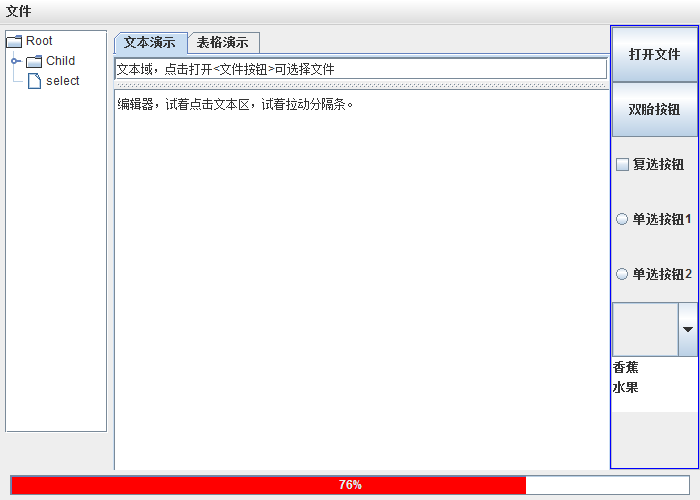
演示界面如下:
JAVA Swing 组件演示***的更多相关文章
- java Swing组件和事件处理(二)
1.BoxLayout类可以创建一个布局对象,成为盒式布局,BoxLayout在javax.Swing border 包中,java.swing 包提供一个Box类,该类也是一个类,创建的容器称作一 ...
- java Swing组件随着窗口拖动等比移动或等比放大
实现原理很简单, 1清空布局(使用绝对布局) 2添加监听器(监听窗口是否被拖动) 3在监听器里面动态调整 组件的位置 效果如下: 拖动之后效果: 代码实现: import java.awt.Event ...
- java swing组件的一些基本属性
JLabel get/setText(): 获取/设置标签的文本. get/seticon(): 获取/设置标签的图片. get/setHorizontalAlignment(): 获取/设置文本的水 ...
- java Swing组件和事件处理
1.常见的容器 JComponent是 Container 的子类,中间容器必须添加到底层容器中才能够发挥作用, JPanel 面板 :使用jPanel 创建一个面板,再通过添加组件到该面板上面,JP ...
- Java -- Swing 组件使用
1. 示例1 public class Main { JFrame f = new JFrame(); Icon okIcon = new ImageIcon("/home/test/sta ...
- Java swing: 实现ActionListener监听器的三种途径
Swing是目前Java中不可缺少的窗口工具组,是用户建立图形化用户界面(GUI)程序的 强大工具.Java Swing组件自动产生各种事件来响应用户行为.如当用户点击按钮或选择菜单项目时,Swing ...
- Java AWT组件开发和Swing界面编程
一.AWT组件开发 1.AWT AWT是抽象窗口工具箱的缩写,它为编写图形用户界面提供了用户接口,通过这个接口就可以继承很多方法,省去了很多工作.AWT还能使应用程序更好地同用户进行交互. AWT中的 ...
- java中经常使用的Swing组件总结
1.按钮(Jbutton) Swing中的按钮是Jbutton,它是javax.swing.AbstracButton类的子类,swing中的按钮可以显示图像,并且可以将按钮设置为窗口的默认图标,而且 ...
- learning java swing 基本组件用法
import javax.swing.*; import java.awt.*; import java.awt.event.ActionListener; import java.awt.event ...
随机推荐
- Appium 的xpath定位
Appium 的xpath定位 1.如果元素text是唯一的,可以通过text文本定位 //*[@text=’text文本属性’] # 定位text driver.find_element_by_xp ...
- Qt 如何处理密集型耗时的事情
有时候需要处理一些跟界面无关的但非常耗时的事情,这些事情跟界面在同一个线程中,由于时间太长,导致界面无法响应,处于“假死”状态.例如:在应用程序中保存文件到硬盘上,从开始保存直到文件保存完毕,程序不响 ...
- 洛谷——P2590 [ZJOI2008]树的统计(树链剖分模板练手)
P2590 [ZJOI2008]树的统计 I. CHANGE u t : 把结点u的权值改为t II. QMAX u v: 询问从点u到点v的路径上的节点的最大权值 III. QSUM u v: 询问 ...
- 爬虫之pyquery库
官方文档:https://pyquery.readthedocs.io/en/latest/ PyQuery是一个强大又灵活的网页解析库.如果你觉得正则写起来太麻烦.BeautifulSoup语法太难 ...
- Vue2 + Koa2 实现后台管理系统
看了些 koa2 与 Vue2 的资料,模仿着做了一个基本的后台管理系统,包括增.删.改.查与图片上传. 工程目录: 由于 koa2 用到了 async await 语法,所以 node 的版本需要至 ...
- rsync+sersync自动同步备份数据
一.为什么要用Rsync+sersync架构?1.sersync是基于Inotify开发的,类似于Inotify-tools的工具2.sersync可以记录下被监听目录中发生变化的(包括增加.删除.修 ...
- jetty添加容器容器提供包
在tomcat的使用中,我们常常会吧容器提供的包放入:TOMCAT_HOME\lib下, 比如mysql-connection-java-version.jar 在使用jetty容器的时候,若要让容器 ...
- nyoj 4 ASCII码排序(set,multiset)
ASCII码排序 时间限制:3000 ms | 内存限制:65535 KB 难度:2 描述 输入三个字符(可以重复)后,按各字符的ASCII码从小到大的顺序输出这三个字符. 输入 第一行输 ...
- 一文教你用 Neo4j 快速构建明星关系图谱
更多有趣项目及代码见于:DesertsX/gulius-projects 前言 本文将带你用 neo4j 快速实现一个明星关系图谱,因为拖延的缘故,正好赶上又一年的4月1日,于是将文中的几个例子顺势改 ...
- [COGS309] [USACO 3.2] 香甜的黄油
★★ 输入文件:butter.in 输出文件:butter.out 简单对比 时间限制:1 s 内存限制:128 MB 描述 农夫John发现做出全威斯康辛州最甜的黄油的方法:糖.把糖 ...