
[Javascript] Getter and Setter Abstractions
JavaScript provides primitive types and means of processing those. However, those are not enough. Real data must somehow come into the program and data must somehow leave the program, for it to become useful to us. In this talk, we will see how two abstractions are essential for data flow and to build up other abstractions, such as Iterator, Iterable, Observable, Scheduling, and others. Talk
Getter as abstractions:
const ten = ;

// Abstractions

// Laziness

const getTen = () => {

  console.log("hi"); // hook for side effects

  // Implementation flexibility

  return  + ;

  // return 2 * 5;

  // return 10

}
Benefits:
- First of all: 'getTen' if you don't call the function, the calcuation inside the fucntion never run.
- You can do any side effects inside function.
- Implmentation flexibility, you can do different ways to aecieve the same effects.
Think about this code:
function add(getX, getY) {

   const x = getX();

   const y = getY();

   return x + y;

}
'getX' and 'getY' are abstract. What we are doing now is adding two abstract number in concrete world. What if we add in abstract world?
function add(getX, getY) {

   return () => { // put code into a get getter function

     const x = getX();

     const y = getY();

     return x + y;

   }

}
Now the function are complete lazy, lazyniess is a good thing, when you have some lzay you use getter can make things concrete.
function add(getX, getY) {

   return () => {

     const x = getX();

     const y = getY();

     return x + y;

   }

}

const getTen = () => ;

const getY = Math.random;

const getSum = add(getTen, getY); // so far no calcuation happens
Lazy initialization and lazy iteration:
let i = ;

const array = [,,,];

function getArrayItem() {

  // lazy iteration

  return array[i++];

}

console.log(getArrayItem());

console.log(getArrayItem());

console.log(getArrayItem());

console.log(getArrayItem());
console.log(getArrayItem()); // undefined
This is a concrete example, we call the fucntion mutiplue time and loop though the array.
And we also see that after call result as 'undefined', if we want to loop the array again from zero idnex, we have to do:
let i = ;

const array = [,,,];

function getArrayItem() {

  // lazy iteration

  return array[i++];

}

console.log(getArrayItem());

console.log(getArrayItem());

console.log(getArrayItem());

console.log(getArrayItem());

i = ;

console.log(getArrayItem());

console.log(getArrayItem());

console.log(getArrayItem());

console.log(getArrayItem());
We call
i = ;
Of course this is not good at all, we leak the information.
The way to improve it is by using getter & lazyniess:
function getGetArrayItem() {

  // lazy initialization

  let i = ;

  const array = [,,,];

  return function() {

    // lazy iteration

    return array[i++];

  }

}

let getArrayItem = getGetArrayItem();

console.log(getArrayItem());

console.log(getArrayItem());

console.log(getArrayItem());

console.log(getArrayItem());

getArrayItem = getGetArrayItem();

console.log(getArrayItem());

console.log(getArrayItem());

console.log(getArrayItem());

console.log(getArrayItem());
getter-getter: Abstract List:
Think about the following example:
function range(left, right) {

  return () => {

    // lazy initialization

    let x = left;

    return () => {

      // lazy iteration

      if (x > right) {

        return undefined;

      }

      return x++;

    }

  }

}

const getGet = range( , );

const get = getGet();

console.log(get()); //

console.log(get());

console.log(get());

console.log(get());

console.log(get());  //

console.log(get());  // undefined

console.log(get());

console.log(get());
It prints out the range of nuber, which we defined, we can notice after the right limit of the number, it just print out undefined.
One way to solve the undefined problem is using for loop:
function range(left, right) {

  return () => {

    // lazy initialization

    let x = left;

    return () => {

      // lazy iteration

      if (x > right) {

        return undefined;

      }

      return x++;

    }

  }

}

const getGet = range( , );

for(let get = getGet(), x = get(); x !== undefined; x = get()) {

  console.log(x) // 10 ... 14

}
The good thing about this code is that no matter how large the range it is, the menory size is always 1. Every time you call the fucntion, it pull one value from the abstract getter function every time. It makes CPU and memory efficient.
Completion markers:
function range(left, right) {

  return () => {

    // lazy initialization

    let x = left;

    return () => {

      // lazy iteration

      if (x > right) {

        return {done: true};

      }

      return {done: false, value: x++};

    }

  }

}

const getGet = range(, );

for(let get = getGet(), res = get(); !res.done; res = get()) {

  console.log(res.value) // 10 ... 14

}
We added {done: true | false} as a complete marker.
Convert to Symbol.iterator:
function range(left, right) {

  return {

    [Symbol.iterator]: () => {

    // lazy initialization

    let x = left;

    return {

      next: () => {

        // lazy iteration

        if (x > right) {

          return {done: true};

        }

        return {done: false, value: x++};

      }

    }

   }

  }

}
Javascript notice that when you are using [Symbol.iterator] and have 'next' inside, then it provides you a nice syntax to loop over the iterator and get the value of out it.
for(let x of range(, )) {

  console.log(x) // 10 ... 14

}
We might have done this:
function range(left, right) {

  return {

    [Symbol.iterator]: () => {

    // lazy initialization

    let x = left;

    return {

      next: () => {

        // lazy iteration

        if (x > right) {

          return {done: true};

        }

        return {done: false, value: x++};

      }

    }

  }

  }

}

for(let x of range(,)) {

  if(x %  === ) {

    console.log(x)

  }

}
We using 'if' inside 'for' loop, well it is nothing wrong, but we can do better. Because range() is abstract function, we don't need to pull all the value done to the concrete world to do the filtering, we can also do the filtering in abstract function.
const filter = pred => iterations => {

  let z = [];

  for (let x of iterations) {

    if(pred(x)) z.push(x);

  }

  return z;

};

function range(left, right) {

  return {

    [Symbol.iterator]: () => {

    // lazy initialization

    let x = left;

    return {

      next: () => {

        // lazy iteration

        if (x > right) {

          return {done: true};

        }

        return {done: false, value: x++};

      }

    }

  }

  }

}

for(let x of filter(x => x %  === )(range(,))) {

  console.log(x)

}
Setter-setter abstraction:
You can think of "setter-setter" is callback:
const setSetTen = (setTen) => {

  setTen()

}

setSetTen(console.log) //
The benifits of doing setter-setter is
- Async
- Inversion of control
const setSetTen = (setTen) => {

  setTimeout(() => {

    //Async

    setTen()

  }, )

}

setSetTen(console.log) //
Setter-setter to Observable:
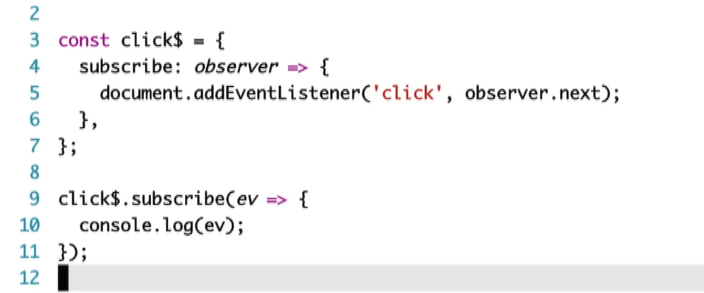
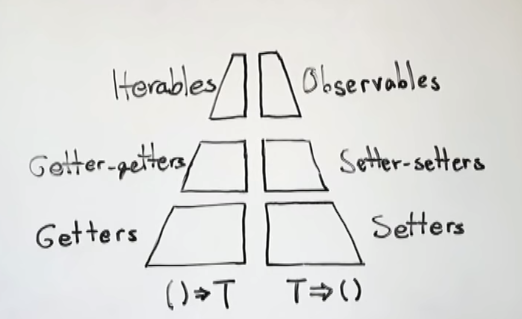
[Javascript] Getter and Setter Abstractions的更多相关文章
- JavaScript getter and setter All In One
JavaScript getter and setter All In One getter & setter JavaScript Object Accessors JavaScript A ...
- JavaScript getter和setter
对象的属性是由属性名name,值key,和其他特性(可读写性 writable,可枚举性enumerable,可配置性configurable)组成的.从ES5开发,提供了getter和setter ...
- javascript的getter和setter(转)
显然这是一个无关IE(高级IE除外)的话题,尽管如此,有兴趣的同学还是一起来认识一下ECMAScript5标准中getter和setter的实现.在一个对象中,操作其中的属性或方法,通常运用最多的就是 ...
- JavaScript中闭包实现的私有属性的getter()和setter()方法
注意: 以下的输出都在浏览器的控制台中 <!DOCTYPE html> <html> <head> <meta charset="utf-8&quo ...
- javascript中的function命名空間與模擬getter、setter
function的命名空間 在javascript中,function也可以擁有自己的命名空間例如以下這段程式碼: 12345678 function () { return 'I am A';} A ...
- javascript权威指南笔记--javascript语言核心(五)--getter和setter属性
getter和setter属性: var p = { x:1.0, y:1.0, get r(){ return Math.sqrt(this.x*this.x + this.y * this.y); ...
- javascript中的getter和setter
在ECMAScript 5中,属性值可以用一个或两个方法代替,这两个方法就是getter和setter var man = { name : 'lidg', weibo : '@lidg', get ...
- 基于 getter 和 setter 撸一个简易的MVVM
Angular 和 Vue 在对Angular的学习中,了解到AngularJS 的两个主要缺点: 对于每一次界面时间,Ajax 或者 timeout,都会进行一个脏检查,而每一次脏检查又会在内部循环 ...
- js中的访问器属性中的getter和setter函数实现数据双向绑定
嗯,之前在读js红宝书的时候,在对象那一章有介绍属性类型.第一种数据类型指的是数据属性,第二种是访问器属性.在初识vue的时候,其双向数据绑定也是基于访问器属性中的getter和setter函数原理来 ...
随机推荐
- 2015 多校赛 第四场 1009 (hdu 5335)
Problem Description In an n∗m maze, the right-bottom corner is the exit (position (n,m) is the exit) ...
- webapi时间字段返回格式设置及返回model首字母小写
GlobalConfiguration.Configuration.Formatters.Remove(new XmlMediaTypeFormatter()); // 解决json序列化时的循环引用 ...
- Multipart/form-data POST文件上传
简单的HTTP POST 大家通过HTTP向服务器发送POST请求提交数据,都是通过form表单提交的,代码如下: <form method="post"action=&qu ...
- mssql server 2005自动备份数据库
(转) (1)启动[sql server Management Studio],在[对象资源管理器]窗口里选择[管理]——[维护计划]选项. 2)右击[维护计划],在弹出的快捷菜单里选择[维护计划向导 ...
- MyEclipse获取注册码
最近刚装上MyEclipse,一直弹窗提示注册码过期,开始还能接受,到最后,每发布一个项目便弹窗提醒,顿时感觉烦了,得治理治理这个烦人的注册码,下面是一段自动生成注册名和注册码的代码,只需要直接拿来用 ...
- Linux学习自动化脚本(一)
https://www.cnblogs.com/handsomecui/p/5869361.html https://blog.csdn.net/daigualu/article/details/76 ...
- AI.框架理论.语义网.语言间距.孤单
刷个博客,转载自于科学网:AI.框架理论.语义网.语言间距.孤单 一:引言: AI几乎是计算机科学家的梦想,自动化比计算机发展的要早的多.早期的自动化节省了大量人力,激发了人类懒惰的滋长和对自身进化缓 ...
- vue中需要注意的问题总结(上)
React 与其说是一种框架,倒不如说是一种开发范式.它的核心理念非常简单: 界面/视图就是数据结构的可视化表达UI = f(data) 而界面/视图由组件组合而来UI = f1(data) + f2 ...
- LINUX - .so 与 .a
.a gcc -c test1.c test2.c(或者g++ -c test1.cpp test2.cpp )--- .o ar -r libtest.a test1.o test2.o ...
- 分治FFT模板
题目链接:https://www.luogu.org/problemnew/show/P4721 总结了一下蒟蒻FFT/NTT容易写错的地方: 1.rev数组求错. 2.cdq注意顺序:先递归 ...