
How to copy files between sites using JavaScript REST in Office365 / SharePoint 2013
http://techmikael.blogspot.in/2013/07/how-to-copy-files-between-sites-using.html
I’m currently playing with a POC for an App, and wanted to try to do the App as a SharePoint hosted one, only using JavaScript and REST.
The starting point was to call _vti_bin/ExcelRest.asmx on the host web from my app web, but this end-point does neither support CORS nor JSONP, so it can’t be used directly. My next thought was; Ok, let’s copy the file from the host web over to my app web, then call ExcelRest locally. Easier said than done!
While the final solution seems easy enough, the research, trial and error have taken me about 3 days. I’m now sharing this with you so you can spend your valuable time increasing the international GDP instead.
Note: If you want to copy files between two libraries on the same level, then you can use the copyTo method. http://server/site/_api/web/folders/GetByUrl('/site/srclib')/Files/getbyurl('madcow.xlsx')/copyTo(strNewUrl = '/site/targetlib/madcow.xlsx,bOverWrite = true)
Problem
Copy a file from a document library in one site to a document library in a different site using JavaScript and REST.
The code samples have URL’s using the App web proxy, but it’s easily modifiable for non-app work as well.
Step 1 – Reading the file
1
2
3
4
5
6
7
8
9
10
11
12
13
14
15
16
17
18
19
var hostweburl = decodeURIComponent(getParameterByName('SPHostUrl'));
var appweburl = decodeURIComponent(getParameterByName('SPAppWebUrl'));
var fileContentUrl = "_api/SP.AppContextSite(@target)/web/GetFileByServerRelativeUrl('/site/library/madcow.xlsx')/$value?@target='" + hostweburl + "'";
var executor = new SP.RequestExecutor(appweburl);
var info = {
url: fileContentUrl,
method: "GET",
binaryStringResponseBody: true,
success: function (data) {
//binary data available in data.body
var result = data.body;
},
error: function (err) {
alert(JSON.stringify(err));
}
};
executor.executeAsync(info);
The important parameter here is setting binaryStringResponseBody to true. Without this parameter the response is being decoded as UTF-8 and the result in the success callback is garbled data, which leads to a corrupt file on save.
The binaryStringResponseBody parameter is not documented anywhere, but I stumbled upon binaryStringRequestbody in an msdn article which was used when uploading a file, and I figured it was worth a shot. Opening SP.RequestExecutor.debug.js I indeed found this parameter.
Step 2 – Patching SP.RequestExecutor.debug.js
Adding binaryStringResponseBody will upon return of the call cause a script error as seen in the figure below. 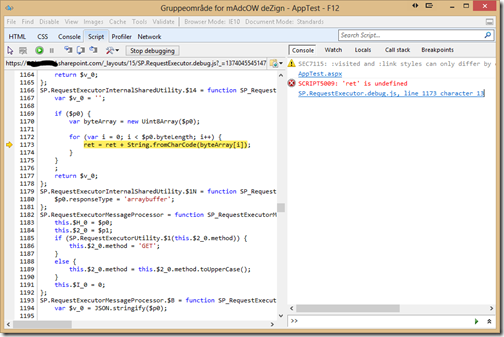
The method in question is reading over the response byte-by-byte from an Uint8Array, building a correctly encoded string. The issue is that it tries to concatenate to a variable named ret, which is not defined. The defined variable is named $v_0, and here we have a real bug in the script. The bug is there both in Office365 and SharePoint 2013 on-premise.
Luckily for us patching JavaScript is super easy. You merely override the methods involved somewhere in your own code before it’s being called. In the below sample it’s being called once the SP.RequestExecutor.js library has been loaded. The method named BinaryDecode is the one with the error, but you have to override more methods as the originator called is internalProcessXMLHttpRequestOnreadystatechange, and it cascades to calling other internal functions which can be renamed at random as the method names are autogenerated. (This happened for me today and I had to change just overrinding the first function).
1
2
3
4
5
6
7
8
9
10
11
12
13
14
15
16
17
18
19
20
21
22
23
24
25
26
27
28
29
30
31
32
33
34
35
36
37
38
39
40
41
42
43
44
45
46
47
48
49
50
51
52
53
54
55
56
57
58
59
60
61
62
63
64
65
66
67
68
69
70
71
72
73
74
75
76
77
78
79
80
81
82
83
84
85
$.getScript(scriptbase + "SP.RequestExecutor.js", function(){
SP.RequestExecutorInternalSharedUtility.BinaryDecode = function SP_RequestExecutorInternalSharedUtility$BinaryDecode(data) {
var ret = '';
if (data) {
var byteArray = new Uint8Array(data);
for (var i = 0; i < data.byteLength; i++) {
ret = ret + String.fromCharCode(byteArray[i]);
}
}
;
return ret;
};
SP.RequestExecutorUtility.IsDefined = function SP_RequestExecutorUtility$$1(data) {
var nullValue = null;
return data === nullValue || typeof data === 'undefined' || !data.length;
};
SP.RequestExecutor.ParseHeaders = function SP_RequestExecutor$ParseHeaders(headers) {
if (SP.RequestExecutorUtility.IsDefined(headers)) {
return null;
}
var result = {};
var reSplit = new RegExp('\r?\n');
var headerArray = headers.split(reSplit);
for (var i = 0; i < headerArray.length; i++) {
var currentHeader = headerArray[i];
if (!SP.RequestExecutorUtility.IsDefined(currentHeader)) {
var splitPos = currentHeader.indexOf(':');
if (splitPos > 0) {
var key = currentHeader.substr(0, splitPos);
var value = currentHeader.substr(splitPos + 1);
key = SP.RequestExecutorNative.trim(key);
value = SP.RequestExecutorNative.trim(value);
result[key.toUpperCase()] = value;
}
}
}
return result;
};
SP.RequestExecutor.internalProcessXMLHttpRequestOnreadystatechange = function SP_RequestExecutor$internalProcessXMLHttpRequestOnreadystatechange(xhr, requestInfo, timeoutId) {
if (xhr.readyState === 4) {
if (timeoutId) {
window.clearTimeout(timeoutId);
}
xhr.onreadystatechange = SP.RequestExecutorNative.emptyCallback;
var responseInfo = new SP.ResponseInfo();
responseInfo.state = requestInfo.state;
responseInfo.responseAvailable = true;
if (requestInfo.binaryStringResponseBody) {
responseInfo.body = SP.RequestExecutorInternalSharedUtility.BinaryDecode(xhr.response);
}
else {
responseInfo.body = xhr.responseText;
}
responseInfo.statusCode = xhr.status;
responseInfo.statusText = xhr.statusText;
responseInfo.contentType = xhr.getResponseHeader('content-type');
responseInfo.allResponseHeaders = xhr.getAllResponseHeaders();
responseInfo.headers = SP.RequestExecutor.ParseHeaders(responseInfo.allResponseHeaders);
if (xhr.status >= 200 && xhr.status < 300 || xhr.status === 1223) {
if (requestInfo.success) {
requestInfo.success(responseInfo);
}
}
else {
var error = SP.RequestExecutorErrors.httpError;
var statusText = xhr.statusText;
if (requestInfo.error) {
requestInfo.error(responseInfo, error, statusText);
}
}
}
};
});
Step 3 – Uploading the file
The next step is to save the file in a library on my app web. The crucial part again is to make sure the data is being treated as binary, this time withbinaryStringRequestBody set to true. Make a note of the digest variable as well. On a page inheriting the SP masterpage you can get this value with $("#__REQUESTDIGEST").val(). If not then you have to execute a separate call to _api/contextinfo. The code for that is at the bottom of this post.
1
2
3
4
5
6
7
8
9
10
11
12
13
14
15
16
17
18
19
20
var appweburl = decodeURIComponent(getParameterByName('SPAppWebUrl'));
var executor = new SP.RequestExecutor(appweburl);
var info = {
url: "_api/web/GetFolderByServerRelativeUrl('/appWebtargetFolder')/Files/Add(url='madcow.xlsx', overwrite=true)",
method: "POST",
headers: {
"Accept": "application/json; odata=verbose",
"X-RequestDigest": digest
},
contentType: "application/json;odata=verbose",
binaryStringRequestBody: true,
body: arrayBuffer,
success: function(data) {
alert("Success! Your file was uploaded to SharePoint.");
},
error: function (err) {
alert("Oooooops... it looks like something went wrong uploading your file.");
}
};
executor.executeAsync(info);
Journey
I started out using jQuery.ajax for my REST calls, but I did not manage to get the encoding right no matter how many posts I read on this. I read through a lot on the following links which led me to the final solution:
- http://social.msdn.microsoft.com/Forums/sharepoint/en-US/02bfbcdc-73c8-4fa5-8967-cfd903a0d72e/javascript-client-object-model-openbinary-method – which got me started on reading files, but the encoding was wrong
- http://www.shillier.com/archive/2013/03/26/uploading-files-in-sharepoint-2013-using-csom-and-rest.aspx – which has good code and samples on uploading files with CSOM and REST, also mentioning that CSOM has a limit on files being 1.5mb, which is why I went for REST.
- http://msdn.microsoft.com/en-us/library/jj164022.aspx – General REST information
- http://blogs.msdn.com/b/uksharepoint/archive/2013/04/20/uploading-files-using-the-rest-api-and-client-side-techniques.aspx – Sample code for uploading using binaryStringRequestBody
Get the digest value
1
2
3
4
5
6
7
8
9
10
11
12
13
14
15
16
17
$.ajax({
url: "_api/contextinfo",
type: "POST",
contentType: "application/x-www-url-encoded",
dataType: "json",
headers: {
"Accept": "application/json; odata=verbose",
},
success: function (data) {
if (data.d) {
var digest = data.d.GetContextWebInformation.FormDigestValue;
}
},
error: function (err) {
alert(JSON.stringify(err));
}
});
How to copy files between sites using JavaScript REST in Office365 / SharePoint 2013的更多相关文章
- 关于在SharePoint 2013(2010)中Javascript如何实现批量批准的自定义操作功能?
1.概述: SharePoint 2013(包括SharePoint 2010)提供了很方便的,多选的界面,但是很多操作还是不能批量进行,比如:批准的功能.如果您要解决方案不关心代码,那么请直接联系作 ...
- Xcode6 ADD Copy Files Build Phase 是灰色的
在学习的怎样写frameWork的时候,查看一个教程How to Create a Framework for iOS [一个中文翻译 创建自己的framework] 其中一个步骤就是添加一个Cop ...
- How do I copy files that need root access with scp
server - How do I copy files that need root access with scp? - Ask Ubuntuhttps://askubuntu.com/quest ...
- Gradle Goodness: Copy Files with Filtering
Gradle Goodness: Copy Files with Filtering Gradle's copy task is very powerful and includes filterin ...
- [MSDN] 使用 SharePoint 2013 中的 JavaScript 库代码完成基本操作
MSDN:http://msdn.microsoft.com/zh-cn/library/jj163201.aspx 了解如何编写代码以在 SharePoint 2013 中使用 JavaScript ...
- SharePoint 2013 中使用 JavaScript Like 和Unlike list item/page/document
SharePoint 2013中新增了很多社交功能,比如用户可以like/unlike 任何一个 list item/page/document,这是一个非常不错的功能. 但有时觉得like/unli ...
- [Forward]Visual Guide: Setting up My Sites in SharePoint 2013
from http://blog.sharedove.com/adisjugo/index.php/2012/07/25/visual-guide-setting-up-my-sites-in-sh ...
- [Bash] Move and Copy Files and Folders with Bash
In this lesson we’ll learn how to move and rename files (mv) and copy (cp) them. Move index.html to ...
- VS Copy Files after build
<Import Project="$(MSBuildToolsPath)\Microsoft.CSharp.targets" /> <ItemGroup> ...
随机推荐
- LINQ to SQL语句非常详细(原文来自于网络)
LINQ to SQL语句(1)之Where Where操作 适用场景:实现过滤,查询等功能. 说明:与SQL命令中的Where作用相似,都是起到范围限定也就是过滤作用的,而判断条件就是它后面所接的子 ...
- 【NS2仿真】UDP协议
# # cbr # \ # udp sink # \ / # n0--------5M 2ms---------n1 # # set ns [new Simulator] set f [open ou ...
- Python 程序如何高效地调试?
作者:Rui L链接:https://www.zhihu.com/question/21572891/answer/26046582来源:知乎著作权归作者所有,转载请联系作者获得授权. 这个要怒答一发 ...
- Sass学习之路:注释、变量以及导入
前言 由于.sass不兼容CSS代码,所以以下内容完全使用.scss的语法. Sass注释 Sass中除了提供CSS中的标准注释之外,还提供了一种静默注释: /* 我是标准注释 */ // 我是静默注 ...
- [Tango] Basic Knowledge
Project Tango类设备能够给开发者在哪些领域带来机会. 室内导航*:室内GPS信号的缺失,使得Project Tango设备会成为室内导航重要应用场景之一.有了它,你就不会在不熟悉的室内商场 ...
- 转贴:JavaScript实现Ajax请求简单示例
转至:https://my.oschina.net/u/658145/blog/167651 <!DOCTYPE HTML PUBLIC "-//W3C//DTD HTML 4.01 ...
- linq之let子句
在Linq查询中Let子句可以创建一个新的范围变量,并使用该变量保存表达式的结果. 看下面的例子: private void LetQuery() { List<UserBaseInfo> ...
- 批量插入数据 C# SqlBulkCopy使用
转自:http://blog.csdn.net/wangzh300/article/details/7382506 private static void DataTableToSQLServer( ...
- JQ关于浏览器宽高的获取方式
JQ关于浏览器宽高的获取方式 alert($(window).height()); //浏览器时下窗口可视区域高度alert($(document).height()); //浏览器时下窗口文档的高度 ...
- vim 正则替换
http://www.cppblog.com/kefeng/archive/2010/10/20/130574.html Vim中的正则表达式功能很强大,如果能自由运用,则可以完成很多难以想象的操作. ...