
新建一个self hosted Owin+ SignalR Project(1)
OWIN是Open Web Server Interface for .Net 的首字母缩写,他的定义如下:
OWIN在.NET Web Server 与Web Application之间定义了一套标准接口,OWIN的目标是用于解耦Web Server和Web Application.基于此标准,鼓励开发者开发简单,灵活的模块,从而推进.Net Web Development开源生态系统的发展.之前.net开发的所有webSite和Web Application不得不和IIS绑定到一起部署,对于部署,相当笨重.而OWIN正好是为了解决这个问题!
1.新建一个Console项目
2.添加Owin self host 引用,打开NuGet 程序包管理平台,输入如下代码:
>install-package Microsoft.Aspnet.WebApi.OwinSelfHost
3.新建一个名字为StartUp.cs的类,添加如下代码:
using Owin;

using System;

using System.Collections.Generic;

using System.Linq;

using System.Text;

using System.Threading.Tasks;

using System.Web.Http;

namespace TestProgram

{

   public class Startup

    {

        public void Configuration(IAppBuilder app)

        {

            //模仿站点配置

            HttpConfiguration config = new HttpConfiguration();

            //添加站点路由

            config.Routes.MapHttpRoute(

                name: "DefaultApi",

                routeTemplate: "api/{controller}/{action}/{id}", //这里为了类MVC特别加入了{action}

                defaults: new { id = RouteParameter.Optional });

            app.UseWebApi(config);

        }

    }

}
4.添加Controller,新建文件夹Controller,添加IndexController.cs,添加如下代码:
using System;

using System.Collections.Generic;

using System.IO;

using System.Linq;

using System.Net.Http;

using System.Net.Http.Headers;

using System.Text;

using System.Threading.Tasks;

using System.Web.Http;

namespace TestProgram.Controller

{

  public  class IndexController:ApiController

    {

        public string Get(string name)

        {

            return name;

        }

     }

}
5.将Owin站点启动,修改Program.cs,如下:
using Microsoft.Owin.Hosting;

using System;

using System.Collections.Generic;

using System.Linq;

using System.Net.Http;

using System.Text;

using System.Threading.Tasks;

namespace TestProgram

{

    class Program

    {

        static void Main(string[] args)

        {

            //此入口是Owin站点的宿主

            string baseAddress = "http://localhost:9009/";//站点启动地址

            using (WebApp.Start<Startup>(baseAddress))

            {

                HttpClient client = new HttpClient();

                //var response = client.GetAsync(baseAddress + "api/index").Result;

                //Console.WriteLine(response);

                //Console.WriteLine(response.Content.ReadAsStreamAsync().Result);

                Console.ReadLine();//不让宿主程序结束

            }

        }

    }

}
6.运行程序,打开浏览器输入 http://localhost:9009/index/index?name="RemiHoston"

由于没有设置返回的数据类型,所以默认返回XMl格式,但是,只是返回字符串并不能满足要求;但是Owin self hosted 程序宿主于Console没有提供文件下载访问,所以我们要自己提供接口支持文件访问
7.添加静态文件访问的接口
修改IndexController.cs添加如下两个方法:
 [HttpGet]

        public HttpResponseMessage Index()

        {

            //构造文件路径,代码重构的时候可以把这一块代码封装成公用方法

            var currentRunPath = AppDomain.CurrentDomain.BaseDirectory;

            var substringBin = currentRunPath.IndexOf("bin");

            //返回Index.html文件

            var path = currentRunPath.Substring(, substringBin) + "Index.html";

            var httpResponseMessage = new HttpResponseMessage();

            httpResponseMessage.Content = new StringContent(File.ReadAllText(path), Encoding.UTF8);

            httpResponseMessage.Content.Headers.ContentType = new MediaTypeHeaderValue("text/html");

            //把文件内容读出来,以HttpResponseMessage的形式返回客户端

            return httpResponseMessage;

        }

        /// <summary>

        /// 获取静态文件,比如css,javascript

        /// </summary>

        /// <param name="fileName"></param>

        /// <returns></returns>

        [HttpGet]

        public HttpResponseMessage GetResource(string fileName)

        {

            //构造文件路径,代码重构的时候可以把这一块代码封装成公用方法

            var currentRunPath = AppDomain.CurrentDomain.BaseDirectory;

            var substringBin = currentRunPath.IndexOf("bin");

            var path = currentRunPath.Substring(, substringBin) + fileName;

            var httpResponseMessage = new HttpResponseMessage();

            if (!File.Exists(path))

            {

                httpResponseMessage.StatusCode = System.Net.HttpStatusCode.NotFound;

                return httpResponseMessage;

            }

            httpResponseMessage.Content = new StringContent(File.ReadAllText(path), Encoding.UTF8);

            httpResponseMessage.Content.Headers.ContentType = new MediaTypeHeaderValue("text/html");

            return httpResponseMessage;

        }
8.新建站点页面
站点根目录下新建Script文件夹,下载添加query-1.6.4.min.js,新建Index.html,添加如下代码:
<!DOCTYPE html>

<html lang="en" xmlns="http://www.w3.org/1999/xhtml">

<head>

    <meta charset="utf-8" />

    <title>Owin默认页</title>

    <!--通过站点接口,下载Jquery-->

    <script src="getresource?filename=scripts/jquery-1.6.4.min.js"></script>

    <script type="text/javascript">

        $(function () {$('body').append("<h1>Hello Owin!</h1>") })

    </script>

</head>

<body>

</body>

</html>
运行重新刷新,页面
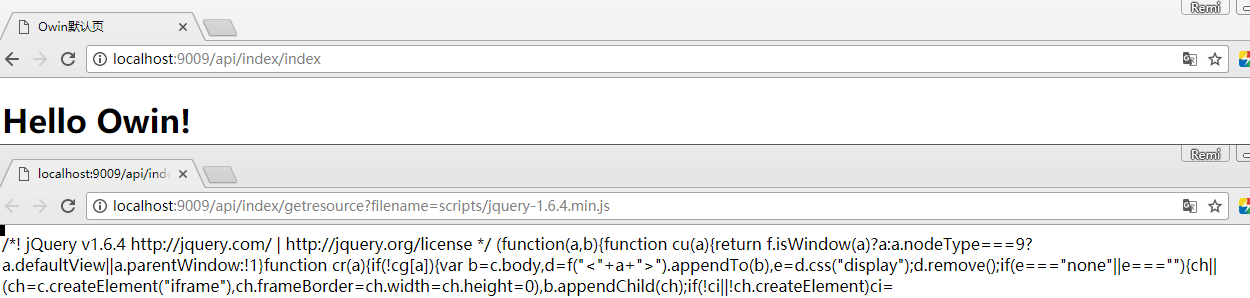
至此,解决了Owin Self Hosted Console 程序加载页面的问题,下一篇将在此基础上新建SignalR程序!
新建一个self hosted Owin+ SignalR Project(1)的更多相关文章
- 新建一个self hosted Owin+ SignalR Project(2)
ASPNET SignalR是为ASP.NET开发人员提供的一个库,可以简化开发人员将实时Web功能添加到应用程序的过程.实时Web功能是指这样一种功能:当所连接的客户端变得可用时服务器代码可以立即向 ...
- Eclipse中在android项目中出现新建一个Activity后,出现整个project的报错以及包导入以后无法执行等等情况分析。
今天用Eclipse去写android项目,然后后面须要建一个Blank Activity后,非常正常的建立的.然后那个Activity是基于ActionBarAtivity,要导入v7,结果由于这 ...
- 18 12 30 新建一个 django project
1. 新建一个 django project 1 2 django-admin.py startproject project_name 特别是在 windows 上,如果报错,尝试用 django- ...
- android studio 导入一个已有的android studio project作为lib使用
android studio 导入一个已有的android studio project作为lib使用 新项目来了. 需要搭建框架. android studio对我来说还是很陌生,之前一个项目在同事 ...
- zynq学习01 新建一个Helloworld工程
1,好早买了块FPGA板,zynq 7010 .终极目标是完成相机图像采集及处理.一个Window C++程序猿才开始学FPGA,一个小菜鸟,准备转行. 2,关于这块板,卖家的官方资料学起来没劲.推荐 ...
- Android学习笔记(一)——新建一个项目
//此系列博文是<第一行Android代码>的学习笔记,如有错漏,欢迎指正! 1.打开Android Studio时出现以下界面,点击”start a new Android Studio ...
- 第一次使用Android Studio时你应该知道的一切配置(二):新建一个属于自己的工程并安装Genymotion模拟器
[声明] 欢迎转载,但请保留文章原始出处→_→ 生命壹号:http://www.cnblogs.com/smyhvae/ 文章来源:http://www.cnblogs.com/smyhvae/p/4 ...
- 新建一个mybatis HelloWorld
1.下载mybatis https://github.com/mybatis/mybatis-3/ 没有梯子好像打不开 下载一个最新版本,我这里下载的是mybatis-3.4.1.zip 里面有myb ...
- Intellij IDEA 新建一个EJB工程(三)
之前都是用IDEA启动JBoss服务器,并在启动的同时将EJB项目部署上去.在构建 artifacts 时遇到很多问题,明明是EJB项目却不能用EJB导出,真是奇怪~~ 后来用Web Applicat ...
随机推荐
- kmp匹配详解
字符串算法都是毒瘤的 一.kmp算法的用处 在文本串中查找模式串的位置,数量 文本串:要在这个字符串查找模式串 模式串:在文本串中查找的字符串 全是废话 二.kmp算法的思想 话说kmp好像是3个发明 ...
- Android组件系列----Intent详解
[声明] 欢迎转载,但请保留文章原始出处→_→ 生命壹号:http://www.cnblogs.com/smyhvae/ 文章来源:http://www.cnblogs.com/smyhvae/p/3 ...
- 【做题】agc016d - XOR Replace——序列置换&环
原文链接 https://www.cnblogs.com/cly-none/p/9813163.html 题意:给出初始序列\(a\)和目标序列\(b\),都有\(n\)个元素.每次操作可以把\(a\ ...
- oracle 连接问题汇总
遇到的情况: 1/后台配置完好,若是连其他的库都是好的,当连接另外的库时,始终连接不上,这是需要考虑到服务端安装文件tnsnames文件中服务名在客户端的安装文件tnsnames文件中是否存在
- npm发包注意
ES6语法的包需要转换为ES5语法 安装bebel npm install --save-dev babel-cli babel-preset-es2015 babel-preset-es2017 b ...
- Series.str——字符串批量处理方法
针对dataframe中的某一行(或列)想做批量字符串处理时,可采用此方法 series.str.python内置的str方法 例如: series.str.replace('A','B') # ...
- postman(四):添加变量
在进行API测试的时候,不同接口之间有时会用到同样的参数,甚至有些值都很少会改变,比如每个请求的ip和端口. 为了提高用例的可读性以及可维护性,可以利用postman的“变量”把经常用到的“固定值”抽 ...
- MSF MS17_010漏洞测试
0x00 window 2003 R2 x86 use exploit/windows/smb/ms17_010_eternalblue show options set rhost 192.168. ...
- HBase Region 各个状态的转换
Region 各个状态的转换 HBase 维护了每个 region 的一个状态信息,并保存在 hbase:meta 中.hbase:meta 本身region的状态信息被持久化到 ZooKeeper. ...
- Deep Learning回顾#之LeNet、AlexNet、GoogLeNet、VGG、ResNet - 我爱机器学习
http://www.cnblogs.com/52machinelearning/p/5821591.html