
SequenceFile文件
SequenceFile文件是Hadoop用来存储二进制形式的key-value对而设计的一种平面文件(Flat File)。目前,也有不少人在该文件的基础之上提出了一些HDFS中小文件存储的解决方案,他们的基本思路就是将小文件进行合并成一个大文件,同时对这些小文件的位置信息构建索引。不过,这类解决方案还涉及到Hadoop的另一种文件格式——MapFile文件。SequenceFile文件并不保证其存储的key-value数据是按照key的某个顺序存储的,同时不支持append操作。
在SequenceFile文件中,每一个key-value被看做是一条记录(Record),因此基于Record的压缩策略,SequenceFile文件可支持三种压缩类型(SequenceFile.CompressionType):
NONE: 对records不进行压缩;
RECORD: 仅压缩每一个record中的value值;
BLOCK: 将一个block中的所有records压缩在一起;
那么,基于这三种压缩类型,Hadoop提供了对应的三种类型的Writer:
SequenceFile.Writer 写入时不压缩任何的key-value对(Record);
- public static class Writer implements java.io.Closeable {
- ...
- //初始化Writer
- void init(Path name, Configuration conf, FSDataOutputStream out, Class keyClass, Class valClass, boolean compress, CompressionCodec codec, Metadata metadata) throws IOException {
- this.conf = conf;
- this.out = out;
- this.keyClass = keyClass;
- this.valClass = valClass;
- this.compress = compress;
- this.codec = codec;
- this.metadata = metadata;
- //创建非压缩的对象序列化器
- SerializationFactory serializationFactory = new SerializationFactory(conf);
- this.keySerializer = serializationFactory.getSerializer(keyClass);
- this.keySerializer.open(buffer);
- this.uncompressedValSerializer = serializationFactory.getSerializer(valClass);
- this.uncompressedValSerializer.open(buffer);
- //创建可压缩的对象序列化器
- if (this.codec != null) {
- ReflectionUtils.setConf(this.codec, this.conf);
- this.compressor = CodecPool.getCompressor(this.codec);
- this.deflateFilter = this.codec.createOutputStream(buffer, compressor);
- this.deflateOut = new DataOutputStream(new BufferedOutputStream(deflateFilter));
- this.compressedValSerializer = serializationFactory.getSerializer(valClass);
- this.compressedValSerializer.open(deflateOut);
- }
- }
- //添加一条记录(key-value,对象值需要序列化)
- public synchronized void append(Object key, Object val) throws IOException {
- if (key.getClass() != keyClass)
- throw new IOException("wrong key class: "+key.getClass().getName() +" is not "+keyClass);
- if (val.getClass() != valClass)
- throw new IOException("wrong value class: "+val.getClass().getName() +" is not "+valClass);
- buffer.reset();
- //序列化key(将key转化为二进制数组),并写入缓存buffer中
- keySerializer.serialize(key);
- int keyLength = buffer.getLength();
- if (keyLength < 0)
- throw new IOException("negative length keys not allowed: " + key);
- //compress在初始化是被置为false
- if (compress) {
- deflateFilter.resetState();
- compressedValSerializer.serialize(val);
- deflateOut.flush();
- deflateFilter.finish();
- } else {
- //序列化value值(不压缩),并将其写入缓存buffer中
- uncompressedValSerializer.serialize(val);
- }
- //将这条记录写入文件流
- checkAndWriteSync(); // sync
- out.writeInt(buffer.getLength()); // total record length
- out.writeInt(keyLength); // key portion length
- out.write(buffer.getData(), 0, buffer.getLength()); // data
- }
- //添加一条记录(key-value,二进制值)
- public synchronized void appendRaw(byte[] keyData, int keyOffset, int keyLength, ValueBytes val) throws IOException {
- if (keyLength < 0)
- throw new IOException("negative length keys not allowed: " + keyLength);
- int valLength = val.getSize();
- checkAndWriteSync();
- //直接将key-value写入文件流
- out.writeInt(keyLength+valLength); // total record length
- out.writeInt(keyLength); // key portion length
- out.write(keyData, keyOffset, keyLength); // key
- val.writeUncompressedBytes(out); // value
- }
- ...
- }
SequenceFile.RecordCompressWriter写入时只压缩key-value对(Record)中的value;
- static class RecordCompressWriter extends Writer {
- ...
- public synchronized void append(Object key, Object val) throws IOException {
- if (key.getClass() != keyClass)
- throw new IOException("wrong key class: "+key.getClass().getName() +" is not "+keyClass);
- if (val.getClass() != valClass)
- throw new IOException("wrong value class: "+val.getClass().getName() +" is not "+valClass);
- buffer.reset();
- //序列化key(将key转化为二进制数组),并写入缓存buffer中
- keySerializer.serialize(key);
- int keyLength = buffer.getLength();
- if (keyLength < 0)
- throw new IOException("negative length keys not allowed: " + key);
- //序列化value值(不压缩),并将其写入缓存buffer中
- deflateFilter.resetState();
- compressedValSerializer.serialize(val);
- deflateOut.flush();
- deflateFilter.finish();
- //将这条记录写入文件流
- checkAndWriteSync(); // sync
- out.writeInt(buffer.getLength()); // total record length
- out.writeInt(keyLength); // key portion length
- out.write(buffer.getData(), 0, buffer.getLength()); // data
- }
- /** 添加一条记录(key-value,二进制值,value已压缩) */
- public synchronized void appendRaw(byte[] keyData, int keyOffset,
- int keyLength, ValueBytes val) throws IOException {
- if (keyLength < 0)
- throw new IOException("negative length keys not allowed: " + keyLength);
- int valLength = val.getSize();
- checkAndWriteSync(); // sync
- out.writeInt(keyLength+valLength); // total record length
- out.writeInt(keyLength); // key portion length
- out.write(keyData, keyOffset, keyLength); // 'key' data
- val.writeCompressedBytes(out); // 'value' data
- }
- } // RecordCompressionWriter
- ...
- }
SequenceFile.BlockCompressWriter 写入时将一批key-value对(Record)压缩成一个Block;
- static class BlockCompressWriter extends Writer {
- ...
- void init(int compressionBlockSize) throws IOException {
- this.compressionBlockSize = compressionBlockSize;
- keySerializer.close();
- keySerializer.open(keyBuffer);
- uncompressedValSerializer.close();
- uncompressedValSerializer.open(valBuffer);
- }
- /** Workhorse to check and write out compressed data/lengths */
- private synchronized void writeBuffer(DataOutputBuffer uncompressedDataBuffer) throws IOException {
- deflateFilter.resetState();
- buffer.reset();
- deflateOut.write(uncompressedDataBuffer.getData(), 0, uncompressedDataBuffer.getLength());
- deflateOut.flush();
- deflateFilter.finish();
- WritableUtils.writeVInt(out, buffer.getLength());
- out.write(buffer.getData(), 0, buffer.getLength());
- }
- /** Compress and flush contents to dfs */
- public synchronized void sync() throws IOException {
- if (noBufferedRecords > 0) {
- super.sync();
- // No. of records
- WritableUtils.writeVInt(out, noBufferedRecords);
- // Write 'keys' and lengths
- writeBuffer(keyLenBuffer);
- writeBuffer(keyBuffer);
- // Write 'values' and lengths
- writeBuffer(valLenBuffer);
- writeBuffer(valBuffer);
- // Flush the file-stream
- out.flush();
- // Reset internal states
- keyLenBuffer.reset();
- keyBuffer.reset();
- valLenBuffer.reset();
- valBuffer.reset();
- noBufferedRecords = 0;
- }
- }
- //添加一条记录(key-value,对象值需要序列化)
- public synchronized void append(Object key, Object val) throws IOException {
- if (key.getClass() != keyClass)
- throw new IOException("wrong key class: "+key+" is not "+keyClass);
- if (val.getClass() != valClass)
- throw new IOException("wrong value class: "+val+" is not "+valClass);
- //序列化key(将key转化为二进制数组)(未压缩),并写入缓存keyBuffer中
- int oldKeyLength = keyBuffer.getLength();
- keySerializer.serialize(key);
- int keyLength = keyBuffer.getLength() - oldKeyLength;
- if (keyLength < 0)
- throw new IOException("negative length keys not allowed: " + key);
- WritableUtils.writeVInt(keyLenBuffer, keyLength);
- //序列化value(将value转化为二进制数组)(未压缩),并写入缓存valBuffer中
- int oldValLength = valBuffer.getLength();
- uncompressedValSerializer.serialize(val);
- int valLength = valBuffer.getLength() - oldValLength;
- WritableUtils.writeVInt(valLenBuffer, valLength);
- // Added another key/value pair
- ++noBufferedRecords;
- // Compress and flush?
- int currentBlockSize = keyBuffer.getLength() + valBuffer.getLength();
- //block已满,可将整个block进行压缩并写入文件流
- if (currentBlockSize >= compressionBlockSize) {
- sync();
- }
- }
- /**添加一条记录(key-value,二进制值,value已压缩). */
- public synchronized void appendRaw(byte[] keyData, int keyOffset, int keyLength, ValueBytes val) throws IOException {
- if (keyLength < 0)
- throw new IOException("negative length keys not allowed");
- int valLength = val.getSize();
- // Save key/value data in relevant buffers
- WritableUtils.writeVInt(keyLenBuffer, keyLength);
- keyBuffer.write(keyData, keyOffset, keyLength);
- WritableUtils.writeVInt(valLenBuffer, valLength);
- val.writeUncompressedBytes(valBuffer);
- // Added another key/value pair
- ++noBufferedRecords;
- // Compress and flush?
- int currentBlockSize = keyBuffer.getLength() + valBuffer.getLength();
- if (currentBlockSize >= compressionBlockSize) {
- sync();
- }
- }
- } // RecordCompressionWriter
- ...
- }
源码中,block的大小compressionBlockSize默认值为1000000,也可通过配置参数io.seqfile.compress.blocksize来指定。
根据三种压缩算法,共有三种类型的SequenceFile文件格式:
1). Uncompressed SequenceFile
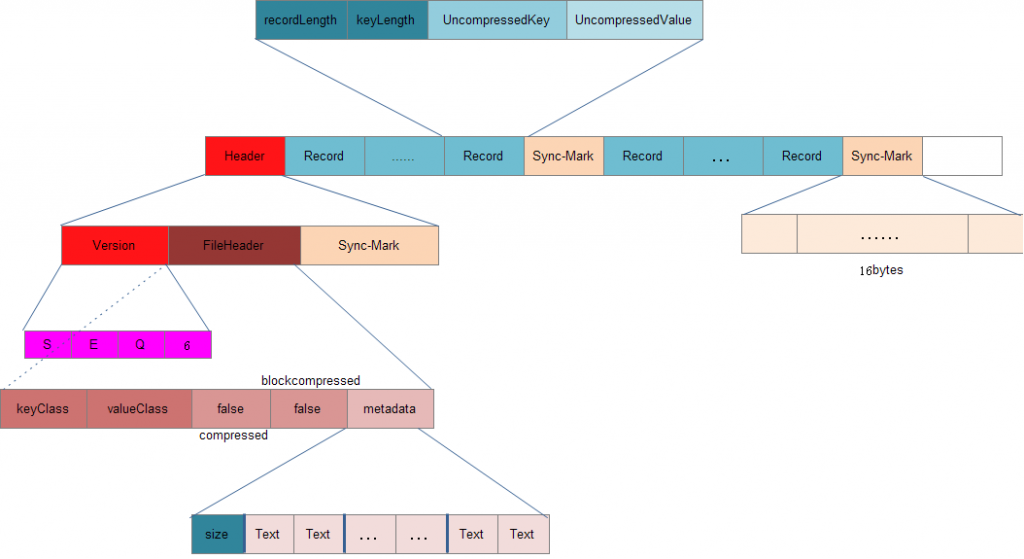
2). Record-Compressed SequenceFile

3). Block-Compressed SequenceFile

SequenceFile文件的更多相关文章
- Hadoop 写SequenceFile文件 源代码
package com.tdxx.hadoop.sequencefile; import java.io.IOException; import org.apache.hadoop.conf.Conf ...
- 基于Hadoop Sequencefile的小文件解决方案
一.概述 小文件是指文件size小于HDFS上block大小的文件.这样的文件会给hadoop的扩展性和性能带来严重问题.首先,在HDFS中,任何block,文件或者目录在内存中均以对象的形式存储,每 ...
- hadoop 将HDFS上多个小文件合并到SequenceFile里
背景:hdfs上的文件最好和hdfs的块大小的N倍.如果文件太小,浪费namnode的元数据存储空间以及内存,如果文件分块不合理也会影响mapreduce中map的效率. 本例中将小文件的文件名作为k ...
- 5.4.1 sequenceFile读写文件、记录边界、同步点、压缩排序、格式
5.4.1 sequenceFile读写文件.记录边界.同步点.压缩排序.格式 HDFS和MapReduce是针对大文件优化的存储文本记录,不适合二进制类型的数据.SequenceFile作 ...
- Hadoop SequenceFile数据结构介绍及读写
在一些应用中,我们需要一种特殊的数据结构来存储数据,并进行读取,这里就分析下为什么用SequenceFile格式文件. Hadoop SequenceFile Hadoop提供的SequenceFil ...
- Hadoop基于文件的数据结构及实例
基于文件的数据结构 两种文件格式: 1.SequenceFile 2.MapFile SequenceFile 1.SequenceFile文件是Hadoop用来存储二进制形式的<key,val ...
- Hadoop之SequenceFile
Hadoop序列化文件SequenceFile能够用于解决大量小文件(所谓小文件:泛指小于black大小的文件)问题,SequenceFile是Hadoop API提供的一种二进制文件支持.这样的二进 ...
- 使用代码查看Nutch爬取的网站后生成的SequenceFile信息
必须针对data文件中的value类型来使用对应的类来查看(把这个data文件,放到了本地Windows的D盘根目录下). 代码: package cn.summerchill.nutch; impo ...
- SequenceFile实例操作
HDFS API提供了一种二进制文件支持,直接将<key,value>对序列化到文件中,该文件格式是不能直接查看的,可以通过hadoop dfs -text命令查看,后面跟上Sequen ...
随机推荐
- Vue父组件接收不到子组件$emit事件的原因分析
通常有两种情况: 事件名称不全是小写.事件名称要求全小写. 不是父子关系.这里的父子关系是严格的父子关系,祖孙关系也不行.只能一层一层触发,这在写树形组件时,很容易掉坑里.
- Expo大作战(三十六)--expo sdk api之 ImagePicker,ImageManipulator,Camera
简要:本系列文章讲会对expo进行全面的介绍,本人从2017年6月份接触expo以来,对expo的研究断断续续,一路走来将近10个月,废话不多说,接下来你看到内容,讲全部来与官网 我猜去全部机翻+个人 ...
- [Hadoop] Windows 下的 Hadoop 2.7.5 环境搭建
原文地址:https://www.cnblogs.com/memento/p/9148721.html 准备说明: jdk:jdk-8u161-windows-x64.exe hadoop:hadoo ...
- python常用模块之pickle
python1个json模块和1个pickle模块都是用于序列化的模块. 其中前文介绍过json模块.json模块只能序列化普通字符,比如字典.列表等.但是如果是函数呢?json其实是无法序列化的.这 ...
- [20180118]tstats的问题.txt
[20180118]tstats的问题.txt --//关于使用tstats收集处理统计信息,可以看链接http://blog.itpub.net/267265/viewspace-1987839/ ...
- [20171124]手工使用Seed_Database.dfb和Seed_Database.ctl建库.txt
[20171124]手工使用Seed_Database.dfb和Seed_Database.ctl建库.txt --//昨天看yueli34的帖子,链接http://www.itpub.net/thr ...
- Spring Boot 静态页面
spring boot项目只有src目录,没有webapp目录,会将静态访问(html/图片等)映射到其自动配置的静态目录,如下 /static /public /resources /META-IN ...
- LCD显示异常分析——开机闪现花屏【转】
转自LCD显示异常分析--开机闪现花屏 最近在工作中,有同事遇到LCD开机瞬间会闪现雪花屏的问题,而这类问题都有个共同点,那就是都发生在带GRAM的屏上,同样的问题,在休眠唤醒时也会出现. 其实这类问 ...
- fedora更新
先换源再更新,否则等的太久,如果已经开始了直接ctrl+c取消 # dnf update
- python 计时累积超过24小时时继续往上累加
最近在做一个工具,要求在工具上面加上程序运行的时间,所以做了个计时器 在网上找了很多发现都是24小时制的,超过24小时后就会回0 然后自己根据24小时制修改了一个不停累加时间的 若是想超过24小时后以 ...