
Linux学习8-CentOS部署自己本地的django项目
前言
自己本地写好的django项目,如何部署到linux服务器上,让其他的小伙伴也能访问呢?本篇以centos系统为例,把本地写好的django项目部署到linux服务器上
环境准备:
环境准备:
1.一台Linux服务器, 操作系统: CentOS 7.4 64位
2.python3.6 (前面已经搭建好)
3.django-2.1.4
django环境准备
前面已经安装好了python3.6.8的环境并且pip也配置好了,安装django直接用pip安装就可以了,安装的django版本位django-2.1.4
pip install django
[root@yoyo ~]# pip -V

pip 18.1 from /usr/local/python3/lib/python3.6/site-packages/pip (python 3.6)

[root@yoyo ~]# pip install django

Looking in indexes: http://mirrors.aliyun.com/pypi/simple/

Collecting django

  Downloading http://mirrors.aliyun.com/pypi/packages/fd/9a/0c028ea0fe4f5803dda1a7afabeed958d0c8b79b0fe762ffbf728db3b90d/Django-2.1.4-py3-none-any.whl (7.3MB)

    100% |████████████████████████████████| 7.3MB 4.8MB/s

Collecting pytz (from django)

  Downloading http://mirrors.aliyun.com/pypi/packages/f8/0e/2365ddc010afb3d79147f1dd544e5ee24bf4ece58ab99b16fbb465ce6dc0/pytz-2018.7-py2.py3-none-any.whl (506kB)

    100% |████████████████████████████████| 512kB 60.9MB/s

Installing collected packages: pytz, django

Successfully installed django-2.1.4 pytz-2018.7
django项目代码
linux服务器上的django环境已经准备好了,接下来就是把在本地电脑已经调通的django项目代码全部复制到服务器上的某个目录下
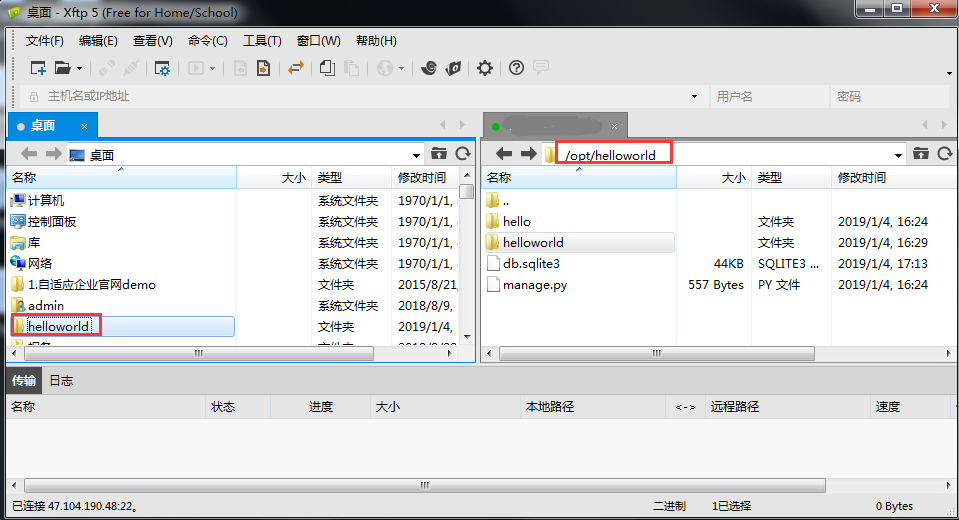
如下图,通过xftp工具把本地项目代码全部传到/opt/helloworld目录下,前提是在本地浏览器测试没问题了。
启动django
打开到helloworld目录,启动服务:python manage.py runserver
[root@yoyo ~]# cd /opt/helloworld/

[root@yoyo helloworld]# python manage.py runserver

Performing system checks...

System check identified no issues (0 silenced).

You have 18 unapplied migration(s). Your project may not work properly until you apply the migrations for app(s): admin, auth, contenttypes, hello, sessions.

Run 'python manage.py migrate' to apply them.

January 04, 2019 - 08:31:40

Django version 2.1.4, using settings 'helloworld.settings'

Starting development server at http://127.0.0.1:8000/

Quit the server with CONTROL-C.
由于这个是搭建在服务器上的,所以只能本机访问:http://127.0.0.1:8000/,可以用python代码验证下
[root@yoyo ~]# python

Python 3.6.8 (default, Jan  2 2019, 16:43:17)

[GCC 4.8.5 20150623 (Red Hat 4.8.5-16)] on linux

Type "help", "copyright", "credits" or "license" for more information.

>>> import requests

>>> r = requests.get("http://127.0.0.1:8000/")

>>> r.status

>>> r.status_code

200

>>>
接下来登录阿里云ECS后台-安全组-配置规则-开放8000端口,在浏览器上输入http://47.104.xx.xx:8000/发现无法访问
外网访问django
如果启动方式是 python manage.py runserver默认只能本机访问,为了放开访问权限,让其他人也能访问到这台机器,需加参数0.0.0.0:端口
python manage.py runserver 0.0.0.0:8000
^C[root@yoyo helloworld]# python manage.py runserver 0.0.0.0:8000

Performing system checks...

System check identified no issues (0 silenced).

January 04, 2019 - 09:57:15

Django version 2.1.4, using settings 'helloworld.settings'

Starting development server at http://0.0.0.0:8000/

Quit the server with CONTROL-C.

Invalid HTTP_HOST header: '47.104.x.x:8000'. You may need to add '47.104.x.x' to ALLOWED_HOSTS.

Bad Request: /

[04/Jan/2019 09:57:20] "GET / HTTP/1.1" 400 59588
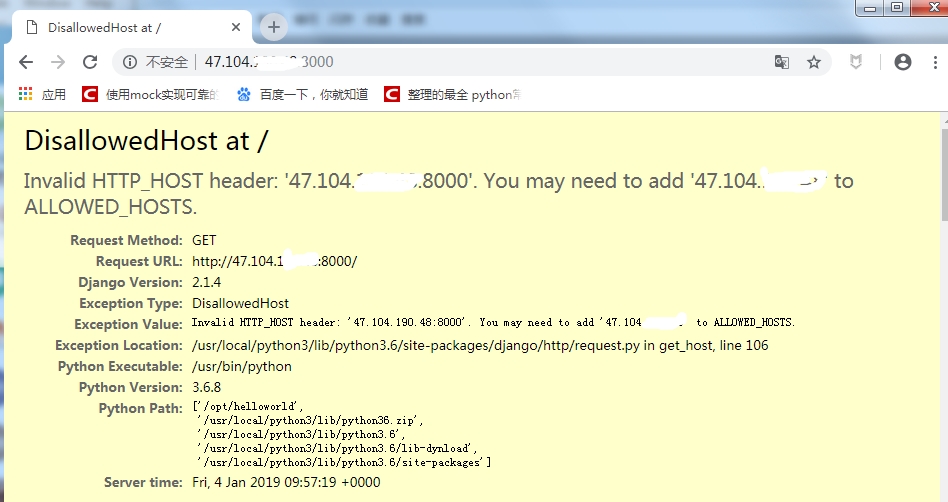
启动服务后在浏览器输入:http://47.104.x.x:8000/ ,会报错‘Invalid HTTP_HOST header: '47.104.x.x:8000'. You may need to add '47.104.x.x' to ALLOWED_HOSTS.’
关闭debug,设置ALLOWED_HOSTS
打开helloworld/settings.py文件,找到这2行代码
# SECURITY WARNING: don't run with debug turned on in production!

DEBUG = True

ALLOWED_HOSTS = []
关闭debug调试功能,ALLOWED_HOSTS设置为全部
# SECURITY WARNING: don't run with debug turned on in production!

DEBUG = False

ALLOWED_HOSTS = ["*"]
修改完成后保存下,重启django服务
python manage.py runserver 0.0.0.0:8000
接着在本地浏览器上访问,就能正常的打开页面了
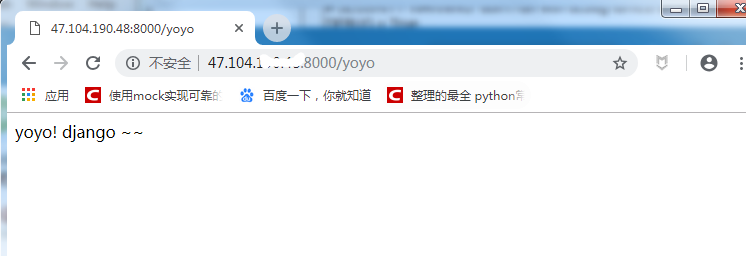
到这里一个简单的django的demo项目就已经成功的部署到linux服务器上了,于是就可以通知你的小伙伴看你做的网站咯~
交流QQ群:779429633
Linux学习8-CentOS部署自己本地的django项目的更多相关文章
- Linux学习django-CentOS部署自己本地的django项目
前言 自己本地写好的django项目,如何部署到linux服务器上,让其他的小伙伴也能访问呢?本篇以centos系统为例,把本地写好的django项目部署到linux服务器上环境准备: 环境准备:1. ...
- Linux学习之Centos(三)------系统文件目录及含义详解
Linux学习之Centos 之三------文件目录及含义 在了解了每个文件的相关种类与属性,以及了解了如何更改文件属性/权限的相关信息后,再来要了解的就是, 为什么每套Linux distribu ...
- Linux学习之CentOS(二十二)--单用户模式下修改Root用户的密码
在上一篇随笔里面详细讲解了Linux系统的启动过程 (Linux学习之CentOS(二十一)--Linux系统启动详解),我们知道Linux系统的启动级别一共有6种级别,通过 /etc/inittab ...
- [转] Linux学习之CentOS(十三)--CentOS6.4下Mysql数据库的安装与配置
from: http://www.cnblogs.com/xiaoluo501395377/archive/2013/04/07/3003278.html 如果要在Linux上做j2ee开发,首先得 ...
- linux学习之centos(三):网卡配置
Linux系统版本:Centos 6.5 在linux学习之centos(二):虚拟网络三种连接方式和SecureCRT的使用中,使用远程工具SecureCRT,通过“ifconfig eth0 + ...
- Linux学习之CentOS(十三)--CentOS6.4下Mysql数据库的安装与配置
原文:http://www.cnblogs.com/xiaoluo501395377/archive/2013/04/07/3003278.html 如果要在Linux上做j2ee开发,首先得搭建好j ...
- Linux学习之CentOS(五)--CentOS下VMware-Tools安装
已经进入到了Linux学习之CentOS的第六篇随笔了,所以这里就介绍一下VMware-Tools的安装. VMware-Tools的安装 VMware-Tools 主要的功能就是让用户在虚拟机和真实 ...
- Linux学习之CentOS(三)--初识linux的文件系统以及用户组等概念
Linux学习之CentOS(三)--初识linux的文件系统以及用户组等概念 进入到了Linux学习之CentOS第三篇了,这篇文章主要记录下对linux文件系统的初步认识,以及用户组.用户权限.文 ...
- Linux学习之CentOS(二)--初识linux的一些常用命令
Linux学习之CentOS(二)--初识linux的一些常用命令 在VM上安装完了CentOS6.4以后,看着linux系统成功跑起来,心里小激动了一把......但是前方学习的道路还很遥远... ...
随机推荐
- Why does Delphi XE7 IDE hangs and fails on out of memory exception?
引自: https://stackoverflow.com/questions/27701294/why-does-delphi-xe7-ide-hangs-and-fails-on-out-of ...
- Linux内核剖析(二)Linux内核绪论
什么是内核 内核是操作系统最基本的部分.它是为众多应用程序提供对计算机硬件的安全访问的一部分软件,这种访问是有限的,并且内核决定一个程序在什么时候对某部分硬件操作多长时间.内核的分类可分为单内核和双内 ...
- Cordova 项目 加载不出XML文件
解决方法:copy bundle 将文件移除再添加
- Generate google sitemap xml
方式一. XNamespace xNamespace = "http://www.sitemaps.org/schemas/sitemap/0.9"; XNamespace xht ...
- 训练的时候 nvidia:自动刷新
间隔一秒自动刷新: watch -n 1 -d nvidia-smi
- 数据类型表(DELPHI、C++)
delphi整型数据表 Integer -2147483648..2147483647 signed 32-bit Cardinal 0..4294967295 unsigned 32-bit Sho ...
- kafka性能测试
参考阿里中间件团队博客的博文 Kafka vs RocketMQ——多Topic对性能稳定性的影响 使用的测试工具为Jmeter
- 手写一个selenium浏览器池
维护一组浏览器,实现每分钟1000次查询.DriverPool使用变幻版只初始化一次的单例模式.维护每个浏览器的当前是否使用的状态. 不需要等待请求来了,临时开浏览器,开一个浏览器会耽误6秒钟. 可以 ...
- int和Integer有什么区别
Java是一个近乎纯洁的面向对象编程语言,但是为了编程的方便还是引入了基本数据类型,但是为了能够将这些基本数据类型当成对象操作,Java为每一个基本数据类型都引入了对应的包装类型(wrapper cl ...
- [原]CentOS7安装Rancher2.1并部署kubernetes (三)---解决登录kubernets超时和部署测试Pod和Containter[nginx为例]
################## Rancher v2.1.7 + Kubernetes 1.13.4 ################ ##################### ...