
使用VS2017遇到的一些小问题
一、去掉预编译头
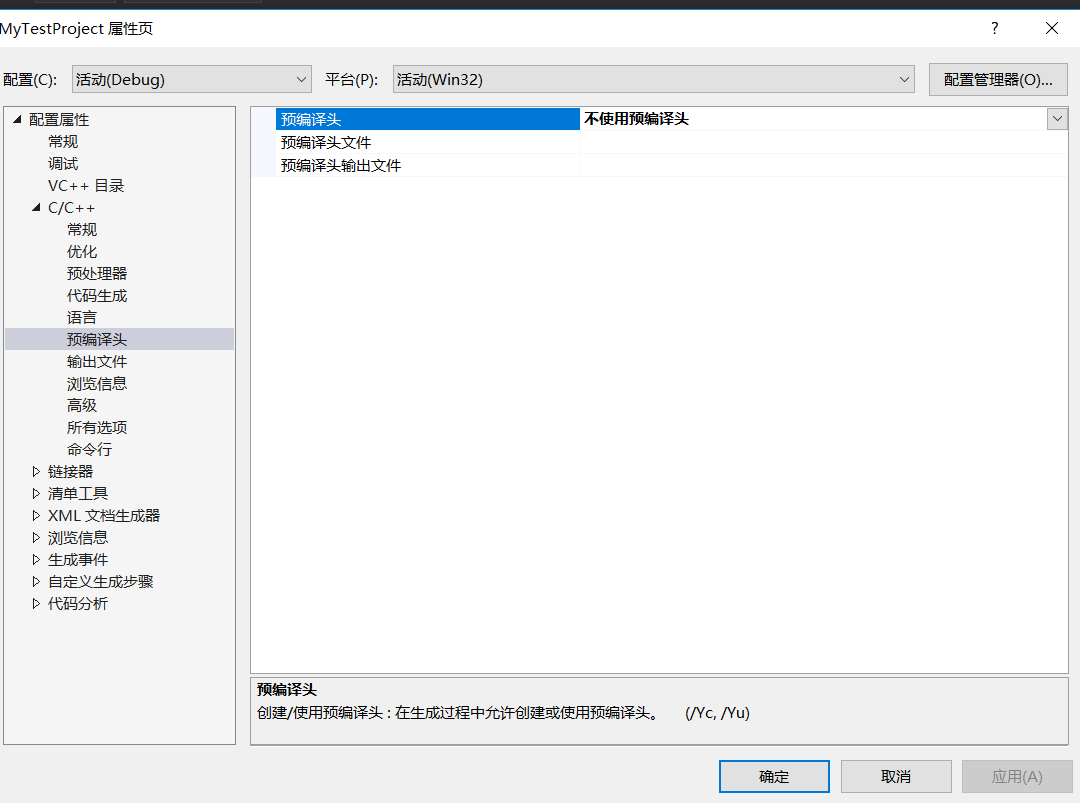
使用VS2017的时候,发现总是会有“pch.h”,“stdafx.h”这类预编译头,去掉还会报错。作为新手的我,暂时用不到这些预编译头,于是想去掉它们。
右键项目->属性->C/C++->预编译头,如下图所示,然后选择不使用预编译头即可。
二、设置C++标准
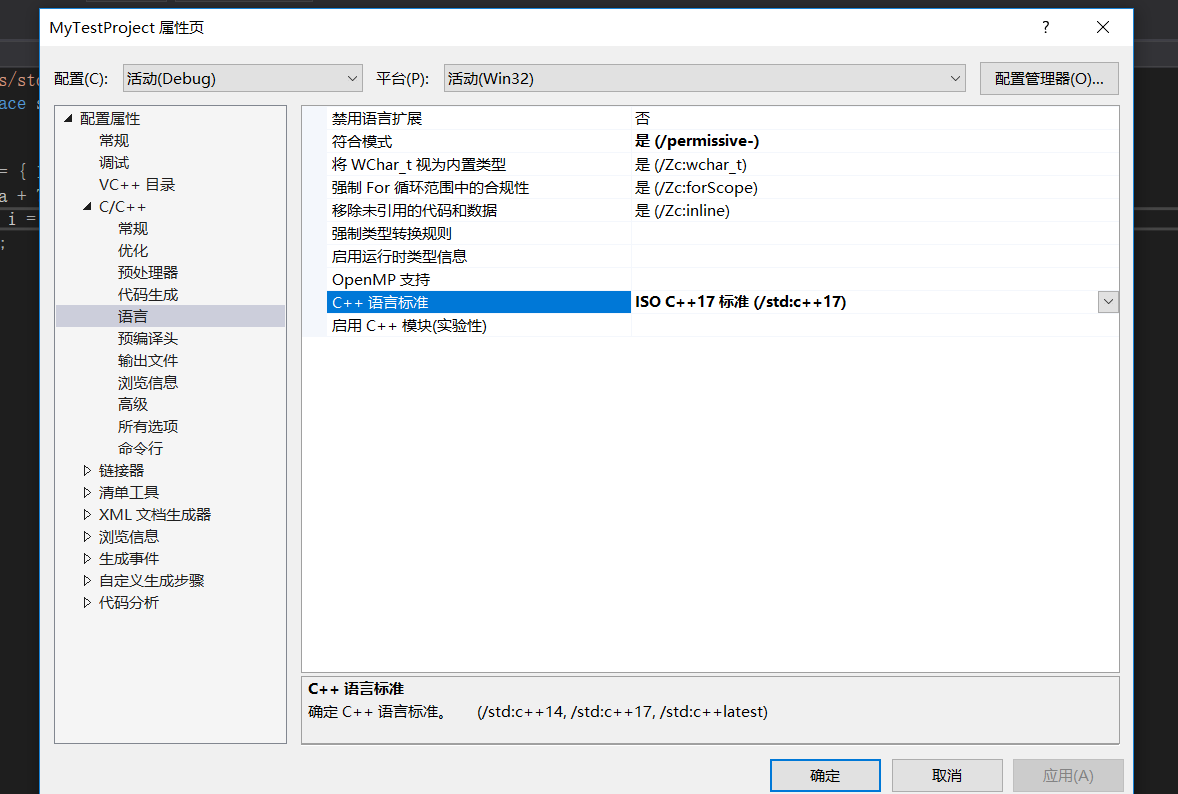
用VS2017写C++的时候想设置一下C++标准,设置成C++14或C++17。
右键项目->属性->C/C++->语言,如下图所示,在C++语言标准选择想要的C++版本即可。
三、使用<bits/stdc++.h>头文件
因为直前用别的编译器都习惯用#include<bits/stdc++.h>都懒得打头文件了。然后,发现VS2017使用这个头文件会报错提示找不到,于是上网找了一下办法。
既然VS2017没有,我们就自己加上去,找到VS2017安装目录,然后找到include文件,我的文件路径是这个:
C:\Program Files (x86)\Microsoft Visual Studio\2017\Community\VC\Tools\MSVC\14.16.27023\include
然后自己创一个bits文件夹,然后进入bits文件夹,创建stdc++.h文件,添加下面的内容:
// 17.4.1.2 Headers

// C

#ifndef _GLIBCXX_NO_ASSERT

#include <cassert>

#endif

#include <cctype>

#include <cerrno>

#include <cfloat>

#include <ciso646>

#include <climits>

#include <clocale>

#include <cmath>

#include <csetjmp>

#include <csignal>

#include <cstdarg>

#include <cstddef>

#include <cstdio>

#include <cstdlib>

#include <cstring>

#include <ctime>

#if __cplusplus >= 201103L

#include <ccomplex>

#include <cfenv>

#include <cinttypes>

#include <cstdalign>

#include <cstdbool>

#include <cstdint>

#include <ctgmath>

#include <cwchar>

#include <cwctype>

#endif

// C++

#include <algorithm>

#include <bitset>

#include <complex>

#include <deque>

#include <exception>

#include <fstream>

#include <functional>

#include <iomanip>

#include <ios>

#include <iosfwd>

#include <iostream>

#include <istream>

#include <iterator>

#include <limits>

#include <list>

#include <locale>

#include <map>

#include <memory>

#include <new>

#include <numeric>

#include <ostream>

#include <queue>

#include <set>

#include <sstream>

#include <stack>

#include <stdexcept>

#include <streambuf>

#include <string>

#include <typeinfo>

#include <utility>

#include <valarray>

#include <vector>

#if __cplusplus >= 201103L

#include <array>

#include <atomic>

#include <chrono>

#include <condition_variable>

#include <forward_list>

#include <future>

#include <initializer_list>

#include <mutex>

#include <random>

#include <ratio>

#include <regex>

#include <scoped_allocator>

#include <system_error>

#include <thread>

#include <tuple>

#include <typeindex>

#include <type_traits>

#include <unordered_map>

#include <unordered_set>

#endif

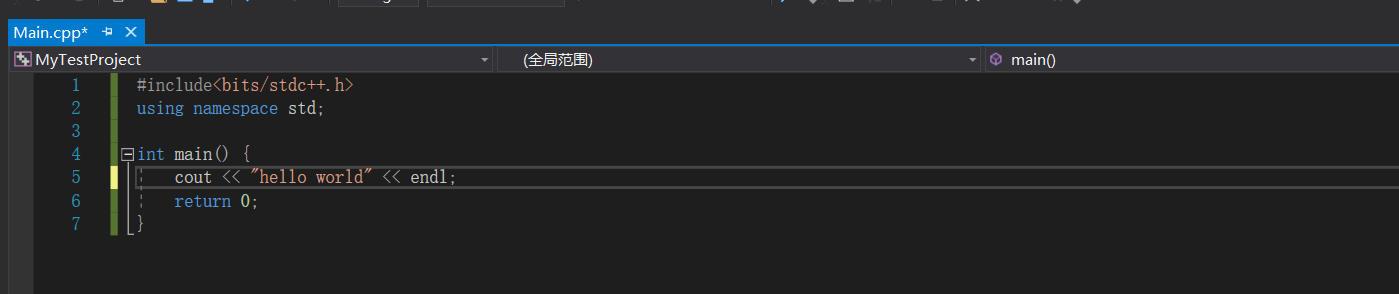
添加完成之后,我们就能正常地使用#include<bits/stdc++.h>了。
使用VS2017遇到的一些小问题的更多相关文章
- 【VS工具】vs2017中的一些小功能
一.json转为类 1.打开一个json文件,复制 2.打开一个.cs文件,将json粘贴为类 3.got it 二.C#交互窗口 1.视图->其他窗口->C#交互窗口 2.打开了一个窗 ...
- VS2017 - Winform 简单托盘小程序
界面比较简单,主要两个button 一个NotifyIcon 和 右键菜单 控件, NotifyIcon 属性,如下: 并为NotifyIcon指定了DoubleClick事件: 主窗体增加两个事件: ...
- Asp.NetCore1.1版本没了project.json,这样来生成跨平台包
本章将要和大家分享的是Asp.NetCore1.1版本去掉了project.json后如何打包生成跨平台包, 为了更好跟进AspNetCore的发展,把之前用来做netcore开发的vs2015卸载后 ...
- Visual studio 编辑combobox程序卡死的问题
问题描述:使用vs2017开发一个winform小程序,一用combobox就卡死. 问题解决:关闭有道词典的取词功能. 软件开多了,就容易有冲突啊!
- 【asp.net core】Publish to a Linux-Ubuntu 14.04 Server Production Environment
Submary 又升级了,目录结构有变化了 . project.json and Visual Studio 2015 with .NET Core On March 7, 2017, the .NE ...
- Vs2017 typescript 开发小问题
最近想写点ts的东西,以前用vs2015很方便,直接创建一个ts app项目就折腾了. Vs2017打开,居然发现这个项目模板不见了. 于是研究了一下,由于原来的ts app项目就是一个asp.n ...
- windows10 vs2017编译opencv_contrib3.4.7的小坑及编译好的资源
1.注意要用正斜杠 / 不要用 \ https://github.com/opencv/opencv/issues/11655 CMake Error at cmake/OpenCVModu ...
- vs2017 .net core WebApp 去掉ApplicationInsights
vs2017新建的 .net core WebApp都内置了这个遥测中间件进去,嗯,用AZURE的话是不错能无缝支持.但不用AZURE就没什么用了. 为了不占地方和提高一点点初始启动的速度,对新建的项 ...
- [干货来袭]C#7.0新特性(VS2017可用)
前言 微软昨天发布了新的VS 2017 ..随之而来的还有很多很多东西... .NET新版本 ASP.NET新版本...等等..太多..实在没消化.. 分享一下其实2016年12月就已经公布了的C#7 ...
随机推荐
- Authentication using SASL/Kerberos
Prerequisites KerberosIf your organization is already using a Kerberos server (for example, by using ...
- dapper.common新增概念object to sql
Dapper.Common About author Email:@qq.com QQ: QQGroup: Config DbContextFactory.AddDataSource(new Data ...
- ffmpeg开发文档
libavcodec - 编码解码器 libavdevice - 输入输出设备的支持 libavfilter - 视音频滤镜支持 libavformat - 视音频等格式的解析 libavutil - ...
- 配置 Log4j 以便查看 MyBatis 操作数据库的过程
在 src/main/resources中添加 log4j.properties 配置文件 ,输入如下内 容.#全局面已直 log4j .rootLogger=ERROR, stdout #MyBat ...
- Java自学-数字与字符串 数学方法
Java Math类常用方法 java.lang.Math提供了一些常用的数学运算方法,并且都是以静态方法的形式存在 步骤 1 : 四舍五入, 随机数,开方,次方,π,自然常数 package dig ...
- Beego 学习笔记12:文件的操作
文件的操作 1> 此事例操作的是text文件 2> 文件的操作有读取text内容,将内容写入到文件中,删除文件,创建文件 3> 新建一个控制器,名为rwfil ...
- JavaScript 之 页面加载事件
一.onload 加载事件 onload 是 window 对象的一个事件,也可以省略 window 直接使用. 常用方式: <head><script> windown.on ...
- SpringBoot2.x的Maven依赖配置
本篇主要说明以下内容: 1.SpringBoot2.x中Maven的配置内容,即:pom.xml的内容说明 1 Maven依赖的配置方式 使用Maven来配置SpringBoot2.x,有两种方式: ...
- 关于IE环境下按回车键会自动触发button 按钮的点击事件的解决方案
今天项目中遇到IE不兼容的问题,于是就根据问题进行修改,修改过程中发现,在输入框内用扫码枪扫描东西后会自动执行页面下面的button按钮,但是其它浏览不会出现这样的问题. 解决方案: 1.用a标签 2 ...
- 【比赛游记】(THUPC,CTS,APIO)2019四连爆蛋记
5 月 11 日 坐飞机来到帝都,报道 THUPC. 试机题有皮配,不会. 晚上吃全聚德,喝星巴克.奢侈. 5 月 12 日 早上打 THUPC. 咕到 9 点半开始,到 2 点半结束.