
k8s安装dashboard
https://github.com/kubernetes/dashboard
2、安装直接使用官方文件就行(如果地址失效去github 看一下)
wget   https://raw.githubusercontent.com/kubernetes/dashboard/v1.10.1/src/deploy/recommended/kubernetes-dashboard.yaml

kubectl apply -f  kubernetes-dashboard.yaml
3、我在master执行完现在如下
[root@master ~]# kubectl get pods --all-namespaces

NAMESPACE     NAME                                    READY   STATUS    RESTARTS   AGE

kube-system   coredns-576cbf47c7-2g27x                1/1     Running   0          18h

kube-system   coredns-576cbf47c7-47mgd                1/1     Running   0          18h

kube-system   etcd-master                             1/1     Running   0          18h

kube-system   kube-apiserver-master                   1/1     Running   0          18h

kube-system   kube-controller-manager-master          1/1     Running   0          18h

kube-system   kube-flannel-ds-amd64-hw277             1/1     Running   4          18h

kube-system   kube-flannel-ds-amd64-j5jcr             1/1     Running   1          18h

kube-system   kube-proxy-8tfsp                        1/1     Running   1          18h

kube-system   kube-proxy-k6k79                        1/1     Running   0          18h

kube-system   kube-scheduler-master                   1/1     Running   0          18h

kube-system   kubernetes-dashboard-65c76f6c97-htfxt   1/1     ImagePullBackOff 0 18h

 #ImagePullBackOff:这个状态是有问题的,然后我就各种百度,从启服务器,发下没有什么卵用啊,初学就是比较费劲,然后才百度出来下面的解决方法
[root@master ~]# kubectl describe -n kube-system pod/kubernetes-dashboard-65c76f6c97-htfxt

Name:               kubernetes-dashboard-65c76f6c97-htfxt

Namespace:          kube-system

Priority:           0

PriorityClassName:  <none>

Node:               node01/172.21.0.14

Start Time:         Sun, 13 Oct 2019 19:42:52 +0800

Labels:             k8s-app=kubernetes-dashboard

                    pod-template-hash=65c76f6c97

Annotations:        <none>

Status:             Running

IP:                 10.244.1.3

Controlled By:      ReplicaSet/kubernetes-dashboard-65c76f6c97

Containers:

  kubernetes-dashboard:

    Container ID:  docker://7f9d2b3f22112c761af8c451376fb2155ac2014f7c13a4a7cda8ebcefebb0de3

    Image:         k8s.gcr.io/kubernetes-dashboard-amd64:v1.10.1

    Image ID:      docker://sha256:f9aed6605b814b69e92dece6a50ed1e4e730144eb1cc971389dde9cb3820d124

    Port:          8443/TCP

    Host Port:     0/TCP

    Args:

      --auto-generate-certificates

    State:          Running

      Started:      Sun, 13 Oct 2019 20:20:58 +0800

    Ready:          True

    Restart Count:  0

    Liveness:       http-get https://:8443/ delay=30s timeout=30s period=10s #success=1 #failure=3

    Environment:    <none>

    Mounts:

      /certs from kubernetes-dashboard-certs (rw)

      /tmp from tmp-volume (rw)

      /var/run/secrets/kubernetes.io/serviceaccount from kubernetes-dashboard-token-m4s7k (ro)

Conditions:

  Type              Status

  Initialized       True

  Ready             True

  ContainersReady   True

  PodScheduled      True

Volumes:

  kubernetes-dashboard-certs:

    Type:        Secret (a volume populated by a Secret)

    SecretName:  kubernetes-dashboard-certs

    Optional:    false

  tmp-volume:

    Type:    EmptyDir (a temporary directory that shares a pod's lifetime)

    Medium:

  kubernetes-dashboard-token-m4s7k:

    Type:        Secret (a volume populated by a Secret)

    SecretName:  kubernetes-dashboard-token-m4s7k

    Optional:    false

QoS Class:       BestEffort

Node-Selectors:  <none>

Tolerations:     node-role.kubernetes.io/master:NoSchedule

                 node.kubernetes.io/not-ready:NoExecute for 300s

                 node.kubernetes.io/unreachable:NoExecute for 300s

Events:

  Type     Reason                  Age                 From               Message

  ----     ------                  ----                ----               -------

  Normal   Scheduled               60m                 default-scheduler  Successfully assigned kube-system/kubernetes-dashboard-65c76f6c97-htfxt to node01

  Normal   Pulling                 58m (x4 over 60m)   kubelet, node01    pulling image "k8s.gcr.io/kubernetes-dashboard-amd64:v1.10.1"

  Warning  Failed                  58m (x4 over 60m)   kubelet, node01    Failed to pull image "k8s.gcr.io/kubernetes-dashboard-amd64:v1.10.1": rpc error: code = Unknown desc = Error response from daemon: Get https://k8s.gcr.io/v2/: net/http: request canceled while waiting for connection (Client.Timeout exceeded while awaiting headers)

  Warning  Failed                  58m (x4 over 60m)   kubelet, node01    Error: ErrImagePull

  Normal   BackOff                 57m (x6 over 60m)   kubelet, node01    Back-off pulling image "k8s.gcr.io/kubernetes-dashboard-amd64:v1.10.1"

  Warning  Failed                  50m (x37 over 60m)  kubelet, node01    Error: ImagePullBackOff

  Warning  FailedMount             28m                 kubelet, node01    MountVolume.SetUp failed for volume "kubernetes-dashboard-certs" : couldn't propagate object cache: timed out waiting for the condition

  Warning  FailedMount             28m                 kubelet, node01    MountVolume.SetUp failed for volume "kubernetes-dashboard-token-m4s7k" : couldn't propagate object cache: timed out waiting for the condition

  Warning  FailedCreatePodSandBox  28m                 kubelet, node01    Failed create pod sandbox: rpc error: code = Unknown desc = failed to set up sandbox container "0ac235fed359b9d102282bcc816ff3de7c9e26d18270067761f5304aa998d747" network for pod "kubernetes-dashboard-65c76f6c97-htfxt": NetworkPlugin cni failed to set up pod "kubernetes-dashboard-65c76f6c97-htfxt_kube-system" network: open /run/flannel/subnet.env: no such file or directory

  Warning  FailedCreatePodSandBox  28m                 kubelet, node01    Failed create pod sandbox: rpc error: code = Unknown desc = failed to set up sandbox container "233c431e6bceddf5f315f1b8aac762359202ca5a13cd4e4d2fd6a2aaf4123cd2" network for pod "kubernetes-dashboard-65c76f6c97-htfxt": NetworkPlugin cni failed to set up pod "kubernetes-dashboard-65c76f6c97-htfxt_kube-system" network: open /run/flannel/subnet.env: no such file or directory

  Normal   SandboxChanged          28m (x3 over 28m)   kubelet, node01    Pod sandbox changed, it will be killed and re-created.

  Warning  FailedCreatePodSandBox  28m                 kubelet, node01    Failed create pod sandbox: rpc error: code = Unknown desc = failed to set up sandbox container "0de536b8aa18baa69b6fbdd645063b61ee7fe0fb141b063a0387872e216a6d18" network for pod "kubernetes-dashboard-65c76f6c97-htfxt": NetworkPlugin cni failed to set up pod "kubernetes-dashboard-65c76f6c97-htfxt_kube-system" network: open /run/flannel/subnet.env: no such file or directory

  Normal   Pulling                 27m (x3 over 28m)   kubelet, node01    pulling image "k8s.gcr.io/kubernetes-dashboard-amd64:v1.10.1"

  Warning  Failed                  27m (x3 over 28m)   kubelet, node01    Failed to pull image "k8s.gcr.io/kubernetes-dashboard-amd64:v1.10.1": rpc error: code = Unknown desc = Error response from daemon: Get https://k8s.gcr.io/v2/: net/http: request canceled while waiting for connection (Client.Timeout exceeded while awaiting headers)

  Warning  Failed                  27m (x3 over 28m)   kubelet, node01    Error: ErrImagePull

  Normal   BackOff                 26m (x4 over 28m)   kubelet, node01    Back-off pulling image "k8s.gcr.io/kubernetes-dashboard-amd64:v1.10.1"

  Warning  Failed                  23m (x14 over 28m)  kubelet, node01    Error: ImagePullBackOff
结果是镜像不存在,我是阿里云所有直接从阿里云pull,在打包,然后在看,还是不行,然后又一顿百度,

docker pull  mirrorgooglecontainers/kubernetes-dashboard-amd64:v1.10.1

docker tag mirrorgooglecontainers/kubernetes-dashboard-amd64:v1.10.1 k8s.gcr.io/kubernetes-dashboard-amd64:v1.10.1
一顿百度解决方法如下: 查看详细信息,发下pod在node01 上运行的,然后吧镜像save 一份到node01服务器就好了,或者直接在node01上面直接pull
[root@master ~]# kubectl  get pods --all-namespaces -o wide

NAMESPACE     NAME                                    READY   STATUS    RESTARTS   AGE   IP            NODE     NOMINATED NODE

kube-system   coredns-576cbf47c7-2g27x                1/1     Running   0          18h   10.244.0.4    master   <none>

kube-system   coredns-576cbf47c7-47mgd                1/1     Running   0          18h   10.244.0.5    master   <none>

kube-system   etcd-master                             1/1     Running   0          18h   172.21.0.10   master   <none>

kube-system   kube-apiserver-master                   1/1     Running   0          18h   172.21.0.10   master   <none>

kube-system   kube-controller-manager-master          1/1     Running   0          18h   172.21.0.10   master   <none>

kube-system   kube-flannel-ds-amd64-hw277             1/1     Running   4          18h   172.21.0.14   node01   <none>

kube-system   kube-flannel-ds-amd64-j5jcr             1/1     Running   1          18h   172.21.0.10   master   <none>

kube-system   kube-proxy-8tfsp                        1/1     Running   1          18h   172.21.0.14   node01   <none>

kube-system   kube-proxy-k6k79                        1/1     Running   0          18h   172.21.0.10   master   <none>

kube-system   kube-scheduler-master                   1/1     Running   0          18h   172.21.0.10   master   <none>

kube-system   kubernetes-dashboard-65c76f6c97-htfxt   1/1     Running   0          18h   10.244.1.3    node01   <none>
4、删除现有的dashboard服务,dashboard服务的namespace是kube-system,但是该服务的类型是ClusterIP,不便于我们通过浏览器访问,因此需要改成NodePort型的;
kubectl delete service kubernetes-dashboard --namespace=kube-system
5、执行以下命令,创建dashboard服务的配置文件
cat <<EOF >  ~/dashboard-svc.yaml

kind: Service

apiVersion: v1

metadata:

  labels:

    k8s-app: kubernetes-dashboard

  name: kubernetes-dashboard

  namespace: kube-system

spec:

  type: NodePort

  ports:

    - port: 443

      targetPort: 8443

  selector:

    k8s-app: kubernetes-dashboard

EOF
6、用刚刚创建的yaml文件创建新的dashboard服务:
kubectl create -f ~/dashboard-svc.yaml
7、想要访问dashboard服务,就要有访问权限,这里需要先设置一个dashboard服务的权限和绑定关系,执行以下命令创建对应的资源文件dashboard-svc-account.yaml:
cat <<EOF >  ~/dashboard-svc-account.yaml

apiVersion: v1

kind: ServiceAccount

metadata:

  labels:

    k8s-app: kubernetes-dashboard

  name: kubernetes-dashboard-admin

  namespace: kube-system

---

apiVersion: rbac.authorization.k8s.io/v1beta1

kind: ClusterRoleBinding

metadata:

  name: kubernetes-dashboard-admin

  labels:

    k8s-app: kubernetes-dashboard

roleRef:

  apiGroup: rbac.authorization.k8s.io

  kind: ClusterRole

  name: cluster-admin

subjects:

- kind: ServiceAccount

  name: kubernetes-dashboard-admin

  namespace: kube-system

EOF
8、执行命令创建ServiceAccount和ClusterRoleBinding:
kubectl create -f ~/dashboard-svc-account.yaml
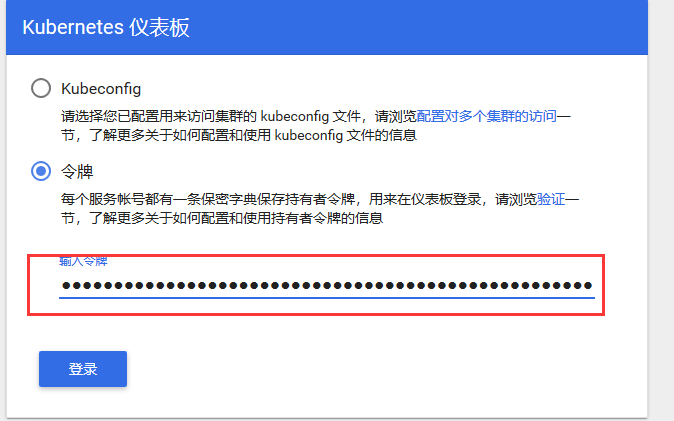
9、找出secret,这个secret中有token,该token是登录dashboard时用到的
[root@master data]# kubectl -n kube-system get secret|egrep  kubernetes-dashboard-admin

kubernetes-dashboard-admin-token-2q42n           kubernetes.io/service-account-token   3      18h
10、查看kubernetes-dashboard-admin-token-2q42n 的详情,里面有对应的token信息:
kubectl describe -n kube-system secret/kubernetes-dashboard-admin-token-2q42n|egrep token:

11、查看pod 位于node01节点:
kubectl describe -n kube-system pod/kubernetes-dashboard-65c76f6c97-htfxt

#查看服务

kubectl get svc -n kube-system

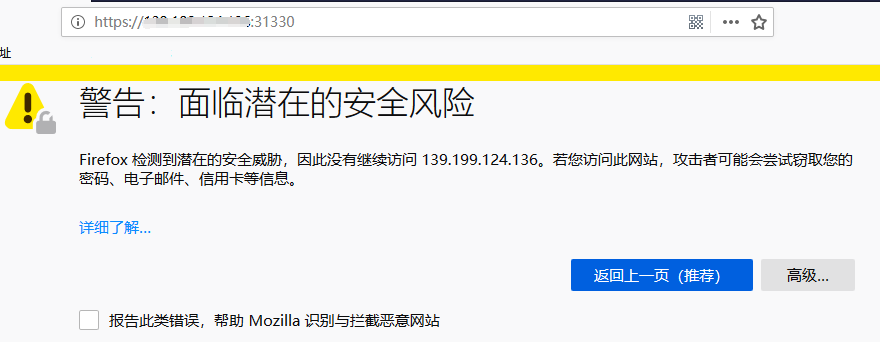
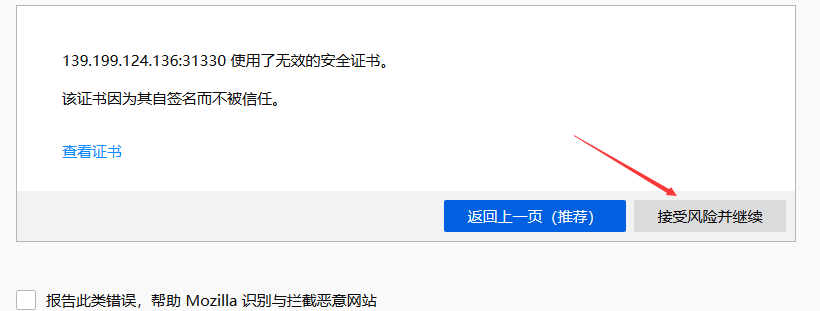
12、用Firefox访问 https://ip:31330 地址,得到以下提示:

13、创建以config方式登录dashborad的用户参考
k8s安装dashboard的更多相关文章
- 【K8S】K8S 1.18.2安装dashboard(基于kubernetes-dashboard 2.0.0版本)
[K8S]K8S 1.18.2安装dashboard(基于kubernetes-dashboard 2.0.0版本) 写在前面 K8S集群部署成功了,如何对集群进行可视化管理呢?别着急,接下来,我们一 ...
- k8s 安装步骤
1 安装Docker 1.1 增加中国区镜像 https://registry.docker-cn.com 2 下载安装k8s的镜像的脚本 https://github.com/AliyunConta ...
- k8s安装部署过程个人总结及参考文章
以下是本人安装k8s过程 一.单机配置 1. 环境准备 主机名 IP 配置 master1 192.168.1.181 1C 4G 关闭所有节点的seliux以及firewalld sed -i 's ...
- kubernetes(安装dashboard)
https://blog.csdn.net/qq_22917163/article/details/84527420 1. 通过yaml文件安装dashboard 我们可以从https://githu ...
- Kubernetes 入门-学习-nginx安装-dashboard安装
一.入门 1.Kubernetes中文社区---http://docs.kubernetes.org.cn/ 2.Kubernetes集群组件: - etcd 一个高可用的K/V键值对存储和服务发现系 ...
- Kubernetes(K8s) 安装(使用kubeadm安装Kubernetes集群)
背景: 由于工作发生了一些变动,很长时间没有写博客了. 概述: 这篇文章是为了介绍使用kubeadm安装Kubernetes集群(可以用于生产级别).使用了Centos 7系统. 一.Centos7 ...
- kubernetes系列(十七) - 通过helm安装dashboard详细教程
1. 前提条件 2. 配置https证书为secret 3. dashboard安装 3.1 helm拉取dashboard的chart 3.2 配置dashboard的chart包配置 3.3 he ...
- kubeadm部署安装+dashboard+harbor
kubeadm 部署安装+dashboard+harbor master(2C/4G,cpu核心数要求大于2) 192.168.80.10 docker.kubeadm.kubelet.kubectl ...
- K8S 部署Dashboard UI
Kubernetes Dashboard是Kubernetes集群的通用.基于Web的UI.它允许用户管理集群中运行的应用程序并对其进行故障排除,以及管理集群本身. 访问到DashBoard有两种方式 ...
随机推荐
- 一次U9身份验证http数据对接
一般情况下传输和回传HTTP协议就搞定了,但这次不同,有身份验证,网上的资料相对较少,怎么办呢?.NET没有不代表JAVA没有,网上搜JAVA身份验证HTTP协议, 果然是有的,跟着代码改成相应的.N ...
- android自定义圆角实线边框,圆角虚线边框,直实线,虚实线,半圆角边框
先上图 在现实项目开发中,单纯的Button,EditText等控件远远不能满足我们项目的UI设计需求,这时候,我们就需要自己动手丰衣足食啦.接下来先给大家介绍一些属性,备注写的都非常清楚啦,我就不啰 ...
- 一、Hadoop入门概述
一.Hadoop是什么 Hadoop是一个由Apche基金会所开发的分布式系统基础架构. 主要解决海量数据的存储和海量数据的分析计算问题. 广义上来说,Hadoop通常是指一个更广泛的概念—Hadoo ...
- 记录一个h5页面生成canvas画布做签名的js插件--signature_pad
demo地址:https://jsfiddle.net/02dLn15g/5/ GitHub地址:https://github.com/szimek/signature_pad 配置项: dotSiz ...
- django2外键,F表达式,Q表达式
一对多 环境 两个类:书的类别和文章,一片文章只能有一个作者,一个作者可以有多个文章,这之间组成了一对多的关系 class Category(models.Model): category = mod ...
- ARM64编译工具链下载
下面是自制的用于编译ARMv8指令的交叉编译工具链: 1.运行在PC上,支持SVE指令,不支持SVE ACLE,版本GCC9.2 https://pan.baidu.com/s/1_NnwajWCel ...
- 极简让ingress-nginx最新版(0.25.0)跑起来
裸步骤: 一,manadatory.yaml apiVersion: v1 kind: Namespace metadata: name: ingress-nginx labels: app.kube ...
- Mybatis JdbcType与Oracle、MySql数据类型对
Mybatis JdbcType Oracle MySql JdbcType ARRAY JdbcType BIGINT BIGINT JdbcType BINARY JdbcTy ...
- Mybatis-plus中的condition条件
@Test public void testCondition() { String name = "王"; String email = ""; condit ...
- Python3 if 变量variable SQL where 语句拼接
最近在写python3的项目,在实际中运用到了根据 if 判断变量variable ,然后去拼接where子句.但是在百度.BING搜索中未找到合适的答案,这是自己想出来的典型php写法,这里做一下记 ...