
JSOUP 爬虫
作者QQ:1095737364 QQ群:123300273 欢迎加入!
1.mavne 依赖:
<!--html 解析 : jsoup HTML parser library @ http://jsoup.org/-->

<dependency>

    <groupId>org.jsoup</groupId>

    <artifactId>jsoup</artifactId>

    <version>1.10.2</version>

</dependency>
2.JSONPUtils工具:
package com.hiione.common.util;

import org.jsoup.Jsoup;

import org.jsoup.nodes.Document;

import org.jsoup.nodes.Element;

import org.jsoup.select.Elements;

import java.io.IOException;

import java.util.Iterator;

public class JsoupUtils {

  public static String jsoupElement(String content){

    Document doc = Jsoup.parse(content);

    Element body = doc.body();

    Elements aHref=body.select("a");

    Elements jsScript = body.select("script");

    Elements form = body.select("form");

    Elements link = body.select("link");

    Elements ifrom = body.select("iframe ");

    Elements http = body.select("http");

    if(jsScript.size()!=0 ||aHref.size()!=0||form.size()!=0||link.size()!=0||ifrom.size()!=0||http.size()!=0){

      return "0";

    }

    return "";

  }

  public static String jsoupElementByURL(String content){

    String url = "http://as.meituan.com/meishi/all";

    Document doc = null;

    try {

      doc = Jsoup.connect(url).get();

    } catch (IOException e1) {

      e1.printStackTrace();

    }

    Element body = doc.body();

    Elements aHref=body.select("a");

    Elements es=body.select("a");

    for (Iterator it = es.iterator(); it.hasNext();) {

      Element e = (Element) it.next();

      System.out.println(e.text()+" "+e.attr("href"));

    }

    Elements jsScript = body.select("script");

    Elements form = body.select("form");

    Elements link = body.select("link");

    Elements ifrom = body.select("iframe ");

    Elements http = body.select("http");

    if(jsScript.size()!=0 ||aHref.size()!=0||form.size()!=0||link.size()!=0||ifrom.size()!=0||http.size()!=0){

      return "0";

    }

    return "";

  }

}
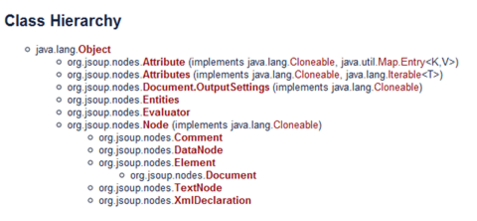
3.jsoup 简介
4.文档输入
// 直接从字符串中输入 HTML 文档

String html = "<html><head><title>JSONP</title></head>" +

"<body><p>这里是 jsoup 项目的相关文章</p></body></html>";

Document doc = Jsoup.parse(html);

// 从URL直接加载 HTML 文档

Document doc = Jsoup.connect("http://www.baidu.net/").get();

String title = doc.title();

Document doc = Jsoup.connect("http://www.baidu.net/")

.data("query", "Java") //请求参数

.userAgent("I’m jsoup") //设置User-Agent

.cookie("auth", "token") //设置cookie

.timeout(3000) //设置连接超时时间

.post(); //使用POST方法访问URL

// 从文件中加载 HTML 文档

File input = new File("D:/test.html");

Document doc = Jsoup.parse(input,"UTF-8","http://www.oschina.net/");
5.解析并提取 HTML 元素
File input = new File("D:/test.html");

Document doc = Jsoup.parse(input, "UTF-8", "http://www.baidu.net/");

Element content = doc.getElementById("content");

Elements links = content.getElementsByTag("a");

for (Element link : links) {

    String linkHref = link.attr("href");

    String linkText = link.text();

}
File input = new File("D:\test.html");

Document doc = Jsoup.parse(input,"UTF-8","http://www.baidu.net/");

Elements links = doc.select("a[href]"); // 具有 href 属性的链接

Elements pngs = doc.select("img[src$=.png]");//所有引用png图片的元素

Element masthead = doc.select("div.masthead").first();

// 找出定义了 class="masthead" 的元素

Elements resultLinks = doc.select("h3.r > a"); // direct a after h3
6.修改数据
doc.select("div.comments a").attr("rel", "nofollow");

//为所有链接增加 rel=nofollow 属性

doc.select("div.comments a").addClass("mylinkclass");

//为所有链接增加 class="mylinkclass" 属性

doc.select("img").removeAttr("onclick"); //删除所有图片的onclick属性

doc.select("input[type=text]").val(""); //清空所有文本输入框中的文本
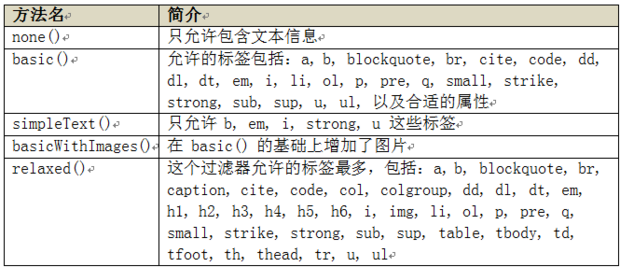
7.HTML 文档清理
String unsafe = "<p><a href='http://www.oschina.net/' onclick='stealCookies()'>JSONP</a></p>";

String safe = Jsoup.clean(unsafe, Whitelist.basic());

// 输出:

// <p><a href="http://www.baidu.net/" rel="nofollow">JSONP</a></p>
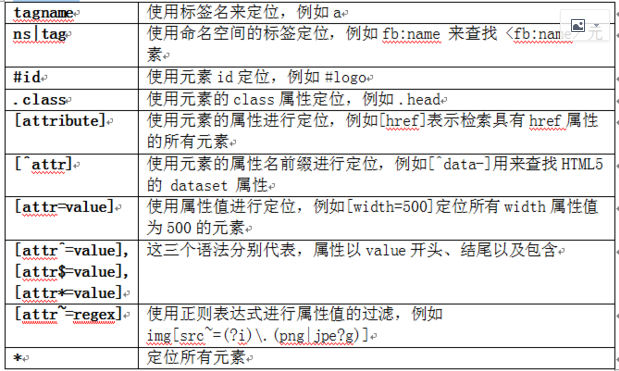
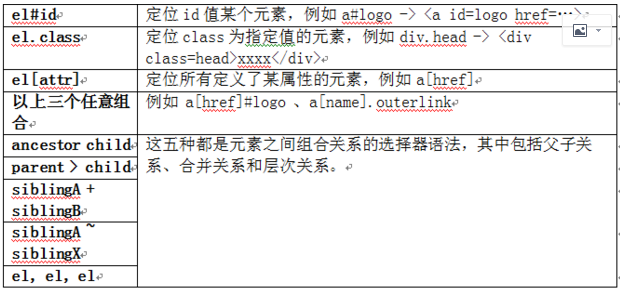
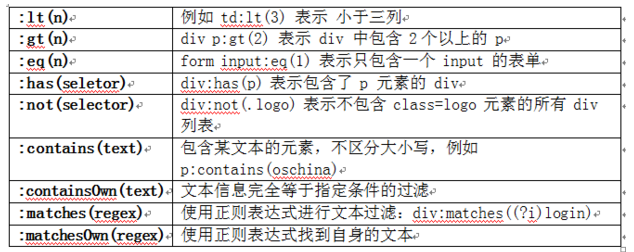
8.jsoup 的过人之处——选择器
JSOUP 爬虫的更多相关文章
- jsoup爬虫简书首页数据做个小Demo
代码地址如下:http://www.demodashi.com/demo/11643.html 昨天LZ去面试,遇到一个大牛,被血虐一番,发现自己基础还是很薄弱,对java一些原理掌握的还是不够稳固, ...
- (java)Jsoup爬虫学习--获取智联招聘(老网站)的全国java职位信息,爬取10页
Jsoup爬虫学习--获取智联招聘(老网站)的全国java职位信息,爬取10页,输出 职位名称*****公司名称*****职位月薪*****工作地点*****发布日期 import java.io.I ...
- (java)Jsoup爬虫学习--获取网页所有的图片,链接和其他信息,并检查url和文本信息
Jsoup爬虫学习--获取网页所有的图片,链接和其他信息,并检查url和文本信息 此例将页面图片和url全部输出,重点不太明确,可根据自己的需要输出和截取: import org.jsoup.Jsou ...
- 【Java】Jsoup爬虫,一个简单获取京东商品信息的小Demo
简单记录 - Jsoup爬虫入门实战 数据问题?数据库获取,消息队列中获取中,都可以成为数据源,爬虫! 爬取数据:(获取请求返回的页面信息,筛选出我们想要的数据就可以了!) 我们经常需要分析HTML网 ...
- JSOUP爬虫示例
利用JSOUP做爬虫,爬取我博客中的所有标题加链接,代码示例如下: package com.test.jsoup; import java.io.IOException; import org.jso ...
- HttpClient&Jsoup爬虫的简单应用
详细的介绍已经有很多前辈总结,引用一下该篇文章:https://blog.csdn.net/zhuwukai/article/details/78644484 下面是一个代码的示例: package ...
- Jsoup爬虫任务总结
这两周由于公司需要大量数据爬取进数据库给用户展示素材,在不停的做爬虫工作,现在总算基本完成就剩清理数据的工作: 公司有一个采集器管理后台的项目,可以直接把爬虫代码打包成jar导入进去设置定时参数即可: ...
- 利用jsoup爬虫工具,爬取数据,并利用excel导出
import java.io.BufferedInputStream; import java.io.BufferedReader; import java.io.FileInputStream; i ...
- Jsoup爬虫解析
需要下载jsoup-1.8.1.jar包 jsoup 是一款Java 的HTML解析器,可直接解析某个URL地址.HTML文本内容.它提供了一套非常省力的API,可通过DOM,CSS以及类似于jQue ...
- jsoup爬虫,项目实战,欢迎收看
import com.mongodb.BasicDBObject import com.mongodb.DBCollection import org.jsoup.Jsoup import org.j ...
随机推荐
- 零基础如何学好python之变量
想要自学python,变量(variable)是必经之路,它是学习python初始时,就会接触到的一个新的知识点,也是一个需要熟知的概念.python是一种动态类型语言,在赋值的执行中可以绑定不同类型 ...
- 1211 BBS后台管理文章添加
目录 昨日内容回顾 侧边栏inclusion_tag inclusion_tag的响应 使用 自定义inclusion_tag,标签,过滤器 文章的点赞点踩 前端 后端 校验规则 文章的评论功能 1. ...
- destoon7.0的商业圈应用于6.0下修改方案
因为destoon7.0发布了,于是自己作死又下载了7.0,看了看7.0的模板确实比6.0好看多了,所以就打算把7.0的模板应用于6.0,在商业圈上出了一个问题,就是商业圈的圈子7.0调用与6.0不同 ...
- Kubernetes 基本概念介绍
什么是Kubernetes? Kubernetes(k8s)是自动化容器操作的开源平台,这些操作包括部署,调度和节点集群间扩展. 如果你曾经用过Docker容器技术部署容器,那么可以将Docker看成 ...
- npm安装模块没有权限解决办法
直接加上unsafe的参数即可 sudo npm install --unsafe-perm --verbose -g sails
- 历史相关API
一.history对象 ①history.back()移动到上一个访问页面,等同于浏览器的后退键. ②history.forward()动到下一个访问页面,等同于浏览器的前进键. ③history.g ...
- leetcode解题报告(27):Reverse Linked List
描述 Reverse a singly linked list. 分析 一开始写的时候总感觉没抓到要点,然后想起上数据结构课的教材上有这道题,翻开书一看完就回忆起来了,感觉解法挺巧妙的,不比讨论区的答 ...
- C#中的Byte,String,Int,Hex之间的转换函数。
/// <summary> Convert a string of hex digits (ex: E4 CA B2) to a byte array. </summary> ...
- Python之☞float浮点数精度问题
Python的浮点数损失精度问题(转) 一个简单的面试题: >>>0.1+0.1+0.1 0.2 >>>0.1+0.1+0.1 0.3000000000000000 ...
- Visual Detail Augmented Mapping for Small Aerial Target Detection(航片动态小目标检测)
1.介绍 航片里小目标占总像元数不足1%,普通目标检测算法如YOLO会有很多错误,主要原因有3点: 1.航片的无关背景占多数 2.目标大小由于飞行高度和拍摄角度不同 3.航片中的小移动目标和噪音会混淆 ...