
详解CATransformLayer
详解CATransformLayer

CATransformLayer与CALayer有着细微的差别,但这些差别会影响到3D变换的动画效果.
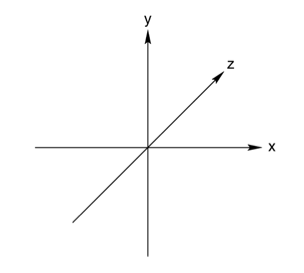
动画都有坐标系,如下所示(注意,这个不是iOS中的坐标系,请勿对号入座):
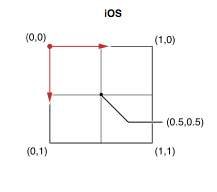
iOS中layer的锚点就在坐标系的正中间.
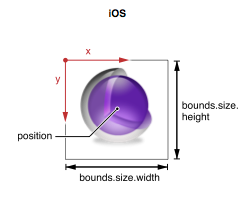
layer的position可以理解为View的center.
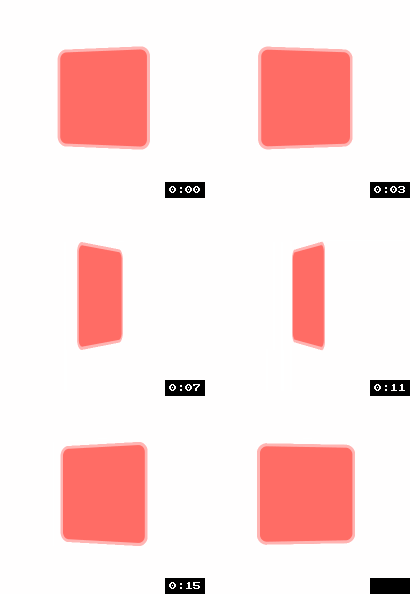
实现带有3d景深效果动画:
//

//  RootViewController.m

//  CATransformLayer

//

//  Copyright (c) 2014年 Y.X. All rights reserved.

//

#import "RootViewController.h"

#import "YXGCD.h"

@interface RootViewController ()

@property (nonatomic, strong) GCDTimer  *timer;

@end

@implementation RootViewController

#define V_CENTER_X           self.view.center.x

#define V_CENTER_Y           self.view.center.y

#define CG_COLOR(R, G, B, A) [UIColor colorWithRed:(R) green:(G) blue:(B) alpha:(A)].CGColor

#define DEGREE(d)            ((d) * M_PI / 180.0f)

- (void)viewDidLoad

{

    [super viewDidLoad];

    // 普通的一个layer

    CALayer *plane        = [CALayer layer];

    plane.anchorPoint = CGPointMake(0.5, 0.5);                         // 锚点

    plane.frame       = (CGRect){CGPointZero, CGSizeMake(, )};   // 尺寸

    plane.position    = CGPointMake(V_CENTER_X, V_CENTER_Y);           // 位置

    plane.opacity         = 0.6;                                       // 背景透明度

    plane.backgroundColor = CG_COLOR(, , , );                      // 背景色

    plane.borderWidth     = ;                                         // 边框宽度

    plane.borderColor     = CG_COLOR(, , , 0.5);                    // 边框颜色(设置了透明度)

    plane.cornerRadius    = ;                                        // 圆角值

    // 创建容器layer

    CALayer *container = [CALayer layer];

    container.frame    = self.view.bounds;

    [self.view.layer addSublayer:container];

    [container addSublayer:plane];

    // 启动定时器

    _timer = [[GCDTimer alloc] initInQueue:[GCDQueue mainQueue]];

    [_timer event:^{

        static float degree = .f;

        // 起始值

        CATransform3D fromValue = CATransform3DIdentity;

        fromValue.m34           = 1.0/ -;

        fromValue               = CATransform3DRotate(fromValue, degree, , , );

        // 结束值

        CATransform3D toValue   = CATransform3DIdentity;

        toValue.m34             = 1.0/ -;

        toValue                 = CATransform3DRotate(toValue, degree += .f, , , );

        // 添加3d动画

        CABasicAnimation *transform3D = [CABasicAnimation animationWithKeyPath:@"transform"];

        transform3D.duration  = .f;

        transform3D.fromValue = [NSValue valueWithCATransform3D:fromValue];

        transform3D.toValue   = [NSValue valueWithCATransform3D:toValue];

        plane.transform = toValue;

        [plane addAnimation:transform3D forKey:@"transform3D"];

    } timeInterval:NSEC_PER_SEC];

    [_timer start];

}

@end
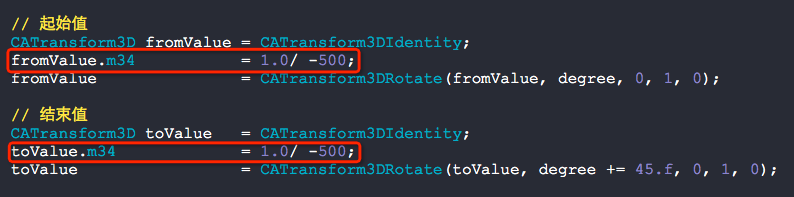
下图中的m34值代表着景深效果,非常关键,其值越接近0,景深效果就越发强烈
如果写成这样子:

那么显示就会变成:
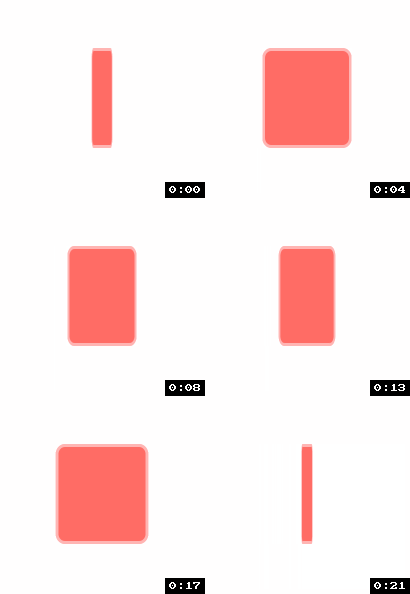
毫无3d感可言.
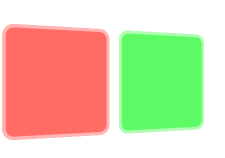
将景深效果添加到容器上面去我们就能得到如下的效果:
- (void)viewDidLoad

{

    [super viewDidLoad];

    // 普通的一个layer

    CALayer *plane1        = [CALayer layer];

    plane1.anchorPoint = CGPointMake(0.5, 0.5);                         // 锚点

    plane1.frame       = (CGRect){CGPointZero, CGSizeMake(, )};   // 尺寸

    plane1.position    = CGPointMake(, V_CENTER_Y);                   // 位置

    plane1.opacity         = 0.6;                                       // 背景透明度

    plane1.backgroundColor = CG_COLOR(, , , );                      // 背景色

    plane1.borderWidth     = ;                                         // 边框宽度

    plane1.borderColor     = CG_COLOR(, , , 0.5);                    // 边框颜色(设置了透明度)

    plane1.cornerRadius    = ;                                        // 圆角值

    // 普通的一个layer

    CALayer *plane2        = [CALayer layer];

    plane2.anchorPoint = CGPointMake(0.5, 0.5);                         // 锚点

    plane2.frame       = (CGRect){CGPointZero, CGSizeMake(, )};   // 尺寸

    plane2.position    = CGPointMake( + , V_CENTER_Y);             // 位置

    plane2.opacity         = 0.6;                                       // 背景透明度

    plane2.backgroundColor = CG_COLOR(, , , );                      // 背景色

    plane2.borderWidth     = ;                                         // 边框宽度

    plane2.borderColor     = CG_COLOR(, , , 0.5);                    // 边框颜色(设置了透明度)

    plane2.cornerRadius    = ;                                        // 圆角值

    // 创建容器layer

    CALayer *container = [CALayer layer];

    container.frame    = self.view.bounds;

    [self.view.layer addSublayer:container];

    CATransform3D plane_3D = CATransform3DIdentity;

    plane_3D.m34           = 1.0/ -;

    plane_3D               = CATransform3DRotate(plane_3D, DEGREE(), , , );

    container.transform    = plane_3D;

    [container addSublayer:plane1];

    [container addSublayer:plane2];

}
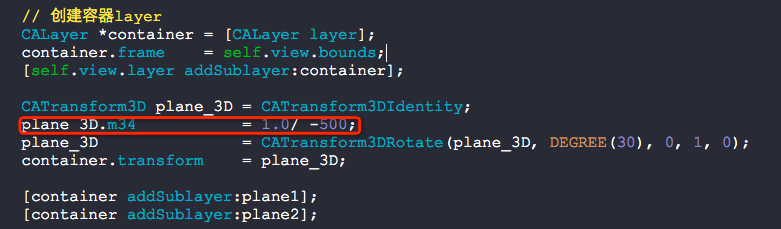
注意,下图红框中的值是非常关键的哦:
到这里还没讲CATransformLayer呢,先看个例子:
效果如下:

- (void)viewDidLoad

{

    [super viewDidLoad];

    // 普通的一个layer

    CALayer *plane1        = [CALayer layer];

    plane1.anchorPoint = CGPointMake(0.5, 0.5);                         // 锚点

    plane1.frame       = (CGRect){CGPointZero, CGSizeMake(, )};   // 尺寸

    plane1.position    = CGPointMake(, V_CENTER_Y);                  // 位置

    plane1.opacity         = 0.6;                                       // 背景透明度

    plane1.backgroundColor = CG_COLOR(, , , );                      // 背景色

    plane1.borderWidth     = ;                                         // 边框宽度

    plane1.borderColor     = CG_COLOR(, , , 0.5);                    // 边框颜色(设置了透明度)

    plane1.cornerRadius    = ;                                        // 圆角值

    // Z轴平移

    CATransform3D plane1_3D = CATransform3DIdentity;

    plane1_3D               = CATransform3DTranslate(plane1_3D, , , -);

    plane1.transform        = plane1_3D;

    // 普通的一个layer

    CALayer *plane2        = [CALayer layer];

    plane2.anchorPoint = CGPointMake(0.5, 0.5);                         // 锚点

    plane2.frame       = (CGRect){CGPointZero, CGSizeMake(, )};   // 尺寸

    plane2.position    = CGPointMake(, V_CENTER_Y);                  // 位置

    plane2.opacity         = 0.6;                                       // 背景透明度

    plane2.backgroundColor = CG_COLOR(, , , );                      // 背景色

    plane2.borderWidth     = ;                                         // 边框宽度

    plane2.borderColor     = CG_COLOR(, , , 0.5);                    // 边框颜色(设置了透明度)

    plane2.cornerRadius    = ;                                        // 圆角值

    // Z轴平移

    CATransform3D plane2_3D = CATransform3DIdentity;

    plane2_3D               = CATransform3DTranslate(plane2_3D, , , -);

    plane2.transform        = plane2_3D;

    // 创建容器layer

    CALayer *container = [CALayer layer];

    container.frame    = self.view.bounds;

    [self.view.layer addSublayer:container];

    // 以Y轴为坐标系,旋转45度

    CATransform3D t = CATransform3DIdentity;

    t.m34 = 1.0/-;

    t = CATransform3DRotate(t, DEGREE(), , , );

    container.transform = t;

    [container addSublayer:plane1];

    [container addSublayer:plane2];

}
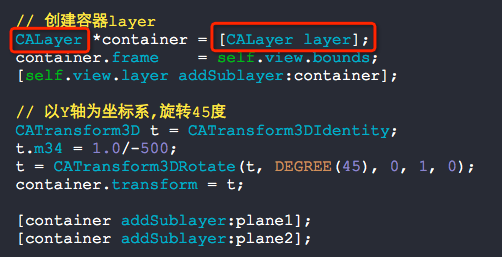
如果把上图的CALayer替换成下图的CATransformLayer
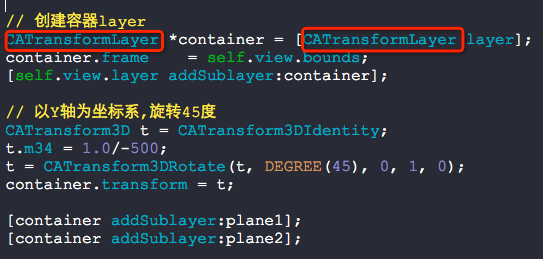
则会产生如下的效果:
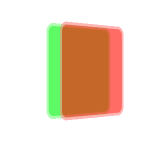
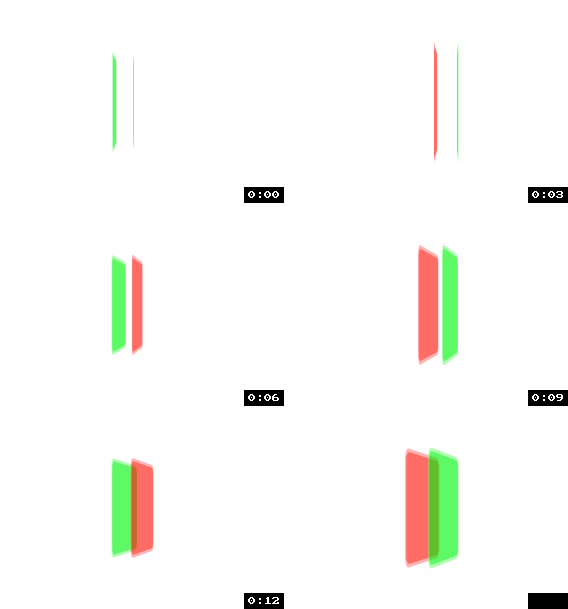
看到上面的图,你应该就明白了CATransformLayer当做容器是为了给里面的Layer提供景深效果用的.
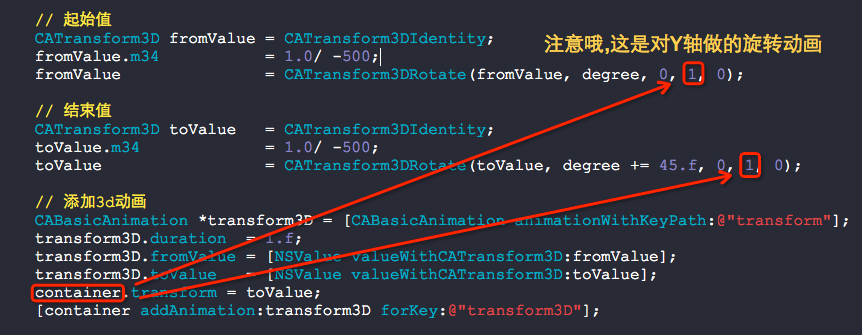
再来做成动画看看效果吧:
- (void)viewDidLoad

{

    [super viewDidLoad];

    // 普通的一个layer

    CALayer *plane1        = [CALayer layer];

    plane1.anchorPoint = CGPointMake(0.5, 0.5);                         // 锚点

    plane1.frame       = (CGRect){CGPointZero, CGSizeMake(, )};   // 尺寸

    plane1.position    = CGPointMake(, V_CENTER_Y);                  // 位置

    plane1.opacity         = 0.6;                                       // 背景透明度

    plane1.backgroundColor = CG_COLOR(, , , );                      // 背景色

    plane1.borderWidth     = ;                                         // 边框宽度

    plane1.borderColor     = CG_COLOR(, , , 0.5);                    // 边框颜色(设置了透明度)

    plane1.cornerRadius    = ;                                        // 圆角值

    // Z轴平移

    CATransform3D plane1_3D = CATransform3DIdentity;

    plane1_3D               = CATransform3DTranslate(plane1_3D, , , -);

    plane1.transform        = plane1_3D;

    // 普通的一个layer

    CALayer *plane2        = [CALayer layer];

    plane2.anchorPoint = CGPointMake(0.5, 0.5);                         // 锚点

    plane2.frame       = (CGRect){CGPointZero, CGSizeMake(, )};   // 尺寸

    plane2.position    = CGPointMake(, V_CENTER_Y);                  // 位置

    plane2.opacity         = 0.6;                                       // 背景透明度

    plane2.backgroundColor = CG_COLOR(, , , );                      // 背景色

    plane2.borderWidth     = ;                                         // 边框宽度

    plane2.borderColor     = CG_COLOR(, , , 0.5);                    // 边框颜色(设置了透明度)

    plane2.cornerRadius    = ;                                        // 圆角值

    // Z轴平移

    CATransform3D plane2_3D = CATransform3DIdentity;

    plane2_3D               = CATransform3DTranslate(plane2_3D, , , -);

    plane2.transform        = plane2_3D;

    // 创建容器layer

    CATransformLayer *container = [CATransformLayer layer];

    container.frame    = self.view.bounds;

    [self.view.layer addSublayer:container];

    [container addSublayer:plane1];

    [container addSublayer:plane2];

    // 启动定时器

    _timer = [[GCDTimer alloc] initInQueue:[GCDQueue mainQueue]];

    [_timer event:^{

        static float degree = .f;

        // 起始值

        CATransform3D fromValue = CATransform3DIdentity;

        fromValue.m34           = 1.0/ -;

        fromValue               = CATransform3DRotate(fromValue, degree, , , );

        // 结束值

        CATransform3D toValue   = CATransform3DIdentity;

        toValue.m34             = 1.0/ -;

        toValue                 = CATransform3DRotate(toValue, degree += .f, , , );

        // 添加3d动画

        CABasicAnimation *transform3D = [CABasicAnimation animationWithKeyPath:@"transform"];

        transform3D.duration  = .f;

        transform3D.fromValue = [NSValue valueWithCATransform3D:fromValue];

        transform3D.toValue   = [NSValue valueWithCATransform3D:toValue];

        container.transform = toValue;

        [container addAnimation:transform3D forKey:@"transform3D"];

    } timeInterval:NSEC_PER_SEC];

    [_timer start];

}
详解CATransformLayer的更多相关文章
- Linq之旅:Linq入门详解(Linq to Objects)
示例代码下载:Linq之旅:Linq入门详解(Linq to Objects) 本博文详细介绍 .NET 3.5 中引入的重要功能:Language Integrated Query(LINQ,语言集 ...
- 架构设计:远程调用服务架构设计及zookeeper技术详解(下篇)
一.下篇开头的废话 终于开写下篇了,这也是我写远程调用框架的第三篇文章,前两篇都被博客园作为[编辑推荐]的文章,很兴奋哦,嘿嘿~~~~,本人是个很臭美的人,一定得要截图为证: 今天是2014年的第一天 ...
- EntityFramework Core 1.1 Add、Attach、Update、Remove方法如何高效使用详解
前言 我比较喜欢安静,大概和我喜欢研究和琢磨技术原因相关吧,刚好到了元旦节,这几天可以好好学习下EF Core,同时在项目当中用到EF Core,借此机会给予比较深入的理解,这里我们只讲解和EF 6. ...
- Java 字符串格式化详解
Java 字符串格式化详解 版权声明:本文为博主原创文章,未经博主允许不得转载. 微博:厉圣杰 文中如有纰漏,欢迎大家留言指出. 在 Java 的 String 类中,可以使用 format() 方法 ...
- Android Notification 详解(一)——基本操作
Android Notification 详解(一)--基本操作 版权声明:本文为博主原创文章,未经博主允许不得转载. 微博:厉圣杰 源码:AndroidDemo/Notification 文中如有纰 ...
- Android Notification 详解——基本操作
Android Notification 详解 版权声明:本文为博主原创文章,未经博主允许不得转载. 前几天项目中有用到 Android 通知相关的内容,索性把 Android Notificatio ...
- Git初探--笔记整理和Git命令详解
几个重要的概念 首先先明确几个概念: WorkPlace : 工作区 Index: 暂存区 Repository: 本地仓库/版本库 Remote: 远程仓库 当在Remote(如Github)上面c ...
- Drawable实战解析:Android XML shape 标签使用详解(apk瘦身,减少内存好帮手)
Android XML shape 标签使用详解 一个android开发者肯定懂得使用 xml 定义一个 Drawable,比如定义一个 rect 或者 circle 作为一个 View 的背景. ...
- Node.js npm 详解
一.npm简介 安装npm请阅读我之前的文章Hello Node中npm安装那一部分,不过只介绍了linux平台,如果是其它平台,有前辈写了更加详细的介绍. npm的全称:Node Package M ...
随机推荐
- 深度学习(七)U-Net原理以及keras代码实现医学图像眼球血管分割
原文作者:aircraft 原文链接:https://www.cnblogs.com/DOMLX/p/9780786.html DRIVE数据集下载百度云链接:链接:https://pan.baidu ...
- PHP之string之ord()函数使用
ord (PHP 4, PHP 5, PHP 7) ord - Return ASCII value of character ord - 返回字符的 ASCII 码值 Description int ...
- 【WAN】PPPOE宽带上网功能详解
1.mac地址克隆 某些地方的运营商会把宽带账号和用户电脑的mac地址绑定起来,运营商的账号只能让当前的电脑去上网,限制路由器上网,这时候路由器可以复制用户电脑的mac伪装成这台电脑去上网,实现路由器 ...
- sql 解释顺序
from:全量数据, where:数据过滤,生成新的虚表.个人主观上理解,where中的条件,如果涉及到join中的表,则会移动到相应的on条件中,减少后续生成的虚表大小. join:根据on中的条件 ...
- 关于vue.js父子组件数据传递
vue.js中使用props down,events up的原则进行父子组件间的通信,先来记录下props down,看个例子: <div id="app2"> < ...
- Asp.Net 之Jquery知识点运用
1.先把要用的body内的代码写好. <div id="ulBox"> <h3>下面的Ulid为"ulList1"</h3> ...
- [javaSE] GUI(事件监听机制)
外部动作——>事件源(组件)——>事件对象——>监听器 获取Frame对象,与上节一样 调用Frame对象的addWindowListener()方法,参数:WindowListen ...
- javascript实现深克隆的几种方法
1)普通函数实现 function cloneObject(obj) { if (obj === null || typeof obj !== 'object') { return obj; } va ...
- sublime3下载安装及常用插件、浏览器预览设置
之前与学习前端有关的软件都安装在了实验室电脑上,最近由于要放寒假(也许我寒假回去会学习呢),于是得在笔记本电脑上重新安装一遍.几个软件各种出错,花了一下午才安装好,必须记录下来啊! 这篇文章主要介绍s ...
- 【转载】windows 下重置 mysql 的 root 密码
今天发现 WordPress 连接不上数据库,登录 window server 服务器查看,所有服务均运行正常. 使用 root 账号登录 mysql 数据库,结果提示密码不匹配.我突然意识到,服 ...