
SharePoint自动化系列——Solution auto-redeploy using Selenium(C#)
转载请注明出自天外归云的博客园:http://www.cnblogs.com/LanTianYou/
本来的想法是做一个可以自动卸载并且部署新solution到SharePoint farm的tool。但是最后只做到retract成功和remove solution之前这个阶段。因为一个原因(等待solution retracted的过程中出现CLR方面的问题)导致不能将整个过程连续起来,这是相关的博问,希望有高手可以解惑。
下面的tool将会根据SharePoint solution wsp文件名自动识别solution,并在相应的站点deactive相应的site collection级别的solution feature,然后在SharePoint farm中卸载相应的solution。
图形界面:
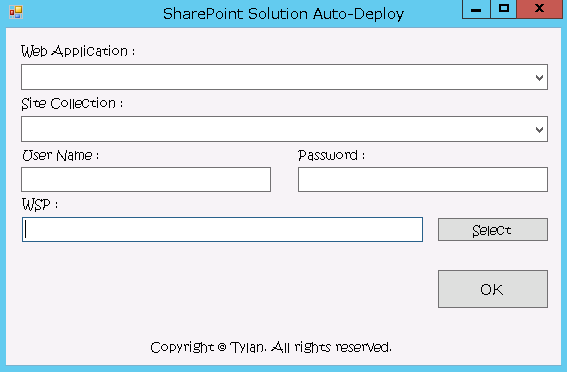
选择Web Application,选择其下的Site Collection,然后填写登陆SharePoint Site的用户名和密码,选择要卸载的wsp文件。之后点击OK,就会自动进行卸载。
待完成的部分(已经都注释掉了)用是从等待retract成功开始,然后remove solution,deploy solution,以及active feature的过程。难点主要是等待solution retract成功。希望SharePoint方面专家可以帮助解决这个问题。相关的详细异常信息,请见博问。
代码如下:
using System;

using System.Collections.Generic;

using System.ComponentModel;

using System.Data;

using System.Drawing;

using System.Linq;

using System.Text;

using System.Threading;

using System.Threading.Tasks;

using System.Windows.Forms;

using Microsoft.SharePoint;

using Microsoft.SharePoint.Administration;

using System.IO;

using OpenQA.Selenium;

using OpenQA.Selenium.IE;

using OpenQA.Selenium.Support;

using OpenQA.Selenium.Support.UI;

using Selenium;

using System.Net;

using System.Runtime.InteropServices;

using System.Globalization;

namespace SharePoint_Solution_Auto_Deploy

{

    public partial class MainForm : Form

    {

        //To make the GetForegroundWindow possible.

        [DllImport("user32.dll", CharSet = CharSet.Auto, ExactSpelling = true)]

        public static extern IntPtr GetForegroundWindow();

        //Form entry.

        public MainForm()

        {

            InitializeComponent();

            getSPWebApps();

        }

        //Add web apps to the combobox.

        private void getSPWebApps()

        {

            try

            {

                SPSecurity.RunWithElevatedPrivileges(() =>

                {

                    foreach (SPWebApplication webApp in SPWebService.ContentService.WebApplications)

                    {

                        WebAppComBox.Items.Add(webApp.Name);

                    }

                });

            }

            catch (Exception ex)

            {

                WriteLog(ex);

            }

        }

        //Web application.

        private void WebAppsComBox_SelectedIndexChanged(object sender, EventArgs e)

        {

            WebAppComBox.Text = WebAppComBox.SelectedItem.ToString();

            SPWebApplicationCollection webApps = SPWebService.ContentService.WebApplications;

            SPWebApplication webApp = webApps[WebAppComBox.Text];

            getSPSites(webApp);

        }

        //Site.

        private void getSPSites(SPWebApplication webApp)

        {

            SPSiteCollection sites = webApp.Sites;

            //Clear old items from the combox first and then add the new items into it.

            SiteComBox.Items.Clear();

            foreach (SPSite site in sites)

            {

                SiteComBox.Items.Add(site.Url.ToString());

            }

        }

        //Write log method.

        private static void WriteLog(Exception ex)

        {

            string logUrl = Environment.GetFolderPath(Environment.SpecialFolder.DesktopDirectory) + "\\SeleniumAutoTest.txt";

            if (File.Exists(@logUrl))

            {

                using (FileStream fs = new FileStream(logUrl, FileMode.Append))

                {

                    using (StreamWriter sw = new StreamWriter(fs, Encoding.Default))

                    {

                        try

                        {

                            sw.Write(ex);

                        }

                        catch (Exception ex1)

                        {

                            WriteLog(ex1);

                        }

                        finally

                        {

                            sw.Close();

                            fs.Close();

                        }

                    }

                }

            }

            else

            {

                using (FileStream fs = new FileStream(logUrl, FileMode.CreateNew))

                {

                    using (StreamWriter sw = new StreamWriter(fs, Encoding.Default))

                    {

                        try

                        {

                            sw.Write(ex);

                        }

                        catch (Exception ex1)

                        {

                            WriteLog(ex1);

                        }

                        finally

                        {

                            sw.Close();

                            fs.Close();

                        }

                    }

                }

            }

        }

        //Select the wsp file action.

        private void select_wsp_button_Click(object sender, EventArgs e)

        {

            OpenFileDialog wspFile = new OpenFileDialog();

            if (wspFile.ShowDialog() == DialogResult.OK)

            {

                WspText.Text = wspFile.FileName;

            }

        }

        //Retract and deploy action.

        private void ok_button_Click(object sender, EventArgs e)

        {

            //1.Login site and deactive the feature.

            IWebDriver iw = new InternetExplorerDriver();

            iw = login(iw, SiteComBox.Text.ToString(), UserNameText.Text.ToString(), PwdText.Text.ToString());

            INavigation navi = iw.Navigate();

            //Go to the site collection features page.

            navi.GoToUrl(SiteComBox.Text.ToString() + "/_layouts/15/ManageFeatures.aspx?Scope=Site");

            //Judge the feature category by the name wsp file selected.

            string category;

            var wspPath = WspText.Text.ToString().Split(new Char[] { '\\' });

            category = wspPath[wspPath.Count() - ];

            //MessageBox.Show(category.ToString());

            //Deactive the feature.

            deactivateFeature(iw, category);

            //2.If has solution, retract first.

            string solutionPageUrl = "http://wdsinpexca:10000/_admin/Solutions.aspx";

            navi.GoToUrl(solutionPageUrl);

            iw.FindElement(By.LinkText(category.ToLower())).Click();

            waitUntilPageLoaded(iw, "ctl00_PlaceHolderMain_solutionStatusToolBar_RptControls_LinkRetractSolution_LinkText");

            iw.FindElement(By.Id("ctl00_PlaceHolderMain_solutionStatusToolBar_RptControls_LinkRetractSolution_LinkText")).Click();

            waitUntilPageLoaded(iw, "ctl00_PlaceHolderMain_ctl02_RptControls_BtnSubmit");

            iw.FindElement(By.Id("ctl00_PlaceHolderMain_ctl02_RptControls_BtnSubmit")).Click();

            //During the retracting period, there will be a down. Let's sleep to get over it.

            //Thread.Sleep(300000);

            //Back to the wsp page.

            iw.FindElement(By.LinkText(category.ToLower())).Click();

            iw.Navigate().Refresh();

            //Wait for the solution retracted.

            //waitUntilPageLoaded(iw, "ctl00_PlaceHolderMain_solutionStatusToolBar_RptControls_LinkRemoveSolution_LinkText");

            //iw.FindElement(By.Id("ctl00_PlaceHolderMain_solutionStatusToolBar_RptControls_LinkRemoveSolution_LinkText")).Click();

            //Click OK in the popup window.

            //IntPtr myPtr = GetForegroundWindow();

            //if (myPtr != IntPtr.Zero)

            //{

            //    System.Windows.Forms.SendKeys.SendWait("{ENTER}");

            //}

            //3.Deploy the solution to the web app.

            //4.Active the site wsp feature.

        }

        //Deactive the feature accourding to the wsp solution category.

        private void deactivateFeature(IWebDriver iw,string category)

        {

            if (category == "APPSSP2013MISite.wsp")

            {

                //Deactive the MISITE feature.

                waitUntilPageLoaded(iw, "ctl00_PlaceHolderMain_featact_rptrFeatureList_ctl21_ctl00_divFeatureStatus");

                string featureStatus = iw.FindElement(By.Id("ctl00_PlaceHolderMain_featact_rptrFeatureList_ctl21_ctl00_divFeatureStatus")).GetAttribute("featurestatus").ToString();

                if (featureStatus == "Active")

                {

                    waitUntilPageLoaded(iw, "ctl00_PlaceHolderMain_featact_rptrFeatureList_ctl21_ctl00_btnActivate");

                    iw.FindElement(By.Id("ctl00_PlaceHolderMain_featact_rptrFeatureList_ctl21_ctl00_btnActivate")).Click();

                    waitUntilPageLoaded(iw, "ctl00_PlaceHolderMain_lnkbtnDeactivate");

                    iw.FindElement(By.Id("ctl00_PlaceHolderMain_lnkbtnDeactivate")).Click();

                }

            }

            //Other solutions can be extended here.

        }

        //Wait until page-element loaded method.

        private static void waitUntilPageLoaded(IWebDriver iw, string element)

        {

            try

            {

                iw.FindElement(By.Id(element));

            }

            catch (Exception ex)

            {

                WriteLog(ex);

                //Refresh the current page.

                //iw.Navigate().Refresh();

                Thread.Sleep();

                waitUntilPageLoaded(iw, element);

            }

        }

        //Login SP site method.

        public static IWebDriver login(IWebDriver driver, string url,string userName,string pwd)

        {

            INavigation navigation = driver.Navigate();

            navigation.GoToUrl(url);

            //driver.FindElement(By.Id("overridelink")).Click();

            IntPtr myPtr = GetForegroundWindow();

            //IntPtr hWnd = FindWindow(null, "abc");

            if (myPtr != IntPtr.Zero)

            {

                //Send message to the window.

                System.Windows.Forms.SendKeys.SendWait(userName);

                System.Windows.Forms.SendKeys.SendWait("{TAB}");

                System.Windows.Forms.SendKeys.SendWait(pwd);

                System.Windows.Forms.SendKeys.SendWait("{ENTER}");

            }

            return driver;

        }

    }

}
因为不知道怎么一气呵成,于是我把Retract和Retract之后的事情拆开来做,就有了下面的:

代码如下:
using System;

using System.Collections.Generic;

using System.ComponentModel;

using System.Data;

using System.Drawing;

using System.Linq;

using System.Text;

using System.Threading;

using System.Threading.Tasks;

using System.Windows.Forms;

using Microsoft.SharePoint;

using Microsoft.SharePoint.Administration;

using System.IO;

using OpenQA.Selenium;

using OpenQA.Selenium.IE;

using OpenQA.Selenium.Support;

using OpenQA.Selenium.Support.UI;

using Selenium;

using System.Net;

using System.Runtime.InteropServices;

using System.Globalization;

using System.Management.Automation;

using System.Management.Automation.Runspaces;

namespace SharePoint_Solution_Auto_Deploy

{

    public partial class MainForm : Form

    {

        //To make the GetForegroundWindow possible.

        [DllImport("user32.dll", CharSet = CharSet.Auto, ExactSpelling = true)]

        public static extern IntPtr GetForegroundWindow();

        //Form entry.

        public MainForm()

        {

            InitializeComponent();

            getSPWebApps();

        }

        //Add web apps to the combobox.

        private void getSPWebApps()

        {

            try

            {

                SPSecurity.RunWithElevatedPrivileges(() =>

                {

                    foreach (SPWebApplication webApp in SPWebService.ContentService.WebApplications)

                    {

                        WebAppComBox.Items.Add(webApp.Name);

                    }

                });

            }

            catch (Exception ex)

            {

                WriteLog(ex);

            }

        }

        //Web application.

        private void WebAppsComBox_SelectedIndexChanged(object sender, EventArgs e)

        {

            WebAppComBox.Text = WebAppComBox.SelectedItem.ToString();

            SPWebApplicationCollection webApps = SPWebService.ContentService.WebApplications;

            SPWebApplication webApp = webApps[WebAppComBox.Text];

            getSPSites(webApp);

        }

        //Site.

        private void getSPSites(SPWebApplication webApp)

        {

            SPSiteCollection sites = webApp.Sites;

            //Clear old items from the combox first and then add the new items into it.

            SiteComBox.Items.Clear();

            foreach (SPSite site in sites)

            {

                SiteComBox.Items.Add(site.Url.ToString());

            }

        }

        //Write log method.

        private static void WriteLog(Exception ex)

        {

            string logUrl = Environment.GetFolderPath(Environment.SpecialFolder.DesktopDirectory) + "\\SeleniumAutoTest.txt";

            if (File.Exists(@logUrl))

            {

                using (FileStream fs = new FileStream(logUrl, FileMode.Append))

                {

                    using (StreamWriter sw = new StreamWriter(fs, Encoding.Default))

                    {

                        try

                        {

                            sw.Write(ex);

                        }

                        catch (Exception ex1)

                        {

                            WriteLog(ex1);

                        }

                        finally

                        {

                            sw.Close();

                            fs.Close();

                        }

                    }

                }

            }

            else

            {

                using (FileStream fs = new FileStream(logUrl, FileMode.CreateNew))

                {

                    using (StreamWriter sw = new StreamWriter(fs, Encoding.Default))

                    {

                        try

                        {

                            sw.Write(ex);

                        }

                        catch (Exception ex1)

                        {

                            WriteLog(ex1);

                        }

                        finally

                        {

                            sw.Close();

                            fs.Close();

                        }

                    }

                }

            }

        }

        //Select the wsp file action.

        private void select_wsp_button_Click(object sender, EventArgs e)

        {

            OpenFileDialog wspFile = new OpenFileDialog();

            if (wspFile.ShowDialog() == DialogResult.OK)

            {

                WspText.Text = wspFile.FileName;

            }

        }

        //Retract and deploy action.

        private void ok_button_Click(object sender, EventArgs e)

        {

            if (WebAppComBox.Text == "" || SiteComBox.Text == "" || UserNameText.Text == "" || PwdText.Text == "" || WspText.Text == "" || CAText.Text == "")

            {

                MessageBox.Show("You can not leave any box blank. Please check your input.");

            }

            else

            {

                //1.Login site and deactive the feature.

                IWebDriver iw = new InternetExplorerDriver();

                iw = login(iw, SiteComBox.Text.ToString(), UserNameText.Text.ToString(), PwdText.Text.ToString());

                INavigation navi = iw.Navigate();

                //Go to the site collection features page.

                navi.GoToUrl(SiteComBox.Text.ToString() + "/_layouts/15/ManageFeatures.aspx?Scope=Site");

                //Judge the feature category by the name wsp file selected.

                string category;

                var wspPath = WspText.Text.ToString().Split(new Char[] { '\\' });

                category = wspPath[wspPath.Count() - ];

                //MessageBox.Show(category.ToString());

                //Deactive the feature.

                deactivateFeature(iw, category);

                //2.If has solution, retract first.

                string solutionPageUrl = CAText.Text + "/_admin/Solutions.aspx";

                navi.GoToUrl(solutionPageUrl);

                iw.FindElement(By.LinkText(category.ToLower())).Click();

                waitUntilPageLoaded(iw, "ctl00_PlaceHolderMain_solutionStatusToolBar_RptControls_LinkRetractSolution_LinkText");

                iw.FindElement(By.Id("ctl00_PlaceHolderMain_solutionStatusToolBar_RptControls_LinkRetractSolution_LinkText")).Click();

                waitUntilPageLoaded(iw, "ctl00_PlaceHolderMain_ctl02_RptControls_BtnSubmit");

                iw.FindElement(By.Id("ctl00_PlaceHolderMain_ctl02_RptControls_BtnSubmit")).Click();

                //During the retracting period, there will be a down. Let's sleep to get over it.

                //Thread.Sleep(300000);

                //Back to the wsp page.

                iw.FindElement(By.LinkText(category.ToLower())).Click();

                iw.Navigate().Refresh();

                iw.Close();

            }

        }

        //Deactive the feature accourding to the wsp solution category.

        private void deactivateFeature(IWebDriver iw,string category)

        {

            if (category == "APPSSP2013MISite.wsp")

            {

                //Deactive the MISITE feature.

                waitUntilPageLoaded(iw, "ctl00_PlaceHolderMain_featact_rptrFeatureList_ctl21_ctl00_divFeatureStatus");

                string featureStatus = iw.FindElement(By.Id("ctl00_PlaceHolderMain_featact_rptrFeatureList_ctl21_ctl00_divFeatureStatus")).GetAttribute("featurestatus").ToString();

                if (featureStatus == "Active")

                {

                    waitUntilPageLoaded(iw, "ctl00_PlaceHolderMain_featact_rptrFeatureList_ctl21_ctl00_btnActivate");

                    iw.FindElement(By.Id("ctl00_PlaceHolderMain_featact_rptrFeatureList_ctl21_ctl00_btnActivate")).Click();

                    waitUntilPageLoaded(iw, "ctl00_PlaceHolderMain_lnkbtnDeactivate");

                    iw.FindElement(By.Id("ctl00_PlaceHolderMain_lnkbtnDeactivate")).Click();

                }

            }

            //Other solutions can be extended here.

        }

        //Wait until page-element loaded method.

        private static void waitUntilPageLoaded(IWebDriver iw, string element)

        {

            try

            {

                iw.FindElement(By.Id(element));

            }

            catch (Exception ex)

            {

                WriteLog(ex);

                //Refresh the current page.

                //iw.Navigate().Refresh();

                Thread.Sleep();

                waitUntilPageLoaded(iw, element);

            }

        }

        //Login SP site method.

        public static IWebDriver login(IWebDriver driver, string url,string userName,string pwd)

        {

            INavigation navigation = driver.Navigate();

            navigation.GoToUrl(url);

            //driver.FindElement(By.Id("overridelink")).Click();

            IntPtr myPtr = GetForegroundWindow();

            //IntPtr hWnd = FindWindow(null, "abc");

            if (myPtr != IntPtr.Zero)

            {

                //Send message to the window.

                System.Windows.Forms.SendKeys.SendWait(userName);

                System.Windows.Forms.SendKeys.SendWait("{TAB}");

                System.Windows.Forms.SendKeys.SendWait(pwd);

                System.Windows.Forms.SendKeys.SendWait("{ENTER}");

            }

            return driver;

        }

        //Remove the solution from the farm.

        private void remove_button_Click(object sender, EventArgs e)

        {

            if (WspText.Text == "" || CAText.Text == "")

            {

                MessageBox.Show("You can not leave the 'WSP' and 'Central Admin' box blank.");

            }

            else

            {

                IWebDriver iw = new InternetExplorerDriver();

                INavigation navi = iw.Navigate();

                navi.GoToUrl(CAText.Text + "/_admin/Solutions.aspx");

                waitUntilPageLoaded(iw, "__gvctl00_PlaceHolderMain_GvItems__div");

                string category;

                var wspPath = WspText.Text.ToString().Split(new Char[] { '\\' });

                category = wspPath[wspPath.Count() - ];

                iw.FindElement(By.LinkText(category.ToLower())).Click();

                waitUntilPageLoaded(iw, "ctl00_PlaceHolderMain_solutionStatusToolBar_RptControls_LinkRemoveSolution_LinkText");

                iw.FindElement(By.Id("ctl00_PlaceHolderMain_solutionStatusToolBar_RptControls_LinkRemoveSolution_LinkText")).Click();

                //Click OK in the popup window.

                IntPtr myPtr = GetForegroundWindow();

                if (myPtr != IntPtr.Zero)

                {

                    System.Windows.Forms.SendKeys.SendWait("{ENTER}");

                }

                iw.Close();

            }

        }

        //Deploy the solution.

        private void deploy_button_Click(object sender, EventArgs e)

        {

            if (WspText.Text == "" || CAText.Text == "")

            {

                MessageBox.Show("You can not leave the 'WSP' and 'Central Admin' box blank.");

            }

            else

            {

                //Open the PowerShell.

                SPSecurity.RunWithElevatedPrivileges(() =>

                {

                    using (Runspace runspace = RunspaceFactory.CreateRunspace())

                    {

                        //MessageBox.Show("Run PowerShell.");

                        runspace.Open();

                        PowerShell ps = PowerShell.Create();

                        ps.Runspace = runspace;

                        Pipeline pipeline = runspace.CreatePipeline();

                        pipeline.Commands.AddScript("Add-PSSnapin microsoft.sharepoint.powershell");

                        string cmd = "Add-SPSolution " + WspText.Text.ToString();

                        pipeline.Commands.AddScript(cmd);

                        pipeline.Invoke();

                    }

                });

                //Go to the solution-deploy page.

                IWebDriver iw = new InternetExplorerDriver();

                INavigation navi = iw.Navigate();

                navi.GoToUrl(CAText.Text + "/_admin/Solutions.aspx");

                waitUntilPageLoaded(iw, "__gvctl00_PlaceHolderMain_GvItems__div");

                string category;

                var wspPath = WspText.Text.ToString().Split(new Char[] { '\\' });

                category = wspPath[wspPath.Count() - ];

                iw.FindElement(By.LinkText(category.ToLower())).Click();

                waitUntilPageLoaded(iw, "ctl00_PlaceHolderMain_solutionStatusToolBar_RptControls_LinkDeploySolution_LinkText");

                iw.FindElement(By.Id("ctl00_PlaceHolderMain_solutionStatusToolBar_RptControls_LinkDeploySolution_LinkText")).Click();

                iw.FindElement(By.Id("ctl00_PlaceHolderMain_ctl02_RptControls_BtnSubmit")).Click();

            }

        }

    }

}
至此,Deactivate Feature,Retract Solution,Remove Solution,Deploy Solution的过程就已经封装好了。至于Active Feature由于界面大小有限就不写了,和Deactivate Feature的过程是一样的。
SharePoint自动化系列——Solution auto-redeploy using Selenium(C#)的更多相关文章
- SharePoint自动化系列——Site/Web/List级别的导航菜单
转载请注明出自天外归云的博客园:http://www.cnblogs.com/LanTianYou/ 需求:在不同的测试用例中,对脚本中不确定的因素需要和用户交互来确定,比如选择哪个site,选择哪个 ...
- SharePoint自动化系列——创建MMS terms
转载请注明出自天外归云的博客园:http://www.cnblogs.com/LanTianYou/ PowerShell脚本实现MMS group.termSet.terms的自动化创建: Add- ...
- SharePoint自动化系列——Select-option标签的定位方法总结
转载请注明出自天外归云的博客园:http://www.cnblogs.com/LanTianYou/ C#中通过Selenium定位页面上的select-option结构,尝试了以下几种方法,均没有生 ...
- SharePoint自动化系列——通过Coded UI录制脚本自动化创建SharePoint Designer Reusable Workflow
Coded UI非常好,我开始还在想,怎么样能让一个通过SharePoint Designer创建的Workflow publish三百五十次?想不到一个好的方法,也不知道SharePoint Des ...
- SharePoint自动化系列——Add content type to list.
转载请注明出自天外归云的博客园:http://www.cnblogs.com/LanTianYou/ 将创建好的content type(若是跨web application需要事先publish c ...
- SharePoint自动化系列——Add/Remove "Record" from items
转载请注明出自天外归云的博客园:http://www.cnblogs.com/LanTianYou/ 目的:批量的将SharePoint items变成records或者将records变成普通的it ...
- SharePoint自动化系列——Content Type相关timer jobs一键执行
转载请注明出自天外归云的博客园:http://www.cnblogs.com/LanTianYou/ 背景: 在SharePoint Central Administration->Monito ...
- SharePoint自动化系列——Create a local user and add to SharePoint
转载请注明出自天外归云的博客园:http://www.cnblogs.com/LanTianYou/ 实现过程:在本地创建一个local user并将该user添加到Administrators组中, ...
- SharePoint自动化系列——Add/Remove “Hold” from items
转载请注明出自天外归云的博客园:http://www.cnblogs.com/LanTianYou/ 问题1: 1.如果SharePoint item被添加了hold,通过UI界面来对SharePoi ...
随机推荐
- LINUX下一款不错的网站压力测试工具webbench
LINUX下一款不错的网站压力测试工具webbench 分类: Linux 2014-07-03 09:10 220人阅读 评论(0) 收藏 举报 [html] view plaincopy wget ...
- Job for vsftpd.service failed because the control process exited with error code
# systemctl start vsftpd.serviceJob for vsftpd.service failed because the control process exited wit ...
- virtualenv沙箱
准备用Django开发网站,豆瓣阅读中有<Django入门>,里面有人批注说用virtualenv+pip很好. 每次搞个什么都感觉举步维艰,因为之前太懒了,什么都懒得深入看一下.pip一 ...
- 微信小程序:bindtap方法传参
1.wxml <view bindtap="pay_again" data-name="{{orderList.jid}}" data-fee=" ...
- Megcup 2017 决赛第一题 规则
2017Megcup 2017Megcup决赛第三题题解 只做出了一道题,虽然慢慢地退出了前128名,但还是要记录一下. 10点钟开始,一看第一题很熟悉,因为研究过格点图中电流问题,其实就是求解线性方 ...
- 【LeetCode】129. Sum Root to Leaf Numbers (2 solutions)
Sum Root to Leaf Numbers Given a binary tree containing digits from 0-9 only, each root-to-leaf path ...
- 【LeetCode】114. Distinct Subsequences
Distinct Subsequences Given a string S and a string T, count the number of distinct subsequences of ...
- iOS - PairProgramming 结对编程
1.PairProgramming 结对编程(Pair-Programming)可能是近年来最为流行的编程方式.所谓结对编程,也就是两个人写一个程序,其中,一个人叫 Driver,另一个人叫 Obse ...
- oc 异常处理
#import <UIKit/UIKit.h> #import "AppDelegate.h" int main(int argc, char * argv[]) { ...
- oc set/get方法
新建一个“Cocoa Touch Class”文件,命名为People People.h 写入 @interface People : NSObject @property int age; @end ...