
linux输入子系统(input subsystem)之按键输入和LED控制
实验现象:在控制台打印按键值,并且通过按键控制相应的LED亮灭。
1.代码
input_subsys_drv.c
 #include <linux/module.h>

 #include <linux/version.h>

 #include <linux/init.h>

 #include <linux/fs.h>

 #include <linux/interrupt.h>

 #include <linux/irq.h>

 #include <linux/sched.h>

 #include <linux/pm.h>

 #include <linux/sysctl.h>

 #include <linux/proc_fs.h>

 #include <linux/delay.h>

 #include <linux/platform_device.h>

 #include <linux/input.h>

 #include <linux/irq.h>

 #include <asm/gpio.h>

 #include <asm/io.h>

 #include <asm/arch/regs-gpio.h>

 struct pin_desc{

     int irq;

     char *name;

     unsigned int pin;

     unsigned int key_val;

 };

 struct pin_desc pins_desc[] = {

     {IRQ_EINT0,  "S2", S3C2410_GPF0,   KEY_L},

     {IRQ_EINT2,  "S3", S3C2410_GPF2,   KEY_S},

     {IRQ_EINT11, "S4", S3C2410_GPG3,   KEY_ENTER},

     {IRQ_EINT19, "S5",  S3C2410_GPG11, KEY_LEFTSHIFT},

 };

 static struct input_dev *input_subsys_dev;

 static struct pin_desc *irq_pd;

 static struct timer_list buttons_timer;

 static irqreturn_t buttons_irq(int irq, void *dev_id)

 {

     /* [cgw]: 按键IO发生边沿中断时重新设置定时间隔

      * 用于按键消抖

      */

     irq_pd = (struct pin_desc *)dev_id;

     buttons_timer.data = irq_pd->pin;

     mod_timer(&buttons_timer, jiffies+HZ/);

     return IRQ_RETVAL(IRQ_HANDLED);

 }

 static void buttons_timer_function(unsigned long data)

 {

     struct pin_desc * pindesc = irq_pd;

     unsigned int pinval;

     if (!pindesc)

         return;

     /* [cgw]: 获取按键IO状态 */

     pinval = s3c2410_gpio_getpin((unsigned int)data);

     /* [cgw]: 根据按键IO状态上报按键事件 */

     if (pinval)

     {

         /* [cgw]: 上报按键弹起 */

         input_report_key(input_subsys_dev, pindesc->key_val, );

         //input_sync(input_subsys_dev);

     }

     else

     {

         /* [cgw]: 上报按键按下 */

         input_report_key(input_subsys_dev, pindesc->key_val, );

         //input_sync(input_subsys_dev);

     }

     //printk("timer occur!\n");

 }

 static int led_event(struct input_dev *dev, unsigned int type, unsigned int code, int value)

 {

     printk("led event!\n");

     printk("value: 0x%x\n", value);

     /* [cgw]: 根据应用程序下发的LED控制事件

      * 亮灭LED

      */

     //if (code == SND_BELL) {

     if (code == LED_MUTE) {

         if (value == 0xAA) {

             /* [cgw]: 点亮 */

             s3c2410_gpio_setpin(S3C2410_GPF4, );

         } else if (value == 0xEE) {

             /* [cgw]: 熄灭 */

             s3c2410_gpio_setpin(S3C2410_GPF4, );

         }

         return ;

     }

     return -;

 }

 int input_subsys_open(struct input_dev *dev)

 {

     int i, retval;

     /* [cgw]: 设置按键IO为中断输入 */

     s3c2410_gpio_cfgpin(S3C2410_GPF0, S3C2410_GPF0_EINT0);

     s3c2410_gpio_cfgpin(S3C2410_GPF2, S3C2410_GPF2_EINT2);

     s3c2410_gpio_cfgpin(S3C2410_GPG3, S3C2410_GPG3_EINT11);

     s3c2410_gpio_cfgpin(S3C2410_GPG11, S3C2410_GPG11_EINT19);

     /* [cgw]: 设置LED IO为输出,初始为熄灭LED */

     s3c2410_gpio_cfgpin(S3C2410_GPF4, S3C2410_GPF4_OUTP);

     s3c2410_gpio_setpin(S3C2410_GPF4, );

     s3c2410_gpio_cfgpin(S3C2410_GPF5, S3C2410_GPF5_OUTP);

     s3c2410_gpio_setpin(S3C2410_GPF5, );

     s3c2410_gpio_cfgpin(S3C2410_GPF5, S3C2410_GPF5_OUTP);

     s3c2410_gpio_setpin(S3C2410_GPF5, );

     /* [cgw]: 为按键IO分配中断线 */

     for (i = ; i < ; i++)

     {

         retval = request_irq(pins_desc[i].irq, buttons_irq, IRQT_BOTHEDGE, pins_desc[i].name, &pins_desc[i]);

     }

     printk("input subsys open!\n");

     return ;

 }

 static int input_subsys_init(void)

 {

     /* [cgw]: 分配一个输入设备 */

     input_subsys_dev = input_allocate_device();

     input_subsys_dev->name = "input_subsys_dev";

     /* [cgw]: 设置支持的事件类型 */

     set_bit(EV_KEY, input_subsys_dev->evbit);

     //set_bit(EV_REP, input_subsys_dev->evbit);

     set_bit(EV_LED, input_subsys_dev->evbit);

     //set_bit(EV_SND, input_subsys_dev->evbit);

     /* [cgw]: 设置支持的事件码 */

     set_bit(KEY_L, input_subsys_dev->keybit);

     set_bit(KEY_S, input_subsys_dev->keybit);

     set_bit(KEY_ENTER, input_subsys_dev->keybit);

     set_bit(KEY_LEFTSHIFT, input_subsys_dev->keybit);

     set_bit(LED_MUTE, input_subsys_dev->ledbit);

     //set_bit(SND_BELL, input_subsys_dev->sndbit);

     /* [cgw]: 分配输入设备的open方法,用户操作open(/dev/xxx, ...)时调用 */

     input_subsys_dev->open = input_subsys_open;

     /* [cgw]: 分配输入设备的event方法,用户在应用程序write()时 */

     input_subsys_dev->event = led_event;

     /* [cgw]: 注册输入设备 */

     input_register_device(input_subsys_dev);

     /* [cgw]: 初始化定时器,用于按键消抖 */

     init_timer(&buttons_timer);

     buttons_timer.function = buttons_timer_function;

     add_timer(&buttons_timer);

     printk("input subsys init!\n");

     return ;

 }

 static void input_subsys_exit(void)

 {

     int i;

     /* [cgw]: 释放按键IO中断 */

     for (i = ; i < ; i++)

     {

         free_irq(pins_desc[i].irq, &pins_desc[i]);

     }

     /* [cgw]: 删除定时器 */

     del_timer(&buttons_timer);

     /* [cgw]: 注销输入设备 */

     input_unregister_device(input_subsys_dev);

     /* [cgw]: 释放输入设备内存空间 */

     input_free_device(input_subsys_dev);

 }

 module_init(input_subsys_init);

 module_exit(input_subsys_exit);

 MODULE_LICENSE("GPL");
input_subsys_test.c
 #include <sys/types.h>

 #include <sys/stat.h>

 #include <fcntl.h>

 #include <stdio.h>

 #include <poll.h>

 #include <signal.h>

 #include <sys/types.h>

 #include <unistd.h>

 #include <fcntl.h>

 #include <linux/input.h>

 int fd;

 void my_signal_fun(int signum)

 {

     struct input_event buttons_event, leds_event;

     /* [cgw]: 异步通知产生时返回的数据 */

     read(fd, &buttons_event, sizeof(struct input_event));

     /* [cgw]: 打印事件类型,事件码,事件值 */

     printf("type: 0x%x code: 0x%x value: 0x%x\n",

            buttons_event.type,

            buttons_event.code,

            buttons_event.value);

     /* [cgw]: 返回的是KEY_L或KEY_S值 */

     if (buttons_event.code == KEY_L || buttons_event.code == KEY_S) {

         /* [cgw]: 按键弹起 */

         if (buttons_event.value == ) {

             /* [cgw]: 构造一个EV_LED事件 */

             //leds_event.type = EV_SND;

             leds_event.type = EV_LED;

             //leds_event.code = SND_BELL;

             leds_event.code = LED_MUTE;

             /* [cgw]: KEY_L和KEY_S控制LED的亮灭 */

             if (buttons_event.code == KEY_L) {

                 leds_event.value = 0xAA;

             } else if (buttons_event.code == KEY_S) {

                 leds_event.value = 0xEE;

             }

             /* [cgw]: 发送LED控制事件 */

             write(fd, &leds_event, sizeof(struct input_event));

             printf("led write!\n");

         }

     }

 }

 int main(int argc, char **argv)

 {

     int Oflags;

     /* [cgw]: 设置需要处理的信号SIGIO,即输入文件会请求一个SIGIO

      * 信号,当有新数据到来这个信号会发给filp->f_owner进程

      */

     signal(SIGIO, my_signal_fun);

     fd = open("/dev/event1", O_RDWR | O_NONBLOCK);

     //printf("fd = 0x%x\n", fd);

     if (fd < )

     {

         printf("can't open!\n");

     }

     /* [cgw]: 根据文件标识符fd,设置能够获得这个文件的进程(owner)

      * getpid()获得当前进程ID

      */

     fcntl(fd, F_SETOWN, getpid());

     /* [cgw]: 获得file->f_flags标志 */

     Oflags = fcntl(fd, F_GETFL);

     /* [cgw]: 置位FASYNC使能异步通知 */

     fcntl(fd, F_SETFL, Oflags | FASYNC);

     while ()

     {

         /* [cgw]: 休眠 */

         sleep();

     }

     return ;

 }
makefile
 KERN_DIR = /work/system/linux-2.6.22.6

 all:

     make -C $(KERN_DIR) M=`pwd` modules

 clean:

     make -C $(KERN_DIR) M=`pwd` modules clean

     rm -rf modules.order

 obj-m    += input_subsys_drv.o
2. 实验
2.1
安装驱动程序:
insmod input_subsys_drv.ko
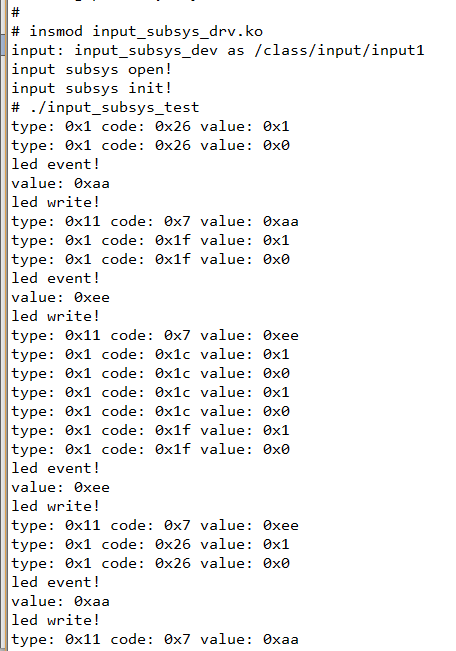
 # insmod input_subsys_drv.ko

 input: input_subsys_dev as /class/input/input1

 input subsys open!

 input subsys init!
运行应用程序
./input_subsys_test
 # ./input_subsys_test

 type: 0x1 code: 0x26 value: 0x1

 type: 0x1 code: 0x26 value: 0x0

 led event!

 value: 0xaa

 led write!

 type: 0x11 code: 0x7 value: 0xaa

 type: 0x1 code: 0x1f value: 0x1

 type: 0x1 code: 0x1f value: 0x0

 led event!

 value: 0xee

 led write!

 type: 0x11 code: 0x7 value: 0xee
3. 现象分析
按一下按键KEY_L,终端输出:
type: 0x1 code: 0x26 value: 0x1  //按键按下

type: 0x1 code: 0x26 value: 0x0  //按键弹起

led event!                       //应用程序操作write, 发送LED控制事件,调用led_event()

value: 0xaa                      //读到的LED亮的命令

led write!                       //返回应用程序继执行

type: 0x11 code: 0x7 value: 0xaa //因为应用程序发送了事件给驱动程序,驱动把这个事件作为一个输入事件(相当于按键输入事件),同样通过异步通知反馈到应用程序
The end!
linux输入子系统(input subsystem)之按键输入和LED控制的更多相关文章
- Linux输入子系统(Input Subsystem)
Linux输入子系统(Input Subsystem) http://blog.csdn.net/lbmygf/article/details/7360084 input子系统分析 http://b ...
- 10. linux输入子系统/input 设备【转】
转自:https://www.cnblogs.com/crmn/articles/6696819.html 按键事件信息之上报绝对事件信息之上报相对事件信息之上报功能键驱动编写多点触控事件的上报 只产 ...
- Linux 输入子系统 input
一.输入子系统 针对输入设备设计:触摸屏.键盘.按键.传感器.鼠标...... 二.每种设备都属于字符设备驱动,程序的写法步骤也相同 1.实现入口函数 xxx_init() 和卸载函数 xxx_exi ...
- Linux输入子系统(转)
Linux输入子系统(Input Subsystem) 1.1.input子系统概述 输入设备(如按键,键盘,触摸屏,鼠标等)是典型的字符设备,其一般的工作机制是低层在按键,触摸等动作发生时产生一个中 ...
- linux输入子系统(6)-input子系统介绍及结构图
注:本系列转自: http://www.ourunix.org/post/290.html input子系统介绍 输入设备(如按键,键盘,触摸屏,鼠标,蜂鸣器等)是典型的字符设备,其一 ...
- linux输入子系统
linux输入子系统(linux input subsystem)从上到下由三层实现,分别为:输入子系统事件处理层(EventHandler).输入子系统核心层(InputCore)和输入子系统设备驱 ...
- Linux 混杂设备、外部中断和输入子系统
混杂设备也是一种字符设备,主设备号固定为10.相对于普通字符设备驱动,它不需要自己去生成设备文件. 1.声明使用的头文件 #include <linux/miscdevice.h> 2.定 ...
- Linux 输入子系统
Technorati 标签: Kernel 输入子系统 Input 在Linux中,输入设备(如按键.键盘.触摸屏.鼠标等)是典型的字符设备,其一般的工作机理,是底层在按键.触摸时,触发一个 ...
- 12.Linux之输入子系统分析(详解)
版权声明:本文为博主原创文章,转载请标注出处: 在此节之前,我们学的都是简单的字符驱动,涉及的内容有字符驱动的框架.自动创建设备节点.linux中断.poll机制.异步通知.同步互斥/非阻塞.定时 ...
随机推荐
- [OAuth]基于DotNetOpenAuth实现Client Credentials Grant
Client Credentials Grant是指直接由Client向Authorization Server请求access token,无需用户(Resource Owner)的授权.比如我们提 ...
- Eclipse中文语言包安装和设置中文Doc
1.安装中文语言包 Eclipse所有的扩展功能都是以插件的形式添加上去的,安装插件时有多种形式,下面是比较常用的两种: 直接将插件中的文件复制到Eclipse对于的目录中.优点是安装时很方便,缺点是 ...
- 前端学PHP之PHP操作memcache
× 目录 [1]安装 [2]连接 [3]增删改查[4]分布式[5]状态[6]安全[7]应用 前面的话 和访问mysql服务器类似,PHP也是作为客户端API访问memcached服务器的,所以同样需要 ...
- 3. 解析 struts.xml 文件
1. struts.xml 文件基本配置: 主要放在资源路径下,配置 sturts2相关的 Action , 拦截器等配置 <struts> <!-- 设置常量 --> < ...
- [.NET] 开头不讲"Hello Word",读尽诗书也枉然 : Word 操作组件介绍 - Spire.Doc
开头不讲"Hello Word",读尽诗书也枉然 : Word 操作组件介绍 - Spire.Doc [博主]反骨仔 [原文地址]http://www.cnblogs.com/li ...
- console.log("A"-"B"+"3")=?
(点击上方的订阅号,可快速关注,关注有惊喜哦^_^) 前不久看到一道JS基础题目,做了一下竟然错了一半...在此分享一下: 先把题目放上来,大家可以自己测试一下再看答案哦^_^ ①console.lo ...
- 全自动迁移数据库的实现 (Fluent NHibernate, Entity Framework Core)
在开发涉及到数据库的程序时,常会遇到一开始设计的结构不能满足需求需要再添加新字段或新表的情况,这时就需要进行数据库迁移. 实现数据库迁移有很多种办法,从手动管理各个版本的ddl脚本,到实现自己的mig ...
- ASP.NET Core 中文文档 第四章 MVC(3.2)Razor 语法参考
原文:Razor Syntax Reference 作者:Taylor Mullen.Rick Anderson 翻译:刘怡(AlexLEWIS) 校对:何镇汐 什么是 Razor? Razor 是一 ...
- unsafe
今天无意中发现C#这种完全面向对象的高级语言中也可以用不安全的指针类型,即要用到unsafe关键字.在公共语言运行库 (CLR) 中,不安全代码是指无法验证的代码.C# 中的不安全代码不一定是危险的, ...
- Asp.Net Core 项目实战之权限管理系统(0) 无中生有
0 Asp.Net Core 项目实战之权限管理系统(0) 无中生有 1 Asp.Net Core 项目实战之权限管理系统(1) 使用AdminLTE搭建前端 2 Asp.Net Core 项目实战之 ...