
C#微型网页查看工具
using System;

using System.Collections.Generic;

using System.ComponentModel;

using System.Data;

using System.Drawing;

using System.Linq;

using System.Text;

using System.Threading.Tasks;

using System.Windows.Forms;

namespace web_borwer

{

    public partial class Form1 : Form

    {

        int i=;

        public Form1()

        {

            InitializeComponent();

            textBox1.Text = "http://192.168.126.131:5000/";

            timer1.Enabled = true;

            timer1.Interval = ;

            label1.Text = i.ToString();

            timer1.Start();

            button1.Text = "start";

            button2.Text = "stop";

            textBox2.Text = "";

                }

        private void button1_Click(object sender, EventArgs e)

        {

        }

        private void timer1_Tick(object sender, EventArgs e)

        {

            webBrowser1.Navigate(textBox1.Text.ToString ());

            i = i + ;

            label1.Text = i.ToString();

            //i = i + 1;

            //textBox1.Text = i.ToString();

        }

        private void label1_Click(object sender, EventArgs e)

        {

        }

        private void Form1_Load(object sender, EventArgs e)

        {

        }

        private void button1_Click_1(object sender, EventArgs e)

        {

            timer1.Interval = Convert.ToInt32(textBox2.Text);

            timer1.Start();

        }

        private void button2_Click(object sender, EventArgs e)

        {

            timer1.Stop();

        }

    }

}
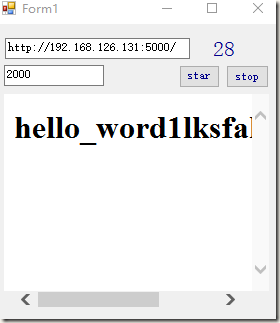
URL 刷新次数
刷新频率 开始 停止
C#微型网页查看工具的更多相关文章
- 网页编程工具:EditPlus
字体:Consolas EditPlus,很土很简单很强大的网页编程工具 http://www.editplus.com/download.html 下载 http://www.cnblogs.co ...
- spider-通过scrapyd网页管理工具执行scrapy框架
1.首先写一个scrapy框架爬虫的项目 scrapy startproject 项目名称 # 创建项目 cd 项目名称 scrapy genspider 爬虫名称 爬虫网址(www.xxxx) #生 ...
- 使用 history 对象和 location 对象中的属性和方法制作一个简易的网页浏览工具
查看本章节 查看作业目录 需求说明: 使用 history 对象和 location 对象中的属性和方法制作一个简易的网页浏览工具 实现思路: 使用history对象中的 forward() 方法和 ...
- FROONT – 超棒的可视化响应式网页设计工具
FROONT 是一个基于 Web 的设计工具,在浏览器中运行,使得各类可视化设计的人员都能进行响应式的网页设计,即使是那些没有任何编码技能的设计师.FROONT 使得响应式网页设计能够可视化操作,能够 ...
- LogViewer - 方便的日志查看工具
一个完整的程序日志记录功能是必不可少的,通过日志我们可以了解程序运行详情.错误信息等,以便更好的发现及解决问题. 日志可以记录到数据库.日志服务器.文件等地方,本文主要介绍文件日志. 文件日志通常是一 ...
- iOS及时log日志查看工具 (iConsole)
github下载地址:https://github.com/nicklockwood/iConsole 偶然看到的一个iOS及时log日志查看工具,通过该工具,我们可以在任何想看日志的时候,通过手势呼 ...
- Windows日志查看工具合集
欢迎关注我的社交账号: 博客园地址: http://www.cnblogs.com/jiangxinnju GitHub地址: https://github.com/jiangxincode 知乎地址 ...
- hexdump——Linux系统的二进制文件查看工具
hexdump是Linux下的一个二进制文件查看工具,可以将二进制文件转换为ASCII.10进制.16进制或8进制进行查看. 首先我们准备一个测试用的文件test,十六进制如下: 00 01 02 0 ...
- node.js基础模块http、网页分析工具cherrio实现爬虫
node.js基础模块http.网页分析工具cherrio实现爬虫 一.前言 说是爬虫初探,其实并没有用到爬虫相关第三方类库,主要用了node.js基础模块http.网页分析工具cherri ...
随机推荐
- [ An Ac a Day ^_^ ] hdu 2830 矩阵交换II
第一眼觉得是个dp 但是有了可以随意交换的条件觉得简单了不少 但是还是没做出来…… 看了一下别人的做法才觉得自愧不如 因为所有列都可以随意交换 应该尽量把长的放在一起 那么将所有的矩形排序之后 以第j ...
- sql 查询表共多少列
1.oracle: select count(*) from user_tab_cols where table_name='表名';--表名含英文的话应为英文大写字母 2.mysql: select ...
- assert的基本用法
assertion(断言)在软件开发中是一种常用的调试方式,很多开发语言中都支持这种机制,如C,C++和Eiffel等,但是支持的形式不尽相同,有的是通过语言本身.有的是通过库函数等.另外,从理论上来 ...
- php注册数模式
在前两篇单例模式和工厂模式后,终于迎来了最后一个基础的设计模式--注册树模式. 什么是注册树模式? 注册树模式当然也叫注册模式,注册器模式.之所以我在这里矫情一下它的名称,是因为我感觉注册树这个名称更 ...
- XTU 1246 Heartstone
$2016$长城信息杯中国大学生程序设计竞赛中南邀请赛$D$题 贪心. 我是这样贪的:开三个优先队列$q[0]$,$q[1]$,$q[2]$,$q[i]$存储对$3$取余之后为$i$的数. 首先看看还 ...
- 解决mac-osx10.11下无法安装wxPython2.8-osx-unicode-2.8.12.1的问题
在mac-osx10.11版本下,安装RIDE前提需要装wxPython2.8-osx-unicode-2.8.12.1库,但在安装wxPython过程中,会提示安装失败,以下提供一种解决方案 这里我 ...
- metasploit nessus & db_autopwn
nessus官网:https://www.tenable.com/products/nessus-vulnerability-scanner 下载地址:https://www.tenable.com/ ...
- hdu 3480 Division(斜率优化DP)
题目链接:hdu 3480 Division 题意: 给你一个有n个数的集合S,现在让你选出m个子集合,使这m个子集合并起来为S,并且每个集合的(max-min)2 之和要最小. 题解: 运用贪心的思 ...
- 手机浏览器wap网页点击链接触发颜色区块的问题解决办法
引子 在做HTML5 WAP网页的时候,一行内容做了2个链接,点击一个标签的时候,整个颜色块会闪一下,影响美观.需求针对这种情况来问我,能否把这个一闪的颜色去掉.我当时就想,这个怎么去?那我也不好直接 ...
- HTML5本地存储详解
HTML5storage提供了一种方式让网站能够把信息存储到你本地的计算机上,并再以后需要的时候进行获取.这个概念和cookie相似,区别是它是为了更大容量存储设计的.Cookie的大小是受限的,并且 ...