
python找寻合适的日志库logging Handler——Handler自定义实现
#!/usr/bin/env python

# -*- coding: utf-8 -*-

#

# Copyright 2012 Ethan Zhang<http://github.com/Ethan-Zhang>

#

# Licensed under the Apache License, Version 2.0 (the "License"); you may

# not use this file except in compliance with the License. You may obtain

# a copy of the License at

#

#     http://www.apache.org/licenses/LICENSE-2.0

#

# Unless required by applicable law or agreed to in writing, software

# distributed under the License is distributed on an "AS IS" BASIS, WITHOUT

# WARRANTIES OR CONDITIONS OF ANY KIND, either express or implied. See the

# License for the specific language governing permissions and limitations

# under the License.

import time

import os

from logging.handlers import TimedRotatingFileHandler

class MultiProcessTimedRotatingFileHandler(TimedRotatingFileHandler):

    def doRollover(self):

        """

        do a rollover; in this case, a date/time stamp is appended to the filename

        when the rollover happens.  However, you want the file to be named for the

        start of the interval, not the current time.  If there is a backup count,

        then we have to get a list of matching filenames, sort them and remove

        the one with the oldest suffix.

        """

        if self.stream:

            self.stream.close()

        # get the time that this sequence started at and make it a TimeTuple

        t = self.rolloverAt - self.interval

        if self.utc:

            timeTuple = time.gmtime(t)

        else:

            timeTuple = time.localtime(t)

        dfn = self.baseFilename + "." + time.strftime(self.suffix, timeTuple)

        #if os.path.exists(dfn):

        #    os.remove(dfn)

        if not os.path.exists(dfn):

            os.rename(self.baseFilename, dfn)

        if self.backupCount > 0:

            # find the oldest log file and delete it

            #s = glob.glob(self.baseFilename + ".20*")

            #if len(s) > self.backupCount:

            #    s.sort()

            #    os.remove(s[0])

            for s in self.getFilesToDelete():

                os.remove(s)

        #print "%s -> %s" % (self.baseFilename, dfn)

        self.mode = 'a'

        self.stream = self._open()

        currentTime = int(time.time())

        newRolloverAt = self.computeRollover(currentTime)

        while newRolloverAt <= currentTime:

            newRolloverAt = newRolloverAt + self.interval

        #If DST changes and midnight or weekly rollover, adjust for this.

        if (self.when == 'MIDNIGHT' or self.when.startswith('W')) and not self.utc:

            dstNow = time.localtime(currentTime)[-1]

            dstAtRollover = time.localtime(newRolloverAt)[-1]

            if dstNow != dstAtRollover:

                if not dstNow:  # DST kicks in before next rollover, so we need to deduct an hour

                    newRolloverAt = newRolloverAt - 3600

                else:           # DST bows out before next rollover, so we need to add an hour

                    newRolloverAt = newRolloverAt + 3600

        self.rolloverAt = newRolloverAt
import logging

from bson.timestamp import Timestamp

from pymongo import Connection

from pymongo.collection import Collection

from pymongo.errors import OperationFailure, PyMongoError

"""

Example format of generated bson document:

{

    'thread': -1216977216,

    'threadName': 'MainThread',

    'level': 'ERROR',

    'timestamp': Timestamp(1290895671, 63),

    'message': 'test message',

    'module': 'test_module',

    'fileName': '/var/projects/python/log4mongo-python/tests/test_handlers.py',

    'lineNumber': 38,

    'method': 'test_emit_exception',

    'loggerName':  'testLogger',

    'exception': {

        'stackTrace': 'Traceback (most recent call last):

                       File "/var/projects/python/log4mongo-python/tests/test_handlers.py", line 36, in test_emit_exception

                       raise Exception(\'exc1\')

                       Exception: exc1',

        'message': 'exc1',

        'code': 0

    }

}

"""

class MongoFormatter(logging.Formatter):

    DEFAULT_PROPERTIES = logging.LogRecord('', '', '', '', '', '', '', '').__dict__.keys()

    def format(self, record):

        """Formats LogRecord into python dictionary."""

        # Standard document

        document = {

            'timestamp': Timestamp(int(record.created), int(record.msecs)),

            'level': record.levelname,

            'thread': record.thread,

            'threadName': record.threadName,

            'message': record.getMessage(),

            'loggerName': record.name,

            'fileName': record.pathname,

            'module': record.module,

            'method': record.funcName,

            'lineNumber': record.lineno

        }

        # Standard document decorated with exception info

        if record.exc_info is not None:

            document.update({

                'exception': {

                    'message': str(record.exc_info[1]),

                    'code': 0,

                    'stackTrace': self.formatException(record.exc_info)

                }

            })

        # Standard document decorated with extra contextual information

        if len(self.DEFAULT_PROPERTIES) != len(record.__dict__):

            contextual_extra = set(record.__dict__).difference(set(self.DEFAULT_PROPERTIES))

            if contextual_extra:

                for key in contextual_extra:

                    document[key] = record.__dict__[key]

        return document

class MongoHandler(logging.Handler):

    def __init__(self, level=logging.NOTSET, host='localhost', port=27017, database_name='logs', collection='logs',

                 username=None, password=None, fail_silently=False, formatter=None, capped=False,

                 capped_max=1000, capped_size=1000000, **options):

        """Setting up mongo handler, initializing mongo database connection via pymongo."""

        logging.Handler.__init__(self, level)

        self.host = host

        self.port = port

        self.database_name = database_name

        self.collection_name = collection

        self.username = username

        self.password = password

        self.fail_silently = fail_silently

        self.connection = None

        self.db = None

        self.collection = None

        self.authenticated = False

        self.formatter = formatter or MongoFormatter()

        self.capped = capped

        self.capped_max = capped_max

        self.capped_size = capped_size

        self.options = options

        self._connect()

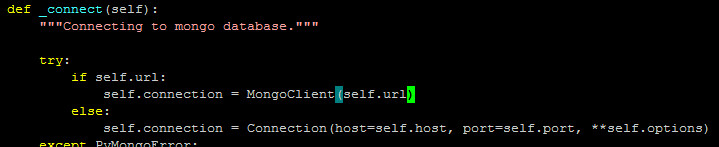
    def _connect(self):

        """Connecting to mongo database."""

        try:

            self.connection = Connection(host=self.host, port=self.port, **self.options)

        except PyMongoError:

            if self.fail_silently:

                return

            else:

                raise

        self.db = self.connection[self.database_name]

        if self.username is not None and self.password is not None:

            self.authenticated = self.db.authenticate(self.username, self.password)

        if self.capped:

            try:  # We don't want to override the capped collection (and it throws an error anyway)

                self.collection = Collection(self.db, self.collection_name, capped=True, max=self.capped_max, size=self.capped_size)

            except OperationFailure:

                # Capped collection exists, so get it.

                self.collection = self.db[self.collection_name]

        else:

            self.collection = self.db[self.collection_name]

    def close(self):

        """If authenticated, logging out and closing mongo database connection."""

        if self.authenticated:

            self.db.logout()

        if self.connection is not None:

            self.connection.disconnect()

    def emit(self, record):

        """Inserting new logging record to mongo database."""

        if self.collection is not None:

            try:

                self.collection.save(self.format(record))

            except Exception:

                if not self.fail_silently:

                    self.handleError(record)
mongodb_url='mongodb://192.168.10.200:10001,192.168.10.201:10001'

handler=MongoHandler(url=mongodb_url)

logger.addHandler(handler)
#!/usr/bin/env python

# -*- coding:utf-8 -*-

import logging

import os,os.path

import datetime

_filefmt=os.path.join("logs","%Y-%m-%d","%H.log")

class MyLoggerHandler(logging.Handler):

    def __init__(self,filefmt=None):

        self.filefmt=filefmt

        if filefmt is None:

            self.filefmt=_filefmt

        logging.Handler.__init__(self)

    def emit(self,record):

        msg=self.format(record)

        _filePath=datetime.datetime.now().strftime(self.filefmt)

        _dir=os.path.dirname(_filePath)

        try:

            if os.path.exists(_dir) is False:

                os.makedirs(_dir)

        except Exception:

            print "can not make dirs"

            print "filepath is "+_filePath

            pass

        try:

            _fobj=open(_filePath,'a')

            _fobj.write(msg)

            _fobj.write("\n")

            _fobj.flush()

            _fobj.close()

        except Exception:

            print "can not write to file"

            print "filepath is "+_filePath

            pass
python找寻合适的日志库logging Handler——Handler自定义实现的更多相关文章
- Python日志库logging总结-可能是目前为止将logging库总结的最好的一篇文章
在部署项目时,不可能直接将所有的信息都输出到控制台中,我们可以将这些信息记录到日志文件中,这样不仅方便我们查看程序运行时的情况,也可以在项目出现故障时根据运行时产生的日志快速定位问题出现的位置. 1. ...
- Python日志库logging总结
转自 https://cloud.tencent.com/developer/article/1354396 在部署项目时,不可能直接将所有的信息都输出到控制台中,我们可以将这些信息记录到日志文件中 ...
- python中的第三方日志模块logging
基本上每个系统都有自己的日志系统,可以使自己写的,也可以是第三方的.下面来简单介绍一下python中第三方的日志模块,入手还是比较简单的,但是也很容易给自己埋雷. 下面是我参考的资料链接 入手demo ...
- Python自带的日志模块logging的使用
import logging # 创建一个logger logger = logging.getLogger('cmccLogger') logger.setLevel(logging.DEB ...
- python基础:日志模块logging,nnlog
python里面用来打印日志的模块,就是logging模块,logging模块可以在控制台打印日志,也可以写入文件中.也可以两个操作都执行 1.控制台输入 import logging#导入模块 lo ...
- python logging日志库
项目中使用的日志库是使用python官方库logging封装的,但是居然一直么有设置日志自动滚动,经常会受到告警说哪台机器磁盘空间又满,清理一下,于是研究一下,解决这个问题. 参考:https://d ...
- Python(2.7.6) 标准日志模块 - Logging Handler
Python 标准日志模块使用 Handler 控制日志消息写到不同的目的地,如文件.流.邮件.socket 等.除了StreamHandler. FileHandler 和 NullHandler ...
- python 重要的日志模块logging
一,logging模块简介 logging模块是Python内置的标准模块,主要用于输出运行日志,可以设置输出日志的等级.日志保存路径.日志文件回滚等:相比print,具备如下优点: 可以通过设置不同 ...
- Python的日志记录-logging模块的使用
一.日志 1.1什么是日志 日志是跟踪软件运行时所发生的事件的一种方法,软件开发者在代码中调用日志函数,表明发生了特定的事件,事件由描述性消息描述,同时还包含事件的重要性,重要性也称为级别或严重性. ...
随机推荐
- 访问路径、URL、资源加载、转码、 btn的设置、枚举
一.URL 1.什么是URL? URL是某个资源的唯一路径,通过这个路径就能访问对应的资源 2.URL的组成 协议头://全路径 * 协议头就代表资源的类型,比如http代表网络服务器资源,ftp代表 ...
- JavaScript库基本格式写法
/********************************************************************* * JavaScript库基本格式写法 * 说明: * 由 ...
- Git详解之六 Git工具
以下内容转载自:http://www.open-open.com/lib/view/open1328070367499.html Git 工具 现在,你已经学习了管理或者维护 Git 仓库,实现代码控 ...
- [转](阿里笔试)使用多线程和sleep函数生成字符串的伪随机排列
http://blog.csdn.net/jiaowopan/article/details/12009079 C/C++(Linux平台) 注意编译连接时需要链接pthread库,即g++ XX.c ...
- BZOJ2090: [Poi2010]Monotonicity 2【线段树优化DP】
BZOJ2090: [Poi2010]Monotonicity 2[线段树优化DP] Description 给出N个正整数a[1..N],再给出K个关系符号(>.<或=)s[1..k]. ...
- POJ3686 The Windy's 【费用流】*
POJ3686 The Windy’s Description The Windy’s is a world famous toy factory that owns M top-class work ...
- java中如何高效的判断数组中是否包含某个元素---
package zaLearnpackage; import org.apache.commons.lang3.ArrayUtils; import java.util.Arrays; import ...
- python scrapy ip代理的设置
在scrapy项目中建一个与spider同级的python目录并在下面添加一个py文件内容为 # encoding: utf-8import base64proxyServer = 代理服务器地址 # ...
- 图像对比度调整的simulink仿真总结
图像对比度调整可以由一个模块contrast adjustment 完成,参数有输入范围和输出范围,计算过程由以下公式决定 解释一下,当input<=low_in的时候输出的值是low_out+ ...
- (高级篇)jQuery学习之jQuery Ajax用法详解
jQuery Ajax在web应用开发中很常用,它主要包括有ajax,get,post,load,getscript等等这几种常用无刷新操作方法,下面我来给各位同学介绍介绍. 我们先从最简单的方法看起 ...