
在web.xml中配置监听器来控制ioc容器生命周期
5、整合关键-在web.xml中配置监听器来控制ioc容器生命周期 原因:
1、配置的组件太多,需保障单实例
2、项目停止后,ioc容器也需要关掉,降低对内存资源的占用。 项目启动创建容器,项目停止销毁容器。
利用ServletContextListener监控项目来控制。 Spring提供了了这样的监控器:
在web.xml配置监听器:
<!-- 监听项目的创建和销毁,依据此来创建和销毁ioc容器 -->

  <!-- needed for ContextLoaderListener -->

    <context-param>

        <!-- 指定Spring配置文件位置 -->

        <param-name>contextConfigLocation</param-name>

        <param-value>classpath:applicationContext.xml</param-value>

    </context-param>

    <!-- Bootstraps the root web application context before servlet initialization -->

    <!--项目启动按照配置文件指定的位置创建容器,项目卸载,销毁容器  -->

    <listener>

        <!-- 加载jar包:org.springframework.web -->

        <listener-class>org.springframework.web.context.ContextLoaderListener</listener-class>

    </listener>
打开
ContextLoaderListener源码发现其实现了ServletContextListener,其中有两个方法,一个创建容器,一个销毁容器
public class ContextLoaderListener extends ContextLoader implements ServletContextListener {

//...

/**

     * Initialize the root web application context.

     */

    @Override

    public void contextInitialized(ServletContextEvent event) {

        initWebApplicationContext(event.getServletContext());

    }

    /**

     * Close the root web application context.

     */

    @Override

    public void contextDestroyed(ServletContextEvent event) {

        closeWebApplicationContext(event.getServletContext());

        ContextCleanupListener.cleanupAttributes(event.getServletContext());

    }

}
由下面的核心代码可知,创建容器后得到一个context对象

public WebApplicationContext initWebApplicationContext(ServletContext servletContext) {

//创建容器

if (this.context == null) {
this.context = createWebApplicationContext(servletContext);

            }

}
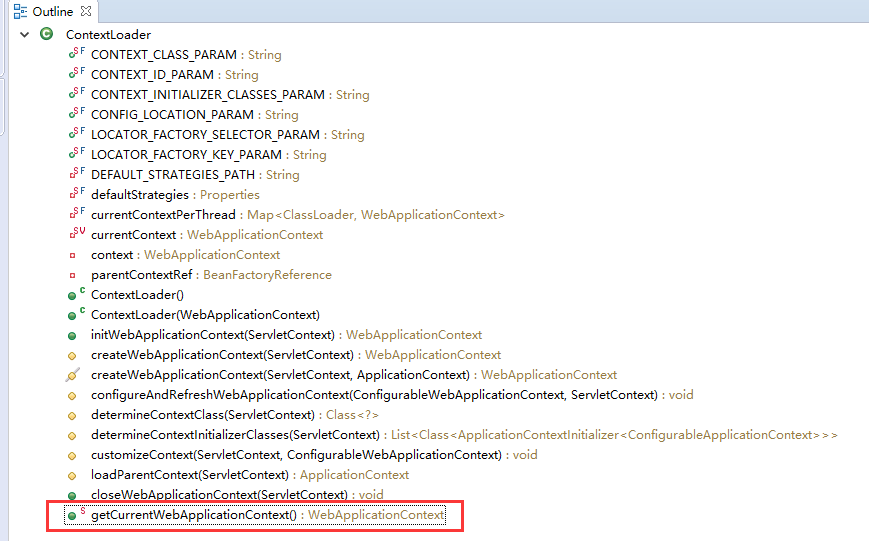
context;就是我们的ioc容器,context有很多方法,
由上图可知getCurrentWebApplicationContext()方法可以获取当前的ioc容器。
    public static WebApplicationContext getCurrentWebApplicationContext() {

        ClassLoader ccl = Thread.currentThread().getContextClassLoader();

        if (ccl != null) {

            WebApplicationContext ccpt = currentContextPerThread.get(ccl);

            if (ccpt != null) {

                return ccpt;

            }

        }

        return currentContext;

    }
getCurrentWebApplicationContext()属于ContextLoader类的,因为属于static,所以监听器来控制ioc容器生命周期
代码如下:
private static ApplicationContext ioc = ContextLoader.getCurrentWebApplicationContext();
在web.xml中配置监听器来控制ioc容器生命周期的更多相关文章
- 在web.xml中配置error-page
在web.xml中配置error-page 在web.xml中有两种配置error-page的方法,一是通过错误码来配置,而是通过异常的类型来配置,分别举例如下: 一. 通过错误码来配置error ...
- web.xml中配置log4j
1.将 commons-logging.jar和 log4j.jar加入你的项目中:2.在src/下创建log4j.properties|log4j.xml文件:3.在web.xml中配置log4j的 ...
- web.xml中配置Spring中applicationContext.xml的方式
2011-11-08 16:29 web.xml中配置Spring中applicationContext.xml的方式 使用web.xml方式加载Spring时,获取Spring applicatio ...
- web.xml 中配置了error-page但不起作用问题
问题: 在web.xml 中配置了 error-page,但是好像不起作用,就是跳转不到指定的页面. 配置信息如下: <!-- 400错误 --> <error-page> & ...
- struts2 在 Action 或 Interceptor 中获取 web.xml 中配置的 <context-param> 参数 (这是我的第一篇博文,哈哈。)
最近为了改一个问题,想加一个控制开关,就在web.xml 中配置了一个 <context-param> 参数,并在 Action 或 Interceptor 中获取参数值. 1.在 web ...
- 在哪个web.xml中配置welcome页面
是在tomcat的web.xml中配置,而不是在你的%web-project-root%/WEB-INF/web.xml中! 示例 <welcome-file-list> <welc ...
- 在web.xml中配置SpringMVC
代码如下 <servlet> <servlet-name>springMVC</servlet-name> <servlet-class>org.spr ...
- web.xml中配置启动时加载的servlet,load-on-starup
web.xml中配置启动时加载的servlet,load-on-starup 使用servlet来初始化配置文件数据: 在servlet的配置当中,<load-on-startup>1&l ...
- web.xml中配置spring.xml的三种方式
我们知道spring在web.xml中可以有三种方式来配置其xml路径:org.springframework.web.servlet.DispatcherServletorg.springframe ...
随机推荐
- 计算机基础-CPU
CPU(Central Processing Unit中央处理器)由运算器和控制器组成--微机性能的集成度最高的核心部件 1.金属触点 2.附带散热器 风冷式 热管散热式 水冷式等 扣具结构要和CPU ...
- 教程+资源,python scrapy实战爬取知乎最性感妹子的爆照合集(12G)!
一.出发点: 之前在知乎看到一位大牛(二胖)写的一篇文章:python爬取知乎最受欢迎的妹子(大概题目是这个,具体记不清了),但是这位二胖哥没有给出源码,而我也没用过python,正好顺便学一学,所以 ...
- oracle 12c 12.1.0.2.0 BUG 22562145
Wed May 23 17:46:14 2018TT01: Standby redo logfile selected for thread 1 sequence 42251 for destinat ...
- webview与JS的交互
webview与JS的交互 一:hybird app, web app 和 native app 的区别 Web App Hybird App 混合Native App 开发成本 低 中 高 维护 ...
- Objective-C 性能监控
1.内存监控 2.卡顿监控 3.fps监控
- MySQL(三)用正则表达式搜索
正则表达式是用来匹配文本的特殊的串(字符集合),将一个模式(正则表达式)与一个文本串进行比较: 所有种类的程序设计语言.文本编辑器.操作系统等都支持正则表达式,正则表达式用正则表达式语言来建立: My ...
- android 通讯类资料整理
https://github.com/koush/AndroidAsync(websocket) https://github.com/loopj/android-async-http http:// ...
- eclipse调试断点【转载】
该片博文是转载他人的博客,原博客地址:http://blog.csdn.net/maritimesun/article/details/7815903 作为开发人员,掌握开发环境下的调试技巧十分有必要 ...
- ASP.NET的生命周期
我主要参考了这些文章 ASP.NET应用程序与页面生命周期, IIS处理Asp.net请求和 Asp.net页面生命周期 asp.net页面的生命周期 页面生命周期开始 (一)页面生命周期的主要阶段包 ...
- you-get帮助使用手册
you-get使用手册 可选参数: -V, --version 查看版本并退出 -h, --help 查看帮助信息 不影响使用的选项: -i, - ...