
c# zxing生成二维码和打印
生成二维码代码
asset=“要生成的字符串”;

public static Bitmap CreateQRCode(string asset)

    {

        EncodingOptions options = new QrCodeEncodingOptions

        {

            DisableECI = true,

            CharacterSet = "UTF-8",

            Width = 120,

            Height = 120

        };

        BarcodeWriter writer = new BarcodeWriter();

        writer.Format = BarcodeFormat.QR_CODE;

        writer.Options = options;

        return writer.Write(asset);

    }
生成图片的方法
public static Image GetPrintPicture(Bitmap image, AssetEntity asset, int picWidth, int picHeight)

    {

        Bitmap printPicture = new Bitmap(picWidth, picHeight);

        int height = 5;

        Font font = new Font("黑体", 10f);

        Graphics g = Graphics.FromImage(printPicture);

        Brush brush = new SolidBrush(Color.Black);

        g.SmoothingMode = SmoothingMode.HighQuality;

        g.TextRenderingHint = System.Drawing.Text.TextRenderingHint.AntiAlias;//如果不填加反锯齿代码效果如图1

        int interval = 15;

        int pointX = 5;

        Rectangle destRect = new Rectangle(190, 10, image.Width, image.Height);

        g.DrawImage(image, destRect, 0, 0, image.Width, image.Height, GraphicsUnit.Pixel);

        height += 8;

        RectangleF layoutRectangle = new RectangleF(pointX, height, 260f, 85f);

        g.DrawString("资产编号:" + asset.Serial, font, brush, layoutRectangle);

        height += interval;

        layoutRectangle = new RectangleF(pointX, height, 230f, 85f);

        g.DrawString("资产名称:" + asset.Name, font, brush, layoutRectangle);

        height += interval;

        layoutRectangle = new RectangleF(pointX, height, 230f, 85f);

        g.DrawString("类    别:" + asset.Category, font, brush, layoutRectangle);

        height += interval;

        layoutRectangle = new RectangleF(pointX, height, 230f, 85f);

        g.DrawString("规格型号:" + asset.Model, font, brush, layoutRectangle);

        height += interval;

        layoutRectangle = new RectangleF(pointX, height, 230f, 85f);

        g.DrawString("生产厂家:" + asset.Manufacturer, font, brush, layoutRectangle);

        height += interval;

        layoutRectangle = new RectangleF(pointX, height, 230f, 85f);

        g.DrawString("启用时间:" + asset.StartUseTime, font, brush, layoutRectangle);

        height += interval;

        layoutRectangle = new RectangleF(pointX, height, 230f, 85f);

        g.DrawString("资产价格:" + asset.Price, font, brush, layoutRectangle);

        height += interval;

        layoutRectangle = new RectangleF(pointX, height, 230f, 85f);

        g.DrawString("保管单位:" + asset.Department, font, brush, layoutRectangle);

        //height += interval;

        layoutRectangle = new RectangleF(pointX + 150, height, 230f, 85f);

        g.DrawString("保管人:" + asset.Manager, font, brush, layoutRectangle);

        height += interval;

        layoutRectangle = new RectangleF(pointX, height, 230f, 85f);

        g.DrawString("存放地点:" + asset.StoragePlace, font, brush, layoutRectangle);

        height += interval;

        layoutRectangle = new RectangleF(pointX, height, 240f, 85f);

        g.DrawString("备    注:" + asset.Remark, font, brush, layoutRectangle);

        return printPicture;

    }
显示效果如下
图1与图2都是我们想要的效果,看起还算不错,如果仅仅保存为图片还可以,但是想要把这种布局的图片打印出来,结果是很不理想的。
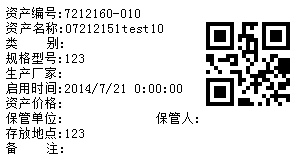
图1
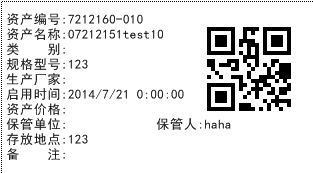
图2
图1打印效果文字不够平滑,非常难看,为了让图片上的文字平滑,加上这么一句话:g.TextRenderingHint = System.Drawing.Text.TextRenderingHint.AntiAlias;//反锯齿,
加上这句话后显示如图2,图2的效果貌似符合要求了,看着非常好,但是用二维码打印机打印出的效果非常的不清晰,这下难住了,经过查很多资料得出结论:想要平滑的效果就必须牺牲清晰度。
这样的结论客户肯定不能接受,后来发现打印的事件提供了画图的Graphics的属性改进后的代码如下:
改进代码
    public static void GetPrintPicture(Bitmap image, AssetEntity asset, PrintPageEventArgs g)

        {

            int height = 5;

            Font font = new Font("宋体", 10f);

            Brush brush = new SolidBrush(Color.Black);

            g.Graphics.SmoothingMode = SmoothingMode.HighQuality;

            int interval = 15;

            int pointX = 5;

            Rectangle destRect = new Rectangle(190, 10, image.Width, image.Height);

            g.Graphics.DrawImage(image, destRect, 0, 0, image.Width, image.Height, GraphicsUnit.Pixel);

            height += 8;

            RectangleF layoutRectangle = new RectangleF(pointX, height, 260f, 85f);

            g.Graphics.DrawString("资产编号:" + asset.Serial, font, brush, layoutRectangle);

            height += interval;

            layoutRectangle = new RectangleF(pointX, height, 230f, 85f);

            g.Graphics.DrawString("资产名称:" + asset.Name, font, brush, layoutRectangle);

            height += interval;

            layoutRectangle = new RectangleF(pointX, height, 230f, 85f);

            g.Graphics.DrawString("类    别:" + asset.Category, font, brush, layoutRectangle);

            height += interval;

            layoutRectangle = new RectangleF(pointX, height, 230f, 85f);

            g.Graphics.DrawString("规格型号:" + asset.Model, font, brush, layoutRectangle);

            height += interval;

            layoutRectangle = new RectangleF(pointX, height, 230f, 85f);

            g.Graphics.DrawString("生产厂家:" + asset.Manufacturer, font, brush, layoutRectangle);

            height += interval;

            layoutRectangle = new RectangleF(pointX, height, 230f, 85f);

            g.Graphics.DrawString("启用时间:" + asset.StartUseTime, font, brush, layoutRectangle);

            height += interval;

            layoutRectangle = new RectangleF(pointX, height, 230f, 85f);

            g.Graphics.DrawString("资产价格:" + asset.Price, font, brush, layoutRectangle);

            height += interval;

            layoutRectangle = new RectangleF(pointX, height, 230f, 85f);

            g.Graphics.DrawString("保管单位:" + asset.Department, font, brush, layoutRectangle);

            //height += interval;

            layoutRectangle = new RectangleF(pointX + 150, height, 230f, 85f);

            g.Graphics.DrawString("保管人:" + asset.Manager, font, brush, layoutRectangle);

            height += interval;

            layoutRectangle = new RectangleF(pointX, height, 230f, 85f);

            g.Graphics.DrawString("存放地点:" + asset.StoragePlace, font, brush, layoutRectangle);

            height += interval;

            layoutRectangle = new RectangleF(pointX, height, 240f, 85f);

            g.Graphics.DrawString("备    注:" + asset.Remark, font, brush, layoutRectangle);

        }
打印代码
    private void sbtnPrintQRCode_Click(object sender, EventArgs e)

        {

            PrintDocument document = new PrintDocument();

            Margins margins = new Margins(0x87, 20, 5, 20);

            document.DefaultPageSettings.Margins = margins;

            PrintPreviewDialog dialog = new PrintPreviewDialog();

            document.PrintPage += new PrintPageEventHandler(this.pd_PrintPage);

            dialog.Document = document;

            try

            {

                if (this.CurrentPrintQRCode != null && this.CurrentPrintQRCode.Count() > 0)

                {

                   document.Print();

                   Thread.Sleep(1000);

                }

            }

            catch (Exception exception)

            {

                DevExpress.XtraEditors.XtraMessageBox.Show(exception.Message, "打印出错", MessageBoxButtons.OK, MessageBoxIcon.Hand);

                document.PrintController.OnEndPrint(document, new PrintEventArgs());

            }

        }
private void pd_PrintPage(object sender, PrintPageEventArgs e) //触发打印事件
{
//PointF f = new PointF(20, 10);//原来方法
//if (currentPrintImage != null)
//{
// e.Graphics.DrawImage(this.currentPrintImage, f);
//}
CreatePicture.GetPrintPicture(this.bitmap, this.assetInfo, e);
}c# zxing生成二维码和打印的更多相关文章
- jquery.qrcode和jqprint的联合使用,实现html生成二维码并打印(中文也ok)
在公司的生产现场中,常常会在一些部品或设备上贴上二维码,用于扫描录入数据,免去手动输入的麻烦. 以前曾经做过winform的程序,生成二维码,并打印出来,使用的是zxing的类库, 但是如果二维码是附 ...
- (转)ZXing生成二维码和带logo的二维码,模仿微信生成二维码效果
场景:移动支付需要对二维码的生成与部署有所了解,掌握目前主流的二维码生成技术. 1 ZXing 生成二维码 首先说下,QRCode是日本人开发的,ZXing是google开发,barcode4j也是老 ...
- zxing生成二维码设置边框颜色
真是研究了很久很久,满满的泪啊 zxing生成二维码,默认是可以增加空白边框的,但是并没有可以设置边框颜色的属性. 其中增加空白边框的属性的一句话是: Map hints = new HashMap( ...
- java学习-zxing生成二维码矩阵的简单例子
这个例子需要使用google的开源项目zxing的核心jar包 core-3.2.0.jar 可以百度搜索下载jar文件,也可使用maven添加依赖 <dependency> <gr ...
- 通过zxing生成二维码
二维码现在随处可见,在日常的开发中,也会经常涉及到二维码的生成,特别是开发一些活动或者推广方面的功能时,二维码甚至成为必备功能点.本文介绍通过 google 的 zxing 包生成带 logo 的二维 ...
- 使用google zxing生成二维码图片
生成二维码工具类: 1 import java.awt.geom.AffineTransform; 2 import java.awt.image.AffineTransformOp; 3 impor ...
- 使用zxing生成二维码 - servlet形式
因为项目有个功能需要打印二维码,因为我比较喜欢使用html+css+js实现,所以首先想到的是jquery.qrcode.js插件,这个插件可以用canvas和table生成二维码,效果也不错,不过对 ...
- Java利用Zxing生成二维码
Zxing是Google提供的关于条码(一维码.二维码)的解析工具,提供了二维码的生成与解析的方法,现在我简单介绍一下使用Java利用Zxing生成与解析二维码 1.二维码的生成 1.1 将Zxing ...
- Java使用ZXing生成二维码条形码
一.下载Zxingjar包 本实例使用的是 zxing3.2.0的版本 下载地址 http://pan.baidu.com/s/1gdH7PzP 说明:本实例使用的3.2.0版本已经使用的java7 ...
随机推荐
- P4714 「数学」约数个数和
题解: 会了Miller-Rabin这题就很简单了 首先这种题很容易想到质因数分解 但是暴力根号算法是不行的 所以要用到 Miller-Rabin素数 https://blog.csdn.net/lt ...
- 【译】异步JavaScript的演变史:从回调到Promises再到Async/Await
我最喜欢的网站之一是BerkshireHathaway.com--它简单,有效,并且自1997年推出以来一直正常运行.更值得注意的是,在过去的20年中,这个网站很有可能从未出现过错误.为什么?因为它都 ...
- vue $mount 和 el的区别
两者在使用效果上没有任何区别,都是为了将实例化后的vue挂载到指定的dom元素中. 如果在实例化vue的时候指定el,则该vue将会渲染在此el对应的dom中,反之,若没有指定el,则vue实例会处于 ...
- 关闭PHP的opcache缓存
1.使用phpinfo();查看配置信息 2.搜索Additional .ini files parsed 3.查看opcache安装目录 4.打开文件将 opcache.enable=1 改成 ...
- 51Nod1306 高楼和棋子 动态规划
原文链接https://www.cnblogs.com/zhouzhendong/p/51Nod1306.html 题目传送门 - 51Nod1306 题意 有个N层的高楼和若干个棋子,所有的棋子都是 ...
- 三级区域jquery插件
/*! * Distpicker v1.0.4 * https://github.com/fengyuanchen/distpicker * * Copyright (c) 2014-2016 Fen ...
- Azkaban
Azkaban安装部署 https://azkaban.github.io/azkaban/docs/2.5/ 安装Azkaban ) 在/opt/module/目录下创建azkaban目录 [kri ...
- day63 django-模板语言
我们的功能是需要解耦的,从开始就一直在强调这一点,所以我们的函数需要另外放到一个单独的文件里面,一般都是放到views文件里面,views叫做视图,一般术语叫做视图函数,用来进行各种逻辑判断的,需要一 ...
- Java实现Windows、Mouse监听器
1.通过实现WindowListener接口来实现Windows监听器: import java.awt.event.WindowEvent; import java.awt.event.Window ...
- appium环境搭建及项目实战
手机端自动化环境搭建比其他自动化环境搭建较为复杂,安装工具有点多,也会有很多坑,安装工具一定注意版本号对应问题. 一.我的电脑环境:win7 64位,安卓测试机4.4.2版本,Python3.6,a ...