
centos 7 之nginx
环境信息
[root@node1 ~]# cat /etc/redhat-release

CentOS Linux release 7.1. (Core)
[root@node1 ~]# uname -r

3.10.-.el7.x86_64
yum安装nginx
查看是有安装包
[root@node1 ~]# yum list | grep nginx
如果没有配置配置epel源
[root@node1 ~]# wget -O /etc/yum.repos.d/epel.repo http://mirrors.aliyun.com/repo/epel-7.repo
如果没有wget则安装
[root@node1 ~]# yum -y install wget
安装nginx
[root@node1 ~]# yum -y install nginx
查看版本
[root@node1 ~]# nginx -V

nginx version: nginx/1.10.
启动 nginx
[root@node1 nginx]# nginx
关闭
[root@node1 nginx]# nginx -s stop
重启
[root@node1 nginx]# nginx -s reload
安装netstat 命令并查看端口
[root@node1 nginx]# yum -y install net-tools

[root@node1 nginx]# netstat -lntup
开机启动
[root@node1 ~]# systemctl enable nginx
编译安装
安装环境
yum install gcc patch libffi-devel python-devel  zlib-devel bzip2-devel openssl-devel ncurses-devel sqlite-devel readline-devel
tk-devel gdbm-devel db4-devel libpcap-devel xz-devel openssl openssl-devel -y
安装启动nginx
下载源码包
[root@localhost opt]# wget -c https://nginx.org/download/nginx-1.12.0.tar.gz
解压源码包
[root@localhost opt]# tar -zxvf nginx-1.12.0.tar.gz
配置,编译安装
[root@localhost nginx-1.12.0]# ./configure --prefix=/opt/nginx1-12/ --with-http_ssl_module --with-http_stub_status_module

[root@localhost nginx-1.12.0]# make && make install
启动nginx
[root@localhost nginx-1.12.0]# cd ../

[root@localhost opt]# cd nginx1-12/sbin

[root@localhost sbin]# ./nginx  #启动

[root@localhost sbin]# ./nginx  -s stop #关闭

[root@localhost sbin]# ./nginx -s reload  #平滑重启
添加环境变量,在 /etc/profile文件中尾部添加
PATH="/usr/local/sbin:/usr/local/bin:/usr/sbin:/usr/bin:/root/bin:/opt/nginx1-12/sbin"

刷新

[root@localhost ~]# source /etc/profile
安装完成后检测服务
[root@localhost sbin]# curl -I 10.0.0.21

HTTP/1.1 200 OK

Server: nginx/1.12.0

Date: Mon, 11 Mar 2019 05:38:58 GMT

Content-Type: text/html

Content-Length: 612

Last-Modified: Mon, 11 Mar 2019 05:29:12 GMT

Connection: keep-alive

ETag: "5c85f228-264"

Accept-Ranges: bytes
日志文件
log_format  main  '$remote_addr - $remote_user [$time_local] "$request" '

                      '$status $body_bytes_sent "$http_referer" '

                      '"$http_user_agent" "$http_x_forwarded_for"';

    access_log  logs/access.log  main;
配置站点
配置nginx.conf文件
worker_processes  ;

events {

    worker_connections  ;

}

http {

    include       mime.types;

    default_type  application/octet-stream;

    sendfile        on;

    keepalive_timeout  ;

    server {

        listen       ;

        server_name  www.demo.com;

        location / {

            root   /var/www/demo;

            index  index.html ;

        }

        location /wx{

            root   /var/www/;

            index  index.html ;

        }

        error_page        /50x.html;

        location = /50x.html {

            root   html;

        }

    }

}
创建 /var/www/demo 和 /var/www/wx 目录
[root@node1 ~]# mkdir -p /var/www/demo

[root@node1 ~]# mkdir -p /var/www/wx
将 www 的用户和用户组改为nginx
[root@node1 var ]# chown -R nginx.nginx .
分别在 demo 和 wx 目录下创建index.html文件并写入数据
[root@node1 demo]# echo "demo" >/var/www/demo/index.html

[root@node1 demo]# cd ../wx/

[root@node1 wx]# echo "wx" >/var/www/wx/index.html

[root@node1 www]# cat demo/index.html

demo

[root@node1 www]# cat wx/index.html

wx
通过crul 命令进行测试也可以通过浏览器访问IP或域名+目录进行测试(不要忘了hosts做解析)
[root@node1 www]# curl 10.0.0.22

demo

[root@node1 www]# curl 10.0.0.22/wx/

wx
配置多个虚拟主机
在配置文件中与第一个server平级写入
       #location ~ /\.ht {

        #    deny  all;

        #}

    }

    server {

        listen 80;

        server_name www.wl21.com;

        location / {

                root /opt/wl21/;

                index index.html;

        }

    }
负载均衡
环境
| 主机名 | IP | 说明 |
|---|---|---|
| node2 | 10.0.0.21 | 负载 |
| node3 | 10.0.0.22 | web01服务器 |
| node4 | 10.0.0.23 | web02服务器 |
node2配置
[root@node2 nginx]# vim nginx.conf

worker_processes  ;

events {

    worker_connections  ;

}

http {

    include       mime.types;

    default_type  application/octet-stream;

    sendfile        on;

    keepalive_timeout  ;

    upstream www_server_pools  {

        server 10.0.0.22:  weight=;

        server 10.0.0.23:  weight=;

    }

   server {

        listen     ;

       server_name  www.demo.com;

        location / {

        proxy_set_header Host $http_host;

        proxy_set_header X-Forwarded-For $remote_addr;

        proxy_pass http://www_server_pools;

       }

   }

}
node2 的IP和域名需要解析
[root@node2 ~]# cat /etc/hosts

127.0.0.1   localhost localhost.localdomain localhost4 localhost4.localdomain4

::         localhost localhost.localdomain localhost6 localhost6.localdomain6

10.0.0.19   www.demo.com
node3 和 node4 配置相同
[root@node3 nginx]# vim nginx.conf

worker_processes  ;

events {

    worker_connections  ;

}

http {

    include       mime.types;

    default_type  application/octet-stream;

    sendfile        on;

    keepalive_timeout  ;

    server {

        listen       ;

        server_name  www.demo.com;

        location / {

            root   /var/www/demo;

            index  index.html index.htm;

        }

        error_page        /50x.html;

        location = /50x.html {

            root   html;

        }

    }

}
创建 /var/www/demo 目录并创建 index.html 文件
10.0.0.22 配置
[root@node3 ~]# mkdir -p /var/www/demo

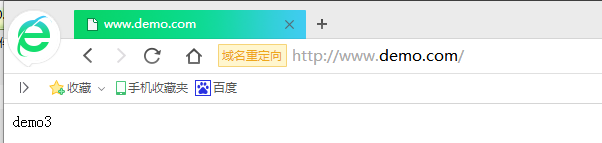
[root@node3 ~]# echo "demo3" >/var/www/demo/index.html
10.0.0.23 配置
[root@node4 ~]# mkdir -p /var/www/demo

[root@node4 ~]# echo "demo4" >/var/www/demo/index.html
域名解析后通过域名进行访问
访问结果

Keepalived 高可用
环境
| 主机名 | IP | 说明 |
|---|---|---|
| node1 | 10.0.0.20 | 备负载 |
| node2 | 10.0.0.21 | 主负载 |
| node3 | 10.0.0.22 | web01服务器 |
| node4 | 10.0.0.23 | web02服务器 |
安装 keepalived (10.0.0.20 备负载同样安装)
[root@node2 ~]# yum -y install keepalived

[root@node2 ~]# rpm -qa keepalived
配置keepalived (主负载配置)
[root@node2 ~]# vim /etc/keepalived/keepalived.conf

! Configuration File for keepalived

global_defs {

   notification_email {

     acassen@firewall.loc

     failover@firewall.loc

     sysadmin@firewall.loc

   }

   notification_email_from Alexandre.Cassen@firewall.loc

   smtp_server 192.168.200.1

   smtp_connect_timeout

   router_id node2         #路由器标识,一个局域网内是唯一的

}

vrrp_instance VI_1 {       #一个实例

    state MASTER           #角色 有 Master 和 Backup 两种

    interface eth0         #通信接口

    virtual_router_id 51   #虚拟路由标识,在一个配置文件内唯一

    priority 150           #竞选优先级

    advert_int 1           #同步通知间隔

    authentication {       #权限认证

        auth_type PASS

        auth_pass

    }

    virtual_ipaddress {    #虚拟IP地址 实际中为域名相对应的IP

        10.0.0.19

    }

}
配置keepalived (备负载配置)
[root@node1 ~]# vim /etc/keepalived/keepalived.conf

! Configuration File for keepalived

global_defs {

   notification_email {

     acassen@firewall.loc

     failover@firewall.loc

     sysadmin@firewall.loc

   }

   notification_email_from Alexandre.Cassen@firewall.loc

   smtp_server 192.168.200.1

   smtp_connect_timeout

   router_id node1

}

vrrp_instance VI_1 {

    state BACKUP            #角色,有Master和Backup两种

    interface eth0

    virtual_router_id

    priority 100            #竞选优先级 数值越大优先级越高

    advert_int

    authentication {

        auth_type PASS

        auth_pass

    }

    virtual_ipaddress {

        10.0.0.19

    }

}
配置完成后重启keepalived
[root@node2 ~]# systemctl restart keepalived
[root@node1 ~]# systemctl restart keepalived
查看node2 主负载IP
[root@node2 ~]# ip a

: lo: <LOOPBACK,UP,LOWER_UP> mtu  qdisc noqueue state UNKNOWN

    link/loopback ::::: brd :::::

    inet 127.0.0.1/ scope host lo

       valid_lft forever preferred_lft forever

    inet6 ::/ scope host

       valid_lft forever preferred_lft forever

: eth0: <BROADCAST,MULTICAST,UP,LOWER_UP> mtu  qdisc pfifo_fast state UP qlen

    link/ether :0c::1c:0e: brd ff:ff:ff:ff:ff:ff

    inet 10.0.0.21/ brd 10.0.0.255 scope global eth0

       valid_lft forever preferred_lft forever

    inet 10.0.0.19/ scope global eth0

       valid_lft forever preferred_lft forever

    inet6 fe80::20c:29ff:fe1c:e18/ scope link

       valid_lft forever preferred_lft forever
关闭主负载 keepalivied 再次查看主负载IP
[root@node2 ~]# systemctl stop keepalived
[root@node2 ~]# ip a

: lo: <LOOPBACK,UP,LOWER_UP> mtu  qdisc noqueue state UNKNOWN

    link/loopback ::::: brd :::::

    inet 127.0.0.1/ scope host lo

       valid_lft forever preferred_lft forever

    inet6 ::/ scope host

       valid_lft forever preferred_lft forever

: eth0: <BROADCAST,MULTICAST,UP,LOWER_UP> mtu  qdisc pfifo_fast state UP qlen

    link/ether :0c::1c:0e: brd ff:ff:ff:ff:ff:ff

    inet 10.0.0.21/ brd 10.0.0.255 scope global eth0

       valid_lft forever preferred_lft forever

    inet6 fe80::20c:29ff:fe1c:e18/ scope link

       valid_lft forever preferred_lft forever
此时查看备负载IP
[root@node1 ~]# ip a

: lo: <LOOPBACK,UP,LOWER_UP> mtu  qdisc noqueue state UNKNOWN

    link/loopback ::::: brd :::::

    inet 127.0.0.1/ scope host lo

       valid_lft forever preferred_lft forever

    inet6 ::/ scope host

       valid_lft forever preferred_lft forever

: eth0: <BROADCAST,MULTICAST,UP,LOWER_UP> mtu  qdisc pfifo_fast state UP qlen

    link/ether :0c::::b8 brd ff:ff:ff:ff:ff:ff

    inet 10.0.0.20/ brd 10.0.0.255 scope global eth0

       valid_lft forever preferred_lft forever

    inet 10.0.0.19/ scope global eth0

       valid_lft forever preferred_lft forever

    inet6 fe80::20c:29ff:fe29:39b8/ scope link

       valid_lft forever preferred_lft forever
启动主负载keepalived 并查看IP
root@node2 ~]# systemctl start keepalived

[root@node2 ~]# ip a

: lo: <LOOPBACK,UP,LOWER_UP> mtu  qdisc noqueue state UNKNOWN

    link/loopback ::::: brd :::::

    inet 127.0.0.1/ scope host lo

       valid_lft forever preferred_lft forever

    inet6 ::/ scope host

       valid_lft forever preferred_lft forever

: eth0: <BROADCAST,MULTICAST,UP,LOWER_UP> mtu  qdisc pfifo_fast state UP qlen

    link/ether :0c::1c:0e: brd ff:ff:ff:ff:ff:ff

    inet 10.0.0.21/ brd 10.0.0.255 scope global eth0

       valid_lft forever preferred_lft forever

    inet 10.0.0.19/ scope global eth0

       valid_lft forever preferred_lft forever

    inet6 fe80::20c:29ff:fe1c:e18/ scope link

       valid_lft forever preferred_lft forever
域名IP回到了主负载上面,此时备负载不在有域名IP
[root@node1 ~]# ip a

: lo: <LOOPBACK,UP,LOWER_UP> mtu  qdisc noqueue state UNKNOWN

    link/loopback ::::: brd :::::

    inet 127.0.0.1/ scope host lo

       valid_lft forever preferred_lft forever

    inet6 ::/ scope host

       valid_lft forever preferred_lft forever

: eth0: <BROADCAST,MULTICAST,UP,LOWER_UP> mtu  qdisc pfifo_fast state UP qlen

    link/ether :0c::::b8 brd ff:ff:ff:ff:ff:ff

    inet 10.0.0.20/ brd 10.0.0.255 scope global eth0

       valid_lft forever preferred_lft forever

    inet6 fe80::20c:29ff:fe29:39b8/ scope link

       valid_lft forever preferred_lft forever
最后要将keepalives 加入开机启动
[root@node1 ~]# systemctl enable keepalived

[root@node2 ~]# systemctl enable keepalived
centos 7 之nginx的更多相关文章
- CentOS7 编译安装 Nginx (实测 笔记 Centos 7.0 + nginx 1.6.2)
环境: 系统硬件:vmware vsphere (CPU:2*4核,内存2G,双网卡) 系统版本:CentOS-7.0-1406-x86_64-DVD.iso 安装步骤: 1.准备 1.1 显示系统版 ...
- CentOS 6.6 nginx PHP 配置
/************************************************************************* * CentOS 6.6 nginx PHP 配置 ...
- CentOS 6.6 nginx install
/************************************************************************* * CentOS 6.6 nginx instal ...
- 删:Centos 7安装Nginx 1.8
[CentOS 7] 安装nginx! 首先进行 nginx yum Nginx安装记录 注意:如果用源码安装,nginx配置时需要指定--with-pcer对应的压缩包路径,如果使用二进制安装不需要 ...
- linux/centos下安装nginx(rpm安装和源码安装)详细步骤
Centos下安装nginx rpm包 ...
- CentOS下安装Nginx并添加nginx_upload_module
安装前,最好能保证依赖的系统软件已经升级. yum update CentOS上安装Nginx,如果只是简单安装,不附加其他第三方模块,一句话可以搞定: yum install nginx ...
- CentOS 7安装nginx
CentOS 7安装nginx 参考网上其他文章做的 安装Nginx 我们从nginx官方的RPM源来安装一个预构建的稳定版本的nginx包. rpm --import http://nginx.or ...
- CentOS 6.5 + Nginx 1.8.0 + PHP 5.6(with PHP-FPM) 负载均衡源码安装
CentOS 6.5 + Nginx 1.8.0 + PHP 5.6(with PHP-FPM) 负载均衡源码安装 http://www.cnblogs.com/ppoo24/p/4918288.ht ...
- CentOS 6.2+Nginx+Nagios,手机短信和qq邮箱提醒
http://chenhao6.blog.51cto.com/6228054/1323192 标签:软件包 配置文件 nagios 服务端 监控 原创作品,允许转载,转载时请务必以超链接形式标明文章 ...
- 在CentOS 上搭建nginx来部署静态页面网站
在centOs 上搭建nginx来部署静态页面网站 一.部署服务器环境 nginx:轻量级.高性能的HTTP及反向代理服务器,占用内存少,并发能力强,相比老牌的apache作为web服务器,性能更加卓 ...
随机推荐
- phoenix表操作
phoenix表操作 进入命令行,这是sqlline.py 配置到path环境变量的情况下 sqlline.py localhost如果要退出命令行:!q 或者 !quit 3.4.1 创建表 ...
- SQL Server索引误区使用建议
常见的误区: 1.数据库不需要索引 2.主键总是聚集的 3.联机索引操作不引起阻塞 4.复合索引下列的顺序不重要 5.聚集索引以物理顺序存储 6.填充因子可以应用在索引的插入过程中 7.每个表应该有聚 ...
- python下载想听的有声书,让喜马拉雅收费,我是程序员!
from urllib import parse,request import urllib header_dict = {'User-Agent': 'Mozilla/5.0 (Windows NT ...
- Html列表分页算法
public class PageHelper { /// <summary> /// 标签 /// </summary> public string Tag { get; s ...
- Facebook的React Native之所以能打败谷歌的原因有7个(ReactNative vs Flutter)
https://baijiahao.baidu.com/s?id=1611028483072699113&wfr=spider&for=pc 如果你喜欢用(或希望能够用)模板搭建应用, ...
- CentOS6.9安装socat
yum -y install epel-release yum -y install socat
- python安装plinter
我下的python2.7是有pip的,但是直接在cmd中输入pip是无响应的.要去环境变量中配置D:/python/Script 这样就可以了. pip install splinter就能下载了
- 【bzoj1264】[AHOI2006]基因匹配Match 树状数组
题解: 一道比较简单的题目 容易发现状态数只有5*n个 而转移需要满足i1<i2;j1<j2 那么很明显是二维平面数点 暴力一点就是二维树状数组+map 5nlog^3 比较卡常 但是注意 ...
- XML与HTML的主要差异
1. 参考 XML 简介 2. XML 与 HTML 的主要差异 XML 不是 HTML 的替代. XML 和 HTML 为不同的目的而设计: XML 被设计为传输和存储数据,其焦点是数据的内容. H ...
- keepalived + glusterfs实现高可用
此处暂时不介绍原理乱七八糟,边做别记录下操作. 1.服务器修改网卡的名字为eth0 .将device和name都改成eth0 vim /etc/sysconfig/network-scripts/if ...