
Core源码(四)IEnumerable
首先我们去core的源码中去找IEnumerable发现并没有,如下
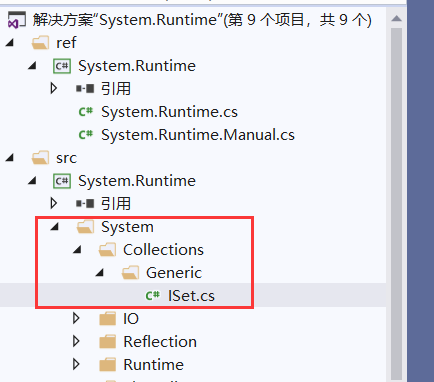
Core中应该是直接使用.net中对IEnumerable的定义
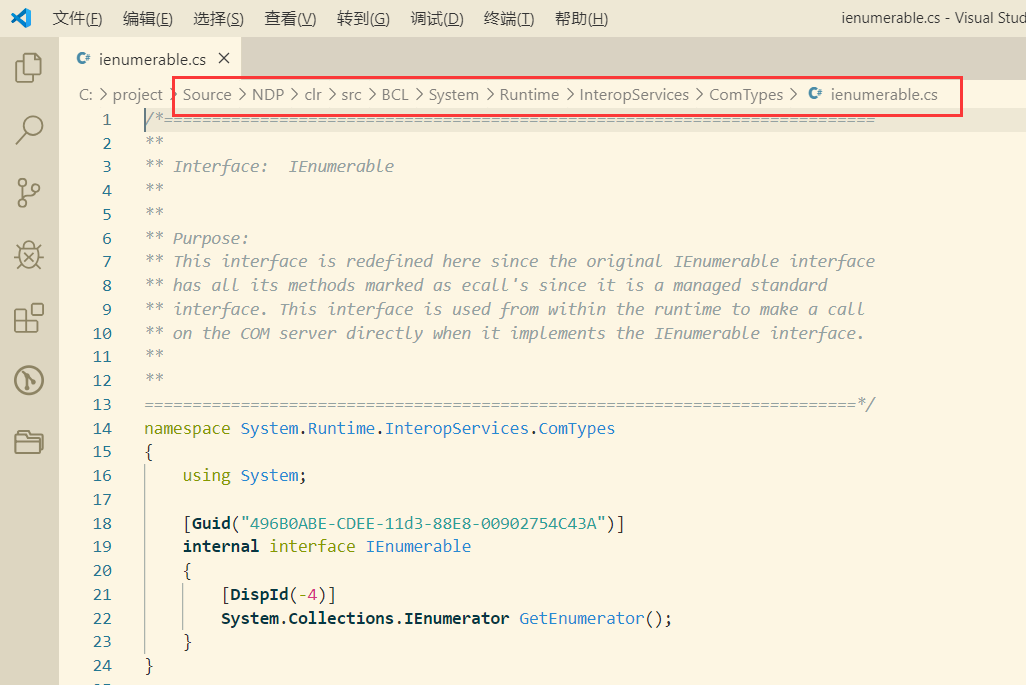
自己实现迭代器
迭代器是通过IEnumerable和IEnumerator接口来实现的,今天我们也来尝试实现自己的迭代器。
首先来看看这两个接口:
internal interface IEnumerable

{

    [DispId(-)]

    System.Collections.IEnumerator GetEnumerator();

}

public interface IEnumerator

{

    object Current { get; }

    bool MoveNext();

    void Reset();

}
并没有想象的那么复杂。其中IEnumerable只有一个返回IEnumerator的GetEnumerator方法。而IEnumerator中有两个方法加一个属性。
接下来,我们继承IEnumerable接口并实现:
public class MyIEnumerable : IEnumerable

{

    private string[] strList;

    public MyIEnumerable(string[] strList)

    {

        this.strList=strList;

    }

    public IEnumerator GetEnumerator()

    {

        return new MyIEnumerator(strList);

    }

}

public class MyIEnumerator:IEnumerator

{

    private string[] strList;

    private int position;

    public MyIEnumerator(string[] strList)

    {

        this.strList=strList;

        position=-;

    }

    public object Current

    {

        get{ return strList[position];}

    }

    public bool MoveNext()

    {

        position++;

        if (position<strList.Length)

        {

            return true;

        }

        return false;

    }

    public void Reset()

    {

        position=-;

    }

}
下面使用原始的方式调用:
static void Main(string[] args)

{

    string[] strList=new string[]{"",""};

    MyIEnumerable my =new MyIEnumerable(strList);

    var enumerator=my.GetEnumerator();

    while (enumerator.MoveNext())

    {

        Console.WriteLine(enumerator.Current);

        //enumerator.Current="";  这会报错

    }

    Console.WriteLine("-------------------------------");

    foreach (var item in my)

    {

        Console.WriteLine(item);

    }

}
这两种取值方式基本等效,因为实际clr编译后生成的代码是相同的。
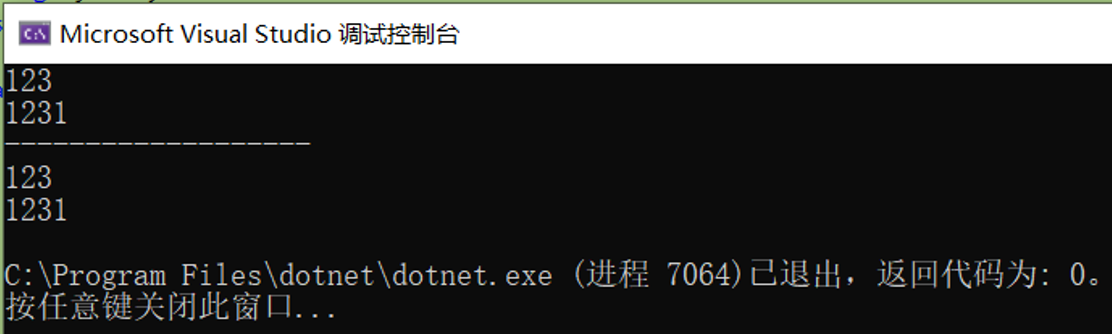
由此可见,两者有这么个关系:
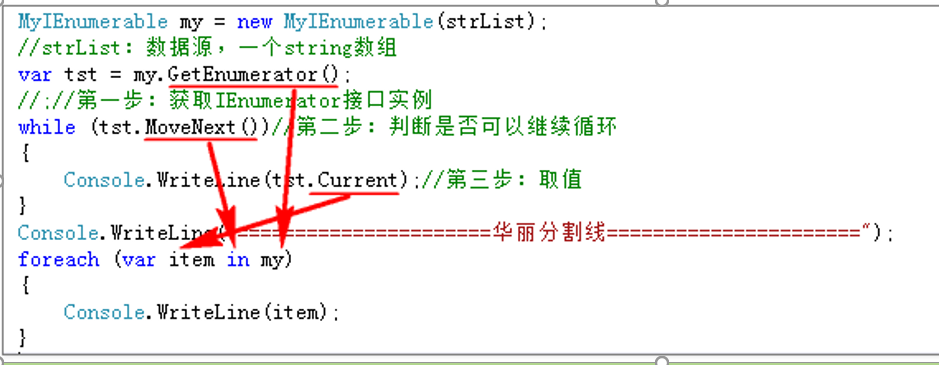
我们可以回答一个问题了“为什么在foreach中不能修改item的值?”:
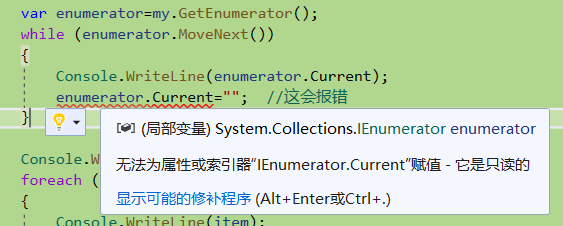
我们还记得IEnumerator的定义吗,接口的定义就只有get没有set。所以我们在foreach中不能修改item的值。
yield的使用
你肯定发现了我们自己去实现IEnumerator接口还是有些许麻烦,并且上面的代码肯定是不够健壮。对的,.net给我们提供了更好的方式。
public IEnumerator GetEnumerator()

{

    //return new MyIEnumerator(strList);

    for (int i = ; i < strList.Length; i++)

    {

        yield return strList[i];

    }

}
你会发现我们连MyIEnumerator都没要了,也可以正常运行。太神奇了。yield到底为我们做了什么呢?
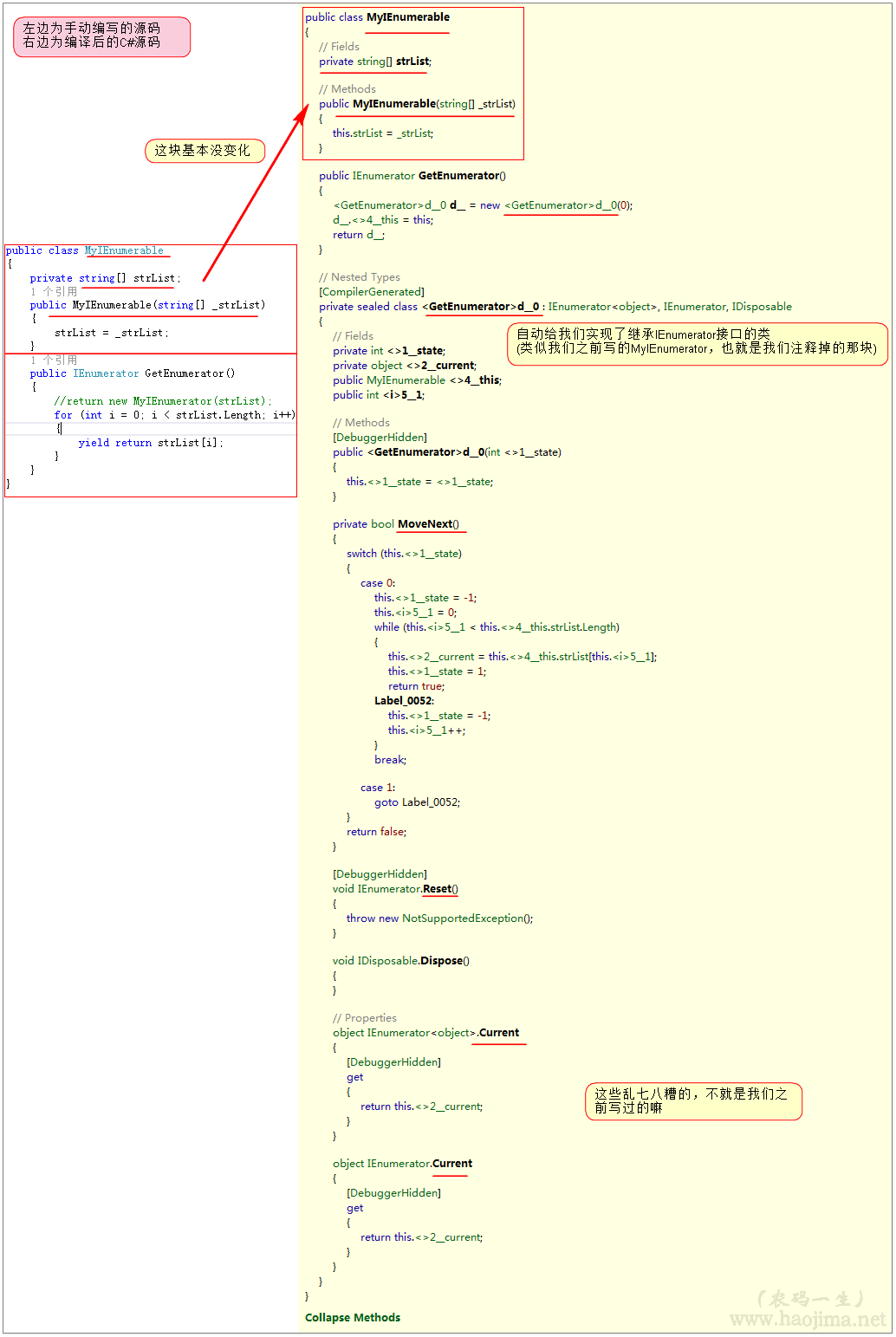
好家伙,我们之前写的那一大坨。你一个yield关键字就搞定了。最妙的是这块代码:

这就是所谓的状态机吧!
我们调用GetEnumerator的时候,看似里面for循环了一次,其实这个时候没有做任何操作。只有调用MoveNext的时候才会对应调用for循环。
为什么Linq to Object中要返回IEnumerable?
因为IEnumerable是延迟加载的,每次访问的时候才取值。也就是我们在Lambda里面写的where、select并没有循环遍历(只是在组装条件),只有在ToList或foreache的时候才真正去集合取值了。这样大大提高了性能。
自己实现MyWhere:
public class MyIEnumerable : IEnumerable

{

    private string[] strList;

    public MyIEnumerable(string[] strList)

    {

        this.strList=strList;

    }

    public IEnumerator GetEnumerator()

    {

        //return new MyIEnumerator(strList);

        for (int i = ; i < strList.Length; i++)

        {

            yield return strList[i];

        }

    }

    public IEnumerable<string> MyWhere(Func<string,bool> func)

    {

        foreach (string item in this)

        {

            if (func(item))

            {

                yield return item;

            }

        }

    }

}
FirstOrDefault的实现
内部调用了TryGetFirst。

private static TSource TryGetFirst<TSource>(this IEnumerable<TSource> source, out bool found)

{

    if (source == null)

    {

        throw Error.ArgumentNull(nameof(source));

    }

    if (source is IPartition<TSource> partition)

    {

        return partition.TryGetFirst(out found);

    }

    if (source is IList<TSource> list)

    {

        if (list.Count > )

        {

            found = true;

            return list[];

        }

    }

    else

    {

        using (IEnumerator<TSource> e = source.GetEnumerator())

        {

            //同样调用了MoveNext方法

            if (e.MoveNext())

            {

                found = true;

                //Current属性在我们的自定义实现里面也有出现

                return e.Current;

            }

        }

    }

    found = false;

    return default(TSource);

}
不传入筛选的实现
private static TSource TryGetFirst<TSource>(this IEnumerable<TSource> source, Func<TSource, bool> predicate, out bool found)

{

    if (source == null)

    {

        throw Error.ArgumentNull(nameof(source));

    }

    if (predicate == null)

    {

        throw Error.ArgumentNull(nameof(predicate));

    }

    if (source is OrderedEnumerable<TSource> ordered)

    {

        return ordered.TryGetFirst(predicate, out found);

    }

    foreach (TSource element in source)

    {

        //循环,直接返回第一个符合条件的对象

        if (predicate(element))

        {

            found = true;

            return element;

        }

    }

    found = false;

    return default(TSource);

}
传入筛选的实现
源码地址
https://gitee.com/qixinbo/MyKestrelServer/tree/master/DataStruct/EnumerableStudy
本文参考《农码一生》
https://www.cnblogs.com/zhaopei/p/5769782.html
Core源码(四)IEnumerable的更多相关文章
- 一个由正则表达式引发的血案 vs2017使用rdlc实现批量打印 vs2017使用rdlc [asp.net core 源码分析] 01 - Session SignalR sql for xml path用法 MemCahe C# 操作Excel图形——绘制、读取、隐藏、删除图形 IOC,DIP,DI,IoC容器
1. 血案由来 近期我在为Lazada卖家中心做一个自助注册的项目,其中的shop name校验规则较为复杂,要求:1. 英文字母大小写2. 数字3. 越南文4. 一些特殊字符,如“&”,“- ...
- 一起来看CORE源码(一) ConcurrentDictionary
先贴源码地址 https://github.com/dotnet/corefx/blob/master/src/System.Collections.Concurrent/src/System/Col ...
- ASP.NET Core[源码分析篇] - WebHost
_configureServicesDelegates的承接 在[ASP.NET Core[源码分析篇] - Startup]这篇文章中,我们得知了目前为止(UseStartup),所有的动作都是在_ ...
- ASP.NET Core[源码分析篇] - Authentication认证
原文:ASP.NET Core[源码分析篇] - Authentication认证 追本溯源,从使用开始 首先看一下我们通常是如何使用微软自带的认证,一般在Startup里面配置我们所需的依赖认证服务 ...
- DOTNET CORE源码分析之IOC容器结果获取内容补充
补充一下ServiceProvider的内容 可能上一篇文章DOTNET CORE源码分析之IServiceProvider.ServiceProvider.IServiceProviderEngin ...
- ASP.NET Core源码学习(一)Hosting
ASP.NET Core源码的学习,我们从Hosting开始, Hosting的GitHub地址为:https://github.com/aspnet/Hosting.git 朋友们可以从以上链接克隆 ...
- asp.net core源码地址
https://github.com/dotnet/corefx 这个是.net core的 开源项目地址 https://github.com/aspnet 这个下面是asp.net core 框架 ...
- ASP .NET CORE 源码地址
ASP .NET CORE 源码地址:https://github.com/dotnet/ 下拉可以查找相应的源码信息, 例如:查找 ASP .NET CORE Microsoft.Extension ...
- .net core 源码解析-web app是如何启动并接收处理请求
最近.net core 1.1也发布了,蹒跚学步的小孩又长高了一些,园子里大家也都非常积极的在学习,闲来无事,扒拔源码,涨涨见识. 先来见识一下web站点是如何启动的,如何接受请求,.net core ...
随机推荐
- SpringBootJPA实现增删改查
一.目录展示 二.导入依赖 <dependency> <groupId>org.springframework.boot</groupId> <artifac ...
- Java之通过接口获取数据并用JDBC存储到数据库中
最近做数据同步功能,从接口获取数据然后存到数据库中以便后续对数据进行相关操作,下面就贴一下相关代码. import com.alibaba.fastjson.JSON; import com.alib ...
- plantuml-绘制状态图和活动图和部署图
背景 状态图:对象的所有状态,以及基于事件发生的状态改变的过程: 活动图:用例的工作流程: 部署图:系统的软硬件物理体系结构: 状态图 基本语法 元素 语法 说明 开始和结束状态 [*] 标识开始和结 ...
- .net core 拦截器的使用
.net core 拦截器的使用 实例代码:https://gitee.com/D_C_L/InterceptorTest.git 拦截器主要是将程序中的一些可以独立出去的模块进行拦截,比如幕等性,和 ...
- Scrapy框架-爬虫程序相关属性和方法汇总
一.爬虫项目类相关属性 name:爬虫任务的名称 allowed_domains:允许访问的网站 start_urls: 如果没有指定url,就从该列表中读取url来生成第一个请求 custom_se ...
- WM消息大全,windows消息大全
WM消息大全 消息名 消息值 说明 WM_CREATE 0x0001 应用程序创建一个窗口 WM_DESTROY 0x0002 一个窗口被销毁 WM_MOVE 0x0003 移动一个窗口 WM_SIZ ...
- 微信小程序之文件系统初探
微信小程序之文件系统初探 1.文件下载 //下载文件 go_download: function() { var content = this; var baseUrl = "http:// ...
- 推荐一个Emoji框架
表情的需求很常见.有的可以看看,没有的可以先收藏以备不时之需. 这个框架的反应速度很快,界面简洁漂亮,功能完备. 而且代码简洁易懂,便于学习. GitHub:https://github.com/ne ...
- 转战物联网·基础篇06-深入理解MQTT协议之基本术语
通过上一节我们对MQTT协议已经有了初步的印象,这一节我们开始深入的理解一下MQTT协议,介绍常用的MQTT 3.1.1版本,5.0版本后面指介绍新增部分即可.这一节我们先介绍MQTT里常用的术语 ...
- 命令模式彻底删除oracle实例
步骤一:关闭数据库export ORACLE_SID=bgsp1. sqlplus / as sysdba2. shutdown immediate步骤二:删除实例相关文件1. find $ORACL ...