
点云3D 目标检测
点云
点云是雷达采集到的信息.
关于点云基本介绍参考https://zhuanlan.zhihu.com/p/22581673
ros中的点云消息结构:http://docs.ros.org/jade/api/sensor_msgs/html/msg/PointCloud2.html
# This message holds a collection of N-dimensional points, which may

# contain additional information such as normals, intensity, etc. The

# point data is stored as a binary blob, its layout described by the

# contents of the "fields" array.

# The point cloud data may be organized 2d (image-like) or 1d

# (unordered). Point clouds organized as 2d images may be produced by

# camera depth sensors such as stereo or time-of-flight.

# Time of sensor data acquisition, and the coordinate frame ID (for 3d

# points).

Header header

# 2D structure of the point cloud. If the cloud is unordered, height is

# 1 and width is the length of the point cloud.

uint32 height

uint32 width

# Describes the channels and their layout in the binary data blob.

PointField[] fields

bool    is_bigendian # Is this data bigendian?

uint32  point_step   # Length of a point in bytes

uint32  row_step     # Length of a row in bytes

uint8[] data         # Actual point data, size is (row_step*height)

bool is_dense        # True if there are no invalid points
PointField结构:http://docs.ros.org/melodic/api/sensor_msgs/html/msg/PointField.html
# This message holds the description of one point entry in the

# PointCloud2 message format.

uint8 INT8    = 1

uint8 UINT8   = 2

uint8 INT16   = 3

uint8 UINT16  = 4

uint8 INT32   = 5

uint8 UINT32  = 6

uint8 FLOAT32 = 7

uint8 FLOAT64 = 8

string name      # Name of field

uint32 offset    # Offset from start of point struct

uint8  datatype  # Datatype enumeration, see above

uint32 count     # How many elements in the field
点云消息数据存储在PointCloud2.data中.
示例:
header:  // 点云的头信息

  seq: 963 //

  stamp:  // 时间戳

    secs: 1541143772

    nsecs: 912011000

  frame_id: "/camera_init"

height: 1   // If the cloud is unordered, height is 1  如果cloud 是无序的 height 是 1

width: 852578  //点云的长度

fields:  //  sensor_msgs/PointField[] fields

  -

    name: "x"

    offset: 0

    datatype: 7 	// 	uint8 INT8    = 1

			//	uint8 UINT8   = 2

			//	uint8 INT16   = 3

			//	uint8 UINT16  = 4

			//	uint8 INT32   = 5

			//	uint8 UINT32  = 6

			//	uint8 FLOAT32 = 7

			//	uint8 FLOAT64 = 8

    count: 1

  -

    name: "y"

    offset: 4

    datatype: 7

    count: 1

  -

    name: "z"

    offset: 8

    datatype: 7

    count: 1

  -

    name: "intensity"

    offset: 16

    datatype: 7

    count: 1

is_bigendian: False

point_step: 32 // Length of a point in bytes 一个点占的字节数

row_step: 27282496 // Length of a row in bytes 一行的长度占用的字节数

data: [ .......................................................... ] //  Actual point data, size is (row_step*height)

is_dense: True // 没有非法数据点
datatype=7对应的类型为PointField.FLOAT32,size为4.x/y/z的偏移都是正常的.为什么intensity的offset变成了16而不是12呢?ros在包装PointCloud2的时候可能在PointField之间添加了一些额外信息,这点我们在处理的时候要注意一下.同理还有Point与Point之间也可能有额外的信息.
点云rosbag转numpy
参考https://gist.github.com/bigsnarfdude/eeb156dc7b4caca69f5b31037da54708
我们想将PointCloud2格式的msg转换为numpy的矩阵格式.即转换成m行n列,每一列即为x,y,z,intensity...
首先我们希望对msg.data做反序列化处理,即
def msg_to_arr(msg):

    arr = np.fromstring(msg.data, dtype_list)
现在问题变成了如何从点云的datatype转到numpy的datatype
DUMMY_FIELD_PREFIX = '__'

# mappings between PointField types and numpy types

type_mappings = [(PointField.INT8, np.dtype('int8')), (PointField.UINT8, np.dtype('uint8')), (PointField.INT16, np.dtype('int16')),

                 (PointField.UINT16, np.dtype('uint16')), (PointField.INT32, np.dtype('int32')), (PointField.UINT32, np.dtype('uint32')),

                 (PointField.FLOAT32, np.dtype('float32')), (PointField.FLOAT64, np.dtype('float64'))]

pftype_to_nptype = dict(type_mappings)

nptype_to_pftype = dict((nptype, pftype) for pftype, nptype in type_mappings)

# sizes (in bytes) of PointField types

pftype_sizes = {PointField.INT8: 1, PointField.UINT8: 1, PointField.INT16: 2, PointField.UINT16: 2,

                PointField.INT32: 4, PointField.UINT32: 4, PointField.FLOAT32: 4, PointField.FLOAT64: 8}

def fields_to_dtype(fields, point_step):

    '''

    Convert a list of PointFields to a numpy record datatype.

    '''

    offset = 0

    np_dtype_list = []

    for f in fields:

        while offset < f.offset:

            # might be extra padding between fields

            np_dtype_list.append(('%s%d' % (DUMMY_FIELD_PREFIX, offset), np.uint8))

            offset += 1

        dtype = pftype_to_nptype[f.datatype]

        if f.count != 1:

            dtype = np.dtype((dtype, f.count))

        np_dtype_list.append((f.name, dtype))

        offset += pftype_sizes[f.datatype] * f.count

    # might be extra padding between points

    while offset < point_step:

        np_dtype_list.append(('%s%d' % (DUMMY_FIELD_PREFIX, offset), np.uint8))

        offset += 1

    return np_dtype_list
代码逻辑很清楚,pftype_to_nptype和nptype_to_pftype定义了点云消息中数据结构和numpy中数据结构的映射关系.
唯一需要注意的就是前面提到过的ros在包装PointCloud2的时候可能在PointField之间添加了一些额外信息,这点我们在处理的时候要注意一下.同理还有Point与Point之间也可能有额外的信息. 代码里的
        while offset < f.offset:

            # might be extra padding between fields

            np_dtype_list.append(('%s%d' % (DUMMY_FIELD_PREFIX, offset), np.uint8))

            offset += 1

    # might be extra padding between points

    while offset < point_step:

        np_dtype_list.append(('%s%d' % (DUMMY_FIELD_PREFIX, offset), np.uint8))

        offset += 1
就是为了处理上述问题.
复现点云检测模型SqueezeSeg检测点云数据
https://blog.csdn.net/AdamShan/article/details/83544089
原文用的py2.7,复现的时候遇到了很多问题
- conda activate env2.7
- pip install tensorflow
- pip install easydict
- pip install joblib
直接运行squeezeseg_ros_node.py的时候会报如下错误.

错误代码的意思是出错于读launch文件.
npy_path = rospy.get_param('npy_path')
这一句会读launch文件中的配置.
在执行了roslaunch squeezeseg_ros squeeze_seg_ros.launch之后,会报错
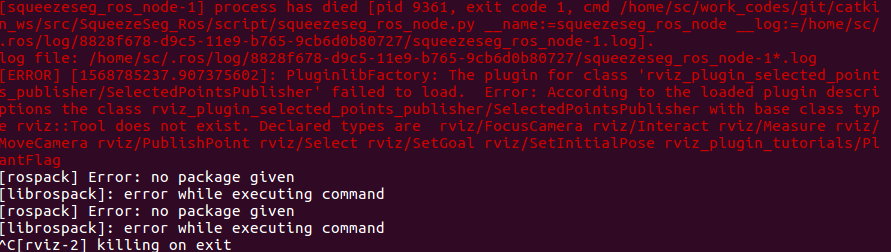
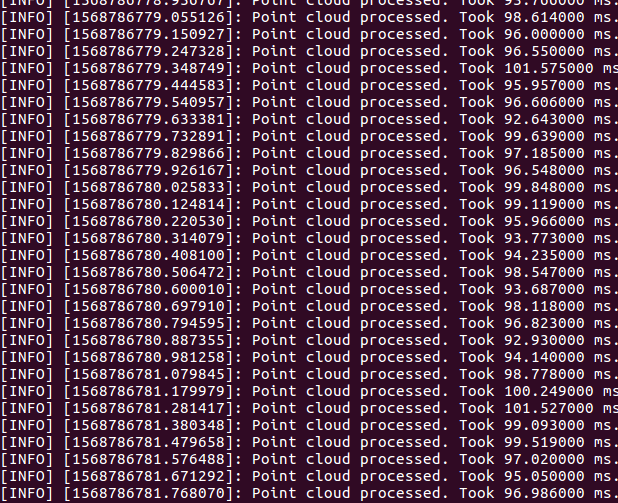
这之后再执行python squeezeseg_ros_node.py就可以正常运行了.
点云3D 目标检测的更多相关文章
- ICCV2019论文点评:3D Object Detect疏密度点云三维目标检测
ICCV2019论文点评:3D Object Detect疏密度点云三维目标检测 STD: Sparse-to-Dense 3D Object Detector for Point Cloud 论文链 ...
- CVPR2020|3D-VID:基于LiDar Video信息的3D目标检测框架
作者:蒋天园 Date:2020-04-18 来源:3D-VID:基于LiDar Video信息的3D目标检测框架|CVPR2020 Brief paper地址:https://arxiv.org/p ...
- CVPR2019:无人驾驶3D目标检测论文点评
CVPR2019:无人驾驶3D目标检测论文点评 重读CVPR2019的文章,现在对以下文章进行点评. Stereo R-CNN based 3D Object Detection for Autono ...
- CVPR2020论文介绍: 3D 目标检测高效算法
CVPR2020论文介绍: 3D 目标检测高效算法 CVPR 2020: Structure Aware Single-Stage 3D Object Detection from Point Clo ...
- 3D目标检测(CVPR2020:Lidar)
3D目标检测(CVPR2020:Lidar) LiDAR-Based Online 3D Video Object Detection With Graph-Based Message Passing ...
- 点云3d检测模型pointpillar
PointPillars 一个来自工业界的模型.https://arxiv.org/abs/1812.05784 3D目标检测通常做法 3d卷积 投影到前平面 在bird-view上操作 处理思路依然 ...
- 三维目标检测论文阅读:Deep Continuous Fusion for Multi-Sensor 3D Object Detection
题目:Deep Continuous Fusion for Multi-Sensor 3D Object Detection 来自:Uber: Ming Liang Note: 没有代码,主要看思想吧 ...
- CVPR2020:利用图像投票增强点云中的三维目标检测(ImVoteNet)
CVPR2020:利用图像投票增强点云中的三维目标检测(ImVoteNet) ImVoteNet: Boosting 3D Object Detection in Point Clouds With ...
- Faster R-CNN:详解目标检测的实现过程
本文详细解释了 Faster R-CNN 的网络架构和工作流,一步步带领读者理解目标检测的工作原理,作者本人也提供了 Luminoth 实现,供大家参考. Luminoth 实现:https:// ...
随机推荐
- Less(6)
1.先判断注入类型 (1)首先看到要求,要求传一个ID参数,并且要求是数字型的:?id=1 (2)再输入?id=1' (3)再输入?id=1 and 1=1 (4)再输入?id=1 and 1=2 ( ...
- Node.js module export async function
一.Demo 1.首先定义 module 文件:bbb.js const fs = require("fs"); function readFileSync() { let res ...
- 手把手教你制作Jlink-OB调试器(含原理图、PCB、外壳、固件)
前言 好久没更新博客和公众号了,感谢大家还没取关哈,好吧,我承认是我太懒了,今天分享一个福利! 趁着前段时间嘉立创和捷配打价格战,一天之内,多次降价,看着真是热闹.捷配降到最低3元一款,而嘉立创降到最 ...
- SpringBoot2.0 整合 SpringSecurity 框架,实现用户权限安全管理
本文源码:GitHub·点这里 || GitEE·点这里 一.Security简介 1.基础概念 Spring Security是一个能够为基于Spring的企业应用系统提供声明式的安全访问控制解决方 ...
- 请求时发送OPTIONS请求
最近在用uni-app开发项目时,发现一个之前没注意到的点,当我发送POST请求的时候,在NetWork可以看到在发送正式的POST请求时,会先发送一个OPTIONS请求,OPTIONS请求后才会发送 ...
- Java面试必备:手写单例模式
面试官:请手写下几种常见的单例模式 我:好的(面带微笑),心里暗喜(送分题). 没成想提笔便写出了如此豪放的代码,不堪回首,请原谅我的不羁! 此篇整理了几种常见的单例模式代码示例,再有面试官让手撕单例 ...
- 【nodejs原理&源码杂记(8)】Timer模块与基于二叉堆的定时器
目录 一.概述 二. 数据结构 2.1 链表 2.2 二叉堆 三. 从setTimeout理解Timer模块源码 3.1 timers.js中的定义 3.2 Timeout类定义 3.3 active ...
- js鼠标滚轮事件上滚下滚判断
onmousewheel <script> var scrollFunc = function (e){ //其实我一开始也不知道用啥 //console.log(e)我们可以打印一下 / ...
- JavaScript 使用new关键字调用函数
使用new关键字调用函数 test.js 代码如下 function Person(name, age, obj) { var o = new Object(); o.name = name; o.a ...
- IDEA中GitLab的使用
首先安装git https://git-scm.com/downloads/ 下载对应的版本 下载好了,安装打开 Windows. 打开之后2步走,与git连接 首先选择仓库,进行git init本地 ...