
游戏设计模式——Unity事件队列(纪念京阿尼事件)
“对消息或事件的发送与受理进行时间上的解耦。”
在游戏开发过程中,经常会出现不同板块之间的信息交流,或是存在“当...,就...”的情况,事件队列编程模式可以有效解决消息传递中产生的脚本耦合问题,让同一个板块的脚本更加单纯,不包含其他脚本的杂质内容,使脚本更容易最大程度的复用。
事件队列模式的运行流程如下:
1.当一个行为(Action)触发了某一事件(Event)后,不是直接调用该事件,而是改为申请将其提交给广播中心,也就是将自己的行为推入广播材料的队列末尾。
2.由中间的的广播中心(事件队列处理系统)统一管理播报这些行为,并且按队列顺利先后播报,播报完了没有广播材料(队列为空)了就停下来摸鱼。
3.关心这些行为的听众会向广播中心注册一个侦听器(买个收音机听广播中心的播报),听到自己感兴趣的,就自发执行相应事件。
4.哪一天这个听众烦了就把收音机砸了,这样侦听器就被移除了,以后无论再发生什么都跟自己没关系。
所以,核心就是要建立这么个广播中心,这个广播中心要能:
1.把稿子交过来(事件队列入队)
2.广播材料,例如不好啦京阿尼被烧了,播完后把稿子扔了(触发事件,事件队列出队)
3.查看和管理收听情况,谁谁谁在听啥(申请注册,移除)
知道这些之后,就可以来建造这么一个广播中心了,为了提升人气,谁都可以来一下,这个广播中心需要接受各式各样的爆料,所以要用到泛型委托;
而且这个广播中心是全世界独一无二的,不能有好几个实例,大家都要从我这过,所以要用到单例;
关于单例,可以看之前写的博客:
https://www.cnblogs.com/koshio0219/p/11203631.html
 using System.Collections;

 using System.Collections.Generic;

 using UnityEngine;

 using UnityEngine.Events;

 using System;

 public class GameEvent{ }

 public class EventQueueSystem : MonoSingleton<EventQueueSystem>

 {

     public delegate void EventDelegate<T>(T e) where T : GameEvent;

     private delegate void InternalEventDelegate(GameEvent e);

     private Dictionary<Type, InternalEventDelegate> delegates = new Dictionary<Type, InternalEventDelegate>();

     private Dictionary<Delegate, InternalEventDelegate> delegateLookup = new Dictionary<Delegate, InternalEventDelegate>();

     private Dictionary<InternalEventDelegate, Delegate> delegateLookOnce = new Dictionary<InternalEventDelegate, Delegate>();

     private Queue eventQueue = new Queue();

     public bool bLimitQueueProcessing = false;

     public float limitQueueTime = 0.1f;

     //注册侦听事件(持续)

     public static void AddListener<T>(EventDelegate<T> del) where T : GameEvent

     {

         Instance.AddDelegate(del);

     }

     //注册侦听事件(一次)

     public static void AddListenerOnce<T>(EventDelegate<T> del) where T : GameEvent

     {

         var result = Instance.AddDelegate(del);

         if (result != null)

             Instance.delegateLookOnce[result] = del;

     }

     //判定侦听事件是否存在

     public static bool HasListener<T>(EventDelegate<T> del) where T : GameEvent

     {

         return Instance.delegateLookup.ContainsKey(del);

     }

     //移除侦听事件

     public static void RemoveListener<T>(EventDelegate<T> del) where T : GameEvent

     {

         if (Instance == null)

             return;

         if (Instance.delegateLookup.TryGetValue(del, out InternalEventDelegate eventDelegate))

         {

             if (Instance.delegates.TryGetValue(typeof(T), out InternalEventDelegate temp))

             {

                 temp -= eventDelegate;

                 if (temp == null)

                     Instance.delegates.Remove(typeof(T));

                 else

                     Instance.delegates[typeof(T)] = temp;

             }

             Instance.delegateLookup.Remove(del);

         }

     }

     public static void RemoveAll()

     {

         if (Instance != null)

         {

             Instance.delegates.Clear();

             Instance.delegateLookup.Clear();

             Instance.delegateLookOnce.Clear();

         }

     }

     private InternalEventDelegate AddDelegate<T>(EventDelegate<T> del) where T : GameEvent

     {

         if (delegateLookup.ContainsKey(del))

             return null;

         void eventDelegate(GameEvent e) => del((T)e);

         delegateLookup[del] = eventDelegate;

         if (delegates.TryGetValue(typeof(T), out InternalEventDelegate temp))

             delegates[typeof(T)] = temp += eventDelegate;

         else

             delegates[typeof(T)] = eventDelegate;

         return eventDelegate;

     }

     //单个事件触发

     private static void TriggerEvent(GameEvent e)

     {

         var type = e.GetType();

         if(Instance.delegates.TryGetValue(type,out InternalEventDelegate eventDelegate))

         {

             eventDelegate.Invoke(e);

             //移除单一侦听

             foreach(InternalEventDelegate item in Instance.delegates[type].GetInvocationList())

             {

                 if (Instance.delegateLookOnce.TryGetValue(item,out Delegate temp))

                 {

                     Instance.delegates[type] -= item;

                     if (Instance.delegates[type] == null)

                         Instance.delegates.Remove(type);

                     Instance.delegateLookup.Remove(temp);

                     Instance.delegateLookOnce.Remove(item);

                 }

             }

         }

     }

     //外部调用的推入事件队列接口

     public static void QueueEvent(GameEvent e)

     {

         if (!Instance.delegates.ContainsKey(e.GetType()))

             return;

         Instance.eventQueue.Enqueue(e);

     }

     //事件队列触发处理

     void Update()

     {

         float timer = 0.0f;

         while (eventQueue.Count > )

         {

             if (bLimitQueueProcessing)

                 if (timer > limitQueueTime)

                     return;

             var e = eventQueue.Dequeue() as GameEvent;

             TriggerEvent(e);

             if (bLimitQueueProcessing)

                 timer += Time.deltaTime;

         }

     }

     private void OnApplicationQuit()

     {

         RemoveAll();

         eventQueue.Clear();

     }

 }
下面是用法测试:
1.例如日本有一个京阿黑怨念深重,这一天终于爆发,他准备烧京阿尼啦,于是:
 using UnityEngine;

 public class 京阿黑 : MonoBehaviour

 {

     private void Start()

     {

         EventQueueSystem.QueueEvent(new 烧京阿尼计划("我要烧京阿尼啦!已备好两桶共计80升汽油!"));

         //过了一段时间...

         EventQueueSystem.QueueEvent(new 烧成功啦("成功啦!京阿尼被我烧死了20+啦!"));

     }

 }
2.这是他准备爆料的稿子,之后广播中心会按顺利广播这两件事:
 public class 烧京阿尼计划 : GameEvent

 {

     public string plan;

     public 烧京阿尼计划(string plan)

     {

         this.plan = plan;

     }

 }

 public class 烧成功啦 : GameEvent

 {

     public string result;

     public 烧成功啦(string result)

     {

         this.result = result;

     }

 }
3.国外有个京阿粉早就关注京阿尼的消息了,自然这两件事他也不能放过,一开始他就注册了侦听,并且已经做好了应对措施:
 using UnityEngine;

 public class 京阿粉 : MonoBehaviour

 {

     private void Awake()

     {

         EventQueueSystem.AddListener<烧成功啦>(知道结果后);

         EventQueueSystem.AddListener<烧京阿尼计划>(听了计划后);

     }

     private void 知道结果后(烧成功啦 e)

     {

         Debug.Log(e.result);

         Debug.Log("完了,ACG业界完了...");

     }

     private void OnDestroy()

     {

         EventQueueSystem.RemoveListener<烧京阿尼计划>(听了计划后);

         EventQueueSystem.RemoveListener<烧成功啦>(知道结果后);

     }

     private void 听了计划后(烧京阿尼计划 e)

     {

         Debug.Log(e.plan);

         Debug.Log("什么?!我要去救京阿尼!");

     }

 }
打印结果如下:
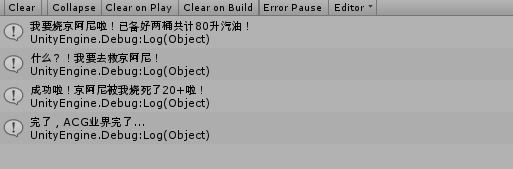
这里有一点要注意,只有在京阿粉早就关注了这两个事件时才能在第一时间做出反应,也就是说,注册侦听器的时间需要比事件发出的时间早才行,不然就没有效果。
2019年12月2日更新:
今天在使用上面的事件系统时发现了一个不太方便的地方,例如我想在类A脚本中添加对某一事件E的侦听,但想在另一个脚本类B中去控制移除。
这时就有必要将事件E的委托函数记录为一个全局变量,并且该委托函数可以在其他脚本中全局取得。这样一想之后,就很容易得出解决方案了。
只要将需要全局控制的委托变量统一放到一个单例类型的委托仓库中就行了,可以对该仓库中的委托进行赋值或取值:
 public class JoyStickUpEvent : GameEvent

 {

     public float TouchTime;

     public JoyStickUpEvent(float touchTime)

     {

         TouchTime = touchTime;

     }

 }
 public class EventDelegate:Singleton<EventDelegate>

 {

     public EventQueueSystem.EventDelegate<JoyStickUpEvent> JoyStickUpHandler;
     //...其他的全局委托
 }
类A中设置委托值并添加侦听:
     private void JoyStickUpHandler(JoyStickUpEvent e)

     {

         //处理摇杆手柄抬起时的行为

     }
     public override void OnAwake()

     {

         EventDelegate.Instance.JoyStickUpHandler = JoyStickUpHandler;

         EventManager.AddListener(EventDelegate.Instance.JoyStickUpHandler);

     }
类B中控制移除侦听:
     public override void Dead()

     {

         EventManager.RemoveListener(EventDelegate.Instance.JoyStickUpHandler);

     }
这样一来,无论是事件的触发还是委托的全局修改都将变得更为灵活和容易,甚至可以在类A中对委托赋值,在类B中添加对应的事件侦听,在类C中移除。
游戏设计模式——Unity事件队列(纪念京阿尼事件)的更多相关文章
- 游戏设计模式——Unity对象池
对象池这个名字听起来很玄乎,其实就是将一系列需要反复创建和销毁的对象存储在一个看不到的地方,下次用同样的东西时往这里取,类似于一个存放备用物质的仓库. 它的好处就是避免了反复实例化个体的运算,能减少大 ...
- 游戏设计模式——C++单例类
前言: 本文将探讨单例类设计模式,单例类的懒汉模式/饿汉模式,单例类的多线程安全性,最后将利用C++模板减少单例类代码量. 本文假设有一个Manager管理类,并以此为探究单例类的设计模式. 懒汉模式 ...
- Qt使用一个事件队列对所有发出的事件进行维护(QObject的event()函数相当于dispatch函数),用EventLabel 继承QLabel作为例子(简单明了) good
事件(event)是由系统或者 Qt 本身在不同的时刻发出的.当用户按下鼠标.敲下键盘,或者是窗口需要重新绘制的时候,都会发出一个相应的事件.一些事件在对用户操作做出响应时发出,如键盘事件等:另一些事 ...
- 游戏设计模式系列(一)—— 单线逻辑&&数据驱动,搞定最容易卡死的结算界面
从事游戏行业1年多了,个中心酸不知从何说起.抛开非技术的不说,一个开发者需要面对的最大问题,可能就是和策划频繁改变的需求做斗争了吧,这时候就体现了设计模式的重要性,抛开正式的设计方式不说,先讲讲我1年 ...
- 独立开发游戏越来越容易:Unity 发布旗下的最新游戏引擎 Unity 5,依然有免费版(转)
独立开发者开发游戏正变得越来越容易,因为在游戏设计中很多吃力不讨好的工作可以直接采用像 Epic Games 或 Unity Technologies 这样的游戏引擎来解决.而这几天,游戏引擎商们先后 ...
- 游戏设计模式:Subclass Sandbox模式,以及功能方法集的设计思考
书中总结出这种 Subclass Sandbox 的设计模式 Game Design Patterns: Subclass Sandbox 这种模式要点有两点: 在基类中实现各种功能性方法供子类调用 ...
- 游戏开发设计模式之状态模式 & 有限状态机 & c#委托事件(unity3d 示例实现)
命令模式:游戏开发设计模式之命令模式(unity3d 示例实现) 对象池模式:游戏开发设计模式之对象池模式(unity3d 示例实现) 原型模式:游戏开发设计模式之原型模式 & unity3d ...
- 【游戏开发&Unity】捏脸系统(附源码)
本着“没有捏脸系统算什么RPG”的想法,着手做一个2d简易捏脸demo.其实换装游戏都差不多啦~ github代码地址:Simple-Character-Edit-System (Unity版本:5. ...
- 怎样将游戏从Unity导到iOS设备上
当我开始开发自己的iOS游戏时,我会考虑的第一件事便是如何将其导出到设备中,如此有效地测试我的游戏.最初,该过程看似很长且复杂,我所遇到的主要问题是,尽管存在许多资源,但是它们并非完全来自同样的地方, ...
随机推荐
- docker容器虚拟化技术
简单来说,在Windows系统下安装各种运行环境的坑简直不要太多了(● ̄(エ) ̄●),并不仅限于docker.Nginx.PHP.Python等等,我会尽详细写出实际过程中遇到的各种各样的奇葩问题 1 ...
- Go语言系列:(1)在VsCode中配置Go的开发环境
一.为什么选VSCode 这个系列的初宗是带领公司的PHPer转Go,在正式写这篇博文前,咱们先说说Go有哪些主流的IDE 1.GoLand(收费) JetBrains出品必属精品,除了贵没有其它缺点 ...
- (办公)记事本_Linux目录和文件都能操作的命令
参考谷粒学院Linux:http://www.gulixueyuan.com/course/300/task/7082/show .cp 1.1.作用主要是拷贝,可以拷贝文件或者目录. 1.2.语法: ...
- core-js@3带来的惊喜
core-js 这个名词肯定很多人没听过,今天也是在配置babelpolyfill方法发现的 起因 在使用useBuiltIns:usage按需加载polyfill时,npm run build,就出 ...
- 【STM32-V7】STM32H743XIH6开发板,丰富软件资源,强劲硬件配置,大量软件解决方案持续更新中(2019-12-12)
说明: 争取做更多的实战性应用,分享更多的嵌入式技术,希望能在实际项目中帮到大家. (1)V7将大力加强对初学者的支持力度,已经更新至63章,下载链接,后37章和一批视频教程将加紧制作. (2)事隔五 ...
- koa2 从入门到进阶之路 (七)
之前的文章我们介绍了一下 koa koa-static静态资源中间件,本篇文章我们来看一下 koa 中 cookie 和 session 的使用. cookie 是存储于访问者的计算机中的变量.可以让 ...
- Java后端高频面试题汇总
Java后端面试题汇总 近来,分专题更新了Java后端面试题,此文章对这些文章做一个目录式的整理,方便查看 1.Java基础 https://www.cnblogs.com/autism-dong ...
- Java集合专题
1.Java 中常用的容器有哪些? 常见容器主要包括 Collection 和 Map 两种,Collection 存储着对象的集合,而 Map 存储着键值对(两个对象)的映射表. Collectio ...
- 松软科技web课堂:SQLServer之ROUND() 函数
ROUND() 函数 ROUND 函数用于把数值字段舍入为指定的小数位数. SQL ROUND() 语法 SELECT ROUND(column_name,decimals) FROM table_n ...
- FCC---Use the CSS Transform Property skewX to Skew an Element Along the X-Axis
The next function of the transform property is skewX(), which skews the selected element along its X ...