
(三十七)c#Winform自定义控件-有标题的面板-HZHControls
官网
前提
入行已经7,8年了,一直想做一套漂亮点的自定义控件,于是就有了本系列文章。
GitHub:https://github.com/kwwwvagaa/NetWinformControl
码云:https://gitee.com/kwwwvagaa/net_winform_custom_control.git
如果觉得写的还行,请点个 star 支持一下吧
欢迎前来交流探讨: 企鹅群568015492 idkey=6e08741ef16fe53bf0314c1c9e336c4f626047943a8b76bac062361bab6b4f8d">
目录
https://www.cnblogs.com/bfyx/p/11364884.html
准备工作
用到了控件基类 UCControlBase,如果你还不了解UCControlBase,请移步 (一)c#Winform自定义控件-基类控件 查看
开始
添加一个用户控件,命名UCPanelTitle,继承自UCControlBase
2个属性
 [Description("边框颜色"), Category("自定义")]

         public Color BorderColor

         {

             get { return this.RectColor; }

             set

             {

                 this.RectColor = value;

                 this.lblTitle.BackColor = value;

             }

         }

         [Description("面板标题"), Category("自定义")]

         public string Title

         {

             get { return lblTitle.Text; }

             set { lblTitle.Text = value; }

         }
全部代码
 using System;

 using System.Collections.Generic;

 using System.ComponentModel;

 using System.Drawing;

 using System.Data;

 using System.Linq;

 using System.Text;

 using System.Windows.Forms;

 namespace HZH_Controls.Controls

 {

     public partial class UCPanelTitle : UCControlBase

     {

         [Description("边框颜色"), Category("自定义")]

         public Color BorderColor

         {

             get { return this.RectColor; }

             set

             {

                 this.RectColor = value;

                 this.lblTitle.BackColor = value;

             }

         }

         [Description("面板标题"), Category("自定义")]

         public string Title

         {

             get { return lblTitle.Text; }

             set { lblTitle.Text = value; }

         }

         public UCPanelTitle()

         {

             InitializeComponent();

         }

     }

 }
 namespace HZH_Controls.Controls

 {

     partial class UCPanelTitle

     {

         /// <summary>

         /// 必需的设计器变量。

         /// </summary>

         private System.ComponentModel.IContainer components = null;

         /// <summary>

         /// 清理所有正在使用的资源。

         /// </summary>

         /// <param name="disposing">如果应释放托管资源,为 true;否则为 false。</param>

         protected override void Dispose(bool disposing)

         {

             if (disposing && (components != null))

             {

                 components.Dispose();

             }

             base.Dispose(disposing);

         }

         #region 组件设计器生成的代码

         /// <summary>

         /// 设计器支持所需的方法 - 不要

         /// 使用代码编辑器修改此方法的内容。

         /// </summary>

         private void InitializeComponent()

         {

             this.lblTitle = new System.Windows.Forms.Label();

             this.SuspendLayout();

             //

             // lblTitle

             //

             this.lblTitle.BackColor = System.Drawing.Color.FromArgb(((int)(((byte)()))), ((int)(((byte)()))), ((int)(((byte)()))));

             this.lblTitle.Dock = System.Windows.Forms.DockStyle.Top;

             this.lblTitle.ForeColor = System.Drawing.Color.White;

             this.lblTitle.Location = new System.Drawing.Point(, );

             this.lblTitle.Name = "lblTitle";

             this.lblTitle.Size = new System.Drawing.Size(, );

             this.lblTitle.TabIndex = ;

             this.lblTitle.Text = "面板";

             this.lblTitle.TextAlign = System.Drawing.ContentAlignment.MiddleCenter;

             //

             // UCPanelTitle

             //

             this.AutoScaleMode = System.Windows.Forms.AutoScaleMode.None;

             this.BackColor = System.Drawing.Color.Transparent;

             this.ConerRadius = ;

             this.Controls.Add(this.lblTitle);

             this.FillColor = System.Drawing.Color.White;

             this.IsRadius = true;

             this.IsShowRect = true;

             this.Name = "UCPanelTitle";

             this.RectColor = System.Drawing.Color.FromArgb(((int)(((byte)()))), ((int)(((byte)()))), ((int)(((byte)()))));

             this.Size = new System.Drawing.Size(, );

             this.ResumeLayout(false);

         }

         #endregion

         private System.Windows.Forms.Label lblTitle;

     }

 }
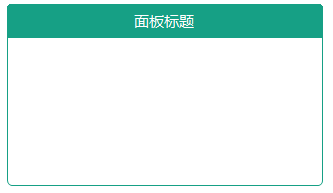
用处及效果
最后的话
如果你喜欢的话,请到 https://gitee.com/kwwwvagaa/net_winform_custom_control 点个星 星吧
(三十七)c#Winform自定义控件-有标题的面板-HZHControls的更多相关文章
- winform 自定义控件属性在属性面板中显示
Jan.David Nothing is impossible, the word itself says 'I'm possible'!" — Audrey Hepburn winform ...
- (二十四)c#Winform自定义控件-单标题窗体
前提 入行已经7,8年了,一直想做一套漂亮点的自定义控件,于是就有了本系列文章. 开源地址:https://gitee.com/kwwwvagaa/net_winform_custom_control ...
- (三)c#Winform自定义控件-有图标的按钮
前提 入行已经7,8年了,一直想做一套漂亮点的自定义控件,于是就有了本系列文章. 开源地址:https://gitee.com/kwwwvagaa/net_winform_custom_control ...
- (五十七)c#Winform自定义控件-传送带(工业)-HZHControls
官网 http://www.hzhcontrols.com 前提 入行已经7,8年了,一直想做一套漂亮点的自定义控件,于是就有了本系列文章. GitHub:https://github.com/kww ...
- (五十六)c#Winform自定义控件-瓶子(工业)-HZHControls
官网 http://www.hzhcontrols.com 前提 入行已经7,8年了,一直想做一套漂亮点的自定义控件,于是就有了本系列文章. GitHub:https://github.com/kww ...
- (五十九)c#Winform自定义控件-池子(工业)-HZHControls
官网 http://www.hzhcontrols.com 前提 入行已经7,8年了,一直想做一套漂亮点的自定义控件,于是就有了本系列文章. GitHub:https://github.com/kww ...
- (六十一)c#Winform自定义控件-信号灯(工业)-HZHControls
官网 http://www.hzhcontrols.com 前提 入行已经7,8年了,一直想做一套漂亮点的自定义控件,于是就有了本系列文章. GitHub:https://github.com/kww ...
- (六十三)c#Winform自定义控件-箭头(工业)-HZHControls
官网 http://www.hzhcontrols.com 前提 入行已经7,8年了,一直想做一套漂亮点的自定义控件,于是就有了本系列文章. GitHub:https://github.com/kww ...
- winform 自定义控件(高手)
高手推荐:https://www.cnblogs.com/bfyx/p/11364884.html c#Winform自定义控件-目录 前提 入行已经7,8年了,一直想做一套漂亮点的自定义控件 ...
随机推荐
- js对象属性的查询(点运算符和方括号运算符的区别)
js中可以通过点(.)和方括号([ ])运算符来获取属性的值.运算符的左侧应该是一个表达式,它返回一个对象.对于点(.)来说,右侧必须是一个以属性名称命名的简单标识符.对于方括号 ([ ])来说方括号 ...
- 如何"快准狠"找到内存相关的问题
为了迅速定位内存问题,通常会先运行几个覆盖面比较大的性能工具,比如 free.top.vmstat.pidstat 等. 具体的分析思路主要有这几步 先用 free 和 top,查看系统整体的内存使用 ...
- vue路由基础总结
1.创建项目 为了练习路由 这里没有选择路由 就选了Bable 自己一步一步的配置 加深印象. 然后下载路由 npm install vue-router --save 2.基础配置 src文件下新建 ...
- mysql复制表结构和表数据
我们知道,在SQL Server中,如果要复制表结构和表数据的话,可以使用select into语句. select * into yanggb1 from yanggb; 但是在MySQL中是不支持 ...
- C# -- DateTime与TimeSpan
1. DateTime的使用 DateTime dt = DateTime.Now; StringBuilder sb = new StringBuilder(); sb.AppendLine(str ...
- 【原】MAC安装Flutter
系统环境要求 Flutter因为是新出的框架,所以对系统还是有一定的要求的. MacOS(64-bit) 磁盘空间:大于700M,如果算上Android Studio等编辑工具,尽量大于3G. 命令号 ...
- [C]struct结构化数据的一些要点
1.用typedef声明一个短语代替冗长的struct成员声明 int main(void) { typedef struct Hores Hores; struct Hores { int age; ...
- IT兄弟连 HTML5教程 CSS3属性特效 2D变换1
通过CSS3转换,能够对元素进行移动.缩放.转动.拉长或拉伸.它如何工作?转换是使元素改变形状.尺寸和位置的一种效果.CSS3转换包括2D转换和3D转换,本小结我们来了解2D变换的转换方法. 转换属性 ...
- Jmeter中使用HTTP信息头管理器发送json格式请求体的接口
Jmeter中,如果请求体的格式为x-www-form-urlencoded,则不需要添加请求头,保持默认即可,但是如果遇到接口的请求体格式为json时,就要用到HTTP信息头管理器,在线程组上右键— ...
- Cross-Site Scripting:Reflected 跨站点脚本:获取