
SpringBoot系列之集成Thymeleaf用法手册
SpringBoot系列之Thymeleaf语法简单介绍
@
Thymeleaf官方文档已经有比较详细的描述,所以本博客只挑部分比较重要的点看一下,还有介绍一下和SpringBoot怎么集成使用
1、模板引擎
引用百度百科的模板引擎解释:
模板引擎(这里特指用于Web开发的模板引擎)是为了使用户界面与业务数据(内容)分离而产生的,它可以生成特定格式的文档,用于网站的模板引擎就会生成一个标准的HTML文档。
在JavaEE领域有几中比较常用的模板引擎,分别是Jsp、Velocity、Freemarker、Thymeleaf,不过对于前端页面渲染效率来说,jsp其实还是最快的,Velocity次之。Thymeleaf虽然渲染效率不是很快,但是语法方面是比较轻巧的,Thymeleaf语法比Velocity轻巧,但是渲染效率不如Velocity
2、Thymeleaf简介
2.1)、Thymeleaf定义
Thymeleaf是适用于Web和独立环境的现代服务器端Java模板引擎,能够处理HTML,XML,JavaScript,CSS甚至纯文本。具体参考Thymeleaf官网
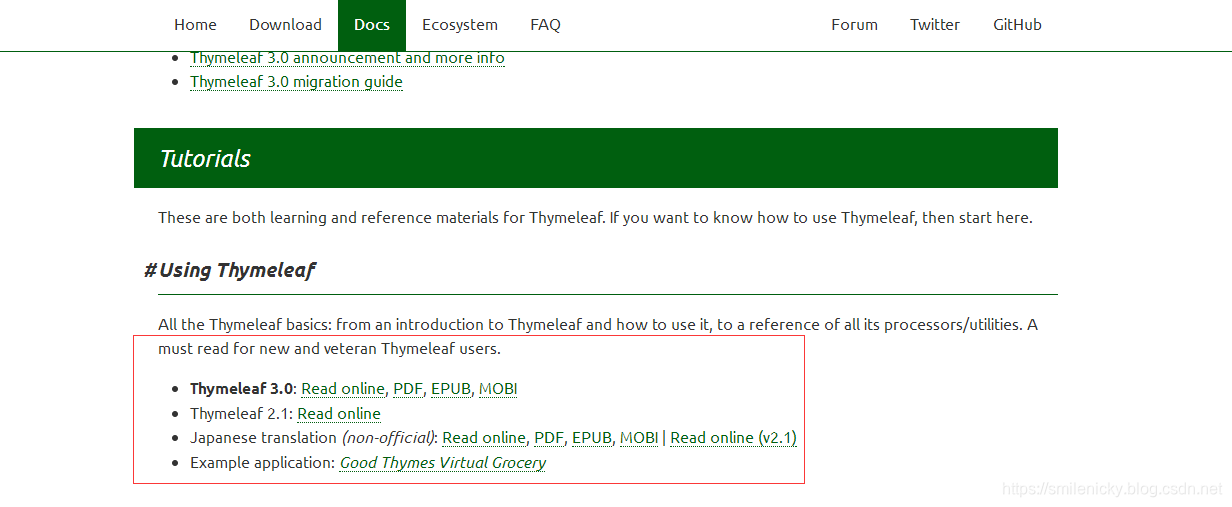
官网提供了在线文档也有文件格式的各种文档
2.2)、适用模板
Thymeleaf适用于如下模板:
- HTML
- XML
- TEXT
- JAVASCRIPT
- CSS
- RAW
有两种标记模板模式(HTML 和 XML)、三种文本模板模式(TEXT、JAVASCRIPT 和 CSS)和一种无操作模板模式 (RAW)。
ok,下面给出一些比较重要的知识点
3、重要知识点
3.1)、th:text和th:utext
这是很常用的text标签,作用是Thymeleaf中设置文本的标签,分为两种,一种是th:text,另外一种是th:utext,两种最重要的区别就是会不会对特殊字符进行转义
- th:text:将所有特殊字符转成字符
- th:utext:不会将特殊字符进行字符转义
注意:这里的特殊字符主要指html标签,/n、/t、etc.这些字符是不支持的
写个例子对比一下:
<span th:text="${'Welcome to our <b>fantastic</b> grocery store!'}"></span><br/>

<span th:utext="${'Welcome to our <b>fantastic</b> grocery store!'}"></span>

3.2)、标准表达式
官方文档里有standard Expression Syntax这个章节,介绍的就是标准的表达式语法应用
Simple expressions(简单表达式语法):
- Variable Expressions: ${...} // 获取遍历值,支持OGNL语法 etc.
获取自定义对象的属性值
获取自定义的变量属性值
使用内置的基本对象
ctx: the context object.
vars: the context variables.
locale: the context locale.
request: (only in Web Contexts) the HttpServletRequest object.
response: (only in Web Contexts) the HttpServletResponse object.
session: (only in Web Contexts) the HttpSession object.
servletContext: (only in Web Contexts) the ServletContext object.
详情参考Thymeleaf的附录A
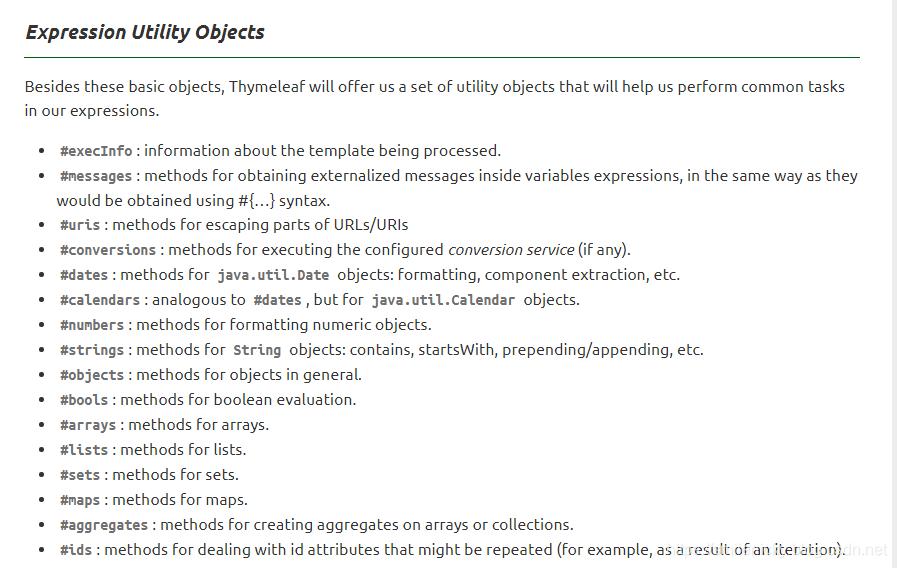
内置的工具类对象
官网已经给出比较详细的介绍,详细用法参考Thymeleaf附录B
- Selection Variable Expressions: *{...} // 选定对象,也就是获取使用 th:object 属性的表达式的值
- Message Expressions: #{...} //国际化内容 详细用法参考我的博客:SpringBoot系列之i18n国际化多语言支持教程
- Link URL Expressions: @{...} // 定义URL链接
<link th:href="@{/static/css/public.css}" rel="stylesheet" type="text/css" />

    <link th:href="@{/static/css/index.css}" rel="stylesheet" type="text/css" />

    <script type="text/javascript" th:src="@{/static/js/jquery-1.3.2.min.js}"></script>

    <script type="text/javascript" th:src="@{/static/js/html5.js}"></script>

    <script type="text/javascript" th:src="@{/static/js/popbox.js}"></script>
* Fragment Expressions: ~{...} //片段引用的表达式 eg: `<div th:insert="~{commons :: main}">....</div>`
- Literals (字面量值)
- Text literals: 'one text', 'Another one!',…
- Number literals: 0, 34, 3.0, 12.3,…
- Boolean literals: true, false
- Null literal: null
- Literal tokens: one, sometext, main,…
- Text operations (文本操作):
- String concatenation: + //连接操作
@{url/}+${id} - Literal substitutions: |The name is ${name}| //字符串中使用
${name}变量值
- String concatenation: + //连接操作
- Arithmetic operations: (数学运算)
- Binary operators: +, -, *, /, %
- Minus sign (unary operator): -
- Boolean operations:(布尔运算)
- Binary operators: and, or
- Boolean negation (unary operator): !, not
- Comparisons and equality:(比较运算)
- Comparators: >, <, >=, <= (gt, lt, ge, le)
- Equality operators: ==, != (eq, ne)
- Conditional operators:(条件运算,包括三元运算符etc.)
- If-then: (if) ? (then)
- If-then-else: (if) ? (then) : (else)
- Default: (value) ?: (defaultvalue)
- Special tokens:(特殊的令牌,也就是使用No-Operatio)
- No-Operation: _
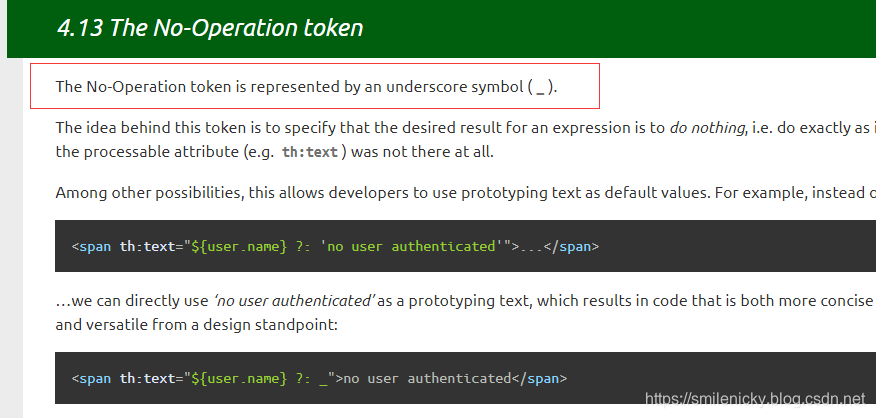
- No-Operation: _
All these features can be combined and neste:
'User is of type ' + (${user.isAdmin()} ? 'Administrator' : (${user.type} ?: 'Unknown'))
翻译过来意思是,这些语法都可以组合使用,这个章节是Thymeleaf一个重要的基本使用章节,本博客对一些重要的知识点进行摘录同时介绍一下在SpringBoot里如何使用,当然自然没有官方文档详细的,不过官方并没有通过中文文档,英文水平不好的话,阅读起来比较困难,当然我也找了一篇国内翻译过来的Thymeleaf中文文档,读者详细的可以参考文档
3.3)、Thymeleaf遍历
遍历是Thymeleaf很常用的例子,支持的属性值有:
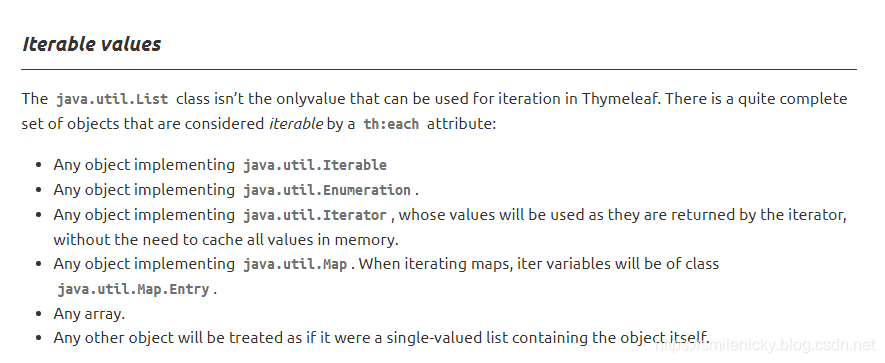
下面还是给下例子,比较容易理解,如下代码使用th:each,th:each="item : ${items}"
<!--最新上架-->

        <div class="first-pannel clearfix">

            <div class="index-f clearfix">

                <h3 class="index-f-head"> 最新上架 <span>每天都有上新,每天都有惊喜</span> </h3>

                <div class="index-f-body">

                    <div class="top-sales newProduct">

                        <ul class="top-sales-list clearfix">

                            <li class="top-sales-item newProduct" th:each="item : ${items}">

                                <p class="item-img"> <a th:href="@{'/portal/item/toDetail/'+${item.spuId}+'/'+${item.skuId}}"><img th:src="@{${item.imgPath}}" /></a> </p>

                                <p class="item-buss"><a th:href="@{'/portal/item/toDetail/'+${item.spuId}+'/'+${item.skuId}}"></a></p>

                                <p class="item-name spec"><a th:href="@{'/portal/item/toDetail/'+${item.spuId}+'/'+${item.skuId}}" th:text="${item.itemName}"></a></p>

                                <p class="item-price spec"><em th:text="${item.mPrice}"></em>元</p>

                            </li>

                        </ul>

                    </div>

                </div>

            </div>

        </div>

        <!--最新上架//-->
3.4)、公共模块抽取
在项目开发中经常遇到一些可以重用的页面,这时候就可以Thymeleaf的Template Layout进行公共页面的复用
本博客以官方介绍的复用footer.html页面进行说明
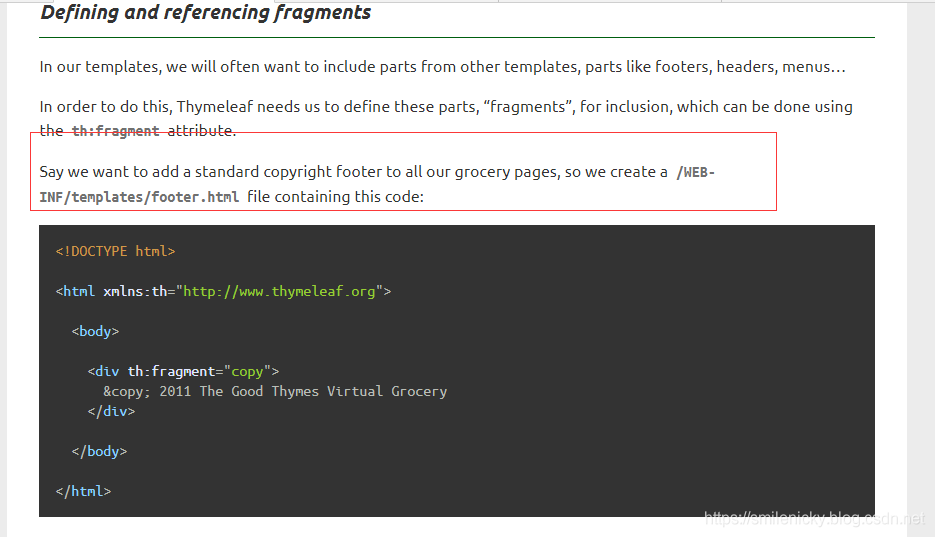
使用步骤:
- 抽取公共的片段
<!DOCTYPE html>
<html xmlns:th="http://www.thymeleaf.org">
<body>
<div th:fragment="copy">
© 2011 The Good Thymes Virtual Grocery
</div>
</body>
</html>
- 引入公共的片段
<div th:insert="~{footer :: copy}"></div>
~{templatename::selector}:模板名::选择器
~{templatename::fragmentname}:模板名::片段名
<div th:insert="footer :: copy"></div>

<div th:replace="footer :: copy"></div>

<div th:include="footer :: copy"></div
三种引入公共片段的th属性:
- th:insert:将公共片段整个插入到声明引入的元素中
- th:replace:将声明引入的元素替换为公共片段
- th:include:将被引入的片段的内容包含进这个标签中
效果对比:
<div>
<footer>
© 2011 The Good Thymes Virtual Grocery
</footer>
</div>
<footer>
© 2011 The Good Thymes Virtual Grocery
</footer>
<div>
© 2011 The Good Thymes Virtual Grocery
</div
3.5)、行内写法介绍
所谓行内写法就是没写在html对应的标签里的写法,直接在页面空白处,用[[....]]或者[(....)]的写法,然后[[....]]和[(....)]的区别其实就等同于th:text和th:utext的区别,一个会进行转义,一个不会转义特殊字符
- [[....]]写法:会转义html标签这些特殊字符(转成字符)
- [(....)]写法:不会转义html标签这些特殊字符(按照其原意)
写个例子就明白了:
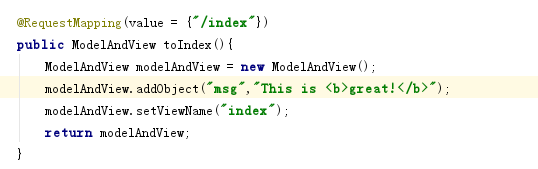
<span>

    The message is [[${msg}]]

</span>

<br/>

<span>

    The message is [(${msg})]

</span>
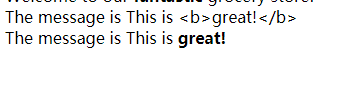
3.6)、Thymeleaf语法规则
引用尚桂谷老师的归纳:
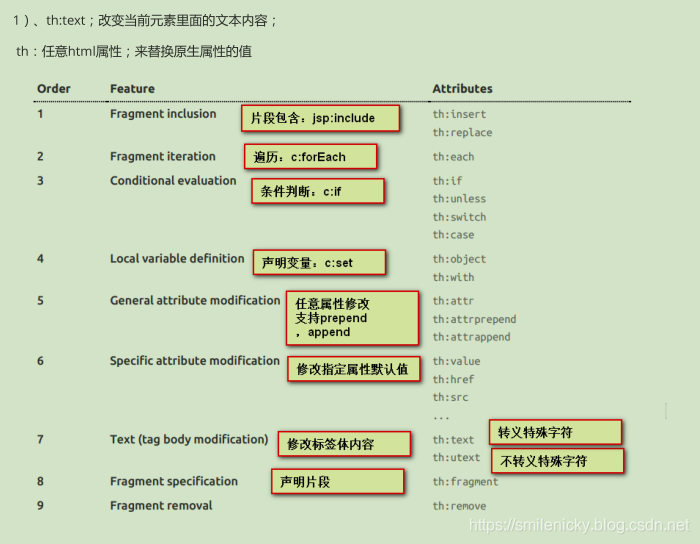
4、SpringBoot集成
4.1)、Springboot集成Thymeleaf简介
maven配置
因为引入了SpringBoot的parent工程,所以不需要写版本号
<!-- Themeleaf -->

    <dependency>

      <groupId>org.springframework.boot</groupId>

      <artifactId>spring-boot-starter-thymeleaf</artifactId>

    </dependency>
application.yml配置
注意:这里的属性大部分都可以不配置的,因为Springboot的自动配置因为做了很多自动配置,我们不配置,就使用默认的,不过下面的例子只是给读者了解一下有这些配置
#添加Thymeleaf配置,除了cache在项目没上线前建议关了,其它配置都可以不用配的,本博客只是列举一下有这些配置

  thymeleaf:

  	# cache默认开启的,这里可以关了,项目上线之前,项目上线后可以开启

    cache: false

    # 这个prefix可以注释,因为默认就是templates的,您可以改成其它的自定义路径

    prefix: classpath:/templates/

    suffix: .html

    mode: HTML5

    # 指定一下编码为utf8

    encoding: UTF-8

    # context-type为text/html,也可以不指定,因为boot可以自动识别

    content-type: text/html
ok,Springboot中Thymeleaf使用非常简单,因为Springboot已经为我们做了很多自动配置,其实,yaml都不需要配置的,直接引入对应的jar,然后就可以直接使用,在resources资源文件夹下面新建一个templates文件夹,所有的html文件都丢在这里,静态资源文件也丢在resources资源文件夹下面
新建一个html文件,然后注意加上<html xmlns:th="http://www.thymeleaf.org">
注意Thymeleaf语法要求比较严格 <meta charset="utf-8" >,不如这样写是不可以的,必须加上斜杠的,<meta charset="utf-8" />
<!DOCTYPE html>

<html lang="en" xmlns:th="http://www.thymeleaf.org">

<head>

    <meta charset="UTF-8">

    <title>Title</title>

</head>

<body>

<div>

    <span th:text="${'Welcome to our <b>fantastic</b> grocery store!'}"></span><br/>

    <span th:utext="${'Welcome to our <b>fantastic</b> grocery store!'}"></span>

</div>

<span>

    The message is [[${msg}]]

</span>

<br/>

<span>

    The message is [(${msg})]

</span>

</body>

</html>
4.2)、Thymeleaf自动配置源码简单分析
ok,然后为什么我说直接引入对应pom配置就可以直接使用了?因为Springboot已经为项目做了很多自动配置,所以本博客简单跟一下源码,了解一下SpringbootThymeleaf的自动配置
SpringBoot的自动配置类在ThymeleafAutoConfiguration里
package org.springframework.boot.autoconfigure.thymeleaf;

....

@Configuration(proxyBeanMethods = false)//定义这是一个配置类

@EnableConfigurationProperties(ThymeleafProperties.class)//使用ThymeleafProperties属性类的属性

@ConditionalOnClass({ TemplateMode.class, SpringTemplateEngine.class })//指定TemplateMode、SpringTemplateEngine(模板引擎类)起效的情况,整个配置类才起作用

@AutoConfigureAfter({ WebMvcAutoConfiguration.class, WebFluxAutoConfiguration.class })//必须在WebMvcAutoConfiguration(SpringMVC自动配置类,这个配置类会加载组装所有的视图解析器)、WebFluxAutoConfiguration类起效后,这个Thymeleaf自动配置类才起效

public class ThymeleafAutoConfiguration {

	//没有自定义的模板解析器类的情况,使用默认的模板解析器

	@Configuration(proxyBeanMethods = false)

	@ConditionalOnMissingBean(name = "defaultTemplateResolver")

	static class DefaultTemplateResolverConfiguration {

		private static final Log logger = LogFactory.getLog(DefaultTemplateResolverConfiguration.class);

		//Thymeleaf的properties配置

		private final ThymeleafProperties properties;

		private final ApplicationContext applicationContext;

		DefaultTemplateResolverConfiguration(ThymeleafProperties properties, ApplicationContext applicationContext) {

			this.properties = properties;

			this.applicationContext = applicationContext;

		}

		//用PostConstruct注解,在依赖注入完成之后,实现类的初始化配置,这个方法主要是检查模板引擎的资源文件路径是否有

		@PostConstruct

		void checkTemplateLocationExists() {

			boolean checkTemplateLocation = this.properties.isCheckTemplateLocation();

			if (checkTemplateLocation) {

				TemplateLocation location = new TemplateLocation(this.properties.getPrefix());

				if (!location.exists(this.applicationContext)) {

					logger.warn("Cannot find template location: " + location + " (please add some templates or check "

							+ "your Thymeleaf configuration)");

				}

			}

		}

		//默认的Thymeleaf资源解析器

		@Bean

		SpringResourceTemplateResolver defaultTemplateResolver() {

			SpringResourceTemplateResolver resolver = new SpringResourceTemplateResolver();

			//资源解析器的所有配置

			resolver.setApplicationContext(this.applicationContext);

			resolver.setPrefix(this.properties.getPrefix());

			resolver.setSuffix(this.properties.getSuffix());

			resolver.setTemplateMode(this.properties.getMode());

			if (this.properties.getEncoding() != null) {

				resolver.setCharacterEncoding(this.properties.getEncoding().name());

			}

			resolver.setCacheable(this.properties.isCache());

			Integer order = this.properties.getTemplateResolverOrder();

			if (order != null) {

				resolver.setOrder(order);

			}

			resolver.setCheckExistence(this.properties.isCheckTemplate());

			return resolver;

		}

	}

	//又是Thymeleaf的自动配置,自动配置模板引擎SpringTemplateEngine

	@Configuration(proxyBeanMethods = false)

	protected static class ThymeleafDefaultConfiguration {

		@Bean

		@ConditionalOnMissingBean(ISpringTemplateEngine.class)

		SpringTemplateEngine templateEngine(ThymeleafProperties properties,

				ObjectProvider<ITemplateResolver> templateResolvers, ObjectProvider<IDialect> dialects) {

			SpringTemplateEngine engine = new SpringTemplateEngine();

			engine.setEnableSpringELCompiler(properties.isEnableSpringElCompiler());

			engine.setRenderHiddenMarkersBeforeCheckboxes(properties.isRenderHiddenMarkersBeforeCheckboxes());

			templateResolvers.orderedStream().forEach(engine::addTemplateResolver);

			dialects.orderedStream().forEach(engine::addDialect);

			return engine;

		}

	}

	@Configuration(proxyBeanMethods = false)

	@ConditionalOnWebApplication(type = Type.SERVLET)

	@ConditionalOnProperty(name = "spring.thymeleaf.enabled", matchIfMissing = true)

	static class ThymeleafWebMvcConfiguration {

		@Bean

		@ConditionalOnEnabledResourceChain

		@ConditionalOnMissingFilterBean(ResourceUrlEncodingFilter.class)

		FilterRegistrationBean<ResourceUrlEncodingFilter> resourceUrlEncodingFilter() {

			FilterRegistrationBean<ResourceUrlEncodingFilter> registration = new FilterRegistrationBean<>(

					new ResourceUrlEncodingFilter());

			registration.setDispatcherTypes(DispatcherType.REQUEST, DispatcherType.ERROR);

			return registration;

		}

		//比较重要的视图解析器配置

		@Configuration(proxyBeanMethods = false)

		static class ThymeleafViewResolverConfiguration {

			@Bean

			@ConditionalOnMissingBean(name = "thymeleafViewResolver")

			ThymeleafViewResolver thymeleafViewResolver(ThymeleafProperties properties,

					SpringTemplateEngine templateEngine) {

				ThymeleafViewResolver resolver = new ThymeleafViewResolver();

				//设置模板引擎

				resolver.setTemplateEngine(templateEngine);

		//字符编码设置

						resolver.setCharacterEncoding(properties.getEncoding().name());

				resolver.setContentType(

						appendCharset(properties.getServlet().getContentType(), resolver.getCharacterEncoding()));

				resolver.setProducePartialOutputWhileProcessing(

						properties.getServlet().isProducePartialOutputWhileProcessing());

				resolver.setExcludedViewNames(properties.getExcludedViewNames());

				resolver.setViewNames(properties.getViewNames());

				// This resolver acts as a fallback resolver (e.g. like a

				// InternalResourceViewResolver) so it needs to have low precedence

				resolver.setOrder(Ordered.LOWEST_PRECEDENCE - 5);

				//Thymeleaf缓存

				resolver.setCache(properties.isCache());

				return resolver;

			}

			private String appendCharset(MimeType type, String charset) {

				if (type.getCharset() != null) {

					return type.toString();

				}

				LinkedHashMap<String, String> parameters = new LinkedHashMap<>();

				parameters.put("charset", charset);

				parameters.putAll(type.getParameters());

				return new MimeType(type, parameters).toString();

			}

		}

	}

	@Configuration(proxyBeanMethods = false)

	@ConditionalOnWebApplication(type = Type.REACTIVE)

	@ConditionalOnProperty(name = "spring.thymeleaf.enabled", matchIfMissing = true)

	static class ThymeleafReactiveConfiguration {

		@Bean

		@ConditionalOnMissingBean(ISpringWebFluxTemplateEngine.class)

		SpringWebFluxTemplateEngine templateEngine(ThymeleafProperties properties,

				ObjectProvider<ITemplateResolver> templateResolvers, ObjectProvider<IDialect> dialects) {

			SpringWebFluxTemplateEngine engine = new SpringWebFluxTemplateEngine();

			engine.setEnableSpringELCompiler(properties.isEnableSpringElCompiler());

			engine.setRenderHiddenMarkersBeforeCheckboxes(properties.isRenderHiddenMarkersBeforeCheckboxes());

			templateResolvers.orderedStream().forEach(engine::addTemplateResolver);

			dialects.orderedStream().forEach(engine::addDialect);

			return engine;

		}

	}

	//ThymeleafWebFluxConfiguration自动配置

	@Configuration(proxyBeanMethods = false)

	@ConditionalOnWebApplication(type = Type.REACTIVE)

	@ConditionalOnProperty(name = "spring.thymeleaf.enabled", matchIfMissing = true)

	static class ThymeleafWebFluxConfiguration {

		@Bean

		@ConditionalOnMissingBean(name = "thymeleafReactiveViewResolver")

		ThymeleafReactiveViewResolver thymeleafViewResolver(ISpringWebFluxTemplateEngine templateEngine,

				ThymeleafProperties properties) {

			ThymeleafReactiveViewResolver resolver = new ThymeleafReactiveViewResolver();

			resolver.setTemplateEngine(templateEngine);

			mapProperties(properties, resolver);

			mapReactiveProperties(properties.getReactive(), resolver);

			// This resolver acts as a fallback resolver (e.g. like a

			// InternalResourceViewResolver) so it needs to have low precedence

			resolver.setOrder(Ordered.LOWEST_PRECEDENCE - 5);

			return resolver;

		}

		private void mapProperties(ThymeleafProperties properties, ThymeleafReactiveViewResolver resolver) {

			PropertyMapper map = PropertyMapper.get();

			map.from(properties::getEncoding).to(resolver::setDefaultCharset);

			resolver.setExcludedViewNames(properties.getExcludedViewNames());

			resolver.setViewNames(properties.getViewNames());

		}

		private void mapReactiveProperties(Reactive properties, ThymeleafReactiveViewResolver resolver) {

			PropertyMapper map = PropertyMapper.get();

			map.from(properties::getMediaTypes).whenNonNull().to(resolver::setSupportedMediaTypes);

			map.from(properties::getMaxChunkSize).asInt(DataSize::toBytes).when((size) -> size > 0)

					.to(resolver::setResponseMaxChunkSizeBytes);

			map.from(properties::getFullModeViewNames).to(resolver::setFullModeViewNames);

			map.from(properties::getChunkedModeViewNames).to(resolver::setChunkedModeViewNames);

		}

	}

	@Configuration(proxyBeanMethods = false)

	@ConditionalOnClass(LayoutDialect.class)

	static class ThymeleafWebLayoutConfiguration {

		@Bean

		@ConditionalOnMissingBean

		LayoutDialect layoutDialect() {

			return new LayoutDialect();

		}

	}

	@Configuration(proxyBeanMethods = false)

	@ConditionalOnClass(DataAttributeDialect.class)

	static class DataAttributeDialectConfiguration {

		@Bean

		@ConditionalOnMissingBean

		DataAttributeDialect dialect() {

			return new DataAttributeDialect();

		}

	}

	@Configuration(proxyBeanMethods = false)

	@ConditionalOnClass({ SpringSecurityDialect.class })

	static class ThymeleafSecurityDialectConfiguration {

		@Bean

		@ConditionalOnMissingBean

		SpringSecurityDialect securityDialect() {

			return new SpringSecurityDialect();

		}

	}

	@Configuration(proxyBeanMethods = false)

	@ConditionalOnClass(Java8TimeDialect.class)

	static class ThymeleafJava8TimeDialect {

		@Bean

		@ConditionalOnMissingBean

		Java8TimeDialect java8TimeDialect() {

			return new Java8TimeDialect();

		}

	}

}
ThymeleafProperties是SpringBoot的属性配置类,使用ConfigurationProperties注解进行属性映射
@ConfigurationProperties(prefix = "spring.thymeleaf")

public class ThymeleafProperties {

	private static final Charset DEFAULT_ENCODING = StandardCharsets.UTF_8;

	//默认的模板资源路径

	public static final String DEFAULT_PREFIX = "classpath:/templates/";

	//默认解析html资源

	public static final String DEFAULT_SUFFIX = ".html";

	/**

	 * Whether to check that the template exists before rendering it.

	 */

	private boolean checkTemplate = true;

	/**

	 * Whether to check that the templates location exists.

	 */

	private boolean checkTemplateLocation = true;

	/**

	 * Prefix that gets prepended to view names when building a URL.

	 */

	private String prefix = DEFAULT_PREFIX;

	/**

	 * Suffix that gets appended to view names when building a URL.

	 */

	private String suffix = DEFAULT_SUFFIX;

	/**

	 * Template mode to be applied to templates. See also Thymeleaf's TemplateMode enum.

	 */

	 //默认模式也是html的

	private String mode = "HTML";

	/**

	 * Template files encoding.

	 */

	private Charset encoding = DEFAULT_ENCODING;

	/**

	 * Whether to enable template caching.

	 */

	 //默认开启缓存,项目没上线建议通过配置关闭,然后按F9就可以自动编译,避免影响调试

	private boolean cache = true;

	....

}
ok,然后简单跟一下视图解析器的源码:Thymeleaf视图解析器类的关键代码,创建视图view的方法,如图,也是根据viewname进行重定向
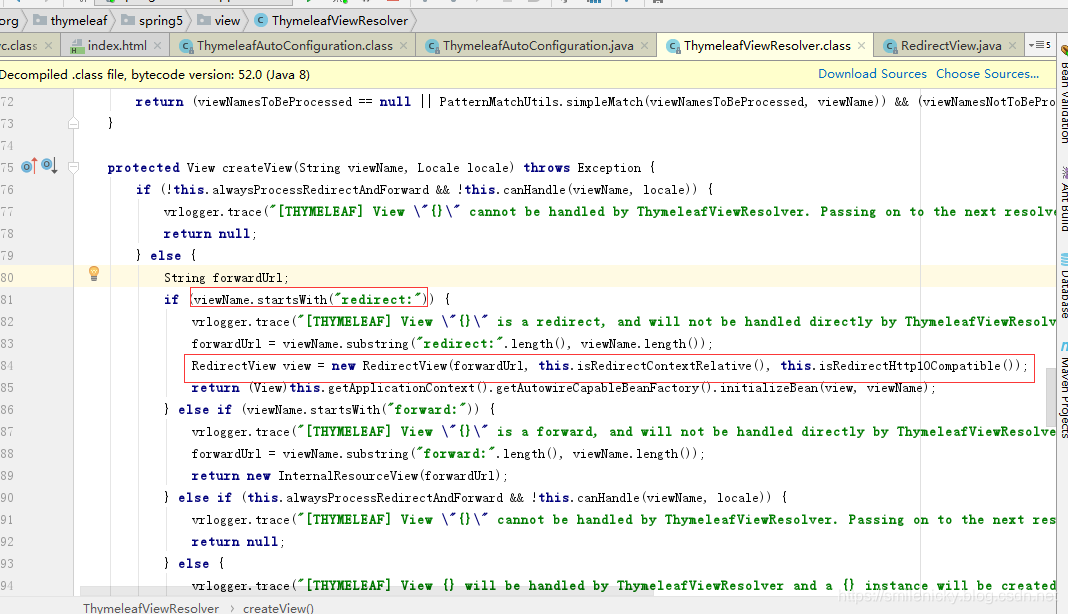
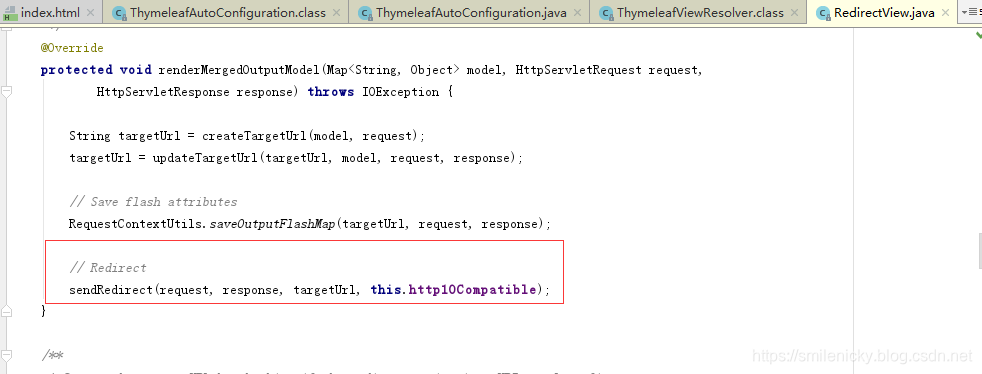
从上面方法可以看出进行重定向或者forward等等方法,然后调一下redirect的,看看RedirectView类,翻下源码,找到如下关键代码:
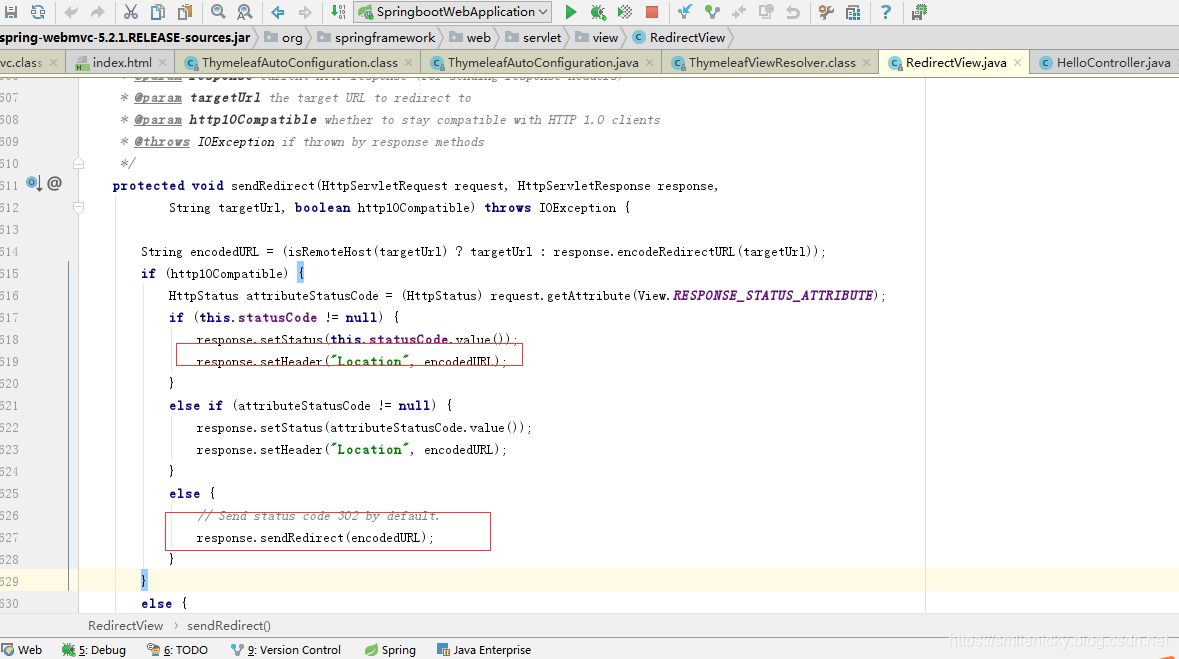
同样在这个类里,进行了状态码设置,请求头设置,然后response.sendRedirect(encodedURL);
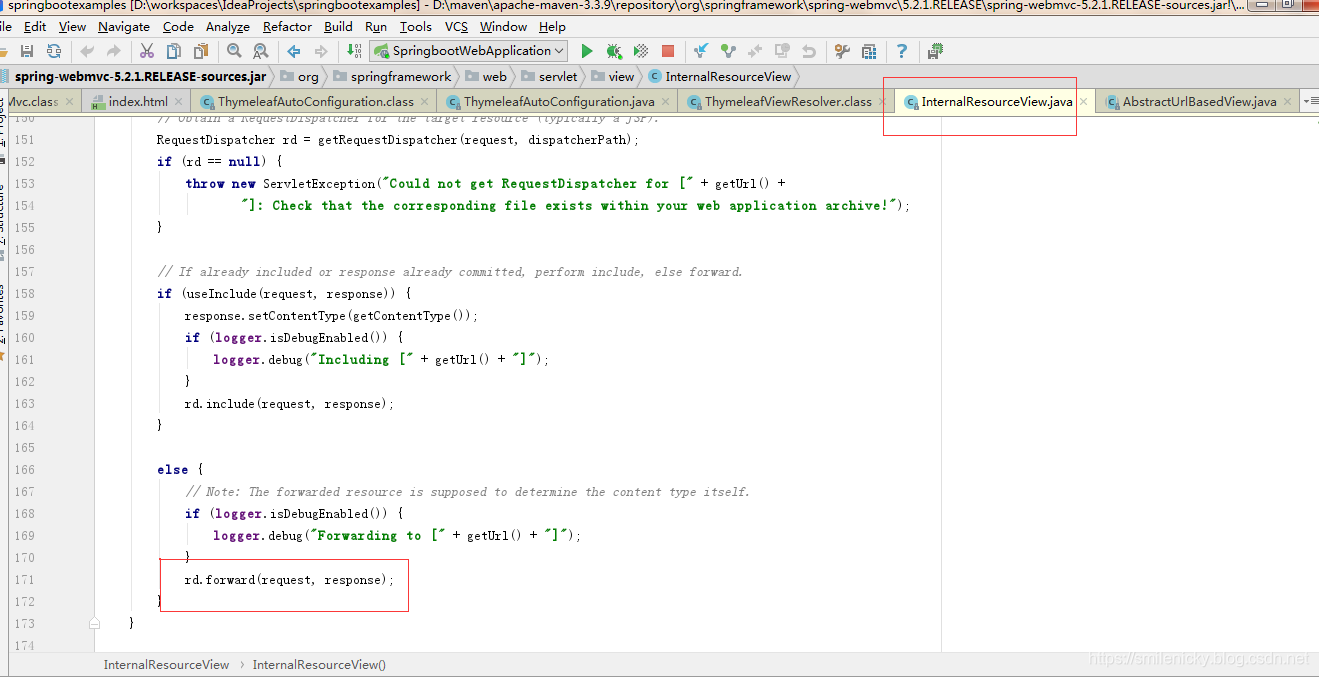
而forward的是通过如图方法进行页面跳转:
附录:
Thymeleaf官方例子
SpringBoot系列之集成Thymeleaf用法手册的更多相关文章
- SpringBoot系列之集成logback实现日志打印(篇二)
SpringBoot系列之集成logback实现日志打印(篇二) 基于上篇博客SpringBoot系列之集成logback实现日志打印(篇一)之后,再写一篇博客进行补充 logback是一款开源的日志 ...
- SpringBoot系列之集成jsp模板引擎
目录 1.模板引擎简介 2.环境准备 4.源码原理简介 SpringBoot系列之集成jsp模板引擎 @ 1.模板引擎简介 引用百度百科的模板引擎解释: 模板引擎(这里特指用于Web开发的模板引擎)是 ...
- SpringBoot系列之集成Mybatis教程
SpringBoot系列之集成Mybatis教程 环境准备:IDEA + maven 本博客通过例子的方式,介绍Springboot集成Mybatis的两种方法,一种是通过注解实现,一种是通过xml的 ...
- SpringBoot系列之@Conditional注解用法简介
SpringBoot系列之@Conditional注解用法简介 引用Spring官方文档的说法介绍一下@Conditional注解:Spring5.0.15版本@Conditional注解官方文档 @ ...
- SpringBoot系列之集成Druid配置数据源监控
SpringBoot系列之集成Druid配置数据源监控 继上一篇博客SpringBoot系列之JDBC数据访问之后,本博客再介绍数据库连接池框架Druid的使用 实验环境准备: Maven Intel ...
- SpringBoot系列之外部配置用法简介
SpringBoot系列之外部配置用法简介 引用Springboot官方文档的说法,官方文档总共列举了如下用法: 1.Devtools global settings properties on yo ...
- SpringBoot系列之集成Dubbo的方式
SpringBoot系列之集成Dubbo的方式 本博客介绍Springboot框架集成Dubbo实现微服务的3种常用方式,对于Dubbo知识不是很熟悉的,请先学习我上一篇博客:SpringBoot系列 ...
- springboot框架中集成thymeleaf引擎,使用form表单提交数据,debug结果后台获取不到数据
springboot框架中集成thymeleaf引擎,使用form表单提交数据,debug结果后台获取不到数据 表单html: <form class="form-horizontal ...
- SpringBoot系列之YAML配置用法
1.全局配置 SpringBoot的全局配置文件有两种: application.properties application.yml 配置文件的作用:修改SpringBoot自动配置的默认值,主要是 ...
随机推荐
- UIAlert
转自:https://blog.csdn.net/deng0zhaotai/article/details/53887508 通过uialertcontroller实现三种简易弹框 (一)警告类 - ...
- SteamVR Plugin
使用HTC vive基于unity做虚拟现实,需要用到steamVR插件,最近查找了很多资料,稍微做一下总结. 做虚拟现实无非是头显在场景中的camera功能以及手柄的操作功能. (一)camera以 ...
- django-模板之静态文件加载(十四)
1.在templates同级目录下建static 2.index.css 3.index.html {% load static %} <!DOCTYPE html> <html l ...
- python实现人工智能Ai抠图功能
这篇文章主要介绍了python实现人工智能Ai抠图功能,本文通过实例代码给大家介绍的非常详细,具有一定的参考借鉴价值,需要的朋友可以参考下 自己是个PS小白,没办法只能通过技术来证明自己. 话不多说, ...
- Https 与 iOS 信息安全
转载自:swift-cafe 什么是 Https 咱们从最直观的说起. 我们平时在用电脑访问网页的时候,有时候会在地址栏的左边多出一个小锁的图标,就像这样: 这是大多数主流浏览器的一个通用做法,当我们 ...
- linux centos ubutun svn搭建
1.卸载SVN 查看自己是否安装了svn svn 上图显示已安装,可用以下命令进行卸载 sudo apt-get remove --purge subversion (–purge 选项表示彻底删除改 ...
- 明解C语言 入门篇 第一章答案
练习1-1 #include <stdio.h> int main() { int a; a = 15; int b; b = 37; int c; c = a - b; printf(& ...
- 学习笔记65_K均值_聚类算法
- Spring Boot实战之定制URL匹配规则
本文首发于个人网站:Spring Boot实战之定制URL匹配规则 构建web应用程序时,并不是所有的URL请求都遵循默认的规则.有时,我们希望RESTful URL匹配的时候包含定界符". ...
- [Luogu5384][Cnoi2019] 雪松果树
传送门 虽然这题是一道二合一,也不算难,但还是学到了很多东西啊,\(k\) 级儿子个数的五种求法!!我还是觉得四种比较好( \(k\) 级儿子个数有五种求法,你知道么? --鲁迅 首先 \(k\) 级 ...