
Zabbix编译安装(全)
一、前言
(一)、概述
Zabbix是一个基于WEB界面的提供分布式系统监视以及网络监视功能的企业级的开源解决方案,Zabbix能监视各种网络参数,保证服务器系统的安全运营;并提供灵活的通知机制以让系统管理员快速定位,解决存在的各种问题;Zabbix主要由两部分构成,Zabbix server与可选组件Zabbix agent;
(二)、预处理
配置环境
OS:CentOS 7.5 64bit
Zabbix版本:3.4
PHP版本:7.2.8
MySQL版本:5.7.22
Nginx版本:1.14.0
hostname:zabbix--1
ip:10.18.43.141
基础需求
[root@zabbix-- ~]# systemctl stop firewalld

[root@zabbix-- ~]# sed -ri '/^SELINUX=*/cSELINUX=disabled' /etc/selinux/config

[root@zabbix-- ~]# setenforce

[root@zabbix-- ~]# mkdir -p /date/zabbix

[root@zabbix-- ~]# groupadd zabbix

[root@zabbix-- ~]# useradd -r -g zabbix -s /sbin/nologin zabbix
二、Zabbix安装
(一)、Zabbix编译
依赖环境库下载:
[root@zabbix-1-1 ~]# yum install net-snmp-devel libevent-devel mysql-devel -y
[root@zabbix-1-1 ~]# wget -P /data/zabbix https://sourceforge.net/projects/zabbix/files/ZABBIX%20Latest%20Stable/3.4.11/zabbix-3.4.11.tar.gz
[root@zabbix-- ~]# cd /data/zabbix/

[root@zabbix-- zabbix]# tar xf zabbix-3.4..tar.gz

[root@zabbix-- zabbix]# cd zabbix-3.4./
执行编译:
[root@zabbix-- zabbix-3.4.]# ./configure \
--enable-server \
--enable-agent \
--with-mysql \
--enable-ipv6 \
--with-net-snmp \
--with-libcurl \
--with-libxml2 \
--prefix=/usr/local/zabbix

[root@zabbix-- zabbix-3.4.]# make install
(二)、MySQL配置
MySQL编译安装请参考:传送门
[root@zabbix-1-1 ~]# mysql -p'Passwd@123'
mysql: [Warning] Using a password on the command line interface can be insecure.
Welcome to the MySQL monitor.  Commands end with ; or \g.
Your MySQL connection id is 1070
Server version: 5.7.22 Source distribution
Copyright (c) 2000, 2018, Oracle and/or its affiliates. All rights reserved.
Oracle is a registered trademark of Oracle Corporation and/or its
affiliates. Other names may be trademarks of their respective
owners.
Type 'help;' or '\h' for help. Type '\c' to clear the current input statement.

mysql> create database zabbix default character set utf8;

Query OK,  row affected (0.00 sec)

mysql> grant all privileges on zabbix.* to 'zabbixadmin'@'10.18.43.141' identified by 'Zabbix@123';

Query OK,  rows affected,  warning (0.00 sec)

mysql> grant all privileges on zabbix.* to 'zabbixadmin'@'127.0.0.1' identified by 'Zabbix@123';

Query OK,  rows affected,  warning (0.00 sec)

mysql> grant all privileges on zabbix.* to 'zabbixadmin'@'localhost' identified by 'Zabbix@123';

Query OK,  rows affected,  warning (0.00 sec)

mysql> grant all privileges on zabbix.* to 'zabbixadmin'@'%' identified by 'Zabbix@123';

Query OK,  rows affected,  warning (0.00 sec)

mysql> flush privileges;

Query OK,  rows affected (0.00 sec)
mysql> \q
Bye
数据导入(注意导入数据的先后顺序,如果顺序错误,就会使数据导入不成功或者其它错误)
[root@zabbix-- ~]# cd /data/zabbix/zabbix-3.4./database/mysql/

[root@zabbix-- mysql]# mysql -u'zabbixadmin' -p'Zabbix@123' zabbix < schema.sql

mysql: [Warning] Using a password on the command line interface can be insecure.

[root@zabbix-- mysql]# mysql -u'zabbixadmin' -p'Zabbix@123' zabbix < images.sql

mysql: [Warning] Using a password on the command line interface can be insecure.

[root@zabbix-- mysql]# mysql -u'zabbixadmin' -p'Zabbix@123' zabbix < data.sql

mysql: [Warning] Using a password on the command line interface can be insecure.
(三)、Zabbix server配置
[root@zabbix-- ~]# vim /usr/local/zabbix/etc/zabbix_server.conf

### Option: LogFile

#       Log file name for LogType 'file' parameter.

#

# Mandatory: no

# Default:

# LogFile=

LogFile=/tmp/zabbix_server.log          #日志存放位置

### Option: DBHost

#       Database host name.

#       If set to localhost, socket is used for MySQL.

#       If set to empty string, socket is used for PostgreSQL.

#

# Mandatory: no

# Default:

# DBHost=localhost

DBHost=10.18.43.141                 #数据库IP地址

### Option: DBName

#       Database name.

#       For SQLite3 path to database file must be provided. DBUser and DBPassword are ignored.

#

# Mandatory: yes

# Default:

# DBName=

DBName=zabbix                       #数据库名称

### Option: DBUser

#       Database user. Ignored for SQLite.

#

# Mandatory: no

# Default:

# DBUser=

DBUser=zabbixadmin                  #数据库用户名称

### Option: DBPassword

#       Database password. Ignored for SQLite.

#       Comment this line if no password is used.

#

# Mandatory: no

# Default:

# DBPassword=

DBPassword=Zabbix@               #数据库用户密码

### Option: AlertScriptsPath

#       Full path to location of custom alert scripts.

#       Default depends on compilation options.

#

# Mandatory: no

# Default:

# AlertScriptsPath=${datadir}/zabbix/alertscripts

AlertScriptsPath=/usr/local/zabbix/alertscripts         #脚本存放位置
(四)、Nginx配置
Nginx编译安装请参考:传送门
[root@zabbix-1-1 ~]# vim /usr/local/nginx/conf/nginx.conf
user  nginx;                    #修改使用用户
http {
  include     /usr/local/nginx/conf/conf.d/*.conf;    #添加子配置路径
}

[root@zabbix-1-1 ~]# vim /usr/local/nginx/conf/conf.d/zabbix.conf
server {
        listen       80;
        server_name  _;

  location / {


        root  /usr/local/nginx/html;
        index index.php;
        }


  location ~ "\.php$" {


        root    /usr/local/nginx/html;
        fastcgi_pass 127.0.0.1:9000;
        fastcgi_index index.php;
        fastcgi_param SCRIPT_FILENAME /usr/local/nginx/html/$fastcgi_script_name;
        include fastcgi_params;


        }
}
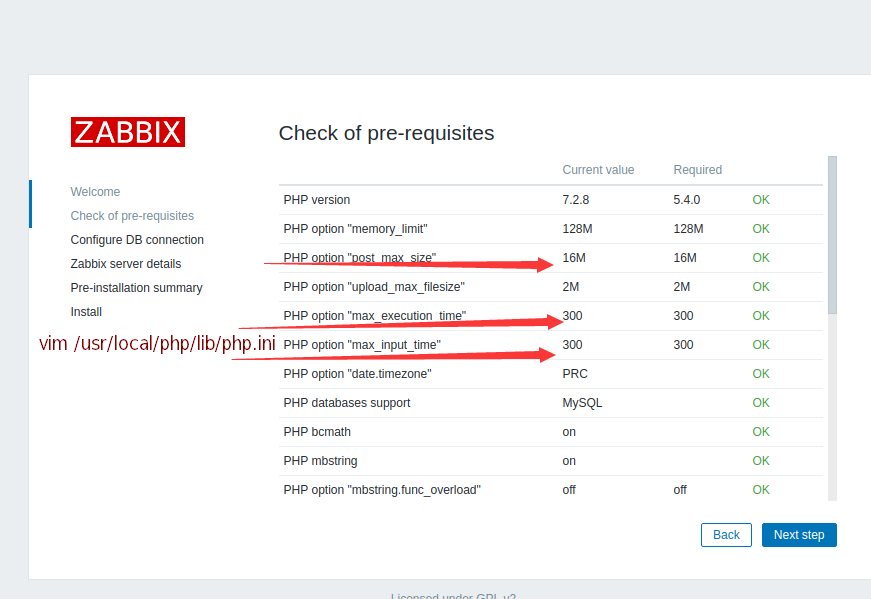
(五)、PHP参数修改
PHP编译安装请参考:传送门
[root@mysql-- ~]# vim /usr/local/php/lib/php.ini
post_max_size = 16M
max_execution_time = 300
max_input_time = 300
三、Zabbix-server Web界面配置
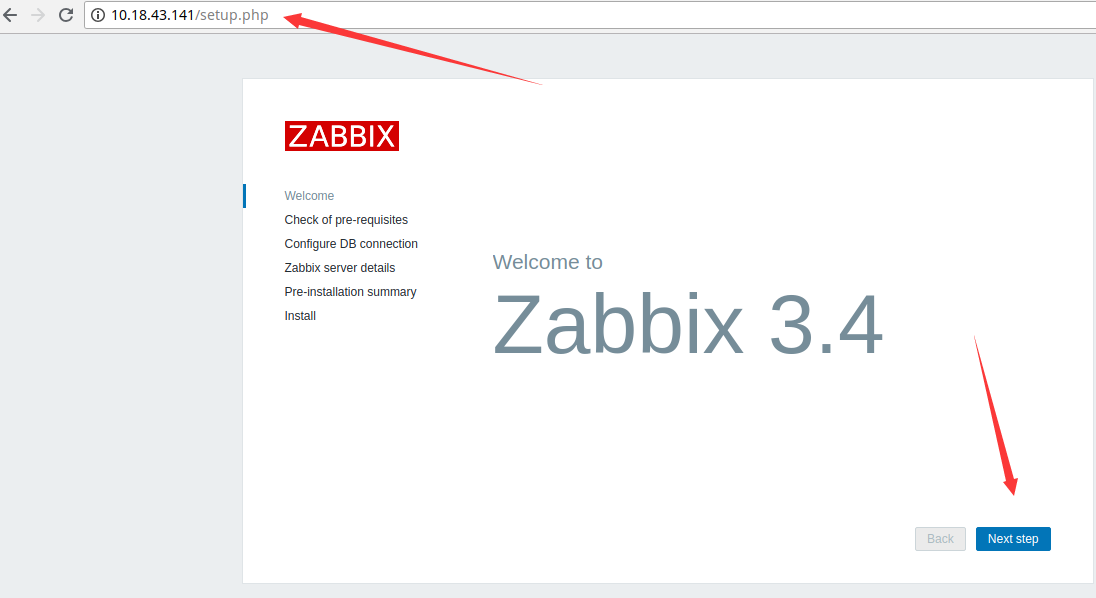
(一)、访问Web页面
访问本机IP地址:http://10.18.43.141/setup.php
(二)、PHP参数修改
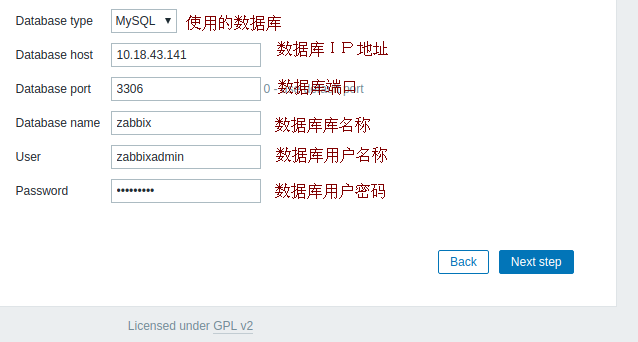
(三)、MySQL参数配置
(四)Zabbix-server 配置

(五)、信息确认
确认以上填写的Web信息,继续下一步。图略。。。
(六)、错误
无法自动下载配置文件,需要我们手动下载。

下载后,刷新页面即可。
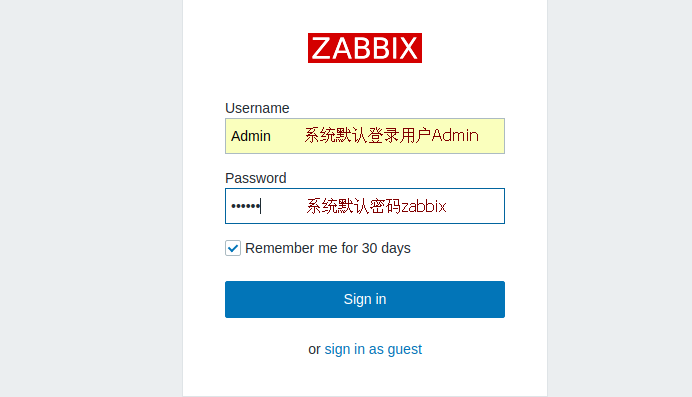
(七)、登录界面
(八)、开始使用
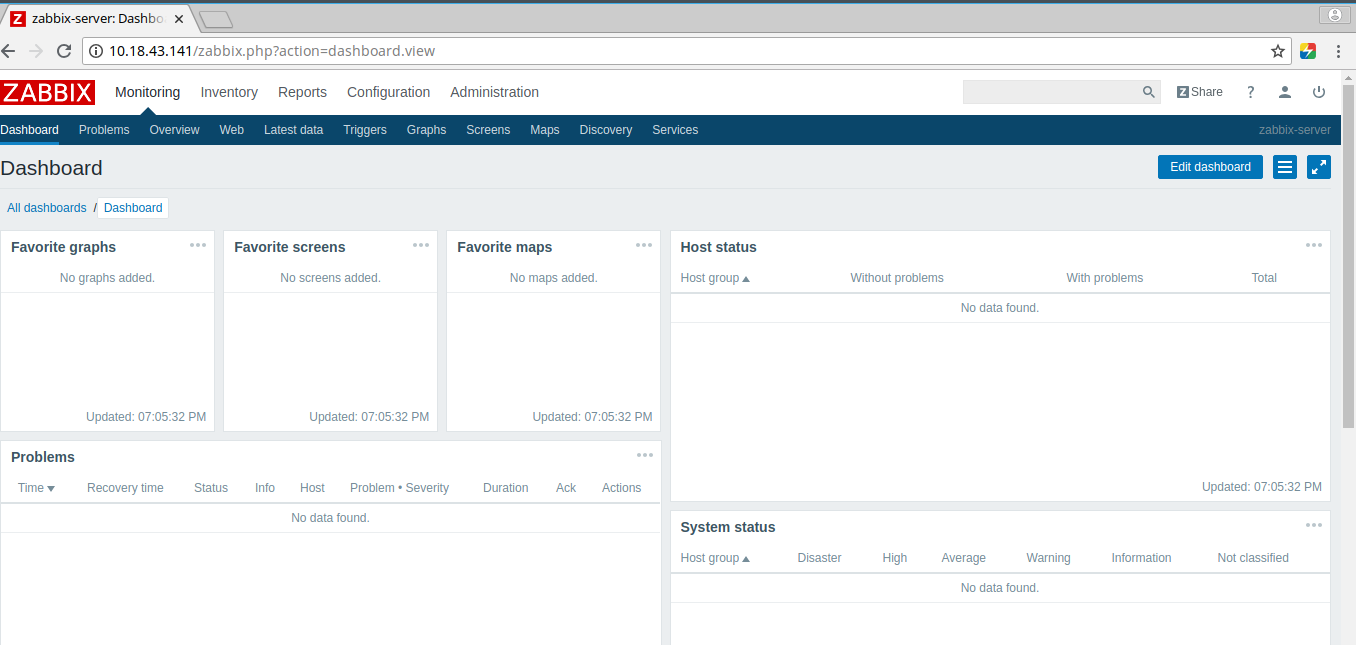
安装完成之后的界面,下次访问 http://10.18.43.141/zabbix.php
Zabbix编译安装(全)的更多相关文章
- nginx配合zabbix编译安装时web下一步跳转问题
很多时候编译安装的时候把zabbix的php包拷贝到web所在目录之后(本文为nginx所在html目录),网页打开http:/localhost/zabbix却进不去下图: 或者是点了下一步没反应, ...
- zabbix编译安装
第一部分zabbix安装部署,实现分布式监控及网络知识 #yum install lrzsz.x86_64 传送文件 安装mysql脚本 #!/bin/bash DIR = pwd NAME = ...
- 干货CentOS6.5_Nginx1.40_Php5.57_MySQL5.5.35编译安装全记录
http://www.unixdo.com/Unix_Linux/CentOS65_Nginx140_Php557_MySQL5535.html 如果是编译升级php,之前做过nginx的虚拟主机配置 ...
- CentOS6.5_Nginx1.40_Php5.57_MySQL5.5.35编译安装全记录
环境说明:CentOS 6.5 32位 PHP Version 5.5.7 mysql version _5.6.16 一.准备工作 配置防火墙,允许防火墙通过22(sshd).80(WEB).3 ...
- linux下php-5.4.8.tar.gz编译安装全攻略
首先安装基础依赖组建,注:这些依赖组建也是LINUX+PHP+MYSQL+APACHE+NGINX+MEMCACHED时必要的系统组件 LANG=C yum -y install gcc gcc-c ...
- 1.zabbix编译安装(环境lnmp)
zabbix服务端安装 1.使用脚本安装.脚本内容如下.安装完用http://192.168.159.20/zabbix #!/bin/bash #使用说明,此版本是针对程序安装路径不在/opt/下的 ...
- 使用Ubuntu系统编译安装Zabbix企业级监控系统
使用Ubuntu系统编译安装Zabbix企业级监控系统 作者:尹正杰 版权声明:原创作品,谢绝转载!否则将追究法律责任. Ubuntu系统部署笔记:https://www.cnblogs.com/ ...
- 一文吃透zabbix4.0的编译安装,最全最详细的安装。
什么是zabbix? zabbix作为一款企业级,开源的,分布式的监控套件,解决了以往监控软件的短板,可以说是现在流行的监控解决方案之一. 监控系统的理想化模样 1.监控数据收集及可视化. 2.数据要 ...
- 编译安装zabbix3.2
1.1 环境准备 系统环境准备:redhat 6.6 64位mysql-5.6.34php-5.6.28zabbix-3.2.1配置前先关闭iptables和SELINUX,避免安装过程中报错. # ...
随机推荐
- node.js + mssql 简易封装操作
时间吧,总是这么凑巧,在我学习[node.js]还没几天,我的 Microsoft SQL Server Management Studio 18 就歇菜了,至于怎么歇菜的吧....它可能的意思就是想 ...
- 用python的matplotlib和numpy库绘制股票K线均线和成交量的整合效果(含量化验证交易策略代码)
在用python的matplotlib和numpy库绘制股票K线均线的整合效果(含从网络接口爬取数据和验证交易策略代码)一文里,我讲述了通过爬虫接口得到股票数据并绘制出K线均线图形的方式,在本文里,将 ...
- 灵雀云CTO陈恺应邀出席国泰君安信息产业投资峰会,探讨全球科技产业新格局
2019年7月9-10日,国泰君安信息产业投资峰会在上海陆家嘴举办.作为国内容器PaaS领域的龙头公司,灵雀云受邀出席本次大会,在“数字化转型从云做起”的论坛中,CTO陈恺发表了<云原生助力企业 ...
- 2. python Mac 安装 dlib
在macOS上: 从Mac App Store安装 XCode(或安装XCode命令行工具)(最低版本是:xcode8 以上) 有 homebrew 安装 有 CMAKE 安装 基础包 :numpy ...
- Windows环境部署Redis集群
一.准备文件 1. 下载Redis for windows 的最新版本 下载地址:https://github.com/MSOpenTech/redis/releases 安装到 c:\Redis ...
- Excel中RATE函数的Java实现
public class RATE { /** * calculateRate:类excel中的RATE函数,计算结果值为月利率,年华利率 需*12期. <br/> * rate = ca ...
- 20190127-Orleans与SF小伙伴的部分问答
Orleans 怎么部署到服务器? 方式1:Orleans 服务端寄宿在Web应用中,将Web应用部署到服务器 方式2:通过SF/K8s部署到服务器 不同服务器上的谷仓和谷如何调配? 由Orleans ...
- 【题解】P2916 [USACO08NOV]安慰奶牛Cheering up the Cow-C++
原题传送门 这道题用最小生成树来完成,我选用的是kruskal(克鲁斯卡尔)来完成.这道题目在克鲁斯卡尔模板的基础上,有变动的地方只有2处:1.因为必须从一个点出发,而最小生成树最后会让所有点都连通, ...
- 爬虫之突破xm-sign校验反爬
喜马拉雅 网页分析 - 打开我们要爬取的音乐专辑https://www.ximalaya.com/ertong/424529/ - F12打开开发者工具 - 点击XHR 随便点击一首歌曲会看到存储所有 ...
- 嵌入式Linux开发环境搭建,问题ping、nfs的解决
一. 嵌入式软件层次 1) Bootloader->引导加载程序 整个嵌入式系统的加载启动任务完全交给Bootloader完成,它的主要任务是将内核映象从硬盘读到RAM中,然后跳转到内核入口启动 ...