
一文吃透zabbix4.0的编译安装,最全最详细的安装。
什么是zabbix?

zabbix作为一款企业级,开源的,分布式的监控套件,解决了以往监控软件的短板,可以说是现在流行的监控解决方案之一。


监控系统的理想化模样

1.监控数据收集及可视化。

2.数据要保存在数据库中。这样以后需要的时候可以对这些数据进行分析计算。
3.方便,快速将监控加入服务器上,不需要繁琐的操作。

4.数据可视化不要很花里胡哨,直观好用。


异常数据报警

1.可以定义复杂的报警逻辑,可以做到Item之间的关联报警,而不是针对一个。

2.报警需要被确认,让运维人员知道多少报警已经有人认领并开始处理。

3.报警方式需要自定义,可以发送邮件和短信。

4.报警内容可以自行设置,在报警邮件中加入一些简单的分析,而不是让运维人员上服务器敲命令来获取基本的信息。

5.报警可以自动跑一些命令,这些命令是需要获取信息,也可以是自动修复。

和其他系统协同工作。

(1)有强大的API可以使用,可以让其他系统调用完成工作

(2)监控数据是开放的,数据库中的数据结构不要太复杂,让人无从下手。

(3)监控可视化的图可以方便的引用,而不是要一大串javascript。
zabbix的编译安装

相对于yum安装,还是编译安装最舒服一些

1.自定义软件功能

2.优化编译参数,提高性能

3.解决不必要的软件以来

4.易做代码升级
进入正题

1.机器规划

10.0.0.20 zabbix Server

10.0.0.23 mysql master

 2.zabbix官网下载源码包
cd /usr/local/src

groupadd -g 1002 zabbix

groupadd -u 1002 -g 1002 zabbix

id zabbix 验证zabbix用户

wget https://jaist.dl.sourceforge.net/project/zabbix/ZABBIX%20Latest%20Stable/4.0.15/zabbix-4.0.15.tar.gz

3.解决必要的依赖关系

#apt install libmysqld-dev  libmysqlclient-dev  libxml2-dev  libxml2 snmp  libsnmp-dev   libevent-dev  curl  libcurl4-openssl-dev

#apt install openjdk-8-jdk

4.开始编译安装


./configure -prefix=/apps/zabbix_server --enable-server --enable-agent --with-mysql --with-net-snmp --with-libcurl --with-libxml2

  LDAP support:          no

  IPv6 support:          no

***********************************************************

*            Now run 'make install'                       *

*                                                         *

*            Thank you for using Zabbix!                  *

*              <http://www.zabbix.com>                    *

***********************************************************

#make

#make install
/usr/bin/install -c -m 644 'zabbix_agentd.man' '/apps/zabbix_proxy/share/man/man8/zabbix_agentd.8'
/usr/bin/install -c -m 644 'zabbix_proxy.man' '/apps/zabbix_proxy/share/man/man8/zabbix_proxy.8'
make[2]: Leaving directory '/usr/local/src/zabbix-4.0.29/man'
make[1]: Leaving directory '/usr/local/src/zabbix-4.0.29/man'
Making install in misc
make[1]: Entering directory '/usr/local/src/zabbix-4.0.29/misc'
make[2]: Entering directory '/usr/local/src/zabbix-4.0.29/misc'
make[2]: Nothing to be done for 'install-exec-am'.
make[2]: Nothing to be done for 'install-data-am'.
make[2]: Leaving directory '/usr/local/src/zabbix-4.0.29/misc'
make[1]: Leaving directory '/usr/local/src/zabbix-4.0.29/misc'
make[1]: Entering directory '/usr/local/src/zabbix-4.0.29'
make[2]: Entering directory '/usr/local/src/zabbix-4.0.29'
make[2]: Nothing to be done for 'install-exec-am'.
make[2]: Nothing to be done for 'install-data-am'.
make[2]: Leaving directory '/usr/local/src/zabbix-4.0.29'
make[1]: Leaving directory '/usr/local/src/zabbix-4.0.29'
root@zabbix-server:~# ll /apps/zabbix_server/
total 28
drwxr-xr-x 7 root root 4096 Mar 10 14:33 ./
drwxr-xr-x 3 root root 4096 Mar 10 14:35 ../
drwxr-xr-x 2 root root 4096 Mar 10 14:33 bin/
drwxr-xr-x 4 root root 4096 Mar 10 14:33 etc/
drwxr-xr-x 3 root root 4096 Mar 10 14:33 lib/
drwxr-xr-x 3 root root 4096 Mar 10 14:34 sbin/
drwxr-xr-x 4 root root 4096 Mar 10 14:33 share/
5.准备数据库

数据库的名称为zabbix_server1;用户名冷雨夜,密码yuye

root@zabbix-server:~# apt install apache2 mysql-client

root@mysql-master:~# mysql

mysql> create database zabbix_server1 character set utf8 collate utf8_bin;

grant all privileges on zabbix_server1.* to lengyuye@"10.0.0.%" identified by 'yuye.zabbix';

mysql> flush privileges;

6.导入数据库

6.1 zabbix_server节点验证是否可以成功登录mysl

root@zabbix-server:/usr/local/src/zabbix-4.0.29/database/mysql# mysql -ulengyuye -pyuye.zabbix -h10.0.0.23

mysql: [Warning] Using a password on the command line interface can be insecure.

Welcome to the MySQL monitor.  Commands end with ; or \g.

Your MySQL connection id is 4

Server version: 5.7.33-0ubuntu0.18.04.1 (Ubuntu)

Copyright (c) 2000, 2021, Oracle and/or its affiliates.

Oracle is a registered trademark of Oracle Corporation and/or its

affiliates. Other names may be trademarks of their respective

owners.

Type 'help;' or '\h' for help. Type '\c' to clear the current input statement.

mysql>

6.2 导入数据库

#编译安装和apt安装还是稍微不一样的,且看。看你是那一个数据库。

pwd

#/usr/local/src/zabbix-4.0.29/database/mysql

#检测这个错误,不要紧,意思就是检测到明文密码是不安全的,没关系

root@zabbix-server:/usr/local/src/zabbix-4.0.29/database/mysql# mysql -ulengyuye -pyuye.zabbix -h10.0.0.23 zabbix_server1 < schema.sql

mysql: [Warning] Using a password on the command line interface can be insecure.

root@zabbix-server:/usr/local/src/zabbix-4.0.29/database/mysql# mysql -ulengyuye -pyuye.zabbix -h10.0.0.23 zabbix_server1 < images.sql

mysql: [Warning] Using a password on the command line interface can be insecure.

root@zabbix-server:/usr/local/src/zabbix-4.0.29/database/mysql# mysql -ulengyuye -pyuye.zabbix -h10.0.0.23 zabbix_server1 < data.sql

mysql: [Warning] Using a password on the command line interface can be insecure.
7.验证数据库

mysql> use zabbix_server1;

Reading table information for completion of table and column names

You can turn off this feature to get a quicker startup with -A

Database changed

mysql> show tables;

+----------------------------+

| Tables_in_zabbix_server1   |

+----------------------------+

| acknowledges               |

| actions                    |

| alerts                     |

| application_discovery      |

| application_prototype      |

| application_template       |

| applications               |

| auditlog                   |

| auditlog_details           |

| autoreg_host               |

| conditions                 |

| config                     |

| corr_condition             |

| corr_condition_group       |

| corr_condition_tag         |

| corr_condition_tagpair     |

| corr_condition_tagvalue    |

| corr_operation             |

| correlation                |

| dashboard                  |

| dashboard_user             |

| dashboard_usrgrp           |

| dbversion                  |

| dchecks                    |

| dhosts                     |

| drules                     |

| dservices                  |

| escalations                |

| event_recovery             |

| event_suppress             |

| event_tag                  |

| events                     |

| expressions                |

| functions                  |

| globalmacro                |

| globalvars                 |

| graph_discovery            |

| graph_theme                |

| graphs                     |

| graphs_items               |

| group_discovery            |

| group_prototype            |

| history                    |

| history_log                |

| history_str                |

| history_text               |

| history_uint               |

| host_discovery             |

| host_inventory             |

| hostmacro                  |

| hosts                      |

| hosts_groups               |

| hosts_templates            |

| housekeeper                |

| hstgrp                     |

| httpstep                   |

| httpstep_field             |

| httpstepitem               |

| httptest                   |

| httptest_field             |

| httptestitem               |

| icon_map                   |

| icon_mapping               |

| ids                        |

| images                     |

| interface                  |

| interface_discovery        |

| item_application_prototype |

| item_condition             |

| item_discovery             |

| item_preproc               |

| items                      |

| items_applications         |

| maintenance_tag            |

| maintenances               |

| maintenances_groups        |

| maintenances_hosts         |

| maintenances_windows       |

| mappings                   |

| media                      |

| media_type                 |

| opcommand                  |

| opcommand_grp              |

| opcommand_hst              |

| opconditions               |

| operations                 |

| opgroup                    |

| opinventory                |

| opmessage                  |

| opmessage_grp              |

| opmessage_usr              |

| optemplate                 |

| problem                    |

| problem_tag                |

| profiles                   |

| proxy_autoreg_host         |

| proxy_dhistory             |

| proxy_history              |

| regexps                    |

| rights                     |

| screen_user                |

| screen_usrgrp              |

| screens                    |

| screens_items              |

| scripts                    |

| service_alarms             |

| services                   |

| services_links             |

| services_times             |

| sessions                   |

| slides                     |

| slideshow_user             |

| slideshow_usrgrp           |

| slideshows                 |

| sysmap_element_trigger     |

| sysmap_element_url         |

| sysmap_shape               |

| sysmap_url                 |

| sysmap_user                |

| sysmap_usrgrp              |

| sysmaps                    |

| sysmaps_elements           |

| sysmaps_link_triggers      |

| sysmaps_links              |

| tag_filter                 |

| task                       |

| task_acknowledge           |

| task_check_now             |

| task_close_problem         |

| task_remote_command        |

| task_remote_command_result |

| timeperiods                |

| trends                     |

| trends_uint                |

| trigger_depends            |

| trigger_discovery          |

| trigger_tag                |

| triggers                   |

| users                      |

| users_groups               |

| usrgrp                     |

| valuemaps                  |

| widget                     |

| widget_field               |

+----------------------------+

144 rows in set (0.00 sec)
8.编辑zabbix server配置文件修改参数

root@zabbix-server:~# vim /apps/zabbix_server/etc/zabbix_server.conf

DBHost=10.0.0.23

DBName=zabbix_server1

DBUser=lengyuye

DBPassword=lengyuye

9.启动zabbix

#查看zabbix的端口是否被监听

root@zabbix-server:/var/www/html/zabbix# ss -tnl

LISTEN                   0                         128                                                 0.0.0.0:10051                                            0.0.0.0:*

LISTEN                   0                         128                                                 0.0.0.0:43397

#端口已经被监听启动zabbix server

/apps/zabbix_server/sbin/zabbix_server -c /apps/zabbix_server/etc/zabbix_server.conf

root@zabbix-server:~# tail /tmp/zabbix_server.log

  1706:20210310:220941.608 VMware monitoring:         YES

  1706:20210310:220941.608 SMTP authentication:       YES

  1706:20210310:220941.608 Jabber notifications:       NO

  1706:20210310:220941.608 Ez Texting notifications:  YES

  1706:20210310:220941.608 ODBC:                       NO

  1706:20210310:220941.608 SSH support:                NO

  1706:20210310:220941.608 IPv6 support:               NO

  1706:20210310:220941.608 TLS support:                NO

  1706:20210310:220941.608 ******************************

  1706:20210310:220941.608 using configuration file: /apps/zabbix_server/etc/zabbix_server.conf
10.登录zabbix

#可能会报错
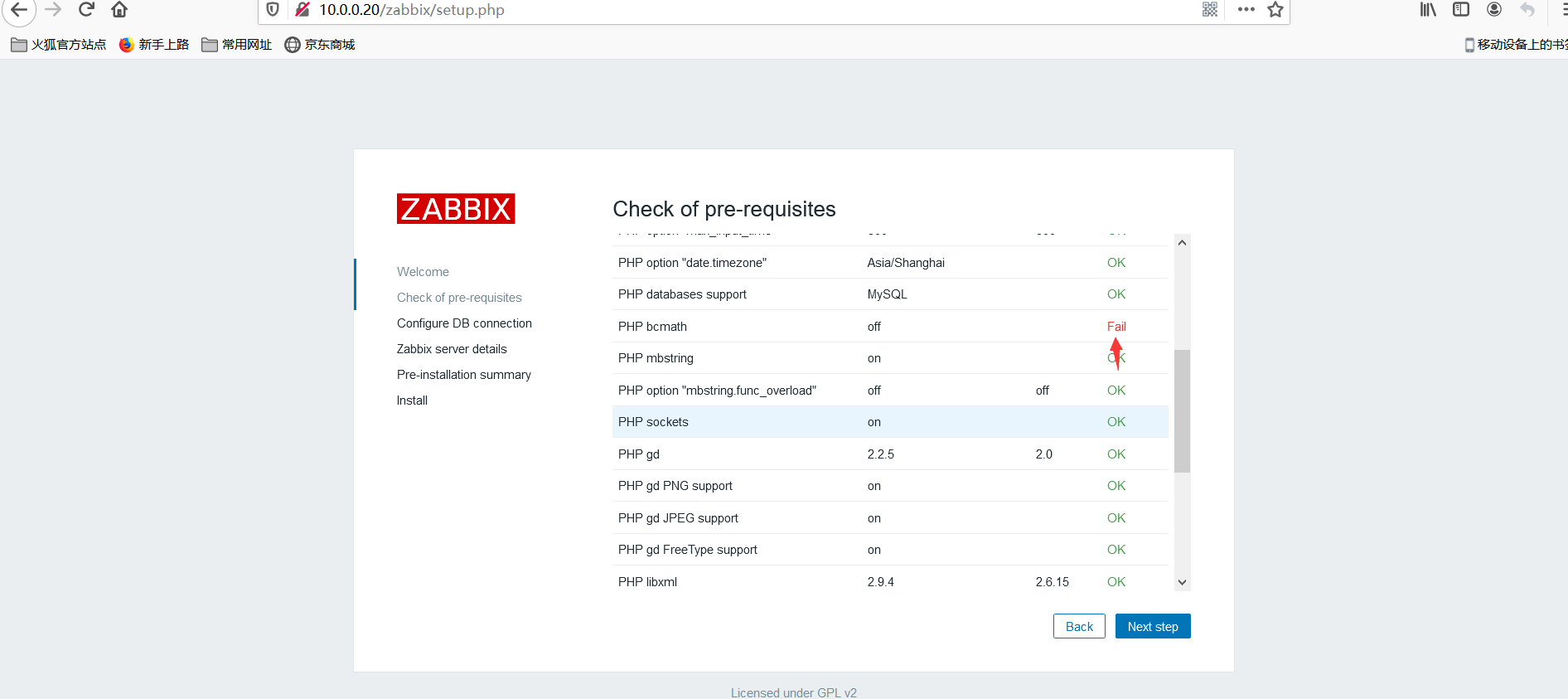
11.修改配置文件

apt-get install php7.2-ladp

apt-get install php7.2-bcmath

systemctl restart mysql

systemctl restart apache2
再次登录已经全部OK!!!

12.设置数据库

13.zabbix server设置
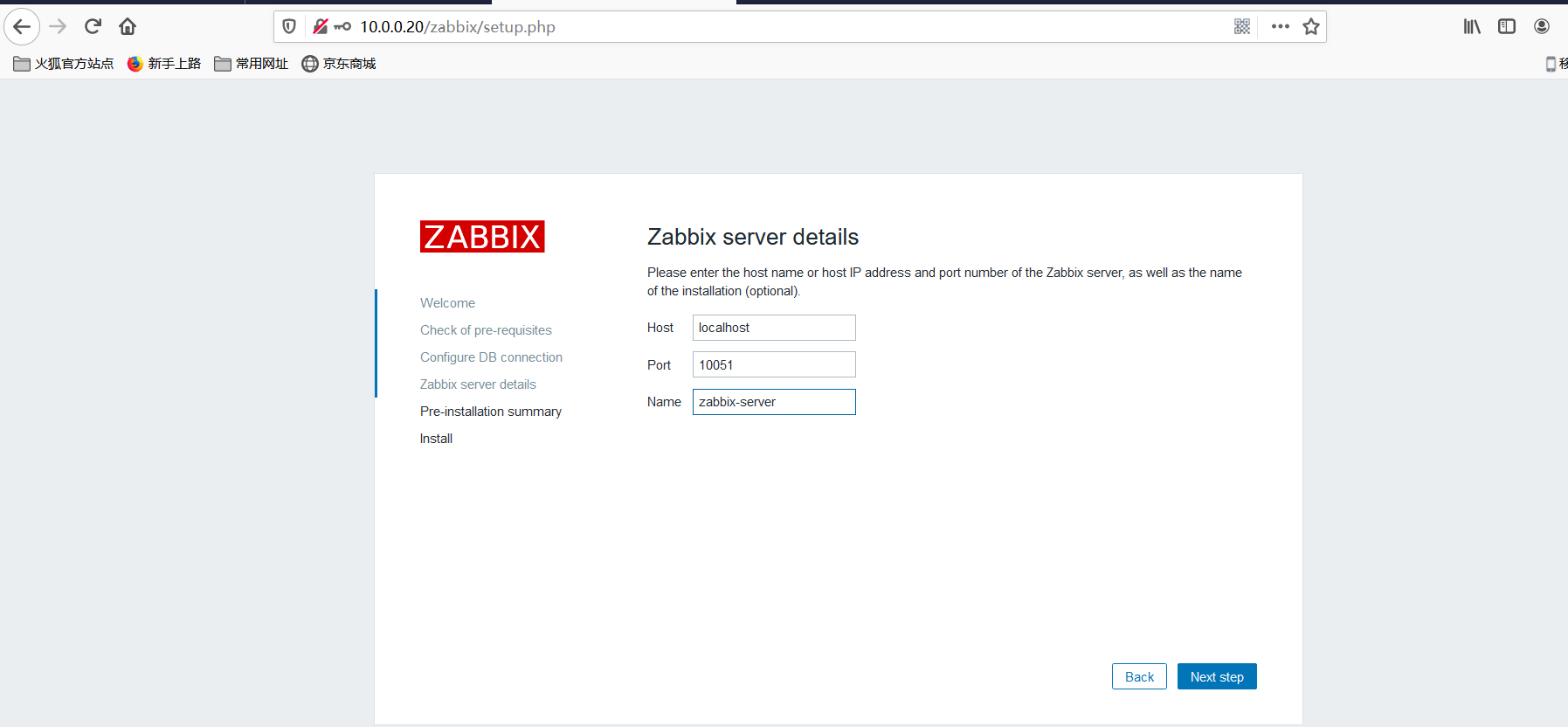
14.确认信息
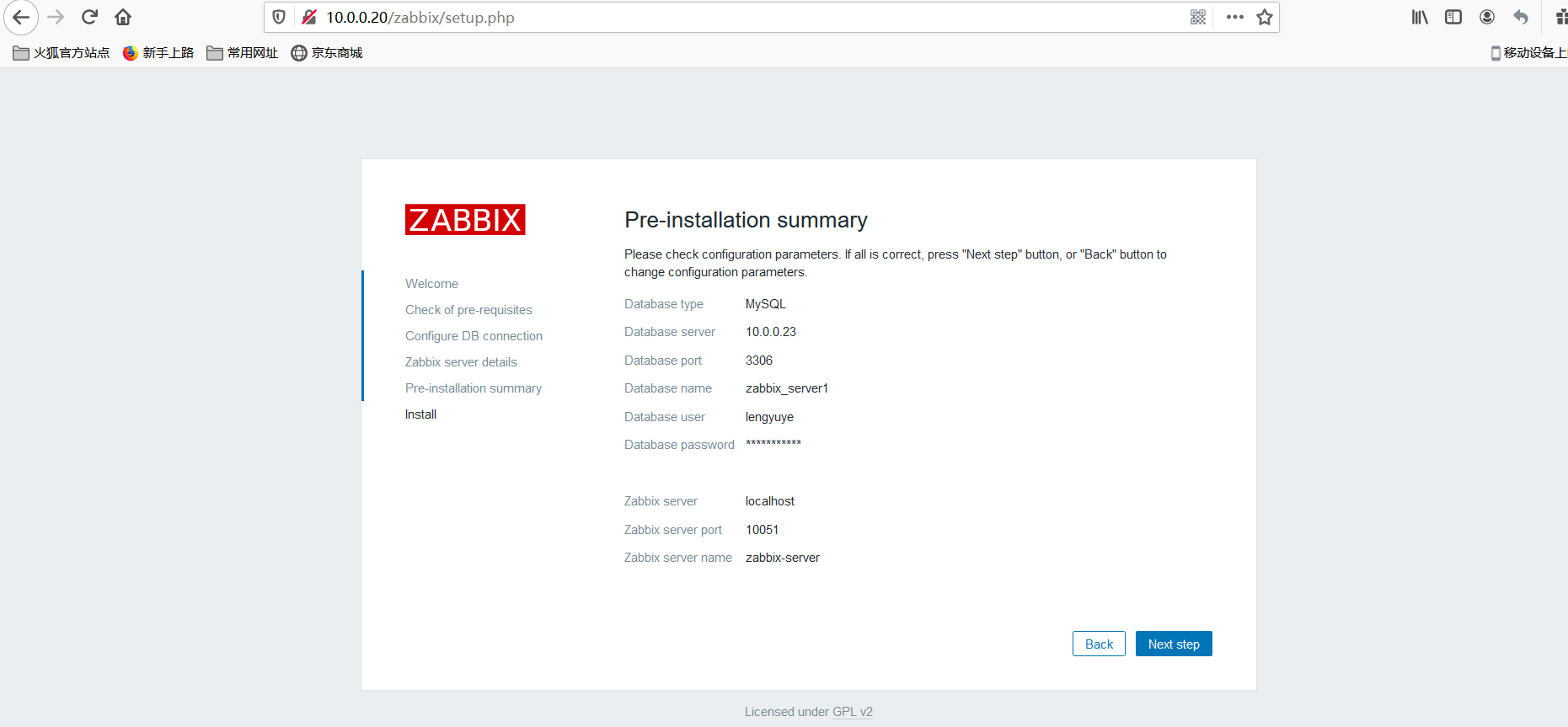
15.手动创建配置文件

<?php

// Zabbix GUI configuration file.

global $DB;

$DB['TYPE']     = 'MYSQL';

$DB['SERVER']   = '10.0.0.23';

$DB['PORT']     = '3306';

$DB['DATABASE'] = 'zabbix_server1';

$DB['USER']     = 'lengyuye';

$DB['PASSWORD'] = 'yuye.zabbix';

// Schema name. Used for IBM DB2 and PostgreSQL.

$DB['SCHEMA'] = '';

$ZBX_SERVER      = 'localhost';

$ZBX_SERVER_PORT = '10051';

$ZBX_SERVER_NAME = 'zabbix-server';

$IMAGE_FORMAT_DEFAULT = IMAGE_FORMAT_PNG;

#刷新页面,成功显示。
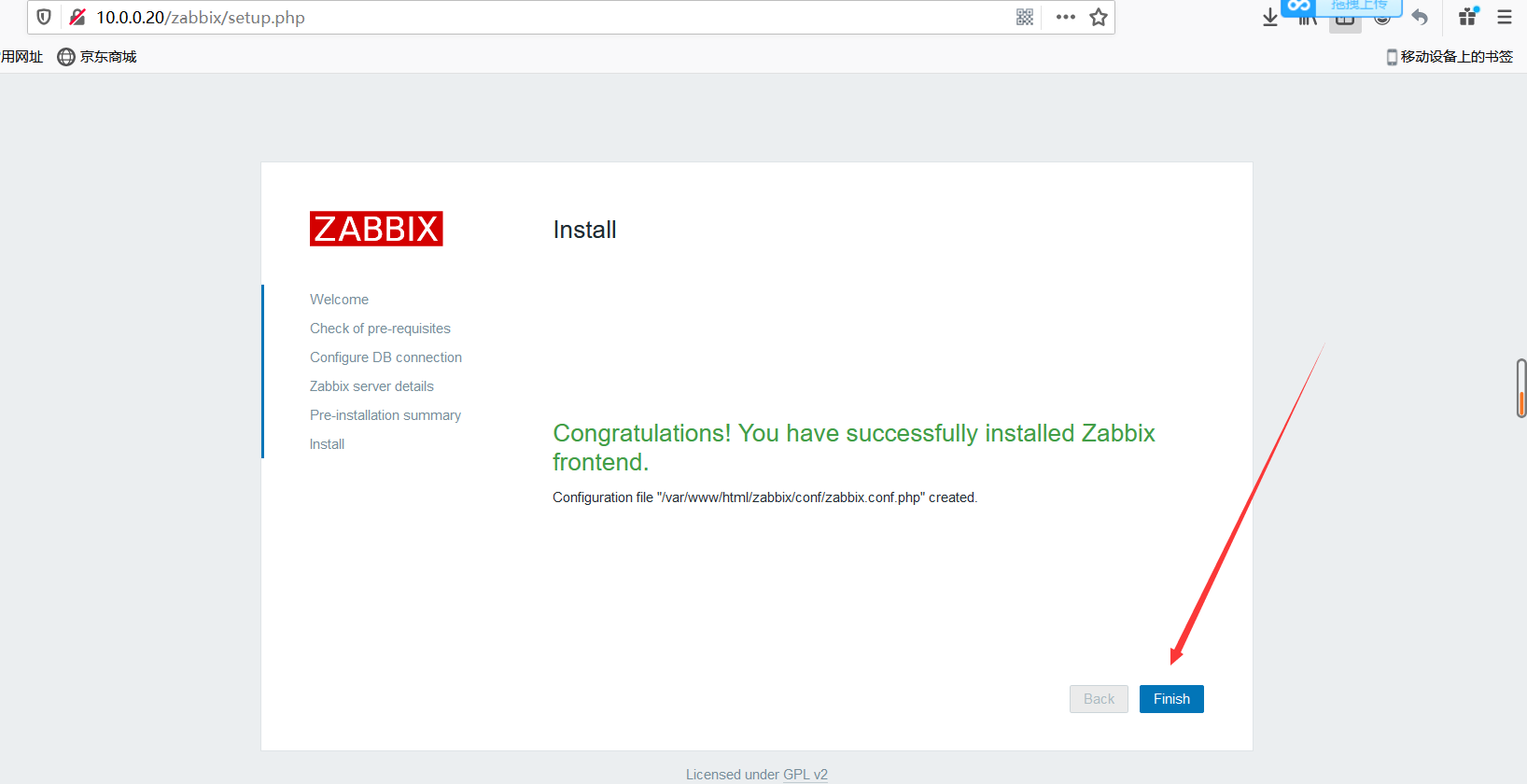
16.登录zabbix

   用户名Admin
   密码zabbix
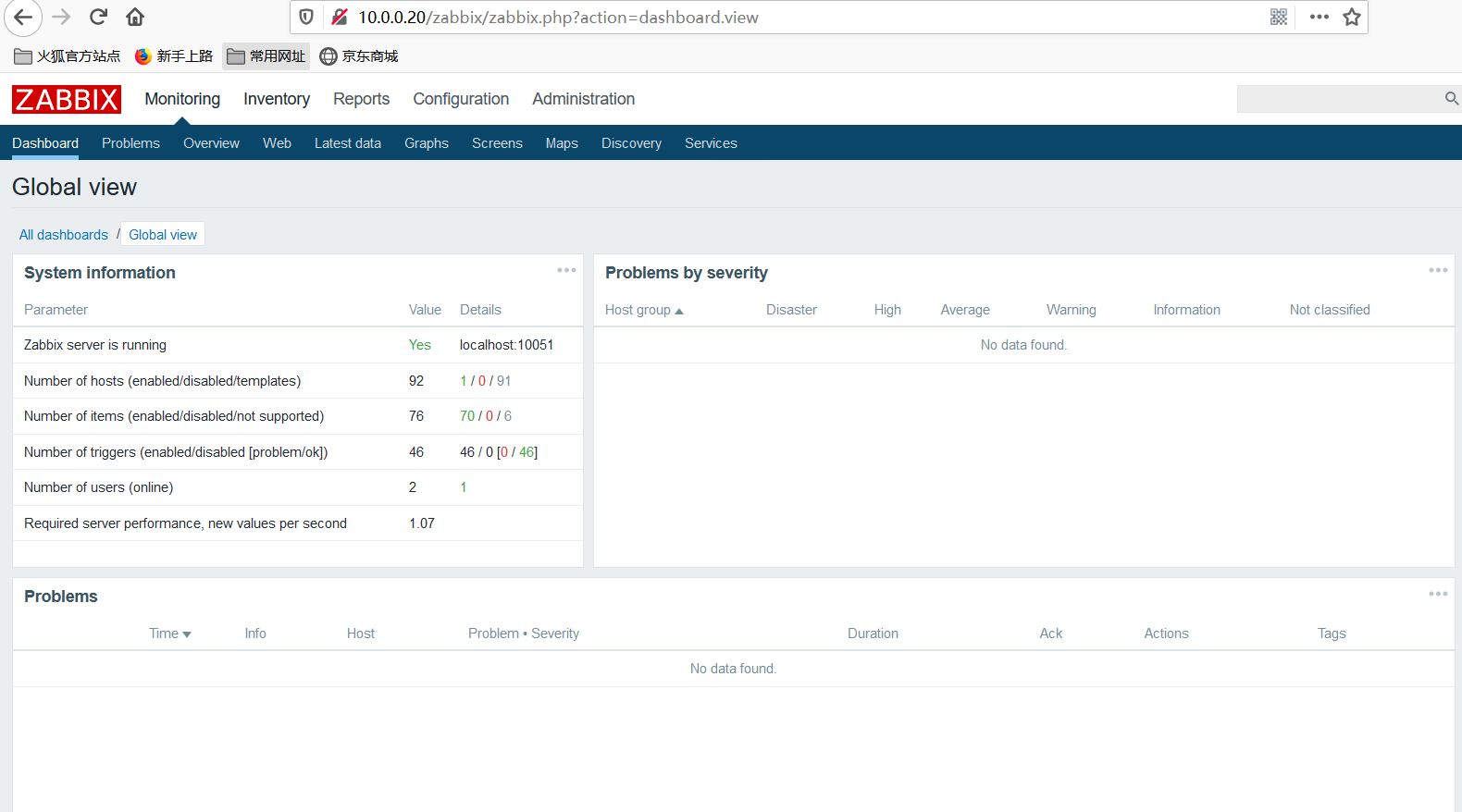
编译安装到这里就全部OK了希望对有所帮助,!!!
一文吃透zabbix4.0的编译安装,最全最详细的安装。的更多相关文章
- 在Ubuntu 64位OS上运行hadoop2.2.0[重新编译hadoop]
最近在学习搭建Hadoop, 我们从Apache官方网站直接下载最新版本Hadoop2.2.官方目前是提供了linux32位系统可执行文件,结果运行时发现提示 “libhadoop.so.1.0.0 ...
- CentOS7.x编译安装zabbix4.0
编译安装zabbix Zabbix简介 Zabbix 是一个企业级的分布式开源监控方案. Zabbix是一款能够监控各种网络参数以及服务器健康性和完整性的软件.Zabbix使用灵活的通知机制,允许用户 ...
- zabbix4.0离线快速编译安装(编译安装方法)
本博客已整理更新至第二版.更新与2019.4.17 其实这个主要是想试一下离线编译安装的具体步骤,记得要配置好本地yum云,因为我们需要使用yum,yum能帮我们自动解决很多依赖问题.发现最主要的问题 ...
- Centos7编译安装zabbix-4.0.1
架构组合:nginx1.9.10+php7.0.32+mysql5.7.22+zabbix4.0.1 nginx1.9.10 先装依赖 openssl-1.1.0f tar zxvf openssl- ...
- Centos 7.5源码编译安装zabbix4.0报fatal error: mysql.h: No such file or directory
系统环境:CentOS 7.5是最小化安装的 编译信息 编译选项: root@Server01 zabbix-]# ./configure --prefix=/usr/share/applicatio ...
- centos7.6环境zabbix3.2源码编译安装版升级到zabbix4.0长期支持版
zabbix3.2源码编译安装版升级到zabbix4.0长期支持版 项目需求: .2版本不再支持,想升级成4.0的长期支持版 环境介绍: zabbix服务端是编译安装的,数据库和web在一台机器上 整 ...
- centos7.6下编译安装zabbix4.0.10长期支持版
一.安装数据库,这里使用的是percona-server5..24版本 配置如下 [root@zabbix4_clone:~]# cat /etc/my.cnf # Example MySQL con ...
- Centos7.5 ZABBIX4.0.3版本的编译安装
Zabbix监控的搭建理论 1. Zabbix Server会去采集监控数据,采集的监控数据会写入到SQL数据库 2. Zabbix的WEB后端采用php语言开发,所有配置信息.用 ...
- centos zabbix4.0编译安装
zabbix的部署原理 zabbix server需要把监控数据入sql数据库,所以得Mysql环境 zabbix的web是基于php开发的,所以得LNMP环境 部署zabbix server和zab ...
随机推荐
- forEachRemaining()方法的用法
forEachRemaining()是java1.8新增的Iterator接口中的默认方法对于这个方法,官方文档是这么描述的:Performs the given action for each re ...
- USB2.0协议学习笔记---描述符
USB设备描述符 字段名 长 度(字节) 地址偏移 含 义 bLenth 1 0 描述符长度 bDescriptorType 1 1 描述符类型 (这里为 1) ...
- live chat for website UX
live chat for website UX increase customer satisfaction using a live chat https://crisp.chat/en/live ...
- 新三板 & 挂牌费用
新三板 & 挂牌费用 关于拟申请公司股票在全国中小企业股份转让系统终止挂牌的提示性公告 https://pilu.tianyancha.com/announcement/ef51e981910 ...
- JavaScript Semicolon Insertion
JavaScript Semicolon Insertion https://blog.izs.me/2010/12/an-open-letter-to-javascript-leaders-rega ...
- css 使用paint创建自定义css
See also: https://houdini.how/ https://github.com/una/extra.css#readme
- Flutter Demo: PageView横向使用
video import 'package:flutter/material.dart'; void main() => runApp(MyApp()); class MyApp extends ...
- NGK公链有发展前景吗?
最近网络中经常能看到一个新公链项目NGK的消息,很多朋友也都私下表示过,非常看好今年的NGK.对此,小编对NGK做了一些功课,发觉到NGK未来在商业Dapp应用的发展前景,下面就给大家分享一下我的理解 ...
- 用一次就会爱上的cli工具开发
本文转载自用一次就会爱上的cli工具开发 写在前面 最近接手任务--使用nodejs开发一个公司内部使用的cli工具,简而言之就是输入一行命令快速搭建好项目结构,也可以通过不同的命令引入不同的文件. ...
- c# winform中窗体切换后释放及防止重复生成
问题1:窗体切换后如何关闭,并释放资? c# winform中,2个窗体,form1和form2,互相切换的时候执行 this.Hide(); Form2 form2 = new Form2(); f ...