
Zabbix编译安装(全)
一、前言
(一)、概述
Zabbix是一个基于WEB界面的提供分布式系统监视以及网络监视功能的企业级的开源解决方案,Zabbix能监视各种网络参数,保证服务器系统的安全运营;并提供灵活的通知机制以让系统管理员快速定位,解决存在的各种问题;Zabbix主要由两部分构成,Zabbix server与可选组件Zabbix agent;
(二)、预处理
配置环境
OS:CentOS 7.5 64bit
Zabbix版本:3.4
PHP版本:7.2.8
MySQL版本:5.7.22
Nginx版本:1.14.0
hostname:zabbix--1
ip:10.18.43.141
基础需求
[root@zabbix-- ~]# systemctl stop firewalld

[root@zabbix-- ~]# sed -ri '/^SELINUX=*/cSELINUX=disabled' /etc/selinux/config

[root@zabbix-- ~]# setenforce

[root@zabbix-- ~]# mkdir -p /date/zabbix

[root@zabbix-- ~]# groupadd zabbix

[root@zabbix-- ~]# useradd -r -g zabbix -s /sbin/nologin zabbix
二、Zabbix安装
(一)、Zabbix编译
依赖环境库下载:
[root@zabbix-1-1 ~]# yum install net-snmp-devel libevent-devel mysql-devel -y
[root@zabbix-1-1 ~]# wget -P /data/zabbix https://sourceforge.net/projects/zabbix/files/ZABBIX%20Latest%20Stable/3.4.11/zabbix-3.4.11.tar.gz
[root@zabbix-- ~]# cd /data/zabbix/

[root@zabbix-- zabbix]# tar xf zabbix-3.4..tar.gz

[root@zabbix-- zabbix]# cd zabbix-3.4./
执行编译:
[root@zabbix-- zabbix-3.4.]# ./configure \
--enable-server \
--enable-agent \
--with-mysql \
--enable-ipv6 \
--with-net-snmp \
--with-libcurl \
--with-libxml2 \
--prefix=/usr/local/zabbix

[root@zabbix-- zabbix-3.4.]# make install
(二)、MySQL配置
MySQL编译安装请参考:传送门
[root@zabbix-1-1 ~]# mysql -p'Passwd@123'
mysql: [Warning] Using a password on the command line interface can be insecure.
Welcome to the MySQL monitor.  Commands end with ; or \g.
Your MySQL connection id is 1070
Server version: 5.7.22 Source distribution
Copyright (c) 2000, 2018, Oracle and/or its affiliates. All rights reserved.
Oracle is a registered trademark of Oracle Corporation and/or its
affiliates. Other names may be trademarks of their respective
owners.
Type 'help;' or '\h' for help. Type '\c' to clear the current input statement.

mysql> create database zabbix default character set utf8;

Query OK,  row affected (0.00 sec)

mysql> grant all privileges on zabbix.* to 'zabbixadmin'@'10.18.43.141' identified by 'Zabbix@123';

Query OK,  rows affected,  warning (0.00 sec)

mysql> grant all privileges on zabbix.* to 'zabbixadmin'@'127.0.0.1' identified by 'Zabbix@123';

Query OK,  rows affected,  warning (0.00 sec)

mysql> grant all privileges on zabbix.* to 'zabbixadmin'@'localhost' identified by 'Zabbix@123';

Query OK,  rows affected,  warning (0.00 sec)

mysql> grant all privileges on zabbix.* to 'zabbixadmin'@'%' identified by 'Zabbix@123';

Query OK,  rows affected,  warning (0.00 sec)

mysql> flush privileges;

Query OK,  rows affected (0.00 sec)
mysql> \q
Bye
数据导入(注意导入数据的先后顺序,如果顺序错误,就会使数据导入不成功或者其它错误)
[root@zabbix-- ~]# cd /data/zabbix/zabbix-3.4./database/mysql/

[root@zabbix-- mysql]# mysql -u'zabbixadmin' -p'Zabbix@123' zabbix < schema.sql

mysql: [Warning] Using a password on the command line interface can be insecure.

[root@zabbix-- mysql]# mysql -u'zabbixadmin' -p'Zabbix@123' zabbix < images.sql

mysql: [Warning] Using a password on the command line interface can be insecure.

[root@zabbix-- mysql]# mysql -u'zabbixadmin' -p'Zabbix@123' zabbix < data.sql

mysql: [Warning] Using a password on the command line interface can be insecure.
(三)、Zabbix server配置
[root@zabbix-- ~]# vim /usr/local/zabbix/etc/zabbix_server.conf

### Option: LogFile

#       Log file name for LogType 'file' parameter.

#

# Mandatory: no

# Default:

# LogFile=

LogFile=/tmp/zabbix_server.log          #日志存放位置

### Option: DBHost

#       Database host name.

#       If set to localhost, socket is used for MySQL.

#       If set to empty string, socket is used for PostgreSQL.

#

# Mandatory: no

# Default:

# DBHost=localhost

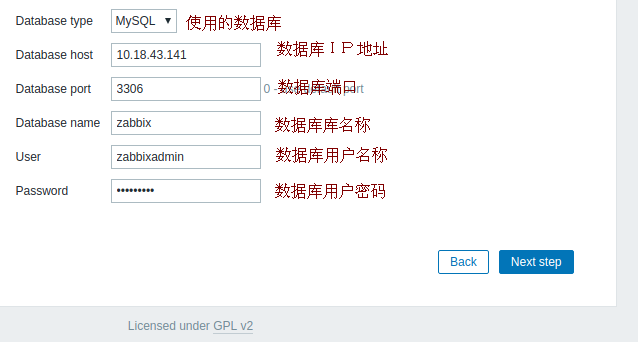
DBHost=10.18.43.141                 #数据库IP地址

### Option: DBName

#       Database name.

#       For SQLite3 path to database file must be provided. DBUser and DBPassword are ignored.

#

# Mandatory: yes

# Default:

# DBName=

DBName=zabbix                       #数据库名称

### Option: DBUser

#       Database user. Ignored for SQLite.

#

# Mandatory: no

# Default:

# DBUser=

DBUser=zabbixadmin                  #数据库用户名称

### Option: DBPassword

#       Database password. Ignored for SQLite.

#       Comment this line if no password is used.

#

# Mandatory: no

# Default:

# DBPassword=

DBPassword=Zabbix@               #数据库用户密码

### Option: AlertScriptsPath

#       Full path to location of custom alert scripts.

#       Default depends on compilation options.

#

# Mandatory: no

# Default:

# AlertScriptsPath=${datadir}/zabbix/alertscripts

AlertScriptsPath=/usr/local/zabbix/alertscripts         #脚本存放位置
(四)、Nginx配置
Nginx编译安装请参考:传送门
[root@zabbix-1-1 ~]# vim /usr/local/nginx/conf/nginx.conf
user  nginx;                    #修改使用用户
http {
  include     /usr/local/nginx/conf/conf.d/*.conf;    #添加子配置路径
}

[root@zabbix-1-1 ~]# vim /usr/local/nginx/conf/conf.d/zabbix.conf
server {
        listen       80;
        server_name  _;

  location / {


        root  /usr/local/nginx/html;
        index index.php;
        }


  location ~ "\.php$" {


        root    /usr/local/nginx/html;
        fastcgi_pass 127.0.0.1:9000;
        fastcgi_index index.php;
        fastcgi_param SCRIPT_FILENAME /usr/local/nginx/html/$fastcgi_script_name;
        include fastcgi_params;


        }
}
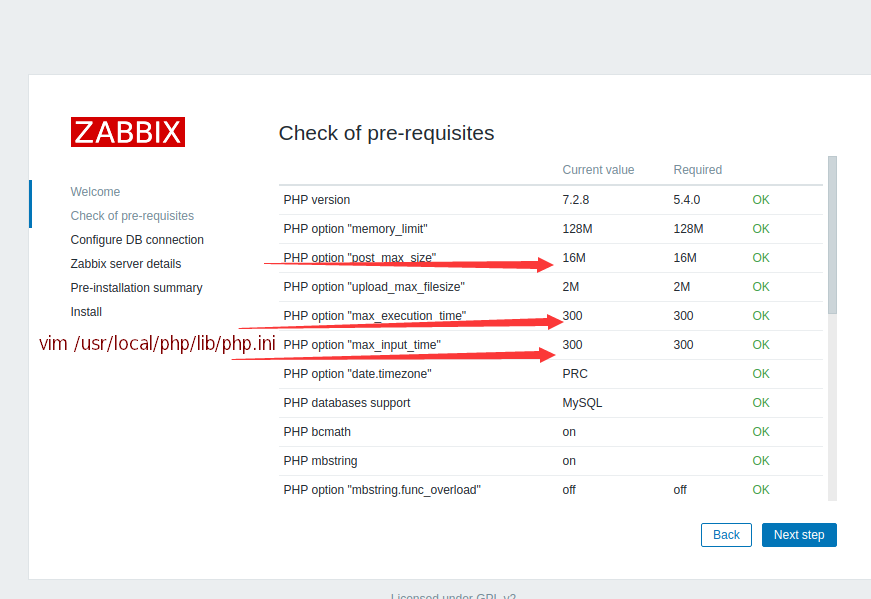
(五)、PHP参数修改
PHP编译安装请参考:传送门
[root@mysql-- ~]# vim /usr/local/php/lib/php.ini
post_max_size = 16M
max_execution_time = 300
max_input_time = 300
三、Zabbix-server Web界面配置
(一)、访问Web页面
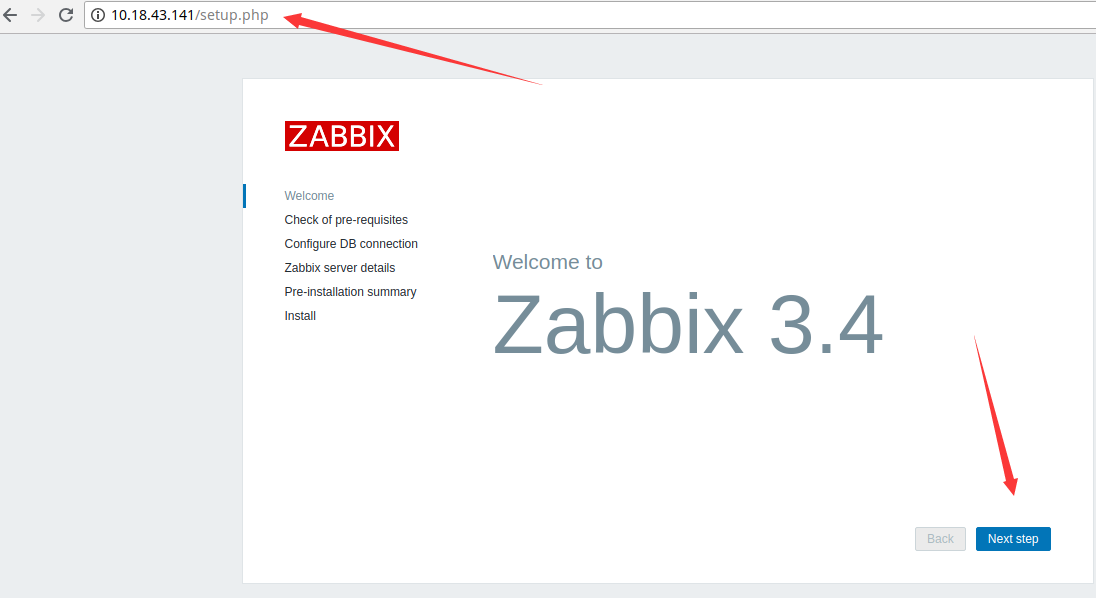
访问本机IP地址:http://10.18.43.141/setup.php
(二)、PHP参数修改
(三)、MySQL参数配置
(四)Zabbix-server 配置

(五)、信息确认
确认以上填写的Web信息,继续下一步。图略。。。
(六)、错误
无法自动下载配置文件,需要我们手动下载。

下载后,刷新页面即可。
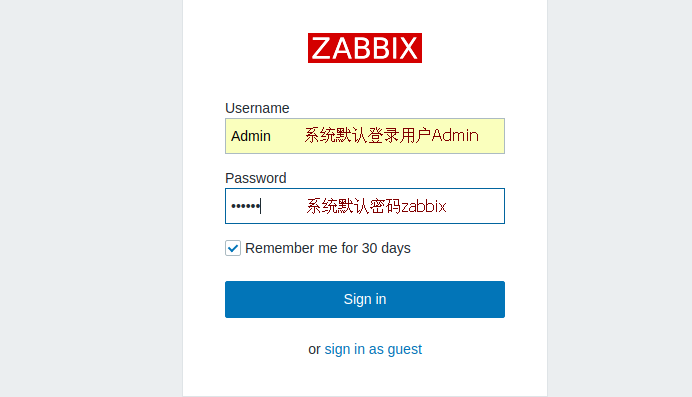
(七)、登录界面
(八)、开始使用
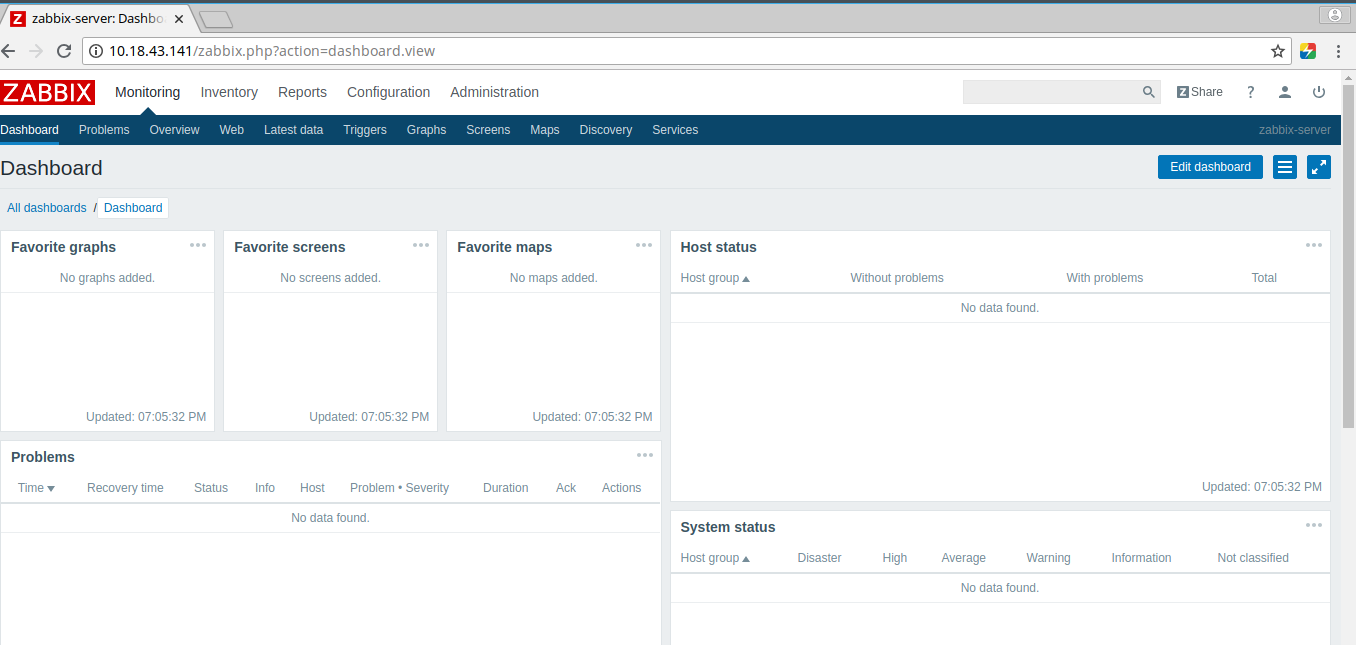
安装完成之后的界面,下次访问 http://10.18.43.141/zabbix.php
Zabbix编译安装(全)的更多相关文章
- nginx配合zabbix编译安装时web下一步跳转问题
很多时候编译安装的时候把zabbix的php包拷贝到web所在目录之后(本文为nginx所在html目录),网页打开http:/localhost/zabbix却进不去下图: 或者是点了下一步没反应, ...
- zabbix编译安装
第一部分zabbix安装部署,实现分布式监控及网络知识 #yum install lrzsz.x86_64 传送文件 安装mysql脚本 #!/bin/bash DIR = pwd NAME = ...
- 干货CentOS6.5_Nginx1.40_Php5.57_MySQL5.5.35编译安装全记录
http://www.unixdo.com/Unix_Linux/CentOS65_Nginx140_Php557_MySQL5535.html 如果是编译升级php,之前做过nginx的虚拟主机配置 ...
- CentOS6.5_Nginx1.40_Php5.57_MySQL5.5.35编译安装全记录
环境说明:CentOS 6.5 32位 PHP Version 5.5.7 mysql version _5.6.16 一.准备工作 配置防火墙,允许防火墙通过22(sshd).80(WEB).3 ...
- linux下php-5.4.8.tar.gz编译安装全攻略
首先安装基础依赖组建,注:这些依赖组建也是LINUX+PHP+MYSQL+APACHE+NGINX+MEMCACHED时必要的系统组件 LANG=C yum -y install gcc gcc-c ...
- 1.zabbix编译安装(环境lnmp)
zabbix服务端安装 1.使用脚本安装.脚本内容如下.安装完用http://192.168.159.20/zabbix #!/bin/bash #使用说明,此版本是针对程序安装路径不在/opt/下的 ...
- 使用Ubuntu系统编译安装Zabbix企业级监控系统
使用Ubuntu系统编译安装Zabbix企业级监控系统 作者:尹正杰 版权声明:原创作品,谢绝转载!否则将追究法律责任. Ubuntu系统部署笔记:https://www.cnblogs.com/ ...
- 一文吃透zabbix4.0的编译安装,最全最详细的安装。
什么是zabbix? zabbix作为一款企业级,开源的,分布式的监控套件,解决了以往监控软件的短板,可以说是现在流行的监控解决方案之一. 监控系统的理想化模样 1.监控数据收集及可视化. 2.数据要 ...
- 编译安装zabbix3.2
1.1 环境准备 系统环境准备:redhat 6.6 64位mysql-5.6.34php-5.6.28zabbix-3.2.1配置前先关闭iptables和SELINUX,避免安装过程中报错. # ...
随机推荐
- dubbo整合springboot最详细入门教程
说明 目前互联网公司,大部分项目都是基于分布式,一个项目被拆分成几个小项目,这些小项目会分别部署在不同的计算机上面,这个叫做微服务.当一台计算机的程序需要调用另一台计算机代码的时候,就涉及远程调用.此 ...
- 联盟链FISCO BCOS v2.0.0-rc3 发布
FISCO BCOS是完全开源的联盟区块链底层技术平台,由金融区块链合作联盟(深圳)(简称金链盟)成立开源工作组通力打造.开源工作组成员包括博彦科技.华为.深证通.神州数码.四方精创.腾讯.微众银行. ...
- mac-VBox-Centos6.6安装增强功能
1. 更新内核 yum update kernel 2.安装依赖包 yum install kernel-headers yum install kernel-devel yum install gc ...
- CentOS 常用命令合集
tail -f ../logs/catalina.out 在Tomcat中的bin目录下查看Tomcat日志 ps -ef|grep java 查看Tomcat服 ...
- 100天搞定机器学习|Day11 实现KNN
机器学习100天|Day1数据预处理 100天搞定机器学习|Day2简单线性回归分析 100天搞定机器学习|Day3多元线性回归 100天搞定机器学习|Day4-6 逻辑回归 100天搞定机器学习|D ...
- Appium+python自动化(十七)- 你难道猴哥失散多年的混血弟弟 - Monkey简介之开山篇(超详解)
简介 今天由宏哥给小伙伴们来介绍猴哥的混血弟弟=Monkey.Monkey 是Android SDK提供的一个命令行工具, 可以简单,方便地运行在任何版本的Android模拟器和实体设备上. Monk ...
- mysql中id值被重置的情况
MySQL中,如果你为一张使用了innodb引擎的表指定了一auto_increment列,那么这张表会有一个auto_increment计数器,专门记录当前auto_increment的相关值,用来 ...
- Ray-基础部分目录
基础部分: 引言 Actor编写-ESGrain与ESRepGrain 消息发布器与消息存储器 Event编写 Handler之CoreHandler编写 Handler之ToReadHandler编 ...
- 【webpack系列】webpack4.x入门配置基础(一)
一.前言 webpack在不断的迭代优化,目前已经到了4.29.6.在webpack4这个版本中,做了很多优化,引入了很多特性,将获得更多模块类型,.mjs支持,更好的默认值,更为简洁的模式设置,更加 ...
- MyBatis从入门到精通(十三):使用discriminator鉴别器映射
最近在读刘增辉老师所著的<MyBatis从入门到精通>一书,很有收获,于是将自己学习的过程以博客形式输出,如有错误,欢迎指正,如帮助到你,不胜荣幸! 本篇博客主要讲解鉴别器映射discri ...