
【python爬虫】对站长网址中免费简历模板进行爬取
本篇仅在于交流学习
解析页面
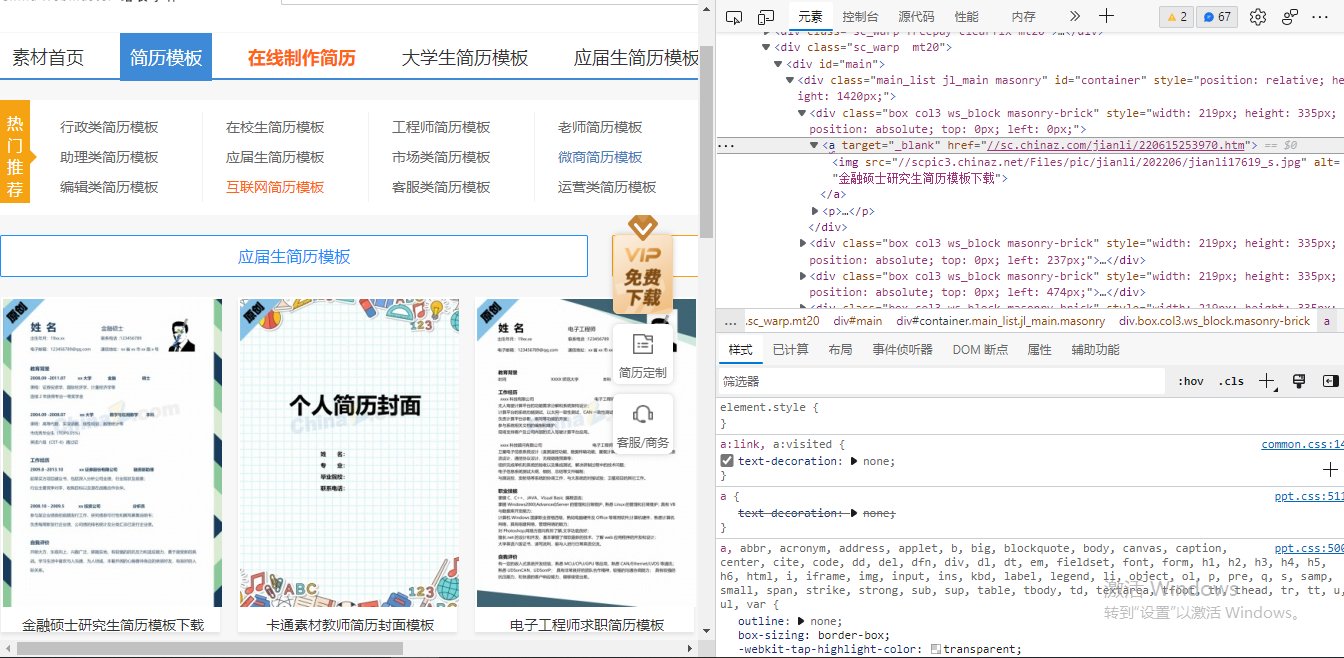
可以采用xpath进行页面连接提取
进入页面
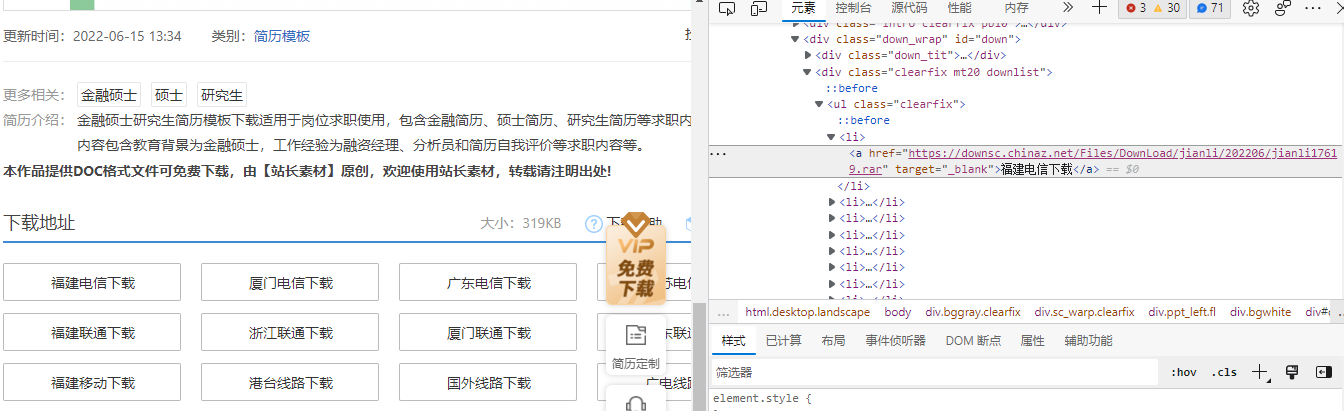
通过进入的页面可以得到下载地址
步骤:
提取表页面模板链接——>进入连接——>提取页面内下载地址连接——>下载保存
headers = {

        'User-Agent': '用自己得头部'

    }

    response = requests.get(url=url, headers=headers).text  #解析页面

    tree = etree.HTML(response)

    #print(tree)

    page_list = tree.xpath('//div[@id="main"]/div/div/a') #捕获信息位置

    for li in page_list:

        page_list_url = li.xpath('./@href')[0]

        page_list_url = 'https:' + page_list_url  #提取页面地址

        #print(page_list_url)

        in_page = requests.get(url=page_list_url,headers=headers).text  #进入地址

        trees = etree.HTML(in_page)

        #print(trees)

        download_url = trees.xpath('//div[@class="clearfix mt20 downlist"]/ul/li/a/@href')[0]  #目的文件地址

        name = trees.xpath('//div[@class="ppt_tit clearfix"]/h1/text()')[0] + '.rar'  #文件名字

        name = name.encode('iso-8859-1').decode('utf-8')  #修改命名乱码

        #print(download_url)

        if not os.path.exists('./download'):  #保存

            os.mkdir('./download')

        download = requests.get(url=download_url,headers=headers).content

        page_name = 'download/' + name

        with open(page_name,'wb') as fp:

            fp.write(download)

            print(name,'end!')
分析网页之间联系:
实施多页面提取
    try:

        start = int(input('请输入要爬取到的尾页:'))

        if start == 1 :

            url = 'https://sc.chinaz.com/jianli/free.html'

            get_page(url)

            print("爬取完毕")

        elif start == 2 :

            url = 'https://sc.chinaz.com/jianli/free.html'

            get_page(url)

            url = 'https://sc.chinaz.com/jianli/free_2.html'

            get_page(url)

            print("爬取完毕")

        elif start >= 3 :

            url = 'https://sc.chinaz.com/jianli/free.html'

            get_page(url)

            for i in range(2, start):

                url = 'https://sc.chinaz.com/jianli/free_%s.html' % (i * 1)

                get_page(url)

                print("爬取完毕")

    except ValueError:

        print('请输入数字:')
完整代码:
import requests

from lxml import etree

import os

def get_page(url):

    headers = {

        'User-Agent': '自己的头部'

    }

    response = requests.get(url=url, headers=headers).text  #解析页面

    tree = etree.HTML(response)

    #print(tree)

    page_list = tree.xpath('//div[@id="main"]/div/div/a') #捕获信息位置

    for li in page_list:

        page_list_url = li.xpath('./@href')[0]

        page_list_url = 'https:' + page_list_url  #提取页面地址

        #print(page_list_url)

        in_page = requests.get(url=page_list_url,headers=headers).text  #进入地址

        trees = etree.HTML(in_page)

        #print(trees)

        download_url = trees.xpath('//div[@class="clearfix mt20 downlist"]/ul/li/a/@href')[0]  #目的文件地址

        name = trees.xpath('//div[@class="ppt_tit clearfix"]/h1/text()')[0] + '.rar'  #文件名字

        name = name.encode('iso-8859-1').decode('utf-8')  #修改命名乱码

        #print(download_url)

        if not os.path.exists('./download'):  #保存

            os.mkdir('./download')

        download = requests.get(url=download_url,headers=headers).content

        page_name = 'download/' + name

        with open(page_name,'wb') as fp:

            fp.write(download)

            print(name,'end!')

def go():  #多页面选择

    try:

        start = int(input('请输入要爬取到的尾页:'))

        if start == 1 :

            url = 'https://sc.chinaz.com/jianli/free.html'

            get_page(url)

            print("爬取完毕")

        elif start == 2 :

            url = 'https://sc.chinaz.com/jianli/free.html'

            get_page(url)

            url = 'https://sc.chinaz.com/jianli/free_2.html'

            get_page(url)

            print("爬取完毕")

        elif start >= 3 :

            url = 'https://sc.chinaz.com/jianli/free.html'

            get_page(url)

            for i in range(2, start):

                url = 'https://sc.chinaz.com/jianli/free_%s.html' % (i * 1)

                get_page(url)

                print("爬取完毕")

    except ValueError:

        print('请输入数字:')

        go()

if __name__ == '__main__':

    go()
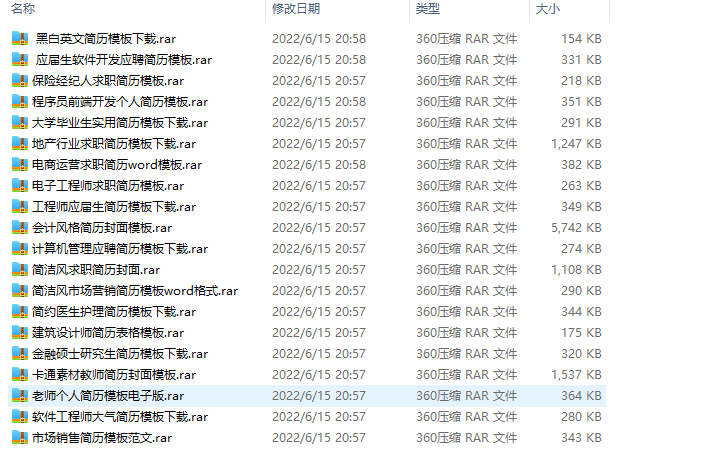
效果:
【python爬虫】对站长网址中免费简历模板进行爬取的更多相关文章
- Python爬虫入门教程 15-100 石家庄政民互动数据爬取
石家庄政民互动数据爬取-写在前面 今天,咱抓取一个网站,这个网站呢,涉及的内容就是 网友留言和回复,特别简单,但是网站是gov的.网址为 http://www.sjz.gov.cn/col/14900 ...
- Python爬虫入门教程第七讲: 蜂鸟网图片爬取之二
蜂鸟网图片--简介 今天玩点新鲜的,使用一个新库 aiohttp ,利用它提高咱爬虫的爬取速度. 安装模块常规套路 pip install aiohttp 运行之后等待,安装完毕,想要深造,那么官方文 ...
- Python爬虫实践~BeautifulSoup+urllib+Flask实现静态网页的爬取
爬取的网站类型: 论坛类网站类型 涉及主要的第三方模块: BeautifulSoup:解析.遍历页面 urllib:处理URL请求 Flask:简易的WEB框架 介绍: 本次主要使用urllib获取网 ...
- Java分布式爬虫Nutch教程——导入Nutch工程,执行完整爬取
Java分布式爬虫Nutch教程--导入Nutch工程,执行完整爬取 by briefcopy · Published 2016年4月25日 · Updated 2016年12月11日 在使用本教程之 ...
- Python中使用requests和parsel爬取喜马拉雅电台音频
场景 喜马拉雅电台: https://www.ximalaya.com/ 找到一步小说音频,这里以下面为例 https://www.ximalaya.com/youshengshu/16411402/ ...
- Python爬虫:新浪新闻详情页的数据抓取(函数版)
上一篇文章<Python爬虫:抓取新浪新闻数据>详细解说了如何抓取新浪新闻详情页的相关数据,但代码的构建不利于后续扩展,每次抓取新的详情页时都需要重新写一遍,因此,我们需要将其整理成函数, ...
- python应用:爬虫框架Scrapy系统学习第四篇——scrapy爬取笔趣阁小说
使用cmd创建一个scrapy项目: scrapy startproject project_name (project_name 必须以字母开头,只能包含字母.数字以及下划线<undersco ...
- Python 网络爬虫 006 (编程) 解决下载(或叫:爬取)到的网页乱码问题
解决下载(或叫:爬取)到的网页乱码问题 使用的系统:Windows 10 64位 Python 语言版本:Python 2.7.10 V 使用的编程 Python 的集成开发环境:PyCharm 20 ...
- Python爬虫学习==>第十一章:分析Ajax请求-抓取今日头条信息
学习目的: 解决AJAX请求的爬虫,网页解析库的学习,MongoDB的简单应用 正式步骤 Step1:流程分析 抓取单页内容:利用requests请求目标站点,得到单个页面的html代码,返回结果: ...
- python网络爬虫(12)去哪网酒店信息爬取
目的意义 爬取某地的酒店价格信息,示例使用selenium在Firefox中的使用. 来源 少部分来源于书.python爬虫开发与项目实战 构造 本次使用简易的方案,模拟浏览器访问,然后输入字段,查找 ...
随机推荐
- (转载)Python 浅析线程(threading模块)和进程(process)
线程是操作系统能够进行运算调度的最小单位.它被包含在进程之中,是进程中的实际运作单位.一条线程指的是进程中一个单一顺序的控制流,一个进程中可以并发多个线程,每条线程并行执行不同的任务 进程与线程 什么 ...
- cmd查看对应端口使用情况
cmd查看端口号netstat -ano | findstr 80
- IDEA如何使用Maven不通过模板创建javaWeb项目
IDEA如何使用Maven不通过模板创建javaWeb项目 1.创建项目 进入IDEA,点击"项目">"新建项目",填写项目信息,最后点击"创建 ...
- Qt开发技术:Q3D图表开发笔记(一):Q3DScatter三维散点图介绍、Demo以及代码详解
前言 qt提供了q3d进行三维开发,虽然这个框架没有得到大量运用也不是那么成功,性能上也有很大的欠缺,但是普通的点到为止的应用展示还是可以的. 其中就包括华丽绚烂的三维图表,数据量不大的时候是可 ...
- RPC通信原理概述
RPC通信原理概述 1.RPC概述 1.什么是RPC RPC(Remote Procedure Call Protocol)远程过程调用协议.它是一种通过网络从远程计算机程序上请求服务,而不需要了解底 ...
- Spring IOC——源码分析
Spring 容器的 refresh() 创建容器 1 //下面每一个方法都会单独提出来进行分析 2 @Override 3 public void refresh() throws BeansExc ...
- Kafka 集群调优
更多内容,前往 IT-BLOG 单个 kafka服务器足以满足本地开发或 POC要求,使用集群的最大好处是可以跨服务器进行负载均衡,再则就是可以使用复制功能来避免因单点故障造成的数据丢失.在维护 Ka ...
- ThreadLocal 类
更多内容,访问 IT-BLOG ThreadLocal 并不是一个Thread,而是 ThreadLocalVariable(线程局部变量).也许把它命名为 ThreadLocalVar更加合适.线程 ...
- 全网最详细中英文ChatGPT-GPT-4示例文档-从0到1快速入门解析非结构化数据应用——官网推荐的48种最佳应用场景(附python/node.js/curl命令源代码,小白也能学)
目录 Introduce 简介 setting 设置 Prompt 提示 Sample response 回复样本 API request 接口请求 python接口请求示例 node.js接口请求示 ...
- 全网最详细中英文ChatGPT-GPT-4示例文档-智能AI写作从0到1快速入门——官网推荐的48种最佳应用场景(附python/node.js/curl命令源代码,小白也能学)
目录 Introduce 简介 setting 设置 Prompt 提示 Sample response 回复样本 API request 接口请求 python接口请求示例 node.js接口请求示 ...