
云笔记项目-测试时无法连接MySQL Server
事情起因:用Mac提交云笔记项目到SVN后,使用台式机import SVN上的云笔记代码,发现到了台式机上,进行junit测试时无法连接Mysql数据库服务器,而Mac上是可以的。以下是报警内容和报警画面
测试连接失败画面:

报警内容:
org.mybatis.spring.MyBatisSystemException: nested exception is org.apache.ibatis.exceptions.PersistenceException:

### Error querying database.  Cause: org.springframework.jdbc.CannotGetJdbcConnectionException: Could not get JDBC Connection; nested exception is org.apache.commons.dbcp.SQLNestedException: Cannot create PoolableConnectionFactory (Could not create connection to database server.)

### The error may exist in file [F:\workspace\Cloud_Note_Clyang\target\classes\Mapper\NoteMapper.xml]

### The error may involve com.boe.Dao.NoteDAO.findNoteByNoteBookId

### The error occurred while executing a query

### Cause: org.springframework.jdbc.CannotGetJdbcConnectionException: Could not get JDBC Connection; nested exception is org.apache.commons.dbcp.SQLNestedException: Cannot create PoolableConnectionFactory (Could not create connection to database server.)

    at org.mybatis.spring.MyBatisExceptionTranslator.translateExceptionIfPossible(MyBatisExceptionTranslator.java:77)

    at org.mybatis.spring.SqlSessionTemplate$SqlSessionInterceptor.invoke(SqlSessionTemplate.java:446)

    at com.sun.proxy.$Proxy19.selectList(Unknown Source)

    at org.mybatis.spring.SqlSessionTemplate.selectList(SqlSessionTemplate.java:230)

    at org.apache.ibatis.binding.MapperMethod.executeForMany(MapperMethod.java:128)

    at org.apache.ibatis.binding.MapperMethod.execute(MapperMethod.java:68)

    at org.apache.ibatis.binding.MapperProxy.invoke(MapperProxy.java:53)

    at com.sun.proxy.$Proxy22.findNoteByNoteBookId(Unknown Source)

    at Test.testNoteDAO.test(testNoteDAO.java:25)

    at sun.reflect.NativeMethodAccessorImpl.invoke0(Native Method)

    at sun.reflect.NativeMethodAccessorImpl.invoke(NativeMethodAccessorImpl.java:62)

    at sun.reflect.DelegatingMethodAccessorImpl.invoke(DelegatingMethodAccessorImpl.java:43)

    at java.lang.reflect.Method.invoke(Method.java:498)

    at org.junit.runners.model.FrameworkMethod$1.runReflectiveCall(FrameworkMethod.java:50)

    at org.junit.internal.runners.model.ReflectiveCallable.run(ReflectiveCallable.java:12)

    at org.junit.runners.model.FrameworkMethod.invokeExplosively(FrameworkMethod.java:47)

    at org.junit.internal.runners.statements.InvokeMethod.evaluate(InvokeMethod.java:17)

    at org.junit.internal.runners.statements.RunBefores.evaluate(RunBefores.java:26)

    at org.junit.internal.runners.statements.RunAfters.evaluate(RunAfters.java:27)

    at org.junit.runners.ParentRunner.runLeaf(ParentRunner.java:325)

    at org.junit.runners.BlockJUnit4ClassRunner.runChild(BlockJUnit4ClassRunner.java:78)

    at org.junit.runners.BlockJUnit4ClassRunner.runChild(BlockJUnit4ClassRunner.java:57)

    at org.junit.runners.ParentRunner$3.run(ParentRunner.java:290)

    at org.junit.runners.ParentRunner$1.schedule(ParentRunner.java:71)

    at org.junit.runners.ParentRunner.runChildren(ParentRunner.java:288)

    at org.junit.runners.ParentRunner.access$000(ParentRunner.java:58)

    at org.junit.runners.ParentRunner$2.evaluate(ParentRunner.java:268)

    at org.junit.runners.ParentRunner.run(ParentRunner.java:363)

    at org.eclipse.jdt.internal.junit4.runner.JUnit4TestReference.run(JUnit4TestReference.java:89)

    at org.eclipse.jdt.internal.junit.runner.TestExecution.run(TestExecution.java:41)

    at org.eclipse.jdt.internal.junit.runner.RemoteTestRunner.runTests(RemoteTestRunner.java:541)

    at org.eclipse.jdt.internal.junit.runner.RemoteTestRunner.runTests(RemoteTestRunner.java:763)

    at org.eclipse.jdt.internal.junit.runner.RemoteTestRunner.run(RemoteTestRunner.java:463)

    at org.eclipse.jdt.internal.junit.runner.RemoteTestRunner.main(RemoteTestRunner.java:209)

以下略...
分析解决:
通过报警内容,发现报“org.springframework.jdbc.CannotGetJdbcConnectionException: Could not get JDBC Connection”,“Cannot create PoolableConnectionFactory (Could not create connection to database server.)“
(1)发现报警不能连接MySQL服务器,网上也有类似的问题,他们是通过修改mysql数据库里user表的方法,参考博客 https://blog.csdn.net/qq_41675973/article/details/84898061
修改mysql库的user表,将host项,从localhost改为%。%这里表示的是允许任意host访问,如果只允许某一个ip访问,则可改为相应的ip,比如可以将localhost改为192.168.1.123,这表示只允许局域网的192.168.1.123这个ip远程访问mysql。
mysql> use mysql;
mysql> update user set host = ‘%’ where user = ‘root’;
mysql> select host, user from user;
mysql> flush privileges;
(2)另外一种是Mysql连接驱动包的问题
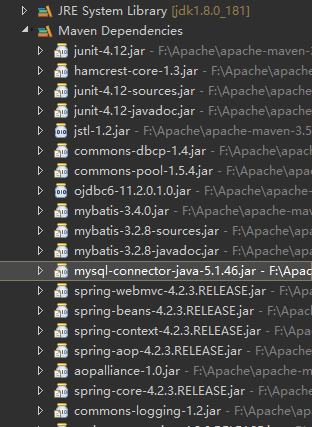
通过对比发现,Mac上Mysql的版本为5.7,驱动版本5.1.34,而台式机上Mysql的版本为8.0,驱动也为5.1.34,尝试将驱动从5.1.34更新为最新的5.1.46
    <dependency>

     <groupId>mysql</groupId>

     <artifactId>mysql-connector-java</artifactId>

     <version>5.1.46</version>

    </dependency>
更新后的驱动
重新进行测试连接:
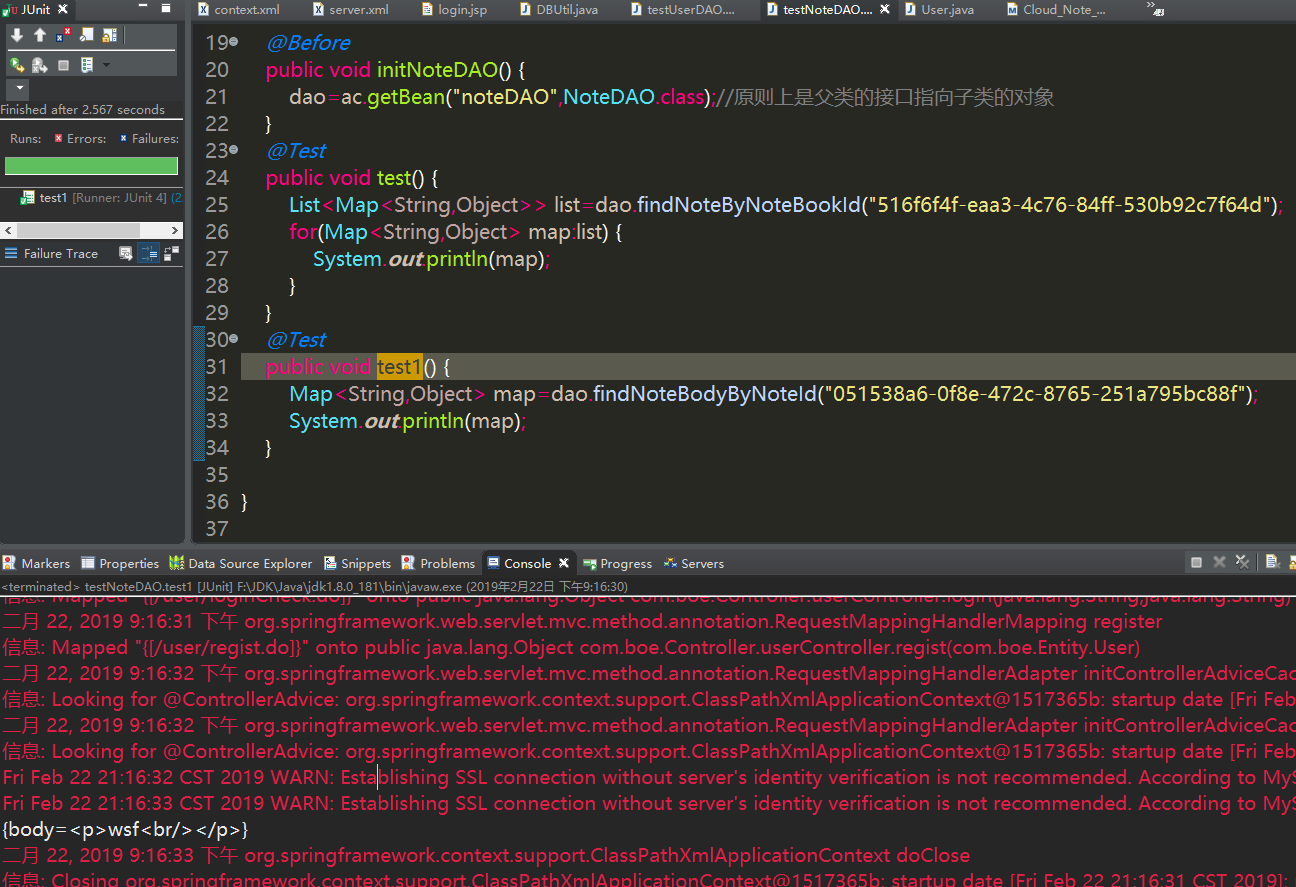
发现可以通过笔记ID来查找到笔记Body内容,测试OK,原因为更换电脑后,Mysql版本更换,驱动包也需要随着更换。
云笔记项目-测试时无法连接MySQL Server的更多相关文章
- ems lite 客户端远程连接mysql server
在本地用ems客户端远程连接虚拟机上的mysql server,弹出客户端没有权限访问mysql server.使用下面方法进行设置:mysql> select host,user,passwo ...
- 使用什么工具连接MySQL Server
字符界面:命令行终端(需MySQL Client) GUI界面:Navicat.MySQL Workbench 开发语言:使用相应语言的MySQL数据库驱动包或模块连接MySQL 我一般用的是命令行, ...
- Java通过mysql-connector-java-8.0.11连接MySQL Server 8.0遇到的几个问题
这次新安装了一个MySQL数据库,然后navicat连接数据库一点问题没有. 但是通过Java的jdbc连接却怎么都建立不了连接. 报如下错: 网上找了很久找到了原因: 数据库用的是Mysql8版本, ...
- VS2017项目中使用代码连接MySQL数据库,以及进行数据添加
//头文件 #include "mysql.h" //函数定义 // 执行sql语句, 包括增加.删除.更新数据 bool ExecuteSql(MYSQL m_mysql,con ...
- Android真机测试时无法连接服务器
之前服务器的通信一直是在模拟机上实现的,今天用在真机上却不成功.百度之后发现是安卓9以后禁止使用HTTP直接访问服务器.记录一下以后使用. 参考博文:https://blog.csdn.net/don ...
- 数据库导入时出现“2006 - MySQL server has gone away”问题的解决(windows)
1.查到文件my.ini,在文件最后([mysqld]段最后),修改"max_allowed_packet = 50M",添加"interactive_timeout = ...
- 用msi安装MySQL时MySQL Server组件不能安装,或安装失败
我的环境: MySQL8.0.15, win10 错误描述:在安装MySQL时,如果MySQL Server组件提示不能安装,错误提示是:VS 2015没有安装或安装失败.原因 ...
- 用EntityFramework6连接MySQL【转】
http://www.cnblogs.com/wujingtao/p/5399950.html 不是微软的亲儿子这待遇就是不一样,其中的坑可真实不少,第一次连MySQL足足折腾了我大半天. 废话不多说 ...
- 使用EntityFramework6连接MySQL
使用EntityFramework6连接MySQL 不是微软的亲儿子这待遇就是不一样,其中的坑可真实不少,第一次连MySQL足足折腾了我大半天. 废话不多说直接开始. 安装MySQL 从官网上下载最新 ...
随机推荐
- Thinkphp时间转换与统计的问题
1.thinkphp一般存入的都是时间戳,如果希望输入时直接显示格式化的时间呢: a. sql语句: SELECT DATE_FORMAT(create_time,'%Y%u') weeks,COUN ...
- [转]asp+oracle分页
PageSize:每页显示的记录数.PageCount:根据用户设定好的PageSize和表中的总记录数,系统自动算出总页数.RecordCount:表中的总记录数.AbsolutePage:表示当前 ...
- sed命令替换
sed '/^.* shareId=.*/s/shareId=.*/ /g' 任意包含shareId=的行执行/s操作,行内所有匹配shareId=.*正则表达式的替换成一个空格
- mybatis关系映射之一对多和多对一
本实例使用用户(User)和博客(Post)的例子做说明: 一个用户可以有多个博客, 一个博客只对应一个用户 一. 例子(本实体采用maven构建): 1. 代码结构图: 2. 数据库: t_user ...
- http etag
基础知识 1) 什么是”Last-Modified”? 在浏览器第一次请求某一个URL时,服务器端的返回状态会是200,内容是你请求的资源,同时有一个Last-Modified的属性 ...
- GPUImage中饱和度调整的实现——GPUImageSaturationFilter
饱和度saturation,是指色彩的鲜艳程度,也称色彩的纯度.饱和度取决于该色中含色成分和消色成分(灰色)的比例.含色成分越大,饱和度越大:消色成分越大,饱和度越小.纯的颜色都是高度饱和的,如鲜红, ...
- pig简介
Apache Pig是MapReduce的一个抽象.它是一个工具/平台,用于分析较大的数据集,并将它们表示为数据流.Pig通常与 Hadoop 一起使用:我们可以使用Apache Pig在Hadoop ...
- python selenium 三种等待方式详解[转]
python selenium 三种等待方式详解 引言: 当你觉得你的定位没有问题,但是却直接报了元素不可见,那你就可以考虑是不是因为程序运行太快或者页面加载太慢造成了元素不可见,那就必须要加等待 ...
- twisted之Deferred类的分析
@_oldStyle class Deferred: called = False#类变量,在实例中引用时会自动在实例中生成 paused = False _debugInfo = None _sup ...
- PHP 文件操作类(转载)
<?php class File { /** * 创建多级目录 * @param string $dir * @param int $mode * @return boolean */ publ ...