
Seaborn图形可视化库
一、绘图
1)快速生成图
import numpy as np

import matplotlib.pyplot as plt

def sinplot(filp=):

    x = np.linspace(,,)

    for i in range(,):

        plt.plot(x,np.sin(x + i * ) * ( - i) * filp)

sinplot()

plt.show()

特别注意: 在ipython中,在导入模块前引用 %matplotlib inline 可替代plt.show()

           在pycharm中不支持 %matplotlib inline 。所有只能 plt.show()  来展示图
sns.set() 默认风格
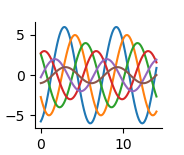
2)去掉上面,和右边的多余的线。sns.despine()
import seaborn as sns

import numpy as np

import matplotlib.pyplot as plt

def sinplot(filp=):

    x = np.linspace(,,)

    for i in range(,):

        plt.plot(x,np.sin(x + i * ) * ( - i) * filp)

sinplot()

sns.despine()

plt.show()
3)风格的展示。调试的是背景
sns.set_style('whitegrid')

5种主题风格

darkgrid

whitegrid

dark

white

ticks
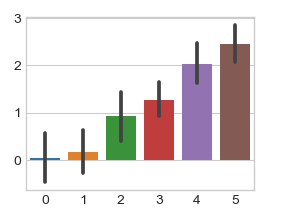
示例一:sns.set_style('whitegrid')
import seaborn as sns

import numpy as np

import matplotlib.pyplot as plt

sns.set_style('whitegrid')

data = np.random.normal(size=(,)) + np.arange() /

sns.barplot(data=data)

plt.show()
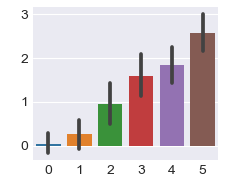
示例二:sns.set_style('darkgrid')
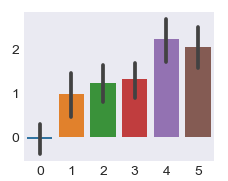
示例三:sns.barplot(data=data)
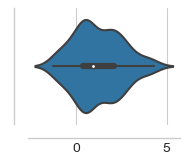
4)可以设置离轴线的距离。sns.despine(offset=10)
import seaborn as sns

import numpy as np

import matplotlib.pyplot as plt

sns.set_style('whitegrid')

data = np.random.normal(size=(,)) + np.arange() /

sns.violinplot(data)

sns.despine(offset=)  # 离轴线的距离

plt.show()
5)隐藏左边的轴线。sns.despine(left=True)
import seaborn as sns

import numpy as np

import matplotlib.pyplot as plt

data = np.random.normal(size=(,)) + np.arange() /

sns.set_style('whitegrid')

sns.boxplot(data=data,palette='deep')

sns.despine(left=True)

plt.show()

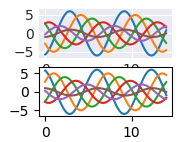
6)指定多种风格。with里面,with外面
import seaborn as sns

import numpy as np

import matplotlib.pyplot as plt

with sns.axes_style("darkgrid"):    # with里面指定一个风格

    plt.subplot()

    sinplot()

plt.subplot()    # 外面指定别的风格

sinplot(-)

plt.show()
7、了解。设置线粗细,坐标文件大小等
import seaborn as sns

import numpy as np

import matplotlib.pyplot as plt

sns.set()

sns.set_context("paper")  # 绘制图的大小 :sns.set_context("talk"),poster,notebook

# sns.set_context("paper",font_scale=1.5,rc={"lines.linewidth":2.5})

#  font_scale=1.5,坐标文字的大小。rc={"lines.linewidth":2.5} 线的粗细

plt.figure(figsize=(,))

sinplot()

plt.show()
二、调色板
1)快速生成调色板
调色板

color_palette() 能传入任何Matplotlib所支持的颜色

color_palette() 不写参数则默认颜色

set_palette() 设置所有图的颜色
示例
import seaborn as sns

import matplotlib.pyplot as plt

sns.set(rc = {"figure.figsize":(,)})

current_palette = sns.color_palette()

sns.palplot(current_palette)

plt.show()

6个默认的颜色循环主题:deep,muted,pastel,bright,dark,colorblind
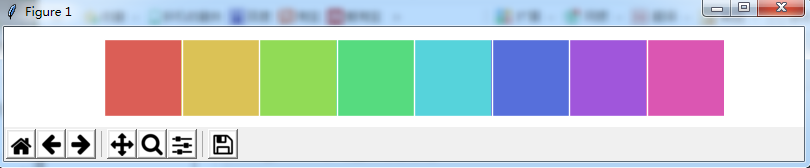
2)当需要更多颜色主题的时候,调用画板。sns.color_palette("hls",8)
import seaborn as sns

import matplotlib.pyplot as plt

sns.set(rc = {"figure.figsize":(,)})

current_palette = sns.color_palette("hls",)

sns.palplot(current_palette)

plt.show()
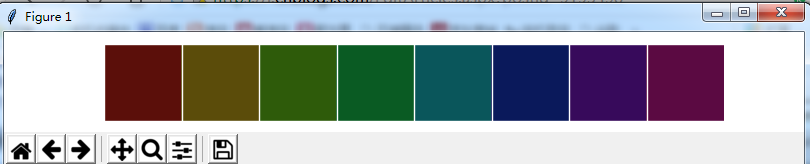
3)设置颜色的饱和度和亮度。sns.hls_palette(8,l=.2,s =.8)
import seaborn as sns

import matplotlib.pyplot as plt

sns.set(rc = {"figure.figsize":(,)})

sns.palplot(sns.hls_palette(,l=.,s =.))  # 注意,前面有小点。饱和度 l=.,亮度 s =.

plt.show()
l ==》亮度 lightness
s ==》饱和 saturation
4)相近颜色的对比色。sns.color_palette("Paired",8)
import seaborn as sns

import matplotlib.pyplot as plt

sns.set(rc = {"figure.figsize":(,)})

sns.palplot(sns.color_palette("Paired",))     # 相近颜色的对比色。sns.color_palette("Paired",)

plt.show()

5)将颜色传入绘制的图形中
import numpy as np

import seaborn as sns

import matplotlib.pyplot as plt

data = np.random.normal(size=(,)) + np.arange() /

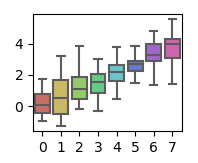
sns.boxplot(data=data,palette=sns.color_palette("hls",))

plt.show()
6)使用xkcd颜色来命令颜色
import seaborn as sns

import matplotlib.pyplot as plt

sns.set(rc = {"figure.figsize":(,)})

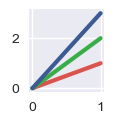
plt.plot([,],[,], sns.xkcd_rgb["pale red"], lw=)

plt.plot([,],[,], sns.xkcd_rgb["medium green"], lw=)

plt.plot([,],[,], sns.xkcd_rgb["denim blue"], lw=)

plt.show()

plt.close()
xkcd包含了一套众包努力的针对随机RGB色的命名。产生了954个可以随时通过xkcd_rgb字典中的命令颜色
7)列表传值绘制多种颜色
import seaborn as sns

import matplotlib.pyplot as plt

sns.set(rc = {"figure.figsize":(,)})

colors = ["windows blue",'amber',"greyish","faded green","dusty purple"]

sns.palplot(sns.xkcd_palette(colors))

plt.show()

plt.close()

8)连续渐变色画板。sns.palplot(sns.color_palette("Blues"))
import seaborn as sns

import matplotlib.pyplot as plt

sns.set(rc = {"figure.figsize":(,)})

sns.palplot(sns.color_palette("Blues"))

plt.show()

plt.close()
默认由浅变深。如果需要翻转渐变色Blues_r 即可

9)cubehelix_palette()调色板。色调线性变换。sns.color_palette("cubehelix",8)
import seaborn as sns

import matplotlib.pyplot as plt

sns.set(rc = {"figure.figsize":(,)})

sns.palplot(sns.color_palette("cubehelix",))

plt.show()

plt.close()
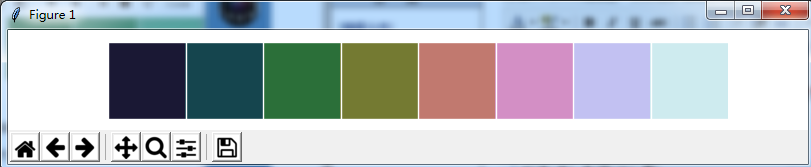
10)在这个区间颜色的变化。sns.cubehelix_palette(8,start=.5,rot=-.75)
import seaborn as sns

import matplotlib.pyplot as plt

sns.set(rc = {"figure.figsize":(,)})

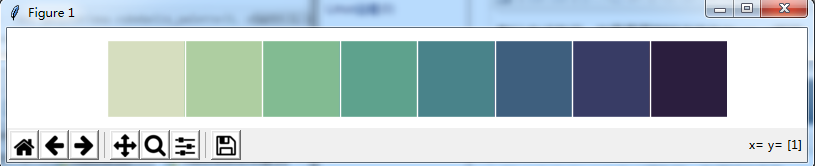
sns.palplot(sns.cubehelix_palette(,start=.,rot=-.))     # 在这个区间颜色的变化

plt.show()

plt.close()
11)定制连续的调色板
示例:sns.light_palette("green")
import seaborn as sns

import matplotlib.pyplot as plt

sns.set(rc = {"figure.figsize":(,)})

sns.palplot(sns.light_palette("green"))     # 定制连续的调色板

plt.show()

plt.close()

示例:sns.dark_palette("purple")
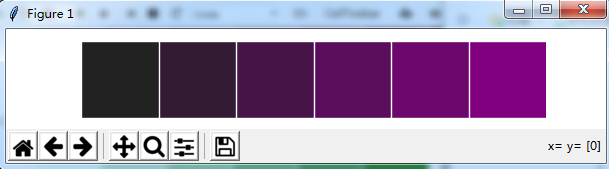
示例: sns.light_palette("navy",reverse=True)

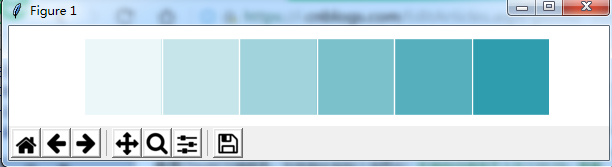
示例:渐变色的另一种方法。sns.light_palette((210,90,60),input="husl")
import seaborn as sns

import matplotlib.pyplot as plt

sns.set(rc = {"figure.figsize":(,)})

sns.palplot(sns.light_palette((,,),input="husl"))     # 定制连续的调色板

plt.show()

plt.close()
12)利用渐变色绘制海拔
import numpy as np

import seaborn as sns

import matplotlib.pyplot as plt

sns.set(rc = {"figure.figsize":(,)})

x,y = np.random.multivariate_normal([,],[[,-.],[-.,]],size=).T

print(x)

print(y)

pal = sns.dark_palette("green",as_cmap=True)

sns.kdeplot(x,y,cmap=pal)

plt.show()

plt.close()

Seaborn图形可视化库的更多相关文章
- E-Form++图形可视化源码库新增同BCGSoft的Ribbon结合示例
2015年11月20日,来自UCanCode E-Form++源码库的开发团队消息,E-Form++正式提供了同BCGSoft的Ribbon界面风格相结合的示例,如下图: 下载此示例请访问: http ...
- Pycon 2017: Python可视化库大全
本文首发于微信公众号“Python数据之道” 前言 本文主要摘录自 pycon 2017大会的一个演讲,同时结合自己的一些理解. pycon 2017的相关演讲主题是“The Python Visua ...
- Python可视化库
转自小小蒲公英原文用Python可视化库 现如今大数据已人尽皆知,但在这个信息大爆炸的时代里,空有海量数据是无实际使用价值,更不要说帮助管理者进行业务决策.那么数据有什么价值呢?用什么样的手段才能把数 ...
- Seaborn数据可视化入门
在本节学习中,我们使用Seaborn作为数据可视化的入门工具 Seaborn的官方网址如下:http://seaborn.pydata.org 一:definition Seaborn is a Py ...
- 推荐12个最好的 JavaScript 图形绘制库
众多周知,图形和图表要比文本更具表现力和说服力.图表是数据图形化的表示,通过形象的图表来展示数据,比如条形图,折线图,饼图等等.可视化图表可以帮助开发者更容易理解复杂的数据,提高生产的效率和 Web ...
- Vis.js – 基于浏览器的动态 JavaScript 可视化库
Vis.js 是一个动态的,基于浏览器的可视化库.该库被设计为易于使用,能处理大量的动态数据.该库由以下几部分组成:一是数据集和数据视图,基于灵活的键/值数据集,可以添加,更新和删除项目,订阅数据集变 ...
- 动态可视化库Vis.js:社交关系谱
Form Here:http://code.csdn.net/news/2819345 Vis.js 是一个动态的.基于浏览器的可视化库,可处理大量的动态数据并能与这些数据进行交互操作.该项目是由Al ...
- python 可视化库
在做titanic分析的过程中,看了一些大神的想法,发现在分析数据的过程中,许多大神会使用到seaborn,plotly这些库,而我等小白仅仅知道matplotlib这个唯一的数据可视化库而已.上网查 ...
- 5-1可视化库Seabon-整体布局风格设置
In [1]: import seaborn as sns import numpy as np import matplotlib as mpl import matplotlib.pyplot a ...
随机推荐
- pta l3-1(凑零钱)
题目链接:https://pintia.cn/problem-sets/994805046380707840/problems/994805054207279104 题意:给定n枚硬币的面值,需要支付 ...
- HDU-2054.A==B?(字符串简单处理)
这道题......被我各种姿势搞死的... 本题大意:给出两个数A和B,判断A和B是否相等,对应输出YES or NO. 本题思路:本题我有两种思路,第一种是直接去除前导零和后导零然后稍加处理比较字符 ...
- Git 分支 - 分支管理
1 查看每一个分支 git branch 2 查看每一个分支的最后一次提交 git branch -v 3 创建分支 (1)只创建本地分支:git branch <branchname> ...
- CountDownLatch的和CyclicBarrier使用
CyclicBarrier的使用: 假设只有一个场景:每个线程代表一个跑步运动员,当运动员都准备好后,才一起出发,只要有一个人没有准备好,大家都等待. CountDownLacth使用: 他经常用于监 ...
- 创建文件指针数组c++
#include<fstream>using namespace std; void main(){ for (int i=0; i<=1; i++) { char szName[1 ...
- 项目总结09:select标签下封装option标签
项目中经常用到Select标签,用封装好的方法获取option,可以避免冗赘的代码: 1.JSP--标签 <select class="width_md" name=&quo ...
- 【linux】常见问题&常用命令笔记
1.重启以及关机命令: Linux centos重启命令: (1)reboot 普通重启 (2)shutdown -r now 立刻重启(root用户使用) (3)shutdown -r 10 过 ...
- Bootstrap(3) 表格与按钮
1.表格 基本格式,实现基本的表格样式 <table class="table"> <thead> <tr> <th>编号</ ...
- mysql分组后将未分组的列合并成行GROUP BY,GROUP_CONCAT
今天遇到一个问题,消息通知可以同时发送给多个班级,而查询消息通知的时候并不需要根据班级分组,如何把多个班级的名称合并成一行数据追加到消息通知的后面呢 然后就发现了 group_concat: SELE ...
- asp.net core mvc 统一过滤参数,防止注入漏洞攻击
参考链接: http://www.lanhusoft.com/Article/132.html 在core下,多少有些改动,其中js部分被注释掉了,如下: public static string F ...