
使用 IntraWeb (8) - 系统模板
我们可以自定义系统错误模板, 编辑 IWError.html 放到模板文件夹后, 它将替换默认的模板.
{在主页面, 这是要模拟一个系统错误}

procedure TIWForm1.IWButton1Click(Sender: TObject);

begin

  Release;

end;
修改前后的 IWError.html 对比:
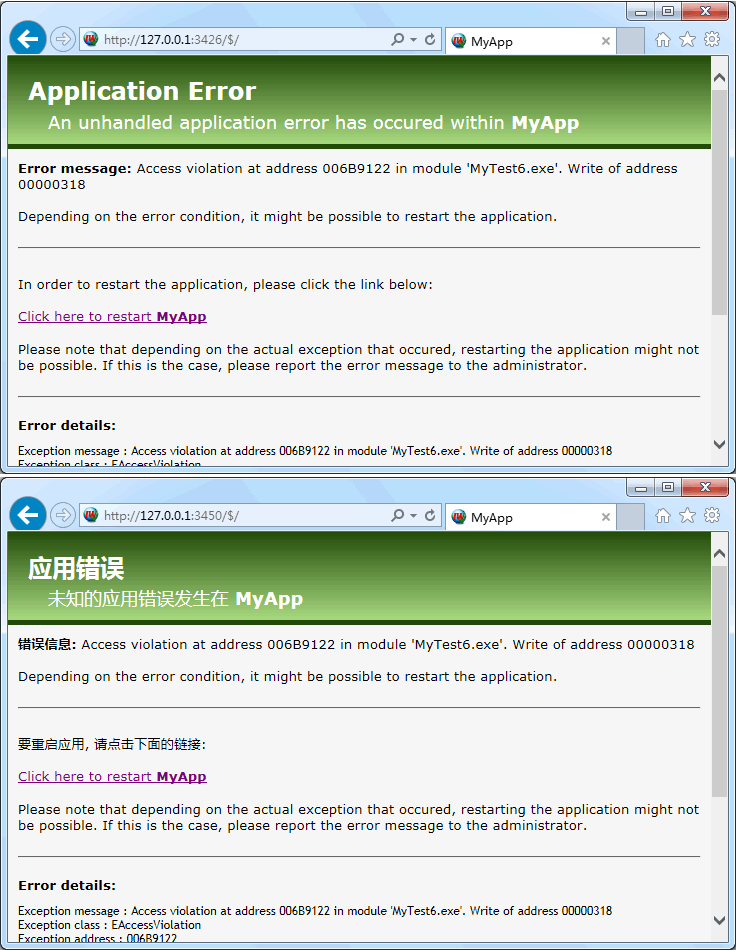
我想办法抠出了 IWError.html 源文件, 从里面可以了解到更多关于模板的问题:
body, div, span, object, iframe, h1, h2, h3, h4, h5, h6, p, blockquote, pre {
border: 0 none;
margin: 0;
padding: 0;
vertical-align: baseline;
}
.iw-body {
background-color: {%BODYBACKCOLOR%};
color: {%BODYTEXTCOLOR%};
font-family: Verdana, Geneva, sans-serif;
}
.iw-header-green{
padding-top: 20px;
padding-left: 20px;
padding-bottom: 10px;
font-size: x-large;
color: {%HEADERTEXTCOLOR%};
background-color: {%FROMCOLOR%};
background-image: -webkit-gradient(linear, left top, left bottom, from({%FROMCOLOR%}), to({%TOCOLOR%}));
background-image: -webkit-linear-gradient(top, {%FROMCOLOR%}, {%TOCOLOR%});
background-image: -moz-linear-gradient(top, {%FROMCOLOR%}, {%TOCOLOR%});
background-image: -ms-linear-gradient(top, {%FROMCOLOR%}, {%TOCOLOR%});
background-image: -o-linear-gradient(top, {%FROMCOLOR%}, {%TOCOLOR%});
background-image: linear-gradient(to bottom, {%FROMCOLOR%}, {%TOCOLOR%});filter:progid:DXImageTransform.Microsoft.gradient(GradientType=0,startColorstr={%FROMCOLOR%}, endColorstr={%TOCOLOR%});}
.iw-header-subtitle {
font-size: large;
padding-left: 20px;
}
.iw-headerline {
background-color: {%FROMCOLOR%};
height: 5px;
}
.iw-content {
padding: 10px;
font-size: small;
}
.iw-restart {
padding: 10px;
font-size: small;
}
.iw-stacktrace {
padding: 10px;
font-size: 12px;
font-family:"Trebuchet MS", Arial, Helvetica, sans-serif
}
{%APPNAME%}
An unhandled application error has occured within {%APPNAME%}
{%EXCEPTIONSPECIFIC%}
Click here to restart {%APPNAME%}
Please note that depending on the actual exception that occured, restarting the application might not be possible. If this is
the case, please report the error message to the administrator.
{%ERRORDETAILS_TITLE%}
IWShowMessage.html(默认信息模板) 和 IWException.html(默认异常模板) 的内嵌标签有: {%textMessage%}、{%butnOk%}
IWError.html(默认错误模板) 的内嵌标签有: {%CONTENT%}, {%AppName%}, {%AppID%}, {%ATOZEDLOGO%}, {%IntraWebLOGO%}, {%APPADDRESS%}, {%EXCEPTIONSPECIFIC%}
关于模板的最新参考: http://www.atozed.com/intraweb/docs/Layout/HTMLTemplates.aspx
使用 IntraWeb (8) - 系统模板的更多相关文章
- 30余套系统模版|DIV+CSS网页模板|简洁大气系统模板
30余套系统模版|DIV+CSS网页模板|简洁大气系统模板.都是一些后台系统的模版,很适合开发一些管理系统,办公系统,网站后台系统等.使用很广泛,很实用的系统模版. 下载地址: 点击下载
- 2017年最新基于Bootstrap 4 的专业、多用途响应式布局的系统模板
本文分享一款2017年最新的2017年最新基于Bootstrap 4 的专业.多用途响应式布局的系统模板,该模板是一款强大并且非常灵活的后台管理系统模板:能适应绝大多数的web应用程序开发,比如:AP ...
- python全栈开发_day17_时间,系统模板和序列化
一:时间模板 1)time 常用功能: time.sleep() time.time() time.strftime() import time print(time.strftime("% ...
- 使用 IntraWeb (7) - 主模板
TIWLayoutMgrHTML.TIWTemplateProcessorHTML 属于页面级的模板, 如果要全站统一模板, 当然要用主模板. TIWTemplateProcessorHTML 通过其 ...
- Flask路由系统与模板系统
路由系统 @app.route('/user/<username>') @app.route('/post/<int:post_id>') @app.route('/post/ ...
- 记从安装centos系统在到使用mono3.2部署MVC过程遇到的问题
一.安装虚拟机并安装配置系统 我不太愿意去下载vmware就用系统里面自带的Hyper-V 系统我选择了最新版本的CentOs6.4 下载地址:http://mirrors.163.com/cento ...
- Xcode7建立自己的自定义工程和类模板
首先进入系统模板的目录 /Applications/Xcode.app/Contents/Developer/Platforms/iPhoneOS.platform/Developer/Library ...
- EA中的模板管理
EA在导出文档的时候可以选择各种模板. 使用系统提供的模板导出的文档会稍显繁杂.这时候就需要我们自定义模板. 1. 在导出文档的dialog, 在Template一项中选择 New Template. ...
- 如何增加Asp.Net Core生成的模板网站中用户信息表中的列(AspNetUsers)
环境: 1.VS2015 Community 14.0.25431.01 Update 3; 2.其他环境(具体哪一个影响不太清楚,都列在这儿) 使用的系统模板 利用系统提供的模板,并选择个人身份验证 ...
随机推荐
- SQL Server修改默认端口号1433
方法1: 1) SqlServer服务使用两个端口:TCP-1433.UDP-1434. 其中1433用于供SqlServer对外提供服务,1434用于向请求者返回SqlServer使用了那个TCP/ ...
- Jenkins 安装及使用
jenkins是基于Java开发的一种持续集成工具,用于监控持续重复的工作. 可以用它做网站代码提交,更新. 1,安装 首先确保目标机器上装有 java jdk 版本最好在 1.6 以上,小编使用的是 ...
- 搜索引擎ElasticSearchV5.4.2系列三之ES使用
相关博文: 搜索引擎ElasticSearchV5.4.2系列一之ES介绍 搜索引擎ElasticSearchV5.4.2系列二之ElasticSearchV5.4.2+kibanaV5.4.2+x- ...
- zabbix报警Too many processes on zabbix server
zabbix大量报警,运行进程过多,但实际有部分机器可以忽略,需要关闭相关的报警 Configuration-->Templates找到Template_Linux点该行的 Triggers选择 ...
- ssh命令集锦
[前提] ssh命令其实平时工作会比较少能够用到(因为直接用远程客户端来连接) 但是偶尔还是需要利用ssh临时的连接到某个服务器,所以当遇到的时候来总结一下 [集锦] 一.ssh以某个用户名连接到某个 ...
- 浅谈js设计模式之发布 — 订阅模式
发布 — 订阅模式又叫观察者模式,它定义对象间的一种一对多的依赖关系,当一个对象的状态发生改变时,所有依赖于它的对象都将得到通知.在 JavaScript开发中,我们一般用事件模型来替代传统的发布 — ...
- 有用的Python模块 - pprint
当想在终端打印一个很大的字典或者一个很长的列表时,总是被print打印出来的效果气懵在电脑前,现在有pprint就不用担心啦. 最直接的使用方式就是 import pprint pprint.ppri ...
- java Set(集合)
set不保存重复的元素(至于如何判断元素相同则较为复杂,后面将会看到).Set中最常被使用的是测试归属表,你可以很容易地询问某个对象是否在某个Set中,正因如此,查找就成了Set最重要的操作,因此通常 ...
- PHP 获取某年第几周的开始日期和结束日期的实例
/** * 获取某年第几周的开始日期和结束日期 * @param int $year * @param int $week 第几周; */ public function weekday($year, ...
- Python3 简明教程学习(上)
一.开始 Python 之旅交互模式 1.Ctrl + D 输入一个 EOF 字符来退出解释器,也可以键入 exit() 来退出 2.#!/usr/bin/env python3 中#!称为 Sheb ...