
Android 中Notification的运用
Notification在手机的运用中是很常见的,比如我们收到一个短信,在我们的通知栏就会显示一个消息的图标用来提示我们,这种我们就可以用Notification来实现。他有很多的用法,比如类似消息的一个提示,进度条式的提示,折叠式啊,或者悬挂式等。下面我们可以看一个简单的也是最基本的Notification:
第一种:基本的Notification
1.API 11 以下的,现在被弃用了,它的简单用法是这样的
1.1这里需要使用PendingIntent,跟Intent相似,Intent 是及时启动,intent 随所在的activity 消失而消失,而PendingIntent它不是马上被调用,它主要用于即将发生的事情,在Notification中,它在下拉状态条点击时候才会发生activity的跳转
PendingIntent pendingIntent = PendingIntent.getActivity(this, , new Intent(this, MainActivity.class), );
1.2然后我们在来看Notification 的使用方法
 Notification notify = new Notification();

    notify.icon = R.drawable.ic_launcher;

    notify.tickerText = "有新短消息了!";

    notify.when = System.currentTimeMillis();

    notify.setLatestEventInfo(this, "通知的消息title",     在后来的版本中基本上会提示找不到,或者提示不建议使用

       "消息内容", pendingIntent);

     notify.number = ;  //消息的数量

     notify.flags |= Notification.FLAG_AUTO_CANCEL; // FLAG_AUTO_CANCEL表明当通知被用户点击时,通知将被清除。
简单提一下2.x版本的处理方式:
Notification notify1 = new Notification(R.drawable.message, "有新短消息了", System.currentTimeMillis());
1.3然后我们需要使用系统的通知管理器来发起通知
 NotificationManager manager = (NotificationManager) getSystemService(Context.NOTIFICATION_SERVICE);

    manager.notify(NOTIFICATION_FLAG, notify);  //发起通知
我们看一下效果图:是不是很熟悉的感觉啊
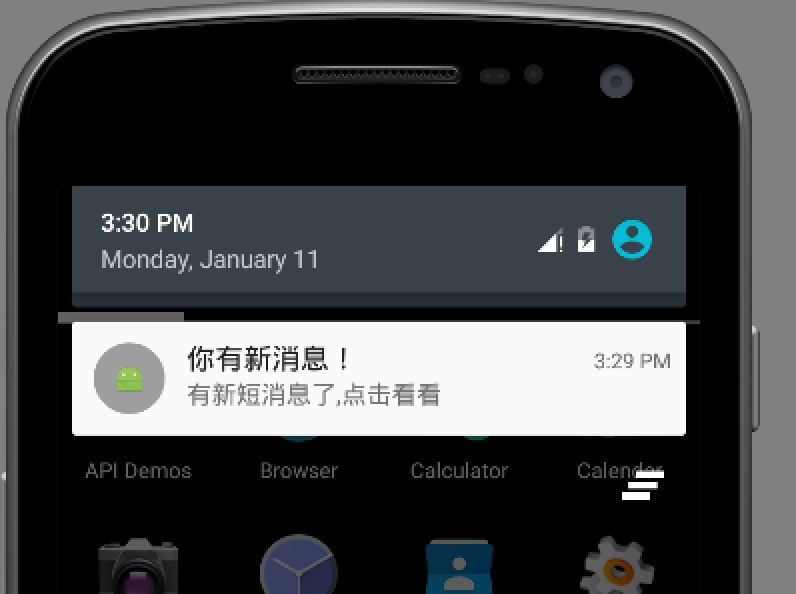
2.API11以后 主要是通过Notification.Builder来创建通知,我们看一下代码实现
PendingIntent pendingIntent = PendingIntent.getActivity(this, 0,  new Intent(this, MainActivity.class), 0);

Notification notify= new Notification.Builder(this)
         .setSmallIcon(R.mipmap.ic_launcher) // 设置状态栏中的小图片,尺寸一般建议在24×24, 这里也可以设置大图标

         .setTicker(有新短消息了!")// 设置显示的提示文字

         .setContentTitle("Title")// 设置显示的标题

         .setContentText("This is message content")// 消息的详细内容

         .setContentIntent(pendingIntent) // 关联PendingIntent

         .setNumber() // 在TextView的右方显示的数字,可以在外部定义一个变量,点击累加setNumber(count),这时显示的和

          .getNotification(); // 需要注意build()是在API level16及之后增加的,在API11中可以使用getNotificatin()来代替

          notify.flags |= Notification.FLAG_AUTO_CANCEL;

NotificationManager manager =(NotificationManager) getSystemService(Context.NOTIFICATION_SERVICE);

          manager.notify(NOTIFICATION_FLAG, notify);
总体上来是没有什么变化,同时我们还可以设置下面的一些属性:
 //设置优先级

   notify.setPriority(Notification.PRIORITY_DEFAULT);

    //设置通知类别

   notify.setCategory(Notification.CATEGORY_MESSAGE);
3.我们也可以使用自定义的Notification:主要使用RemoteViews,
第一步:写好你想要  Notification样式的xml 文件
第二步:在上面的列子中加入下面的代码:
RemoteViews remote = new RemoteViews(getPackageName(),

                    R.layout.my_notification);

            rv.setTextViewText(R.id.content, "hello!");

            myNotify.contentView = rv;
可以使用它做折叠视图,简单说一下,它主要是用来显示长文本,它拥有2个视图,一个是普通状态下的,一个是展开状态下的,
Intent intent = new Intent(Intent.ACTION_MAIN);

               PendingIntent contentIntent = PendingIntent.getActivity(this, ,

                       intent, );

               Notification.Builder buider = new Notification.Builder(this)

                       .setSmallIcon(R.mipmap.ic_launcher)

                       .setTicker("您有新短消息")

                       .setContentTitle("Notification Title")

                       .setContentText("This is message")

                       .setContentIntent(contentIntent)

                       .setAutoCancel(true)

                       .setLargeIcon(BitmapFactory.decodeResource(getResources(), R.mipmap.ic_launcher));

               RemoteViews contentView = new RemoteViews(getPackageName(),

                       R.layout.my_notification);

               contentView.setTextViewText(R.id.text_content, "show!");

               Notification notification1=buider.build();

               //指定视图Notification 正常状态下的视图

               notification1.contentView=contentView;

               RemoteViews expandView = new RemoteViews(getPackageName(),

                       R.layout.my_notification_expand);
               //展开时的视图

               notification1.bigContentView = expandView;

               manager.notify(NOTIFICATION_FLAG, notification1);
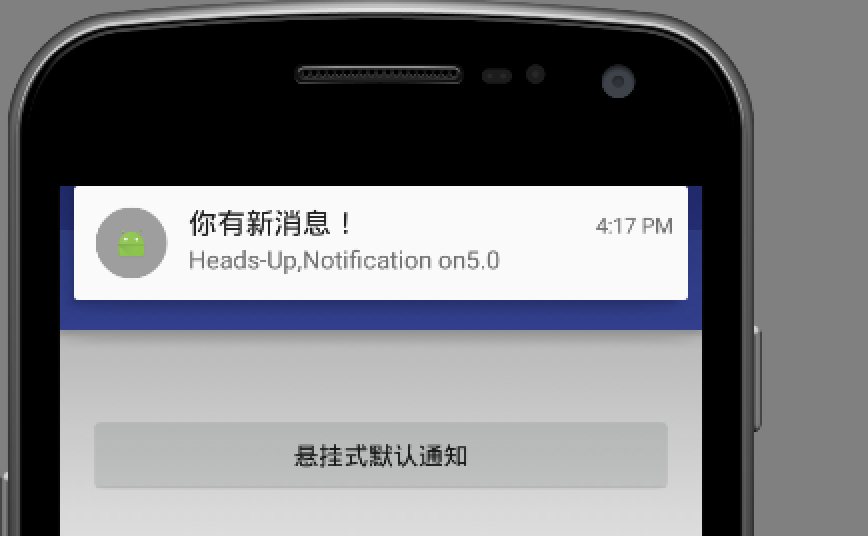
4.悬挂式Notification,他是5.0中新增的,也就是API中的Headsup的Notification,可以子啊不打断用户操作的时候,给用户通知
它跟其他的不同,主要在下面这句代码:
 //设置为悬挂,主要设置 setFullScreenIntent

   notify.setContentText("Heads-Up,Notification on5.0").setFullScreenIntent(pendingIntent, true);
如下图:
5.进度条的Notification,我们一般常见的是下载软件的时候,显示的会有一个下载进度的通知,其实这个也是很好实现的‘
在Api中是这样介绍的:
To use a progress indicator on platforms starting with Android 4.0, call setProgress(). For previous versions, you must create your own custom notification layout that includes a ProgressBar view.
它的意思是在android4.0以上平台,我们可以直接setProgress()的方法,但是对于之前的我们只能自定义布局。
我们来简单看一下:这个是api给的一个demo。下面我们重点看一下着色的部分
mNotificationManager =

                        (NotificationManager) getSystemService(Context.NOTIFICATION_SERVICE);

                builder = new NotificationCompat.Builder(this);

                builder.setContentTitle("Picture Download")

                        .setContentText("Download in progress")

                        .setSmallIcon(R.mipmap.ic_launcher);

                new Thread(

                        new Runnable() {

                            @Override

                            public void run() {

                                int incr;

                                // Do the "lengthy" operation 20 times

                                for (incr = ; incr <= ; incr+=) {

                                    // Sets the progress indicator to a max value, the

                                    // current completion percentage, and "determinate"

                                    // state

                                    builder.setProgress(, incr, false);

                                    // Displays the progress bar for the first time.

                                    mNotificationManager.notify(, builder.build());

                                    // Sleeps the thread, simulating an operation

                                    // that takes time

                                    try {

                                        // Sleep for 5 seconds

                                        Thread.sleep(*);

                                    } catch (InterruptedException e) {

                                        Log.d(TAG, "sleep failure");

                                    }

                                }

                                // When the loop is finished, updates the notification

                                builder.setContentText("Download complete")

                                        // Removes the progress bar

                                        .setProgress(0,0,true);

                                mNotificationManager.notify(NOTIFICATION_FLAG, builder.build());

                            }

                        }

// Starts the thread by calling the run() method in its Runnable

                ).start();
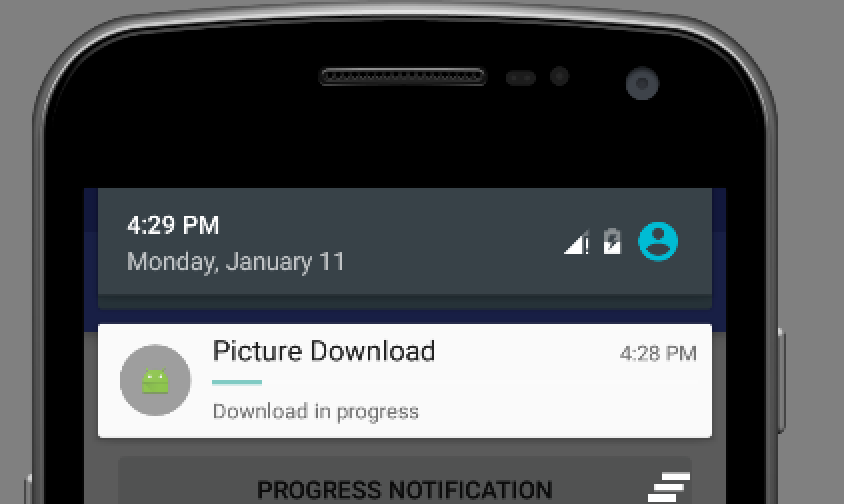
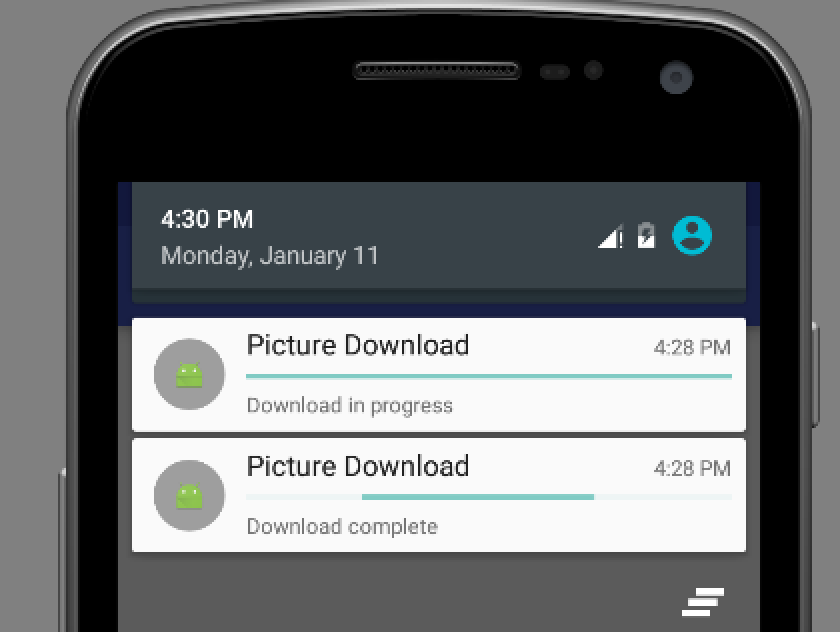
mBuilder.setProgress(100, incr, false);和 mBuilder.setProgress(0, 0, true);的区别,如果把蓝色的部分替换为前者,在运行的时候,我们会看见是它下载完成后会给我们一个通知说下载完成,但是后者会给我们提示下载完成的同时,进度条是在运行的,不断的和滚动,也就是效果是有所不同
如下图:第一个图是下载在进行的时候,第二个是我使用后 mBuilder.setProgress(0, 0, true),下载完成的时候,我们可以发现他还存在进度条,但是一直在滚动,我这里是静态图片,大家可以运行一下看看效果,第三个图,mBuilder.setProgress(100,incr,false) ,下载完成时显示的通知
还有一些其他的,辟比如锁屏下的,显示等级的Notification,在这里我就不写了,大家可以没事看看api。介绍的很详细。
Android 中Notification的运用的更多相关文章
- Android中的通知—Notification 自定义通知
Android中Notification通知的实现步骤: 1.获取NotificationManager对象NotificationManager的三个公共方法:①cancel(int id) 取消以 ...
- Android中使用Notification实现进度通知栏(Notification示例三)
我们在使用APP的过程中,软件会偶尔提示我们进行版本更新,我们点击确认更新后,会在通知栏显示下载更新进度(已知长度的进度条)以及安装情况(不确定进度条),这就是我们今天要实现的功能.实现效果如下: 在 ...
- Android中使用Notification实现普通通知栏(Notification示例一)
Notification是在你的应用常规界面之外展示的消息.当app让系统发送一个消息的时候,消息首先以图表的形式显示在通知栏.要查看消息的详情需要进入通知抽屉(notificationdrawer) ...
- Android中的消息通知(NotificationManager和Notification)
下面来谈谈notification,这个notification一般用在电话,短 信,邮件,闹钟铃声,在手机的状态栏上就会出现一个小图标,提示用户处理这个通知,这时手从上方滑动状态栏就可以展开并处理这 ...
- android中提示&对话框----Notification
Notification(状态栏通知) 一.Notification用于状态栏显示通知的控件,在不同的设备上面Notification是不一样的 二.Notification的基本布局 元素组成: I ...
- Android中使用Notification在状态栏上显示通知
场景 状态栏上显示通知效果 注: 博客: https://blog.csdn.net/badao_liumang_qizhi关注公众号 霸道的程序猿 获取编程相关电子书.教程推送与免费下载. 实现 新 ...
- Android 中常见控件的介绍和使用
1 TextView文本框 1.1 TextView类的结构 TextView 是用于显示字符串的组件,对于用户来说就是屏幕中一块用于显示文本的区域.TextView类的层次关系如下: java.la ...
- Android之Notification介绍
Notification就是在桌面的状态通知栏.这主要涉及三个主要类: Notification:设置通知的各个属性. NotificationManager:负责发送通知和取消通知 Notifica ...
- 一个Demo学完Android中所有的服务(转)
说明:这个例子实现了Android中常见的许多服务,下面是实现的截图 接下来,以源代码的方式分析这个例子 1.MainActivity--主界面 这个类主要是实现用户所看到的这个Activity, ...
随机推荐
- mac os vim 乱码
yum -y groupinstall chinese-support vim /etc/sysconfig/i18n LANG="zh_CN.UTF-8" LANGUAGE=&q ...
- QF——对不同尺寸屏幕的适配(自动布局:AutoLayout)
对不同尺寸设备UI的适配: 很多时候,我们的App可能运行在不同尺寸的设备上,或者横竖屏时,呈现方法应该也不一样.这样便要求UI里各控件的位置和大小不能写死. 对于不同尺寸UI的适配,一般有三种对策: ...
- 安装Eclipse Color Theme
我们都知道eclipse默认的颜色主题是白色的背景,但是如果想改变代码编辑区的背景颜色,需要怎么办呢? 今天给大家介绍一个非常赞的eclipse,可以很方便的根据自己的需求选择喜欢的颜色主题,其他的不 ...
- Atom power-mode
最近看到很多大牛都在用这个酷炫狂拽掉渣天的插件,于是就默默地git了一波.实际结果就是机械键盘加上砰砰砰砰,根本停不下来有没有. 建议(ˉ(∞)ˉ) :视力2.0的同学不建议使用,眼瞎的同学用就用吧, ...
- 用JavaScript获取地址栏参数的方法
/** * 获取地址栏参数 * * @example GetUrlString('id') * * @desc 调用时加上判断,保证程序不会出错 * var myurl = GetUrlString( ...
- codeforces 645E . Intellectual Inquiry
题目链接 如果不考虑重复的元素, 那么我们可以很容易的发现, 长度为n的字符串它的子串数量是 $ 2^n $ . 我们设每个到位置i, 答案的数量为f[i]. 然后我们考虑重复的, 我们发现, 每加入 ...
- Oracle查看和修改连接数(进程/会话/并发等等)
查询数据库当前进程的连接数及会话的连接数.并发连接数以及会话情况等等,感兴趣的你可以参考下哈,希望可以帮助到你 1.查询数据库当前进程的连接数: 复制代码 代码如下: select count(* ...
- Hibernate get 和load的区别
1 load是要用的时候才从数据库去查询,get 是马上查询. 2 对于不存在的记录,get会报空指针异常,load会报 org.hibernate.ObjectNotFoundException: ...
- Trunk Club:颠覆男士时装零售的创业公司_第1页_福布斯中文网
Trunk Club:颠覆男士时装零售的创业公司_第1页_福布斯中文网 Trunk Club:颠覆男士时装零售的创业公司
- 解决cookie无法删除的问题
今天遇到一个cookie无法删除的问题,退出操作时cookie无法删除,必须在首页先进行退出操作,后来发现一个网友的博客,介绍了无法删除Cookie的原因,原来是我关于cookie的基础知识没搞清楚. ...