
vue 项目集成 husky+commitlint+stylelint
最近刚换了新工作,这两天也没有业务上的需求,做了一些前端工程化方面的东西。要在现有的项目中集成 husky+commitlint+stylelint,也不能对现有代码产生影响。
使用 lint 的目的:
- 拒绝错误代码被提交到代码仓库
- 修复、美化代码
简单介绍一下库:
我们在创建 vue 项目的时候,eslint 已经集成好了,根据我们自己的需求修改 eslint 规则配置。
规则地址:https://eslint.vuejs.org/rules
查看规则效果地址:https://mysticatea.github.io/vue-eslint-demo/
stylelint
可以帮助我们自动修复错误、格式化样式代码。
使用
1.安装 stylelint、stylelint-config-standard 两个依赖到我们的项目中
yarn add stylelint stylelint-config-standard -D
2.在根目录,创建一个 .stylelintrc 配置文件
{

  "extends": "stylelint-config-standard",

  "rules": {

    "indentation": [

      2,

      {

        "baseIndentLevel": 1

      }

    ],

    "declaration-block-semicolon-newline-after": "always"

  }

}
husky
官方文档:https://typicode.github.io/husky/#/
Git hooks made easy.
引自官方,可以让 git hooks 变得更简单,在特定的重要动作触发自定义脚本。比如:当我们在提交或者推送代码的时候,可以使用它验证提交信息、运行测试、格式化代码、触发 CI/CD 等。
使用
这里我们使用 yarn 来安装并启用。
1.安装 husky
yarn add husky -D
2.启用 git hooks
yarn husky install
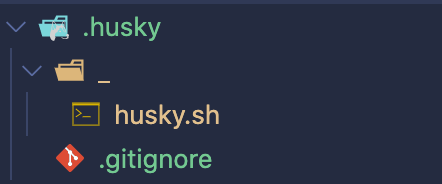
执行完这步后,以为可以忽略后面的步骤。把生成的
.husky目录下文件添加在.gitignore,结果其他小伙伴更新代码后,需要再次执行次步骤才能使用,显然不是友好的。
3.在 package.json 文件中,安装依赖后启用 git hooks
"script": {

   "postinstall": "husky install"

}
commitlint
官方文档:https://commitlint.js.org/#/
用来帮助我们在多人开发时,遵守 git 提交约定。
使用
1.将 @commitlint/cli、@commitlint/config-conventional 两个依赖安装到我们的项目中
yarn add @commitlint/cli @commitlint/config-conventional -D
2.在根目录,创建一个 commitlint.config.js 配置文件
echo "module.exports = {extends: ['@commitlint/config-conventional']}" > commitlint.config.js
增加 commit-msg 勾子
使用下面命令增加一个 git 提交信息的勾子,会在 .husky 目录下创建一个 commit-msg 文件。
yarn husky add .husky/commit-msg 'yarn commitlint --edit "$1"'
lint-staged
在前面已经配置了 stylelint、husk、commitlint。lint-staged 在我们提交代码时,只会对修改的文件进行检查、修复处理,以保证提交的代码没有语法错误,不会影响其他伙伴在更新代码无法运行的问题。
使用
1.安装 lint-staged 依赖到我们的项目中
yarn add lint-staged -D
2.在根目录,创建一个 .lintstagedrc 配置文件
{

  "*.{js,vue}": ["npm run lint"],

  "*.{html,vue,css,scss,sass,less}": ["stylelint --fix"]

}
增加 pre-commit 勾子
在 .husky 目录创建一个 pre-commit 文件。
yarn husky add .husky/pre-commit 'yarn lint-staged --allow-empty "$1"'
问题
整个实践下来,遇到了两个影响比较大的问题。
Windows
当我们在 Windows 的 Git Bash 上使用 Yarn,git hooks 会失败(stdin is not a tty)。

解决方案:
1.在 .husky 目录下创建一个 common.sh 文件:
#!/bin/sh

command_exists () {

  command -v "$1" >/dev/null 2>&1

}

# Windows 10, Git Bash and Yarn workaround

if command_exists winpty && test -t 1; then

  exec < /dev/tty

fi
2.在对应的勾子文件中,增加一行 . "$(dirname "$0")/common.sh" 代码
#!/bin/sh

. "$(dirname "$0")/_/husky.sh"

. "$(dirname "$0")/common.sh"

yarn …
CI
最初没有考虑到 CI 是不需要 git hooks 的问题,就直接将代码合并到测试服的分支上,通过 Jenkins 构建出现了 husky install 失败。
解决方案:
使用 is-ci,在 ci 场景不会执行 husky install。
1.安装 is-ci
$ yarn add is-ci -D
2.在 .husky 目录下,创建一个 install.js 文件
const { spawnSync } = require('child_process')

const isCI = require('is-ci')

if (!isCI) {

  spawnSync('husky', ['install'], {

    stdio: 'inherit',

    shell: true

  })

}
3.修改 package.json 文件
"script": {

   "postinstall": "node .husky/install.js"

}
补充
vue eslint 配置
module.exports = {

  root: true,

  env: {

    node: true

  },

  extends: ['plugin:vue/essential', 'eslint:recommended'],

  parserOptions: {

    parser: 'babel-eslint'

  },

  rules: {

    'no-console': process.env.NODE_ENV === 'production' ? 'warn' : 'off',

    'no-debugger': process.env.NODE_ENV === 'production' ? 'warn' : 'off',

    "indent": ["error", 2],

    'vue/max-attributes-per-line': [

      'error',

      { multiline: { allowFirstLine: false } }

    ],

    'vue/html-indent': [

      'error',

      2,

      {

        attribute: 1,

        baseIndent: 1,

        closeBracket: 0,

        alignAttributesVertically: true,

        ignores: []

      }

    ],

    'vue/html-closing-bracket-newline': [

      'error',

      {

        singleline: 'never',

        multiline: 'never'

      }

    ]

  }

}
vue 项目集成 husky+commitlint+stylelint的更多相关文章
- 手把手教你搭建规范的团队vue项目,包含commitlint,eslint,prettier,husky,commitizen等等
目录 1,前言 2,创建项目 2,安装vue全家桶 3,配置prettier 4,配置eslint 5,配置husky + git钩子 6,配置commitlint 6.1,配置commitlint格 ...
- vue项目集成金格WebOffice2015
下载 官网地址:http://www.goldgrid.com/jinge_download/index.aspx?num=5 解压后的文件 js文件中有两个重要的js文件iWebOffice2015 ...
- vite搭建vue项目-集成别名@、router、vuex、scss就是这样简单
为什么要使用vite 当我们开始构建越来越大型的应用时, 需要处理的 JavaScript 代码量也呈指数级增长. 包含数千个模块的大型项目相当普遍. 这个时候我们会遇见性能瓶颈 使用 JavaScr ...
- 如何为你的 Vue 项目添加配置 Stylelint
如何为你的 Vue 项目添加配置 Stylelint 现在已经是 9102 年了,网上许多教程和分享帖都已经过期,照着他们的步骤来会踩一些坑,如 stylelint-processor-html 已经 ...
- 快速新建并配置一个eslint+prettier+husky+commitlint+vue3+vite+ts+pnpm的项目
前置准备 一台电脑 vscode pnpm vscode插件:ESLint v2.2.6及以上 vscode插件:Prettier - Code formatter v9.5.0及以上 vscode插 ...
- Vue.js项目集成ElementUI
Vuejs实例-02Vue.js项目集成ElementUI Vuejs实例-02Vue.js项目集成ElementUI 0:前言 vue.js的UI组件库,在git上有多个项目,我见的使用者比较多 ...
- vue-multi-module【多模块集成的vue项目,多项目共用一份配置,可以互相依赖,也可以独立打包部署】
基于 vue-cli 2 实现,vue 多模块.vue多项目集成工程 Github项目地址 : https://github.com/BothEyes1993/vue-multi-module 目标: ...
- 记录vue项目 用hbuilder离线打包集成极光推送 安卓篇
极光推送的官方demo: https://github.com/jpush/jpush-hbuilder-demo 里面也记录有详细的方法了. 我记录下自己的过程. 首先去极光那里创建一个应用 获取A ...
- 收下这款 Vue 项目模版,它将让你的开发效率在 2021 年提高 50%
这是什么 vue-automation 是一款开箱即用的 Vue 项目模版,它基于 Vue CLI 4 众所周知,虽然 Vue CLI 提供了脚手架的功能,但由于官方的脚手架过于简单,运用在实际项目开 ...
随机推荐
- Linux Bash Script conditions
Linux Bash Script conditions shell 编程之条件判断 条件判断式语句.单分支 if 语句.双分支 if 语句.多分支 if 语句.case 语句 refs http:/ ...
- 知乎 bug
知乎 bug shit zhihu https://zhuanlan.zhihu.com/p/111809590 无法展开评论 https://unpkg.zhimg.com/@cfe/sentry- ...
- MongoDB Up and Going
# MongoDB Up and Going https://ide.c9.io/xgqfrms/mongodb # MongoDB 教程 https://www.runoob.com/mongodb ...
- cookie all in one
cookie all in one credentials: "include" https://developers.google.com/web/updates/2015/03 ...
- PostgreSQL All In One
PostgreSQL All In One SQL macOS https://www.postgresql.org/download/macosx/ EDB installer PostgreSQL ...
- Swift 5.3
Swift 5.3 https://swift.org/blog/ refs xgqfrms 2012-2020 www.cnblogs.com 发布文章使用:只允许注册用户才可以访问!
- DOM & Shadow DOM & Virtual DOM
DOM & Shadow DOM & Virtual DOM What is the difference between Shadow DOM and Virtual DOM? ht ...
- svg & regex
svg & regex https://developer.mozilla.org/en-US/docs/Web/JavaScript/Reference/Global_Objects/Reg ...
- postman功能介绍
- restful风格的理解
简而言之,就是不同的命令响应不同的操作: 关注点在url中的不同参数,是因为不同的参数才使得不同的method去对应的不同的操作.