
打造静态分析器(二)基于Asp.Net Core 3.0的AspectCore组件检测
上一篇,我们打造了一个简单的分析器,但是我们实际使用分析器就是为了对项目做分析检测,增加一些非语法的自检的
比如Asp.Net Core 3.0的替换依赖注入检测
设计分析
我们创建一个默认的Asp.Net Core 3.0的项目
打开Startup.cs
大致结构如下
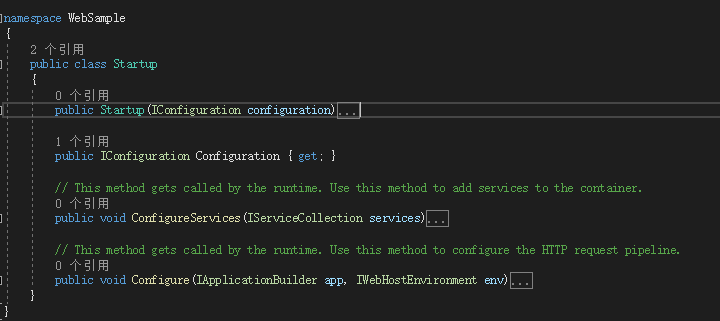
我们要针对Startup分析,第一方法ConfigureServices的返回类型必须是void
这是Asp.Net Core 3.0的改动之一,所以,当Startup.ConfigureServices返回类型不等于void的时候,我们就抛出错误提示
我们编写一个Startup的监视代码
    public class StartupAnalyzerContext : BaseAnalyzContext

    {

        private static DiagnosticDescriptor NotFindConfigureServices = new DiagnosticDescriptor("Class", "Startup", "未找到方法ConfigureServices", "Error", DiagnosticSeverity.Error, true);

        public override DiagnosticDescriptor[] SupportedDiagnostics => new DiagnosticDescriptor[]

        {

            NotFindConfigureServices

        };

        public override void Execute(SyntaxNodeAnalysisContext context)

        {

            if (context.Node.Kind() == SyntaxKind.ClassDeclaration &&

                context.Node is ClassDeclarationSyntax classDeclaration &&

                classDeclaration.Identifier.Text.Equals("Startup")

            )

            {

                var methods = classDeclaration.Members.OfType<MethodDeclarationSyntax>();

                if (!methods.Any(_method => _method.Identifier.Text.Equals("ConfigureServices")))

                    context.ReportDiagnostic(Diagnostic.Create(NotFindConfigureServices, classDeclaration.GetLocation()));

                else

                {

                }

            }

        }

    }
如果没在Startup类里找到ConfigureServices方法则抛出错误
我们注释掉ConfigureServices方法
看看结果

已经可以正常分析方法了
下一步,我们分析ConfigureServices方法的返回值是否是void
                else

                {

                    var voidSymbol = context.Compilation.GetTypeByMetadataName(typeof(void).FullName);

                    var configureServices = methods.FirstOrDefault(_method => _method.Identifier.Text.Equals("ConfigureServices"));

                    var returnType = configureServices.ReturnType;

                    var typeInfo = context.SemanticModel.GetTypeInfo(returnType);

                    if (!typeInfo.Type.Equals(voidSymbol))

                        context.ReportDiagnostic(Diagnostic.Create(ConfigureServicesReturnType, configureServices.GetLocation()));

                }
我们刚才的else部分逻辑,找到了ConfigureServices方法才进入这部分逻辑,我们修改一下ConfigureServices方法返回值,改为Asp.Net Core 3.0一下,常见的IServiceProvider

完善AspectCore的依赖注入替换分析
项目引用AspectCore.Extensions.DependencyInjection
判断Program.CreateHostBuilder是否存在
分析CreateHostBuilder的代码体,是否存在一个UseServiceProviderFactory方法,存在则判断是否是泛型AspectCore.Injector.IServiceContainer的类
    public class ProgramAnalyzerContext : BaseAnalyzContext

    {

        private static DiagnosticDescriptor NotFindCreateHostBuilder = new DiagnosticDescriptor("Class", "Program", "未找到方法CreateHostBuilder", "Error", DiagnosticSeverity.Error, true);

        private static DiagnosticDescriptor CreateHostBuilderReturnType = new DiagnosticDescriptor("Class", "Program", "无法分析返回值类型非IHostBuilder的CreateHostBuilder方法", "Error", DiagnosticSeverity.Error, true);

        private static DiagnosticDescriptor NotFindUseServiceProviderFactory = new DiagnosticDescriptor("Class", "Program", "未找到UseServiceProviderFactory方法", "Error", DiagnosticSeverity.Error, true);

        private static DiagnosticDescriptor AspectCoreServiceProviderFactory = new DiagnosticDescriptor("Class", "Program", "请Nuget安装AspectCore.Extensions.DependencyInjection", "Error", DiagnosticSeverity.Error, true);

        private static DiagnosticDescriptor UseServiceProviderFactoryType = new DiagnosticDescriptor("Class", "Program", "UseServiceProviderFactory(new AspectCoreServiceProviderFactory())", "Error", DiagnosticSeverity.Error, true);

        public override DiagnosticDescriptor[] SupportedDiagnostics => new DiagnosticDescriptor[]

        {

            NotFindCreateHostBuilder,

            CreateHostBuilderReturnType,

            NotFindUseServiceProviderFactory,

            AspectCoreServiceProviderFactory,

            UseServiceProviderFactoryType

        };

        public override void Execute(SyntaxNodeAnalysisContext context)

        {

            if (context.Node.Kind() == SyntaxKind.ClassDeclaration &&

                context.Node is ClassDeclarationSyntax classDeclaration &&

                classDeclaration.Identifier.Text.Equals("Program")

            )

            {

                var methods = classDeclaration.Members.OfType<MethodDeclarationSyntax>();

                if (!methods.Any(_method => _method.Identifier.Text.Equals("CreateHostBuilder")))

                    context.ReportDiagnostic(Diagnostic.Create(NotFindCreateHostBuilder, classDeclaration.GetLocation()));

                else

                {

                    var aspectCoreServiceProviderFactorySymbol = context.Compilation.GetTypeByMetadataName("AspectCore.Extensions.DependencyInjection.AspectCoreServiceProviderFactory");

                    var iServiceContainerSymbol = context.Compilation.GetTypeByMetadataName("AspectCore.Injector.IServiceContainer");

                    if (aspectCoreServiceProviderFactorySymbol == null)

                    {

                        context.ReportDiagnostic(Diagnostic.Create(AspectCoreServiceProviderFactory, classDeclaration.GetLocation()));

                        return;

                    }

                    var createHostBuilder = methods.FirstOrDefault(_method => _method.Identifier.Text.Equals("CreateHostBuilder"));

                    var expressionBody = createHostBuilder.ExpressionBody as ArrowExpressionClauseSyntax;

                    if (expressionBody != null)

                    {

                        var expressions = ConvertArrowExpression(expressionBody);

                        if (!expressions.Any(expression=> ((MemberAccessExpressionSyntax)expression.Expression).Name.Identifier.Text.Equals("UseServiceProviderFactory")))

                            context.ReportDiagnostic(Diagnostic.Create(NotFindUseServiceProviderFactory, createHostBuilder.GetLocation()));

                        else

                        {

                            var useServiceProviderFactoryExpression = expressions.FirstOrDefault(expression => ((MemberAccessExpressionSyntax)expression.Expression).Name.Identifier.Text.Equals("UseServiceProviderFactory"));

                            var method = context.SemanticModel.GetSymbolInfo(useServiceProviderFactoryExpression.Expression).Symbol as IMethodSymbol;

                            if (!method.TypeArguments.Any(_param => _param.Equals(iServiceContainerSymbol)))

                                context.ReportDiagnostic(Diagnostic.Create(UseServiceProviderFactoryType, createHostBuilder.GetLocation()));

                        }

                    }

                }

            }

        }

        private List<InvocationExpressionSyntax> ConvertArrowExpression(ArrowExpressionClauseSyntax expresionBody)

        {

            var result = new List<InvocationExpressionSyntax>();

            var firstExpresson = (InvocationExpressionSyntax) expresionBody.Expression;

            var expression = firstExpresson;

            result.Add(expression);

            while (IsNext(expression))

            {

                expression = Next(expression);

                result.Add(expression);

            }

            return result;

        }

        private InvocationExpressionSyntax Next(InvocationExpressionSyntax expression)

        {

            var method = (MemberAccessExpressionSyntax) expression.Expression;

            Console.WriteLine($"{method.Name}");

            return (InvocationExpressionSyntax)method.Expression;

        }

        private bool IsNext(InvocationExpressionSyntax expression)

        {

            var method = (MemberAccessExpressionSyntax)expression.Expression;

            return method.Expression.Kind() == SyntaxKind.InvocationExpression;

        }

    }
打造静态分析器(二)基于Asp.Net Core 3.0的AspectCore组件检测的更多相关文章
- 用VSCode开发一个基于asp.net core 2.0/sql server linux(docker)/ng5/bs4的项目(1)
最近使用vscode比较多. 学习了一下如何在mac上使用vscode开发asp.netcore项目. 这里是我写的关于vscode的一篇文章: https://www.cnblogs.com/cgz ...
- [译]基于ASP.NET Core 3.0的ABP v0.21已发布
基于ASP.NET Core 3.0的ABP v0.21已发布 在微软发布仅仅一个小时后, 基于ASP.NET Core 3.0的ABP v0.21也紧跟着发布了. v0.21没有新功能.它只是升级到 ...
- 基于ASP.NET Core 3.0快速搭建Razor Pages Web应用
前言 虽然说学习新的开发框架是一项巨大的投资,但是作为一个开发人员,不断学习新的技术并快速上手是我们应该掌握的技能,甚至是一个.NET Framework开发人员,学习.NET Core 新框架可以更 ...
- 基于Asp.Net Core 5.0依赖Quartz.Net框架编写的任务调度web管理平台
源码地址: https://github.com/246850/Calamus.TaskScheduler 演示地址:http://47.101.47.193:1063/ 1.Quartz.NET框架 ...
- 基于ASP.NET Core 6.0的整洁架构
大家好,我是张飞洪,感谢您的阅读,我会不定期和你分享学习心得,希望我的文章能成为你成长路上的垫脚石,让我们一起精进. 本节将介绍基于ASP.NET Core的整洁架构的设计理念,同时基于理论落地的代码 ...
- 用VSCode开发一个基于asp.net core 2.0/sql server linux(docker)/ng5/bs4的项目(2)
第一部分: http://www.cnblogs.com/cgzl/p/8478993.html 为Domain Model添加约束 前一部分, 我们已经把数据库创建出来了. 那么我们先看看这个数据库 ...
- 基于ASP.NET Core 5.0使用RabbitMQ消息队列实现事件总线(EventBus)
文章阅读请前先参考看一下 https://www.cnblogs.com/hudean/p/13858285.html 安装RabbitMQ消息队列软件与了解C#中如何使用RabbitMQ 和 htt ...
- 用VSCode开发一个基于asp.net core 2.0/sql server linux(docker)/ng5/bs4的项目(3)
第一部分: http://www.cnblogs.com/cgzl/p/8478993.html 第二部分: http://www.cnblogs.com/cgzl/p/8481825.html 由于 ...
- 如何基于asp.net core的Identity框架在mysql上作身份验证处理
首先了解这个概念,我一开始也是理解和掌握基本的概念,再去做程序的开发.Identity框架是微软自己提供,基于.net core平台,可拓展.轻量 级.面向多个数据库的身份验证框架.IdentityS ...
随机推荐
- µDoo持有者将分享我们广告总收入的10%,并以BTC支付!
Jason8th October 2019 在数字化世界中,去中心化将是未来,Howdoo的社交媒体和内容交付理念为在新经济中使用的核心用户提供了公平.透明的奖励回报.随着Howdoo上的内容创作者有 ...
- When Lambo with Howdoo
原文链接:https://howdoo.io/when-lambo/ 为了庆祝即将推出的革命性新社交媒体平台Howdoo以及我们令人惊喜的合作伙伴关系和社区,我们正在发起一项竞赛,以最终回答“When ...
- 《Object Storage on CRAQ: High-throughput chain replication for read-mostly workloads》论文总结
CRAQ 论文总结 说明:本文为论文 <Object Storage on CRAQ: High-throughput chain replication for read-mostly wor ...
- Centos 6.4最小化安装后的优化(1)
一.更新yum官方源 Centos 6.4系统自带的更新源速度比较慢,相比各位都有所感受,国内的速度慢的让人受不了.为了让centos6.4系统使用速度更快的yum更新源,一般都会选择更换源,详细步骤 ...
- AcWing 93. 递归实现组合型枚举
AcWing 93. 递归实现组合型枚举 原题链接 从 1~n 这 n 个整数中随机选出 m 个,输出所有可能的选择方案. 输入格式 两个整数 n,m ,在同一行用空格隔开. 输出格式 按照从小到大的 ...
- 命令模式(c++实现)
命令模式 目录 命令模式 模式定义 模式动机 UML类图 源码实现 优点 缺点 模式定义 命令模式(Facade),将一个请求封装为一个对象,从而使你可用不同的请求对客户进行参数化:对请求排队或记录请 ...
- Go Pentester - HTTP Servers(2)
Routing with the gorilla/mux Package A powerful HTTP router and URL matcher for building Go web serv ...
- Python Ethical Hacking - VULNERABILITY SCANNER(5)
EXPLOITATION - XSS VULNS XSS - CROSS SITE SCRIPTING VULNS Allow an attacker to inject javascript cod ...
- P1536 村村通(洛谷)并查集
隔壁的dgdger带我看了看老师的LCA教程,我因为学习数学太累了(就是懒),去水了一下,感觉很简单的样子,于是我也来写(水)个博客吧. 题目描述 某市调查城镇交通状况,得到现有城镇道路统计表.表中列 ...
- 手把手教你安装Office 2019 for Mac ,安装包和破解码都给你准备好了,还装不上的话,你找我!
准备一个安装包,和一个破解工具 安装MicrosoftOffice16.23.19030902_Installer.pkg, 注意在断网情况下安装 同时不要自动更新 , 安装好之后不要打开文件! ...