
java爬知乎问题的所有回答
突然想爬知乎问题的答案, 然后就开始研究知乎页面,刚开始是爬浏览器渲染好的页面, 解析DOM,找到特定的标签,
后来发现,每次只能得到页面加载出来的几条数据,想要更多就要下拉页面,然后浏览器自动加载几条数据,这样的话解析DOM没用啊,
不能获得所有的回答,然后就搜索了下问题,发现可以使用模拟浏览器发送请求给服务器,获取服务器响应,解析返回的数据,
有了方法,接着就是分析网络请求了, 我用的是火狐浏览器, 按F12点击 网络
鼠标定位到当前位置的最底端
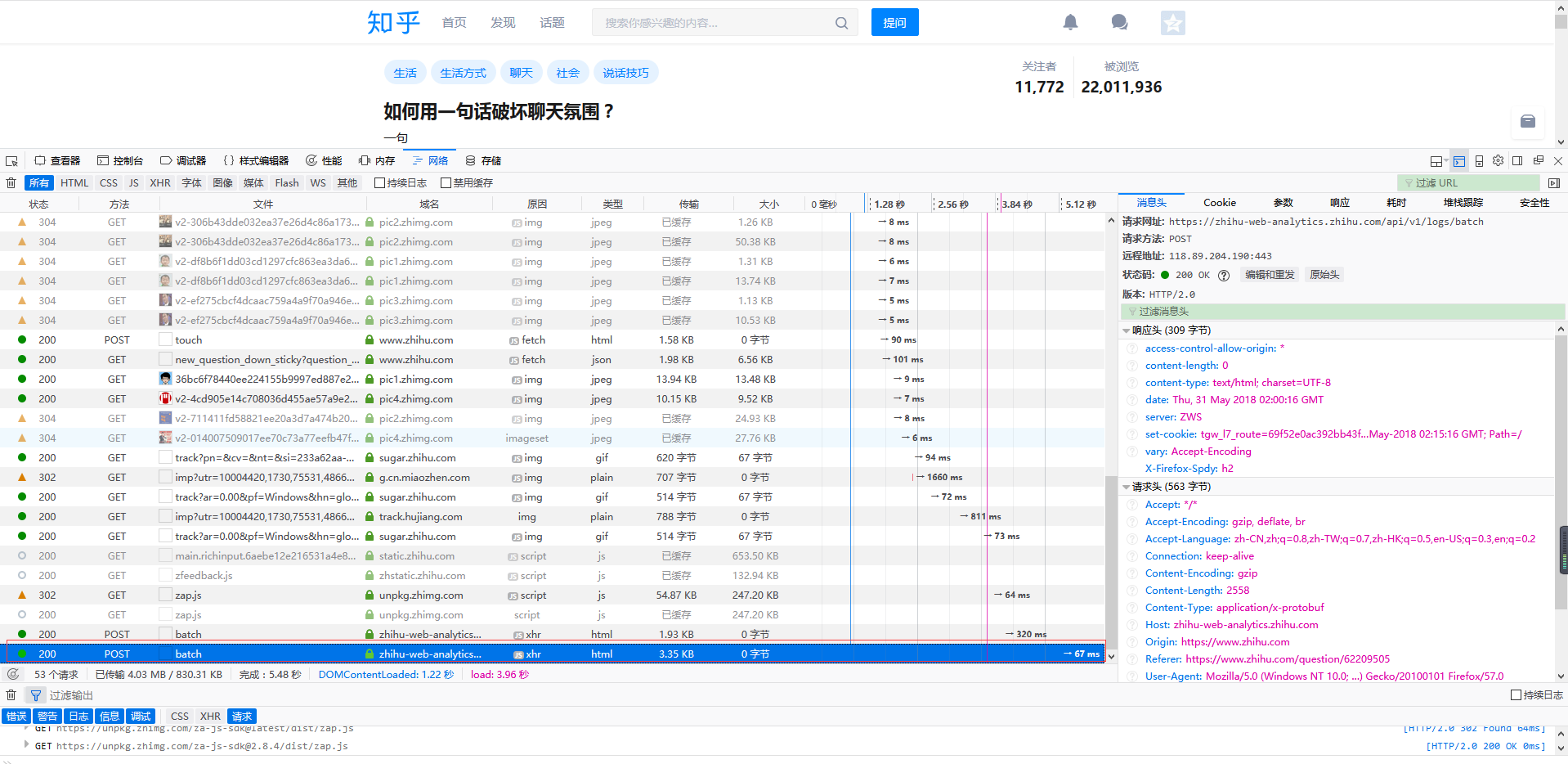
然后下拉滚动条,感觉已经加载新内容了就可以停止了, 这个时候请求新内容的url肯定已经出来了, 剩下的就是找出这个url。
一种方法是看url的意思, 这个不太好看的出来,另一种就是直接复制url到浏览器, 看返回结果,最后得到的请求url是

把链接拿到浏览器地址栏,查看的结果是

接下来就是写代码了
import com.google.gson.Gson;

import com.google.gson.internal.LinkedTreeMap;

import java.io.*;

import java.net.*;

import java.util.*;

public class ZhiHu {

    public static void main(String[] args){
        //请求链接

        String url = "https://www.zhihu.com/api/v4/questions/62209505/answers?" +

                "include=data[*].is_normal,admin_closed_comment,reward_info," +

                "is_collapsed,annotation_action,annotation_detail,collapse_reason," +

                "is_sticky,collapsed_by,suggest_edit,comment_count,can_comment,content," +

                "editable_content,voteup_count,reshipment_settings,comment_permission," +

                "created_time,updated_time,review_info,relevant_info,question,excerpt," +

                "relationship.is_authorized,is_author,voting,is_thanked,is_nothelp;data[*].mark_infos[*].url;" +

                "data[*].author.follower_count,badge[?(type=best_answerer)].topics&sort_by=default";
        //调用方法

        StringBuffer stringBuffer = sendGet(url,20,0);
        //输出结果

        System.out.println(delHTMLTag(new String(stringBuffer)));

    }

    public static StringBuffer sendGet(String baseUrl,int limit,int offset) {

        //存放每次获取的返回结果

        String responseResult = "";
        //读取服务器响应的流

        BufferedReader bufferedReader = null;

        //存放所有的回答内容

        StringBuffer stringBuffer = new StringBuffer();

        //每次返回的回答数

        int num = 0;

        try {

            //更改链接的limit设置每次返回的回答条数, 更改offset设置查询的起始位置

            //即上一次的limit+offset是下一次的起始位置,经过试验,每次最多只能返回20条结果

            String urlToConnect = baseUrl + "&limit="+limit+"&offset="+offset;

            URL url = new URL(urlToConnect);

            // 打开和URL之间的连接

            URLConnection connection = url.openConnection();

            // 设置通用的请求属性,这个在上面的请求头中可以找到

            connection.setRequestProperty("Referer","https://www.zhihu.com/question/276275499");

            connection.setRequestProperty("origin","https://www.zhihu.com");

            connection.setRequestProperty("x-udid","换成自己的udid");

            connection.setRequestProperty("Cookie","换成自己的cookie值");

            connection.setRequestProperty("accept", "application/json, text/plain, */*");

            connection.setRequestProperty("connection", "Keep-Alive");

            connection.setRequestProperty("Host", "www.zhihu.com");

            connection.setRequestProperty("user-agent", "Mozilla/5.0 (Windows NT 10.0; Win64; x64; rv:57.0) Gecko/20100101 Firefox/57.0");

            // 建立实际的连接

            connection.connect();

            // 定义 BufferedReader输入流来读取URL的响应

            bufferedReader = new BufferedReader(new InputStreamReader(connection.getInputStream()));

            String line = null;

            while ((line = bufferedReader.readLine()) != null) {

                responseResult += line;

            }

            //将返回结果转成map

            Gson gson = new Gson();

            Map<String, Object> map = new HashMap<String,Object>();

            map = gson.fromJson(responseResult, map.getClass());

            //获取page信息

            LinkedTreeMap<String,Object> pageList = (LinkedTreeMap<String,Object>)map.get("paging");

            //得到总条数

            double totals = (Double)pageList.get("totals");

            //等于0 说明查询的是最后不足20条的回答

            if(totals-(limit + offset) != 0) {

                //如果每页的页数加上起始位置与总条数的差大于20, 可以递归查找下一个20条内容

                if (totals - (limit + offset) > 20) {

                    //追加返回结果

                     stringBuffer.append(sendGet(baseUrl, 20, limit + offset));

                     stringBuffer.append("\r\n");//换行,调整格式

                } else {

                    //如果不大于20,说明是最后的几条了,这时需要修改limit的值

                    stringBuffer.append(sendGet(baseUrl, (int) (totals - (limit + offset)), limit + offset));

                    stringBuffer.append("\r\n");

                }

            }

            //获得包含回答的数组

            ArrayList<LinkedTreeMap<String,String>> dataList = (ArrayList<LinkedTreeMap<String,String>>)map.get("data");

            //追加每一条回答,用于返回

            for(LinkedTreeMap<String,String> contentLink : dataList){

                stringBuffer.append(contentLink.get("content")+"\r\n\r\n");

                num++;//本次查询到多少条回答

            }

            System.out.println("回答数  "+num);

        } catch (Exception e) {

            System.out.println("发送GET请求出现异常!" + e);

            e.printStackTrace();

        }

        // 使用finally块来关闭输入流

        finally {

            try {

                if (bufferedReader != null) {

                    bufferedReader.close();

                }

            } catch (Exception e2) {

                e2.printStackTrace();

            }

        }

        //返回本次查到的所有回答

        return stringBuffer;

    }
    private static final String regEx_script = "<script[^>]*?>[\\s\\S]*?<\\/script>"; // 定义script的正则表达式

    private static final String regEx_style = "<style[^>]*?>[\\s\\S]*?<\\/style>"; // 定义style的正则表达式

    private static final String regEx_html = "<[^>]+>"; // 定义HTML标签的正则表达式

    private static final String regEx_space = "\\s*|\t|\r|\n";//定义空格回车换行符

    /**

     * @param htmlStr

     * @return

     *  删除Html标签

     */

    public static String delHTMLTag(String htmlStr) {

        Pattern p_script = Pattern.compile(regEx_script, Pattern.CASE_INSENSITIVE);

        Matcher m_script = p_script.matcher(htmlStr);

        htmlStr = m_script.replaceAll(""); // 过滤script标签

        Pattern p_style = Pattern.compile(regEx_style, Pattern.CASE_INSENSITIVE);

        Matcher m_style = p_style.matcher(htmlStr);

        htmlStr = m_style.replaceAll(""); // 过滤style标签

        Pattern p_html = Pattern.compile(regEx_html, Pattern.CASE_INSENSITIVE);

        Matcher m_html = p_html.matcher(htmlStr);

        htmlStr = m_html.replaceAll(""); // 过滤html标签

        return htmlStr.replaceAll(" ",""); // 返回文本字符串

    }
}
输出结果
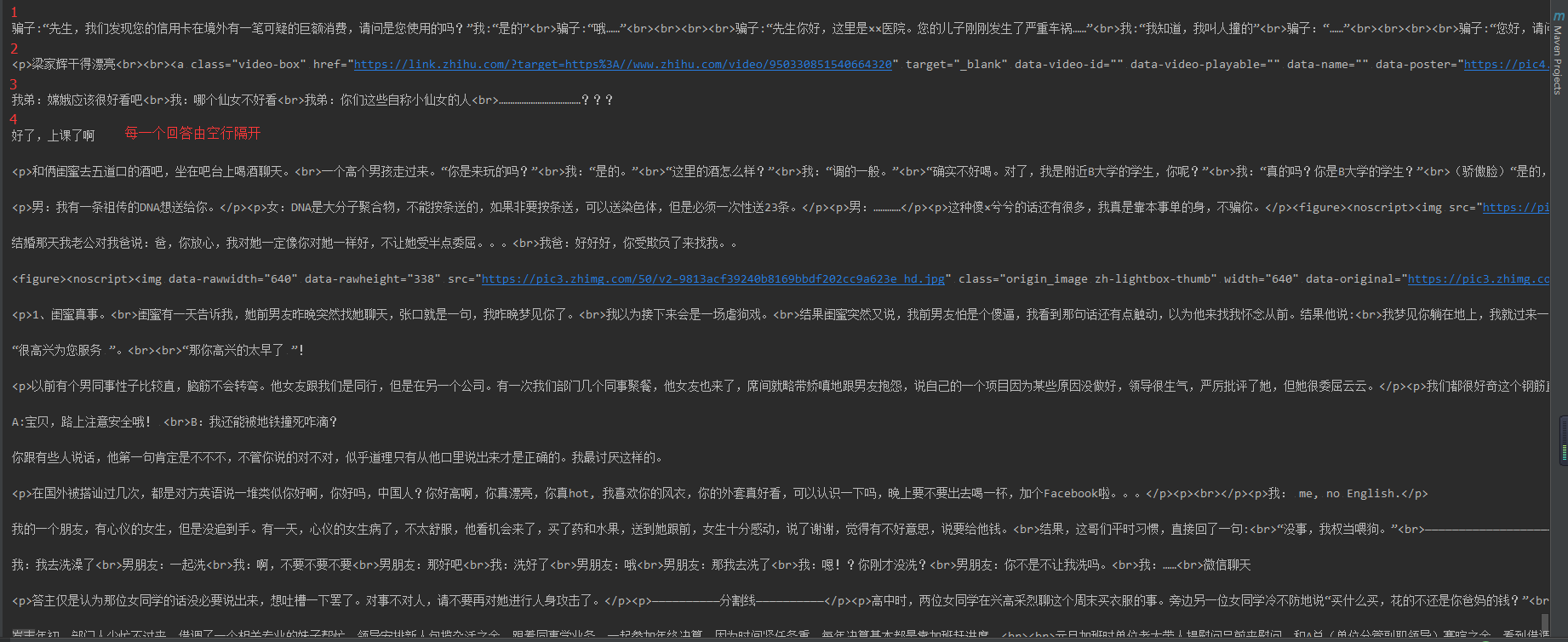
回答数量越多,显示的时候需要的时间也就越长,显示的顺序跟页面上的不一样, 从下到上,20个一组显示
为了缩短等待时间, 使用多线程
ZhiHuSpider.java 先获取总共的条数,然后offset每次增加20,循环创建线程
import com.google.gson.Gson;

import com.google.gson.internal.LinkedTreeMap;

import java.io.BufferedReader;

import java.io.IOException;

import java.io.InputStreamReader;

import java.net.URL;

import java.net.URLConnection;

import java.util.HashMap;

import java.util.Map;

public class ZhiHuSpider {

    public static void main(String[] args){

        String baseUrl= "https://www.zhihu.com/api/v4/questions/62209505/answers?" +

                "include=data[*].is_normal,admin_closed_comment,reward_info," +

                "is_collapsed,annotation_action,annotation_detail,collapse_reason," +

                "is_sticky,collapsed_by,suggest_edit,comment_count,can_comment,content," +

                "editable_content,voteup_count,reshipment_settings,comment_permission," +

                "created_time,updated_time,review_info,relevant_info,question,excerpt," +

                "relationship.is_authorized,is_author,voting,is_thanked,is_nothelp;data[*].mark_infos[*].url;" +

                "data[*].author.follower_count,badge[?(type=best_answerer)].topics&sort_by=default";

        //存放每次获取的返回结果

        String responseResult = "";

        BufferedReader bufferedReader = null;

        //存放多有的的回答内容

        StringBuffer stringBuffer = new StringBuffer();

        //每次返回的回答数

        URLConnection connection = null;

        try {

            String urlToConnect = baseUrl+ "&limit="+20+"&offset="+0;

            URL url = new URL(urlToConnect);

            // 打开和URL之间的连接

            connection = url.openConnection();

        // 设置通用的请求属性

        connection.setRequestProperty("Referer","https://www.zhihu.com/question/276275499");

        connection.setRequestProperty("origin","https://www.zhihu.com");

        connection.setRequestProperty("x-udid","换成自己的udid值");

        connection.setRequestProperty("Cookie","换成自己的cookie值");

        connection.setRequestProperty("accept", "application/json, text/plain, */*");

        connection.setRequestProperty("connection", "Keep-Alive");

        connection.setRequestProperty("Host", "www.zhihu.com");

        connection.setRequestProperty("user-agent", "Mozilla/5.0 (Windows NT 10.0; Win64; x64; rv:57.0) Gecko/20100101 Firefox/57.0");

        // 建立实际的连接

        connection.connect();

        // 定义 BufferedReader输入流来读取URL的响应

        bufferedReader = new BufferedReader(new InputStreamReader(connection.getInputStream()));

        String line = null;

        while ((line = bufferedReader.readLine()) != null) {

            responseResult += line;

        }

        //将返回结果转成map

        Gson gson = new Gson();

        Map<String, Object> map = new HashMap<String,Object>();

        map = gson.fromJson(responseResult, map.getClass());

        //获取page信息

        LinkedTreeMap<String,Object> pageList = (LinkedTreeMap<String,Object>)map.get("paging");

        //得到总条数

        double totals = (Double)pageList.get("totals");

        for(int offset = 0 ;offset < totals; offset += 20){

            SpiderThread spiderThread = new SpiderThread(baseUrl,20,offset);

            new Thread(spiderThread).start();

        }

        } catch (IOException e) {

            e.printStackTrace();

        }finally{

                try {

                    if(bufferedReader != null) {

                        bufferedReader.close();

                    }

                } catch (IOException e) {

                    e.printStackTrace();

                }

        }

    }

}
SpiderThread.java
import com.google.gson.Gson;

import com.google.gson.internal.LinkedTreeMap;

import java.io.BufferedReader;

import java.io.InputStreamReader;

import java.net.URL;

import java.net.URLConnection;

import java.util.ArrayList;

import java.util.HashMap;

import java.util.Map;

public class SpiderThread implements Runnable{

    private String baseUrl;

    private int limit;

    private int offset;

    SpiderThread(String baseUrl,int limit,int offset){

        this.baseUrl = baseUrl;

        this.limit = limit;

        this.offset = offset;

    }

    public void run() {

        System.out.println(delHTMLTag(new String(sendGet(baseUrl,limit,offset))));

    }

    public  StringBuffer sendGet(String baseUrl,int limit,int offset) {

        //存放每次获取的返回结果

        String responseResult = "";

        BufferedReader bufferedReader = null;

        //存放多有的的回答内容

        StringBuffer stringBuffer = new StringBuffer();

        //每次返回的回答数

        int num = 0;

        try {

            //更改链接的limit设置每次返回的回答条数, 更改offset设置查询的起始位置

            //即上一次的limit+offset是下一次的起始位置,经过试验,每次最多只能返回20条结果

            String urlToConnect = baseUrl + "&limit="+limit+"&offset="+offset;

            URL url = new URL(urlToConnect);

            // 打开和URL之间的连接

            URLConnection connection = url.openConnection();

            // 设置通用的请求属性

            connection.setRequestProperty("Referer","https://www.zhihu.com/question/276275499");

            connection.setRequestProperty("origin","https://www.zhihu.com");

            connection.setRequestProperty("x-udid","换成自己的udid值");

            connection.setRequestProperty("Cookie","换成自己的cookie值");

            connection.setRequestProperty("accept", "application/json, text/plain, */*");

            connection.setRequestProperty("connection", "Keep-Alive");

            connection.setRequestProperty("Host", "www.zhihu.com");

            connection.setRequestProperty("user-agent", "Mozilla/5.0 (Windows NT 10.0; Win64; x64; rv:57.0) Gecko/20100101 Firefox/57.0");

            // 建立实际的连接

            connection.connect();

            // 定义 BufferedReader输入流来读取URL的响应

            bufferedReader = new BufferedReader(new InputStreamReader(connection.getInputStream()));

            String line = null;

            while ((line = bufferedReader.readLine()) != null) {

                responseResult += line;

            }

            //将返回结果转成map

            Gson gson = new Gson();

            Map<String, Object> map = new HashMap<String,Object>();

            map = gson.fromJson(responseResult, map.getClass());

            //获得包含回答的数组

            ArrayList<LinkedTreeMap<String,String>> dataList = (ArrayList<LinkedTreeMap<String,String>>)map.get("data");

            //追加每一条回答,用于返回

            // String str = null;

            for(LinkedTreeMap<String,String> contentLink : dataList){

                stringBuffer.append(contentLink.get("content")+"\r\n\r\n");

                num++;//本次查询到多少条回答

            }

            System.out.println("回答条数====================================="+num);

        } catch (Exception e) {

            System.out.println("发送GET请求出现异常!" + e);

            e.printStackTrace();

        }

        // 使用finally块来关闭输入流

        finally {

            try {

                if (bufferedReader != null) {

                    bufferedReader.close();

                }

            } catch (Exception e2) {

                e2.printStackTrace();

            }

        }

        //返回本次查到的所有回答

        return stringBuffer;

    }
    private static final String regEx_script = "<script[^>]*?>[\\s\\S]*?<\\/script>"; // 定义script的正则表达式

    private static final String regEx_style = "<style[^>]*?>[\\s\\S]*?<\\/style>"; // 定义style的正则表达式

    private static final String regEx_html = "<[^>]+>"; // 定义HTML标签的正则表达式

    private static final String regEx_space = "\\s*|\t|\r|\n";//定义空格回车换行符

    /**

     * @param htmlStr

     * @return

     *  删除Html标签

     */

    public static String delHTMLTag(String htmlStr) {

        Pattern p_script = Pattern.compile(regEx_script, Pattern.CASE_INSENSITIVE);

        Matcher m_script = p_script.matcher(htmlStr);

        htmlStr = m_script.replaceAll(""); // 过滤script标签

        Pattern p_style = Pattern.compile(regEx_style, Pattern.CASE_INSENSITIVE);

        Matcher m_style = p_style.matcher(htmlStr);

        htmlStr = m_style.replaceAll(""); // 过滤style标签

        Pattern p_html = Pattern.compile(regEx_html, Pattern.CASE_INSENSITIVE);

        Matcher m_html = p_html.matcher(htmlStr);

        htmlStr = m_html.replaceAll(""); // 过滤html标签

        return htmlStr.replaceAll(" ",""); // 返回文本字符串

    }
}
遇到一个问题

试了下, 其他的都是没问题的,totals就是总条数,就这个有问题,
链接是:https://www.zhihu.com/api/v4/questions/62209505/answers?include=data[*].is_normal,admin_closed_comment,reward_info,is_collapsed,annotation_action,annotation_detail,collapse_reason,is_sticky,collapsed_by,suggest_edit,comment_count,can_comment,content,editable_content,voteup_count,reshipment_settings,comment_permission,created_time,updated_time,review_info,relevant_info,question,excerpt,relationship.is_authorized,is_author,voting,is_thanked,is_nothelp;data[*].mark_infos[*].url;data[*].author.follower_count,badge[?(type=best_answerer)].topics&limit=20&offset=2020&sort_by=default
2018.6.1
添加了个去掉html标签的方法, 显示的更好看点
java爬知乎问题的所有回答的更多相关文章
- Java爬取同花顺股票数据(附源码)
最近有小伙伴问我能不能抓取同花顺的数据,最近股票行情还不错,想把数据抓下来自己分析分析.我大A股,大家都知道的,一个概念火了,相应的股票就都大涨. 如果能及时获取股票涨跌信息,那就能在刚开始火起来的时 ...
- MinerHtmlThread.java 爬取页面线程
MinerHtmlThread.java 爬取页面线程 package com.iteye.injavawetrust.miner; import org.apache.commons.logging ...
- MinerConfig.java 爬取配置类
MinerConfig.java 爬取配置类 package com.iteye.injavawetrust.miner; import java.util.List; /** * 爬取配置类 * @ ...
- Java爬取网络博客文章
前言 近期本人在某云上购买了个人域名,本想着以后购买与服务器搭建自己的个人网站,由于需要筹备的太多,暂时先搁置了,想着先借用GitHub Pages搭建一个静态的站,搭建的过程其实也曲折,主要是域名地 ...
- Java爬取校内论坛新帖
Java爬取校内论坛新帖 为了保持消息灵通,博主没事会上上校内论坛看看新帖,作为爬虫爱好者,博主萌生了写个爬虫自动下载的想法. 嗯,这次就选Java. 第三方库准备 Jsoup Jsoup是一款比较好 ...
- Java爬取B站弹幕 —— Python云图Wordcloud生成弹幕词云
一 . Java爬取B站弹幕 弹幕的存储位置 如何通过B站视频AV号找到弹幕对应的xml文件号 首先爬取视频网页,将对应视频网页源码获得 就可以找到该视频的av号aid=8678034 还有弹幕序号, ...
- java爬取网页内容 简单例子(2)——附jsoup的select用法详解
[背景] 在上一篇博文java爬取网页内容 简单例子(1)——使用正则表达式 里面,介绍了如何使用正则表达式去解析网页的内容,虽然该正则表达式比较通用,但繁琐,代码量多,现实中想要想出一条简单的正则表 ...
- java爬取并下载酷狗TOP500歌曲
是这样的,之前买车送的垃圾记录仪不能用了,这两天狠心买了好点的记录仪,带导航.音乐.蓝牙.4G等功能,寻思,既然有这些功能就利用起来,用4G听歌有点奢侈,就准备去酷狗下点歌听,居然都是需要办会员才能下 ...
- Java爬取并下载酷狗音乐
本文方法及代码仅供学习,仅供学习. 案例: 下载酷狗TOP500歌曲,代码用到的代码库包含:Jsoup.HttpClient.fastJson等. 正文: 1.分析是否可以获取到TOP500歌单 打开 ...
随机推荐
- 第一册:lesson seventy nine.
原文: Carol's shopping list. What are you doing Carol? I'm making a shopping list Tom. What do we need ...
- C#通过虚方法实现方法重写—多态。
class Program { //希望person存的是哪个类的对象就调用哪个类的方法 //第一步 将父类中对应方法家virtual关键字 变为虚方法(子类可重写) //子类中方法用override ...
- 【转载】IIS报错不是有效的Win32应用程序
今天在IIS中部署ASP.NET网站后,访问网站报错,提示信息为:未能加载文件或程序集XXX.dll或它的某一个依赖项,不是有效的Win32应用程序(异常来至HRESULT:0x800700C1).通 ...
- SQL 常用的判断、连表、跨库、去重、分组、ROW_NUMBER()分析函数SQL用法
常用的SQL 由浅入深 大致上回想一下自己常用的SQL,并做个记录,目标是实现可以通过在此页面查找到自己需要的SQL ,陆续补充 有不足之处,请提醒改正 首先我创建了两个库,每个库两张表.(工作 ...
- Module的加载实现
烂笔头开始记录小知识点啦- 浏览器要加载 ES6模块,: <script type="module" src="./foo.js"></scr ...
- 5; XHTML图像
1.背景图案的设置 2.将图片插入到网页中去 3.用图像作为超链接 4.使用工具建立地图索引 5.切片索引 6.为网站添加图标 5.1 背景图案的设置 格式:<body background=” ...
- jQuery 事件 - ready() 方法
转载:http://www.w3school.com.cn/jquery/jquery_hide_show.asp 实例 在文档加载后激活函数: $(document).ready(function( ...
- 4种方法实现Html转码
<script> var HtmlUtil = { /*1.用浏览器内部转换器实现html转码*/ htmlEncode: function(html) { //1.首先动态创建一个容器标 ...
- cf55D. Beautiful numbers(数位dp)
题意 题目链接 Sol 看到这种题就不难想到是数位dp了. 一个很显然的性质是一个数若能整除所有位数上的数,则一定能整除他们的lcm. 根据这个条件我们不难看出我们只需要记录每个数对所有数的lcm(也 ...
- js中判断空及获取当前服务的根路径
function isValue(o) { return (this.isObject(o) || this.isString(o) || this.isNumber(o) || this.isBoo ...