
WiFi-ESP8266入门http(3-2)网页认证上网-post请求
测试账号密码 加密模式 1
18011210338 +
015871 -
测试2
1601120382 +1
mimaHENFuzb -1
打开网页
手机端
http://10.255.44.33/srun_portal_phone.php?ac_id=1&
电脑端
http://10.255.44.33/srun_portal_pc.php?ac_id=1&
连上西电网 wifi名:stu-xdwlan 密码 :空(所有认证上网的WIFI名都是空)
输入 10.255.44.33
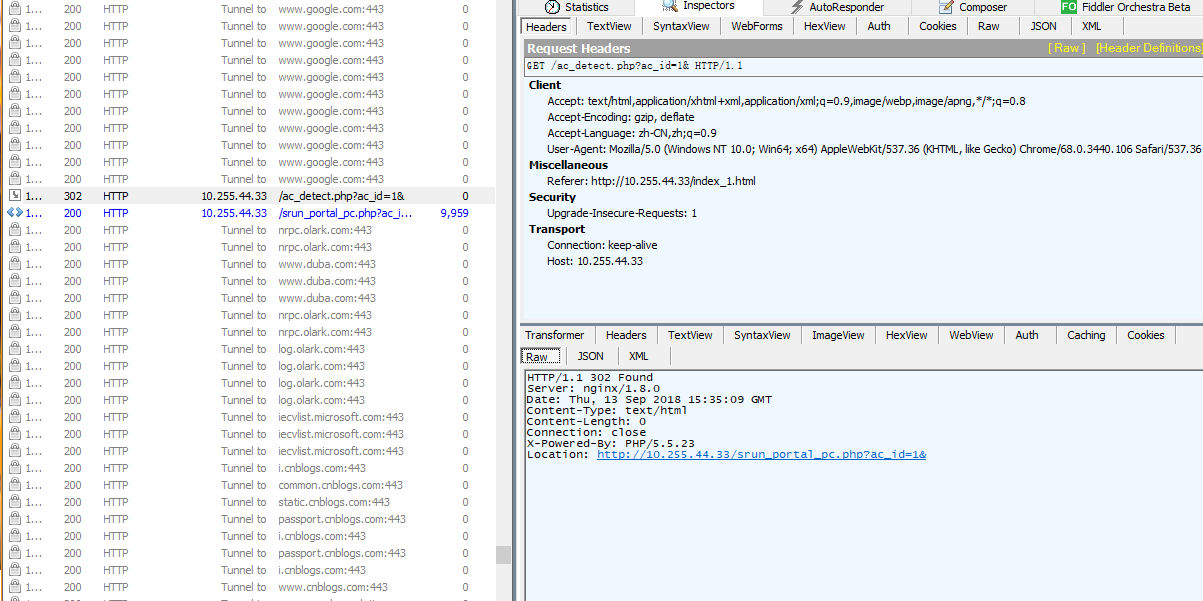
发送:
GET http://10.255.44.33/ac_detect.php?ac_id=1& HTTP/1.1

Host: 10.255.44.33

Connection: keep-alive

Upgrade-Insecure-Requests: 1

User-Agent: Mozilla/5.0 (Windows NT 10.0; Win64; x64) AppleWebKit/537.36 (KHTML, like Gecko) Chrome/68.0.3440.106 Safari/537.36

Accept: text/html,application/xhtml+xml,application/xml;q=0.9,image/webp,image/apng,*/*;q=0.8

Referer: http://10.255.44.33/index_1.html

Accept-Encoding: gzip, deflate

Accept-Language: zh-CN,zh;q=0.9

Cookie: login=bQ0pOyR6IXU7PJaQQqRAcBPxGAvxAcroYylaKlmvDiG3pL%252BfKr5VTKRuLk0qItTDR0QjBKFE4G8GyMjUM3dNeDa3B5RpzpgI%252B1yveIbZXB7uXYzCInIqfHqZbn9GPjEaUwWEKjrHBE7cXyC0mAwXw%252BO%252FOcy7YZwdJhmFf4%252BUtT%252BWr0Oudrz13KfS4g%253D%253D
接收:
HTTP/1.1 302 Found

Server: nginx/1.8.0

Date: Thu, 13 Sep 2018 15:35:09 GMT

Content-Type: text/html

Content-Length: 0

Connection: close

X-Powered-By: PHP/5.5.23

Location: http://10.255.44.33/srun_portal_pc.php?ac_id=1&
网页被重定向到
http://10.255.44.33/srun_portal_pc.php?ac_id=1&
自动跳转
发送:
GET http://10.255.44.33/srun_portal_pc.php?ac_id=1& HTTP/1.1

Host: 10.255.44.33

Connection: keep-alive

Upgrade-Insecure-Requests: 1

User-Agent: Mozilla/5.0 (Windows NT 10.0; Win64; x64) AppleWebKit/537.36 (KHTML, like Gecko) Chrome/68.0.3440.106 Safari/537.36

Accept: text/html,application/xhtml+xml,application/xml;q=0.9,image/webp,image/apng,*/*;q=0.8

Referer: http://10.255.44.33/index_1.html

Accept-Encoding: gzip, deflate

Accept-Language: zh-CN,zh;q=0.9
接收:
HTTP/1.1 200 OK

Server: nginx/1.8.0

Date: Thu, 13 Sep 2018 15:35:09 GMT

Content-Type: text/html; charset=utf-8

Transfer-Encoding: chunked

Connection: close

X-Powered-By: PHP/5.5.23

1f36

<!DOCTYPE html PUBLIC "-//W3C//DTD XHTML 1.0 Transitional//EN" "http://www.w3.org/TR/xhtml1/DTD/xhtml1-transitional.dtd">

<html xmlns="http://www.w3.org/1999/xhtml">

<head>

<meta http-equiv="Content-Type" content="text/html; charset=utf-8" />

<title>登录</title>

<script language="javascript" src="js/jquery.js"></script>

<script language="javascript" src="js/srun_portal.js"></script>

<script language="javascript" src="js/message.js"></script>

</head>

<style type="text/css">

	* {

		margin:0px 0px;

		padding:0px 0px;

		font-family:'微软雅黑','Microsoft Yahei',Arial, Helvetica, sans-serif;

	}

	body {

		margin:0 auto;

		padding:0px 0px;

	}

	a {

		color:#333;

		text-decoration: none;

		cursor: pointer;

		outline:none;

	}

	a:hover {

		text-decoration: none;

		color:#06F;

	}

	ul {

		list-style:none;

	}

	.float_l {

		float:left;

	}

	.float_r {

		float:right;

	}

	.clearfix:before, .clearfix:after {

		content: "";

		display: block;

	}

	.clearfix:after {

		clear: both;

	}

	.navbar {

		width:100%;

		margin:0 auto;

		vertical-align:middle;

		 background:url(images/head-bg.png)

		/*background-color:#1997ec;*/

	}

	.container {

		background-image:url(images/bg_5.jpg) ;

		height:600px;

		margin:0px auto;

		text-align:center;

	}

	.contain {

		width:980px;

		height:100%;

		margin:0 auto;

		padding:0px;

	}

	.footer {

		width:980px;

		margin:0 auto;

		font-size:12px;

		height:35px;

		line-height:35px;

	}

	.login {

		padding:1.5em 1.5em 1em;

		/*background-color:#e2eef1;

		background-image: linear-gradient(to bottom, rgb(226, 238, 241) 50%, rgb(212, 229, 234) 100%);

		border:1px solid #CCC;*/

		border-radius: 4px 4px 4px 4px;

		text-align:left;

		font-size:.875em;

		position:relative;

	}

	ul.login li {

		margin-bottom:5px;

	}

	/*----login tab---*/

	.margbt { margin-bottom:4px; color:white;}

	textarea, input[type="text"], input[type="password"], input[type="datetime"], input[type="datetime-local"], input[type="date"], input[type="month"], input[type="time"], input[type="week"], input[type="number"], input[type="email"], input[type="url"], input[type="search"], input[type="tel"], input[type="color"], .uneditable-input {

		background-color: rgb(255, 255, 255);

		border: 1px solid rgb(204, 204, 204);

		box-shadow: 0px 1px 1px rgba(0, 0, 0, 0.075) inset;

		transition: border 0.2s linear 0s, box-shadow 0.2s linear 0s;

	}

	select, textarea, input[type="text"], input[type="password"], input[type="datetime"], input[type="datetime-local"], input[type="date"], input[type="month"], input[type="time"], input[type="week"], input[type="number"], input[type="email"], input[type="url"], input[type="search"], input[type="tel"], input[type="color"], .uneditable-input {

		display: inline-block;

		height: 24px;

		margin-bottom: 10px;

		font-size: 14px;

		line-height: 24px;

		color: rgb(36, 36, 36);

		border-radius: 3px;

		vertical-align: middle;

		padding: 4px 6px;

	}

	textarea:focus, input[type="text"]:focus, input[type="password"]:focus, input[type="datetime"]:focus, input[type="datetime-local"]:focus, input[type="date"]:focus, input[type="month"]:focus, input[type="time"]:focus, input[type="week"]:focus, input[type="number"]:focus, input[type="email"]:focus, input[type="url"]:focus, input[type="search"]:focus, input[type="tel"]:focus, input[type="color"]:focus, .uneditable-input:focus {

		border-color: rgba(82, 168, 236, 0.8);

		outline: 0px none;

		box-shadow: 0px 1px 1px rgba(0, 0, 0, 0.075) inset, 0px 0px 8px rgba(82, 168, 236, 0.6);

	}

	.input input[type="text"], .input input[type="password"] { width:268px;}

	input[type="checkbox"] { vertical-align:middle; margin-top:-3px;}

	.login input[type='button'],input[type='submit'] {

		width:80px;

		border:0px solid #FFF;

		height:35px;

		color:#FFF;

		font-size:14px;

		background-image:none;

		background-clip:border-box;

		background-color:#b2cb49;

		display:inline-block;

		background-attachment:scroll;

		background-repeat:repeat;

		background-position-x:0%;

		background-position-y:0%;

		border-top-left-radius:3px;

		border-top-right-radius:3px;

		border-bottom-left-radius:3px;

		border-bottom-right-radius:3px;

		cursor:pointer;

	}

	.login input[type='button']:hover,,input[type='submit']:hover {

		background-color:#a2c800;

	}

	.login a {

		width:80px;

		border:0px solid #FFF;

		height:35px;

		line-height:35px;

		text-align:center;

		color:#FFF;

		font-size:14px;

		background-image:none;

		background-clip:border-box;

		background-color:#3bb3e0;

		display:inline-block;

		background-attachment:scroll;

		background-repeat:repeat;

		background-position-x:0%;

		background-position-y:0%;

		border-top-left-radius:3px;

		border-top-right-radius:3px;

		border-bottom-left-radius:3px;

		border-bottom-right-radius:3px;

	}

	.login a:hover {

		background-color:#2482a5;

	}

	/*----login tab---*/

	.logo {

		/* background:url(images/head-bg.png); no-repeat */

		height:70px;

		margin:0px;

	}

	.waps{

		width:600px;

		text-align:center;

		line-height:28px;

		font-size:12px;

		font-family:Arial, Helvetica, sans-serif;

		margin-top:100px;

		color:white;

		text-align:left;

		border:1px solid #CCC;

		border-radius: 4px 4px 4px 4px;

		padding:5px 5px;

	}

	.con{

		text-align:left;

		width:600px;

		margin:0px auto;

		background:rgba(255, 255, 255, 0.8) none repeat scroll 0 0 !important;/*实现FF背景透明,文字不透明*/

		filter:Alpha(opacity=80);

		background:#fff;/*实现IE背景透明*/

		border-radius: 4px 4px 4px 4px;

	}

	.con p{

		position:relative;

		padding:5px 10px;

		color:black;

	}/*实现IE文字不透明*/

</style>

<body class="bottom">

<div class="navbar"><div class="logo"><img src="./images/xidian.png" style="width: 300px;margin: 0px 200px;"></div>

<!--<span style="float: right; margin-top: -45px; margin-right:220px;font-size:22px;color:red">上网不涉密  涉密不上网</span>-->

</div>

<div class="container">

	<div class="contain clearfix">

    	<!-- <div class="float_l waps" style="margin-top:90px; width:600px; color:white; text-align:left; font-size:13px; border:1px solid #CCC; border-radius: 4px 4px 4px 4px; padding:10px 10px;">

      		<div class="con">

      		<p>

      		<br/>


        通知列表: <br/>

  	<a href="http://10.0.0.55:8800/notice/list/view?id=4" style="text-decoration:underline" target="_blank">《关于校园网计费系统启用的通知》</a><br/>

  	<a href="http://10.0.0.55:8800/notice/list/view?id=3" style="text-decoration:underline" target="_blank">《校园网网费微信支付演示》</a><br/>

  	<a href="http://10.0.0.55:8800/notice/list/view?id=1" style="text-decoration:underline" target="_blank">《关于升级后校园网计费系统试运行的通知》</a><br/>

<br/>

<br/>

			</p>

			</div>

        </div> -->

        <div class="float_r" style="margin-top: 80px;">

						<form name="form2" action="srun_portal_pc.php"  method="post" onsubmit="return check(this)">

			<input type="hidden" name="action" value="login">

			<input type="hidden" name="ac_id" value="1">

			<input type="hidden" name="user_ip" value="">

			<input type="hidden" name="nas_ip" value="">

			<input type="hidden" name="user_mac" value="">

			<input type="hidden" name="url" value="" >

						<ul class="login">

                <li><p class="margbt">用户名/username</p>

                    <div class="input">

                        <input type="text" name="username" size="35" value="" >

                    </div>

                </li>

                <li>

                    <p class="margbt">密码/password</p>

                    <div class="input">

                        <input type="password" name="password" size="35" value="">

                    </div>

                </li>

                <li><label class="margbt"><input name="save_me" title="记忆密码" type="checkbox" value="1"  /> 记住密码</label>

79d

        <li class="margin">

                    <table width="100%" border="0" cellspacing="0" cellpadding="0">

                        <tr valign="middle">

                            <td width="90" height="40" align="left">

                                <input class="a a_demo_one" type="submit" id="button" value="登录"/>

                            </td>

                            <td width="100" align="center">

                                <input class="a a_demo_two" type="button" onClick="do_logout()" value="注销"/>

                            </td>

                            <td width="90" align="right"><a href="http://10.255.44.1:8800" target="_blank" class="a a_demo_three" id="goto_services">自服务</a>

                            </td>

                        </tr>

                    </table>

                    <br/>

                </li>

            </ul>

			</form>

        </div>

    </div>

</div>

<div class="footer">

    <div class="float_l" style="width:auto;">所有版权:© 西安电子科技大学</div>

    <div class="float_r">

    <a href="/download_client.html" target="_blank" style="color:#FF0000">联系我们</a>  |  联系电话:(029)88201252;南校区电话(029)81891357;

    <!--<div class="float_r"><a href="http://" target="_blank" style="color:#00C">有线客户端下载</a>  |  <a href="http://.edu.cn" target="_blank">联系我们</a>  |  <a href="http://nc.tju.edu.cn/inc/Notice/201511/P020151128844022637447.pdf" target="_blank">使用帮助</a></div>

    <div style="text-align:center; margin:0px auto;display:none;">北京理工大学  <a href="http://www.bit.edu.cn" target="_blank">联系我们</a>  |  <a href="http://.edu.cn/inc/Notice/201511/P020151128844022637447.pdf" style="text-decoration:underline" target="_blank">使用帮助</a></div>-->

</div>

</body>

</html>

0
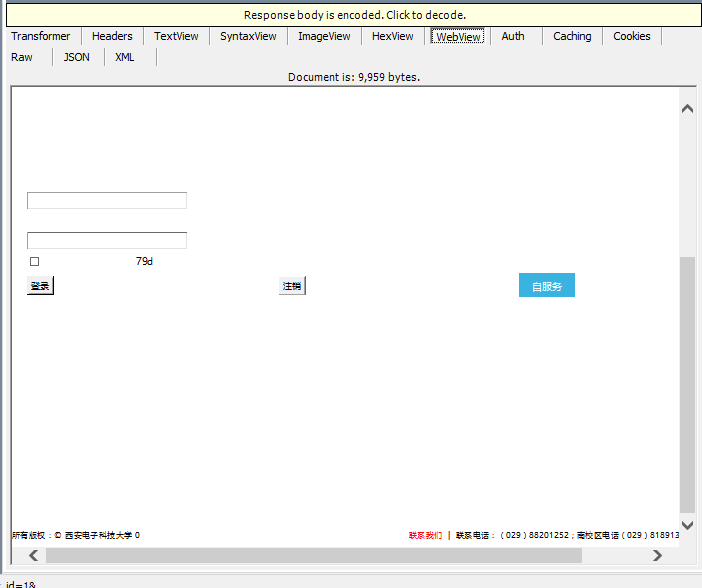
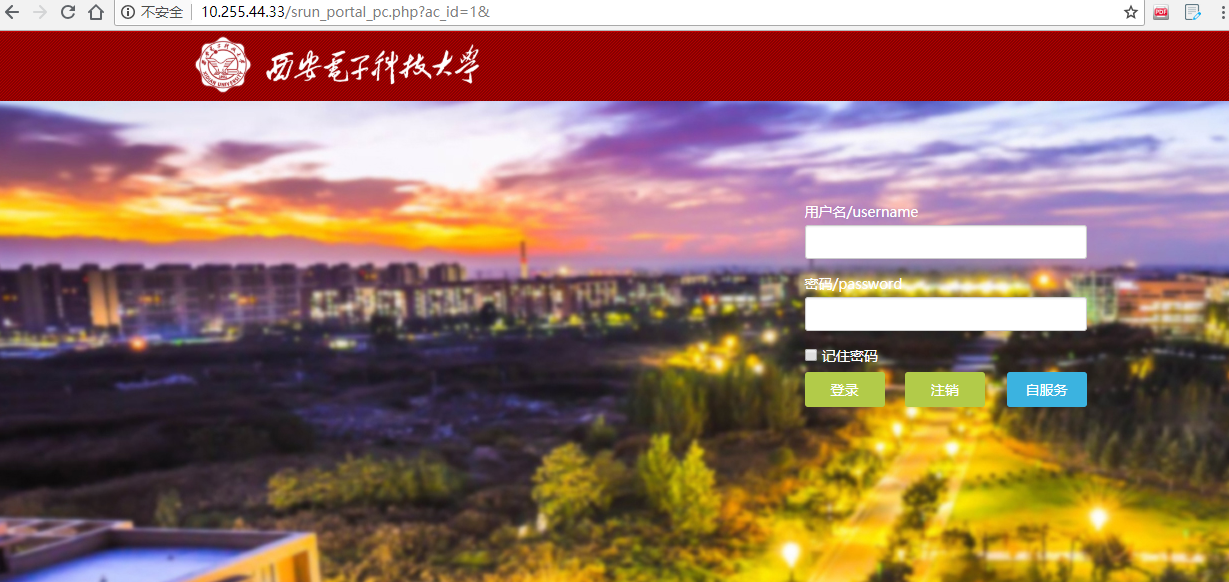
-------------------------------------------------------
输入账号密码

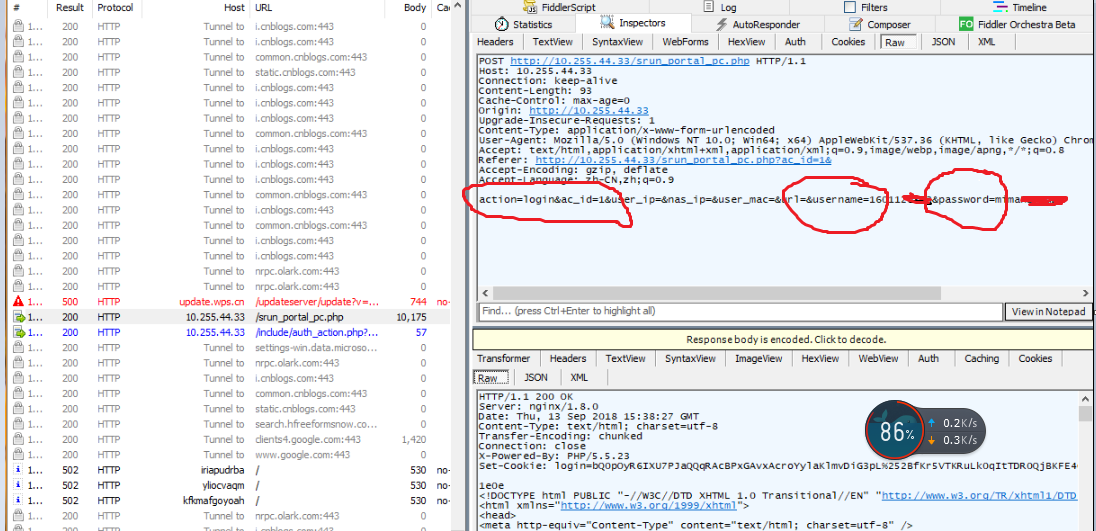
发出响应
- 发送一个表单,里面是自己的上网信息。
POST http://10.255.44.33/srun_portal_pc.php HTTP/1.1

Host: 10.255.44.33

Connection: keep-alive

Content-Length: 93

Cache-Control: max-age=0

Origin: http://10.255.44.33

Upgrade-Insecure-Requests: 1

Content-Type: application/x-www-form-urlencoded

User-Agent: Mozilla/5.0 (Windows NT 10.0; Win64; x64) AppleWebKit/537.36 (KHTML, like Gecko) Chrome/68.0.3440.106 Safari/537.36

Accept: text/html,application/xhtml+xml,application/xml;q=0.9,image/webp,image/apng,*/*;q=0.8

Referer: http://10.255.44.33/srun_portal_pc.php?ac_id=1&

Accept-Encoding: gzip, deflate

Accept-Language: zh-CN,zh;q=0.9

action=login&ac_id=1&user_ip=&nas_ip=&user_mac=&url=&username=1601120382&password=mimaHENFuzb
表单的构造代码:
   <form name="form2" action="srun_portal_pc.php"  method="post" onsubmit="return check(this)">

            <input type="hidden" name="action" value="login">

            <input type="hidden" name="ac_id" value="1">

            <input type="hidden" name="user_ip" value="">

            <input type="hidden" name="nas_ip" value="">

            <input type="hidden" name="user_mac" value="">

            <input type="hidden" name="url" value="" >

                        <ul class="login">

                <li><p class="margbt">用户名/username</p>

                    <div class="input">

                        <input type="text" name="username" size="35" value="" >

                    </div>

                </li>

                <li>

                    <p class="margbt">密码/password</p>

                    <div class="input">

                        <input type="password" name="password" size="35" value="">

                    </div>

                </li>

                <li><label class="margbt"><input name="save_me" title="记忆密码" type="checkbox" value="1"  /> 记住密码</label>

79d

        <li class="margin">

                    <table width="100%" border="0" cellspacing="0" cellpadding="0">

                        <tr valign="middle">

                            <td width="90" height="40" align="left">

                                <input class="a a_demo_one" type="submit" id="button" value="登录"/>

                            </td>

                            <td width="100" align="center">

                                <input class="a a_demo_two" type="button" onClick="do_logout()" value="注销"/>

                            </td>

                            <td width="90" align="right"><a href="http://10.255.44.1:8800" target="_blank" class="a a_demo_three" id="goto_services">自服务</a>

                            </td>

                        </tr>

                    </table>

                    <br/>

                </li>

            </ul>

            </form>
a.找到 <form action="login" id="regform" method="post" autocomplete="off" title="Form used by registered users to login">
这是说明一个表单,注意method字段就好,大多是post,但是也可能为get,两种方式的数据传输是不一样的,需要不同的构造方式,本文以post为例,如果有遇到get情况可以融会贯通或者论坛求助.
b.上面图片其中蓝色的是输入信息的input(需要一点html的知识),
< input id="password" name="password" type="password" size="25" class="text" accesskey="p">
就是上面这样的,主要找到name的值,这是网页提交时候里面密码对应的字段,需要记下,同样要获得username的对应字段.
c.找到表单提交的网站(真的需要html知识),比如上图为 http://10.255.44.33/srun_portal_pc.php 这个提交的网站和<form action="login" id="regform" method="post" autocomplete="off" title="Form used by registered users to login">里面的action字段有关系,说明提交到哪儿去. 但是并不能直接使用这个网址,因为还没有联网的权限没有dns服务器来给我们解析网址.可以ping或者其他的方式获得网址对应的ip (此处针对特殊情况提示,可能有的端口不是默认80,这种情况也需要了解端口号)
收到
-得到登陆界面的源码
HTTP/1.1 200 OK

Server: nginx/1.8.0

Date: Thu, 13 Sep 2018 15:38:27 GMT

Content-Type: text/html; charset=utf-8

Transfer-Encoding: chunked

Connection: close

X-Powered-By: PHP/5.5.23

Set-Cookie: login=bQ0pOyR6IXU7PJaQQqRAcBPxGAvxAcroYylaKlmvDiG3pL%252BfKr5VTKRuLk0qItTDR0QjBKFE4G8GyMjUM3dNeDa3B5RpzpgI%252B1yveIbZXB7uXYzCInIqfHqZbn9GPjEaUwWEKjrHBE7cXyC0mAwXw%252BO%252FOcy7YZwdJhmFf4%252BUtT%252BWr0Oudrz13KfS4g%253D%253D; expires=Sat, 13-Oct-2018 15:38:27 GMT; Max-Age=2592000

1e0e

<!DOCTYPE html PUBLIC "-//W3C//DTD XHTML 1.0 Transitional//EN" "http://www.w3.org/TR/xhtml1/DTD/xhtml1-transitional.dtd">

<html xmlns="http://www.w3.org/1999/xhtml">

<head>

<meta http-equiv="Content-Type" content="text/html; charset=utf-8" />

<title>登录</title>

<script language="javascript" src="js/jquery.js"></script>

<script language="javascript" src="js/srun_portal.js"></script>

<script language="javascript" src="js/message.js"></script>

</head>

<style type="text/css">

	* {

		margin:0px 0px;

		padding:0px 0px;

		font-family:'微软雅黑','Microsoft Yahei',Arial, Helvetica, sans-serif;

	}

	body {

		margin:0 auto;

		padding:0px 0px;

	}

	a {

		color:#333;

		text-decoration: none;

		cursor: pointer;

		outline:none;

	}

	a:hover {

		text-decoration: none;

		color:#06F;

	}

	ul {

		list-style:none;

	}

	.float_l {

		float:left;

	}

	.float_r {

		float:right;

	}

	.clearfix:before, .clearfix:after {

		content: "";

		display: block;

	}

	.clearfix:after {

		clear: both;

	}

	.navbar {

		width:100%;

		margin:0 auto;

		vertical-align:middle;

		 background:url(images/head-bg.png)

		/*background-color:#1997ec;*/

	}

	.container {

		background-image:url(images/bg_5.jpg) ;

		height:600px;

		margin:0px auto;

		text-align:center;

	}

	.contain {

		width:980px;

		height:100%;

		margin:0 auto;

		padding:0px;

	}

	.footer {

		width:980px;

		margin:0 auto;

		font-size:12px;

		height:35px;

		line-height:35px;

	}

	.login {

		padding:1.5em 1.5em 1em;

		/*background-color:#e2eef1;

		background-image: linear-gradient(to bottom, rgb(226, 238, 241) 50%, rgb(212, 229, 234) 100%);

		border:1px solid #CCC;*/

		border-radius: 4px 4px 4px 4px;

		text-align:left;

		font-size:.875em;

		position:relative;

	}

	ul.login li {

		margin-bottom:5px;

	}

	/*----login tab---*/

	.margbt { margin-bottom:4px; color:white;}

	textarea, input[type="text"], input[type="password"], input[type="datetime"], input[type="datetime-local"], input[type="date"], input[type="month"], input[type="time"], input[type="week"], input[type="number"], input[type="email"], input[type="url"], input[type="search"], input[type="tel"], input[type="color"], .uneditable-input {

		background-color: rgb(255, 255, 255);

		border: 1px solid rgb(204, 204, 204);

		box-shadow: 0px 1px 1px rgba(0, 0, 0, 0.075) inset;

		transition: border 0.2s linear 0s, box-shadow 0.2s linear 0s;

	}

	select, textarea, input[type="text"], input[type="password"], input[type="datetime"], input[type="datetime-local"], input[type="date"], input[type="month"], input[type="time"], input[type="week"], input[type="number"], input[type="email"], input[type="url"], input[type="search"], input[type="tel"], input[type="color"], .uneditable-input {

		display: inline-block;

		height: 24px;

		margin-bottom: 10px;

		font-size: 14px;

		line-height: 24px;

		color: rgb(36, 36, 36);

		border-radius: 3px;

		vertical-align: middle;

		padding: 4px 6px;

	}

	textarea:focus, input[type="text"]:focus, input[type="password"]:focus, input[type="datetime"]:focus, input[type="datetime-local"]:focus, input[type="date"]:focus, input[type="month"]:focus, input[type="time"]:focus, input[type="week"]:focus, input[type="number"]:focus, input[type="email"]:focus, input[type="url"]:focus, input[type="search"]:focus, input[type="tel"]:focus, input[type="color"]:focus, .uneditable-input:focus {

		border-color: rgba(82, 168, 236, 0.8);

		outline: 0px none;

		box-shadow: 0px 1px 1px rgba(0, 0, 0, 0.075) inset, 0px 0px 8px rgba(82, 168, 236, 0.6);

	}

	.input input[type="text"], .input input[type="password"] { width:268px;}

	input[type="checkbox"] { vertical-align:middle; margin-top:-3px;}

	.login input[type='button'],input[type='submit'] {

		width:80px;

		border:0px solid #FFF;

		height:35px;

		color:#FFF;

		font-size:14px;

		background-image:none;

		background-clip:border-box;

		background-color:#b2cb49;

		display:inline-block;

		background-attachment:scroll;

		background-repeat:repeat;

		background-position-x:0%;

		background-position-y:0%;

		border-top-left-radius:3px;

		border-top-right-radius:3px;

		border-bottom-left-radius:3px;

		border-bottom-right-radius:3px;

		cursor:pointer;

	}

	.login input[type='button']:hover,,input[type='submit']:hover {

		background-color:#a2c800;

	}

	.login a {

		width:80px;

		border:0px solid #FFF;

		height:35px;

		line-height:35px;

		text-align:center;

		color:#FFF;

		font-size:14px;

		background-image:none;

		background-clip:border-box;

		background-color:#3bb3e0;

		display:inline-block;

		background-attachment:scroll;

		background-repeat:repeat;

		background-position-x:0%;

		background-position-y:0%;

		border-top-left-radius:3px;

		border-top-right-radius:3px;

		border-bottom-left-radius:3px;

		border-bottom-right-radius:3px;

	}

	.login a:hover {

		background-color:#2482a5;

	}

	/*----login tab---*/

	.logo {

		/* background:url(images/head-bg.png); no-repeat */

		height:70px;

		margin:0px;

	}

	.waps{

		width:600px;

		text-align:center;

		line-height:28px;

		font-size:12px;

		font-family:Arial, Helvetica, sans-serif;

		margin-top:100px;

		color:white;

		text-align:left;

		border:1px solid #CCC;

		border-radius: 4px 4px 4px 4px;

		padding:5px 5px;

	}

	.con{

		text-align:left;

		width:600px;

		margin:0px auto;

		background:rgba(255, 255, 255, 0.8) none repeat scroll 0 0 !important;/*实现FF背景透明,文字不透明*/

		filter:Alpha(opacity=80);

		background:#fff;/*实现IE背景透明*/

		border-radius: 4px 4px 4px 4px;

	}

	.con p{

		position:relative;

		padding:5px 10px;

		color:black;

	}/*实现IE文字不透明*/

</style>

<body class="bottom">

<div class="navbar"><div class="logo"><img src="./images/xidian.png" style="width: 300px;margin: 0px 200px;"></div>

<!--<span style="float: right; margin-top: -45px; margin-right:220px;font-size:22px;color:red">上网不涉密  涉密不上网</span>-->

</div>

<div class="container">

	<div class="contain clearfix">

    	<!-- <div class="float_l waps" style="margin-top:90px; width:600px; color:white; text-align:left; font-size:13px; border:1px solid #CCC; border-radius: 4px 4px 4px 4px; padding:10px 10px;">

      		<div class="con">

      		<p>

      		<br/>


        通知列表: <br/>

  	<a href="http://10.0.0.55:8800/notice/list/view?id=4" style="text-decoration:underline" target="_blank">《关于校园网计费系统启用的通知》</a><br/>

  	<a href="http://10.0.0.55:8800/notice/list/view?id=3" style="text-decoration:underline" target="_blank">《校园网网费微信支付演示》</a><br/>

  	<a href="http://10.0.0.55:8800/notice/list/view?id=1" style="text-decoration:underline" target="_blank">《关于升级后校园网计费系统试运行的通知》</a><br/>

<br/>

<br/>

			</p>

			</div>

        </div> -->

        <div class="float_r" style="margin-top: 80px;">

						<table width="400" height="260" class="login">

			<form name="form3" action="srun_portal_pc.php"  method="post">

			<input type="hidden" name="action" value="auto_logout">

			<input type="hidden" name="info" value="">

			<input type="hidden" name="user_ip" value="10.175.128.157">

			<input type="hidden" name="username" value="1601120383">

				<tr>

					<td width="70">

					</td>

					<td valign="top">

						<table>

							<tr>

								<td height="40"></td>

								<td height="40" style="font-weight:bold;color:orange;">

									网络已连接								</td>

							</tr>

														<tr>

								<td height="30" align="right" style="font-weight:bold;color:white;">用户名:</td>

								<td height="30" style="font-weight:bold;color:white;">  <span id="user_name">1601120383</span></td>

							</tr>

							<tr>

								<td height="

99d

30" align="right" style="font-weight:bold;color:white;">已用流量:</td>

								<td height="30" style="font-weight:bold;color:white;">  <span id="sum_bytes"><font color="#aaaaaa">正在获取...</font></span></td>

							</tr>

							<tr>

								<td height="30" align="right" style="font-weight:bold;color:white;">已用时长:</td>

								<td height="30" style="font-weight:bold;color:white;">  <span id="sum_seconds"></span></td>

							</tr>

							<tr>

								<td height="30" align="right" style="font-weight:bold;color:white;">帐户余额:</td>

								<td height="30" style="font-weight:bold;color:white;">  <span id="user_balance"></span></td>

							</tr>

							<tr>

								<td height="30" align="right" style="font-weight:bold;color:white;">IP地址:</td>

								<td height="30" style="font-weight:bold;color:white;">  <span id="user_ip"></span></td>

							</tr>

							<script language="javascript">

								setTimeout("get_online_info('10.175.128.157')", 2000);

							</script>

														<tr>

								<td colspan="2" height="30"></td>

							</tr>

							<tr>

								<td height="" colspan="2" style="font-weight:bold;color:black;">

																		<input type="submit" value="注销" class="a a_demo_one">

																										</td>

							</tr>

						</table>

						</table>

					</td>

				</tr>

			</form>

			</table>

        </div>

    </div>

</div>

<div class="footer">

    <div class="float_l" style="width:auto;">所有版权:© 西安电子科技大学</div>

    <div class="float_r">

    <a href="/download_client.html" target="_blank" style="color:#FF0000">联系我们</a>  |  联系电话:(029)88201252;南校区电话(029)81891357;

    <!--<div class="float_r"><a href="http://" target="_blank" style="color:#00C">有线客户端下载</a>  |  <a href="http://.edu.cn" target="_blank">联系我们</a>  |  <a href="http://nc.tju.edu.cn/inc/Notice/201511/P020151128844022637447.pdf" target="_blank">使用帮助</a></div>

    <div style="text-align:center; margin:0px auto;display:none;">北京理工大学  <a href="http://www.bit.edu.cn" target="_blank">联系我们</a>  |  <a href="http://.edu.cn/inc/Notice/201511/P020151128844022637447.pdf" style="text-decoration:underline" target="_blank">使用帮助</a></div>-->

</div>

</body>

</html>

0
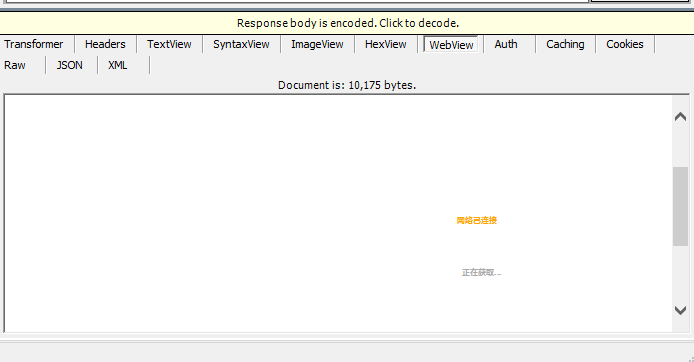

自动发送

POST http://10.255.44.33/include/auth_action.php?k=97323 HTTP/1.1

Host: 10.255.44.33

Connection: keep-alive

Content-Length: 32

Accept: */*

Origin: http://10.255.44.33

X-Requested-With: XMLHttpRequest

User-Agent: Mozilla/5.0 (Windows NT 10.0; Win64; x64) AppleWebKit/537.36 (KHTML, like Gecko) Chrome/68.0.3440.106 Safari/537.36

Content-Type: application/x-www-form-urlencoded

Referer: http://10.255.44.33/srun_portal_pc.php

Accept-Encoding: gzip, deflate

Accept-Language: zh-CN,zh;q=0.9

Cookie: login=bQ0pOyR6IXU7PJaQQqRAcBPxGAvxAcroYylaKlmvDiG3pL%252BfKr5VTKRuLk0qItTDR0QjBKFE4G8GyMjUM3dNeDa3B5RpzpgI%252B1yveIbZXB7uXYzCInIqfHqZbn9GPjEaUwWEKjrHBE7cXyC0mAwXw%252BO%252FOcy7YZwdJhmFf4%252BUtT%252BWr0Oudrz13KfS4g%253D%253D

action=get_online_info&key=97323
接收
HTTP/1.1 200 OK

Server: nginx/1.8.0

Date: Thu, 13 Sep 2018 15:38:29 GMT

Content-Type: text/html

Content-Length: 57

Connection: close

X-Powered-By: PHP/5.5.23

3254815282,716678,0.00,40:f0:2f:10:05:aa,0,10.175.128.157
2 西工大测试 -深蓝认证系统


发送
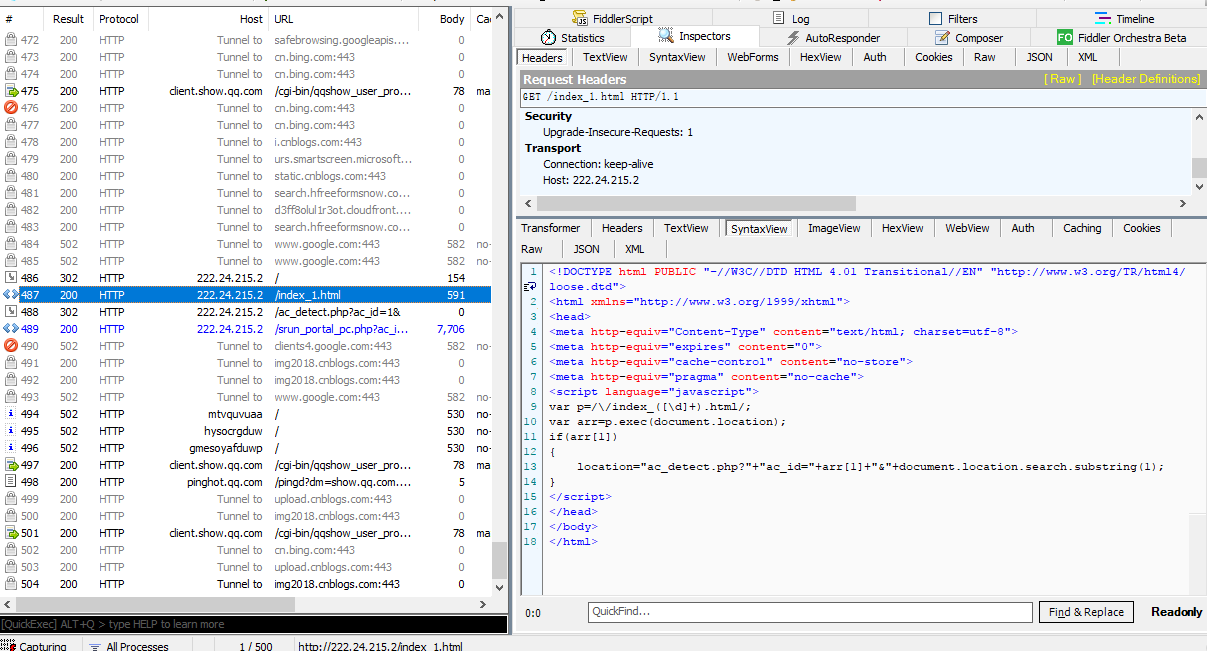
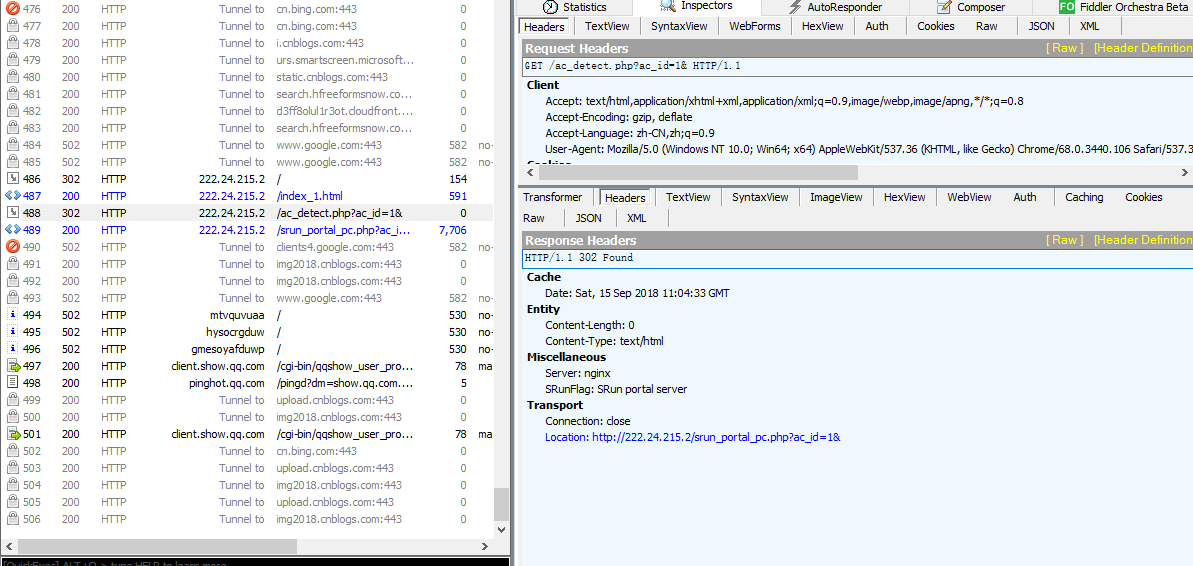
GET http://222.24.215.2/ HTTP/1.1

Host: 222.24.215.2

Connection: keep-alive

Upgrade-Insecure-Requests: 1

User-Agent: Mozilla/5.0 (Windows NT 10.0; Win64; x64) AppleWebKit/537.36 (KHTML, like Gecko) Chrome/68.0.3440.106 Safari/537.36

Accept: text/html,application/xhtml+xml,application/xml;q=0.9,image/webp,image/apng,*/*;q=0.8

Accept-Encoding: gzip, deflate

Accept-Language: zh-CN,zh;q=0.9

Cookie: login=bQ0pOyR6IXU7PJaQQqRAcBPxGAvxAcroYylaKZYk0%252BE7NWAwIX8J%252BofU%252FGBv8G2r96CR%252B8lRV1fPAIw7AOLzxqjLJiifbxx8D9jJbg9cx2lpey8ZbFYk2fspNtwmewwdHZGmJWM2FzDsHCznDERDCddiS4ELeuSs5023dMCKn930ThvKk9jIB%252FI%253D
接收
HTTP/1.1 302 Moved Temporarily

Server: nginx

Date: Sat, 15 Sep 2018 11:04:33 GMT

Content-Type: text/html

Content-Length: 154

Connection: close

Location: http://222.24.215.2/index_1.html

SRunFlag: SRun portal server

<html>

<head><title>302 Found</title></head>

<body bgcolor="white">

<center><h1>302 Found</h1></center>

<hr><center>nginx</center>

</body>

</html>
发送
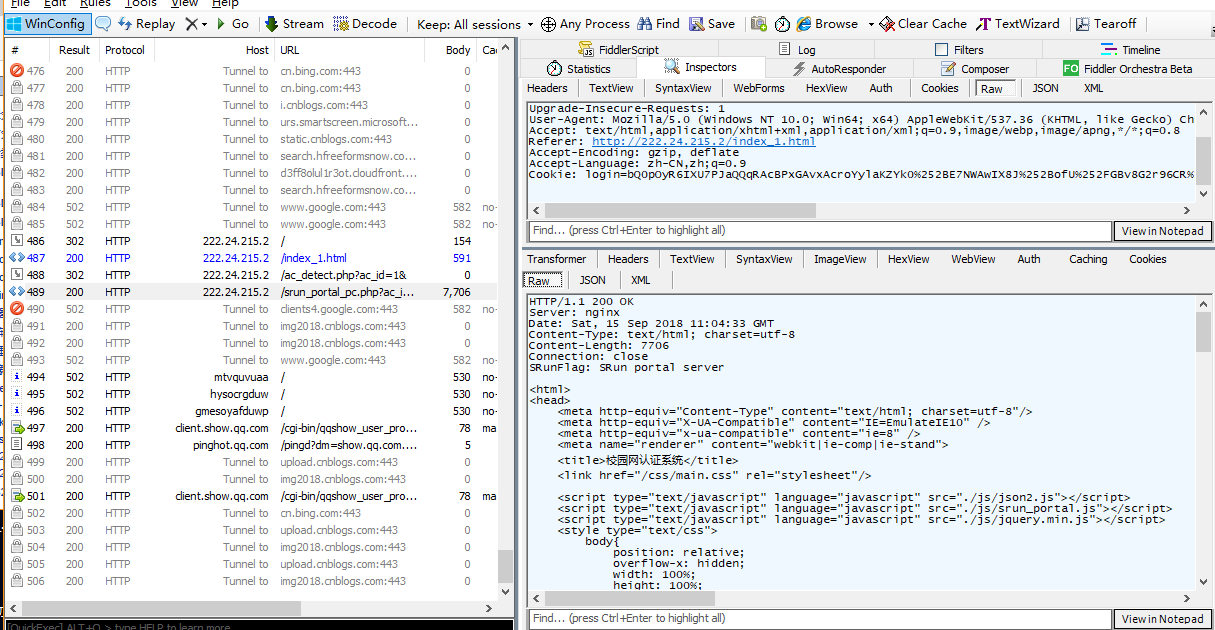
GET http://222.24.215.2/srun_portal_pc.php?ac_id=14& HTTP/1.1

Host: 222.24.215.2

Connection: keep-alive

Upgrade-Insecure-Requests: 1

User-Agent: Mozilla/5.0 (Windows NT 10.0; Win64; x64) AppleWebKit/537.36 (KHTML, like Gecko) Chrome/68.0.3440.106 Safari/537.36

Accept: text/html,application/xhtml+xml,application/xml;q=0.9,image/webp,image/apng,*/*;q=0.8

Accept-Encoding: gzip, deflate

Accept-Language: zh-CN,zh;q=0.9

Cookie: login=bQ0pOyR6IXU7PJaQQqRAcBPxGAvxAcroYylaKZYk0%252BE7NWAwIX8J%252BofU%252FGBv8G2r96CR%252B8lRV1fPAIw7AOLzxqjLJiifbxx8D9jJbg9cx2lpey8ZbFYk2fspNtwmewwdHZGmJWM2FzDsHCznDERDCddiS4ELeuSs5023dMCKn930ThvKk9jIB%252FI%253D
接收
<html>

<head>

    <meta http-equiv="Content-Type" content="text/html; charset=utf-8"/>

    <meta http-equiv="X-UA-Compatible" content="IE=EmulateIE10" />

    <meta http-equiv="x-ua-compatible" content="ie=8" />

    <meta name="renderer" content="webkit|ie-comp|ie-stand">

    <title>校园网认证系统</title>

    <link href="/css/main.css" rel="stylesheet"/>

    <script type="text/javascript" language="javascript" src="./js/json2.js"></script>

    <script type="text/javascript" language="javascript" src="./js/srun_portal.js"></script>

    <script type="text/javascript" language="javascript" src="./js/jquery.min.js"></script>

    <style type="text/css">

        body{

            position: relative;

            overflow-x: hidden;

            width: 100%;

            height: 100%;

        }

        .pos{

            position: absolute;

            left:50%;

            margin-left: -400px;

            top:100px;

            right:0;

            bottom: 0;

            background-color: #fff;

            border-radius: 15px;

            width:800px;

        }

        .bottom1{ background: url(images/timg.png) no-repeat center 0/cover; width: 100%; height: 100%;}

    </style>

</head>

<body class="bottom1">

<div class="max11">

    <table class="contain clearfix pos">

        <tr height="80">

            <td width="40"></td>

            <td colspan="3"><img src="data:images/logo22.png" style="width: 250px;"></td>

        </tr>

        <tr>

            <td width="40"></td>

            <td width="300" valign="top">

                <table width="300">

                    <tr>

                        <td><h3 style="margin-top: 20px;">通知公告</h3></td>

                    </tr>

                    <tr>

                        <td class="border bg_color"  valign="top" style="line-height:1.3;">

                            <p>      1、本页面认证使用深澜账号和密码,如深澜账号未激活,请点击此链接激活<a href='http://zizhu.nwpu.edu.cn:8900/active' target='__blank'>http://zizhu.nwpu.edu.cn:8900/active</a>,激活时初始密码为身份证号码后8位(如果有X为大写)<br /><br />      2、激活后在此页面输入账号和密码可认证上网<br /><br />      3、访客请点击“访客”按钮,输入邀请码认证上网<br /><br /></p>

                        </td>

                    </tr>

<!--                    <tr>-->

<!--                        <td class="downs bg_rgba">-->

<!--                            <h3>附件下载</h3>-->

<!--                            <ul class="clearfix">-->

<!--                                <li>-->

<!--                                    <a href="files/校园网用户手册v1.1.doc"><i class="icon_w"></i>校园网用户手册</a>-->

<!--                                </li>-->

<!--                            </ul>-->

<!--                        </td>-->

<!---->

<!--                    </tr>-->

                </table>

            </td>

            <td width="30"></td>

            <td valign="top">

                <table width="350" height="45" bgcolor="#444444" style="margin-top: 20px; display: none;" >

                    <tr>

                        <td align="center">

                            <p style="color:white;font-weight:bold;" >网络准入认证系统</p>

                        </td>

                    </tr>

                </table>

                                    <table width="350" height="260" class="login">

                        <form name="form2" action="srun_portal_pc.php?ac_id=14&" method="post"

                              onsubmit="return check(this)">

                            <input type="hidden" name="action" value="login">

                            <input type="hidden" name="ac_id" value="14">

                            <input type="hidden" name="user_ip" value="">

                            <input type="hidden" name="nas_ip" value="">

                            <input type="hidden" name="user_mac" value="">

                            <input type="hidden" name="url" value="">

                            <tr>

                                <td width="40">

                                </td>

                                <td valign="top" >

                                    <table width="100%" style="margin-left: -150px;">

                                        <tr>

                                            <td height="20" style="color:red;font-size:12px;"></td>

                                        </tr>

                                        <tr>

                                            <td height="25">账号</td>

                                        </tr>

                                        <tr>

                                            <td height="30">

                                                <input type="text" name="username" size="35"

                                                       value="2017262083" placeholder="account">

                                            </td>

                                        </tr>

                                        <tr>

                                            <td height="25">密码</td>

                                        </tr>

                                        <tr>

                                            <td height="30">

                                                <input type="password" name="password" size="35"

                                                       value="" placeholder="password">

                                            </td>

                                        </tr>

                                        <tr>

                                            <td height="30">

                                                <input name="save_me" title="记忆密码" type="checkbox"

                                                       value="1"  />

                                                记住密码

                                            </td>

                                        </tr>

                                        <tr>

                                            <td height="50" align="">

                                                <input type="submit" value="登录" class="a a_demo_one" style="margin-left: 18%;">

                                                <input type="button" value="访客" class="a a_demo_three" style="margin-left: 10%;" onclick="location.href='./srun_portal_code.php?ac_id=14';">

                                            </td>

                                        </tr>

                                        <tr>

                                            <td height="30"></td>

                                        </tr>

                                    </table>

                                </td>

                            </tr>

                            <tr>

                                <td class="downs bg_rgba">

                                    <div class="align" style="margin-left: 12%">

                                        <h3>附件下载</h3>

                                        <ul class="clearfix">

                                            <li>

                                                <a href="files/用户激活手册.doc"><i class="icon_w"></i>用户激活手册</a>

                                            </li>

                                        </ul>

                                    </div>

                                </td>

                            </tr>

                        </form>

                    </table>

                    </td>

    </tr>

    </table>

</div>

</body>

</html>
输入账号密码提交
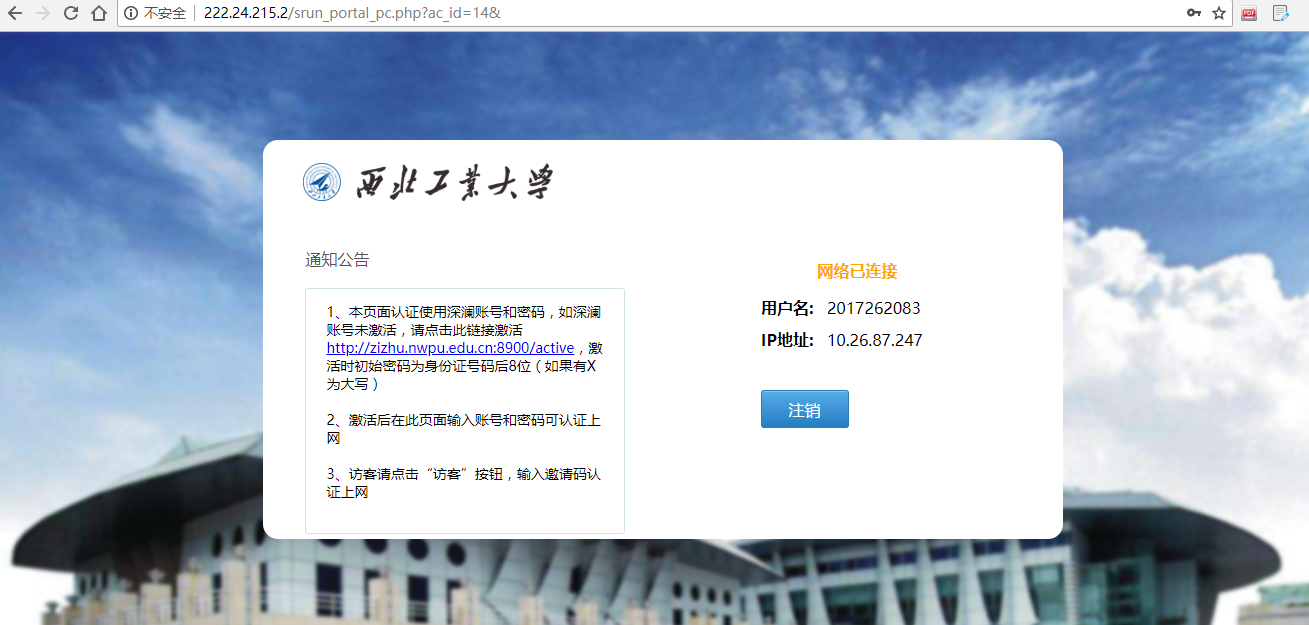

发送
POST http://222.24.215.2/srun_portal_pc.php?ac_id=14& HTTP/1.1

Host: 222.24.215.2

Connection: keep-alive

Content-Length: 94

Cache-Control: max-age=0

Origin: http://222.24.215.2

Upgrade-Insecure-Requests: 1

Content-Type: application/x-www-form-urlencoded

User-Agent: Mozilla/5.0 (Windows NT 10.0; Win64; x64) AppleWebKit/537.36 (KHTML, like Gecko) Chrome/68.0.3440.106 Safari/537.36

Accept: text/html,application/xhtml+xml,application/xml;q=0.9,image/webp,image/apng,*/*;q=0.8

Referer: http://222.24.215.2/srun_portal_pc.php?ac_id=14&

Accept-Encoding: gzip, deflate

Accept-Language: zh-CN,zh;q=0.9

Cookie: login=bQ0pOyR6IXU7PJaQQqRAcBPxGAvxAcroYylaKZYk0%252BE7NWAwIX8J%252BofU%252FGBv8G2r96CR%252B8lRV1fPAIw7AOLzxqjLJiifbxx8D9jJbg9cx2lpey8ZbFYk2fspNtwmewwdHZGmJWM2FzDsHCznDERDCddiS4ELeuSs5023dMCKn930ThvKk9jIB%252FI%253D

action=login&ac_id=14&user_ip=&nas_ip=&user_mac=&url=&username=2017262083&password=qq591428339  //密码修改 3-1
接收
HTTP/1.1 200 OK

Server: nginx

Date: Sat, 15 Sep 2018 11:01:24 GMT

Content-Type: text/html; charset=utf-8

Content-Length: 6233

Connection: close

Set-Cookie: login=bQ0pOyR6IXU7PJaQQqRAcBPxGAvxAcroYylaKZYk0%252BE7NWAwIX8J%252BofU%252FGBv8G2r96CR%252B8lRV1fPAIw7AOLzxqjLJiifbxx8D9jJbg9cx2lpey8ZbFYk2fspNtwmewwdHZGmJWM2FzDsHCznDERDCddiS4ELeuSs5023dMCKn930ThvKk9jIB%252FI%253D; expires=Mon, 15-Oct-2018 11:01:23 GMT; Max-Age=2592000

SRunFlag: SRun portal server

<html>

<head>

    <meta http-equiv="Content-Type" content="text/html; charset=utf-8"/>

    <meta http-equiv="X-UA-Compatible" content="IE=EmulateIE10" />

    <meta http-equiv="x-ua-compatible" content="ie=8" />

    <meta name="renderer" content="webkit|ie-comp|ie-stand">

    <title>校园网认证系统</title>

    <link href="/css/main.css" rel="stylesheet"/>

    <script type="text/javascript" language="javascript" src="./js/json2.js"></script>

    <script type="text/javascript" language="javascript" src="./js/srun_portal.js"></script>

    <script type="text/javascript" language="javascript" src="./js/jquery.min.js"></script>

    <style type="text/css">

        body{

            position: relative;

            overflow-x: hidden;

            width: 100%;

            height: 100%;

        }

        .pos{

            position: absolute;

            left:50%;

            margin-left: -400px;

            top:100px;

            right:0;

            bottom: 0;

            background-color: #fff;

            border-radius: 15px;

            width:800px;

        }

        .bottom1{ background: url(images/timg.png) no-repeat center 0/cover; width: 100%; height: 100%;}

    </style>

</head>

<body class="bottom1">

<div class="max11">

    <table class="contain clearfix pos">

        <tr height="80">

            <td width="40"></td>

            <td colspan="3"><img src="data:images/logo22.png" style="width: 250px;"></td>

        </tr>

        <tr>

            <td width="40"></td>

            <td width="300" valign="top">

                <table width="300">

                    <tr>

                        <td><h3 style="margin-top: 20px;">通知公告</h3></td>

                    </tr>

                    <tr>

                        <td class="border bg_color"  valign="top" style="line-height:1.3;">

                            <p>      1、本页面认证使用深澜账号和密码,如深澜账号未激活,请点击此链接激活<a href='http://zizhu.nwpu.edu.cn:8900/active' target='__blank'>http://zizhu.nwpu.edu.cn:8900/active</a>,激活时初始密码为身份证号码后8位(如果有X为大写)<br /><br />      2、激活后在此页面输入账号和密码可认证上网<br /><br />      3、访客请点击“访客”按钮,输入邀请码认证上网<br /><br /></p>

                        </td>

                    </tr>

<!--                    <tr>-->

<!--                        <td class="downs bg_rgba">-->

<!--                            <h3>附件下载</h3>-->

<!--                            <ul class="clearfix">-->

<!--                                <li>-->

<!--                                    <a href="files/校园网用户手册v1.1.doc"><i class="icon_w"></i>校园网用户手册</a>-->

<!--                                </li>-->

<!--                            </ul>-->

<!--                        </td>-->

<!---->

<!--                    </tr>-->

                </table>

            </td>

            <td width="30"></td>

            <td valign="top">

                <table width="350" height="45" bgcolor="#444444" style="margin-top: 20px; display: none;" >

                    <tr>

                        <td align="center">

                            <p style="color:white;font-weight:bold;" >网络准入认证系统</p>

                        </td>

                    </tr>

                </table>

                                <table width="400" height="260" class="login">

                    <form name="form3" action="srun_portal_pc.php" method="post">

                        <input type="hidden" name="action" value="auto_logout">

                        <input type="hidden" name="info" value="">

                        <input type="hidden" name="user_ip" value="10.26.87.247">

                        <input type="hidden" name="username" value="2017262083">

                        <tr>

                            <td width="70">

                            </td>

                            <td valign="top">

                                <table>

                                    <tr>

                                        <td height="40"></td>

                                        <td height="40" style="font-weight:bold;color:orange;">

                                            网络已连接                                        </td>

                                    </tr>

                                                                            <tr>

                                            <td height="30" align="right" style="font-weight:bold;color:black;">用户名:</td>

                                            <td height="30">  <span id="user_name">2017262083</span></td>

                                        </tr>

                                        <tr>

                                            <td height="30" align="right" style="font-weight:bold;color:black;">IP地址:</td>

                                            <td height="30">  <span id="user_ip">10.26.87.247</span></td>

                                        </tr>

                                                                            <script language="javascript">

                                            setTimeout("get_online_info('10.26.87.247')", 2000);

                                        </script>

                                                                        <tr>

                                        <td colspan="2" height="30"></td>

                                    </tr>

                                    <tr>

                                        <td height="" colspan="2" style="font-weight:bold;color:black;">

                                                                                            <input type="submit" value="注销" class="a a_demo_one">

                                                                                                                                    </td>

                                    </tr>

                                </table>

                </table>

            </td>

        </tr>

        </form>

    </table>

        </td>

    </tr>

    </table>

</div>

</body>

</html>
其他网址;
2.发送POST登陆信息
这一步主要是想网络认证服务器发送认证信息获得上网权限.
公开wifi的web验证一般都至少两个信息(字段) username和password
<ignore_js_op>
上图中点击一个对话框,右键Inspect (使用Chrome浏览器)或者直接F12开发者模式下区Element,目的是查看这两个要发送信息的字段名字,如下图
<ignore_js_op>
<ignore_js_op>
a.找到 <form action="login" id="regform" method="post" autocomplete="off" title="Form used by registered users to login">
这是说明一个表单,注意method字段就好,大多是post,但是也可能为get,两种方式的数据传输是不一样的,需要不同的构造方式,本文以post为例,如果有遇到get情况可以融会贯通或者论坛求助.
b.上面图片其中蓝色的是输入信息的input(需要一点html的知识),
< input id="password" name="password" type="password" size="25" class="text" accesskey="p">
就是上面这样的,主要找到name的值,这是网页提交时候里面密码对应的字段,需要记下,同样要获得username的对应字段.
c.找到表单提交的网站(真的需要html知识),比如上图为https://securelogin.arubanetworks.com/cgi-bin/login 这个提交的网站和<form action="login" id="regform" method="post" autocomplete="off" title="Form used by registered users to login">里面的action字段有关系,说明提交到哪儿去. 但是并不能直接使用这个网址,因为还没有联网的权限没有dns服务器来给我们解析网址.可以ping或者其他的方式获得网址对应的ip (此处针对特殊情况提示,可能有的端口不是默认80,这种情况也需要了解端口号)
OK,至此我们需要了解abc三方面的信息.然后简单利用linux的curl命令来模拟我们的web登陆动作,实质就是把需要的数据发送过去.
以post为例子,命令
root@Atom:~# curl -k -d "user=yourusername&password=yourpassword" 172.24.12.239/cgi-bin/login
解释:
curl 是一个程序
-k表示不接收加密(注意到web使用了https,正常需要openssh等加密解密,Atom安装openssh什么太麻烦且没有必要)
-d 表示data,也就是用post发送时候数据单独的,-d的后面data,字段间用&连接.
"user=yourusername&password=yourpassword"为我们需要发送的数据,user即使我们在b里面获取的name的字段名字,password是密码的字段名字,=后面为你自己的信息,每一个都必须正确
172.24.12.239/cgi-bin/login 为我们信息提交的地址,在c步骤获取的,如果端口号不是80需要在ip后面加上:xxx,例如172.24.12.239:8080/cgi-bin/login
该命令发送完后,如果正常我们会收到认证成功后返回的信息(一般是一个网页,比如说认证成功3秒跳转xx之类),不用理会. 可以尝试连接网络测试.

WiFi-ESP8266入门http(3-2)网页认证上网-post请求的更多相关文章
- WiFi-ESP8266入门http(3-3)网页认证上网-post请求-ESP8266程序
第一版 原型系统 连上西电的网 直接发送上网的认证信息 返回认证结果网页 成功上网 #include <ESP8266WiFi.h> #define Use_Serial Serial s ...
- WiFi-ESP8266入门http(3-1)网页认证上网-post请求(原教程)
教程:http://geek-workshop.com/thread-37484-1-1.html 源码:链接:https://pan.baidu.com/s/1yuYYqsM-WSOb0AbyAT0 ...
- WiFi-ESP8266入门http(3-4)网页一键配网(1若为普通wifi直连 2若为西电网页认证自动网页post请求连接)+网页按钮灯控+MQTT通信
网页一键配网(1若为普通wifi直连 2若为西电网页认证自动网页post请求连接)+网页按钮灯控+MQTT通信 工程连接:https://github.com/Dongvdong/ESP8266_H ...
- 我了解到的新知识之—Apple Captive Portal 网页认证登陆公共Wifi
因为今天一个用户遇到选择公司WiFi后,无法弹出网页认证登陆界面的问题,随即上网搜索相关信息,因为公司内没有VPN,无法FQ,只能用bing来搜索一下相关信息了. Captive Portal听起来好 ...
- 6-STM32物联网开发WIFI(ESP8266)+GPRS(Air202)系统方案安全篇(Wi-Fi模块SSL连接MQTT)
5-STM32物联网开发WIFI(ESP8266)+GPRS(Air202)系统方案安全篇(配置MQTT的SSL证书,验证安全通信) 首先确定自己的固件打开了SSL,升级篇里面的固件我打开了SSL,如 ...
- 5-STM32物联网开发WIFI(ESP8266)+GPRS(Air202)系统方案安全篇(配置MQTT的SSL证书,验证安全通信)
4-STM32物联网开发WIFI(ESP8266)+GPRS(Air202)系统方案安全篇(为域名申请SSl证书) 前面的准备工作终于完了 复制这两个证书 放到云端MQTT的这个位置,其实放哪里都可以 ...
- 4-STM32物联网开发WIFI(ESP8266)+GPRS(Air202)系统方案安全篇(为域名申请SSl证书)
3-STM32物联网开发WIFI(ESP8266)+GPRS(Air202)系统方案安全篇(购买域名,域名绑定IP) 然后就是等着..... 假设可以了 咱呢是配置MQTT实现SSL安全加密通信,所以 ...
- 3-STM32物联网开发WIFI(ESP8266)+GPRS(Air202)系统方案安全篇(购买域名,域名绑定IP)
2-STM32物联网开发WIFI(ESP8266)+GPRS(Air202)系统方案安全篇(监听Wi-Fi和APP的数据) 因为安全连接是和域名绑在一块的,所以需要申请域名 有没有不知道域名是什么的, ...
- 2-STM32物联网开发WIFI(ESP8266)+GPRS(Air202)系统方案安全篇(监听Wi-Fi和APP的数据)
1-STM32物联网开发WIFI(ESP8266)+GPRS(Air202)系统方案安全篇(来看一下怎么样监听网络数据,监听电脑上位机软件的数据) 因为那个软件只能监听咱自己电脑上的数据,所以咱就用电 ...
随机推荐
- vue批量验证提交表单的数据是否合规
<!DOCTYPE html> <html lang="en"> <head> <meta charset="UTF-8&quo ...
- Spring 切入点配置
有关各种拦截的切入点配置举例 (1)只对返回值为String的方法进行拦截 @Pointcut("execution (java.lang.String com.zzdr.spring.se ...
- 数据筛选和API优化
筛选数据 需求:如果数据库中存在OrderNum相同,且IsDefault不同的记录,那么IsDefault值为0的记录将替换值为1的记录(IsDefault值为1的记录不展示). 由于查出来的数据不 ...
- concrrent类下 BlockingDeque 下 自己实现代码编写
一.LinkedBlockingDeque简介 java6增加了两种容器类型,Deque和BlockingDeque,它们分别对Queue和BlockingQueue进行了扩展. Deque是一个双端 ...
- power designer的安装
PowerDesigner的安装 原由:新学期要开概要设计(软件设计与体系结构)这门课,老师推荐了两个CASE工具. Rational Rose Power Designer 本来想找rose的资源, ...
- Android 7.0 fiddler代理抓不到https请求的解决办法
解决方法: 1.在源码res目录下新建xml目录,增加network_security_config.xml文件 (工程名/app/src/main/res/xml/network_security ...
- 利用Selenium爬取淘宝商品信息
一. Selenium和PhantomJS介绍 Selenium是一个用于Web应用程序测试的工具,Selenium直接运行在浏览器中,就像真正的用户在操作一样.由于这个性质,Selenium也是一 ...
- mysql练习----The JOIN operation
game id mdate stadium team1 team2 1001 8 June 2012 National Stadium, Warsaw POL GRE 1002 8 June 2012 ...
- mssql sqlserver 下文分享一种新颖的字符串截取方法
原文地址:http://www.maomao365.com/?p=7307 摘要: 以前分割字符串时,都使用类似split函数的方式处理,下文分享一种对有规律的字符串的分隔方式, 即:1. ...
- 数据库之mysql篇(6)—— mysql常用函数函数/自定义函数
常用函数 运算函数 我相信你都能看懂,所以以上的不再做过多解释 然后还有个,前面漏掉的between and: 意指10是否在0到20之间,如果是返回1,否则返回0 日期函数 这个要稍微注意一下参数, ...