
IntelliJ IDEA mybatis-generator的使用
STEP 1. 在maven项目的pom.xml 添加mybatis-generator-maven-plugin 插件
pop.xml
<dependency>
   <groupId>org.mybatis.generator</groupId>
   <artifactId>mybatis-generator-core</artifactId>
   <version>1.3.2</version>
</dependency>
<!-- mybatis generator 自动生成代码插件 -->
<plugin>
   <groupId>org.mybatis.generator</groupId>
   <artifactId>mybatis-generator-maven-plugin</artifactId>
   <version>1.3.2</version>
   <configuration>
      <configurationFile>${basedir}/src/main/resources/generator/generateConfig.xml</configurationFile>
      <overwrite>true</overwrite>
      <verbose>true</verbose>
   </configuration>
</plugin>
STEP 2. 在maven项目下的src/main/resources 目录下建立名为 generatorConfig.xml的配置文件,作为mybatis-generator-maven-plugin 插件的执行目标,模板如下:
resources/generator/generateConfig.xml
<?xml version="1.0" encoding="UTF-8" ?>
<!DOCTYPE generatorConfiguration PUBLIC "-//mybatis.org//DTD MyBatis Generator Configuration 1.0//EN" "http://mybatis.org/dtd/mybatis-generator-config_1_0.dtd" >
<generatorConfiguration>
    <classPathEntry
            location="D:\mysql-connector-java-5.1.26.jar" />
    <context id="context1" targetRuntime="MyBatis3">
        <commentGenerator>
            <!-- 是否去除自动生成的注释 true:是 : false:否 -->
            <property name="suppressAllComments" value="true" />
        </commentGenerator>

        <jdbcConnection driverClass="com.mysql.jdbc.Driver"
                        connectionURL="jdbc:mysql://192.168.1.223:3306/pwtp"
                        userId="root" password="youotech" />
        <javaModelGenerator targetPackage="cc.rqzx.www.entity"
                            targetProject="src/main/java" />

        <sqlMapGenerator targetPackage="mapper"
                         targetProject="src/main/resources" />

        <javaClientGenerator type="XMLMAPPER" targetPackage="cc.rqzx.www.dao"
                             targetProject="src/main/java">
        </javaClientGenerator>

        <table tableName="info" domainObjectName="info"
               enableCountByExample="false" enableUpdateByExample="false" enableDeleteByExample="false"
               enableSelectByExample="false" selectByExampleQueryId="false" >
            <property name="useActualColumnNames" value="true"/>
        </table>
    </context>
</generatorConfiguration>
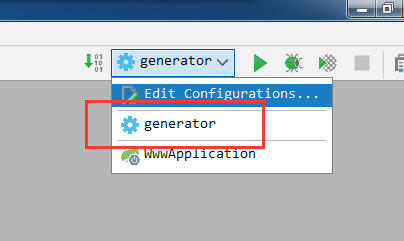
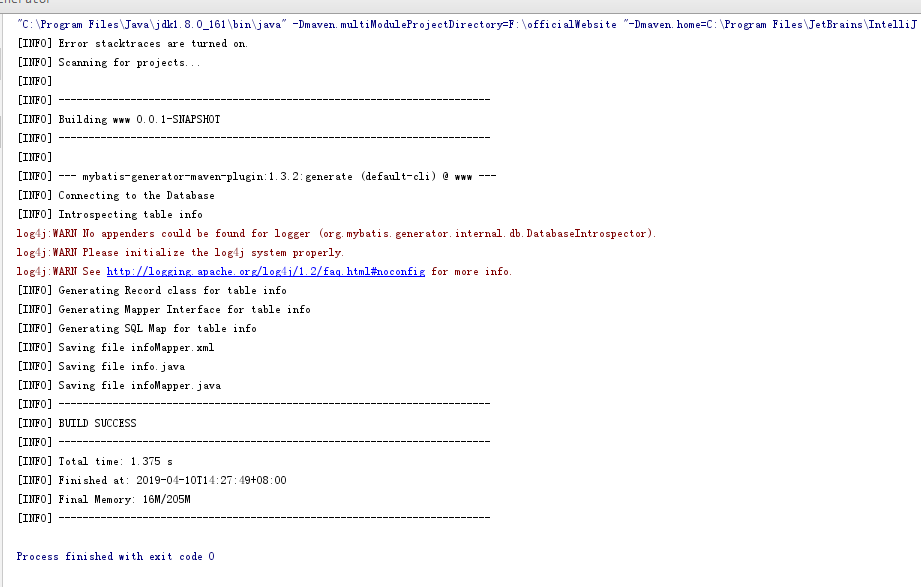
STEP 3. 在Intellij IDEA添加一个“Run运行”选项,使用maven运行mybatis-generator-maven-plugin插件 :
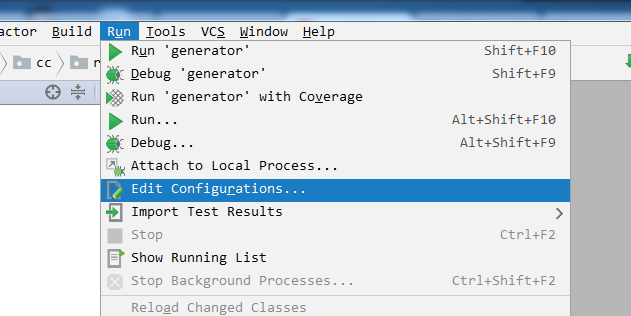
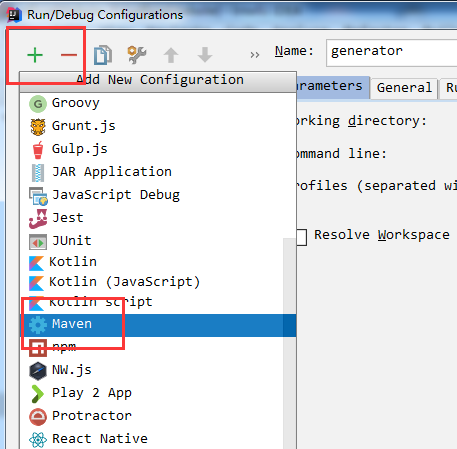
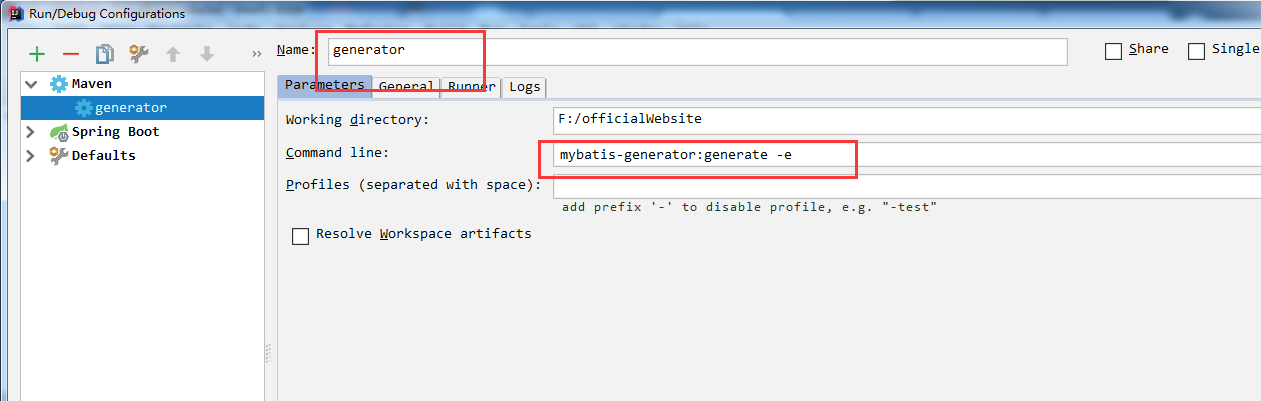
mybatis-generator:generate -e
IntelliJ IDEA mybatis-generator的使用的更多相关文章
- 记一次 IDEA mybatis.generator 自定义扩展插件
在使用 idea mybatis.generator 生成的代码,遇到 生成的代码很多重复的地方, 虽然代码是生成的,我们也不应该允许重复的代码出现,因为这些代码后期都要来手动维护. 对于生成时间戳注 ...
- Maven多模块项目使用MyBatis Generator
开发环境: JDK:8u102 Maven:3.3.9 MySQL:5.7.10 MySQL Connector:5.1.40 IDE:IntelliJ IDEA 2016 MyBatis:3.4.1 ...
- mybatis.generator.configurationFile
mybatis.generator.configurationFile 有一个更好的配置方法,可以不用在generateConfig.xml里面写死驱动的地址:如果你的mybatis连接也是在pom. ...
- JAVA入门[7]-Mybatis generator(MBG)自动生成mybatis代码
一.新建测试项目 新建Maven项目MybatisDemo2,修改pom.xml引入依赖.dependencies在上节基础上新增 <dependency> <groupId> ...
- SpringBoot入门教程(四)MyBatis generator 注解方式和xml方式
MyBatis 是一款优秀的持久层框架,它支持定制化 SQL.存储过程以及高级映射.MyBatis 避免了几乎所有的 JDBC 代码和手动设置参数以及获取结果集.MyBatis 可以使用简单的 XML ...
- spingBoot整合mybatis+generator+pageHelper
spingBoot整合mybatis+generator+pageHelper 环境/版本一览: 开发工具:Intellij IDEA 2018.1.4 springboot: 2.0.4.RELEA ...
- 在IDEA中使用MyBatis Generator自动生成代码
转载自 https://blog.csdn.net/hua_faded/article/details/78900780 一.配置Maven pom.xml 文件 在pom.xml增加以下插件: ...
- 在 Gradle 中使用 MyBatis Generator
在 Intellij IDEA 中结合 Gradle 使用 MyBatis Generator 逆向生成代码 Info: JDK 1.8 Gradle 2.14 Intellij IDEA 2016. ...
- 在IDEA中使用MyBatis Generator逆向工程生成代码
本文介绍一下用Maven工具如何生成Mybatis的代码及映射的文件. 一.配置Maven pom.xml 文件 在pom.xml增加以下插件: <build> <finalName ...
- SpringBoot+Mybatis+Generator 逆向工程使用(二)
Mybatis-Genarator 逆向工程使用 个人开发环境 java环境:Jdk1.8.0_60 编译器:IntelliJ IDEA 2017.1.4 mysql驱动:mysql-connecto ...
随机推荐
- HTTP协议初步解析
一.什么是HTTP协议 HTTP是hypertext transfer protocol(超文本传输协议)的简写,它是TCP/IP协议的一个应用层协议,定义了Web客户端向Web服务器请求Web页面的 ...
- python使用高阶函数计算整数阶乘
from functools import reduce num = 10 print(reduce(lambda x, y: x * y, range(1, num + 1)))
- Cleanmymac X好不好用?
Cleanmymac X是一款Mac清理软件,能够帮助我们快速实现快速实现磁盘清理,是mac用户的智能助手.那么为什么大家会认定它并坚定不移呢?小编带你感受感受. 1. 简洁大气的外观. 用户正版官方 ...
- Linux设置虚拟内存教学和实战
介绍 在我们自己的购买的服务器环境中,一般是买的1g的内存,但是当服务器里面的东西装的比较多的时候就会导致内存不够用了,本文将模拟一个真实的内存不够用的情况下,如何通过修改虚拟内存来让系统正常运行,我 ...
- amd显卡更新最新驱动鼠标顿卡的解决方法
测试了下游戏,很稳.方法:在卡顿的状态下打开RADEON设置,依次点击显示器→规格→覆盖,将支持HDCP选为禁用,按提示重启即可.
- mysql------Windows7 64bit安装教程------下载mysql
.1.进入官网的下载位置,https://dev.mysql.com/downloads/installer/: 2.选择“Windows”; 3.点击"MySQL Installer&qu ...
- 5DAY高级权限
5DAY高级权限 0xff001 suid\sgid\sticky ; s\s\t ; 4\2\1特殊位 001.描述 suid,sgid针对文件程序时,具备临时提升权限 sgid 针对目录时,该目录 ...
- postgre索引
1.创建一般索引 单字段索引: CREATE INDEX index_name ON table_name (field1); 联合索引: CREATE INDEX index_name ON tab ...
- Promise的一点感悟~
在什么大环境下? 今天要讨论的Promise,是js的同步|异步任务的概念下出来的 什么是同步?什么是异步? 我的理解: 一件事情Q 分三部分:Q1 , Q2 , Q3 同步方式完成: Q1 - ...
- springboot学习一:快速搭建springboot项目
1.idea创建springboot工程 JDK选择1.8以上的版本 选择springboot的版本和添加配置项 新建一个HelloController,测试 访问 http://localhost: ...