
JSON in SQL Server 2016
JSON functions in SQL Server enable you to analyze and query JSON data, transform JSON to relational format, and export SQL query results as JSON text.

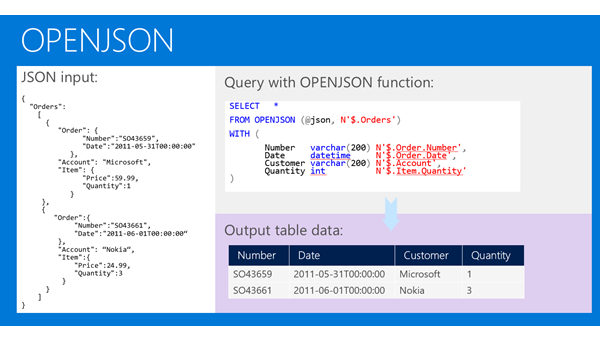
If you have JSON text, you can extract data from JSON or verify that JSON is properly formatted using built-in functions JSON_VALUE, JSON_QUERY, and ISJSON. For more advanced querying and analysis, the OPENJSON function can transform an array of JSON objects into a set of rows. Any SQL query can be executed on the returned result set. Finally, there is the FOR JSON clause that enables you to format query results as JSON text.
SELECT TOP 1000 [Version]

      ,[OSType]

      ,[Online]

      ,[OnlineT]

  FROM [ApplicationTest].[dbo].[table1]

  for json auto
We can start with simple examples. In the following Transact-SQL code, we will define a text variable where we will put JSON text:
DECLARE @json NVARCHAR(4000)

SET @json =

N'{

    "info":{

      "type":1,

      "address":{

        "town":"Bristol",

        "county":"Avon",

        "country":"England"

      },

      "tags":["Sport", "Water polo"]

   },

   "type":"Basic"

}'
Now, we can extract values and objects from JSON text using the JSON_VALUE and JSON_QUERY functions:
SELECT

  JSON_VALUE(@json, '$.type') as type,

  JSON_VALUE(@json, '$.info.address.town') as town,

  JSON_QUERY(@json, '$.info.tags') as tags
This query will return “Basic”, “Bristol”, and ["Sport", "Water polo"] values. The JSON_VALUE function returns one scalar value from JSON text (e.g. strings, numbers, true/false) that is placed on a JSON path specified as the second parameter. JSON_QUERY returns an object or array (in this example an array of tags) on the JSON path. JSON built-in functions use JavaScript-like syntax to reference values and objects in JSON text via second parameter.
The OPENJSON function enables you to reference some array in JSON text and return elements from that array:
SELECT value

FROM OPENJSON(@json, '$.info.tags')

INSERT INTO Orders(Number, Date, Customer, Quantity)

SELECT Number, Date, Customer, Quantity

 OPENJSON (@orders)

 WITH (

        Number varchar(200),

        Date datetime,

        Customer varchar(200),

        Quantity int

 ) AS OrdersArray
Four columns in the result set that is returned by OPENJSON are defined in the WITH clause. OPENJSON will try to find the properties Number, Date, Customer, and Quantity in each JSON object and convert their values into columns in the result set. By default, NULL will be returned if the property is not found. The assumption in the query above is that the @orders variable contains the following JSON array:
'[

   {"Number":1, "Date": "8/10/2012", "Customer": "Adventure works", "Quantity": 1200},

   {"Number":4, "Date": "5/11/2012", "Customer": "Adventure works", "Quantity": 100},

   {"Number":6, "Date": "1/3/2012", "Customer": "Adventure works", "Quantity": 250},

   {"Number":8, "Date": "12/7/2012", "Customer": "Adventure works", "Quantity": 2200}

]'
As you can see, the transformation from a JSON text to a relational form is simple. You just need to specify column names and types and OPENJSON will find properties in JSON that match these columns. In this example, plain JSON is used; however, OPENJSON can handle any nested/hierarchical structure of JSON objects.
Also, OPENJSON can be used to combine relational and JSON data in the same query. If we assume that the JSON array shown in the previous example is stored in the Orders column, the following query can combine the columns and JSON fields:
SELECT Id, FirstName, LastName, Number, Date, Customer, Quantity

 FROM Person

    CROSS APPLY OPENJSON (OrdersJson)

                            WITH (

                                        Number varchar(200),

                                        Date datetime,

                                        Customer varchar(200),

                                        Quantity int ) AS OrdersArray
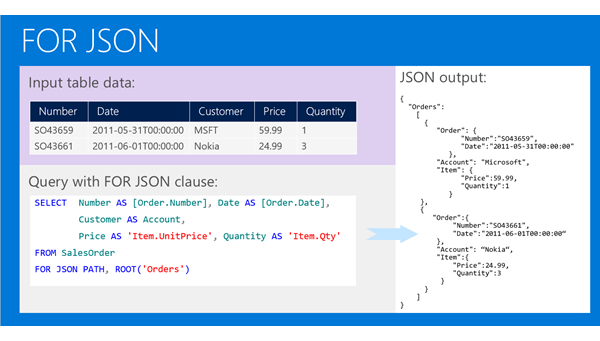
 select * from [dbo].[table1] for json auto

 declare @jsondata varchar(max)

 set @jsondata=N'[{"Version":"2.1.1.1","OSType":1,"Online":1,"OnlineT":"on"},{"Version":"2.1.1.2","OSType":1,"Online":1,"OnlineT":"on"}]';

 select Version

 from openjson(@jsondata)

 with(

	Version varchar(50)

 )
JSON in SQL Server 2016的更多相关文章
- SQL Server 2016原生支持JSON
转载原地址: http://www.cnblogs.com/lyhabc/p/4747694.html SQL Server 2005 开始支持 XML 数据类型,提供原生的 XML数据类型.XML ...
- SQL Server 2016新特性: 对JSON的支持
SQL Server 2005开始支持XML数据类型,提供原生的XML数据类型.XML索引及各种管理或输出XML格式的函数.随着JSON的流行,SQL Server2016开始支持JSON数据类 ...
- 微软发布正式版SQL Server 2016
微软于今天在SQL 官方博客上宣布 SQL Server 数据库软件的正式发布版本(GA),历时一年多,微软为该软件发布了多个公共预览版和候选版本,而今天最终版本终于上线了.在博客中,微软数据集团的企 ...
- SQL Server 2016 CTP2.2 的关键特性
SQL Server 2016 CTP2.2 的关键特性 正如微软CEO 说的,SQL Server2016 是一个Breakthrough Flagship Database(突破性的旗舰级数据库 ...
- 数据库技术丛书:SQL Server 2016 从入门到实战(视频教学版) PDF
1:书籍下载方式: SQL Server2016从入门到实战 PDF 下载 链接:https://pan.baidu.com/s/1sWZjdud4RosPyg8sUBaqsQ 密码:8z7w 学习 ...
- SQL Server 2016最值得关注的10大新特性
全程加密技术(Always Encrypted) 全程加密技术(Always Encrypted)支持在SQL Server中保持数据加密,只有调用SQL Server的应用才能访问加密数据.该功能支 ...
- SQL Server 2016 特性和安装方法
SQL Server 2016 特性: 全程加密技术(Always Encrypted),动态数据屏蔽(Dynamic Data Masking),JSON支持,多TempDB数据库文件,PolyBa ...
- SQL Server 2016 ->> T-SQL新特性
1) TRUNCATE表分区而不是整表 CREATE TABLE dbo.TruncatePartitionTest ( PrtCol INT, Col2 ) ) ON [myPS1](PrtCol) ...
- SQL Server 2016白皮书
随着SQL Server 2016正式版发布日临近,相关主要特性通过以下预览学习: Introducing Microsoft SQL Server 2016 e-bookSQL Server 201 ...
随机推荐
- [Micropython]TPYBoard v102 DIY照相机
摄像头(CAMERA或WEBCAM)又称为电脑相机.电脑眼.电子眼等,是一种视频输入设备,被广泛的运用于视频会议,安防系统 .图像采集系统. 环境监控 .工业现场过程控制 等方面.本实验用TPYBoa ...
- Laravel5:重定向 redirect 函数的详细使用
Laravel5 中新增了一个函数 redirect() 来代替 Laravel4 中 Redirect::to() 来进行重定向操作.函数 redirect() 可以将用户重定向到不同的页面或动作, ...
- AQS实现原理分析——ReentrantLock
在Java并发包java.util.concurrent中可以看到,不少源码是基于AbstractQueuedSynchronizer(以下简写AQS)这个抽象类,因为它是Java并发包的基础工具类, ...
- Javascript设计模式之我见:观察者模式
大家好!本文介绍观察者模式及其在Javascript中的应用. 模式介绍 定义 定义对象间一种一对多的依赖关系,使得每当一个对象改变状态,则所有依赖于它的对象都会得到通知并被自动更新. 类图及说明 S ...
- 【C#复习总结】dynamic
介绍 C# 4 引入了一个新类型 dynamic. 该类型是一种静态类型,但类型为 dynamic 的对象会跳过静态类型检查. 大多数情况下,该对象就像具有类型 object 一样. 在编译时,将假定 ...
- quartz获取缓存中所有运行中的Job
原文地址:https://blog.csdn.net/zzm8421/article/details/77769203 Quartz 2.1.5: public static void getAllJ ...
- Python-每日习题-0009-time
题目:暂停一秒输出 程序分析:使用 time 模块的 sleep() 函数. import time for i in range(4): print(str(int(time.time()))[-2 ...
- An error occurred while updating the entries. See the inner exception for details.
EF插入或更新数据时出现错误提示:An error occurred while updating the entries. See the inner exception for details.的 ...
- 第五章 动态SQL 批量操作
用于实现动态SQL的元素主要有 if trim where set choose(when.otherwise) foreach MyBatis 缓存 一级缓存 在test类中 调用相同的方法 第二 ...
- VO和DO转换(四) MapStruct
VO和DO转换(一) 工具汇总 VO和DO转换(二) BeanUtils VO和DO转换(三) Dozer VO和DO转换(四) MapStruct MapStruct